
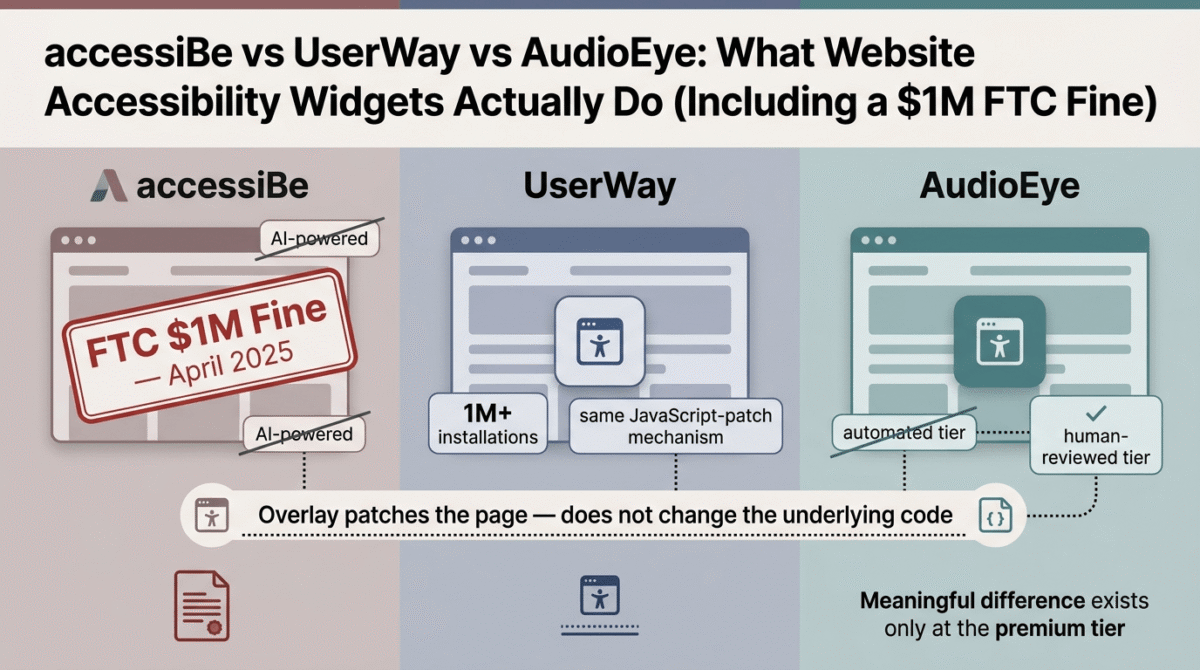
Most small business owners encounter website accessibility tools the same way: an ADA demand letter arrives, or a developer mentions a lawsuit a competitor faced, and a search for “fix ADA compliance” turns up a handful of products promising a one-line JavaScript snippet that makes the problem go away. That promise is the entire reason this product category exists, and it is also the exact claim that got one of its most prominent vendors fined $1 million by the Federal Trade Commission in 2025.
This is a harder post to write honestly than most comparisons on this site, because the honest answer is not “here are three good options, pick based on your budget.” The honest answer involves a real, documented regulatory action, a body of court rulings that have rejected these tools as evidence of compliance, and lawsuit data suggesting that installing one of these widgets does not reliably protect you, and in some analyses, sites using them have been disproportionately targeted by the exact lawsuits they’re marketed to prevent. We are going to walk through what accessiBe vs UserWay vs AudioEye actually are, what the FTC found, and what we think you should actually do if accessibility compliance is a real concern for your site.
Table of Contents
What These Tools Actually Are, in Plain Terms
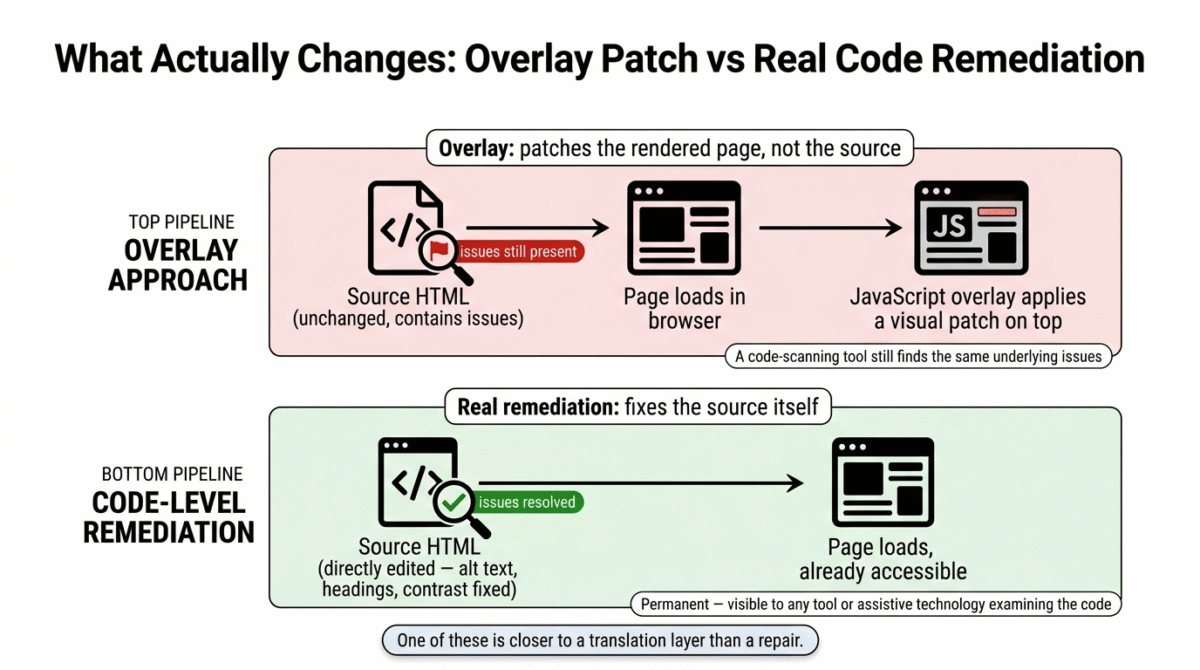
All three of these products, accessiBe, UserWay, and AudioEye’s automated tier, are accessibility overlays. Practically, that means you add a small piece of JavaScript to your site, and a floating widget appears that lets visitors adjust font size, contrast, cursor size, and a few other display preferences. Behind the scenes, the software also attempts to automatically scan your page and patch some accessibility issues at the moment the page loads, without changing your site’s actual underlying code.
That last detail is the most important technical fact in this entire category, and it is worth being completely clear about it: an overlay does not fix your website’s HTML. It applies a JavaScript layer on top of your existing, unchanged code at the moment a visitor loads the page. Independent accessibility practitioners and automated testing tools that scan your site’s actual source, rather than the overlay’s runtime patches, generally do not see the underlying issues as resolved, because they are not resolved. The overlay is closer to a real-time visual translation layer than a repair.
The accessiBe FTC Fine: What Actually Happened, and Why It Matters to You
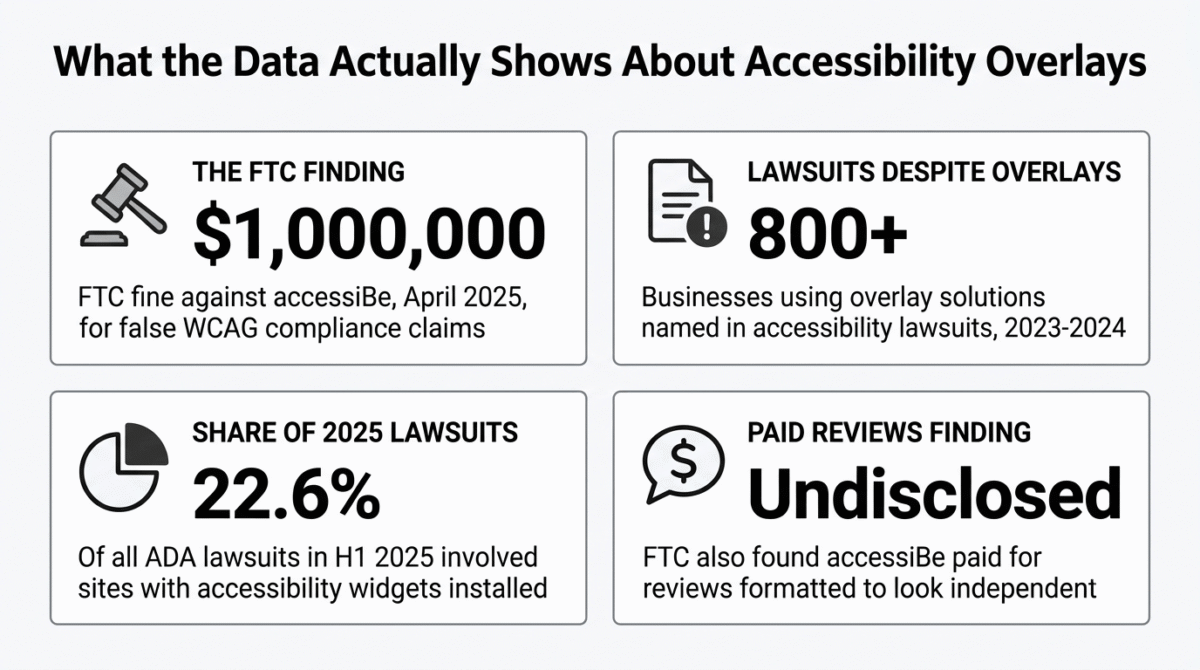
In April 2025, the Federal Trade Commission finalized a $1 million order against accessiBe specifically for deceptive marketing claims about its accessWidget product. The FTC’s complaint found that accessWidget did not, in fact, make basic website components, menus, headings, tables, images, WCAG compliant, despite accessiBe’s marketing claims that its AI-powered tool could make any website fully compliant. The final order explicitly bars accessiBe from claiming that its automated products can make a website WCAG compliant or that they can ensure continued compliance over time.
There is a second part of the FTC’s findings worth knowing, because it speaks directly to how much you should trust third-party reviews and testimonials in this category generally: the FTC also found that accessiBe paid for third-party reviews that were formatted to look like independent opinions, without disclosing the commercial relationship behind them. If you have read a glowing, seemingly independent review of an accessibility overlay product anywhere on the internet, including possibly ones that informed earlier comparisons of this exact category, this is worth keeping in mind.
This is not a minor technicality. It is a federal regulator concluding, after investigation, that one of the most widely marketed products in this space made false claims about the exact thing, ADA and WCAG compliance, that businesses are buying it to get.
Does Installing an Overlay Actually Protect You From a Lawsuit?
This is the question that actually matters to a small business owner, and the data here is genuinely uncomfortable. Industry analysis tracking accessibility lawsuit filings found that more than 800 businesses using overlay solutions faced accessibility lawsuits in 2023 and 2024 alone, the presence of an overlay did not protect them. Separate reporting cites that sites with accessibility widgets installed accounted for roughly 22.6% of all ADA lawsuits in the first half of 2025, and that a meaningful share of 2024 accessibility lawsuits explicitly cited the overlay itself as making the site worse for users of assistive technology, not better.
There is also a less obvious mechanism worth understanding: courts have, in multiple cases, rejected the installation of an overlay as evidence of good-faith compliance effort. Plaintiff’s attorneys in this space frequently use automated scanning tools to identify lawsuit targets in the first place, and because an overlay patches the page at render time rather than fixing the underlying HTML, many automated scans still detect the same underlying violations regardless of whether the widget is installed. In some accounts, the visible accessibility icon itself has been described as functioning almost as a signal to plaintiff’s firms that a site is aware of accessibility obligations and has chosen a surface-level fix, which is not the message a business intends to send by installing one.
None of this means these companies are scams, or that the products do nothing useful. The font-resizing, contrast, and cursor controls genuinely help some users, and automated detection does catch some real issues. The problem is specifically with the gap between what these products are marketed as solving and what they are actually capable of solving, and that gap is the entire reason the FTC took action and the reason courts have pushed back.
accessiBe Overview: AI-First Overlay, Now Under a Federal Compliance Order
What it is: A JavaScript overlay widget emphasizing AI-powered automated remediation
Pricing: Commonly cited in the $49–$199/month range per site
Regulatory status: Subject to an April 2025 FTC order barring claims that its product ensures WCAG compliance
accessiBe built its early market position specifically on AI automation, the pitch was that a single script could detect and remediate accessibility issues without developer involvement. The product’s underlying mechanism, as described in independent technical comparisons, is the same JavaScript-patching-at-render-time approach used by the other overlay products in this category. What separates accessiBe from its direct competitors at this point is not really a technical distinction, it is the FTC’s specific finding that the company’s compliance claims were false and misleading, backed by a federal order that bars the company from repeating them.
If you are currently using accessiBe, or considering it, the FTC’s order is directly relevant context: it means a federal regulator examined the specific question of whether this product does what it claims, and concluded that it does not. That should weigh heavily in any decision to rely on it as your primary or sole accessibility compliance measure.
UserWay Overview: The Most Widely Installed Widget, Now Backed by LevelAccess
What it is: A JavaScript overlay widget emphasizing AI-powered personalization controls, now owned by LevelAccess
Pricing: Tiers commonly cited from roughly $49/month up to $249/month, with some sources citing an entry point around $490/year
Regulatory status: Has not faced FTC enforcement action at the time of writing
UserWay is, by installation count, the largest player in this category, reportedly over one million installations, making it the most widely deployed overlay widget on the web. Unlike accessiBe, UserWay has not faced FTC enforcement action, and its acquisition by LevelAccess has given it access to broader professional accessibility services, including manual audits and PDF remediation, as paid add-ons beyond the core widget.
The honest caveat here is the same one that applies across this entire category: UserWay’s core widget operates on the identical underlying mechanism as accessiBe’s, JavaScript patching applied at render time, not changes to your actual source code. Independent comparisons consistently describe UserWay’s coverage gaps as similar to accessiBe’s in substance, even though UserWay has not been the subject of the same regulatory action and generally receives better customer service reviews. The scale of UserWay’s install base is also cited directly in lawsuit-pattern analysis, sites with accessibility widgets installed, UserWay’s chief among them given its market share, accounted for a meaningful share of 2025’s ADA lawsuit filings.
AudioEye Overview: The Hybrid Model, With a Real Distinction at Higher Tiers
What it is: Automated overlay scanning combined with human expert review and remediation at premium tiers
Pricing: Commonly cited starting around $199/month, scaling up to roughly $799/month depending on the tier and service level
Regulatory status: No FTC enforcement action at the time of writing; publicly traded (NASDAQ: AEYE)
AudioEye is the one product in this comparison that introduces a genuinely meaningful structural difference, and it is worth taking seriously: at its higher tiers, AudioEye combines automated scanning with human, IAAP-certified expert testing and manual remediation, meaning a real person reviews flagged issues and, in some cases, actual code-level fixes are made, not just JavaScript patches applied at render time.
The honest caveat, repeated across multiple independent comparisons, is that AudioEye’s lower, fully automated tier still relies on the same overlay technology and carries the same fundamental limitations as accessiBe and UserWay. The “hybrid” branding can create an impression of comprehensive source-code remediation that only actually applies once you are paying for the premium, human-reviewed service level, at the automated tier alone, you are paying more for essentially the same category of product, with the same gap between marketing and underlying capability.
AudioEye’s Assurance Guarantee, which includes legal defense support if a subscribed business receives an ADA claim, is a genuinely distinctive feature among the three products covered here, though it is worth reading the specific terms of that guarantee carefully, including what triggers it and what it actually covers, before treating it as a substitute for genuine compliance work.
So What Should You Actually Do?
This is the section that matters more than any feature comparison, and it is where we want to be direct rather than hedge for the sake of seeming balanced across three products that share the same core limitation.
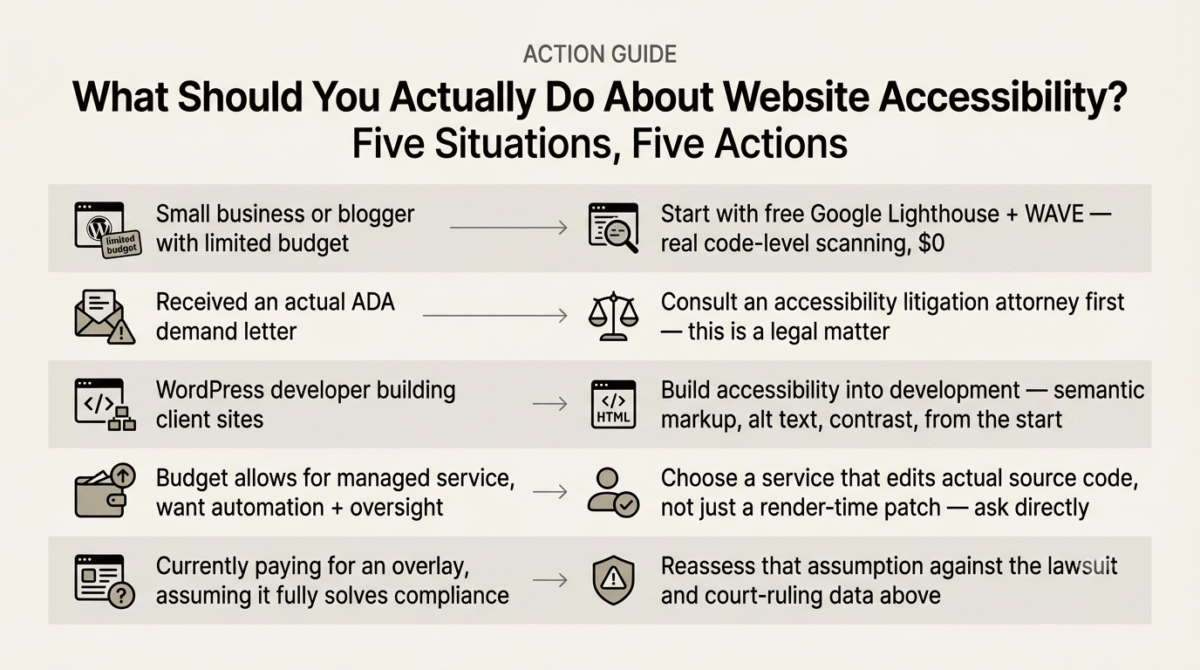
If you are a small business or blogger with a WordPress site and limited budget: Start with free, code-level testing tools rather than a paid overlay. Google Lighthouse (built into Chrome’s developer tools) and the WAVE browser extension both scan your actual HTML and surface real, specific issues, alt text missing from images, insufficient color contrast, improperly structured headings, that you or a developer can then fix directly in your site’s code. Lighthouse’s web-based sibling, PageSpeed Insights, is covered alongside other diagnostic tools in our GTmetrix vs PageSpeed Insights vs Pingdom comparison, if you want to run the same underlying engine without opening dev tools. These tools only catch an estimated 25–30% of total accessibility issues automatically, with the remainder requiring manual review, but the issues they do catch are reportedly the same ones that trigger the large majority of ADA lawsuits, making them a genuinely high-value starting point at zero cost.
If you have received an actual ADA demand letter: This is a legal situation, not just a technical one, and an overlay widget installed reactively after a demand letter arrives is unlikely to resolve the underlying legal exposure, based on the court rulings and lawsuit pattern data covered above. Consult an attorney with accessibility litigation experience, and consider a service that provides actual audit documentation, a VPAT (Voluntary Product Accessibility Template), and genuine remediation, not just a widget installation. For general business legal needs beyond litigation specifically, see our Rocket Lawyer vs LegalZoom vs LawDepot comparison of online legal services.
If you are a WordPress developer building sites for clients: Build accessibility into the development process itself, semantic HTML, proper heading structure, alt text, sufficient color contrast, and keyboard navigability, rather than treating it as a widget to bolt on afterward. See our full WordPress developer toolkit guide for the rest of the stack that supports building accessibility in from the start rather than patching it on later. This is both the more defensible approach legally and, frankly, the correct approach technically; accessibility built into the code is genuinely more durable than a runtime patch layered on top of inaccessible markup.
If your budget allows for a managed service and you want both automation and human oversight: A hybrid approach that pairs automated scanning with actual manual review and code-level fixes, rather than an overlay alone, is the more defensible investment, even though it costs meaningfully more than a basic widget subscription. The distinction to look for specifically is whether a service modifies your actual source code or only patches the page at render time; ask this question directly before purchasing.
If you are currently paying for accessiBe, UserWay, or AudioEye’s automated tier and believe it has fully solved your compliance obligation: Reassess that assumption directly in light of the lawsuit pattern data and court rulings above. The widget may still provide some genuine usability value for visitors who use its display adjustment features, but it should not be treated as a substitute for an actual code-level accessibility review if legal exposure is a real concern for your business.
Frequently Asked Questions
Did the FTC really fine accessiBe $1 million?
Yes. In April 2025, the FTC finalized a $1 million order against accessiBe for deceptively claiming that its AI-powered accessWidget could make any website WCAG compliant. The FTC’s complaint found these claims were false and misleading, and the order bars accessiBe from making similar compliance claims about its automated products going forward.
Does installing an accessibility widget protect my business from an ADA lawsuit?
The available evidence suggests not reliably. Industry tracking found that over 800 businesses using overlay solutions were named in accessibility lawsuits in 2023 and 2024, and courts have in multiple cases rejected the presence of an overlay as evidence of good-faith ADA compliance effort. Some analyses also found that overlay-installed sites made up a substantial share of 2025’s lawsuit filings, with some lawsuits explicitly citing the overlay as worsening accessibility rather than improving it.
What is the difference between an overlay and real accessibility remediation?
An overlay applies a JavaScript layer on top of your website that adjusts the page’s appearance and behavior at the moment it loads, without changing your underlying HTML. Real remediation involves actually editing your site’s source code, proper heading structure, alt text, color contrast, keyboard navigation, so the accessibility fix is permanent and detectable by any tool or assistive technology examining your actual code, not just the runtime patch layered on top of it.
Are there any free tools that help with website accessibility?
Yes. Google Lighthouse, built into Chrome’s developer tools, and the WAVE browser extension both scan your site’s actual code for free and surface specific, real accessibility issues you can fix directly. These automated tools catch an estimated 25–30% of total accessibility issues, with the remainder generally requiring manual testing and review, but they are a genuinely valuable, no-cost starting point.
Should I avoid accessibility overlays entirely?
The honest answer depends on your goal. If you want to offer visitors some genuine display customization options, font size, contrast adjustment, an overlay can provide modest value for that narrow purpose. If your goal is defensible legal compliance with ADA or WCAG standards, the evidence strongly suggests an overlay alone is not sufficient, and in some documented cases has been associated with worse legal and accessibility outcomes than expected, not better.
What should I do if I already received an ADA demand letter?
Treat it as a legal matter first. Consult an attorney experienced in accessibility litigation rather than relying solely on a quick technical fix. If you want a technical accessibility partner alongside legal counsel, look specifically for one that performs genuine code-level remediation and provides audit documentation, rather than one that installs a widget and considers the matter resolved.
Is WordPress accessible by default?
WordPress core has made meaningful accessibility improvements in recent versions, and a well-built, semantic WordPress theme combined with accessible plugin choices goes a long way toward genuine compliance. However, accessibility is significantly affected by theme choice, page builder usage, and how content is structured by the site owner, a technically accessible WordPress core does not guarantee an accessible final site, which is why code-level testing of your specific, finished site remains necessary regardless of platform. See our roundup of essential WordPress plugins for choices that support, rather than undermine, accessibility on top of WordPress core.








