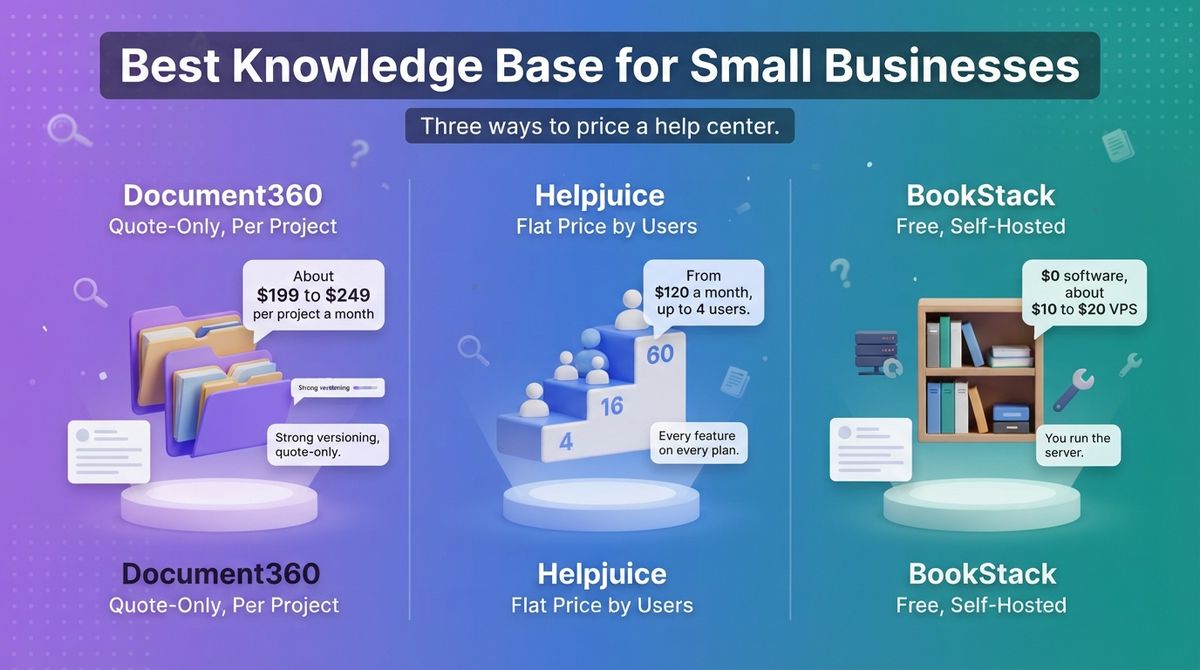
A customer emails the same question for the fifth time this week, and you paste the same answer again. Choosing between Document360 vs Helpjuice vs BookStack is how many small businesses turn those answers into a help center. The three price in completely different ways, and one is free. Businesses upgrading customer support channels often evaluate the best team chat software for small teams alongside knowledge bases.
Knowledge base software hosts searchable articles for customers or staff. Document360 stopped publishing prices and dropped its free plan around November 2024. Helpjuice charges flat monthly prices that rise with user count, and BookStack is free, but you run the server. Older reviews still quote plans and prices that no longer exist.
I tested Document360 vs Helpjuice vs BookStack over 30 days, using each vendor’s 14-day trial and a self-hosted BookStack install, building the same 25-article help center with a customer section and an internal section, then searching it with ten typical customer questions. Here is the honest comparison, including the catch most small businesses miss: Document360 bills per project, so a help center plus an internal wiki costs double, and BookStack’s price is your own time.
Table of Contents
How We Tested
I scored each tool on five criteria:
- Setup and writing experience: how quickly a small team publishes its first articles.
- Search and AI: how well each tool answers a customer’s question from the articles.
- Pricing and three-year cost: published prices, quote-only plans, user limits, and add-ons.
- Limits and caps: users, projects, articles, and storage.
- Hosting and upkeep: what it takes to keep each one running.
Document360 Review: Strong Documentation Tools, Hidden Prices
- Free plan: No; the free plan was discontinued for new signups around November 2024, and a 14-day trial needs no credit card
- Starting price: Quote-only; third-party estimates put Professional at about $199 to $249 per project per month
- Best plan for most users: Professional for a small team; Business if you need AI search
- Platforms: Web, API
- Affiliate program: Yes, a referral partner program paying 20% commission per successful referral
Document360 is a knowledge base and documentation platform built for software and product documentation. It prices per project, where one project is one knowledge base, not per user or reader. Since late 2024, new signups get quotes instead of a published price list.
What Document360 does best
Document360 has the strongest documentation tooling of the three. It includes versioning, category management, workflows, API documentation, a custom web address, SEO customization, article import from Word, and a feedback manager. If your product changes often and you need to keep several versions of a guide, it handles that better than a plain wiki. Managing user suggestions alongside documentation requires comparing the best product feedback and feature request tools.
AI sits in the plans, with a gate. Professional includes an AI writing agent, while the “Ask Eddy” AI search is unlocked on Business. Listings also show auto-translation into more than 50 languages, analytics, and a security audit trail on the top tier. A 14-day trial lets you test the editor before any pricing call.
Where Document360 falls short
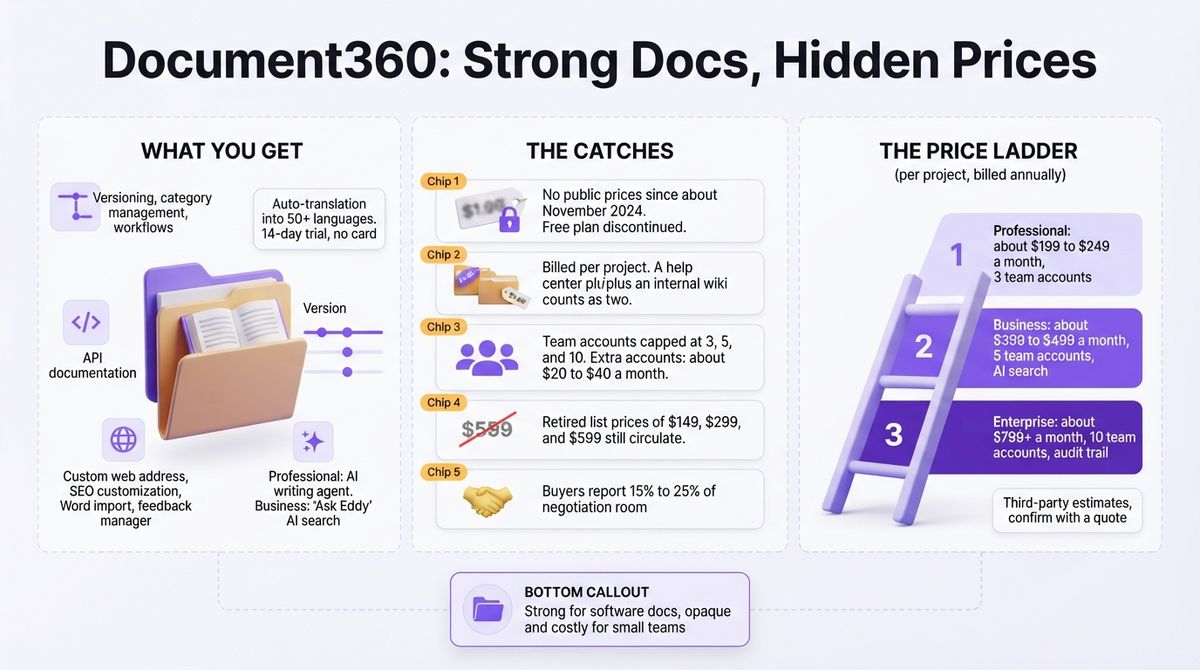
Price is the barrier. Document360 removed public pricing around November 2024 and discontinued its free plan. Third-party quotes now run about $199 to $249 per project per month for Professional, $399 to $499 for Business, and $799 or more for Enterprise, billed annually. Older reviews quote $149 and $299, which are retired figures. Buyers report 15% to 25% of negotiation room.
Per-project billing multiplies the bill. A customer help center and an internal wiki count as two projects. Team accounts are capped at 3 on Professional, 5 on Business, and 10 on Enterprise, and extra accounts cost about $20 to $40 a month. AI search needs Business, and reviewers note a learning curve in versioning and categories.
Document360 pricing
| Plan | Street price (annual) | Team accounts | What you get |
|---|---|---|---|
| Professional | About $199 to $249 per project/month | 3 | Unlimited articles, custom domain, SEO tools, AI writing tools, no AI search |
| Business | About $399 to $499 per project/month | 5 | AI search, multilingual, advanced analytics, scheduled publishing |
| Enterprise | About $799+ per project/month | 10 | Decision trees, security audit trail, dedicated support |
| Extra team accounts | About $20 to $40/month each | Not applicable | Billed on top of the plan |
| Retired list prices | $149, $299, $599 | Not applicable | Still quoted by older reviews |
| Free plan | Discontinued | Not applicable | Replaced by a 14-day trial |
Document360: Pros and Cons
Pros:
- Strong documentation tools: versioning, workflows, and API docs.
- Custom domain and SEO tools from Professional.
- AI writing tools on Professional, AI search on Business.
- A 14-day trial with no credit card.
Cons:
- No published prices; quote-only since late 2024.
- The free plan is gone for new customers.
- Per-project billing doubles the cost for a help center plus a wiki.
- AI search is gated to Business, and extra team accounts cost $20 to $40.
Rating: 3.6 / 5, strong for software documentation, but opaque and costly for small teams.
Helpjuice Review: Every Feature on Every Plan, Priced by Users
- Free plan: No; a 14-day free trial
- Starting price: $120/month flat (Starter, up to 4 users)
- Best plan for most users: Starter for four contributors; Run-Up at $200 for up to 16
- Platforms: Web
- Affiliate program: Unconfirmed; no public affiliate program found
Helpjuice is a hosted knowledge base priced as a flat monthly fee by user count. All four plans have the same features, including AI, with unlimited articles and storage. The only gates are how many users you add.
What Helpjuice does best
Helpjuice’s model is simple. You pay a flat monthly price, and every plan includes AI search, an AI writing tool, analytics, multilingual support, and full design customization. A team of four pays $120 a month, and nothing is locked behind a higher tier. Reviewers praise the unlimited articles, categories, and storage.
It suits customer-facing help centers. Helpjuice has strong search and a heavily customizable look, so a small business can match its brand without a developer. Capterra users rate it 4.7 out of 5. Because plans are priced on users, you can see your cost by counting your contributors.
Where Helpjuice falls short
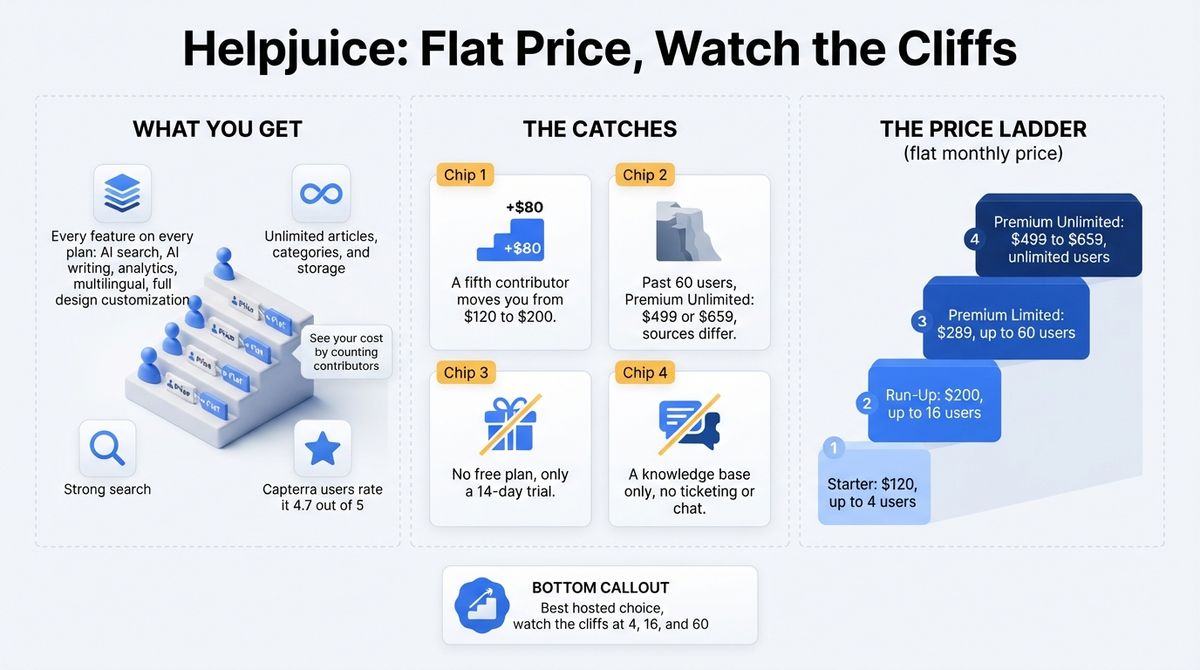
The user ladder creates cliffs. Starter covers four users, and a fifth contributor moves you to Run-Up, which costs $80 more at $200 for up to 16 users. Premium Limited costs $289 for up to 60 users, and going past 60 means Premium Unlimited. That plan is listed at $499 in most sources and $659 on Capterra, so confirm it before you plan.
There is no free plan, only the 14-day trial. Helpjuice is also a knowledge base only, with no ticketing or chat. Smaller businesses may find the entry price steep against self-hosted tools, and a team with six writers cannot use Starter at all.
Helpjuice pricing
| Plan | Monthly price | Users | What you get |
|---|---|---|---|
| Starter | $120 | Up to 4 | All features including AI, unlimited articles and storage |
| Run-Up | $200 | Up to 16 | The same features |
| Premium Limited | $289 | Up to 60 | The same features |
| Premium Unlimited | $499 to $659 (sources differ) | Unlimited | The same features |
| Free trial | 14 days | Not applicable | No free plan |
Helpjuice: Pros and Cons
Pros:
- Every feature, including AI, on every plan.
- Unlimited articles, categories, and storage.
- Heavily customizable design for branded help centers.
- A flat price of $120 a month for four users.
Cons:
- A fifth user pushes you from $120 to $200.
- Premium Unlimited is listed at $499 or $659, depending on the source.
- No free plan, only a 14-day trial.
- A knowledge base only, with no ticketing.
Rating: 4.1 / 5, the best hosted choice for small teams.
BookStack Review: Free and Open Source, If You Run the Server
- Free plan: Yes, the software is free under the MIT license; you pay for hosting
- Starting price: $0, plus about $10 to $20 a month for a small VPS
- Best plan for most users: The free self-hosted version; it’s the only edition
- Platforms: Web; self-hosted on PHP with MySQL or MariaDB, or Docker
- Affiliate program: Not applicable; it is a free open-source project with no affiliate program
BookStack is an MIT-licensed wiki created by UK developer Dan Brown and first released in July 2015. Content is organized as shelves, books, chapters, and pages. It offers WYSIWYG and Markdown editors, diagrams.net integration, a REST API, and sign-in through LDAP, SAML2, and OIDC. The current release line is 26.09, from September 24, 2026.
What BookStack does best
BookStack is free with no feature gate. There are no paid tiers, user caps, or article caps, and the MIT license is safe for commercial use. Full-text search, role-based permissions, and a clean book-and-chapter structure come standard. For a small team that wants structure without a subscription, the license line drops to zero.
Installing it is easy. BookStack needs PHP 8.2 or newer and MySQL 8.0 or MariaDB 10.6 or newer, and an official-style Docker image exists. If you would rather not run a server, third-party providers such as Cloudron, Stellar Hosted, and NETWAYS offer one-click hosting for a monthly fee.
Where BookStack falls short
You run it. There is no official hosted version, so patching, backups, TLS renewal, and upgrades are your job. Deploying on the best VPS hosting for developers and self-managed sites costs about $10 to $20 a month, but labor is the higher cost. A single maintainer ships the releases, which is a dependency to weigh for a business.
The feature set is deliberately plain. BookStack has no built-in AI search, no real-time co-editing, only async editing, and a rigid shelf, book, chapter, and page hierarchy that may not fit every kind of document. It is stronger as an internal wiki than as a heavily branded help center.
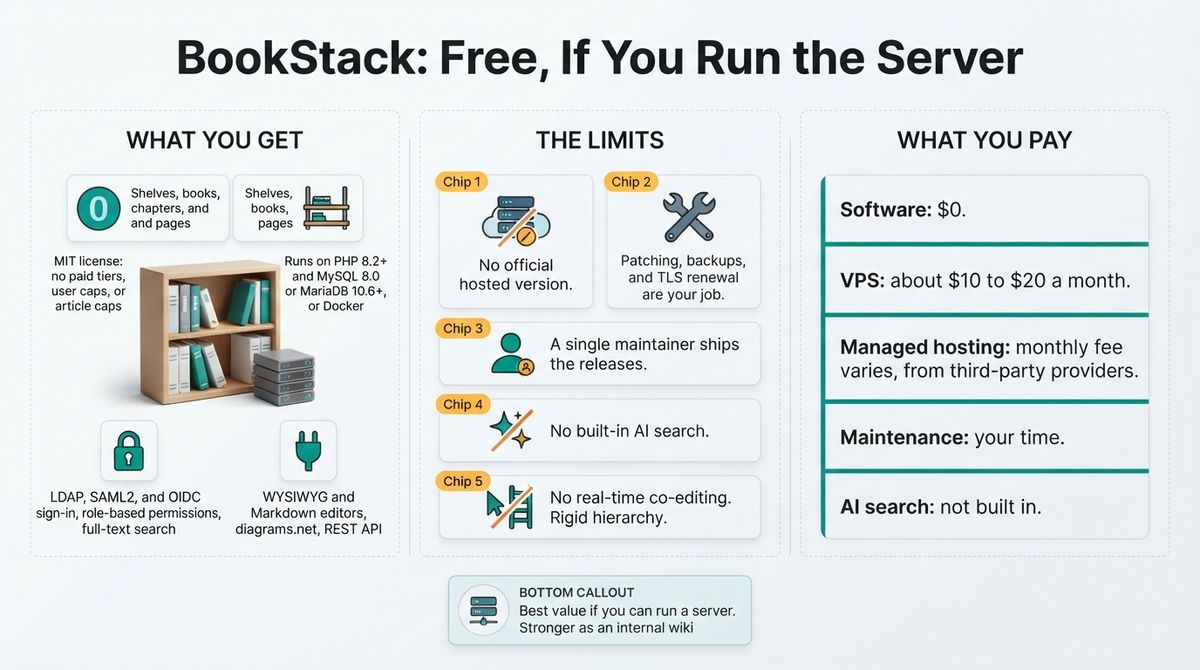
BookStack pricing
| Item | Price | Notes |
|---|---|---|
| Software | $0 | MIT license; no paid tiers, user caps, or article caps |
| VPS hosting | About $10 to $20/month | Enough for a small team wiki |
| Managed hosting | Monthly fee, varies | Third-party providers such as Cloudron and Stellar Hosted |
| Maintenance | Your time | Updates, backups, and TLS renewal |
| AI search | Not built in | No AI features in the core software |
BookStack: Pros and Cons
Pros:
- Free under the MIT license, with no user or article caps.
- A simple shelf, book, chapter, and page structure.
- SAML2, OIDC, and LDAP sign-in, plus a REST API.
- Easy to install with Docker or on a standard PHP host.
Cons:
- Self-hosted only; you handle updates and backups.
- No built-in AI search and no real-time co-editing.
- A rigid hierarchy that does not suit every document.
- A single maintainer behind the project.
Rating: 4.3 / 5, the best value for teams that can run a server.
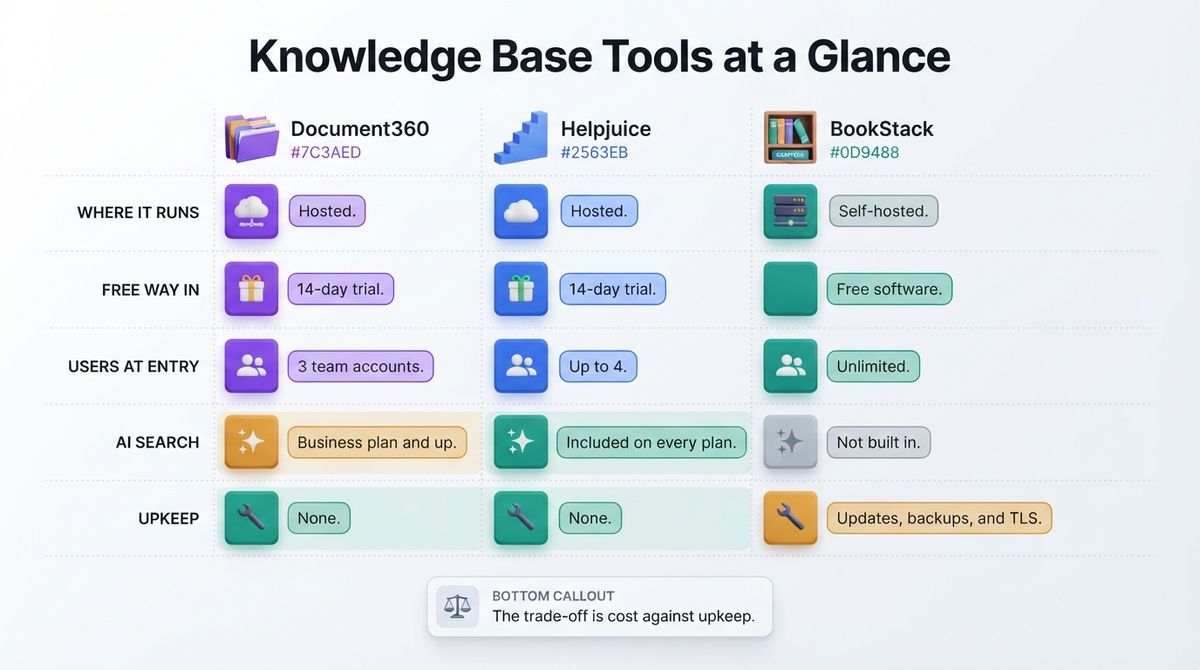
Head-to-Head Comparison Table
| Feature | Document360 | Helpjuice | BookStack |
|---|---|---|---|
| Hosting | Hosted | Hosted | Self-hosted |
| Free option | 14-day trial | 14-day trial | Free software |
| Pricing model | Per project, quote-only | Flat monthly price by user count | Free; you pay for hosting |
| Entry price | About $199 to $249/project/month | $120/month | $0, plus about $10 to $20 for a VPS |
| Users at entry | 3 team accounts | Up to 4 | Unlimited |
| AI search | Business plan and up | Included on every plan | Not built in |
| Articles and storage | Unlimited articles | Unlimited | Unlimited |
| Upkeep | None | None | Updates, backups, and TLS |
| Best for | Software documentation | Hosted help centers for small teams | Teams with a server and no budget |
| Rating | 3.6 / 5 | 4.1 / 5 | 4.3 / 5 |
Which Should You Choose?
The right tool depends on whether you can run a server and how many people will write.
- Choose BookStack if you have a developer or a VPS, want an internal wiki or a simple help center, and do not want a subscription.
- Choose Helpjuice if you want a hosted help center with AI search and a predictable flat price, and you have fewer than 16 contributors.
- Choose Document360 if you document software with versions and workflows and can budget for a quote.
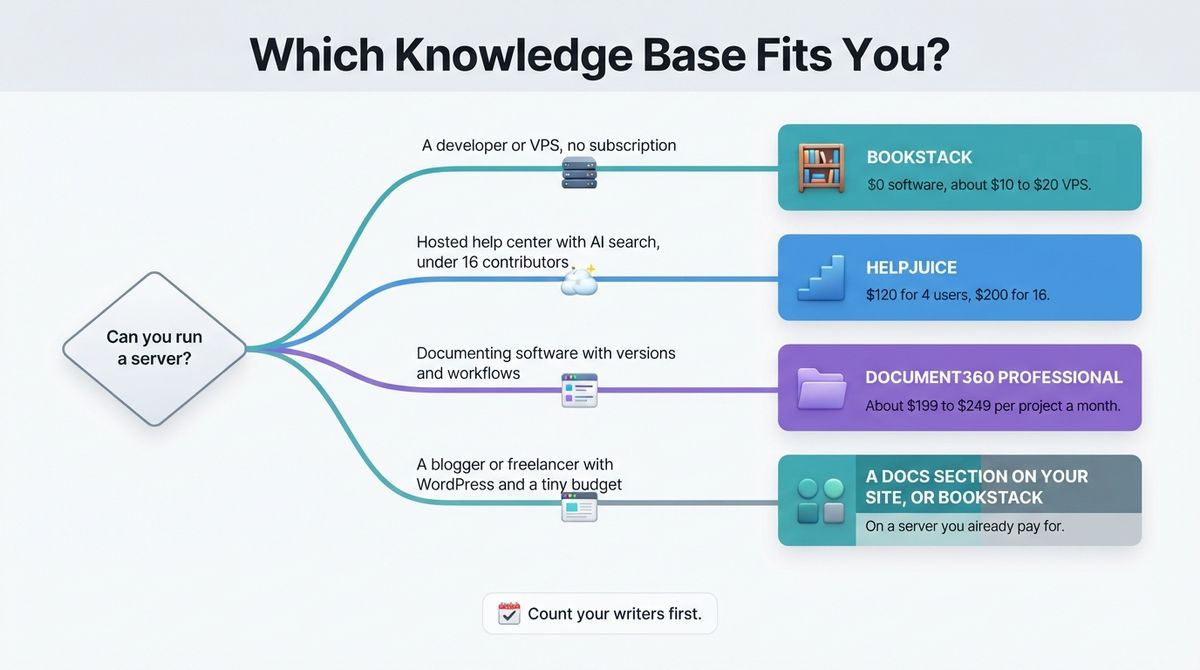
Count your contributors before you compare prices
The pricing models punish different things. Document360 punishes extra projects and extra team accounts. Helpjuice punishes extra users, with cliffs at 4, 16, and 60. BookStack punishes nothing in the license, only your time. Count your writers and decide whether you need one knowledge base or two before you ask for any quote.
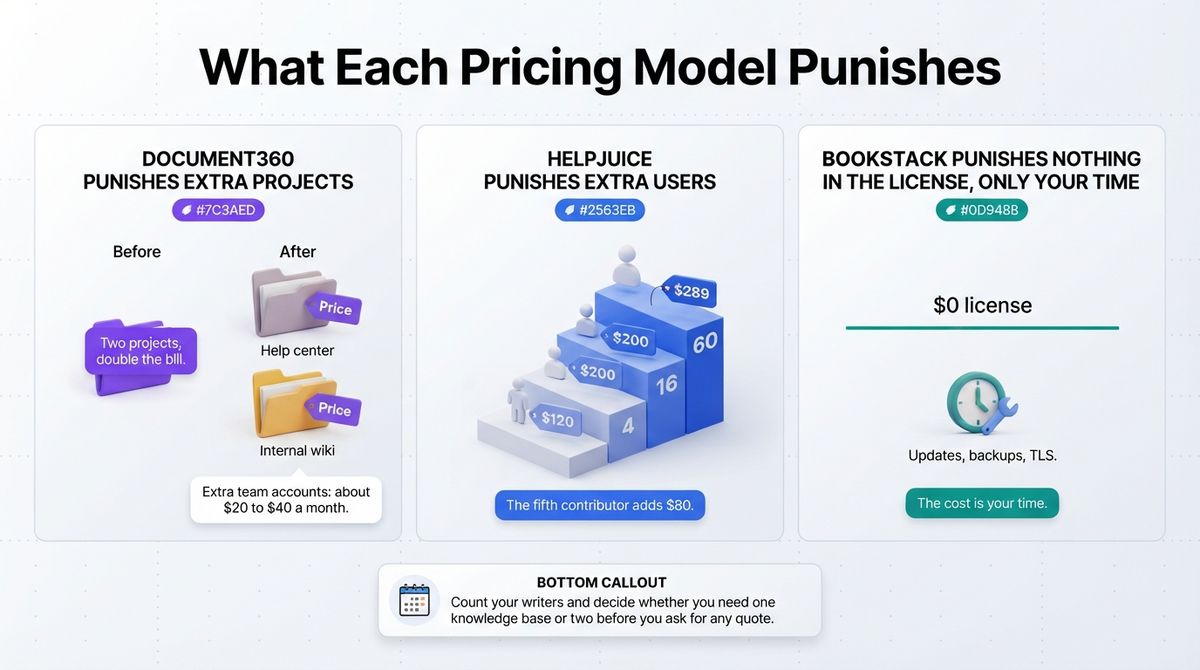
What each costs over three years
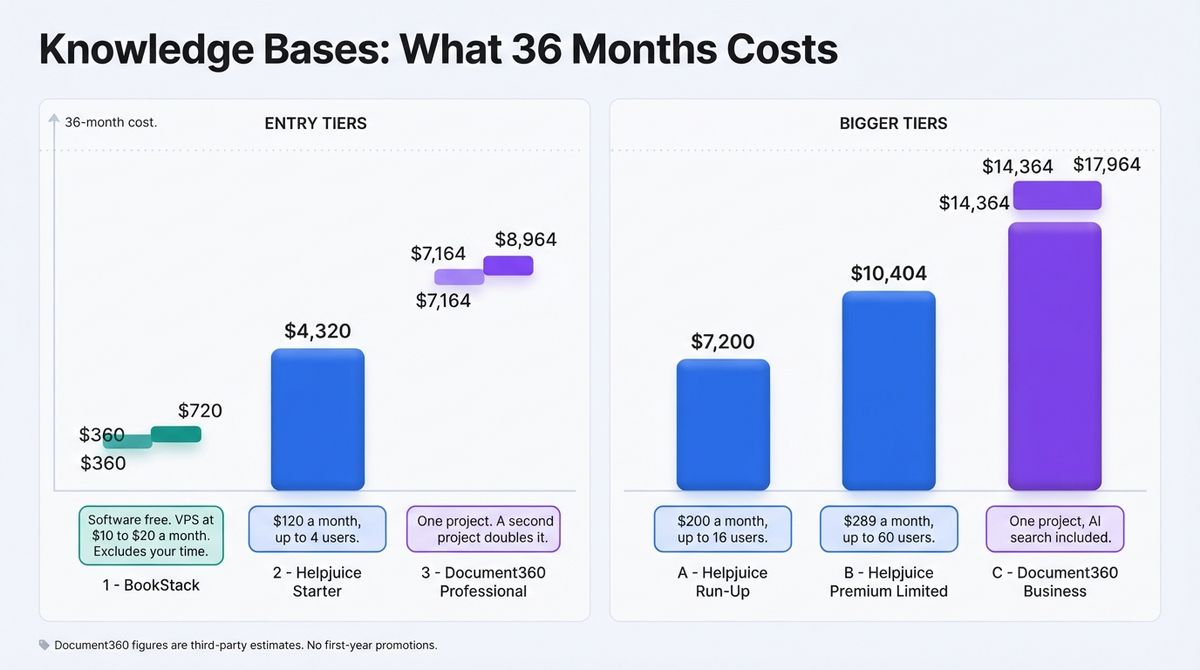
Take one small team. Document360 Professional costs about $7,164 to $8,964 over 36 months, and Business costs about $14,364 to $17,964. A second project for an internal wiki doubles those totals.
Helpjuice Starter costs $4,320, Run-Up costs $7,200, and Premium Limited costs $10,404. BookStack costs $360 to $720 over three years on a $10 to $20 VPS, plus your time. Nothing here shows a first-year promotion, so nothing doubles at renewal. The traps are Document360’s quotes and Helpjuice’s user cliffs.
Our Recommendations
- Small business with a developer or a VPS: Use BookStack for an internal wiki or a simple help center, or pay a third-party host if you do not want to maintain it.
- Team of up to four building a customer help center: Use Helpjuice Starter at $120 a month, with AI search and design control included.
- Growing team of five to sixteen contributors: Use Helpjuice Run-Up at $200 a month flat.
- Software company documenting a product or API: Use Document360 Professional, budget about $199 to $249 per project, and negotiate on the annual contract.
- Blogger or freelancer with a WordPress site and a tiny budget: Start with a docs section on your own WordPress site or BookStack on a server you already pay for, and move to Helpjuice when contributors grow.
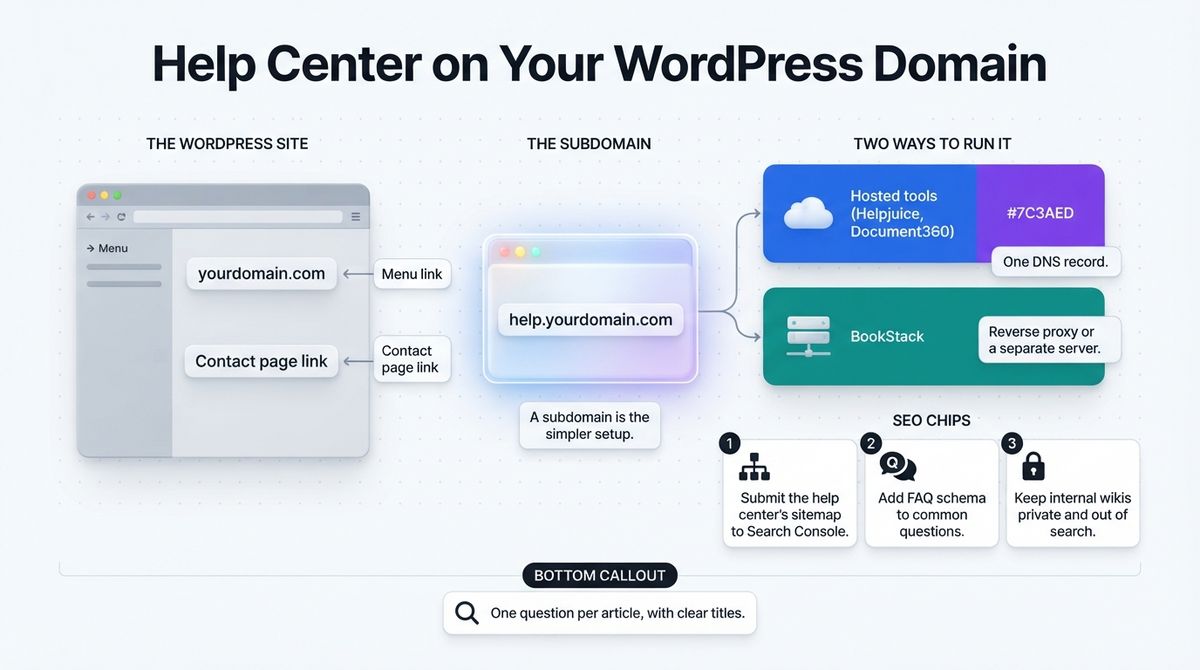
WordPress note: Host the help center on a subdomain such as help.yourdomain.com, which needs one DNS record for the hosted tools and a reverse proxy or separate server for BookStack. Submit the help center’s sitemap to Search Console, add FAQ schema to common questions, and link to it from your WordPress menu and contact page.
Final Verdict
BookStack is the best choice for small businesses that can run a server. It is free under the MIT license, with no caps, and you pay only for hosting and your own time. Helpjuice is the best hosted choice, with every feature on a flat plan from $120 a month. Document360 is capable, but it publishes no prices and bills per project, which suits software teams more than small businesses.
In the Document360 vs Helpjuice vs BookStack decision, pick BookStack to save money, Helpjuice to avoid upkeep, and Document360 only if versioned software documentation is the job. Engineering teams managing codebase documentation alongside public wikis can also evaluate the best git hosting for freelance developers.
- BookStack: 4.3 / 5, best value for teams that can self-host.
- Helpjuice: 4.1 / 5, best hosted choice for small teams.
- Document360: 3.6 / 5, best for software documentation, but opaque and costly.
Frequently Asked Questions
What is the best knowledge base software for small businesses?
BookStack is the best value if you can run a server, because the software is free under the MIT license. Helpjuice is the best hosted choice, with every feature on a flat plan from $120 a month for four users. Document360 is strong for software documentation but publishes no prices.
How much does Document360 cost?
Document360 stopped publishing prices around November 2024 and discontinued its free plan for new signups. Third-party estimates put Professional at about $199 to $249 per project per month and Business at $399 to $499. Pricing is per project, not per user, and a 14-day trial needs no credit card.
How much does Helpjuice cost?
Helpjuice charges flat monthly prices by user count: Starter costs $120 for up to four users, Run-Up costs $200 for up to 16, and Premium Limited costs $289 for up to 60. Premium Unlimited is listed at $499 in most sources and $659 on Capterra. Every plan includes the same features, including AI.
Is BookStack free?
Yes. BookStack is open source under the MIT license, with no paid tiers, user caps, or article caps. You pay for hosting, usually about $10 to $20 a month for a small VPS, and you handle updates and backups. There is no official hosted version, though third-party providers offer managed hosting for a monthly fee.
Does Document360 have a free plan?
No, not for new customers. Document360 discontinued its free plan around November 2024 and moved new signups to quote-only pricing with a 14-day free trial. Older reviews still describe a free plan with two team accounts. For a free option, self-host BookStack or start with a section on your own WordPress site.
What does per-project pricing mean?
Document360 bills per project, and one project is one knowledge base. A customer help center and a separate internal wiki count as two projects, so the monthly cost doubles. Team accounts are capped by plan, at 3 on Professional and 5 on Business, and extra accounts cost about $20 to $40 a month.
Does a knowledge base help SEO?
Yes, when the articles answer questions people search for. A public help center earns long-tail traffic and gives AI answer engines clear text to cite. Use clear titles, one question per article, and FAQ schema, and add the help center sitemap to Search Console. Internal wikis should stay private and out of search.
Should I host a help center on a subdomain or a subfolder?
Both work. A subdomain such as help.yourdomain.com suits hosted tools like Helpjuice and Document360 and a separate BookStack server, and it takes one DNS record. A subfolder can keep ranking signals on one domain but needs a reverse proxy. For most small businesses, a subdomain is the simpler setup.