Hosting WordPress on a VPS gives you control that managed hosts do not, including your own PHP version, server stack, and caching. The trade-off is that you run the server, so the provider you choose affects price, bandwidth, and how much help you get from documentation. This guide compares DigitalOcean vs Vultr vs Hetzner for developers and self-managed WordPress sites.
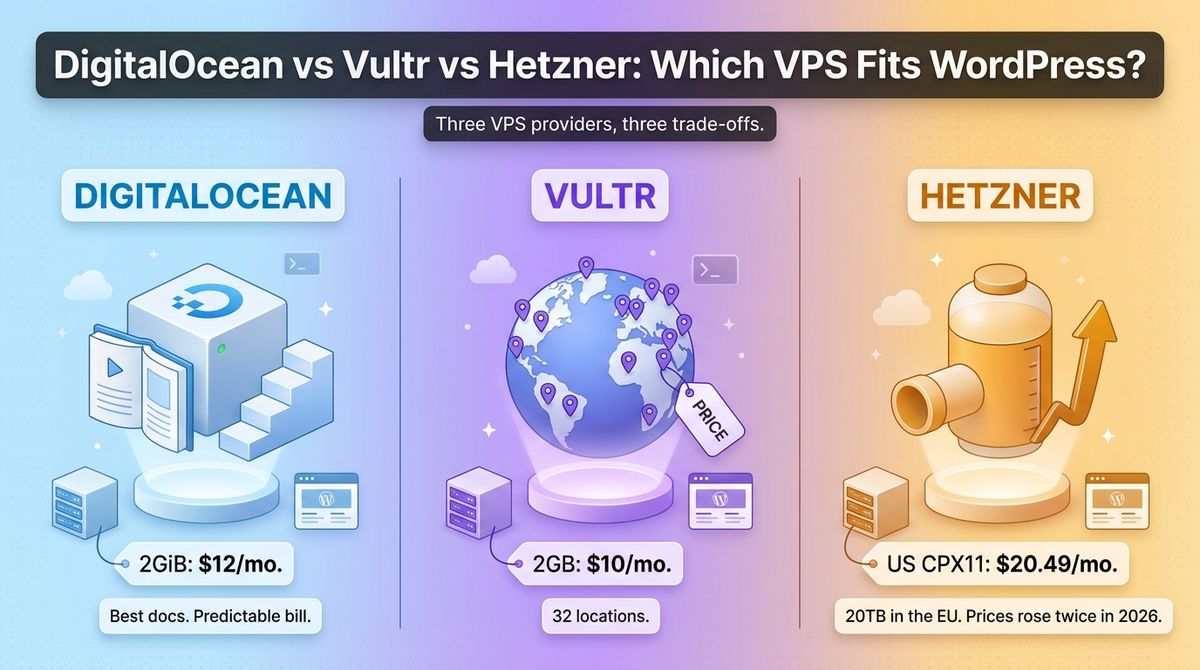
The three providers take different routes. DigitalOcean sells simple Droplets backed by strong documentation. Vultr undercuts on price and offers the widest set of locations. Hetzner built its reputation on cheap servers with huge bandwidth, but it raised prices twice in 2026.
I tested DigitalOcean vs Vultr vs Hetzner for 30 days, running the same WordPress install on a 2GB server at each: Ubuntu 24.04 with Nginx, PHP-FPM, MariaDB, and Redis, with identical plugins and scheduled backups. Here is the honest comparison. Two catches to know first: Hetzner’s June 2026 increase made its US servers cost more than DigitalOcean or Vultr, and its cheap CX line was listed as unavailable to order in early October.
Table of Contents
How We Tested
I scored each provider on five criteria, using the same WordPress stack throughout.
- Price for WordPress-sized servers. I compared 2GB and 4GB servers, with and without backups, over 12 months.
- Bandwidth and overage. I checked included transfer and what each provider charges beyond it.
- Locations and coverage. I compared data center locations against readers in the US, UK, Canada, and Australia.
- Billing and hidden costs. I looked at backups, snapshots, and what happens to billing when a server is stopped.
- Ecosystem and setup. I checked documentation, marketplace images, and support from server panels such as SpinupWP and RunCloud.
As a WordPress developer, I weighted ease of setup and predictable monthly cost above raw benchmark scores.
DigitalOcean Review: The Best Documentation and the Most Predictable Bill
- Free plan: No; new accounts have been offered $200 in credit for 60 days
- Starting price: $4 a month for a 512MiB Droplet; $12 for a 2GiB Droplet
- Best plan for most users: 2GiB Basic Droplet at $12
- Platforms: Web, API, doctl CLI
- Affiliate program: Yes, 10% of the referred customer’s monthly spend for 12 months, through Impact
DigitalOcean sells Droplets, its virtual servers, alongside managed databases, Kubernetes, Spaces object storage, and App Platform. Basic Droplets are shared-CPU servers aimed at blogs, test apps, and small production sites. Since January 1, 2026, Droplets bill per second with a 60-second minimum and a monthly cap.
What DigitalOcean does best
DigitalOcean has the clearest pricing and the best learning material of the three. Basic Droplets run $4, $6, $12, $18, and $24 a month, each with a published transfer allowance. Its community tutorials and 1-Click WordPress image make a first server easier to set up.
The bill stays predictable. Transfer is pooled across your team, overage is a flat $0.01 per GiB, and cloud firewalls are free. Managed databases start at $15 a month, which helps when you want to move MariaDB off the web server later.
Where DigitalOcean falls short
DigitalOcean costs more than Vultr at the same size. A 2GiB Droplet is $12 against $10 at Vultr, and 4GiB is $24 against $20. Backups add 20% for weekly copies or 30% for daily ones, so a $12 Droplet becomes $14.40 with weekly backups.
Powered-off Droplets still bill until you destroy them, and snapshots cost $0.06 per GB a month. Entry plans are small: the $6 Droplet has 1GiB of RAM, which is tight for WordPress with caching. Start at the $12 tier.

DigitalOcean pricing
| Plan | Price | Specs | Included transfer |
|---|---|---|---|
| Basic 512MiB | $4 a month | 1 vCPU, 10GiB SSD | 500GiB |
| Basic 1GiB | $6 a month | 1 vCPU, 25GiB SSD | 1,000GiB |
| Basic 2GiB | $12 a month | 1 vCPU, 50GiB SSD | 2,000GiB |
| Basic 2GiB, 2 vCPU | $18 a month | 2 vCPU, 60GiB SSD | 3,000GiB |
| Basic 4GiB | $24 a month | 2 vCPU, 80GiB SSD | 4,000GiB |
| Backups | 20% weekly or 30% daily of the Droplet price | Usage-based plans from $0.01 per GiB a month | Not applicable |
| Overage | $0.01 per GiB | Outbound transfer above the pooled allowance | Inbound is free |
DigitalOcean: Pros and Cons
Pros:
- Clear price ladder with published transfer allowances
- Strong tutorials and a 1-Click WordPress image
- Per-second billing with a monthly cap
- Free cloud firewalls and managed databases from $15
Cons:
- Costs more than Vultr at comparable sizes
- Backups add 20% to 30% to the Droplet price
- Powered-off Droplets still bill until destroyed
- The $6 Droplet has only 1GiB of RAM
Rating: 4.5 / 5, the best documentation and the most predictable bill.
Vultr Review: The Lowest Price and the Widest Map
- Free plan: No; promotional credits for new accounts vary
- Starting price: $5 a month for a 1GB Regular server; a $2.50 IPv6-only plan exists in limited regions
- Best plan for most users: 2GB Regular at $10, or High Performance for NVMe storage
- Platforms: Web, API, CLI
- Affiliate program: Yes, a referral and affiliate program with a one-time bounty (reported at up to $100 per qualified signup; confirm on Vultr’s referral page)
Vultr is a developer cloud with virtual servers, bare metal, and GPU instances across 32 locations. Its Cloud Compute line has Regular, High Performance (AMD EPYC with NVMe), High Frequency (Intel at 3GHz or higher), and Optimized tiers. Servers bill hourly and cap at the monthly price.
What Vultr does best
Vultr gives you the most server for the money at the entry level. A 2GB Regular server costs $10 with 55GB of storage and 2TB of transfer, and a 4GB server costs $20 with 3TB. That undercuts DigitalOcean by $2 and $4 a month at the same sizes.
It also has the widest map. With 32 locations, you can place a server close to readers in Australia, Canada, or the UK. High Performance starts at $6 for a 1GB NVMe server, which is a better fit for database-heavy WordPress sites than the $5 SATA tier.
Where Vultr falls short
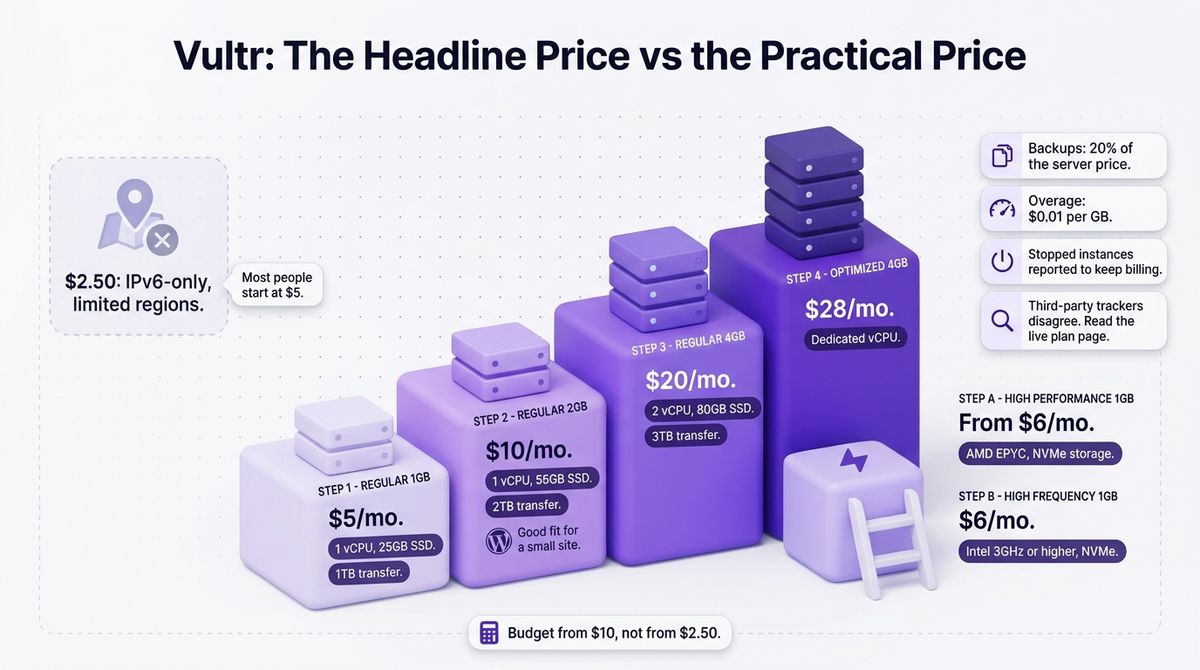
The headline price is not the practical one. The $2.50 plan is IPv6-only and limited to certain regions, so most people start at $5. Prices and transfer allowances for High Performance and High Frequency differ across third-party trackers, so read the live plan page before you buy.
Backups add 20% of the server price, and overage is $0.01 per GB. Stopped instances are reported to keep billing until you destroy them. Documentation is solid but less extensive than DigitalOcean’s tutorial library.
Vultr pricing
| Plan | Price | Specs | Notes |
|---|---|---|---|
| Regular, 1GB | $5 a month | 1 vCPU, 25GB SSD, 1TB transfer | Entry plan most people start with |
| Regular, 2GB | $10 a month | 1 vCPU, 55GB SSD, 2TB transfer | Good fit for a small WordPress site |
| Regular, 4GB | $20 a month | 2 vCPU, 80GB SSD, 3TB transfer | Room for caching and a database |
| High Performance, 1GB | From $6 a month | AMD EPYC, NVMe storage | Faster storage than Regular |
| High Frequency, 1GB | $6 a month | Intel 3GHz or higher, NVMe | Faster single-core speed |
| Optimized, 4GB | $28 a month | Dedicated vCPU | For steady production loads |
| Backups and overage | 20% of server price; $0.01 per GB | Not applicable | Plus a $2.50 IPv6-only plan in limited regions |
Vultr: Pros and Cons
Pros:
- Lowest price at 2GB and 4GB
- 32 locations worldwide
- NVMe high-performance servers from $6
- Hourly billing with a monthly cap
Cons:
- The $2.50 headline plan is IPv6-only and region-limited
- Plan details differ across third-party trackers
- Stopped instances are reported to keep billing
- Less extensive tutorials than DigitalOcean
Rating: 4.4 / 5, the lowest price and the widest map.
Hetzner Review: Huge Bandwidth, but No Longer the Cheapest Everywhere
- Free plan: No
- Starting price: €5.49 a month for a CX23 in the EU (listed as unavailable to order in early October); US servers from $20.49
- Best plan for most users: CPX22 in the EU at €19.49
- Platforms: Web, API
- Affiliate program: None confirmed
Hetzner has run data centers in Germany since 1997, and its cloud product launched in 2017. It has six cloud locations: Falkenstein, Nuremberg, Helsinki, Ashburn, Hillsboro, and Singapore. The EU plans include at least 20TB of traffic, which no competitor here matches.
What Hetzner does best
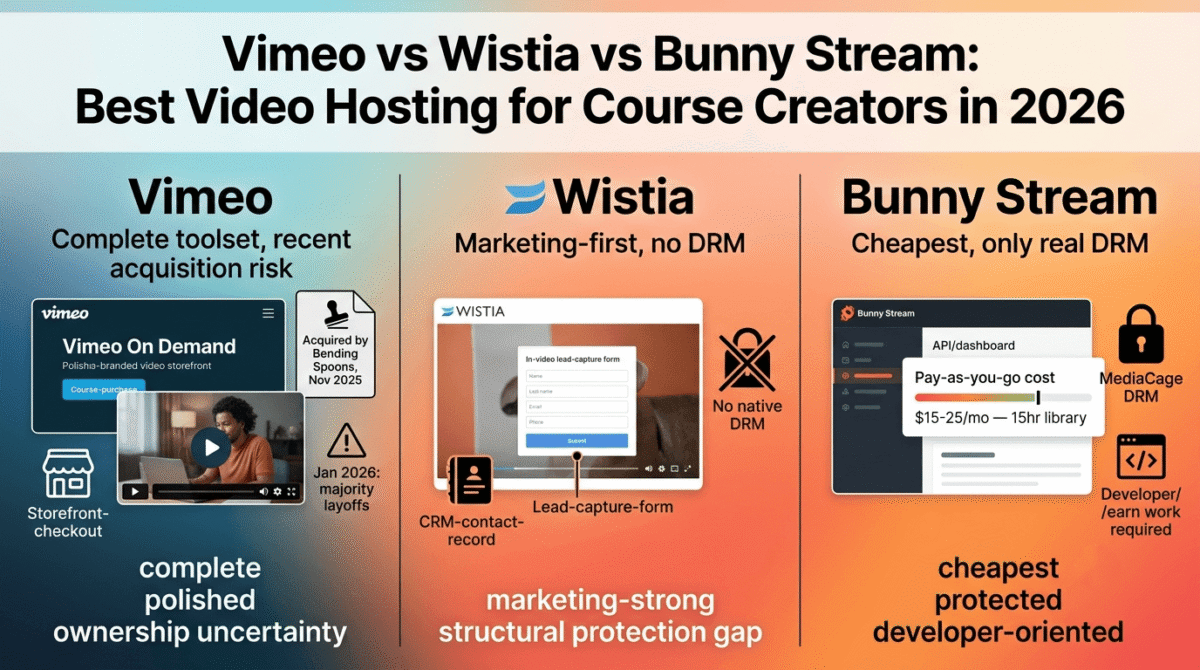
Hetzner still wins on included traffic. EU plans include at least 20TB, against 2TB to 4TB at DigitalOcean and Vultr for similar sizes. A bandwidth-heavy site with downloads or video and an EU audience can cost far less here. If your site relies heavily on video content instead of text, you might also want to explore the best video hosting platforms for course creators.
The EU hardware is generous for the money. A CX23 gives 2 shared vCPUs, 4GB of RAM, and 40GB of NVMe storage for €5.49. A CPX22 gives 3 vCPUs, 4GB, 80GB of storage, and 20TB for €19.49.
Where Hetzner falls short
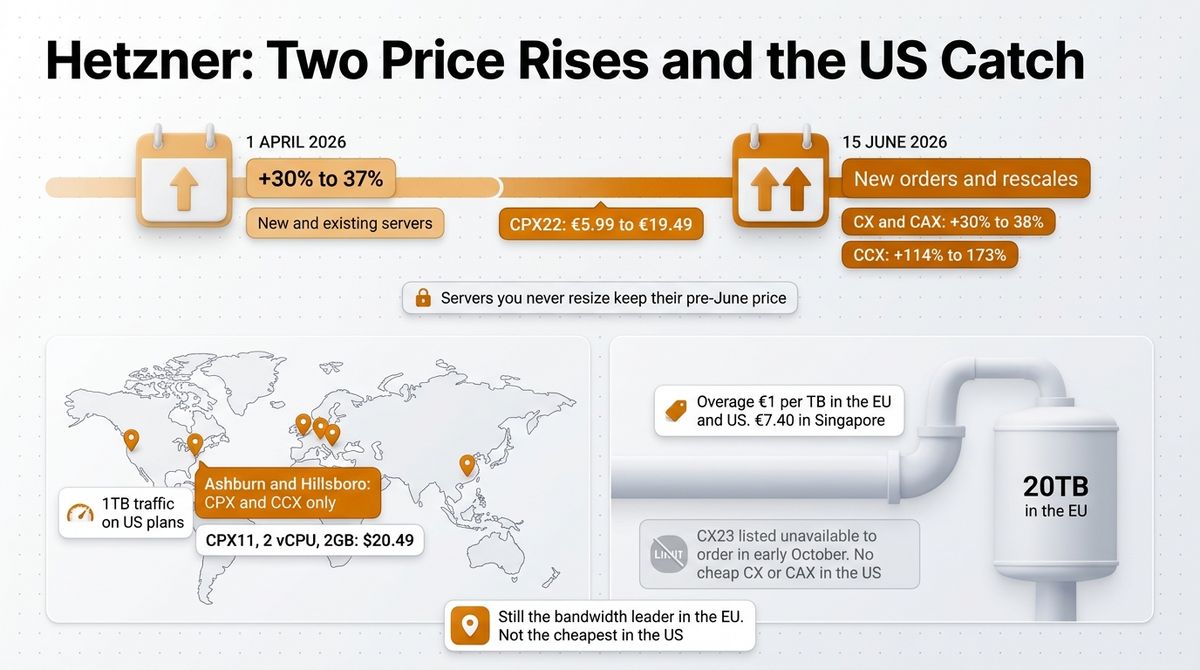
Hetzner raised cloud prices twice in 2026. On April 1, prices rose roughly 30% to 37% for new and existing servers. On June 15, new orders and rescales rose again: CX and CAX by 30% to 38%, CPX by 144% to 175%, and CCX by 113% to 173% in the EU. A CPX22 went from €5.99 at the start of the year to €19.49.
The US is the weak spot. Ashburn and Hillsboro run CPX and CCX plans only, with 1TB of traffic, and a CPX11 with 2 vCPUs and 2GB costs $20.49. The cheap CX and CAX lines have never existed in the US, and the CX line was listed as unavailable to order in early October. Overage is €1 per TB in the EU and US, and €7.40 in Singapore.
Hetzner pricing
| Plan | Location | Price | Specs | Included traffic |
|---|---|---|---|---|
| CX23 | EU | €5.49 a month | 2 shared vCPU, 4GB, 40GB NVMe | 20TB; listed as unavailable to order in early October |
| CX33 | EU | €8.49 a month | 4 shared vCPU, 8GB, 80GB NVMe | 20TB |
| CAX11 | EU | €5.99 a month | 2 Arm vCPU, 4GB, 40GB NVMe | 20TB |
| CPX22 | EU | €19.49 a month | 3 shared AMD vCPU, 4GB, 80GB | 20TB |
| CPX11 | US (Ashburn, Hillsboro) | $20.49 a month | 2 vCPU, 2GB | 1TB |
| CCX13 | EU | €42.99 a month | 2 dedicated vCPU, 8GB, 80GB SSD | 20TB |
| Traffic overage | EU and US; Singapore | €1 per TB; €7.40 per TB | Beyond the included traffic | Not applicable |
Hetzner: Pros and Cons
Pros:
- At least 20 TB of included traffic in the EU
- Strong EU hardware for the price
- Two US locations, Ashburn and Hillsboro
- Supported by SpinupWP and RunCloud
Cons:
- Two price increases in 2026, with CPX up to 175% in the EU
- US servers cost more than DigitalOcean or Vultr
- The cheap CX line was listed as unavailable in early October
- Only 1TB of traffic on US plans
Rating: 4.0 / 5, the best EU bandwidth, but no longer the cheapest elsewhere.
Head-to-Head Comparison Table
| Feature | DigitalOcean | Vultr | Hetzner |
|---|---|---|---|
| 2GB-class server | $12 (1 vCPU, 2GiB, 50GiB, 2TB) | $10 (1 vCPU, 2GB, 55GB, 2TB) | US: CPX11 at $20.49 (2 vCPU, 2GB, 1TB); EU: CX23 at €5.49 (4GB) if orderable |
| 4GB-class server | $24 (2 vCPU, 80GiB, 4TB) | $20 (2 vCPU, 80GB, 3TB) | EU: CPX22 at €19.49 (3 vCPU, 80GB, 20TB) |
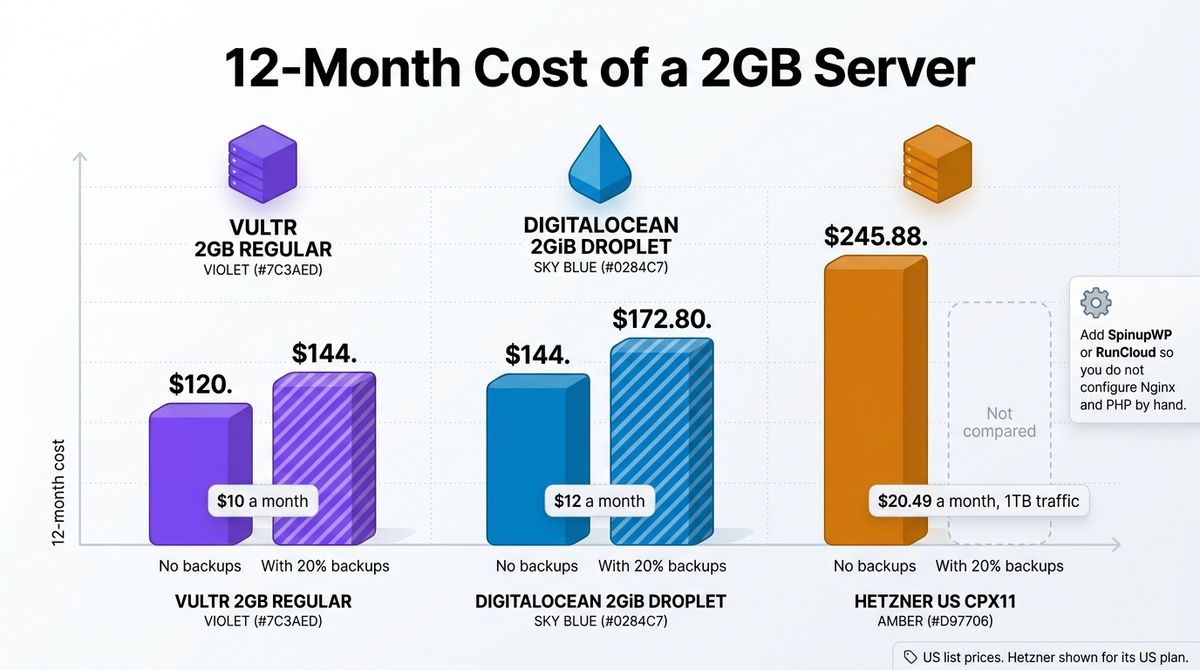
| 12-month cost, 2GB-class server | $144 | $120 | US: $245.88 for CPX11 |
| 12-month cost with 20% backups, 2GB-class | $172.80 | $144 | Not compared |
| Overage | $0.01 per GiB | $0.01 per GB | €1 per TB in the EU and US |
| Locations | Multiple US, EU, and Asia regions | 32 locations | 6: Falkenstein, Nuremberg, Helsinki, Ashburn, Hillsboro, Singapore |
| Billing | Per second, monthly cap; powered-off servers still bill | Hourly, monthly cap; stopped instances reported to bill | Hourly pricing by plan; check the console |
| 2026 price changes found | Per-second billing from January 1 | None found | Increases on April 1 and June 15 |
| SpinupWP and RunCloud support | Yes | Yes | Yes |
| Affiliate program | Yes, 10% of monthly spend for 12 months | Yes, one-time bounty | None confirmed |
| Best for | Documentation and a predictable bill | Lowest US price and widest locations | EU audiences with heavy bandwidth |
| Our rating | 4.5 / 5 | 4.4 / 5 | 4.0 / 5 |
Which Should You Choose?
Choose DigitalOcean if you are setting up your first VPS or want the best tutorials and managed add-ons. The extra $2 to $4 a month buys the clearest documentation.
Choose Vultr if you want the lowest price at 2GB and 4GB or need a location close to readers outside the US and EU. High Performance suits database-heavy sites.
Choose Hetzner if your audience is in Europe and your site moves a lot of data. Confirm that the CX plan is orderable before you plan around it.
Skip all three if you do not want to maintain a server. Managed WordPress hosting, like the options in our web hosting comparison, handles backups, caching, and features found in the best WordPress security plugins for you.
Compare the 12-month cost, not the headline price. A 2GB server costs $120 a year at Vultr and $144 at DigitalOcean, and adding 20% backups raises those to $144 and $172.80. Hetzner’s US CPX11 costs about $246 a year before backups. Add a server panel such as SpinupWP or RunCloud if you do not want to configure Nginx and PHP by hand.

Our Recommendations
- Solo WordPress developer hosting a few client sites for US, UK, or Australian readers: Vultr 2GB Regular at $10, or High Performance for NVMe storage.
- Developer setting up a first self-managed server: DigitalOcean 2GiB Droplet at $12, with its tutorials and 1-Click WordPress image.
- Site with an EU audience and heavy downloads or video: Hetzner CPX22 at €19.49 with 20TB, or CX23 if it is available to order.
- Freelancer or small agency running many sites: Any of the three with SpinupWP or RunCloud, choosing the provider by where your readers are.
- Anyone who wants to avoid server maintenance: Managed WordPress hosting instead of a VPS.
Final Verdict
For most readers comparing DigitalOcean vs Vultr vs Hetzner, DigitalOcean is the winner. It has the clearest pricing, the best documentation, and a bill that stays predictable. Vultr costs less and covers more locations, and Hetzner remains the bandwidth leader in Europe but is no longer cheap in the US.
- DigitalOcean: 4.5 / 5, the best documentation and the most predictable bill.
- Vultr: 4.4 / 5, the lowest price and the widest map.
- Hetzner: 4.0 / 5, the best EU bandwidth, but no longer the cheapest elsewhere.
Frequently Asked Questions
What is the best VPS for WordPress?
DigitalOcean is the best VPS for most developers running WordPress because of its documentation, simple per-second billing, and a 2GiB Droplet at $12 a month. Vultr costs less, at $10 for a comparable 2GB server, and has 32 locations. Hetzner suits EU audiences with heavy bandwidth, though its prices rose in 2026.
Did Hetzner raise prices in 2026?
Yes, twice. On April 1, 2026, Hetzner raised cloud prices by 30 to 37% for new and existing servers. On June 15, it raised them again for new orders and rescales: CX and CAX by 30 to 38%, CPX by 144 to 175%, and CCX by 113 to 173%. Servers you never resize keep their pre-June price.
Is DigitalOcean cheaper than Vultr?
No. Vultr is cheaper at comparable sizes: a 2GB Regular server costs $10 a month against $12 for a 2GiB DigitalOcean Droplet, and 4GB costs $20 against $24. Both include 2TB of transfer at 2GB and charge $0.01 per GB over it. DigitalOcean includes more transfer at 4GB, with 4TB against Vultr’s 3TB.
Is Hetzner still the cheapest VPS?
Not in the US. Hetzner’s US plans start with the CPX11, with 2 vCPUs and 2GB, at $20.49 a month and 1TB of traffic, against $10 to $12 at Vultr and DigitalOcean. In the EU, CX is cheaper at €5.49 for 4GB, but it was listed as unavailable to order in early October.
How much RAM does a WordPress VPS need?
Start with 2GB. A 1GB server can run a small WordPress site, but Nginx, PHP-FPM, MariaDB, and caching leave little headroom, and server panels such as SpinupWP recommend at least 2GB. A 2GB server costs $10 at Vultr, $12 at DigitalOcean, and about €5.49 for 4GB at Hetzner in the EU.
Do stopped servers still cost money?
Yes. DigitalOcean bills powered-off Droplets until you destroy them, and Vultr is reported to bill stopped instances too. Snapshots add separate fees: DigitalOcean charges $0.06 per GB a month. Destroy servers you no longer need after taking a snapshot, and check each provider’s console for forgotten volumes and backups.
Can I use SpinupWP or RunCloud with these providers?
Yes. SpinupWP lists DigitalOcean, Hetzner Cloud, and Vultr as hosts, and RunCloud lists all three among its supported providers. Both install and manage a WordPress stack of Nginx, PHP, and a database on a server you own, which saves hours of manual setup. Check each panel’s current provider list and pricing before you commit.
Does Hetzner have US data centers?
Yes. Hetzner Cloud has two US locations, Ashburn in Virginia and Hillsboro in Oregon, plus Falkenstein, Nuremberg, Helsinki, and Singapore. US plans are CPX and CCX only and include 1 TB of traffic, against 20 TB or more in the EU. Overage is €1 per TB in the EU and the US and €7.40 per TB in Singapore.