
Your team of three to fifteen has outgrown email threads and group texts, and you want one place for conversations that does not cost much. Comparing Slack vs Discord vs Google Chat is the usual move. The three are built for different groups: Slack for companies, Discord for communities, and Google Chat for teams already on Google.
A team chat tool replaces long email chains with channels, direct messages, and file sharing. The differences that matter are history, guests, and price. Slack’s free plan hides messages older than 90 days, Discord has no business plan at all, and Google Chat is free but gets its admin controls from Google Workspace. Discord also made headlines in 2026 for its age-verification rollout.
I tested Slack vs Discord vs Google Chat for 30 days, running the same five-person project on each, with channels for client work, a shared file thread, a guest invited from outside the team, and a search for a decision made more than 90 days earlier. Here is the honest comparison, including the catch most small teams miss: Slack’s free plan hides history after 90 days, and Discord has no SSO or business plan, so the cheapest choice is not always the safest.
Table of Contents
How We Tested
I scored each tool on five criteria:
- Free-plan limits: message history, app integrations, and what the free plan blocks.
- Guests and external collaboration: how well you can chat with clients outside your team.
- Admin, security, and compliance: SSO, retention, and controls for business use.
- Pricing and three-year cost: monthly versus annual billing and what a five-person team pays.
- Integrations and calls: app support, webhooks, huddles, and video.
Slack Review: The Best Chat Product, With a 90-Day Free Limit
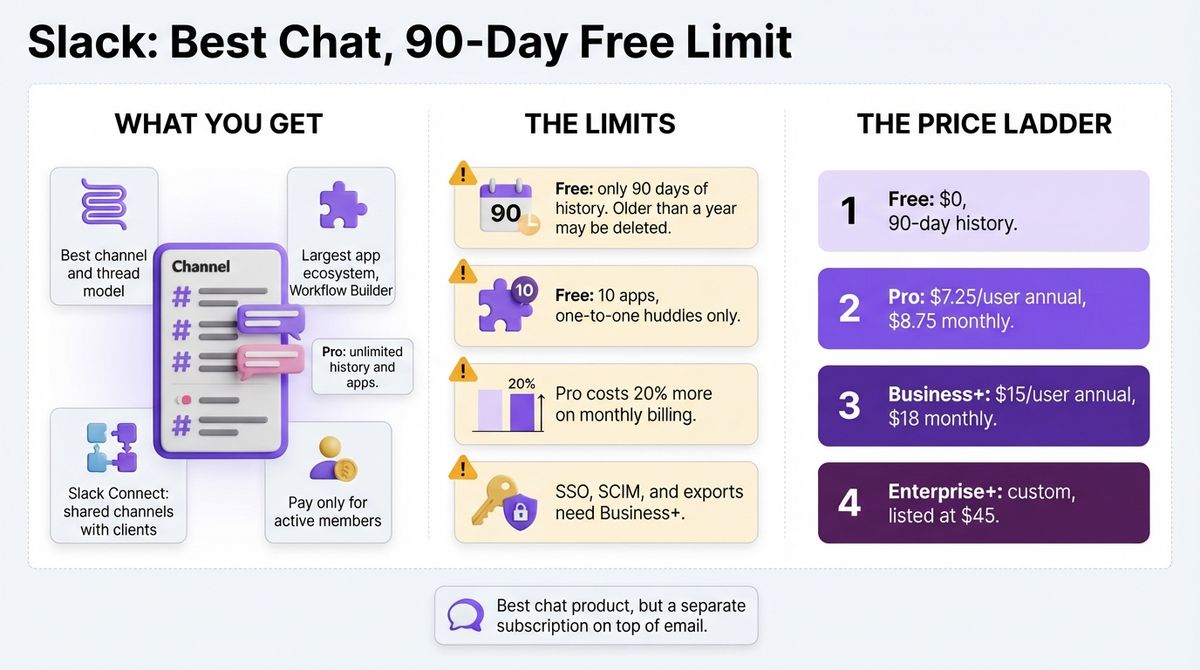
- Free plan: Yes, with 90 days of searchable message and file history, 10 app integrations, and one-to-one huddles
- Starting price: $8.75/user/month, or $7.25/user/month billed annually (Pro)
- Best plan for most users: Pro
- Platforms: Web, Windows, macOS, Linux, iOS, Android
- Affiliate program: Yes, per a third-party listing: about $4 per first purchase through CJ with a 30-day cookie (confirm before you rely on it)
Slack is the best-known team chat tool and is owned by Salesforce. It offers channels, threads, huddles, Workflow Builder, and a large app ecosystem. It sells Free, Pro, Business+, and Enterprise+ plans, and it bills only for active members.
What Slack does best
Slack has the most mature channel-and-thread model and the broadest set of app integrations. Pro removes the free limits: unlimited message history and integrations, group huddles, Workflow Builder, guest access, and 24/7 support, for $7.25 per user a month billed annually.
Fair billing means you pay only for active members, so someone who never logs in does not cost you. Slack Connect lets you share channels with clients and partners, which is stronger than the guest tools in Discord or Google Chat.
Where Slack falls short
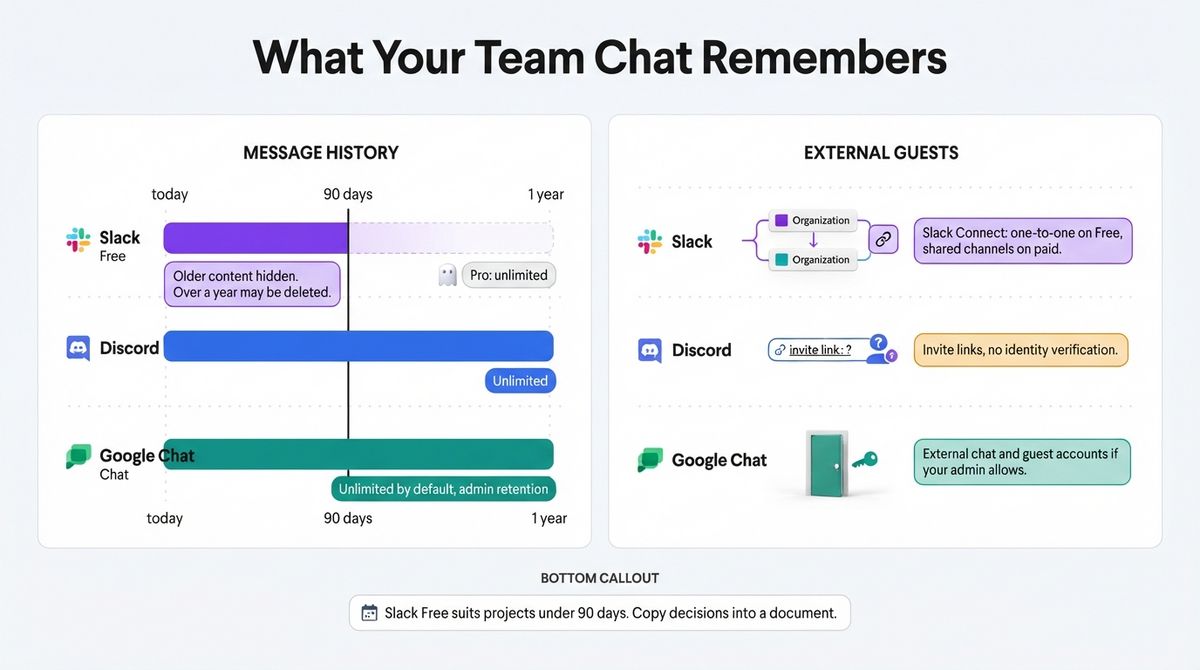
The free plan is the catch. It shows only 90 days of searchable messages and files, allows 10 apps, and limits huddles and Slack Connect to one-to-one. Slack also says free-plan content older than one year may be permanently deleted. A decision made in March is out of view by June.
Price per head adds up. Pro costs $8.75 on monthly billing, 20% more than the annual rate. SAML SSO, SCIM, data exports, and advanced AI start at Business+, which costs $15 annually or $18 monthly. Older reviews quote Business+ at $12.50, which is no longer current. Slack is also a separate subscription on top of your email.
Slack pricing
| Plan | Monthly billing | Annual billing | What you get |
|---|---|---|---|
| Free | $0 | $0 | 90-day history, 10 apps, one-to-one huddles, Slack Connect one-to-one only |
| Pro | $8.75/user/month | $7.25/user/month | Unlimited history and apps, group huddles, Workflow Builder, guest access, 24/7 support, basic AI |
| Business+ | $18/user/month | $15/user/month | SAML SSO, SCIM, data exports, admin controls, advanced AI, four-hour first response |
| Enterprise+ | Custom | Listed at $45/user/month | Large organizations |
Slack: Pros and Cons
Pros:
- The best channel and thread model of the three.
- The largest app ecosystem.
- Slack Connect for client channels.
- Fair billing charges only for active members.
Cons:
- The free plan hides history after 90 days.
- Monthly billing costs 20% more.
- SSO needs Business+ at $15 per user.
- A separate subscription on top of email.
Rating: 4.4 / 5, the best team chat for most small teams.
Discord Review: Free and Fast, But Built for Communities
- Free plan: Yes, with unlimited messaging, no message-history limit, and 10 MB uploads
- Starting price: $0 (Nitro is $2.99 or $9.99 a month, for personal perks)
- Best plan for most users: Free
- Platforms: Web, Windows, macOS, Linux, iOS, Android
- Affiliate program: Unconfirmed, no public affiliate program found
Discord is a voice, video, and text platform that began with gaming and now hosts creator and community servers. It has no per-seat business plan. Nitro and Server Boosts are personal and community upgrades, not business features. In 2026 it rolled out age verification and filed confidentially for a US IPO.
What Discord does best
Discord is the best free option for voice and community. It has no message-history limit, persistent drop-in voice channels, a granular role-based permission system, and free bots. End-to-end encryption for voice and video arrived in March 2026.
It scales to large groups. Servers can hold up to 25 million members, so it suits creator communities and customer groups. For an informal team that talks by voice all day, the drop-in channels feel more natural than scheduled meetings. If your team needs standard phone calling alongside internal chat, explore top business voip phone systems to complete your communication stack.
Where Discord falls short
Discord has no business plan. There is no SSO or SAML, no enterprise agreement, and no volume licensing. Reviewers report no documented SOC 2 or ISO certification and note that text messages are not end-to-end encrypted. Guests join through invite links without identity verification. Because Discord lacks native single sign-on, account managers should review popular authenticator apps for team security to protect login credentials.
Nitro does not fix this, because it adds personal perks such as bigger uploads and animated avatars, not business controls. The age-verification rollout and a 2025 vendor breach that exposed some ID photos made the platform contested. Free uploads are capped at 10 MB, and Discord no longer shows Nitro prices on its Nitro page.

Discord pricing
| Item | Price | Notes |
|---|---|---|
| Free | $0 | Unlimited messaging, no history limit, 10 MB uploads |
| Nitro Basic | $2.99/month or $29.99/year | Personal perks, 50 MB uploads |
| Nitro | $9.99/month or $99.99/year | 500 MB uploads, HD streaming, 2 Server Boosts |
| Server Boost | $4.99/boost/month | Higher upload limits and audio quality for a server |
| Business plan | None | No per-seat plan or enterprise agreement |
Discord: Pros and Cons
Pros:
- Free with no message-history limit.
- Persistent voice channels with roles and permissions.
- End-to-end encrypted voice and video since March 2026.
- Free bots.
Cons:
- No business plan, SSO, or documented compliance certifications.
- Text messages are not end-to-end encrypted.
- A contested age-verification rollout and a 2025 vendor breach.
- 10 MB uploads on the free plan.
Rating: 3.3 / 5, great for communities, a poor fit for business teams.
Google Chat Review: Free Chat for Teams Already on Google
- Free plan: Yes, with a personal Google account: one-to-one messages, group chats, and Spaces
- Starting price: $8.40/user/month, or $7/user/month billed annually (Google Workspace Business Starter, which includes Chat)
- Best plan for most users: Free for tiny teams; Business Starter for business use
- Platforms: Web, iOS, Android, and a Gmail sidebar
- Affiliate program: Yes, the Google Workspace Affiliate Program through CJ Affiliate, with a cash payout per referred user that varies by edition and a 30-day cookie
Google Chat is Google’s team chat inside Gmail and its own apps. It offers direct messages, group chats, and Spaces for projects and teams, with Meet calls. It is free with a personal Google account, and every Google Workspace plan includes it with admin controls.
What Google Chat does best
If you already use Google, Chat costs nothing extra. It sits inside Gmail, links to Drive files and Docs, and starts Meet calls from a conversation. Business Starter at $7 per user a month billed annually also includes Gmail on your own domain, 30 GB of pooled storage per user, and Meet for 100 people. If you are setting up Workspace from scratch, compare business email hosting for small teams to ensure the whole suite fits your stack.
Admin controls come with Workspace. Message history is unlimited by default and admins can set retention. External chat can be limited to approved domains, and guest accounts let invited people join without a Google account. Gemini in Chat starts at Business Standard, and Business Plus adds Vault for retention and eDiscovery.
Where Google Chat falls short
Chat is less polished than Slack. Threading in Spaces is simpler, third-party integrations are fewer and centered on Google, and external collaboration is less developed than Slack Connect. Teams that depend on many outside apps feel the gap.
The free personal version has no business admin suite, so a working team ends up on Workspace. That costs $7 to $8.40 per user a month whether or not you want the email. Starter caps Meet at 100 participants, and Business plans cap at 300 users.

Google Chat pricing
| Plan | Annual billing | Monthly billing | What you get |
|---|---|---|---|
| Personal Google account | $0 | $0 | One-to-one chat, group chats, Spaces; no business admin suite |
| Business Starter | $7/user/month | $8.40/user/month | Chat with admin controls, Gmail on your domain, 30 GB pooled storage per user, Meet for 100 |
| Business Standard | $14/user/month | $16.80/user/month | 2 TB pooled storage per user, Meet for 150 with recording, Gemini in Chat |
| Business Plus | $22/user/month | $26.40/user/month | 5 TB pooled storage per user, Meet for 500, Google Vault retention and eDiscovery |
Google Chat: Pros and Cons
Pros:
- Free with a personal Google account.
- Included in every Workspace plan, with email, Meet, and Drive.
- Unlimited history by default, with admin retention controls.
- External chat and guest accounts under admin control.
Cons:
- Simpler threading and fewer third-party integrations than Slack.
- The free version has no business admin suite.
- Workspace costs $7 to $8.40 per user a month.
- Business plans cap at 300 users.
Rating: 4.3 / 5, the best value for teams already on Google.
Head-to-Head Comparison Table
| Feature | Slack | Discord | Google Chat |
|---|---|---|---|
| Free plan | Yes, 90-day history, 10 apps, one-to-one huddles | Yes, no history limit, 10 MB uploads | Free with a personal Google account |
| Paid entry price | Pro, $7.25/user annual ($8.75 monthly) | No business plan; Nitro is a personal perk | Workspace Business Starter, $7/user annual ($8.40 monthly) |
| Message history | 90 days on Free; unlimited on paid | Unlimited | Unlimited by default; admin retention |
| External guests | Slack Connect; free is one-to-one only | Invite links, no identity verification | External chat and guest accounts if admin allows |
| SSO and compliance | SAML SSO and SCIM on Business+ | None documented | Workspace admin console; Vault on Business Plus |
| Calls | Huddles, group huddles on paid | Voice channels, screenshare | Google Meet, 100 participants on Starter |
| Integrations | Largest ecosystem, Workflow Builder | Free bots | Google-centered, fewer third-party apps |
| Best for | Companies and client work | Communities and informal groups | Teams already on Google |
| Rating | 4.4 / 5 | 3.3 / 5 | 4.3 / 5 |
Which Should You Choose?
The right tool depends on the tools you already pay for and who you talk to.
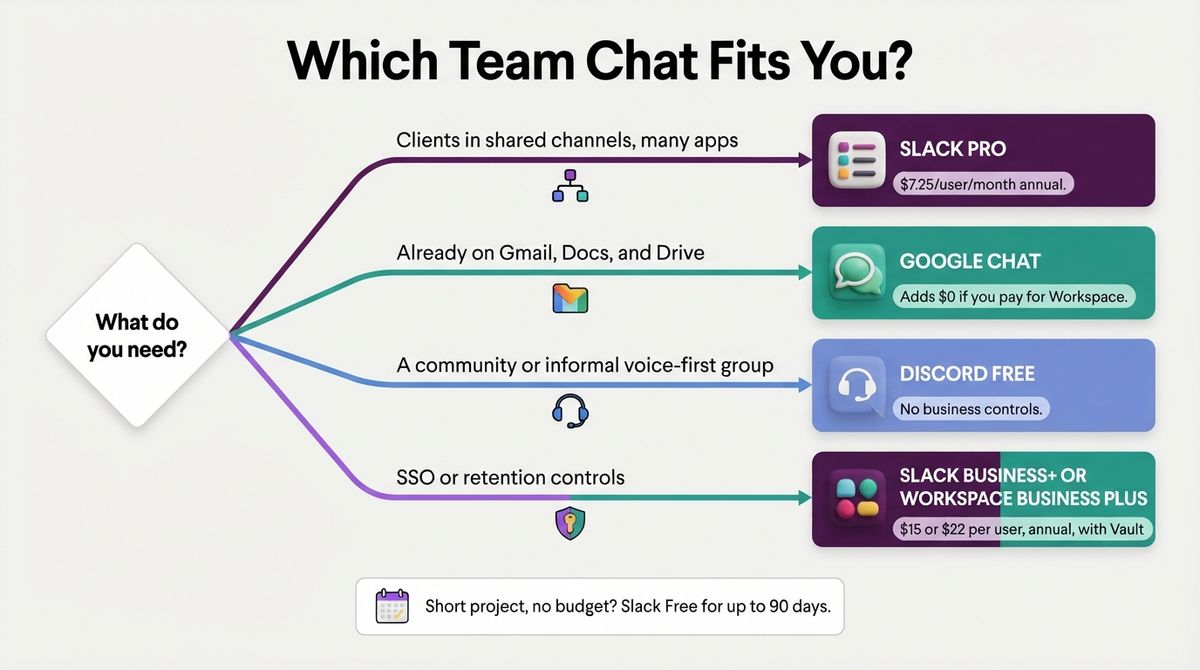
- Choose Slack if you work with clients in shared channels, rely on many apps, and want the best chat experience.
- Choose Google Chat if your team already uses Gmail, Docs, and Drive, because Chat adds no cost.
- Choose Discord if you run a community or an informal voice-first group, and you accept that it has no business controls.
Match chat to the tools you already pay for
If you already pay for Google Workspace, Chat is effectively free and Slack is an extra $7.25 per user a month. If you do not use Google, Slack Pro is the cleaner choice. Slack Free works for projects shorter than 90 days, provided you copy decisions into a document before they disappear from view. Choosing your communication tool is just one step in building a complete small business software stack guide for your operations.
What each costs over three years
Take a team of five. Slack Pro costs $1,305 over 36 months on annual billing, or $1,575 if you pay monthly. Slack Business+ costs $2,700 on annual billing. Google Workspace Business Starter costs $1,260 on annual billing, or $1,512 monthly, and includes email, storage, and Meet.
Discord costs $0 in subscriptions, but adds no business controls. If you already pay for Workspace, Google Chat adds $0 to that bill, while Slack adds $1,305. Slack bills only active members, which can lower its total.

Our Recommendations
- Freelance team already on Google Workspace: Use Google Chat and create one Space per client. It adds no cost and keeps files in Drive.
- Small agency or remote team with clients and many apps: Use Slack Pro on annual billing, and use Slack Connect for client channels.
- Short project with no budget: Use Slack Free for up to 90 days, and copy decisions into a shared document.
- Creator with an audience community: Use Discord for the community, and keep internal team chat on Slack or Google Chat.
- Team that needs SSO or retention controls: Use Slack Business+ at $15 per user annually, or Google Workspace Business Plus at $22 with Vault.
WordPress note: Slack and Discord accept incoming webhooks, and Google Chat supports them in Workspace Spaces. Many form, WooCommerce, and uptime plugins can post to a channel, so orders and failures reach the team in seconds. Send alerts to a dedicated channel so conversation stays readable.
Final Verdict
Slack is the best team chat for most small teams. It has the strongest channels, the broadest integrations, and client-ready shared channels, and Pro costs $7.25 per user a month on annual billing. Google Chat is the better value if you already pay for Google Workspace, since it adds no cost. Discord is free and fast, but it is built for communities and has no business plan.
In the Slack vs Discord vs Google Chat decision, pick Slack for the best chat, Google Chat if you already live in Google, and Discord only for communities.
- Slack: 4.4 / 5, best team chat for most small teams.
- Google Chat: 4.3 / 5, best value for teams already on Google.
- Discord: 3.3 / 5, best for communities, not business teams.

Frequently Asked Questions
What is the best team chat software for small teams?
Slack is the best team chat for most small teams that need client channels and integrations, at $7.25 per user a month billed annually. Google Chat is the better value if you already pay for Google Workspace. Discord is free but built for communities and has no business plan, SSO, or admin suite.
What are the limits of Slack’s free plan?
Slack Free shows only 90 days of searchable message and file history, allows 10 app integrations, and limits huddles and Slack Connect to one-to-one. Slack says free-plan content older than one year may be permanently deleted. Pro removes the history limit at $7.25 per user a month billed annually, or $8.75 monthly.
Is Discord good for business teams?
Not usually. Discord is free, has no message-history limit, and offers strong voice channels, but it has no business plan, SSO, or volume licensing. Reviewers report no documented compliance certifications, and text messages are not end-to-end encrypted. It suits communities and informal groups better than client work.
Is Google Chat free?
Yes, with a personal Google account. You get direct messages, group chats, and Spaces at no cost. Business use normally comes through Google Workspace, where Chat is included in every plan. Business Starter costs $7 per user a month billed annually or $8.40 monthly and adds admin controls, your own email domain, and Meet.
How much does Slack cost per user?
Slack Pro costs $7.25 per user a month billed annually or $8.75 billed monthly. Business+ costs $15 annually or $18 monthly and adds SAML SSO, SCIM, and data exports. Slack bills only active members. A five-person team on Pro pays $1,305 over three years on annual billing.
Can I chat with clients outside my team?
Yes, on all three, with different rules. Slack Connect shares channels with other organizations on paid plans, and free plans allow one-to-one only. Google Chat allows external chat and guest accounts if your admin permits it. Discord uses invite links with no identity verification, which is weaker for client work.
What happened with Discord’s age verification?
Discord announced age assurance checks in 2026. Starting in the second half of the year, users must verify they are adults, by a face scan or ID, to reach age-restricted servers and sensitive content. Discord says not everyone will need to verify. A 2025 vendor breach exposed some ID photos, which made the policy contested.
Can I send WordPress alerts to team chat?
Yes. Slack and Discord accept incoming webhooks, and Google Chat supports them in Workspace Spaces. Many form, WooCommerce, and uptime plugins can post to a channel, so orders and failures reach the team in seconds. Send alerts to a dedicated channel so conversation stays readable.