A WordPress developer lives in an editor, switching between PHP, JavaScript, CSS, and templates all day. The wrong choice costs time in slow startups, weak PHP intelligence, or missing debugging, and the three leading options differ sharply. This guide compares VS Code vs Sublime Text vs Zed for plugin, theme, and client-site work.
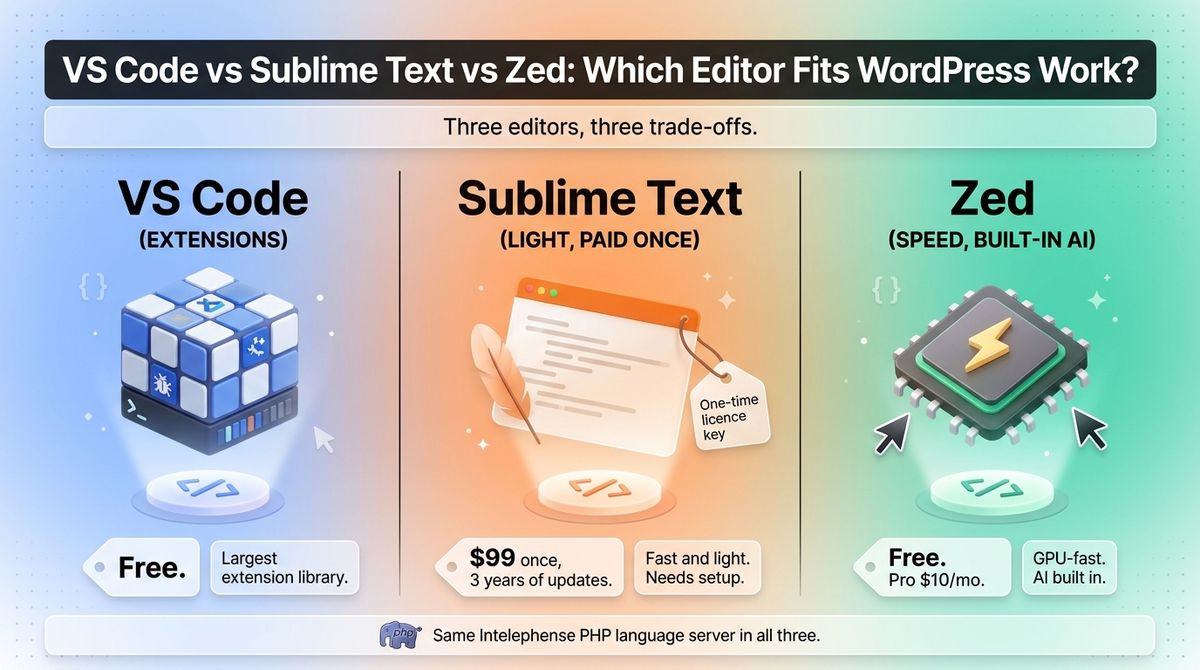
VS Code is Microsoft’s free, extension-heavy editor. Sublime Text is a fast, paid editor with a one-time license. Zed is a newer open-source editor written in Rust with AI built in. All three can run the same Intelephense PHP language server, so the differences come down to speed, tooling, and cost.
I tested VS Code vs Sublime Text vs Zed for 30 days, working on the same WordPress plugin in each: PHP editing with Intelephense, Git commits, SSH and SFTP deploys, and a project with thousands of files open at once. Here is the honest comparison. Two catches to know first: Sublime Text’s stable build dates from May 2025, and Zed’s hosted AI models now require a paid plan.
Table of Contents
How We Tested
I scored each editor on five criteria, using the same plugin project throughout.
- PHP and WordPress intelligence. I checked completion, go to definition, and hover help for WordPress hooks and functions.
- Debugging and built-in tooling. I looked at Xdebug stepping, Git, and the integrated terminal.
- Speed and memory. I compared startup time, search across files, and memory use on a large project.
- Remote work. I tested SSH, SFTP, and container workflows for editing files on a server.
- Cost and AI. I priced each editor over 36 months, including AI add-ons.
As a WordPress developer, I weighted hooks and filters completion and server editing more heavily than general-purpose features. Choosing an editor is just one part of building essential tools for WordPress developers.
VS Code Review: The Most Complete Editor for WordPress Work
- Free plan: Free for private and commercial use; Copilot Free adds up to 2,000 completions a month
- Starting price: $0; paid Copilot plans are billed separately
- Best plan for most users: Free
- Platforms: Windows, macOS, Linux, Web
- Affiliate program: None
Visual Studio Code is Microsoft’s free code editor, built on Electron. Microsoft’s build is based on the open-source Code – OSS project but ships under a separate product license. Releases now arrive weekly: version 1.143 shipped on October 22, 2026, and made the Copilot harness the default for new AI sessions.
What VS Code does best
VS Code has the largest extension library of the three. PHP Intelephense, PHP Debug for Xdebug, PHPUnit, and Composer extensions cover most plugin and theme work. A single install gives you Git, a terminal, and a debugger in one window.
Debugging and remote work are strongest here. The PHP Debug extension steps through Xdebug sessions inside the editor, and the editor connects to servers and containers over SSH. For a developer who edits on a staging server, that removes a lot of file shuffling. Many developers connect their code editors directly to local WordPress development environment tools.
Where VS Code falls short
VS Code uses more memory than Zed or Sublime Text because it is built on Electron. Startup can slow once many extensions load. Weekly releases keep it current, but they also change the interface, and AI features often.
AI is pushed hard. Microsoft began retiring IntelliCode’s free local completions in late 2025, so Copilot Free is the built-in option, capped at 2,000 completions a month with limited chat and agent use. Paid Copilot plans are billed separately and now meter usage in AI credits. Sources disagree on current prices, so check GitHub’s plans page. Developers comparing built-in AI options can also look into top AI code assistant tools.
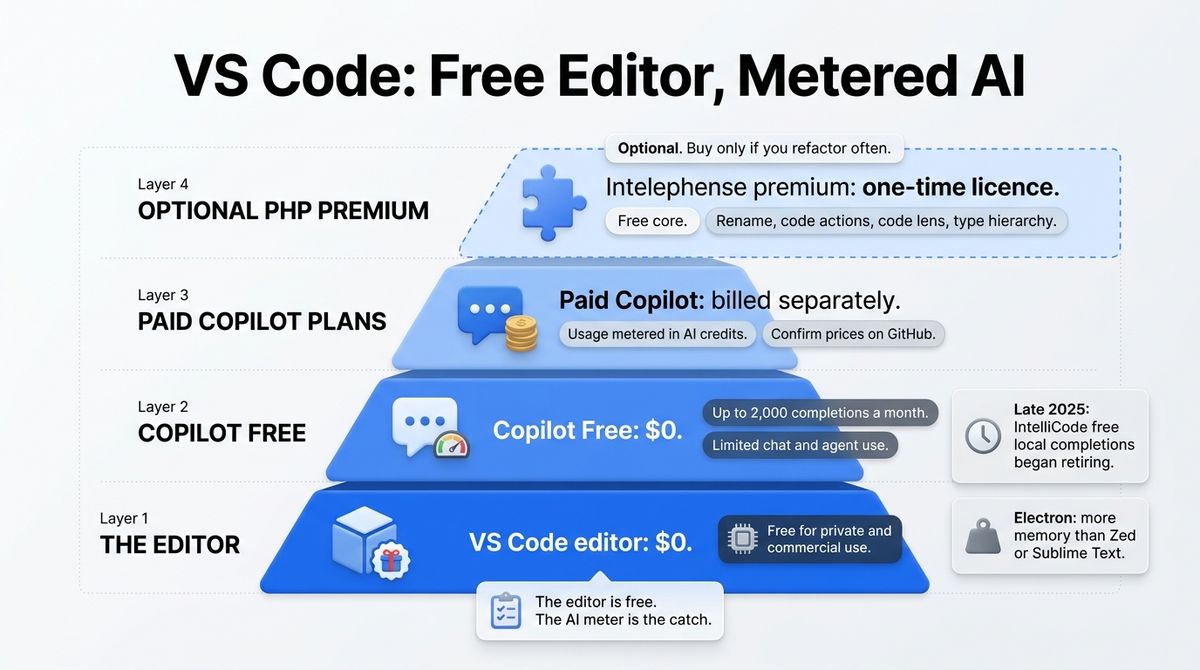
VS Code pricing
| Item | Cost | Notes |
|---|---|---|
| VS Code editor | $0 | Free for private and commercial use |
| Copilot Free | $0 | Up to 2,000 completions a month, limited chat and agent use |
| Paid Copilot plans | Billed separately | Usage metered in GitHub AI Credits; confirm prices on GitHub |
| PHP Intelephense premium | One-time licence | Free core; premium adds rename, code actions, code lens, type hierarchy, and find all implementations |
VS Code: Pros and Cons
Pros:
- Largest extension library of the three
- Xdebug debugging inside the editor
- Remote development over SSH and in containers
- Free for private and commercial use
- Weekly releases keep it current
Cons:
- Higher memory use because of Electron
- Startup slows as extensions pile up
- Free Copilot is capped at 2,000 completions a month
- Interface and AI features change often
Rating: 4.6 / 5, the most complete editor for WordPress work.
Sublime Text Review: Fast, Light, and Paid Once
- Free plan: Unlimited free evaluation; a license is required for continued use
- Starting price: $99 one-time personal license with 3 years of updates
- Best plan for most users: Personal license
- Platforms: Windows, macOS, Linux
- Affiliate program: None confirmed
Sublime Text is a paid code editor with a custom native interface, first released in 2008. Sublime Text 4 launched in 2021. Sublime HQ also sells Sublime Merge, a separate Git client.
What Sublime Text does best
Sublime Text is the lightest and quickest to open of the three. It uses a custom native interface, so it stays responsive on older laptops and large files. Multi-cursor editing and Goto Anything remain among the best of any editor.
With the LSP package and LSP-intelephense, it gets the same PHP language server as VS Code. Packages add SFTP deploys, linters, and Emmet. The $99 license includes three years of updates, and you keep every build in that window forever with no subscription.
Where Sublime Text falls short
Sublime Text needs setup to match an IDE. LSP, PHP intelligence, Git, and debugging come from packages you install and configure. AI assistance also depends on third-party packages.
The stable build is old: Build 4200 shipped on May 21, 2025, and development builds have continued since. The personal license covers three years of updates, then an upgrade is needed for later builds. Business licenses are per seat per year, starting at $65 a seat.
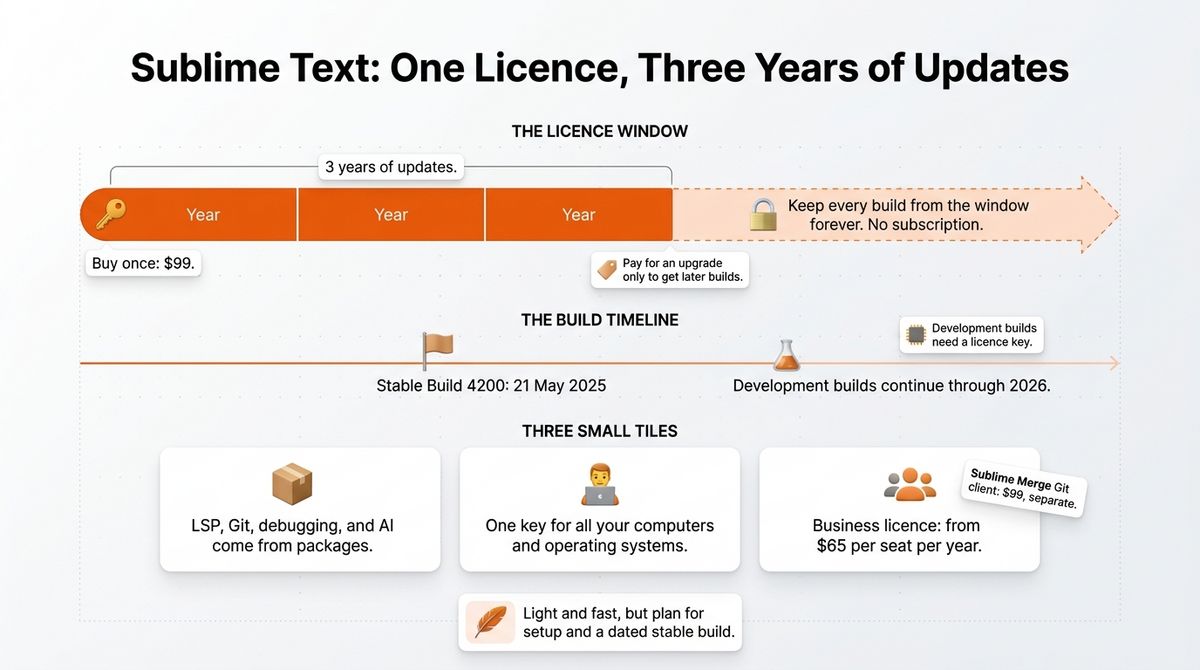
Sublime Text pricing
| Item | Price | Notes |
|---|---|---|
| Evaluation | Free | Full download; license required for continued use |
| Personal license | $99 once | 3 years of updates; one key for all your computers and operating systems |
| Business license | From $65 per seat per year | Annual per-seat pricing, tiered by volume |
| Sublime Merge | $99 | Separate Git client; bundle available |
Sublime Text: Pros and Cons
Pros:
- Fast and light, even on older machines
- One-time $99 license with no subscription
- One key covers every computer and operating system
- Same Intelephense language server through LSP
Cons:
- Needs package setup to match an IDE
- No built-in debugger or AI
- Stable build is from May 2025
- Updates stop after 3 years unless you upgrade
Rating: 4.0 / 5, fast and light, but it needs setup and has an older stable build.
Zed Review: The Fastest-Feeling Editor, With AI Built In
- Free plan: Yes; Personal plan with 2,000 accepted edit predictions a month and unlimited bring-your-own-key AI
- Starting price: Free; Pro at $10 a month
- Best plan for most users: Personal (free)
- Platforms: macOS, Linux, Windows
- Affiliate program: None confirmed
Zed is an open-source code editor written in Rust. Zed 1.0 shipped in April 2026, and stable release 1.24.2 followed on October 14, 2026. It runs on macOS, Linux, and Windows.
What Zed does best
Zed is the fastest-feeling editor here. It is written in Rust and renders on the GPU, so large projects open quickly and typing stays responsive. The editor is free and open source, with no sign-in needed.
Live collaboration and remote development are built in, which suits pair work and server editing. The Personal plan includes 2,000 accepted edit predictions a month and unlimited AI with your own API keys or external agents. Students get Pro free for a year.
Where Zed falls short
The extension library is smaller than VS Code’s, and PHP support depends on extensions such as the PHP extension and DEVSENSE’s PHP Tools. Windows support is newer than macOS and Linux, and some reports say those two platforms are more polished. I could not confirm Xdebug step debugging for PHP, so check it before you commit.
AI features are built in, so you see them even if you do not want them. Zed-hosted models need Pro at $10 a month, which includes $5 of token credit and bills beyond that at API list price plus 10%. Business is $30 per seat per month.
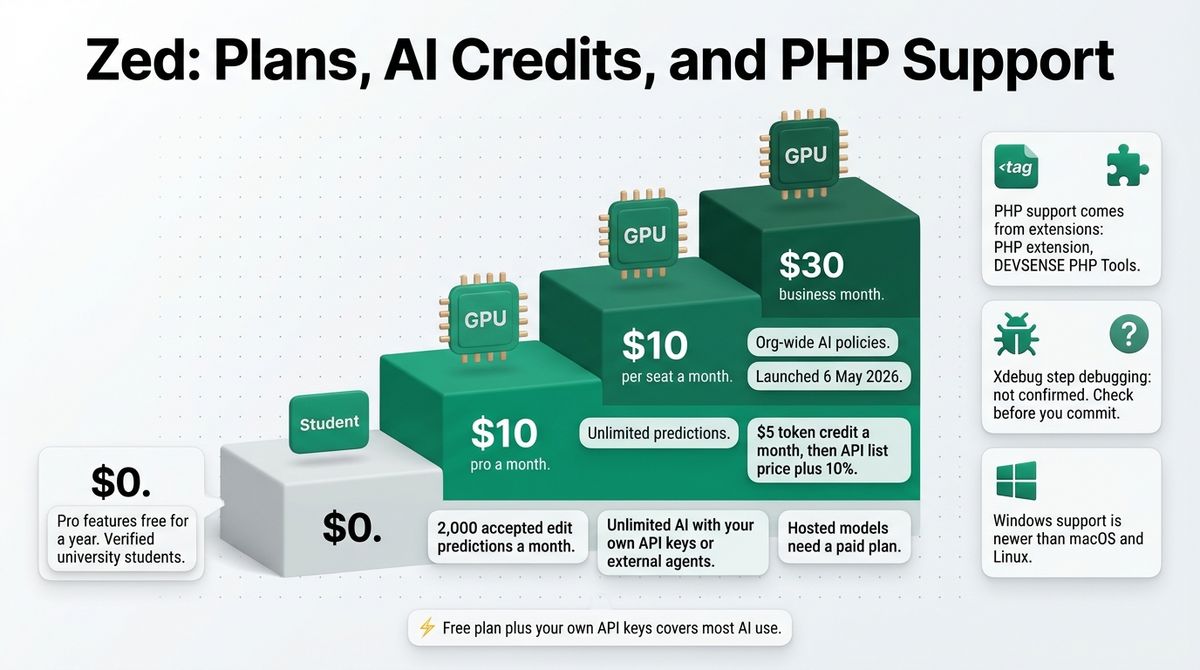
Zed pricing
| Plan | Price | Edit predictions | Hosted AI | Notes |
|---|---|---|---|---|
| Personal | $0 | 2,000 accepted a month | Bring your own keys or external agents; hosted models need a paid plan | Full editor, live collaboration, all three platforms |
| Pro | $10 a month | Unlimited | $5 token credit a month, then API list price plus 10% | Hosted models included |
| Business | $30 per seat a month | Unlimited | Org-wide AI policies | Launched May 6, 2026 |
| Student | $0 | Unlimited | Pro features free for a year | Verified university students |
Zed: Pros and Cons
Pros:
- Fastest-feeling of the three, written in Rust
- Free and open source, with no sign-in for the editor
- Live collaboration and remote development built in
- Free AI with your own API keys
Cons:
- Smaller extension library than VS Code
- PHP support depends on extensions
- Windows support is newer than macOS and Linux
- Hosted AI models need a paid plan
Rating: 4.2 / 5, the fastest-feeling editor, with a smaller PHP ecosystem.
Head-to-Head Comparison Table
| Feature | VS Code | Sublime Text | Zed |
|---|---|---|---|
| Price | Free | $99 once, with 3 years of updates | Free; Pro at $10 a month |
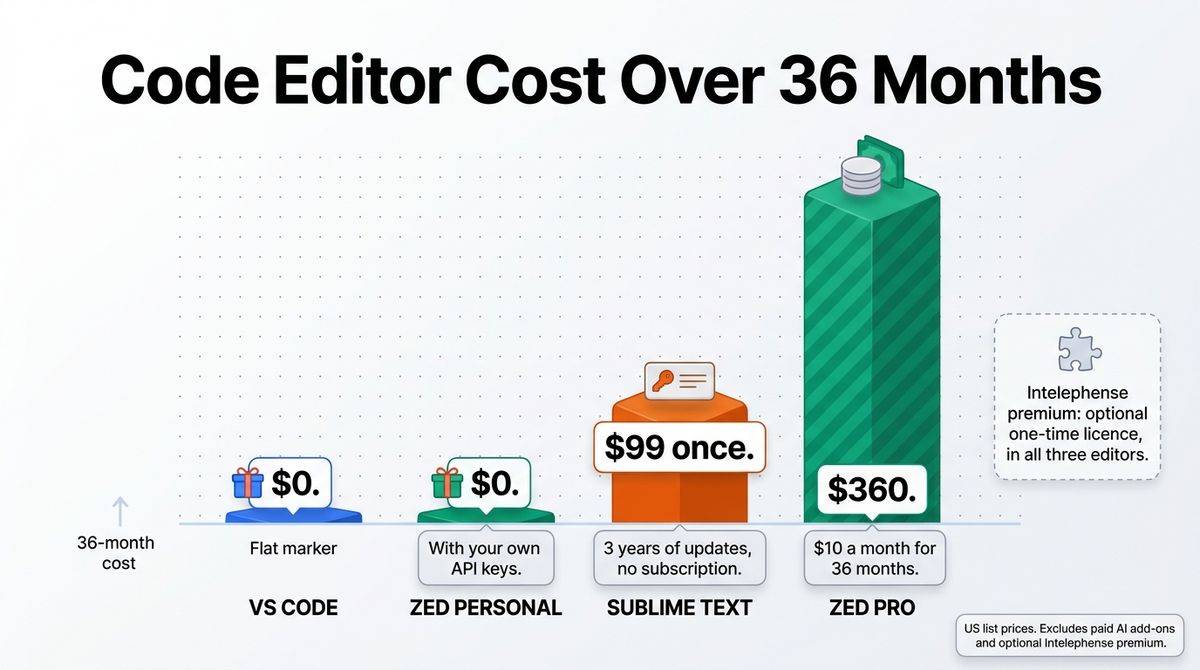
| 36-month cost | $0 | $99 | $0, or $360 on Pro |
| Open source | Code – OSS core; Microsoft build has a separate license | No | Yes |
| Platforms | Windows, macOS, Linux, Web | Windows, macOS, Linux | macOS, Linux, Windows |
| Built on | Electron | Custom native interface | Rust, GPU-rendered |
| Extension ecosystem | Largest | Packages through Package Control | Smaller and growing |
| PHP intelligence | Intelephense, PHP Tools | LSP-intelephense, Phpactor | PHP extension with Intelephense, Phpactor, or PHP Tools |
| Xdebug debugging | PHP Debug extension in the editor | Through packages | Not confirmed |
| Server editing | SSH and container development | SFTP through packages | Built-in remote development |
| Built-in AI | GitHub Copilot; Free plan is capped | Third-party packages only | Built in; free with your own keys |
| Release cadence | Weekly; 1.143 on October 22, 2026 | Stable 4200 (May 2025); development builds continue | Frequent; 1.24.2 on October 14, 2026 |
| Affiliate program | None | None confirmed | None confirmed |
| Best for | Full-featured WordPress development | Fast edits and one-time pricing | Speed and built-in collaboration |
| Our rating | 4.6 / 5 | 4.0 / 5 | 4.2 / 5 |
Which Should You Choose?
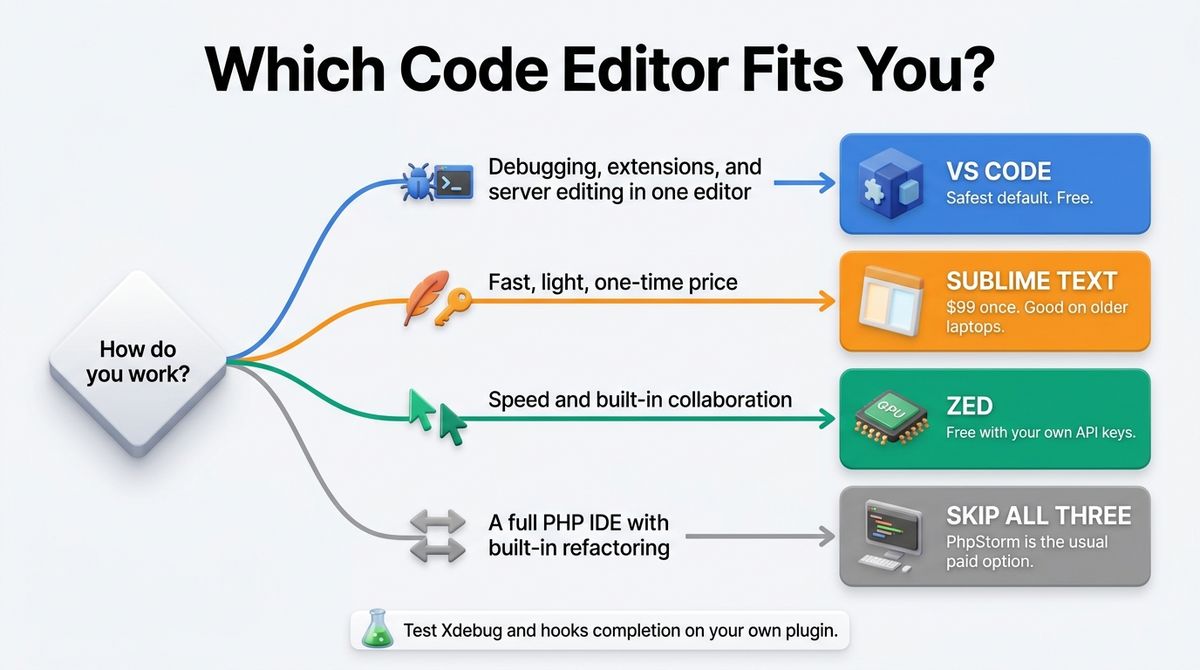
Choose VS Code if you want debugging, extensions, and server editing in one free editor. It is the safest default for plugin and theme work. After setting up your editor, ensure your site is protected with reliable WordPress security plugin solutions.
Choose Sublime Text if you want a fast, light editor and prefer a one-time purchase to a subscription. It suits quick edits and older machines.
Choose Zed if speed and built-in collaboration matter most, and you are happy to rely on extensions for PHP. The free plan with your own API keys covers AI.
Skip all three if you want a full PHP IDE with built-in refactoring. PhpStorm is the usual paid option.
Over three years, VS Code and Zed Personal cost $0, Sublime Text costs $99 once, and Zed Pro would cost $360. Intelephense’s one-time premium licence is optional in all three editors, so budget for it only if you refactor often.
Our Recommendations
- Solo WordPress developer building plugins and themes: VS Code with Intelephense and PHP Debug.
- Freelancer editing client files over SFTP or SSH: Sublime Text with an SFTP package, or VS Code with SSH development.
- Developer on an older laptop: Sublime Text, for the lightest memory use.
- Developer who wants built-in AI with their own API keys: Zed on the free Personal plan.
- Agency standardizing on one editor: VS Code, since it is free and has the largest extension library.
Final Verdict
For most readers comparing VS Code vs Sublime Text vs Zed, VS Code is the winner. It is free, has the largest extension library, and handles Xdebug and remote work inside the editor. Zed is the quickest with AI built in, and Sublime Text is the lightest with a one-time price.
- VS Code: 4.6 / 5, the most complete editor for WordPress work.
- Zed: 4.2 / 5, the fastest-feeling editor, with a smaller PHP ecosystem.
- Sublime Text: 4.0 / 5, fast and light, but it needs setup and has an older stable build.
Frequently Asked Questions
What is the best code editor for WordPress development?
VS Code is the best code editor for most WordPress developers because it has the largest extension library, Xdebug debugging through PHP Debug, and Intelephense for PHP code intelligence. Sublime Text is faster and lighter, and Zed feels quickest with built-in AI. All three can use the same Intelephense language server.
Is VS Code free?
Yes. The VS Code editor is free for private and commercial use. GitHub Copilot Free adds up to 2,000 completions a month and limited chat and agent use. Paid Copilot plans and third-party AI services are billed separately. PHP Intelephense’s core features are free, with a one-time paid licence for premium features.
How much does Sublime Text cost?
Sublime Text costs $99 as a one-time personal license, which includes three years of updates. After that, you keep every build released in that window forever, and you pay for an upgrade only to get later builds. Business licenses are per seat per year, from about $65. You can evaluate it for free.
Is Zed free?
Yes. The Zed editor is free and open source, and the Personal plan includes 2,000 accepted edit predictions a month plus unlimited AI with your own API keys or external agents. Zed Pro costs $10 a month and adds unlimited predictions and $5 of hosted token credit. Students get Pro free for a year.
Does Zed support PHP and WordPress?
Yes, through extensions. Zed’s PHP extension supports language servers such as Intelephense and Phpactor, and DEVSENSE publishes a PHP Tools extension for Zed with optional premium features. WordPress hooks and functions need WordPress stubs added to the language server, as in any editor. Check Xdebug debugging support before you commit.
Is Sublime Text still maintained?
Yes. Sublime Text 4 launched in 2021, and the stable build is 4200 from May 21, 2025. Development builds have continued through 2026, with Build 4207 listed in August. Development builds still require a licence key. Sublime HQ also maintains Sublime Merge, its separate Git client.
Which code editor is fastest?
Zed and Sublime Text feel faster than VS Code. Zed is written in Rust and renders on the GPU, and Sublime Text uses a custom native interface. VS Code is built on Electron and uses more memory, especially with many extensions. Trim extensions you do not use to narrow the gap.
Do I need Intelephense premium?
No. Intelephense’s free features include completion, go to definition, diagnostics, and hover documentation, which cover most solo plugin work. Premium adds rename, code actions, code lens, type hierarchy, and find all implementations through a one-time licence. It works in VS Code, Sublime Text, and Zed, so buy it only if you refactor often.