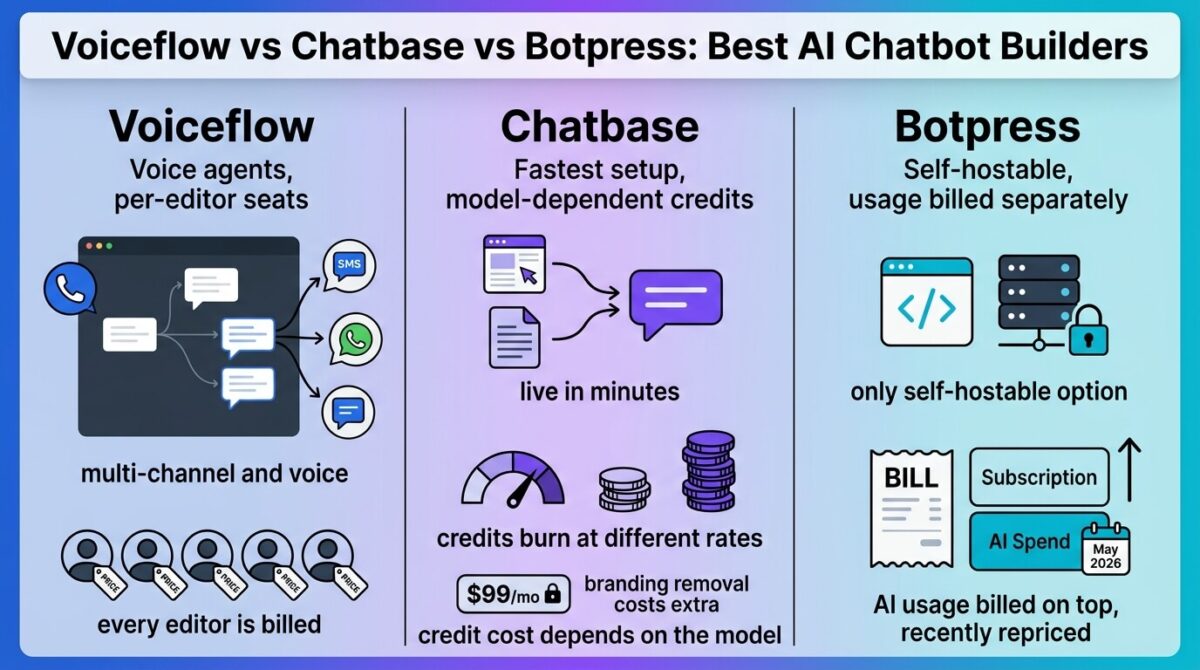
Voiceflow vs Chatbase vs Botpress all let someone build an AI chatbot without writing code, much like configuring automated workflows in Zapier Vs Make Vs N8n: Best No-Code Automation Tools, but each one bills for that chatbot in a way that can surprise a team once it scales past a solo builder’s first prototype. Voiceflow charges per editor seat. Chatbase meters by message credits that burn at different rates depending on which AI model answers. Botpress bills a base subscription plus separate usage costs for the AI model itself.
One of these three also repriced significantly in the middle of 2026, which means some of what’s still circulating online about it no longer applies.
I tested Voiceflow vs Chatbase vs Botpress for 30 days, building the same customer support bot in all three and tracking where the advertised price stopped covering what a small team would need to pay in practice. Here is the honest comparison, including a May 2026 repricing that raised one platform’s team-tier cost by more than 50%.
Table of Contents
How We Tested
Five criteria shaped the testing:
- Pricing model per seat, per message credit, or base plan plus separate usage billing
- Team cost at scale: what a 5-10 person team would pay once everyone who needs access is counted
- Hidden or separate costs: branding removal, AI model usage, and other charges not in the headline price
- Self-hosting option: whether running the platform without an ongoing subscription is realistically available
- Setup speed and channel support: how quickly a working bot went live, and across how many channels
Voiceflow Review: Powerful Multi-Channel Agents, Priced Per Editor Seat
Free plan: Yes, Sandbox plan, 2 agents, limited monthly credits
Starting price: $60/month (Pro, per editor seat)
Best plan for most users: Pro, for a solo builder; additional editors add $50-54/month each
Platforms: Web chat, phone, SMS, WhatsApp
Affiliate program: No, Voiceflow runs no consumer referral program
Voiceflow builds agents that work across web chat, phone, SMS, and WhatsApp from one visual flow builder, offering advanced media capabilities that complement tools explored in Pika Vs HeyGen Vs Synthesia: Best AI Video Generators with voice and telephony support more developed than either competitor offers.
What Voiceflow does best
Multi-channel support, especially phone and voice agents, is where Voiceflow pulls ahead: the same agent logic can answer a phone call or a web chat message without separate builds, a capability neither Chatbase nor Botpress matches as directly. Pro’s 10,000 monthly credits and access to all LLM models give a solo builder meaningful room to iterate before hitting a usage ceiling.
The visual flow builder also tested as the most mature of the three for complex, branching conversation logic, with templates that speed up building a working first draft.
Where Voiceflow falls short
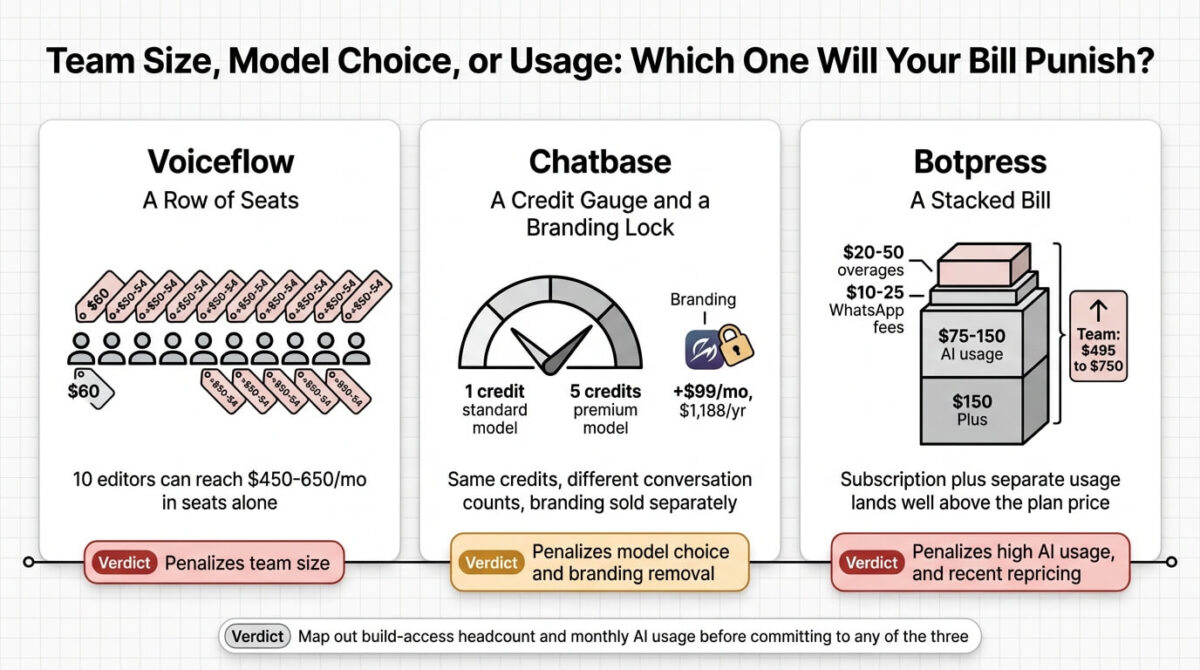
Pricing is per editor seat, not per agent or per team, and every additional person who needs build access costs $50-54/month on top of the base plan, regardless of how often they log in. Independent cost modeling found a 10-editor team could run $450-650/month in seat costs alone, before voice minutes or infrastructure, with one analysis projecting over $15,000/year for a 10-seat Team deployment.
Credits also don’t roll over between months, and enabling auto top-ups or automatic tier upgrades to avoid interruptions can add unplanned charges if usage spikes unexpectedly.
Voiceflow pricing
| Plan | Price | Credits/Month | Notable Feature |
|---|---|---|---|
| Sandbox | $0 | ~100-1,000 | 2 agents, community support |
| Pro | $60/month (per editor) | 10,000 | 2 workspaces, up to 20 agents, all LLM models |
| Business | $150/month (per editor) | 30,000 | Unlimited agents, priority support |
| Enterprise | Custom | Custom | SSO, dedicated support, SLAs |
Voiceflow: Pros and Cons
Pros:
- Strongest voice and phone agent capability of the three tools tested
- Multi-channel support (web, phone, SMS, WhatsApp) from one builder
- Mature visual flow builder for complex conversation logic
- Access to all LLM models included from the Pro tier
Cons:
- Per-editor seat pricing scales poorly for any team beyond a solo builder
- A 10-editor team can run $450-650/month in seat costs before usage
- Credits don’t roll over between billing months
- No startup, nonprofit, or usage-based discount programs published
Rating: 3.9 / 5, the strongest voice and multi-channel capability of the three, with seat-based pricing that scales worse than either competitor for a growing team.
Chatbase Review: Fast to Launch, With a Branding Fee That Isn’t in the Headline Price
Free plan: Yes, 50 message credits/month, agents auto-delete after 14 days inactive
Starting price: $32/month (Hobby, billed annually)
Best plan for most users: Standard, $120/month annual, the tier Chatbase itself labels as most popular
Platforms: Web widget, WhatsApp, Facebook, Instagram
Affiliate program: Yes, Chatbase affiliate program
hatbase focuses on training a chatbot from existing content, a website, documents, or a knowledge base similar to how creators repurpose video libraries using OpusClip Vs Repurpose.Io Vs Vidyo.Ai: Best Content Repurposing Tools and getting it live on a site within minutes rather than building conversation flows manually.
What Chatbase does best
Setup speed is Chatbase’s clearest advantage: pointing it at an existing website or document set and getting a working, trained chatbot live happens faster than building equivalent logic manually in Voiceflow or Botpress. Standard’s helpdesk-style features and Zendesk or Salesforce ticket training at Pro make it a reasonable fit for a support team wanting an AI layer on existing content.
Flat, predictable tier pricing, Free through Pro, is also easier to reason about upfront than Botpress’s usage-stacked model, at least until credit consumption varies by the model in use.
Where Chatbase falls short
Removing Chatbase’s branding costs an additional $99/month, $1,188 a year, a separate add-on not included even at Standard or Pro, which many assume comes bundled into a higher-priced plan. Message credits also don’t spend at a flat rate: a response from a more capable model like Claude Opus can burn 5 credits while a standard model uses 1, meaning the same “4,000 credits” can cover very different numbers of conversations depending on which model is selected.
Tiers also jump in large steps, Free to $32 to $120 to $400, with no fine-grained option in between and no credit rollover, so outgrowing a tier mid-month means either an immediate upgrade or paying auto-recharge fees at $40 per extra 1,000 credits.
Chatbase pricing
| Plan | Price | Credits/Month | Notable Feature |
|---|---|---|---|
| Free | $0 | 50 | 1 agent, auto-deletes after 14 days inactive |
| Hobby | $32/month (annual) | 500-700 | 2 seats, basic integrations |
| Standard | $120/month (annual) | 4,000 | 3 seats, helpdesk features |
| Pro | $400/month (annual) | 15,000 | 5 seats, Zendesk/Salesforce training |
Chatbase: Pros and Cons
Pros:
- Fastest setup of the three for training a bot on existing content
- Helpdesk and ticketing system integration at higher tiers
- Flat, predictable tier pricing compared to usage-stacked alternatives
- 20% discount for annual billing across every tier
Cons:
- Branding removal costs a separate $99/month, not included in any public tier
- Credit cost per message varies by AI model, making usage harder to predict
- Large jumps between tiers with no fine-grained option in between
- Credits don’t roll over, and auto-recharge adds cost beyond the plan price
Rating: 4.1 / 5, the fastest setup of the three, with a branding fee and model-dependent credit cost that complicate an otherwise simple pricing page.
Botpress Review: The Only Self-Hostable Option, Recently Repriced
Free plan: Yes, roughly 25 conversations/month on current pricing
Starting price: $150/month (Plus, billed annually), plus separate AI usage cost
Best plan for most users: Plus, for a small team launching a production bot
Platforms: Web chat, WhatsApp, Slack, Messenger, Telegram, Instagram
Affiliate program: No, Botpress runs no consumer referral program
Botpress restructured its pricing on May 14, 2026, raising its Team tier from $495 to $750/month, a 51.5% increase, and renaming its entry tier from Pay-as-you-go to Free. Reviews published before that date describe pricing that’s no longer available.
What Botpress does best
Open-source roots mean a technical team can inspect the underlying code, much like coordinating productivity workflows with Reclaim.Ai Vs Motion Vs Sunsama: Best AI Calendar And Scheduling Assistants, and a self-hosted deployment is a legitimate option for teams wanting full infrastructure control without an ongoing SaaS subscription, something neither Voiceflow nor Chatbase offers at all. Live-agent handoff, visual knowledge base indexing, and RBAC at Team give it meaningful production-grade depth for a technical, developer-leaning team.
Pricing isn’t per editor seat the way Voiceflow’s is, so adding team members for collaboration doesn’t multiply the base subscription cost the same way.
Where Botpress falls short
Every plan bills AI usage, what Botpress calls AI Spend, separately from the base subscription, based on LLM token consumption. A realistic small-business cost breakdown found the $150/month Plus subscription paired with $75-150/month in LLM usage, $10-25/month in WhatsApp API fees, and $20-50/month in overages, pushing the total meaningfully above the advertised plan price.
The May 2026 repricing has also left a gap between what’s documented online and what’s currently available: articles citing the older $89 Plus or $495 Team pricing describe tiers that no longer exist, making it easy to budget off outdated numbers without checking the current page directly.
Botpress pricing
| Plan | Price | Conversations/Month | Notable Feature |
|---|---|---|---|
| Free | $0 + AI usage | ~25 | Visual builder, community support |
| Plus | $150/month annual ($189 monthly) + AI usage | ~250 | Live-agent handoff, knowledge base indexing |
| Team | $750/month + AI usage | ~1,500 | RBAC, live collaboration |
| Enterprise | Custom (~$2,000+/month) | Custom | White-glove onboarding, dedicated support |
Botpress: Pros and Cons
Pros:
- Only one of the three offering a working open-source, self-hostable option
- Not priced per editor seat; team collaboration doesn’t multiply base cost
- Live-agent handoff and RBAC suited to production, developer-leaning deployments
- Supports the broadest channel list among the three platforms tested
Cons:
- AI Spend billed separately from every plan, based on model usage
- Team tier rose 51.5% in a May 2026 repricing, from $495 to $750/month
- Significant online content still describes pricing that’s no longer current
- Realistic small-business total cost can run well above the advertised plan price
Rating: 4.0 / 5, the most flexible option with a working self-hosting path, undercut by a recent price increase and usage costs billed separately from the plan.
Head-to-Head Comparison
| Feature | Voiceflow | Chatbase | Botpress |
|---|---|---|---|
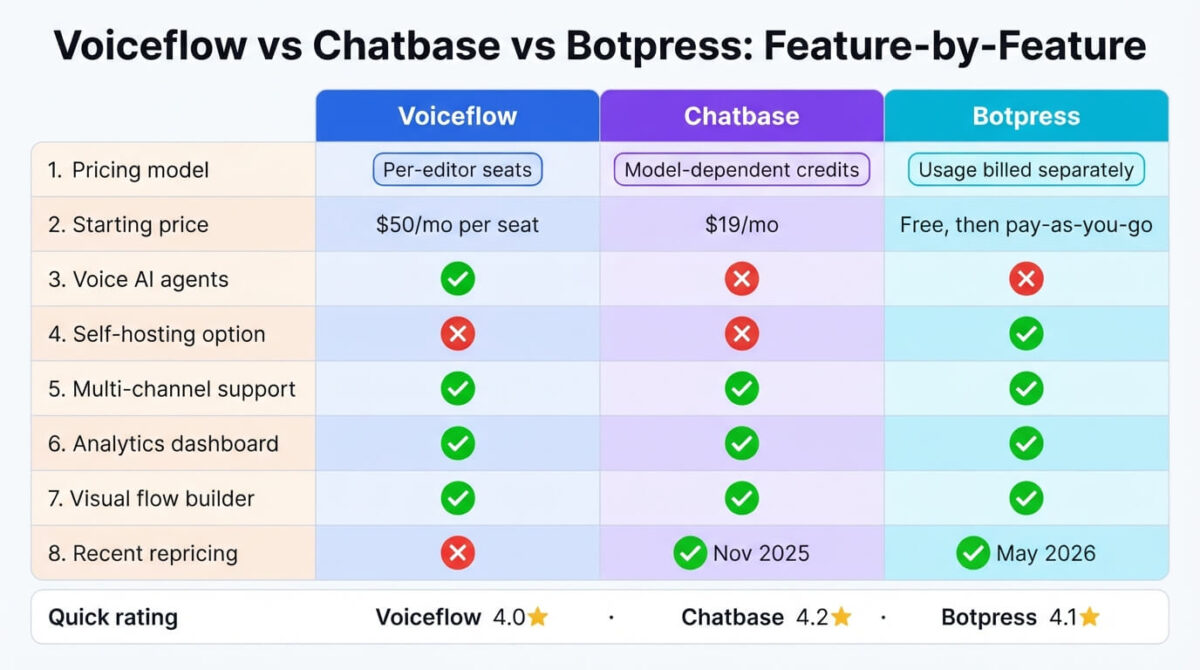
| Pricing model | Per editor seat | Message credits (model-dependent) | Base plan + separate AI usage |
| Starting price | $60/month/editor | $32/month (annual) | $150/month (annual) + usage |
| Self-hosting option | No | No | Yes, open-source |
| Voice/phone support | Strongest | No | Limited |
| Branding removal | Included at paid tiers | $99/month add-on | Included at Plus |
| Recent pricing changes | Stable | Stable | Repriced May 2026 (+51.5% on Team) |
| Best suited for | Multi-channel and voice agents | Fast setup on existing content | Technical teams wanting self-hosting flexibility |
Which Should You Choose?
Choose Voiceflow if voice or phone agents are part of the requirement, and the team stays small enough that per-editor seat costs don’t compound.
Choose Chatbase if the priority is getting a trained support bot live quickly, and the $99/month branding fee and model-dependent credit cost are budgeted in from the start.
Choose Botpress if a technical team wants the option to self-host, or needs collaboration without per-seat pricing, and separate AI usage billing is accounted for alongside the subscription.
Our Recommendations
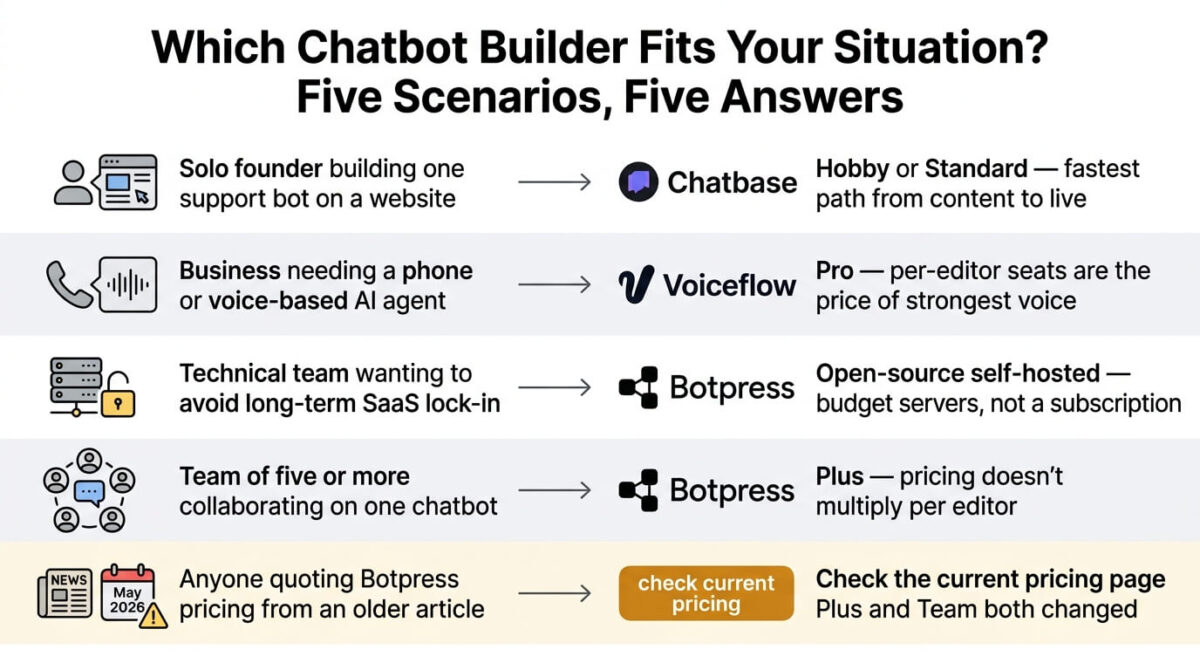
Based on 30 days of testing across setup, team scaling, and channel coverage, here is the recommended setup by situation:
Solo founder building a single support bot on a website: Chatbase Hobby or Standard, for the fastest path from existing content to a live bot.
Business needing a phone- or voice-based AI agent: Voiceflow Pro, accepting per-editor seat costs as the price of the strongest voice capability available.
Technical team wanting to avoid long-term SaaS lock-in: Botpress’s open-source self-hosted option, budgeting server costs instead of a subscription.
Team of five or more collaborating on one chatbot: Botpress Plus, since its pricing doesn’t multiply per editor the way Voiceflow’s does.
Anyone quoting Botpress pricing from an older article: Confirm current Plus and Team pricing directly, since the May 2026 repricing changed both tiers significantly.
Final Verdict
Voiceflow, Chatbase, and Botpress each bill in a way that rewards a different kind of team, and none of their headline prices is the full story once usage and team size enter the picture.
- Chatbase 4.1 / 5 the fastest setup, with a branding fee and model-dependent credits to plan around
- Botpress 4.0 / 5 the most flexible, with a working self-hosting path, recently repriced and billed with separate AI usage costs
- Voiceflow 3.9 / 5 the strongest voice and multi-channel capability, with the worst-scaling pricing model for a growing team
Before committing to one of these three, map out how many people need build access and how much AI usage the bot will generate monthly. Voiceflow penalizes team size, Chatbase penalizes model choice and branding, and Botpress adds usage costs on top of its recently increased subscription price.
Frequently Asked Questions
Does Voiceflow really charge per editor, not per chatbot?
Yes. Every person who needs build access, not every agent or bot created, costs an additional $50-54/month on top of the base plan. A 10-editor team can run $450-650/month in seat costs alone before any usage or infrastructure costs.
How much does it cost to remove Chatbase’s branding?
$99 per month, billed at $1,188 per year, as a separate add-on not included in any publicly listed tier, including Pro at $400/month annually.
Did Botpress really raise its prices in 2026?
Yes. On May 14, 2026, Botpress restructured its pricing, raising the Team tier from $495 to $750/month, a 51.5% increase, and renaming its free entry tier from Pay-as-you-go to Free. Content published before that date describes pricing no longer available.
Why do Chatbase’s message credits vary in cost?
Because credit consumption depends on which AI model answers each message. A response from a more capable model like Claude Opus can cost 5 credits, while a standard model costs 1, so the same credit allowance covers a different number of conversations depending on model choice.
Can Botpress be self-hosted for free?
Yes, through its open-source core, which a technical team can run on its own infrastructure without an ongoing SaaS subscription. Botpress Cloud, the managed version with AI Spend billing, is a separate, non-open-source product most businesses use instead.
Which tool is cheapest for a solo builder with no team?
Chatbase’s Hobby plan at $32/month annually is the cheapest functional paid tier among the three, since Voiceflow’s and Botpress’s entry paid tiers both start around $60-150/month before any usage costs.
Does Botpress’s subscription price include AI model usage?
No. Every Botpress plan bills AI spend separately based on token consumption, on top of the base subscription. A realistic small-business deployment can add $75-150/month in model usage alone beyond the advertised plan price.
Which platform is best for voice or phone-based chatbots specifically?
Voiceflow, by a clear margin. Its support for phone and voice channels alongside web chat and SMS is more developed than Chatbase, which doesn’t support voice at all, or Botpress, where voice support is more limited.