
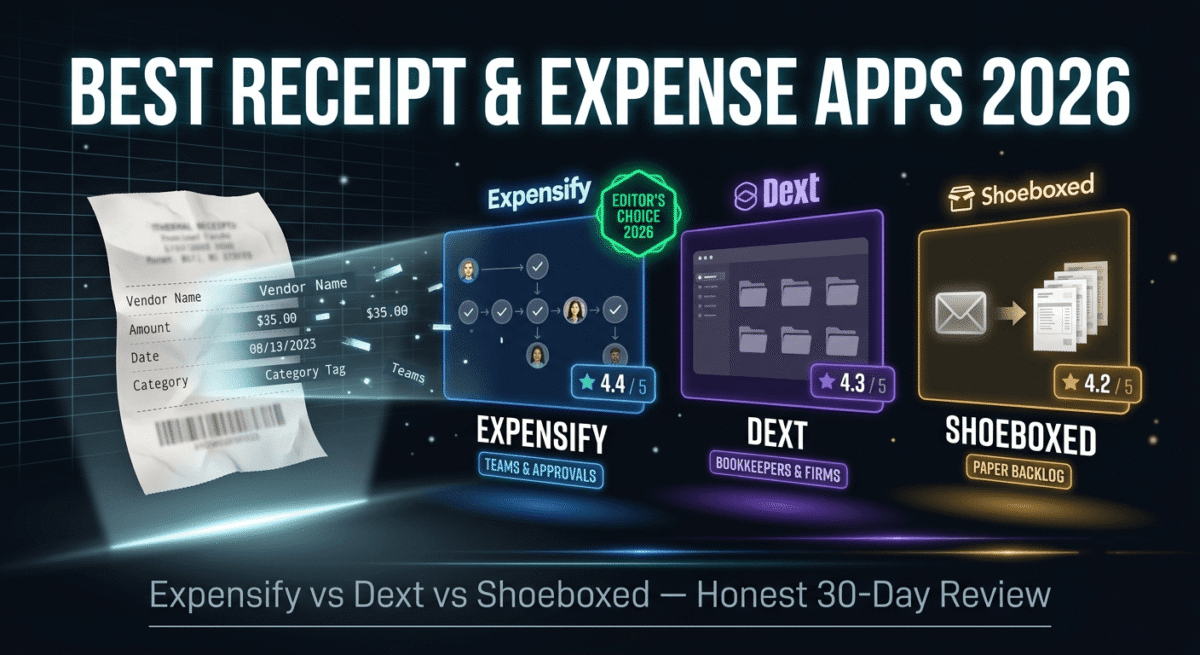
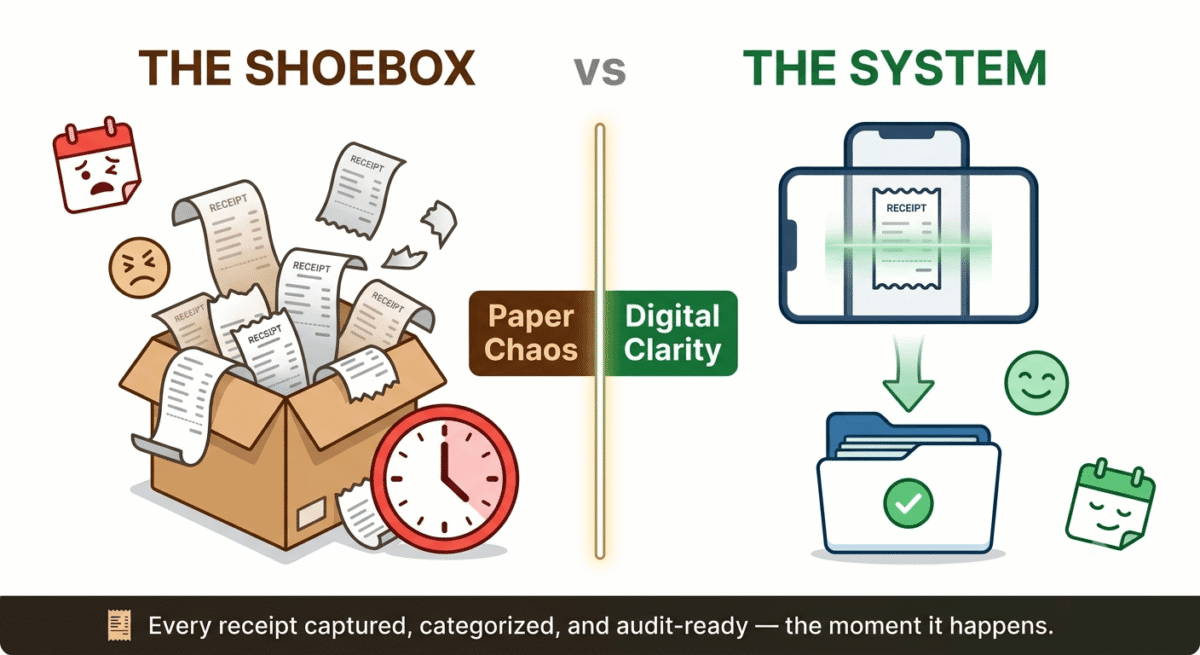
A shoebox of crumpled receipts has been the small business cliché for tax season for decades, and the reason it has not disappeared is that the underlying problem hasn’t gone away: every business expense needs to be captured, categorized, and kept somewhere an accountant or the IRS can find it months later. What has changed is the tool: instead of an actual shoebox, most freelancers and small business owners now use a phone camera and a piece of software that scans, reads, and files the receipt automatically, often before the ink on the thermal paper has even started to fade. See our full freelancer toolkit roundup for the rest of the stack a receipt app typically fits alongside.
This category sits adjacent to, but distinct from, full accounting software like QuickBooks or Wave covered elsewhere on this site. A receipt and expense app’s job is narrower and more specific: capture the expense at the moment it happens, extract the relevant data accurately, and either feed it into your accounting software or stand in for one if your needs are simple enough. I tested Expensify vs Dext vs Shoeboxed for 30 days, scanning real receipts and tracking how cleanly each platform’s output fed into an actual bookkeeping process. Here is the honest comparison, including a pricing detail in Expensify’s advertised rate that’s worth understanding before you sign up expecting the cheaper number.
Table of Contents
How We Tested These Apps
Every platform was evaluated against five criteria:
- Scanning accuracy, how reliably does the app correctly extract the vendor, amount, date, and category from a real, sometimes faded or crumpled receipt
- Real cost at typical freelancer or small team usage, not just the headline price, but what triggers a higher tier or an unexpected requirement
- Workflow fit, does the app stand alone for very simple needs, or does it require pairing with separate accounting software to be useful
- Approval and team features, for anyone with even one other person submitting expenses, how well does the platform handle review and reimbursement
- Audit-readiness, does the output meet the standard an accountant or the IRS would actually accept if it were ever questioned
Why a Dedicated Receipt App Is Different From Your Accounting Software’s Built-In Scanner
This is worth clarifying directly, because several of this category’s biggest names, QuickBooks among them, include a basic receipt scanner as a feature of broader accounting software, which can make a dedicated app feel redundant. The distinction that actually matters is depth and specialization: a dedicated receipt and expense app generally extracts data more accurately, handles edge cases like foreign currency or faded thermal receipts more reliably, and offers richer categorization and approval workflows than a bolted-on feature inside a broader accounting platform.
It’s also worth being explicit about what this category does not replace. A receipt app captures and organizes individual expenses, it does not handle invoicing, payroll, or full tax preparation. See our FreshBooks vs PayPal vs Bonsai comparison of invoicing software for the client-billing side this category deliberately doesn’t cover. For most freelancers and small businesses, a dedicated receipt tool feeds into accounting software like QuickBooks, Xero, or Wave rather than replacing it entirely, which is why integration quality with those platforms matters as much as the scanning technology itself.
Expensify Review: Best All-in-One Option, With a Pricing Detail Worth Reading Carefully
Free plan: Yes, free for individuals tracking personal expenses, with limits
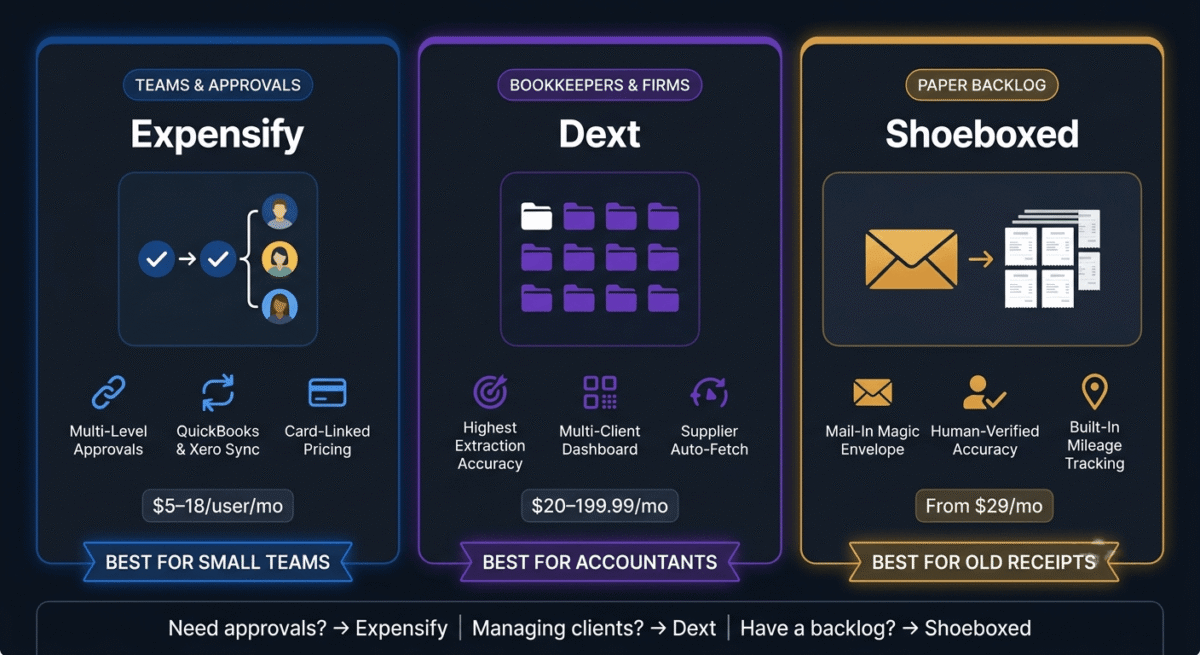
Starting paid price: $5/user/month with the Expensify Card adopted, $10–18/user/month without it
Best plan for most freelancers and small teams: The paid plan, with the Card requirement weighed carefully against your actual banking preferences
Platforms: Web, iOS, Android
Affiliate program: Yes, Expensify affiliate program
Expensify has the broadest feature set in this comparison, SmartScan OCR for receipt capture, automated expense categorization, multi-level approval workflows, and integrations with major accounting platforms, making it the closest thing to a complete expense management system rather than a pure receipt scanner.
What Expensify does best
SmartScan, Expensify’s receipt-scanning technology, is consistently rated among the most accurate in this category for extracting vendor names, totals, dates, and basic categorization from a photographed receipt, including reasonably reliable performance on faded or lower-quality images that trip up less sophisticated OCR engines.
The platform’s approval workflows and policy enforcement are the most developed of the three tools tested, letting a small business set spending rules, route expenses through a designated approver, and flag submissions that fall outside policy automatically, genuinely useful the moment you have even one employee or contractor submitting expenses you need to review before reimbursing.
Integration with QuickBooks and Xero is mature and widely cited as one of Expensify’s strongest practical advantages, expenses captured and categorized in Expensify sync cleanly into the accounting software many freelancers and small businesses already use for everything else, reducing duplicate data entry significantly.
Expensify offers a genuinely usable free tier for individuals tracking personal expenses, which is a reasonable way to test the platform’s scanning accuracy and interface before committing to a paid plan or evaluating whether the Expensify Card makes sense for your situation.
Where Expensify falls short
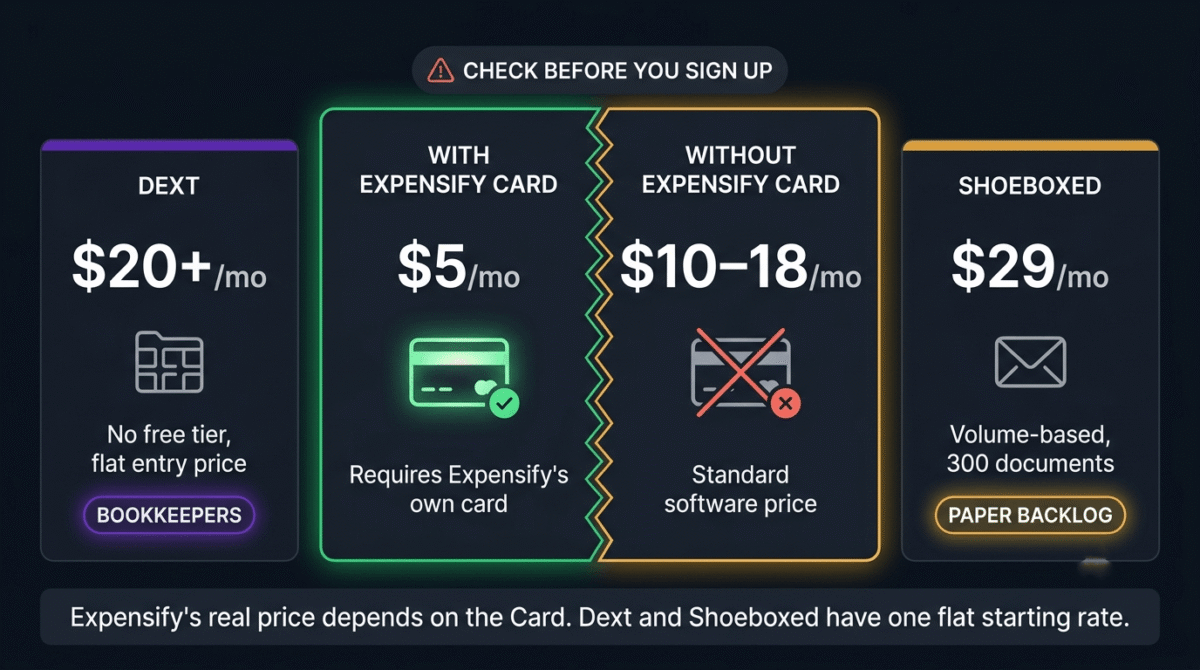
This is the detail that deserves the most direct attention: Expensify’s most commonly advertised price, around $5 per user per month, is conditional on adopting the Expensify Card, the company’s own corporate card product. Without using the card, the same plan costs meaningfully more, commonly cited in the $10–18 per user per month range. This is not a hidden fee in the traditional sense, Expensify discloses the card requirement, but the headline number that shows up in marketing and quick comparisons is easy to mistake for the standalone software price, when it is actually a price contingent on restructuring part of your business banking around Expensify’s own card.
Expensify itself, in its own published guidance, explicitly steers readers away from free alternatives, describing its 30-day trial as “a better starting point than a free tool that creates more manual work than it saves”, worth reading with the obvious caveat that this is the company’s own marketing framing of its competitors, not an independent assessment, and free or lower-cost tools genuinely do meet the needs of many simpler freelance situations.
The platform is, by its own design intent and independent reviewer consensus, built primarily for corporate teams rather than solo freelancers, a solo user accessing the full feature set without the Expensify Card may find the platform more complex than their actual needs require, paying for approval workflows and policy enforcement they will never use.
Expensify pricing
| Plan | Price | Conditions |
|---|---|---|
| Free (individual) | $0 | Personal expense tracking only, limited features |
| Paid (with Expensify Card) | ~$5 / user / month | Requires adopting Expensify’s card product |
| Paid (without Expensify Card) | ~$10–18 / user / month | Full features without the card requirement |
| Enterprise | Custom | Advanced policy controls, larger teams |
Confirm current card requirements and pricing directly, the gap between card and non-card pricing is significant enough to materially affect your decision.
Expensify: Pros and Cons
Pros:
- SmartScan OCR rates among the most accurate receipt scanning in this comparison
- Most developed approval workflows and policy enforcement of the three tools
- Mature, widely praised QuickBooks and Xero integration
- Usable free tier for individuals to test before committing
- Broadest overall feature set for teams needing structured expense management
Cons:
- Advertised lower price requires adopting the Expensify Card, confirm the real cost for your situation before assuming the headline rate applies
- Built primarily for corporate teams, adding complexity a solo freelancer may not need
- Company’s own marketing explicitly discourages free alternatives, worth reading skeptically
- Full feature set may be overkill for simple, single-user expense tracking
Rating: 4.4 / 5, Best for small teams needing real approval workflows and accounting integration, provided you read the Expensify Card pricing condition carefully before assuming the lower advertised rate applies to your situation.
Dext Review: Best for Accountants and Bookkeepers Managing Multiple Clients
Free plan: No, paid plans starting around $20/month for basic business use
Starting paid price: ~$20/month entry tier, scaling up to roughly $199.99/month for accounting firms managing multiple clients with advanced features
Best for: Bookkeepers and accounting firms needing high-accuracy data extraction across many client accounts, or any business prioritizing extraction accuracy above all else
Platforms: Web, iOS, Android
Affiliate program: Yes, Dext affiliate program
Dext, formerly known as Receipt Bank, occupies a distinct position in this comparison: it is built primarily for the accountant-client relationship rather than for an individual freelancer managing their own expenses directly, and its feature set reflects that audience clearly.
What Dext does best
Data extraction accuracy is widely cited as Dext’s standout strength, independent comparisons consistently note Dext’s AI-powered extraction as among the most precise in this category, which matters disproportionately for a bookkeeper or accountant who needs confidence that the numbers flowing into a client’s books are correct without manual double-checking every entry.
The multi-client dashboard is Dext’s clearest structural advantage for its core audience: an accounting firm managing receipts and invoices across many separate client accounts gets one unified workspace rather than juggling separate logins or exports for each client, with workflows specifically designed around the realities of that professional relationship.
Supplier auto-fetch, automatically retrieving invoices and statements directly from certain suppliers rather than waiting for a client to manually upload them, is a genuinely time-saving feature for bookkeepers managing recurring vendor relationships across multiple clients, reducing the chasing-down-documents work that consumes a meaningful share of bookkeeping time.
Dext is consistently rated as having a minimal learning curve and strong ease of administration, a real advantage for a freelancer or small business with limited time to learn a new tool, even though the platform’s deeper multi-client features are aimed at a different audience.
Where Dext falls short
The entry price, at roughly $20/month with no free tier at all, is higher than several competitors’ starting points for a solo freelancer who simply wants basic receipt scanning, Dext’s value proposition is strongest at the scale and complexity of an accounting practice, not for the simplest possible individual use case.
Approval workflows and policy enforcement, while present, are reported as less developed than Expensify’s equivalent features, a small business specifically needing robust spending controls and multi-level approval chains will likely find Expensify’s tools more mature.
Pricing scaling up to nearly $200/month for accounting firms with advanced multi-client features represents a real cost that only makes sense once you are managing receipts and invoices across multiple separate client relationships, a solo freelancer evaluating Dext against that top-tier price point is comparing against a use case that isn’t theirs.
Dext pricing
| Plan | Price | Key Features |
|---|---|---|
| Entry (business) | ~$20 / month | Basic receipt and invoice extraction |
| Higher tiers | Scales up | More documents, advanced workflows |
| Accounting firm (multi-client) | Up to ~$199.99 / month | Client management portals, advanced features |
Dext: Pros and Cons
Pros:
- Among the most accurate AI-powered data extraction in this comparison
- Multi-client dashboard purpose-built for the accountant-client relationship
- Supplier auto-fetch reduces manual document chasing for recurring vendors
- Minimal learning curve and strong ease of administration
- Strong fit for bookkeepers and accounting firms managing several clients simultaneously
Cons:
- No free tier, and entry pricing higher than some competitors for solo use
- Approval workflows less developed than Expensify’s
- Top-tier pricing only makes sense at accounting-firm scale, not for an individual freelancer
- Less suited to a business wanting built-in expense reimbursement workflows
Rating: 4.3 / 5, Best for bookkeepers and accounting firms managing multiple clients, or anyone prioritizing extraction accuracy above all else. Likely overkill and overpriced for a solo freelancer’s simplest needs.
Shoeboxed Review: Best for Clearing a Backlog of Paper Receipts You’d Rather Not Scan Yourself
Free plan: No, plans based on document volume
Starting paid price: Startup plan from $29/month for 300 digital and physical documents
Best for: Freelancers and small businesses with a genuine backlog of paper receipts, or anyone who prefers mailing in receipts over manually photographing each one
Platforms: Web, iOS, Android, plus a physical mail-in service
Affiliate program: Yes, Shoeboxed affiliate program
Shoeboxed solves a problem neither Expensify nor Dext directly addresses: the literal shoebox of crumpled, faded paper receipts that has accumulated over months or years and that nobody has the patience to photograph one at a time. Its signature “Magic Envelope” mail-in service is a genuinely distinct approach in this category.
What Shoeboxed does best
The Magic Envelope service, mailing in a stack of physical receipts for Shoeboxed to scan and digitize, is Shoeboxed’s clearest differentiator and the reason it remains the recommended option across independent comparisons specifically for anyone with a genuine backlog of old, faded, or simply too-numerous paper receipts to photograph individually. This is the only major service among the three tools compared here offering this physical mail-in option.
Human data verification, layered on top of OCR technology, is reported as producing meaningfully higher practical accuracy than pure automated scanning, particularly valuable for older, faded thermal receipts where automated OCR alone frequently produces errors that a human reviewer catches and corrects.
Shoeboxed explicitly markets its digital records as IRS-accepted, with audit-ready export formats built specifically around tax-time and bookkeeping needs, a clear, direct value proposition for a freelancer or small business owner whose primary goal is being properly prepared if their return is ever questioned.
Built-in mileage tracking via GPS on the mobile app is a useful secondary feature for any freelancer or small business owner who also needs to track vehicle expenses for tax deduction purposes, bundling a second common bookkeeping need into the same platform.
Where Shoeboxed falls short
The mail-in service’s prepaid postage is currently limited to the US, which meaningfully reduces the platform’s value for international users, non-US freelancers and small businesses can still use the photo-scanning app, but the signature mail-in feature that differentiates Shoeboxed most clearly is unavailable to them.
Pricing is based on document volume rather than a flat per-user rate, starting at $29/month for 300 documents, and paper scanning plus additional services can add to the overall cost beyond the base plan, which is worth modeling against your actual expected volume before assuming the entry tier covers your needs.
Shoeboxed’s approval workflows and team expense management features are notably less developed than Expensify’s, it is built around the individual or small-team bookkeeping and tax-preparation use case specifically, not around managing reimbursements across a larger team with multiple approvers.
The hybrid OCR-plus-human-verification approach, while more accurate on difficult receipts, introduces higher processing latency than pure automated scanning, if you need expenses categorized and available immediately rather than within a day or two, this tradeoff is worth weighing against Expensify’s or Dext’s faster, fully automated processing.
Shoeboxed pricing
| Plan | Price | Documents Included |
|---|---|---|
| Startup | $29 / month | 300 digital and physical documents |
| Higher tiers | Scales up with volume | More documents, additional services |
Shoeboxed: Pros and Cons
Pros:
- Only major service in this comparison offering a physical mail-in scanning option
- Human verification layered on OCR improves accuracy on old or faded receipts
- Explicitly markets IRS-accepted digital records with audit-ready exports
- Built-in GPS mileage tracking bundled into the same platform
- Best fit for clearing a genuine backlog of paper receipts
Cons:
- Prepaid mail-in postage currently limited to the US
- Volume-based pricing can add up beyond the base plan depending on your actual receipt count
- Approval workflows and team features less developed than Expensify’s
- Human verification introduces processing latency compared to fully automated competitors
Rating: 4.2 / 5, Best for freelancers and small businesses with a real backlog of paper receipts who want a mail-in solution and IRS-ready digital records, rather than the fastest possible automated processing.
Head-to-Head Comparison
| Feature / Category | Expensify | Dext | Shoeboxed |
|---|---|---|---|
| Free Plan | Yes Individuals, limited | No | No |
| Entry Paid Price | ~$5 / user With Card $10–18 without | ~$20 / month | $29 / month 300 documents |
| Scanning Accuracy | Strong SmartScan OCR | Among highest in category Automated OCR | Strong Human-verified |
| Best For | Small teams needing approval workflows & corporate cards | Bookkeepers & accountants managing multi-client feeds | Clearing large backlogs of physical paper receipts |
| Physical Mail-In Option | No | No | Yes Magic Envelope |
| Approval Workflows | Most Developed Multi-level routing | Limited | Limited |
| Accounting Integration | Strong QuickBooks, Xero, NetSuite | Strong QuickBooks, Xero, Sage | Moderate Basic sync options |
| Mileage Tracking | Limited Distance & map logging | No | Yes Built-in GPS |
| IRS-Ready Export Marketing | Yes | Yes | Explicitly Emphasized |
Which App Should You Choose?
Choose Expensify if:
You have at least one other person submitting expenses and need real approval workflows and policy enforcement, or you want the most mature integration with QuickBooks or Xero. Read the Expensify Card pricing condition carefully before assuming the lower advertised rate applies, confirm the actual cost for your specific setup before comparing it against competitors.
Choose Dext if:
You are a bookkeeper or accountant managing receipts and invoices across multiple separate client accounts, or extraction accuracy matters more to you than any other single factor. For that specific audience, Dext’s multi-client dashboard and supplier auto-fetch are difficult to replicate with the other two tools.
Choose Shoeboxed if:
You have a genuine backlog of paper receipts you would rather mail in than photograph one at a time, or you specifically want human-verified accuracy on old, faded receipts and explicitly IRS-ready digital records for tax season.
The Freelancer and Small Business Setup Recommendation
Based on 30 days of testing across real receipts and accounting workflows, here is the recommended setup by situation:
Solo freelancer with straightforward, low-volume expenses: Wave Receipts or a similarly free, simple scanner paired with free Wave accounting, for genuinely basic needs, a dedicated paid app is more capability than most solo freelancers actually require. Many freelancers pair that expense tracking with time tracking software for billing hours alongside costs, see our Toggl vs Clockify vs Harvest comparison.
Solo freelancer wanting more automation without enterprise complexity: Expensify’s individual free tier to start, evaluating whether the Expensify Card’s discounted rate makes sense once you understand the full cost comparison for your situation.
Small team (2–10 people) needing approval workflows before reimbursement: Expensify’s paid plan, accepting either the Card adoption or the higher non-Card rate, since the approval and policy features are the most developed in this comparison.
Bookkeeper or accountant managing multiple client accounts: Dext, for the multi-client dashboard and extraction accuracy that neither Expensify nor Shoeboxed matches for this specific professional use case.
Anyone with an actual box of paper receipts accumulated over months or years: Shoeboxed’s mail-in service specifically, this is the one genuine, structural advantage neither competitor offers, and it solves the exact backlog problem a phone-scanning app does not.
Final Verdict
Expensify is the best all-in-one option for small teams in 2026, its combination of accurate scanning, mature approval workflows, and strong accounting software integration makes it the most complete platform in this comparison, provided you confirm the real cost of the Card-versus-no-Card pricing structure before committing.
Dext is the best choice for bookkeepers and accounting firms, its multi-client dashboard and extraction accuracy are purpose-built for that specific professional relationship in a way the other two tools simply aren’t designed for.
Shoeboxed is the best choice for clearing a genuine paper receipt backlog, its mail-in Magic Envelope service is a real, structurally distinct advantage for anyone who would rather ship a stack of receipts than photograph each one individually.
Ratings:
- Expensify: 4.4 / 5
- Dext: 4.3 / 5
- Shoeboxed: 4.2 / 5
Frequently Asked Questions
What is the best receipt scanning app in 2026?
Expensify is the best overall choice for small teams needing approval workflows and accounting integration, with the caveat that you should confirm whether the lower advertised price requires adopting the Expensify Card. Dext is the better choice for bookkeepers and accounting firms managing multiple clients. Shoeboxed is the best choice if you have a backlog of paper receipts you’d rather mail in than scan individually.
Is there a genuinely free receipt scanning app?
Wave Receipts is completely free with no paid tier required for basic receipt scanning and bookkeeping, making it a solid starting point for freelancers and very small businesses with straightforward needs. Zoho Expense also offers a free plan for up to 3 users, though limited to a relatively small number of scans per month. Expensify offers a free tier for individuals tracking personal expenses, though business features require a paid plan.
Does Expensify really cost $5 a month?
Only with the Expensify Card adopted as part of your business banking. Without the Card, the same plan costs meaningfully more, commonly cited in the $10–18 per user per month range. This pricing structure is disclosed by Expensify, but the headline $5 figure shown in marketing and quick comparisons can be mistaken for the standalone software price if you don’t read the specific terms.
Can a receipt app replace full accounting software?
Generally not. A receipt app captures, scans, and organizes individual expenses, but most freelancers and small businesses still need dedicated accounting software like QuickBooks, Xero, or Wave for invoicing, payroll, and full tax preparation. Expensify and Zoho Expense both offer some expense reporting beyond pure capture, but even these are typically used alongside, not instead of, full accounting software.
What is the difference between Expensify and Dext?
Expensify is built primarily for corporate and small-team expense management, with strong approval workflows and policy enforcement. Dext is built primarily for accountants and bookkeepers managing receipts and invoices across multiple separate client accounts, with a stronger focus on raw extraction accuracy and a multi-client dashboard. A solo freelancer’s needs are generally better served by Expensify’s simpler individual tier or a free alternative; an accounting practice’s needs are generally better served by Dext.
Is Shoeboxed’s mail-in service worth the extra step compared to just using a phone camera?
For a genuine backlog of old or faded paper receipts, yes, the time saved not photographing dozens or hundreds of receipts individually, combined with human verification catching errors automated OCR alone would miss, makes the mail-in service worthwhile for that specific situation. For ongoing, day-to-day receipt capture as expenses happen, a phone-camera-based app like Expensify or Dext is faster and more immediate.
Are digital receipts accepted by the IRS instead of paper originals?
Generally yes, provided the digital record clearly shows the necessary information (vendor, date, amount, and business purpose) and the scanning method is reliable. Shoeboxed explicitly markets its digital records as IRS-accepted, and Expensify, Dext, and QuickBooks all produce audit-ready exports. That said, it’s worth confirming with your own accountant whether your specific situation requires keeping physical originals for any period before discarding them.








