
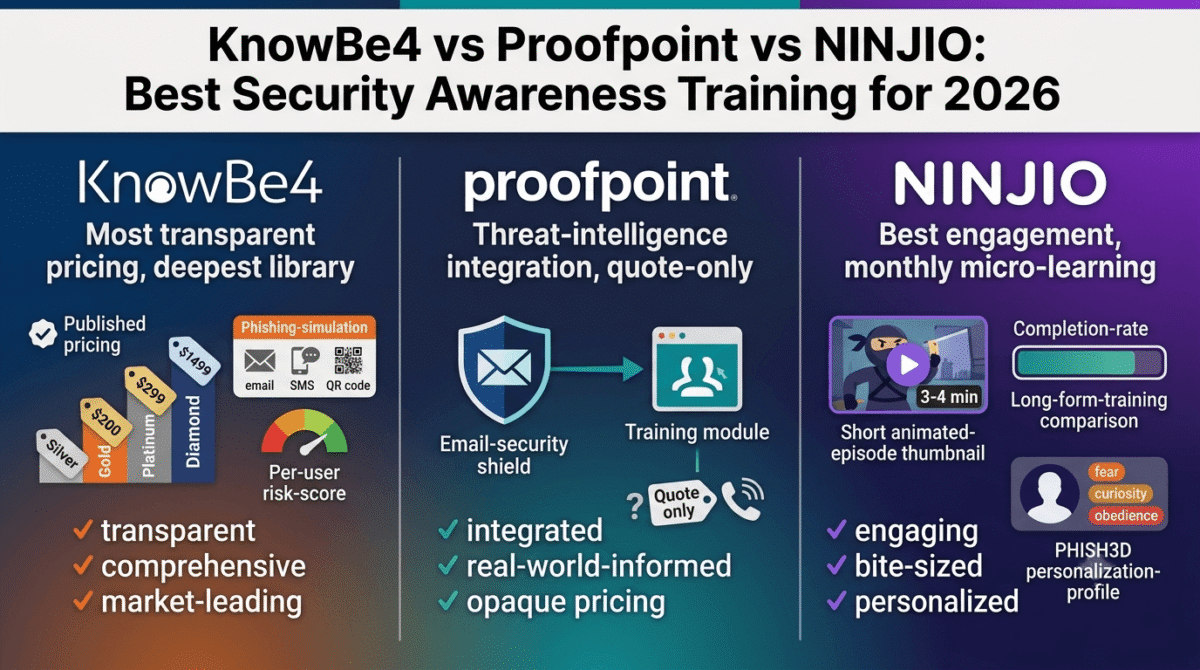
Every antivirus tool, password manager, and VPN reviewed elsewhere on this site is solving the same underlying problem from the software side: making it technically harder for an attacker to get in. Security awareness training solves the other half of that problem, the half no piece of software can fully patch, a human being clicking a convincing phishing link, reusing a compromised password, or wiring money to a fraudulent invoice because the email looked legitimate enough. Industry breach research consistently identifies human error and social engineering as factors in a large majority of confirmed breaches, which is the entire reason this category exists: training the person at the keyboard, not just the software behind them.
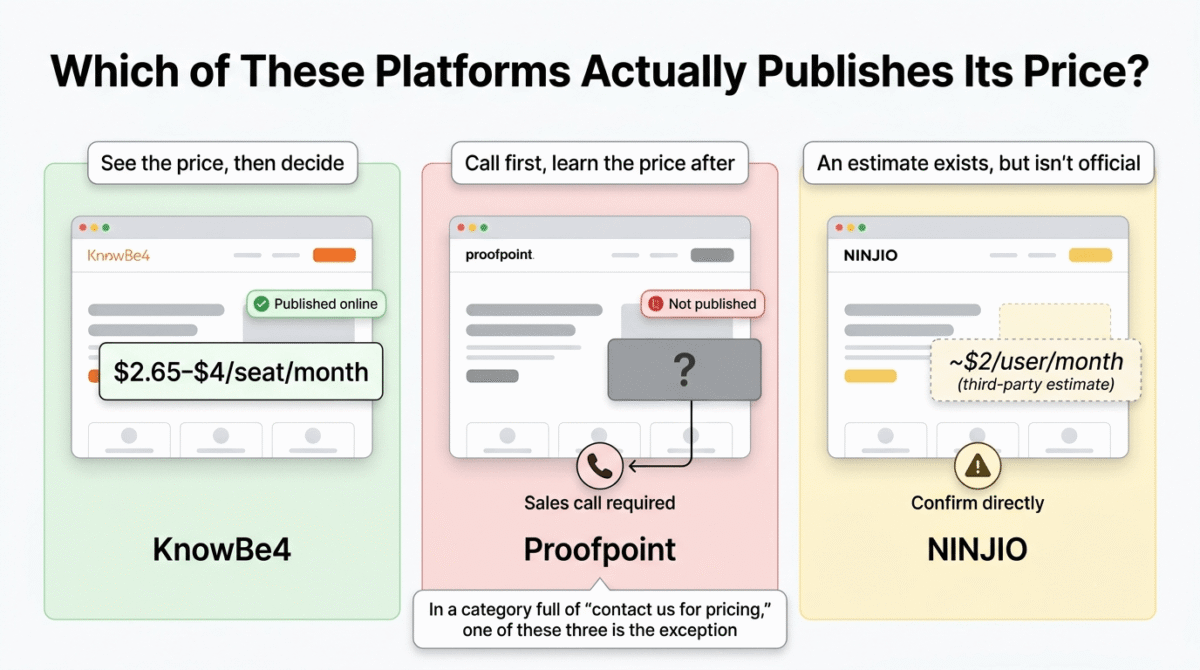
This category is also unusually difficult to comparison-shop, because the biggest names in the space frequently hide their pricing behind a sales call. We are going to walk through KnowBe4 vs Proofpoint vs NINJIO as honestly as the available information allows, flagging clearly where pricing is transparent and where it genuinely is not, because in a category already known for “contact us for a quote,” pretending otherwise would be its own form of dishonesty.
Table of Contents
How We Evaluated These Platforms
Every platform was assessed against five criteria:
- Pricing transparency, is published, per-seat pricing actually available, or is a sales call required before you learn the cost?
- Content depth and update frequency, how large is the training library, and how often is new content added to reflect current attack patterns?
- Phishing simulation realism, how closely do simulated phishing tests resemble real-world attacks, including email, SMS, and QR code-based attempts?
- Completion rates and engagement, does the format actually hold an employee’s attention, or does it produce the “click through to finish” behavior common with compliance-driven training?
- Fit for small and growing businesses specifically, not just enterprise capability, but whether a 10–50 person company can realistically deploy and manage the platform without a dedicated security team
Why This Category Matters More Than It Used to for Small Businesses
It is tempting to assume security awareness training is an enterprise concern, something a Fortune 500 company’s compliance department worries about, not a 12-person agency or a solo WordPress developer managing client sites. That assumption has become measurably less safe to hold. Phishing attacks increasingly target small businesses specifically, partly because smaller organizations are statistically less likely to have any formal training program in place, making them comparatively easier targets than larger companies that have invested in this exact category.
For a freelancer or small agency handling client data, financial information, or website access credentials, a single successful phishing attack against one employee can compromise an entire client relationship, and unlike a larger company, a small business often has no dedicated IT or security staff to catch the problem before real damage occurs. See our full freelancer toolkit roundup for the rest of what a lean operation typically runs to protect client relationships like this. This is the practical reason this category belongs on a site focused on tools for small businesses and freelancers, not just enterprise IT buyers.
KnowBe4 Review: The Market Leader, With the Most Transparent Published Pricing in This Comparison
Pricing model: Published per-seat pricing, tiered by feature level (Silver, Gold, Platinum, Diamond) and seat-count discount bands
Starting price: Entry tiers commonly cited around $2.65–$4 per seat per month at lower seat counts, decreasing at higher volume and longer contract terms
Best for: Small to mid-size businesses that want the deepest content library and the most established platform, with actual published pricing to compare against alternatives
Free trial: Yes
KnowBe4 has built its reputation as the largest and most established name in this category, and the company’s decision to publish actual pricing tiers online, genuinely unusual in this market, is itself a meaningful point in its favor for any small business trying to budget without first sitting through a sales call.
What KnowBe4 does best
Pricing transparency is KnowBe4’s most underrated advantage in this specific comparison. Independent analysis of this category notes directly that KnowBe4 is the only major company providing transparent pricing online, which makes it dramatically easier for a small business owner to evaluate fit and cost before committing time to a sales process, a real, practical advantage when most competitors require a call just to learn whether the product is in your budget range at all.
The content library is the largest and most frequently updated in this comparison, spanning security awareness modules, compliance-specific training, and an extensive phishing simulation template library that gets updated to reflect current attack patterns, including email, SMS, and QR code-based phishing attempts.
KnowBe4’s risk-scoring and continuous assessment capabilities are highlighted across independent review platforms as a genuine differentiator, rather than treating training as a one-time annual event, the platform tracks ongoing phish-prone percentage by individual user, letting a business identify and target additional training toward the specific employees who need it most rather than applying a uniform program to everyone regardless of actual risk.
The tiered structure, Silver, Gold, Platinum, and Diamond, lets a small business start with foundational training and simulated phishing at the lower tiers, then add AI-driven content and advanced features at higher tiers only once the budget and need justify it, rather than committing to an all-or-nothing platform.
Where KnowBe4 falls short
The breadth of the platform, which is a genuine strength for a mid-size organization, can feel like more administrative overhead than a very small team actually needs, a five-person agency may find the platform’s full feature set more complex to configure and maintain than a lighter, more narrowly focused tool would require.
While the entry-tier pricing is published, the lowest rates shown across review platforms are frequently tied to larger seat counts and multi-year contract terms, a small business with fewer than 20 seats on a single-year term should expect a noticeably higher effective per-seat rate than the headline pricing implies, and should confirm the actual quote for their specific size before assuming the lowest advertised number applies.
Compliance training, while included and a genuine strength relative to some competitors, adds another layer of content for employees to work through, appropriate for businesses in regulated industries, but potentially more than a small business with no specific regulatory requirement actually needs.
KnowBe4: Pros and Cons
Pros:
- Most transparent published pricing of the major platforms in this category
- Largest, most frequently updated content and phishing simulation library
- Strong continuous risk-scoring lets training be targeted at the highest-risk individuals
- Tiered structure allows starting small and adding features as needs grow
- Bundles security and compliance training in one platform, useful for regulated industries
Cons:
- Full feature set can be more administrative overhead than a very small team needs
- Lowest published rates are tied to larger seat counts and multi-year terms, confirm your actual quote
- Compliance training adds content volume that may be unnecessary outside regulated industries
- Still requires more setup time than a lightweight, single-purpose tool
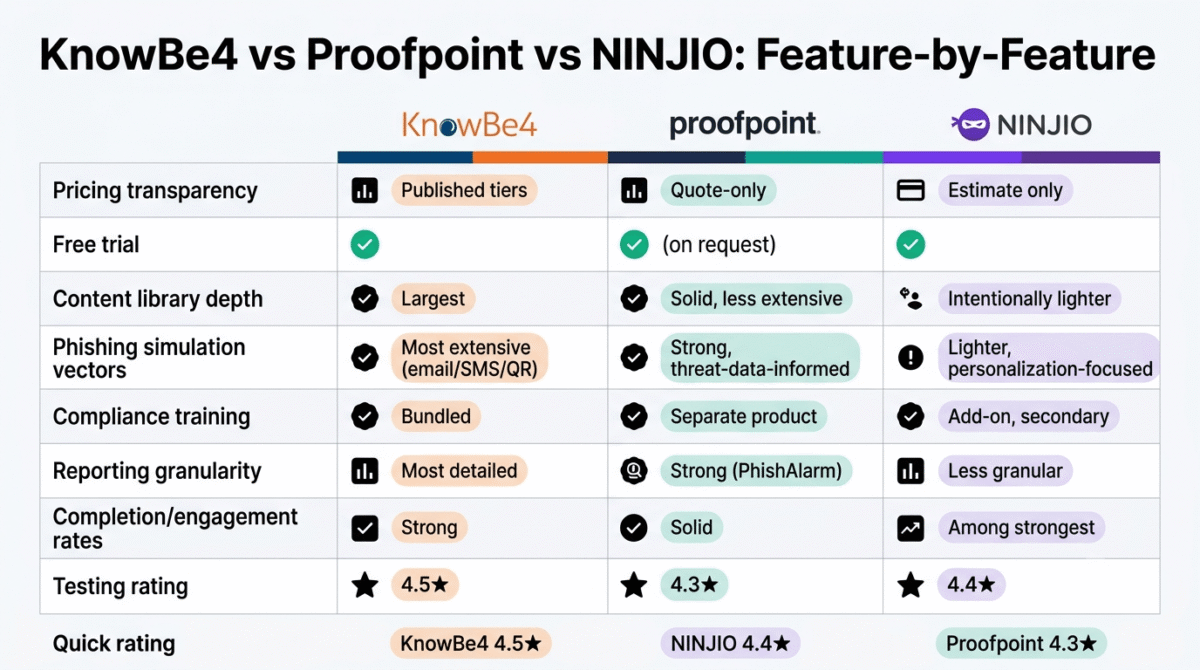
Rating: 4.5 / 5, Best overall platform for small to mid-size businesses that want the deepest content library and the most genuinely comparable published pricing in this category.
Proofpoint Security Awareness Training Review: Best for Businesses Already Using Proofpoint’s Email Security
Pricing model: Quote-only, no published pricing available at the time of writing
Starting price: Not publicly disclosed; confirm directly with Proofpoint sales
Best for: Businesses already using Proofpoint’s email security products who want training informed by the same real-world threat intelligence protecting their inbox
Free trial: Available on request
Proofpoint’s position in this category is shaped heavily by where the company comes from: it is fundamentally an email security company first, and its security awareness training product is built to complement that core business, which shows up clearly in both its strengths and its gaps.
What Proofpoint does best
The integration between Proofpoint’s email security tools and its awareness training is the platform’s clearest differentiator. Training content and simulated phishing scenarios are informed by real-world threat intelligence Proofpoint observes across its own email security customer base, meaning the phishing simulations your employees see are modeled on attacks Proofpoint has genuinely detected in the wild, not generic, hypothetical scenarios built independently of actual threat data.
For an organization already running Proofpoint’s email security products, adding the awareness training creates a unified view of both the technical defense layer and the human training layer within one vendor relationship, useful for a business that wants a single point of contact and a single dashboard rather than stitching together security tools from multiple vendors.
Proofpoint’s PhishAlarm and triage tools support tracking report-button usage over time, measuring not just whether employees avoid clicking simulated phishing emails, but whether they are actively reporting suspicious emails using the proper channel, a more behaviorally meaningful metric than completion rate alone.
Where Proofpoint falls short
Pricing is entirely quote-based, with no published rates available anywhere at the time of writing, a real disadvantage for a small business trying to budget or compare options without committing to a sales conversation first. This is the most significant practical drawback relative to KnowBe4 in this specific comparison.
Independent reviewers on G2 specifically note that while Proofpoint is easy to implement, it sometimes lacks the depth of content and assessment tools that KnowBe4 provides, the training library and risk-scoring capabilities are generally described as less extensive than the market leader’s.
Proofpoint’s compliance training, when available, is reported as a separate solution rather than an add-on to the core awareness platform, meaning a business needing both security awareness and compliance-specific training may need to evaluate and budget for what is effectively two separate products, where KnowBe4 bundles both more directly.
The clearest value case for Proofpoint specifically depends on already being a Proofpoint email security customer, for a small business with no existing Proofpoint relationship, there is less inherent reason to choose this platform over a more transparent, equally capable alternative.
Proofpoint: Pros and Cons
Pros:
- Training informed by real-world threat intelligence from Proofpoint’s own email security customer base
- Unified vendor relationship for businesses already using Proofpoint’s email security products
- PhishAlarm and triage tools support tracking report-button behavior, not just click-avoidance
- Generally regarded as easy to implement
Cons:
- No published pricing, quote-only, requiring a sales conversation to learn cost
- Content depth and assessment tools reported as less extensive than KnowBe4’s
- Compliance training is a separate solution rather than a bundled add-on
- Clearest value case depends on an existing Proofpoint email security relationship
Rating: 4.3 / 5, Best for businesses already invested in Proofpoint’s email security ecosystem who want unified threat intelligence across both layers. Harder to recommend on a standalone basis given the lack of published pricing.
NINJIO Review: Best for Genuine Engagement and Completion Rates in a Small Team
Pricing model: Subscription-based, scoped to organization size; some third-party pricing trackers cite an entry point around $2 per user per month
Starting price: Not consistently published, third-party estimates vary; confirm directly with NINJIO
Best for: Small businesses that want training employees will actually watch and remember, prioritizing engagement over comprehensive compliance documentation
Free trial: Yes
NINJIO takes a deliberately different approach from KnowBe4’s comprehensive platform or Proofpoint’s enterprise-threat-intelligence angle: it bets that short, well-produced, story-driven content beats long-form compliance training on the metric that actually matters, whether employees remember and apply what they watched.
What NINJIO does best
The format itself is NINJIO’s defining differentiator. Rather than slideshow-style modules or lengthy video courses, NINJIO delivers monthly micro-learning episodes, animated, narrative stories roughly three to four minutes long, based on real-world security breaches, released on a regular monthly cadence rather than as a single annual training event.
Independent review platforms consistently show NINJIO earning some of the highest satisfaction and ease-of-use scores in this category, with reviewers specifically citing it as easier to use and better matched to their organization’s needs than several named competitors in direct head-to-head comparisons. High completion rates are the practical payoff of the short, engaging format, a three-to-four-minute monthly episode is a far easier ask of a busy employee than a 45-minute annual compliance module, and the completion data reflects that.
NINJIO’s PHISH3D component tests users against seven categories of emotional manipulation that social engineering attacks typically exploit, fear, obedience, curiosity, and others, building an individual susceptibility profile per employee that personalizes future training and simulated phishing toward each person’s specific psychological vulnerabilities, rather than delivering identical generic content to everyone.
NINJIO explicitly positions its format as the opposite of “check the box” compliance training, with the company’s own stated position being that monthly microlearning produces better behavior change than long-form annual sessions, while the company does offer an add-on compliance-focused option for businesses that need formal documentation, it is presented as a secondary option rather than the platform’s core design philosophy.
Where NINJIO falls short
The lighter content format, which drives NINJIO’s strong completion rates, comes with a real tradeoff: content volume is intentionally lower than KnowBe4’s or Proofpoint’s libraries, and reporting is generally described as less granular, appropriate for a business prioritizing genuine behavior change over comprehensive audit documentation, but a real limitation for an organization in a regulated industry that needs detailed compliance records.
Pricing is not consistently published across NINJIO’s own materials, and third-party pricing trackers offer estimates that should be treated as directional rather than confirmed, get an actual quote for your specific organization size before budgeting around any third-party estimate you find online.
NINJIO’s narrower phishing simulation and assessment depth, relative to KnowBe4’s more extensive testing capabilities, means a business specifically prioritizing rigorous phishing simulation testing across many attack vectors may find KnowBe4’s broader library a better fit despite NINJIO’s stronger engagement numbers.
NINJIO: Pros and Cons
Pros:
- Story-driven, animated monthly episodes produce some of the strongest completion and engagement rates in this category
- PHISH3D builds individualized susceptibility profiles per employee rather than generic, one-size-fits-all content
- Explicitly designed to avoid “check the box” compliance training fatigue
- Strong independent reviewer satisfaction scores relative to named competitors
- Lighter administrative burden fits a small team without dedicated security staff well
Cons:
- Lower content volume and less granular reporting than KnowBe4 or Proofpoint
- Pricing not consistently published, confirm directly rather than relying on third-party estimates
- Less suited to organizations needing extensive, detailed compliance documentation
- Narrower phishing simulation depth than KnowBe4’s more extensive library
Rating: 4.4 / 5, Best for small businesses that want genuinely high training engagement and completion without the administrative weight of a full compliance-focused platform.
Head-to-Head Comparison
| Criteria / Metric | KnowBe4 | Proofpoint (PSAT) | NINJIO |
|---|---|---|---|
| Pricing transparency | Most transparent Published seat tiers (Silver, Gold, Platinum, Diamond) | Quote-only enterprise sales Custom pricing bundled with email security | Not consistently published Quote-based per-user subscription tiers |
| Content library depth | Largest in market 1,000+ videos, games, posters, & interactive modules | Solid library Focused, threat-guided education modules | Intentionally lighter 3–4 min Hollywood-style micro-episodes |
| Compliance training | Bundled Includes GDPR, HIPAA, PCI-DSS, SOC 2 modules | Separate solution Primary focus is core security threat awareness | Add-on / Secondary focus Core focus remains human risk reduction |
| Phishing simulation depth | Most extensive Email, SMS/smishing, vishing, QR codes, & USB tests | Strong (threat-informed) Driven by real live threat data from Proofpoint TAP | Lighter simulation depth Uses PHISH3D & NINJIO Risk Algorithm™ |
| Reporting granularity | Most detailed Phish-prone % scores, industry benchmarks, executive visual reports | Strong analytics Integrates with PhishAlarm & IT threat triage | Less granular Tracks user risk scores & episode completion |
| Completion & engagement | Strong Wide variety, but potential module fatigue | Solid Targeted micro-lessons based on risk level | Among the strongest Anime/storytelling format yields high completion |
| Setup complexity | Moderate Requires initial AD/Okta sync & whitelisting | Moderate Seamless for Proofpoint stack; complex standalone | Lowest Out-of-the-box automated monthly delivery |
| Best fit | SMB to Enterprise Broad security, compliance, & deep analytics | Proofpoint Ecosystem Existing Proofpoint email security customers | Small to Mid-Market Teams Prioritizing high engagement & low admin overhead |
Which Platform Should You Choose?
Choose KnowBe4 if:
You want the deepest content library, the most extensive phishing simulation testing, and the most genuinely comparable published pricing in this category. For most small and growing businesses without a strong existing vendor relationship pulling them toward a competitor, KnowBe4’s combination of transparency and depth makes it the most defensible default choice.
Choose Proofpoint if:
Your business already uses Proofpoint’s email security products and you want training informed by the same real-world threat intelligence protecting your inbox, with a single unified vendor relationship across both layers. Go in prepared for a sales conversation to learn actual pricing, since none is published.
Choose NINJIO if:
Your priority is genuine employee engagement and completion rather than comprehensive compliance documentation, and you run a small team without dedicated security staff to manage a heavier platform. The monthly micro-learning format is specifically designed to solve the “employees click through training without absorbing it” problem that plagues longer-form compliance courses.
The Small Business Setup Recommendation
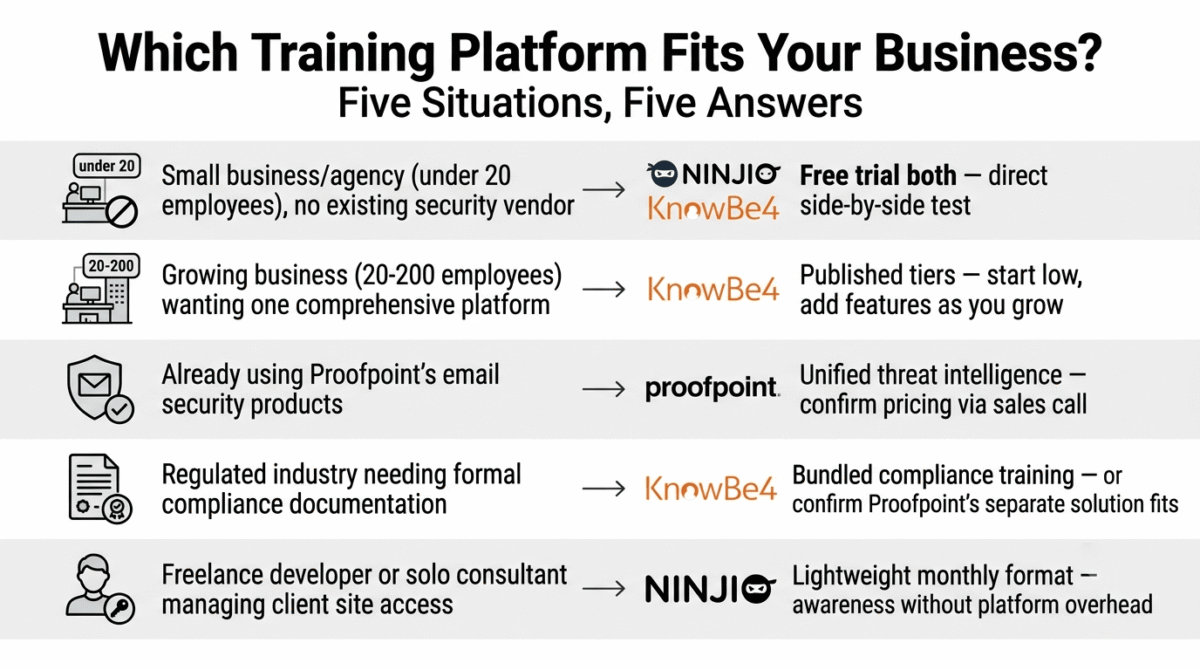
Based on the criteria above, here is the recommended setup by business situation:
Small business or agency (under 20 employees) with no existing security vendor relationship: Start with NINJIO’s free trial or KnowBe4’s lower tier, depending on whether engagement or content depth matters more to your specific team, both offer free trials, making a direct side-by-side test the most reliable way to decide for your specific group of employees.
Growing business (20–200 employees) wanting the most comprehensive single platform: KnowBe4, given its published pricing tiers and the ability to start at a lower tier and add features as the organization and budget grow.
Business already using Proofpoint’s email security products: Add Proofpoint’s awareness training specifically for the unified threat intelligence and single-vendor relationship, after confirming actual pricing through a sales conversation.
Business in a regulated industry needing formal compliance documentation: KnowBe4’s bundled compliance training, or confirm Proofpoint’s separate compliance solution meets your specific regulatory requirement, since NINJIO’s compliance add-on is explicitly positioned as secondary to its core engagement-first approach.
Freelance WordPress developer or solo consultant managing client site access: Even a single-person operation benefits from the awareness-building aspect of this category, NINJIO’s lightweight monthly format is a reasonable way to stay current on attack patterns without committing to a platform built for managing dozens of employees. See our full WordPress developer toolkit guide for the rest of the stack a freelance developer typically runs alongside basic security awareness training.
Final Verdict
KnowBe4 is the best overall security awareness training platform for most small and growing businesses in 2026, its combination of published, comparable pricing, the deepest content library in this comparison, and a tiered structure that scales with your organization make it the most defensible default choice for a business without a strong existing reason to choose a competitor.
NINJIO is the best choice when engagement and completion rates matter more than comprehensive documentation, its story-driven monthly format is genuinely well-suited to a small team that needs employees to actually retain security training, not just click through it.
Proofpoint is the right choice specifically for existing Proofpoint email security customers, the unified threat intelligence and single-vendor relationship are real advantages for that specific audience, though the lack of published pricing makes it harder to recommend without reservation on a standalone basis.
Ratings:
- KnowBe4: 4.5 / 5
- NINJIO: 4.4 / 5
- Proofpoint: 4.3 / 5
Frequently Asked Questions
What is the best security awareness training platform in 2026?
KnowBe4 is the best overall choice for most small and growing businesses, combining published pricing transparency with the deepest content library in this comparison. NINJIO is the better choice if employee engagement and completion rates matter more than comprehensive compliance documentation. Proofpoint is the right choice specifically for businesses already using Proofpoint’s email security products.
Does a small business really need security awareness training?
Yes, phishing and social engineering attacks increasingly target small businesses specifically, partly because smaller organizations are statistically less likely to have any formal training program in place. A single successful phishing attack against one employee can compromise client data, financial information, or website credentials, and a small business typically has no dedicated security staff to catch the problem before damage occurs.
Why don’t Proofpoint and NINJIO publish their pricing online?
This is common in the security awareness training category generally, many vendors prefer to scope pricing based on organization size, seat count, and specific feature requirements through a sales conversation rather than a fixed published rate. KnowBe4 is specifically noted across independent industry analysis as the only major platform providing transparent, published pricing online, which is one of its clearest practical advantages for a business trying to budget without first committing to a sales call.
What is a phishing simulation, and why does it matter?
A phishing simulation is a deliberately sent fake phishing email, text message, or other attack designed to test whether employees recognize and correctly respond to it, without any real risk. The data from these simulations, who clicked, who reported it, who ignored it, gives a business a much more accurate picture of actual risk than a training completion rate alone, since an employee can complete training perfectly and still click a realistic phishing attempt months later.
How often should employees go through security awareness training?
Most experts and platforms in this category recommend ongoing, regular training rather than a single annual session NINJIO’s monthly micro-learning model and KnowBe4’s continuous phishing simulation testing both reflect this philosophy. Annual, long-form compliance training alone is widely regarded across this industry as less effective at producing actual behavior change than shorter, more frequent reinforcement throughout the year.
Can a one-person business or solo freelancer benefit from this kind of training?
Yes, in a more limited but still meaningful way. A solo freelancer or consultant managing client website access, financial accounts, or sensitive data is just as vulnerable to a convincing phishing attempt as a larger team, and staying current on evolving attack patterns through a lightweight platform like NINJIO’s monthly format is a reasonable, low-effort way to maintain awareness without needing a platform built for managing many employees.
What is the difference between security awareness training and antivirus or password manager software?
Antivirus software and password managers, covered elsewhere on this site, protect against technical vulnerabilities and credential weaknesses. See our 1Password vs Bitwarden vs Dashlane comparison for the password managers half. Security awareness training addresses the human side of the same problem, training people to recognize and resist phishing attempts, social engineering, and other attacks that succeed by manipulating a person rather than exploiting a software flaw. A complete security setup for a small business generally includes both categories, not one in place of the other.








