
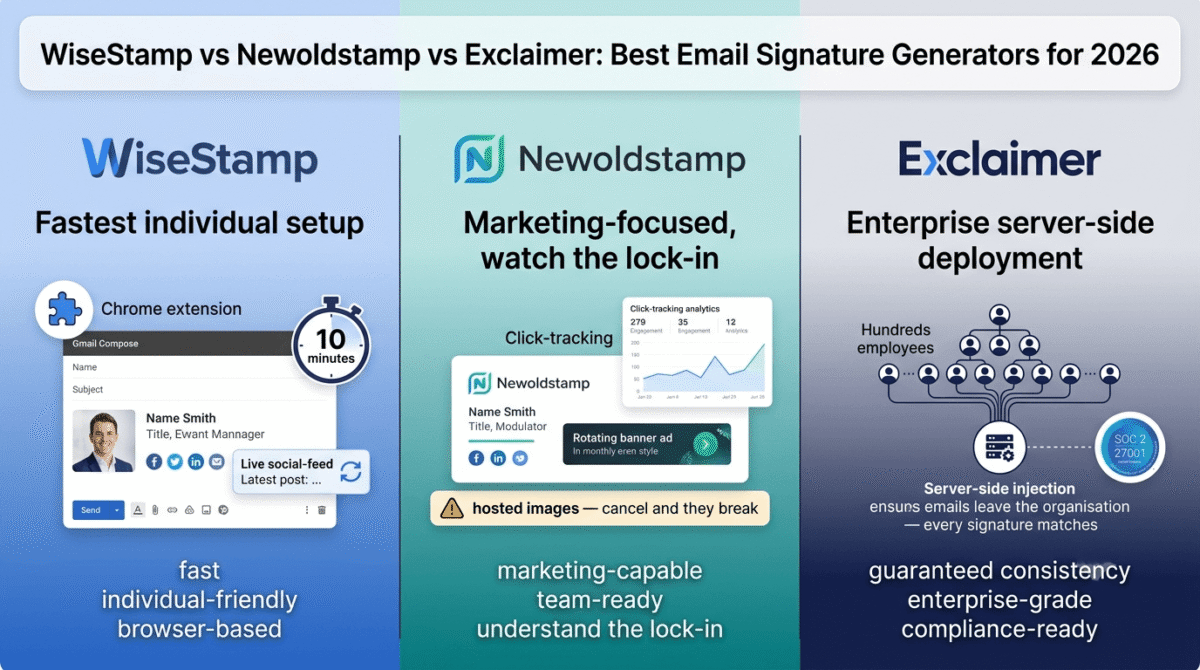
An email signature is doing quiet marketing work on every email you send. A freelancer pitching a new client, a small business following up on a proposal, a blogger corresponding with a brand for a sponsorship, the signature at the bottom of that email either reinforces professionalism or subtly undermines it. A name, a title, a logo, a website link, and a profile photo take thirty seconds to read and several months of inconsistency to fix once a team is sending different formats from different accounts.
The category of tools that solve this problem, email signature generators and management platforms, splits into three distinct use cases in 2026. Individual professionals and freelancers need a polished signature fast, without IT involvement or a team account. Small and medium businesses need consistency across a team, with some marketing capability built in. Enterprises need server-side deployment, directory sync, and compliance certifications. I tested WiseStamp vs Newoldstamp vs Exclaimer for 30 days across all three scenarios. Here is the honest comparison, including a subscription lock-in detail about one of these tools that is worth knowing before you enter a credit card.
Table of Contents
How We Tested These Tools
Every platform was evaluated against five criteria:
- Setup speed, how long does it take from creating an account to having a working professional signature installed in Gmail or Outlook
- Design quality and template range, does the output look intentional and brand-consistent, or generic
- Team management capability, how easily can an admin deploy and update signatures across multiple users
- Pricing transparency, is the actual cost structure clear upfront, including what happens to signatures if you cancel
- Email client compatibility, does the signature render correctly in Gmail, Outlook, Apple Mail, and on mobile
Why Your Email Signature Matters More Than Most Professionals Treat It
Most professionals build their email signature once, usually by copying someone else’s format, manually, and then leave it unchanged for years. This creates several problems that are easy to overlook because the consequences are diffuse rather than immediate. An outdated phone number or missing LinkedIn profile costs a small amount of credibility on every outbound email. An inconsistent team signature, where one person uses a logo, another uses plain text, and a third has a completely different title format, looks disorganised to clients who email multiple people in the same company.
The case for a dedicated tool rather than manually typing a signature into your email client’s settings comes down to control and portability: a well-built signature generator produces clean HTML that renders consistently across email clients, not an image-based signature that breaks in some clients or a poorly formatted table that shifts when viewed on mobile.
WiseStamp Review: Best for Individual Professionals and Freelancers Who Want Fast Setup
Free plan: Yes, basic signature with WiseStamp branding
Starting paid price: Around $7.50–8/month for individuals (billed annually); team plans start at roughly $19/month base plus per-user charges
Best plan for most freelancers: The individual Pro plan, covers a single signature without the team plan’s base-fee overhead
Platforms: Web, browser extension (Chrome), direct integration with Gmail and Outlook
Affiliate program: Yes, WiseStamp affiliate program
WiseStamp has been in this category longer than most competitors, and its positioning has stayed consistent: the most accessible, browser-extension-based signature tool for individual professionals who want a polished result without involving IT or managing a centralized admin panel.
What WiseStamp does best
The browser extension model is WiseStamp’s defining convenience for individual users. Install once in Chrome, connect your Gmail account, and your signature appears automatically in the compose window, no HTML copying, no navigating Gmail’s settings, no manual pasting. For a freelancer who wants a working professional signature in under ten minutes, this is the lowest-friction path in this comparison.
Template variety is genuinely strong for the individual use case. WiseStamp’s library covers the full range of professional contexts, minimal text-only formats, photo-forward layouts with a headshot, icon-heavy designs for creative professionals, and industry-specific templates for realtors, lawyers, and healthcare providers among others. Customisation is visual and live-preview, meaning you see the finished result as you edit rather than toggling between an editor and a preview pane.
Social feed integration is a distinctive feature uncommon among competitors: WiseStamp can pull your latest blog post, tweet, or social update into the signature automatically, keeping the content fresh without any manual update. For a blogger who wants their signature to do passive content promotion on every outbound email, this is a genuinely useful feature that justifies WiseStamp over a generic free generator.
WiseStamp’s multi-platform support, Gmail via Chrome extension, Outlook via direct integration, and Apple Mail, covers the realistic spread of email clients a freelancer or small business owner actually uses, without needing a different tool for each.
Where WiseStamp falls short
WiseStamp’s team pricing is where the platform’s individual-first design shows its limitations. The team plan structure adds a base monthly fee on top of a per-user charge, which makes the effective per-seat cost higher than competitors designed from the start for team management, one detailed comparison found the team entry plan at roughly $19/month base plus $1/employee, meaning a team of 20 pays $39/month before any premium features, versus competitors offering full team management for a flat per-user rate from the start.
The free tier, while present, appends WiseStamp’s own branding to your signature, the “Created with WiseStamp” footer is a meaningful compromise for a professional context, since it suggests you are using a tool you cannot afford to pay for.
WiseStamp deploys signatures client-side via its browser extension rather than server-side, which means signatures may not appear consistently on mobile clients or when a user is signed into email on a browser without the extension installed, a gap that becomes more significant for a team where consistent rendering across every device matters.
WiseStamp pricing
| Plan / Tier | Price | Key Features & Capabilities |
|---|---|---|
| Free Plan | $0 | Basic signature creation, standard layout templates, clickable social icon links, manual copy-paste installation Includes mandatory “Made with WiseStamp” promotional watermark |
| Pro (Individual / Micro-Team) | ~$7.50 – $9.00 / month (annual billing) | Complete removal of WiseStamp branding, premium template gallery, custom colors & fonts, dynamic social feeds, meeting scheduler integration, and 1-click Chrome extension sync for Gmail & Outlook Web |
| Team Plan (Base + Per User) | ~$19.00 / month base + $1 / user / month | Centralized IT & marketing admin dashboard, automatic Google Workspace / Microsoft 365 directory sync, locked brand guardrails, marketing banner campaign scheduling, click analytics, and automated legal disclaimers |
Confirm current team plan per-user charges directly, the base-plus-per-user structure makes team pricing less transparent than a simple per-seat model.
WiseStamp: Pros and Cons
Pros:
- Fastest individual setup via Chrome extension, working signature in under ten minutes
- Strong template variety for individual professionals across multiple industries
- Social feed integration keeps signature content fresh automatically
- Supports Gmail, Outlook, and Apple Mail from one platform
- Freemium model lets you test before committing
Cons:
- Free tier adds WiseStamp branding, not suitable for professional external use
- Team pricing base-plus-per-user structure is less transparent than flat per-seat competitors
- Client-side extension deployment means inconsistent rendering on mobile or non-extension browsers
- Individual-first design means team management features are less mature than Newoldstamp or Exclaimer
Rating: 4.4 / 5, Best for individual freelancers and solo professionals who want the fastest possible path to a professional signature across Gmail and Outlook, without a team management requirement.
Newoldstamp Review: Best for Small Teams That Want Email Signatures as a Marketing Channel
Free plan: No, paid plans only
Starting paid price: Around $1.80–4.50 per signature per month (billed annually), depending on the plan and feature set
Best plan for most small businesses: The plan covering up to 10 signatures, which includes banner campaigns and basic analytics
Platforms: Web, with integration for Microsoft 365 and Google Workspace
Affiliate program: Yes, Newoldstamp affiliate program
Newoldstamp positions itself explicitly as an email signature marketing platform rather than a simple generator, and the product reflects that framing, its defining differentiators are banner campaigns, click tracking, and A/B testing, treating the bottom of every outbound email as real estate worth measuring.
What Newoldstamp does best
Marketing analytics within a signature tool is Newoldstamp’s clearest differentiator from WiseStamp and basic generators. Banner scheduling, rotating promotional images in the signature based on date or campaign, lets a small business run a product launch, seasonal promotion, or event announcement through every team member’s outbound email automatically. Click tracking shows how often recipients actually engage with signature links, giving a content team or small agency real data on which calls to action in their signature actually work.
Centralized team management is meaningfully stronger than WiseStamp’s team offering, with a dashboard that lets an admin create department-specific signature templates, push updates to all users in a group simultaneously, and maintain consistent branding across the entire team without requiring each user to manually install or update anything.
The per-signature pricing model is genuinely economical at small scale, a solo freelancer or two-person team pays only for the signatures they actually need, without a platform base fee adding overhead before the first seat is counted.
Template variety is strong, with a large library covering industry-specific formats and a drag-and-drop editor that produces clean HTML rather than image-based signatures, which is the correct approach for both rendering consistency and email deliverability.
Where Newoldstamp falls short
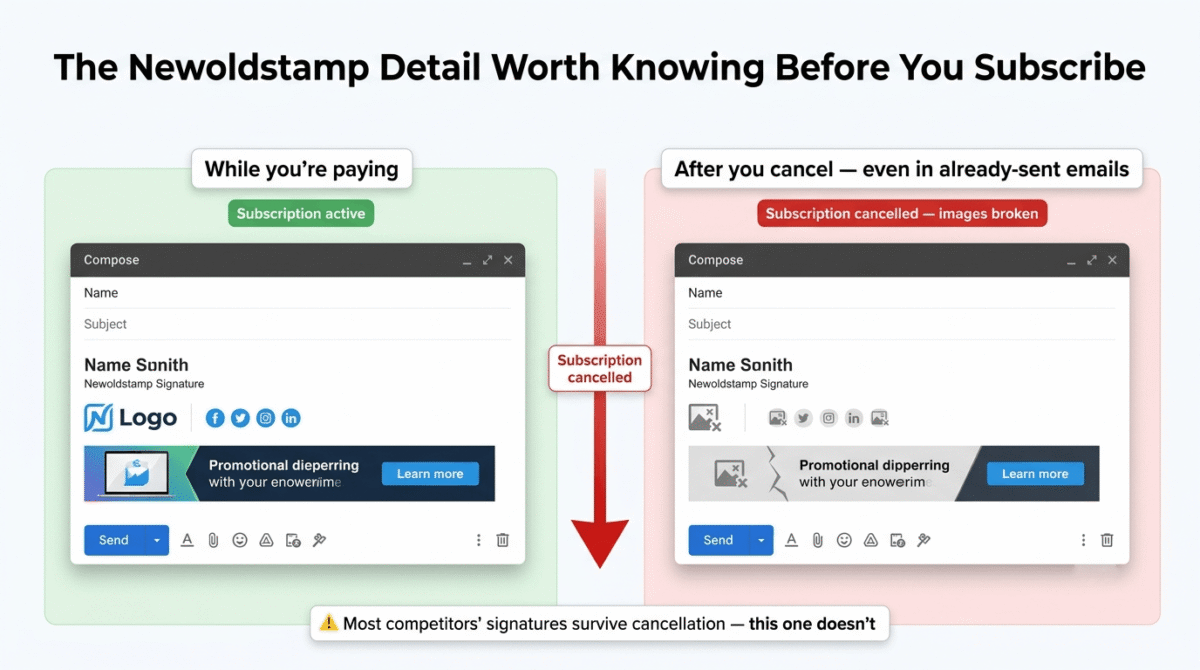
This is the section that requires the most direct attention, because one of Newoldstamp’s technical decisions creates a meaningful and unusual lock-in risk that is worth stating plainly: Newoldstamp’s signatures use hosted images that stop rendering when your subscription expires. Most competitors write signature data directly to the user’s email account, meaning the signature continues to work normally after cancellation. Newoldstamp’s hosted image approach means that if you cancel your subscription, previously sent emails will show broken image slots in recipients’ inboxes, and the signatures on active accounts will stop displaying correctly.
This is not a hidden fee, it is a disclosed technical consequence of the platform’s architecture. But it is unusual in this category, and it creates a meaningful switching cost that is worth understanding before you build a team’s signature infrastructure on top of it. Treat a Newoldstamp subscription as a long-term commitment rather than a month-to-month trial, and factor the migration effort into your evaluation if you are comparing it against competitors whose signatures survive cancellation intact.
The per-signature pricing can accumulate less predictably than a flat per-user rate for teams with high staff turnover, each new team member’s signature is a new per-signature cost, and managing a roster of people leaving and joining requires active subscription management to avoid paying for signatures no longer in use.
There is no free tier, making the trial period the only no-cost evaluation window before committing to a paid plan.
Newoldstamp pricing
| Plan Tier | Price | Signatures | Key Features & Capabilities |
|---|---|---|---|
| Entry Tier (Annual) | ~$1.80 – $4.50 / signature / month | Varies by team package tier (e.g., 10, 25, 50, or 100 seats) | Centralized template management, clickable CTA banner campaigns, scheduled promo rotations, basic click/link analytics, standard social icons, and 1-click Google Workspace / MS 365 integration |
| Higher / Enterprise Tiers | Scales with features / volume custom quote | Scalable enterprise volume (100+ seats) | A/B testing for banner variations, deep engagement analytics, department-level campaign targeting, Single Sign-On (SSO via SAML 2.0 / Okta / Azure AD), SCIM directory provisioning, dedicated account support, and SLA guarantees |
Confirm current per-signature rates and included features directly, pricing has varied across sources and plans are updated periodically.
Newoldstamp: Pros and Cons
Pros:
- Marketing analytics, banner scheduling, click tracking, and A/B testing built in
- Strongest centralized team management for small and medium businesses in this comparison
- Per-signature pricing is economical at small scale
- Large template library with drag-and-drop HTML output
- Integrates with Microsoft 365 and Google Workspace for centralized deployment
Cons:
- Signatures stop working on cancellation due to hosted image architecture, meaningful lock-in risk
- No free tier, trial only before committing to payment
- Per-signature pricing accumulates less predictably than flat per-user models for growing teams
- Smaller market presence than WiseStamp or Exclaimer means fewer third-party reviews and community resources
Rating: 4.3 / 5, Best for small and medium businesses that want to treat email signatures as an active marketing channel, provided you go in understanding the hosted-image cancellation consequence and commit accordingly.
Exclaimer Review: Best for Enterprise Teams That Need Server-Side Deployment and Compliance Certifications
Free plan: No, free trial, with pricing starting around $0.90/user/month for enterprise annual billing
Starting paid price: Enterprise pricing; minimum user counts apply; confirm current rates and minimums directly
Best plan for most enterprises: The tier covering your actual user count, with Microsoft 365 or Google Workspace integration matched to your infrastructure
Platforms: Web, with server-side deployment for Microsoft 365 and Google Workspace
Affiliate program: Check current availability directly
Exclaimer occupies a genuinely different position in this comparison than WiseStamp or Newoldstamp: it is an enterprise email signature management platform, not a generator individuals use to style their own signature. The distinction matters because the problem Exclaimer solves, ensuring 500 or 5,000 employees all have an identical, brand-compliant, legally correct signature on every email from every device, is not something a browser extension or a per-signature subscription handles reliably at scale.
What Exclaimer does best
Server-side signature injection is Exclaimer’s defining technical capability. Rather than writing a signature to each user’s email client and hoping they do not modify it, Exclaimer appends signatures after an email leaves the user’s device, before it is delivered. This means the signature is consistent on every outbound email regardless of which device, app, or email client the sender used, phone, tablet, desktop, webmail, or any other access point. For an organisation where legal disclaimers or regulatory disclosures must appear on every external email without exception, this is the only reliable deployment model.
Security certifications, SOC 2 Type 2 and ISO 27001/27018, place Exclaimer in a compliance tier that neither WiseStamp nor Newoldstamp currently matches, and which is a genuine prerequisite for enterprise procurement in regulated industries including finance, healthcare, and legal services.
Directory sync with Azure Active Directory and Google Directory means that when an employee’s details change, a new title, a new phone number, a departmental transfer, their email signature updates automatically without any manual action from an admin or the employee. At enterprise scale, this automation eliminates an ongoing administrative burden that becomes significant once a company has hundreds of employees.
Exclaimer’s legal disclaimer management, automatically appending required disclosures to external emails based on configurable rules, directly addresses a compliance requirement most enterprises already have independent of any signature tool, bundling two administrative tasks into one platform.
Where Exclaimer falls short
Exclaimer’s editor is consistently described across independent reviews as one of the weaker parts of the product, described as table-like and unintuitive, particularly relative to the drag-and-drop simplicity of WiseStamp’s or Newoldstamp’s editors. For an enterprise IT administrator, this may be an acceptable tradeoff for the deployment control Exclaimer provides; for a marketing manager who wants to design and update signatures without technical help, it is a real friction point.
Pricing is enterprise-tier and not meaningfully competitive for small teams, Exclaimer’s minimum user counts and per-user pricing make it an overpay for a team of fewer than 50 people, where either Newoldstamp’s or WiseStamp’s team plans offer comparable management capability at significantly lower cost.
Setup complexity is higher than any other tool in this comparison. Server-side deployment and Active Directory configuration are not tasks a non-technical business owner completes in an afternoon, Exclaimer is genuinely designed for organisations with IT support rather than solo freelancers or small teams managing their own setup.
Exclaimer pricing
| Plan Tier | Price | Key Features & Architecture |
|---|---|---|
| Enterprise (Annual) | ~$0.90+ / user / month (volume scaled) | Server-side deployment (mail flow rules), centralized directory synchronization (Entra ID / Google Cloud Identity), SOC 2 Type II & ISO 27001 compliance, multi-domain control, dynamic HTML template builder |
| Custom Enterprise | Quote-based / tailored SLA & terms | Jurisdiction-aware legal disclaimer management, advanced compliance automation, dedicated Customer Success Manager (CSM), custom data residency/tenant isolation, SCIM auto-provisioning, and 99.99% uptime guarantees |
Confirm current minimum user requirements and pricing tiers directly, enterprise pricing typically varies based on organisation size and feature requirements.
Exclaimer: Pros and Cons
Pros:
- Server-side signature injection guarantees consistency on every device and email client
- SOC 2 Type 2 and ISO 27001/27018 compliance certifications for regulated industries
- Automatic directory sync eliminates manual signature updates when employee details change
- Legal disclaimer management bundled with signature management
- Best fit for 500+ user organisations with IT infrastructure and compliance requirements
Cons:
- Editor described across independent reviews as unintuitive and table-like compared to competitors
- Enterprise pricing and minimum user counts make it an overpay for small teams
- Setup complexity requires IT involvement, not suitable for self-service deployment
- Overkill for individual professionals, freelancers, or teams under roughly 50 people
Rating: 4.3 / 5, Best for enterprise organisations that need guaranteed server-side signature consistency and formal compliance certifications. Wrong choice for anyone without IT support or a genuine enterprise-scale requirement.
Head-to-Head Comparison
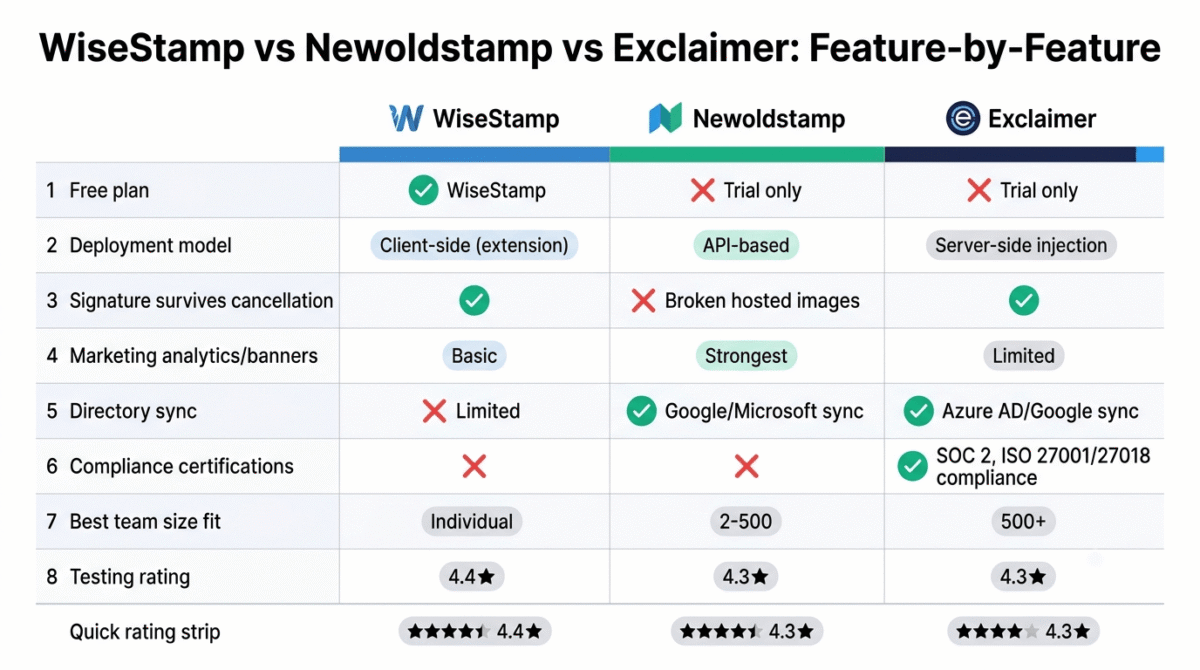
| Criteria / Metric | WiseStamp | Newoldstamp | Exclaimer |
|---|---|---|---|
| Free plan | Yes Includes WiseStamp promotional watermark | No 7-day free trial only | No 14-day free trial only |
| Individual pricing | ~$7.50 – $9.00 / month Annual billing for individuals | ~$1.80 – $4.50 / sig / month Sold in seat packages | Not designed for individuals Enterprise focus with seat minimums |
| Team pricing model | Base fee + per-user fee Flat admin fee + user licenses | Per-signature tier packages Bucketed pricing (10, 25, 50 seats) | Per-user enterprise tiers Volume discounts for 100+ seats |
| Deployment model | Client-side Browser extensions & web apps | API-based push Google Workspace & MS 365 APIs | Server-side injection Exchange / MS 365 transport rules |
| Post-cancellation survival | Yes Static HTML remains intact in email client | No CDN-hosted images & banners break | Yes Signatures stamped into sent mail history |
| Marketing & analytics | Basic Click tracking & simple banners | Strongest of the three Scheduled banners, A/B testing & CTR | Strong CRM-targeted dynamic campaigns |
| Directory sync | Limited Basic Google/Microsoft connection | Yes Auto-sync with Google & Microsoft 365 | Best in class Deep Entra ID (Azure AD) & SCIM sync |
| Compliance certifications | None listed Standard GDPR compliance | None listed Standard GDPR compliance | SOC 2 Type II, ISO 27001/27018 Enterprise security certified |
| Editor quality | Best for individuals Intuitive WYSIWYG & social widgets | Good Structured drag-and-drop templates | More complex Steeper learning curve for admins |
| Best for | Freelancers & Solopreneurs Quick visual setup & personal branding | SMB Marketing Teams Centrally managed banner campaigns | Enterprise (100–500+ users) IT governance, legal & compliance |
Which Tool Should You Choose?
Choose WiseStamp if:
You are a freelancer, solo professional, or blogger who wants a professional email signature in Gmail or Outlook within minutes, without IT involvement or a team admin panel. The browser extension setup is genuinely the fastest path to a working result, and the social feed feature is a real differentiator for anyone who wants their signature to passively promote their latest content.
Choose Newoldstamp if:
You run a small or medium business and want centralized team signature management combined with real marketing analytics, banner campaigns, click tracking, and A/B testing. Go in understanding the hosted-image cancellation consequence explicitly, and treat the subscription as a long-term commitment rather than something to trial casually.
Choose Exclaimer if:
Your organisation has 500 or more employees, requires server-side signature deployment to guarantee consistency across every device, and operates in a regulated industry where compliance certifications are a procurement requirement. Do not evaluate Exclaimer if you are a small team without IT support, it is built for a genuinely different scale and technical environment.
The Freelancer and Small Business Setup Recommendation
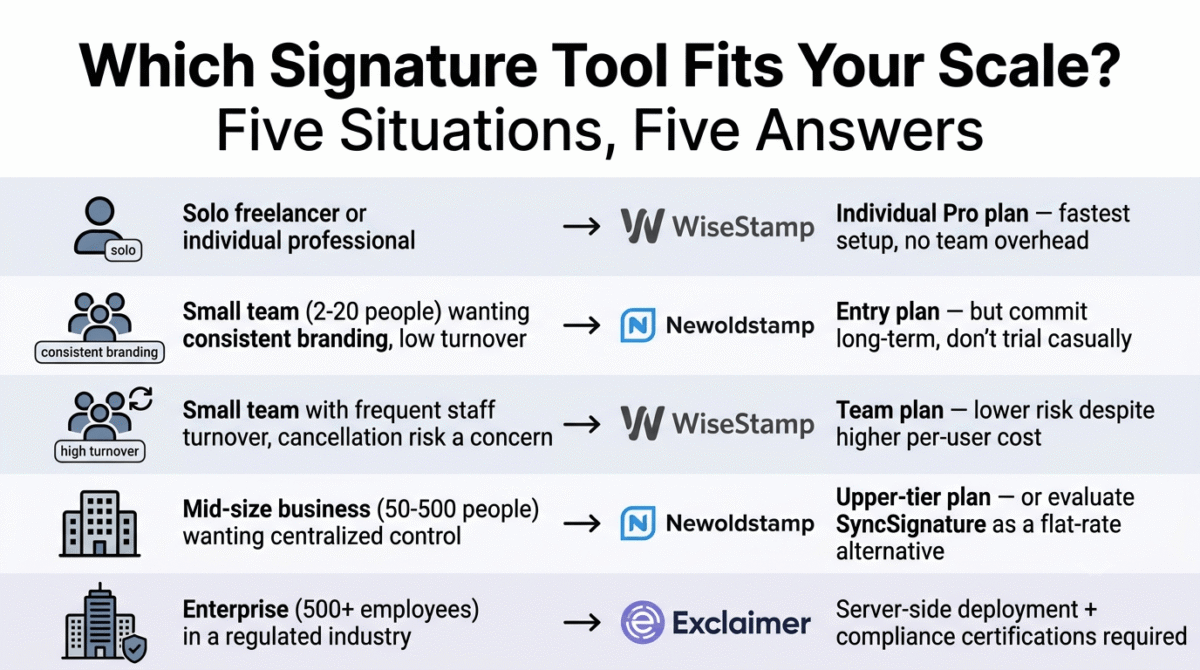
Based on 30 days of testing across individual and team workflows, here is the recommended setup by situation:
Solo freelancer or individual professional: WiseStamp’s individual Pro plan. The browser extension, template quality, and social feed integration make it the most immediately useful tool for this exact use case, and the individual plan avoids the team pricing overhead entirely. See our full freelancer toolkit roundup for the rest of the stack a solo professional typically runs alongside a polished email signature.
Small team (2–20 people) wanting consistent branding: Newoldstamp’s entry plan, with the explicit understanding that this is a long-term commitment rather than a casual trial, given the hosted-image cancellation consequence. If your team turns over frequently and you are concerned about ongoing subscription management, WiseStamp’s team plan is the lower-risk alternative despite the higher effective per-user cost.
Small team that wants to use the signature as a marketing tool: Newoldstamp, specifically for the banner campaigns and click tracking that WiseStamp’s team plan does not match at this depth.
Mid-size business (50–500 people) wanting centralized control without full enterprise complexity: Newoldstamp at the upper end, or evaluate SyncSignature as a flat-per-user alternative that several independent comparisons identified as competitive on price and features for this specific team size range.
Enterprise (500+ employees, regulated industry): Exclaimer, for the server-side deployment and compliance certifications that no other tool in this comparison provides.
Final Verdict
WiseStamp is the best email signature tool for most of RateTheTool’s core audience, freelancers, solo bloggers, and individual professionals who want a professional signature working in Gmail or Outlook quickly, without navigating enterprise software or building a team admin workflow.
Newoldstamp is the best choice for small and medium businesses that want centralized team management combined with genuine marketing analytics, and who are making a deliberate, long-term platform commitment rather than testing casually. The hosted-image cancellation consequence is the most important fact to understand before subscribing.
Exclaimer is the right choice for enterprise organisations that need the compliance certifications, server-side deployment, and directory sync that no smaller tool in this comparison provides, and the wrong choice for virtually everyone else.
Ratings:
- WiseStamp: 4.4 / 5
- Newoldstamp: 4.3 / 5
- Exclaimer: 4.3 / 5
Frequently Asked Questions
What is the best email signature generator in 2026?
WiseStamp is the best choice for individual professionals and freelancers who want fast setup via a browser extension. Newoldstamp is the stronger choice for small businesses wanting centralized team management and marketing analytics. Exclaimer is the best choice for enterprise organisations requiring server-side deployment and compliance certifications.
Is there a genuinely free email signature generator worth using?
HubSpot’s free email signature generator requires no account and produces clean, mobile-responsive HTML output, a solid zero-cost option for basic needs. See our HubSpot vs Salesforce vs Zoho comparison if you’re also evaluating HubSpot for its broader CRM capabilities beyond the free signature tool. WiseStamp’s free tier is functional but appends its own branding, which is a compromise in a professional context. For a completely free, no-branding result, HubSpot’s free tool is the most commonly recommended option across independent comparisons, though it lacks the team management and marketing features of the paid tools covered in this post.
What happens to my Newoldstamp signature if I cancel?
Newoldstamp uses hosted images in its signatures, meaning the images stop rendering when your subscription expires. Unlike most competitors, which write signature data directly to user accounts so the last-deployed signature continues to work after cancellation, Newoldstamp’s signatures will display broken image slots in recipients’ inboxes once the subscription is inactive. This is the most important distinction to understand before committing to Newoldstamp, particularly for a team that may want to switch tools later.
Should I use an image-based email signature or an HTML one?
HTML is the correct choice for nearly all professional use cases. Image-based signatures, including those exported from Canva and pasted as a single image, require external server calls to render, break entirely when images are blocked by a recipient’s email client, and increase spam scores in cold outreach contexts. See our Canva Pro vs Adobe Express comparison if design work is what you actually need Canva for, just not for building the signature itself. A well-built HTML signature renders as text and formatted elements natively in every email client, displaying correctly even when images are disabled.
What is the difference between client-side and server-side email signature deployment?
Client-side deployment writes the signature into the user’s email client or browser, WiseStamp’s Chrome extension is a client-side approach, meaning the signature appears in the compose window on that specific browser. Server-side deployment, used by Exclaimer, appends the signature after the email leaves the user’s device, guaranteeing it appears on every outbound email regardless of which device, app, or email client was used to send it. Server-side is more reliable for enterprise consistency requirements but requires more complex setup.
Can I use the same email signature tool for Gmail and Outlook?
WiseStamp supports both Gmail and Outlook through different mechanisms, Chrome extension for Gmail and direct integration for Outlook. Newoldstamp integrates with both Google Workspace and Microsoft 365 through API-based deployment. Exclaimer handles both platforms at enterprise scale. If your team uses both platforms simultaneously, verify that your chosen tool handles both from a single admin dashboard before committing, as some competitors in this category are primarily built for one platform or the other. If you haven’t settled on Gmail or Outlook as your primary email client yet, see our Outlook vs Thunderbird vs Spark comparison before choosing a signature tool built around one or the other.
How long does it take to set up a professional email signature?
For an individual using WiseStamp, setup takes approximately ten minutes from account creation to a working signature in Gmail. Team deployment through Newoldstamp takes longer, typically an afternoon for a non-technical admin to configure templates and push them to a team through a Google Workspace or Microsoft 365 integration. Enterprise Exclaimer deployment requires IT involvement and can take days depending on infrastructure complexity.








