A QR code printed on a restaurant menu, a business card, or a thousand product labels seems like a permanent, set-it-and-forget-it piece of design, until the link behind it needs to change, or worse, until the subscription powering it lapses and every printed copy silently stops working. This single risk is the most important thing to understand about this category before generating a single code, and it is a detail several popular tools do not make obvious until after you have already printed and distributed something.
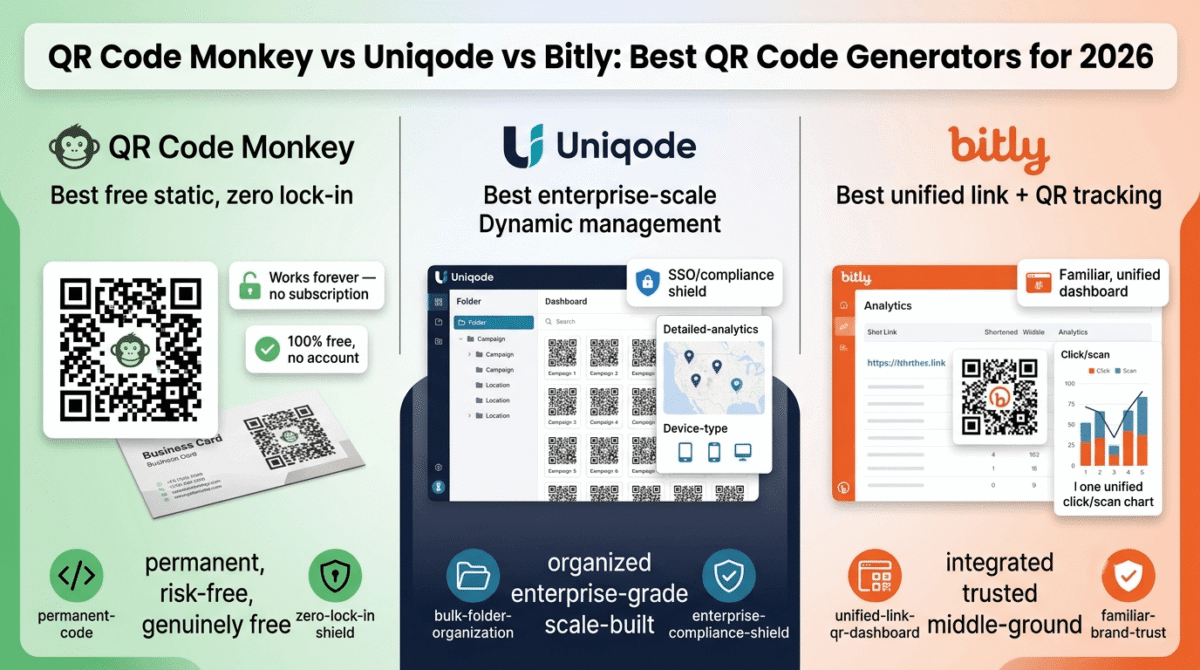
QR code generators in 2026 split cleanly into two categories that get conflated constantly: tools that generate a permanent, unchangeable code pointing directly at a fixed destination, and tools that generate an editable, trackable code that depends on an ongoing service staying active. I tested QR Code Monkey vs Uniqode vs Bitly for 30 days, generating real codes for both temporary and permanent use cases. Here is the honest comparison. If you want a second comparison covering a different set of competitors, see our QR Code Generator vs Uniqode vs QR TIGER review for more options in the same category.
Table of Contents
How We Tested These Tools
Every platform was evaluated against five criteria:
- Static vs. dynamic code clarity, does the tool make it obvious which type of code you are creating, and what happens if you stop paying
- Design customization, can you produce a branded code that does not look like a generic black-and-white square
- Analytics depth, for dynamic codes, what do you actually learn about who scanned, when, and from where
- Free tier honesty, what can you accomplish without paying, and are the limits disclosed clearly upfront
- Long-term reliability for printed materials, the single most important practical question for anyone putting a code on something physical
The One Distinction That Matters More Than Any Feature in This Category
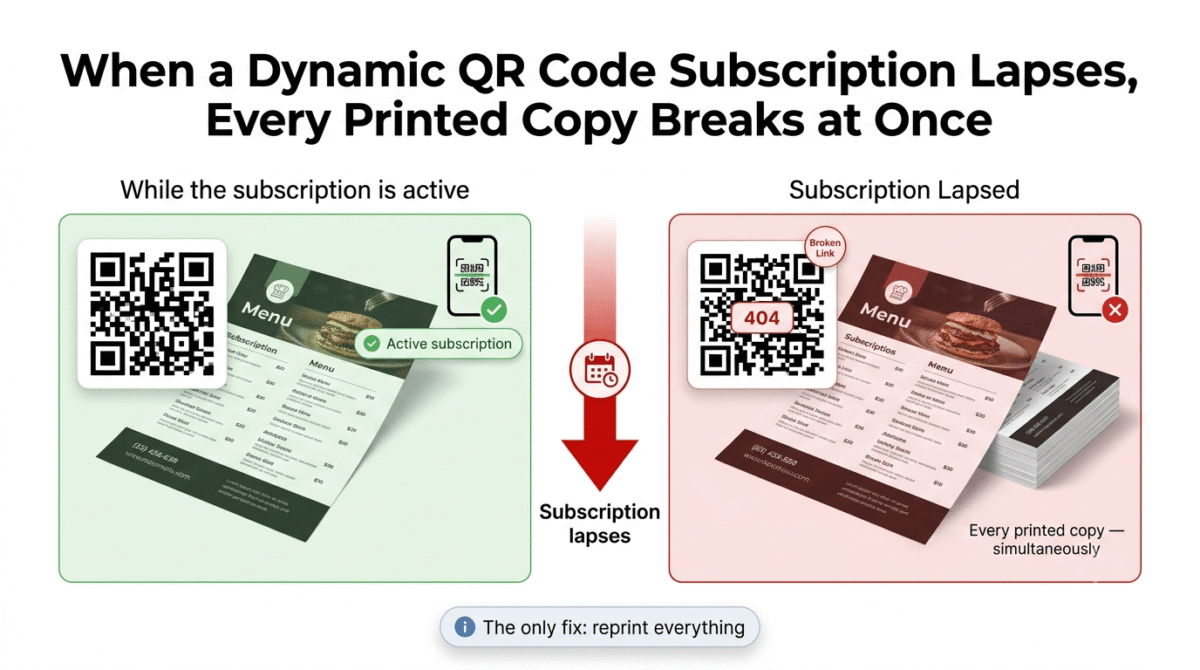
Before comparing specific tools, it is worth being unusually direct about something the category as a whole does not always make clear: a static QR code encodes a destination directly into the code’s pattern, permanently, with no ongoing service required, once generated, it works forever, with no subscription, no expiration, and no dependency on the company that generated it staying in business. A dynamic QR code instead encodes a short redirect link, which means the company’s server has to keep working, and your subscription has to keep being paid, for the code to keep functioning at all.
This distinction matters enormously for anything printed on a physical object. If you put a dynamic QR code on packaging, business cards, or signage, and your subscription to the platform that created it lapses, every single printed copy of that code stops working simultaneously, with no way to fix it short of reprinting everything. This is a genuine, well-documented risk in this category, not a hypothetical edge case, and it is the single most important thing to understand before choosing a tool for anything you cannot easily reprint.
QR Code Monkey Review: Best Free Static QR Code Generator With No Account Required
Free plan: Yes, completely free, unlimited static codes, no account or watermark
Starting paid price: No paid tier for the core static generation tool itself
Best for: Permanent destinations, a homepage, a fixed PDF, a contact card, where the link will never need to change
Platforms: Web
Affiliate program: Limited, confirm current availability directly
QR Code Monkey occupies a clear, useful niche in this category: it does one thing, generate a high-quality, customizable static QR code, completely free, with no account, no watermark, and no subscription ever required for that core function.
What QR Code Monkey does best
Unlimited free static codes with genuine design customization is QR Code Monkey’s defining strength. You can adjust colors, add a logo, and choose from several pattern styles, producing a code that looks intentionally branded rather than a generic black-and-white grid, all without creating an account or paying anything.
Because the codes are static, there is no ongoing dependency on QR Code Monkey as a company. Once you generate and download the code, it works indefinitely, even if the company shut down tomorrow, the destination is baked directly into the code’s pattern, not routed through a server that needs to keep running.
High-resolution export options, including formats suitable for professional printing, make QR Code Monkey a genuinely capable tool for anyone designing print materials, not just a quick web-only generator.
The complete absence of a paywall for the core feature means there is no risk of a surprise charge, no trial that auto-renews, and no feature gate hiding behind a “free” label that turns out to require payment at the final step, a refreshing contrast to several patterns we have flagged in other software categories on this site.
Where QR Code Monkey falls short
Static codes cannot be edited after printing. If the destination URL changes, your website migrates, a campaign page gets taken down, a phone number changes, the QR code on every printed item becomes permanently broken, with the only fix being a full reprint. A stable, long-term domain registrar choice reduces how often ‘your website migrates’ actually happens in the first place, see our Namecheap vs GoDaddy vs Porkbun comparison. This is not a flaw in QR Code Monkey specifically; it is the inherent tradeoff of choosing a static code for any use case where the destination might change.
There is no scan tracking or analytics of any kind with a static code, you have no way to know how many people scanned it, when, or from where, which matters for any marketing use case where measuring engagement is part of the goal.
QR Code Monkey offers no bulk generation tools for creating large quantities of unique codes at once, for a business needing hundreds or thousands of individual codes (unique product codes, individual employee business cards), a platform built for bulk creation will be considerably more efficient.
QR Code Monkey: Pros and Cons
Pros:
- Completely free, unlimited static codes with genuine design customization
- No account, watermark, or subscription required
- High-resolution exports suitable for professional printing
- Zero ongoing dependency risk, codes work forever once generated
- No paywall surprises of any kind for the core feature
Cons:
- Static codes cannot be edited after printing, a destination change means a full reprint
- No scan tracking or analytics whatsoever
- No bulk generation for creating many unique codes at once
- Not suited to any use case where you want to measure engagement
Rating: 4.4 / 5, Best free tool for permanent destinations where the link will never change and tracking is not required. The right default choice for most one-off blogger and small business use cases.
Uniqode Review: Best for Businesses Needing Enterprise-Grade Dynamic Code Management at Scale
Free plan: Limited trial; core dynamic features require a paid plan
Starting paid price: Plans reportedly starting around $5/month at the lowest tier, scaling to $49+/month for full dynamic features and analytics
Best for: Agencies and businesses managing large numbers of dynamic codes across campaigns, locations, or teams
Platforms: Web
Affiliate program: Yes, confirm current terms directly
Uniqode, formerly known as Beaconstac before a 2023 rebrand, positions itself explicitly as the security-first, enterprise-grade option in this category, built for organizations managing QR codes at real scale, with the governance and compliance features that scale demands.
What Uniqode does best
Enterprise-grade security and compliance, including SSO and relevant compliance certifications, make Uniqode a genuinely appropriate choice for larger organizations with formal procurement and security review requirements that a simpler consumer tool would not satisfy.
Bulk generation and folder-based organization let a team create and manage potentially thousands of dynamic codes across different campaigns, locations, or team members from a single centralized dashboard, a meaningfully different use case than a blogger or solo freelancer generating one or two codes occasionally.
Detailed analytics, including scan location, device type, and time of scan, give marketing teams genuine insight into how a QR code campaign is performing, well beyond a simple scan count. Pairing that scan data with website analytics on the landing page itself completes the picture, see our Google Analytics vs Hotjar vs Matomo comparison.
Direct integrations with tools like Salesforce and Zapier let Uniqode plug into an existing business workflow, automating what happens after a code is scanned rather than treating the QR code as an isolated, standalone asset.
Where Uniqode falls short
The pricing, particularly for full dynamic features and analytics, is reported as escalating quickly, entry tiers exist around $5/month, but the features most businesses actually want (dynamic codes, full analytics) push the realistic cost considerably higher, with some sources citing roughly $49/month for that tier of functionality.
The interface and overall feature set are widely described as overwhelming for smaller teams or individuals who just want a simple QR code, Uniqode is built for an enterprise buyer’s needs, and that complexity shows up as friction for anyone with a simpler, smaller-scale use case.
Because Uniqode’s core value is dynamic codes, the lock-in risk described earlier in this post applies directly here: any code generated through Uniqode depends on your subscription remaining active. If you print Uniqode-generated codes on physical materials and later let the subscription lapse, those codes stop functioning, a risk worth weighing seriously against the benefit of editability and tracking before committing to any dynamic QR platform for a permanent physical application.
The Beaconstac-to-Uniqode rebrand has created some lingering confusion in search results and reviews, with older content still referencing the previous name, worth being aware of so you are confident you are evaluating current information rather than outdated pricing or features.
Uniqode pricing
| Plan | Price | Key features |
|---|---|---|
| Entry tier | ~$5 / month (billed annually) | Basic dynamic QR codes (2–15 active), editable destination URLs, standard scan analytics (30–90 day retention), custom colors & basic logo placement |
| Mid / Higher tiers | Up to ~$49+ / month | Expanded dynamic codes (250+), full geo-location & device analytics, bulk CSV generation, custom white-label domain, Google Analytics / Meta pixel tracking, SOC 2 & GDPR compliance |
Pricing has been reported inconsistently across sources and has shifted since the Beaconstac rebrand, confirm current tiers directly on Uniqode’s site before committing.
Uniqode: Pros and Cons
Pros:
- Enterprise-grade security and compliance features (SSO, relevant certifications)
- Strong bulk generation and centralized management for large code volumes
- Detailed analytics including location, device, and scan time
- Direct integrations with Salesforce, Zapier, and other business tools
- Genuinely built for scale, not adapted from a simpler consumer tool
Cons:
- Pricing escalates quickly for the features most businesses actually need
- Interface and feature set can overwhelm smaller teams or individual users
- Subject to the same dynamic-code lock-in risk as any subscription-dependent QR platform
- Rebrand from Beaconstac has created some search and review confusion
- Overkill for a blogger or freelancer with a handful of simple QR code needs
Rating: 4.2 / 5, Best for agencies and larger businesses managing QR codes at real scale with genuine analytics and compliance needs. Significant overkill, and meaningful ongoing cost, for a simple individual use case.
Bitly Review: Best for Combining Link Shortening and QR Codes in One Familiar Platform
Free plan: Yes, limited free tier covering basic short links and QR codes
Starting paid price: Core plan around $10/month, Growth around $29/month for advanced analytics
Best for: Bloggers and small businesses who already use Bitly for link shortening and want QR codes managed in the same dashboard
Platforms: Web, browser extension, mobile apps
Affiliate program: Yes, Bitly affiliate program
Bitly’s QR code offering benefits from a structural advantage neither QR Code Monkey nor Uniqode can claim: it is tied to a link management platform many bloggers and marketers already use, which means QR codes and shortened links can live in the same dashboard, share the same analytics framework, and benefit from brand recognition Bitly has built over many years as a link-shortening service.
What Bitly does best
Unified analytics across short links and QR codes is Bitly’s clearest differentiator. If you are already using Bitly to shorten and track links in blog posts, social media, or email campaigns, adding QR codes to the same platform means one consistent analytics view rather than juggling a separate tool with its own reporting format. See our Buffer vs Publer vs Sprout Social comparison of social media scheduling tools if that’s the main channel you’re driving QR scans from.
Bitly’s brand recognition and long track record as a link-shortening service give its QR codes a degree of implicit trust, anyone familiar with Bitly links understands the underlying concept already, which can reduce hesitation for a less tech-savvy audience encountering a Bitly-branded QR code.
The platform’s mobile apps and browser extension make generating a quick QR code or short link convenient from wherever you are working, without needing to open a separate dedicated QR tool just for that single task.
For a blogger or small business that wants QR codes specifically tied to trackable marketing campaigns, a printed flyer pointing to a landing page, a business card linking to a portfolio, Bitly’s combination of familiarity, unified tracking, and reasonable entry pricing makes it a sensible default rather than a specialized tool.
Where Bitly falls short
Bitly’s QR-specific feature depth does not match Uniqode’s, bulk generation, advanced folder organization, and enterprise compliance features are either absent or more limited, which makes Bitly a weaker choice specifically for a business managing QR codes at real organizational scale.
Bitly’s QR codes are, like Uniqode’s, dynamic by nature when tied to the platform’s short-link infrastructure, meaning the same lock-in risk applies. A Bitly QR code printed on physical material depends on your Bitly subscription and Bitly’s service remaining active indefinitely.
The free tier’s QR code allowance is limited, and meaningful analytics depth requires the Growth plan at $29/month, a real cost for a small business that only occasionally needs trackable codes rather than an ongoing campaign infrastructure.
Bitly pricing
| Plan | Price | Key features |
|---|---|---|
| Free | $0 forever | 5 short links/month, 2 customizable QR codes/month, 2 landing pages, 30 days of basic click tracking |
| Core | ~$10 / month (billed annually) | 100 short links/month, 5 QR codes/month, custom back-halves, UTM link builder, 5 link redirects/month |
| Growth | ~$29 / month (billed annually) | 500 short links/month, 10 QR codes/month, 1 complimentary custom domain, bulk link creation via API, 4 months of analytics data |
Bitly: Pros and Cons
Pros:
- Unified analytics across short links and QR codes in one dashboard
- Strong brand recognition and long track record
- Convenient mobile apps and browser extension
- Reasonable entry pricing for bloggers already using Bitly for link shortening
- Sensible default for trackable marketing campaigns specifically
Cons:
- Less QR-specific feature depth than Uniqode for bulk or enterprise use
- Same dynamic-code lock-in risk as any subscription-dependent platform
- Free tier QR allowance is limited
- Meaningful analytics depth requires the higher-priced Growth plan
- Adds less value if you do not already use or want Bitly for link shortening
Rating: 4.3 / 5, Best for bloggers and small businesses who want QR codes and short links tracked together in one familiar, reasonably priced platform.
Head-to-Head Comparison
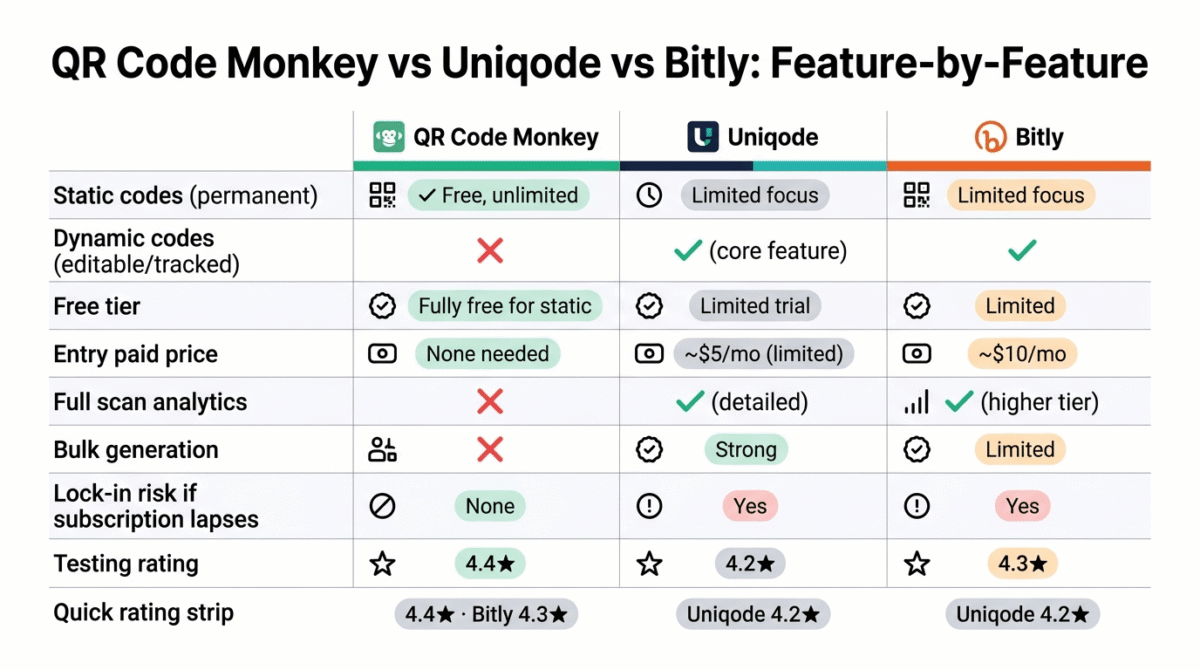
| Feature / Criteria | QR Code Monkey | Uniqode | Bitly |
|---|---|---|---|
| Static codes (permanent) | Yes, free & unlimited High-res PNG, SVG, PDF vector export | Limited focus Static output available via free tool | Limited focus Primary focus is redirect-based links |
| Dynamic codes (editable, tracked) | No Purely static generator tool | Yes Core strength with real-time target updates | Yes Natively tied to shortened link management |
| Free tier | 100% Free No sign-up required for static codes | 14-Day Free Trial Trial access to dynamic features | Yes 2 dynamic QR codes & 5 short links/month |
| Entry paid price | None needed Free forever | ~$5 / mo Starter plan ($5/mo billed annually) | ~$10 / mo Core plan ($10/mo billed annually) |
| Full analytics | None No scan counts or location metrics | Yes, detailed GPS/city scans, device, time & GA integration | Yes Click/scan counts, referrer data, location |
| Bulk generation | No Single-code generation only | Yes, strong CSV batch upload up to thousands at once | Limited / Enterprise Batch & API generation on higher tiers |
| Enterprise & compliance | No No compliance certifications | Yes SOC 2 Type II, GDPR, SSO, RBAC | Yes SOC 2 Type II, GDPR, CCPA, SSO (Enterprise) |
| Lock-in risk if subscription lapses | None Static codes work forever on print | Yes Dynamic redirect links deactivate | Yes Dynamic redirect links deactivate |
| Best for | Permanent print items, high-res vector downloads, zero-budget projects | Dedicated offline-to-online marketing, bulk print collateral, agency multi-user teams | Unified short link + QR code tracking across digital and physical channels |
Which Tool Should You Choose?
Choose QR Code Monkey if:
The destination behind your QR code will never need to change, a link to your homepage, a fixed contact card, a permanent PDF, and you do not need scan tracking. This is the right default for the majority of simple, low-stakes use cases, and it carries zero ongoing cost or lock-in risk.
Choose Uniqode if:
You are managing QR codes at genuine organizational scale, multiple campaigns, locations, or team members, and need enterprise-grade analytics, bulk generation, and compliance features. Budget for the realistic ongoing cost once you need full dynamic functionality, not just the low entry-tier price.
Choose Bitly if:
You already use, or want to use, Bitly for link shortening, and you want QR codes tracked alongside your other shortened links in one unified dashboard. This is the sensible middle ground between QR Code Monkey’s free simplicity and Uniqode’s enterprise scale.
The Blogger and Small Business Setup Recommendation
Based on 30 days of testing across both static and dynamic use cases, here is the recommended setup by situation:
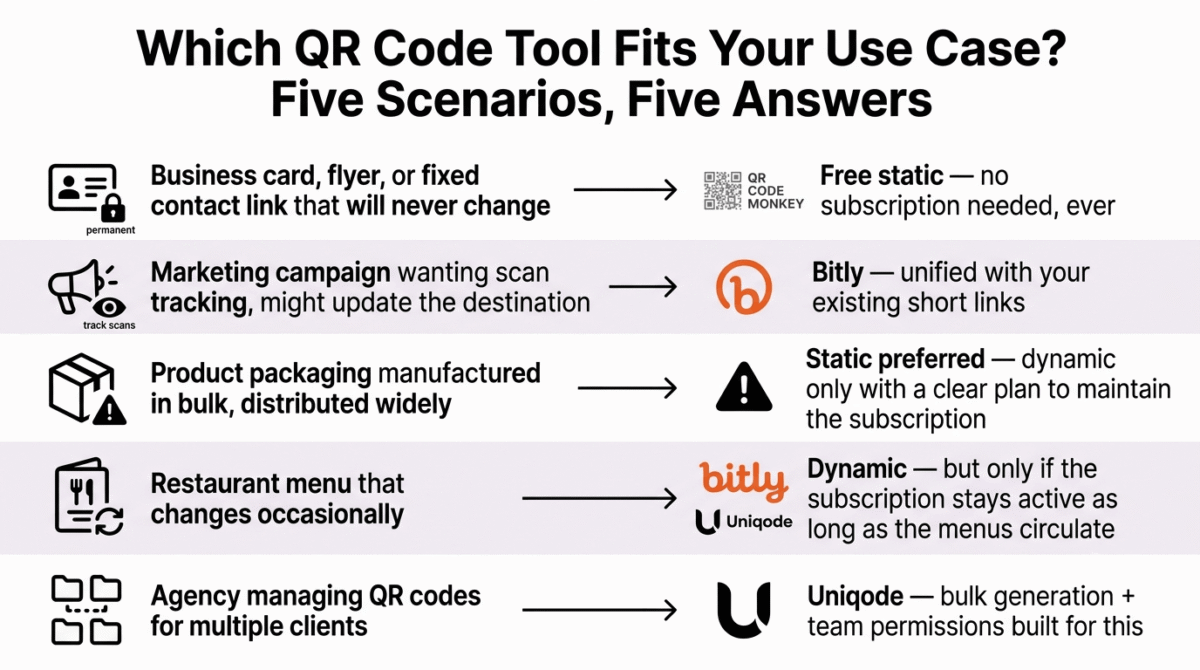
QR code for a business card, printed flyer with a permanent message, or a fixed contact link: QR Code Monkey’s free static generator. There is no reason to pay for or depend on a subscription for a destination that will never change.
QR code for a marketing campaign where you want to track scans and the destination might need updating: Bitly, if you want simple, unified tracking with your existing short links, or Uniqode if you are running the campaign across multiple locations or team members at real scale.
QR code printed on product packaging that will be manufactured in bulk and distributed widely: Use a dynamic code from Uniqode or Bitly only if you have a clear plan to maintain that subscription for the entire useful life of the packaging, and seriously consider a static code instead if the destination is genuinely permanent, to eliminate the lock-in risk entirely.
Restaurant menu QR code: This is the textbook case for understanding the static-versus-dynamic tradeoff. If your menu changes occasionally, a dynamic code lets you update the destination without reprinting physical menus, but only if you are confident you will keep that subscription active for as long as the printed menus remain in circulation.
Agency managing QR codes for multiple clients: Uniqode’s bulk generation, folder organization, and team permissions are built specifically for this exact scenario, and the cost is justified once you are managing enough codes that organization itself becomes a real task.
Final Verdict
QR Code Monkey is the best choice for the majority of simple, permanent QR code needs, it is genuinely free, has no lock-in risk whatsoever, and produces a professional, customizable result for any destination that will not need to change.
Bitly is the best choice for bloggers and small businesses wanting trackable, editable codes without enterprise complexity, its unified analytics with existing short links and reasonable pricing make it the sensible middle option in this comparison.
Uniqode is the best choice once QR code management becomes a genuine organizational task, its bulk generation, analytics depth, and compliance features justify the higher cost specifically for agencies and businesses operating at real scale.
The most important takeaway from this entire comparison is not which tool wins, but understanding which type of code your use case actually needs, choosing a dynamic code for a destination that will never change adds unnecessary cost and risk, while choosing a static code for a campaign you want to track and update leaves real value on the table.
Ratings:
- QR Code Monkey: 4.4 / 5
- Bitly: 4.3 / 5
- Uniqode: 4.2 / 5
Frequently Asked Questions
What is the best QR code generator in 2026?
QR Code Monkey is the best free choice for permanent, untracked destinations. Bitly is the best choice for bloggers and small businesses wanting trackable, editable codes in a familiar platform. Uniqode is the best choice for agencies and businesses managing QR codes at real organizational scale with enterprise compliance needs.
What is the difference between a static and dynamic QR code?
A static QR code encodes a destination directly and permanently, it works forever with no subscription or ongoing service required, but it cannot be edited after creation. A dynamic QR code encodes a short redirect link instead, which can be edited after printing and allows scan tracking, but depends entirely on the issuing platform’s service and your subscription remaining active.
What happens to a dynamic QR code if I stop paying for the subscription?
It stops working entirely. Because dynamic codes route through the issuing platform’s server rather than encoding the destination directly, a lapsed subscription breaks every printed copy of that code simultaneously, with no way to fix it short of generating new codes and reprinting all affected materials. This is one of the most important risks to understand before choosing a dynamic QR code for anything printed on physical materials with a long useful life.
Should I use a static or dynamic QR code for my business?
t depends entirely on whether the destination might change and whether you need scan tracking. Use a static code for permanent destinations like a fixed contact card or homepage link. Use a dynamic code for marketing campaigns, restaurant menus, or anything where the destination might be updated or where measuring engagement matters, but only if you are confident you can maintain the subscription for as long as the printed materials remain in use.
Are free QR code generators safe to use?
Reputable free tools like QR Code Monkey are safe for generating static codes, since the destination is encoded directly with no ongoing dependency on the service. Exercise more caution with unfamiliar QR code generators in general, regardless of price, since a malicious or compromised dynamic QR service could theoretically redirect a previously safe code to a harmful destination after the fact, a risk that does not apply to static codes once generated.
Can I track how many people scan a static QR code?
No. Static codes have no tracking mechanism, since the destination is encoded directly with no intermediate server logging the scan. If tracking matters for your use case, you need a dynamic QR code from a platform like Bitly or Uniqode, accepting the ongoing subscription dependency that comes with it.
How do I add a logo or custom design to a QR code without breaking its functionality?
Most QR code generators, including QR Code Monkey, support adding a logo and adjusting colors within the code’s design, as long as the core scannable pattern maintains sufficient contrast and error-correction integrity. Testing the final code with multiple phone cameras before printing in bulk is a reasonable precaution, since aggressive customization can occasionally reduce scan reliability.