
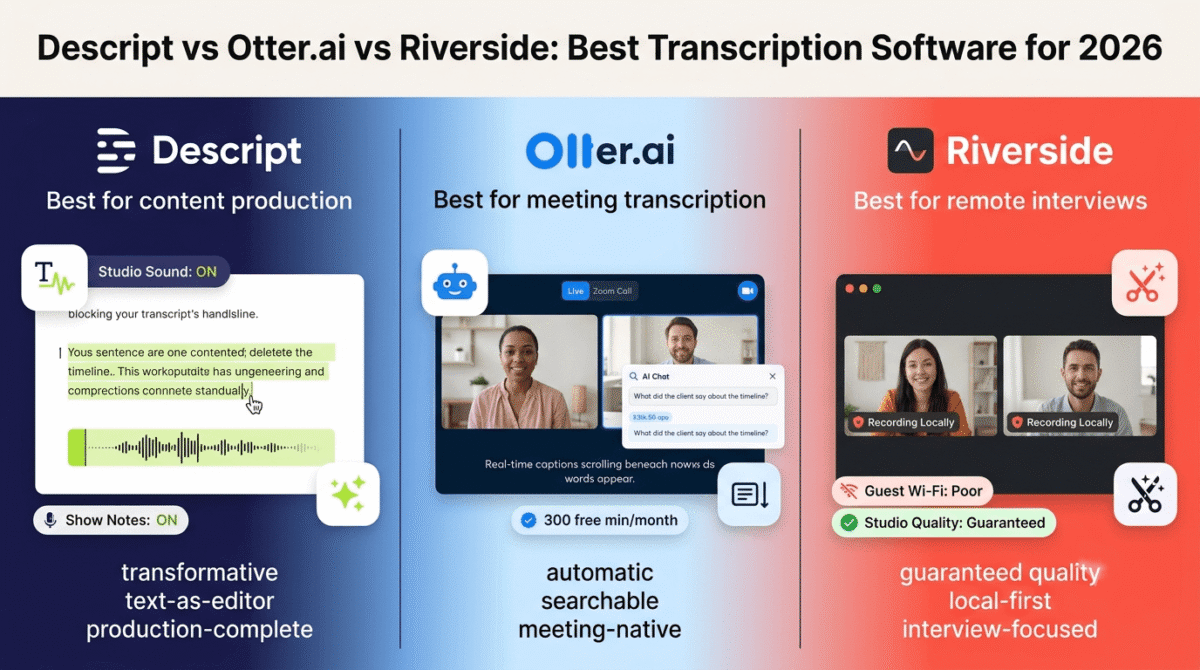
Every hour of spoken audio you produce, a podcast episode, a client interview, a YouTube video, a webinar, contains content that exists in only one form: time-locked audio that nobody can search, skim, quote, or repurpose without listening to the whole thing first.
Transcription software unlocks that content. A 45-minute podcast episode becomes a searchable text document, a blog post draft, a set of social media quotes, a newsletter excerpt, and a show notes page, all from one recording. A client interview becomes a reference document you can ctrl+F for specific decisions. A YouTube video becomes closed captions, a transcript for SEO, and a source of pull quotes for LinkedIn.
In 2026, AI transcription accuracy has crossed a meaningful threshold. Clean audio in English now transcribes at 92–96% accuracy without human review, good enough for most creator and business use cases without manual correction. The tools have also diverged sharply in what they do with that transcript: some tools stop at text output, others use the transcript as the foundation for a full content production workflow.
I tested Descript vs Otter.ai vs Riverside across 30 days of real content workflows, podcast editing, meeting transcription, interview processing, and social clip creation. Here is the honest comparison.
Table of Contents
How We Evaluated These Tools
Every platform was tested across five criteria:
- Transcription accuracy, word-for-word accuracy across different audio quality conditions: studio-quality solo recording, noisy remote interview, multi-speaker conversation, and non-native English speakers
- Workflow integration, does the tool fit naturally into existing content production workflows, or does it require significant process change to adopt?
- What you can do with the transcript, does the tool stop at text, or does it enable editing, repurposing, and publishing from the transcript itself?
- Pricing transparency, are usage limits clear before you sign up, or do media hour caps and AI credit systems create unexpected costs?
- Value for the core audience, does the tool deliver meaningful time savings for bloggers, podcasters, and content creators at a price they can justify?
Why Transcription Software Matters for Bloggers and Content Creators
Transcription software is not just a utility for people who need text from audio. For content creators, it is a content multiplication system.
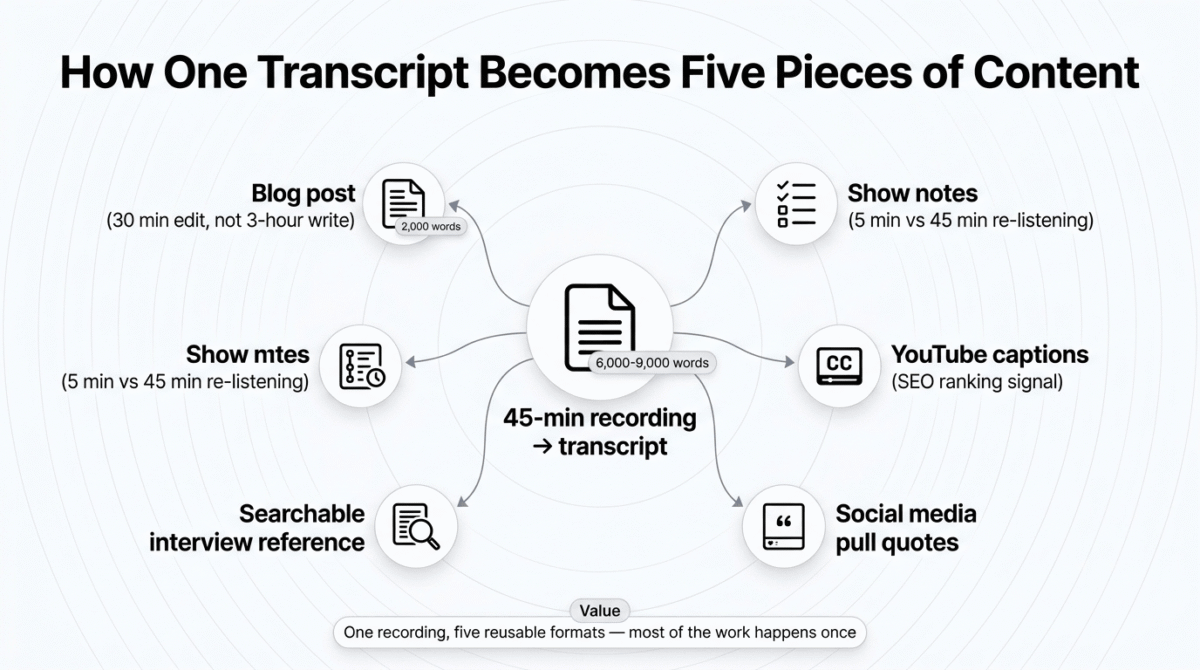
Blog posts from podcast episodes. A 45-minute podcast episode contains 6,000–9,000 words of spoken content. With a transcript, turning that into a 2,000-word blog post is a 30-minute editing job rather than a 3-hour writing project. The SEO value of that post compounds for years after the episode stops being actively promoted.
Show notes without the manual work. Show notes for a podcast episode, timestamps, key takeaways, guest quotes, resource mentions, are all extractable from a transcript with AI assistance. What previously took 45 minutes of re-listening takes 5 minutes of transcript review.
YouTube closed captions and video SEO. YouTube’s algorithm uses closed captions as a ranking signal. Auto-generated captions have 70–80% accuracy on average; a professionally transcribed SRT file is 92–96% accurate and directly improves video discoverability. The time investment to produce it drops from hours to minutes with the right tool.
Social media clip creation. The best 60-second moment from a 45-minute recording is buried in the timeline without a transcript. With a searchable transcript, finding and clipping quotable moments takes minutes rather than scrubbing through audio.
Interview and research documentation. Bloggers who interview experts for content need accurate quotes. A transcript eliminates the transcription error problem that plagues manual note-taking and allows attribution with exact wording. Transcription is one piece of that production stack, see our full content creator toolkit roundup for the rest of what pairs with it.
Descript Review: Best Transcription Software for Video and Podcast Creators
Free plan: Yes, 1 hour of transcription per month, 720p export, watermarked
Starting paid price: $16/user/month (Hobbyist, annual billing) / $24/month (monthly)
Best plan for most users: Creator, $24/user/month (annual billing)
Platforms: Web, macOS, Windows
Affiliate program: Yes, Descript affiliate program
Descript was built on a single idea that changed podcast and video editing: what if you edited audio and video by editing text? Delete a sentence from the transcript and the corresponding audio disappears from the timeline. Rearrange paragraphs and the footage follows. In 2026, that text-based editing paradigm has expanded into a full content production platform, transcription, editing, AI voice cloning, noise removal, social clip creation, and publishing, built around the transcript as the central creative document.
What Descript does best
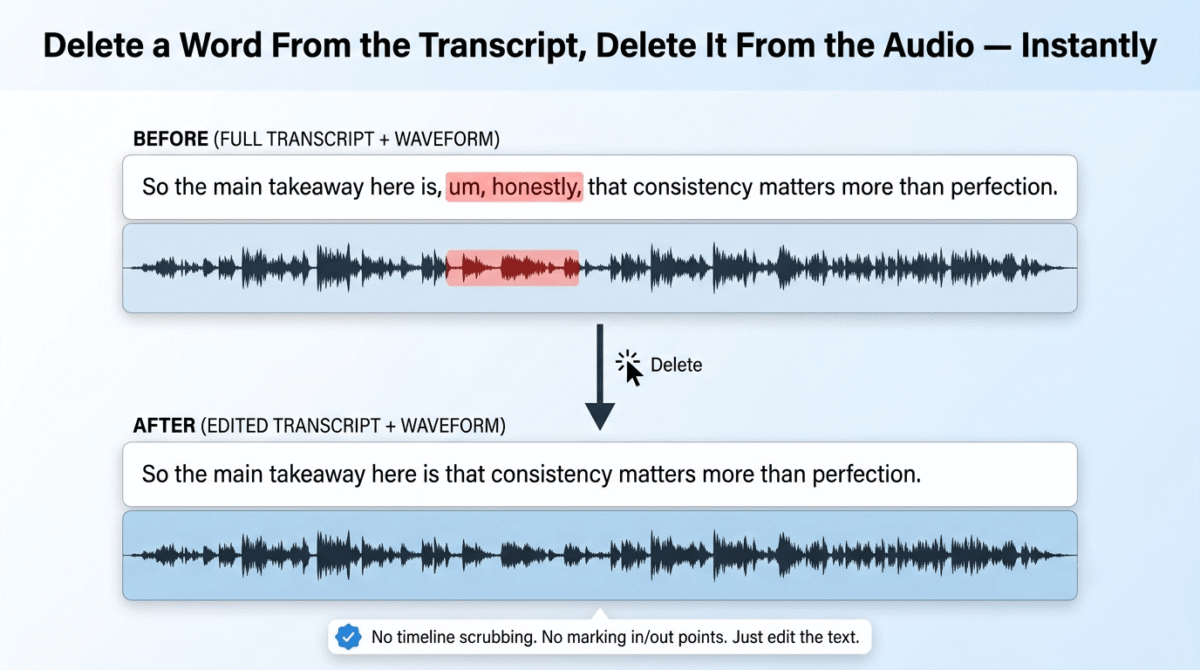
The text-based editing workflow is Descript’s defining advantage and the feature that most differentiates it from Otter.ai and Riverside. Upload a recording, receive the transcript in minutes, then edit the recording by editing the text, no timeline scrubbing, no marking in and out points, no cutting and dragging clips. Delete “um” from the transcript and the audio filler disappears. Delete an entire paragraph and the video cuts around it seamlessly. For podcasters and video creators who spend hours in audio editing timelines, this workflow change is genuinely transformative.
Underlord, Descript’s AI production assistant, operates on the transcript after generation. Ask it to identify the best 60-second clip for social media and it returns three options with timestamps. Ask it to write show notes and it produces a structured outline from the transcript content. Ask it to remove all filler words across a 45-minute recording and it removes every “um”, “uh”, “like”, and “you know” in under 30 seconds. These AI actions run from a conversational prompt interface rather than requiring manual configuration.
Studio Sound is Descript’s audio enhancement layer, a single click transforms noisy, uneven audio recorded in a non-professional environment into clean, broadcast-quality sound. In testing on a laptop microphone recording from a home office with intermittent background noise, Studio Sound produced output indistinguishable from a professionally treated recording studio. For bloggers recording audio in imperfect home environments, this feature alone justifies the Creator plan subscription.
The Overdub feature, AI voice cloning that generates audio in your voice from text, allows fixing transcript errors by typing the correct word rather than re-recording. Mispronounced a product name? Stumbled over a sentence? Type the correction and Descript generates the audio in your voice. After 10 minutes of voice training, the clone is indistinguishable from the original recording in casual listening.
Transcription accuracy on clean English audio runs at approximately 92–95%, competitive with Otter.ai and sufficient for most creator use cases without manual correction. Speaker detection handles two-person conversations reliably; accuracy drops with three or more simultaneous speakers.
Where Descript falls short
Descript is a video and audio editing platform with transcription built in, not a transcription tool with some editing features. This distinction matters for the use case decision. If you need to transcribe meeting recordings and send the text to colleagues, Otter.ai is a cleaner and cheaper solution. If you need to process recordings for publishing, Descript is in a different category.
The media hour limits are the most common source of surprise cost for new Descript users. The Hobbyist plan at $16/month includes 10 media hours per month, enough for approximately eight to ten 60-minute podcast episodes. Exceed this and you pay for additional hours or upgrade to Creator ($24/month) which includes 30 media hours, enough for daily content production. The free plan’s 1 hour per month is a genuine trial, not a functional ongoing tier for any creator publishing regularly.
AI credits, the currency for Underlord actions, Studio Sound processing, and Overdub generation, are separate from media hours on the Hobbyist plan. The 400 AI credits included monthly run out faster than most creators expect during active production sessions. The Creator plan includes unlimited AI actions, making it the functional minimum for anyone using Descript’s AI features regularly rather than occasionally.
Descript does not join live meetings or provide real-time transcription. It processes recorded files, upload an MP3, MP4, or WAV and receive a transcript. For meeting transcription where the transcript needs to be available during or immediately after the call, Otter.ai is purpose-built for this workflow.
Descript pricing
| Plan | Annual Price | Monthly Price | Key limits |
|---|---|---|---|
| Free | $0 | $0 | 1 hour transcription/month, 720p watermarked export, 100 one-time AI credits |
| Hobbyist | $16/user/month | $24/user/month | 10 media hours/month, 400 AI credits, no watermark, 1080p export, Overdub |
| Creator | $24/user/month | $35/user/month | 30 media hours/month, unlimited AI actions, 4K export, full template library |
| Business | $50/user/month | $65/user/month | 40 media hours/month, team collaboration, custom AI voices, advanced publishing |
| Enterprise | Custom | Custom | Unlimited media, SSO, advanced security, dedicated support |
Pricing trap warning: Descript’s free plan (1 hour/month) and Hobbyist plan (10 hours/month) look sufficient until you calculate actual production volume. A podcaster publishing two 45-minute episodes per week uses approximately 6 hours of media time monthly, fitting Hobbyist. A daily content creator or anyone producing video alongside podcasting will hit the 10-hour Hobbyist cap in the first two weeks and need Creator at $24/month. AI credits on Hobbyist are also separate from media hours, heavy use of Studio Sound, Underlord, and Overdub exhausts 400 credits faster than casual users expect. Budget for Creator as the realistic tier for any professional creator, not Hobbyist.
Descript: Pros and Cons
Pros:
- Text-based editing, edit audio and video by editing the transcript (no timeline scrubbing)
- Underlord AI generates show notes, social clips, and filler word removal from the transcript
- Studio Sound transforms poor-quality home recordings into broadcast-quality audio in one click
- Overdub voice cloning fixes recording errors by typing corrections
- 92–95% transcription accuracy on clean English audio
- Full content production workflow in one tool, transcription, editing, AI, publishing
- Free plan with 1 hour/month, no credit card required for evaluation
Cons:
- Not suitable for live meeting transcription, processes recorded files only
- Hobbyist plan’s 10 media hours/month consumed quickly by active creators
- AI credits on Hobbyist plan are separate and limited, Creator needed for unlimited AI use
- macOS and Windows desktop apps only, no Linux support
- Steeper learning curve than Otter.ai for users who only need basic transcription
- Monthly billing is 33–50% more expensive than annual, worth noting before starting
Rating: 4.7 / 5, Best transcription software for podcasters, YouTubers, and video content creators who want to edit, produce, and repurpose content from the transcript itself. The Creator plan at $24/month (annual) is the realistic tier for professional use, the most complete AI content production platform built around transcription available in 2026.
Otter.ai Review: Best Transcription Software for Meeting Transcription and Team Collaboration
Free plan: Yes, 300 minutes/month, 30-minute session limit
Starting paid price: $8.33/user/month (Pro, annual billing) / $16.99/month (monthly)
Best plan for most users: Pro, $8.33/user/month (annual billing)
Platforms: Web, iOS, Android, integrates with Zoom, Google Meet, Microsoft Teams
Affiliate program: Yes, Otter.ai affiliate program
Otter.ai launched in 2018 as an AI transcription platform and has spent six years refining one specific use case: capturing what is said in meetings, making it searchable, and distributing it to teams efficiently. In 2026, it remains the most widely used dedicated meeting transcription tool, and the right choice for the use case it was built for.
What Otter.ai does best
OtterPilot is Otter’s live meeting transcription bot, it automatically joins Zoom, Google Meet, and Microsoft Teams calls from your calendar, transcribes the conversation in real time with speaker labels, and delivers a summary within minutes of the call ending. If you haven’t settled on which of these video conferencing tools to standardise on, see our Zoom vs Microsoft Teams vs Google Meet comparison. No manual upload, no recording management, no post-call processing step. The transcript and summary appear in your Otter workspace before you have opened your follow-up email.
Real-time captioning is Otter’s most unique capability in this comparison. During a live call, participants can follow along with the live transcript appearing on screen, useful for accessibility, for participants with hearing difficulties, and for meetings where staying focused on a speaker is difficult while simultaneously taking notes. Neither Descript nor Riverside offer live captioning during an ongoing call.
The AI Chat feature allows conversational queries against your meeting archive. Ask “What did the client say about the renewal timeline in last Thursday’s call?” and Otter searches semantically across your transcripts and returns the specific moment with a timestamp link. For professionals who attend many meetings and need to retrieve specific decisions or commitments from past conversations, this search capability is genuinely time-saving. If you want to auto-transcribe your meetings and are weighing Otter against other dedicated meeting assistants, see our Fathom vs Fireflies vs Otter.ai comparison.
Slide capture, a feature unique to Otter among the three tools tested, automatically captures and embeds presentation slides alongside the meeting transcript at the moment they appear on screen. A transcript of a sales presentation becomes a combined document with both the spoken narrative and the visual slides in context, significantly more useful than a text-only transcript for review and follow-up.
The free plan is the most generous free transcription offer in this comparison, 300 minutes per month with no time limit on the account and no credit card required. For a professional attending three to five one-hour meetings per week, the free tier covers approximately 60% of their monthly transcription volume.
Where Otter.ai falls short
Otter’s 2025 Pro plan pricing change is the most discussed story about the tool this year, and the most important for new subscribers to understand. The Pro plan’s monthly transcription allowance was cut from 6,000 minutes to 1,200 minutes with no reduction in price. At $8.33/month (annual), 1,200 minutes equals 20 hours of meeting transcription per month. For most individuals, this is sufficient. For professionals attending multiple hour-long calls daily, the limit becomes a real constraint by week three of the month.
When the monthly limit is reached, transcription stops entirely until the billing period resets, there is no overage option, no pay-per-minute extension, and no rollover of unused minutes. For a sales professional or consultant who relies on Otter for every client call, hitting this wall mid-month is a significant operational disruption.
Otter is a meeting transcription tool, it does not edit audio or video, it does not generate social media clips, and it does not produce publishable content from transcripts. The transcript is the output, not the starting point for production. For podcasters or video creators who need to edit and repurpose recorded content, Otter provides the raw transcript but the production work happens elsewhere.
Transcription accuracy drops meaningfully with accents, technical terminology, cross-talk, and poor audio conditions. In testing with two non-native English speakers in a meeting with background noise, accuracy fell to approximately 75–80%, requiring significant manual correction before the transcript was usable. Descript’s Studio Sound preprocessing reduces this problem for uploaded files but Otter has no audio enhancement layer.
Otter.ai pricing
| Plan | Annual Price | Monthly Price | Key limits |
|---|---|---|---|
| Free | $0 | $0 | 300 minutes/month, 30-minute session limit, 3 file imports/month |
| Pro | $8.33/user/month | $16.99/user/month | 1,200 minutes/month, 90-minute session, 10 file imports/month |
| Business | $20/user/month | $30/user/month | 6,000 minutes/month, 4-hour session, shared workspaces, advanced admin |
| Enterprise | Custom | Custom | Unlimited minutes, SSO, HIPAA, custom data retention |
Pricing trap warning: Otter’s Pro plan was reduced from 6,000 to 1,200 minutes per month in 2025 at the same price. 1,200 minutes equals approximately 20 one-hour meetings per month, sufficient for most individual users but a hard stop with no overage option. Professionals attending more than 4–5 hours of meetings per week should budget for the Business plan at $20/user/month which restores 6,000 minutes. The 300-minute free tier, while generous, imposes a hard 30-minute per-session limit, any meeting over 30 minutes requires a paid plan or is cut off at the 30-minute mark.
Otter.ai: Pros and Cons
Pros:
- Best live meeting transcription, OtterPilot joins Zoom, Meet, and Teams automatically
- Real-time captions during live calls, unique capability in this comparison
- AI Chat allows conversational queries against your entire meeting archive
- Slide capture embeds presentation slides alongside the transcript automatically
- 300 minutes/month free plan, most generous free transcription tier in this comparison
- Deepest calendar and video conferencing integration
- Clean mobile app for on-the-go transcript access
Cons:
- Pro plan reduced from 6,000 to 1,200 minutes/month with no price reduction, most-cited 2025 complaint
- Hard stop at monthly limit, no overage option, transcription ceases until next billing period
- No audio or video editing capability, transcript is the end product
- No audio enhancement, accuracy drops significantly with poor recording conditions
- 30-minute session limit on free plan cuts off any meeting that runs long
- File import limited to 3/month on free and 10/month on Pro
- Not suitable for podcast or video production workflows
Rating: 4.3 / 5, Best transcription software for meeting-heavy professionals, team leads, and anyone whose primary transcription need is capturing and searching what is said in video calls. The Pro plan at $8.33/month (annual) is the most affordable credible subscription in this comparison. The 2025 minute reduction is the tool’s biggest current limitation, budget for Business at $20/month if you attend more than 20 hours of meetings monthly.
Riverside Review: Best Transcription Software for Remote Podcast and Video Interview Recording
Free plan: Yes, up to 2 hours recording/month, 720p video, basic transcription
Starting paid price: $15/month (Standard, annual billing)
Best plan for most users: Standard, $15/month (annual billing)
Platforms: Web, no desktop app required; browser-based for all participants
Affiliate program: Yes, Riverside affiliate program
Riverside entered the market as a recording platform, not a transcription tool, and that origin story is important for understanding where it fits in this comparison. Riverside solves a specific and expensive problem: recording remote interviews and podcast conversations in studio quality, regardless of each participant’s internet connection. Transcription, text-based editing, and AI clip creation are built on top of that recording foundation.
What Riverside does best
Local recording is Riverside’s foundational technical differentiator. Unlike Zoom or Google Meet, which record the compressed video stream being transmitted over the network, Riverside records each participant’s audio and video locally on their device at full quality. Even if your guest has an unstable connection, causing pixelation and audio drops during the call, their local recording is clean and uninterrupted. The two recordings are automatically synced in the cloud after the call ends, producing studio-quality multi-track audio and 4K video from a browser-based session.
For podcasters and video creators who conduct remote interviews, this local recording architecture eliminates the most common technical failure mode, a guest with poor internet connection ruining an hour of content. The reassurance of knowing both recordings are clean regardless of network conditions changes the experience of producing remote content.
The transcription is generated from the local high-quality recording rather than the network stream, which meaningfully improves accuracy compared to transcribing a compressed video call recording. In testing, Riverside’s transcription accuracy on clean dual-track interview audio was approximately 93–94%, comparable to Descript and slightly above Otter.ai on equivalent content.
Magic Clips, Riverside’s AI clip creation feature, analyses the transcript and automatically identifies the most engaging moments from a long recording, generating social media clips with captions and branding. For content creators who produce long-form interviews and need to extract short-form social content, this automated clip discovery removes the most time-consuming step of the social repurposing workflow.
The text-based editor works similarly to Descript’s core editing paradigm, edit the transcript and the audio/video follows. Delete a section from the transcript and it disappears from the recording. For interview editing where removing tangents, false starts, and off-topic segments is the primary editing task, this is significantly faster than timeline editing.
Where Riverside falls short
Riverside is a recording platform first, the transcription accuracy and text-based editing capabilities, while solid, are not best-in-class compared to dedicated tools. Descript’s Studio Sound audio enhancement, Underlord AI production assistant, and Overdub voice correction are meaningfully more capable than Riverside’s equivalent features. Otter’s live meeting transcription and real-time captioning are capabilities Riverside does not offer at all, transcription only begins after the recording ends.
The participant experience requires some management. Guests must open a browser link, allow microphone and camera permissions, and engage with an interface they have not used before. For experienced podcast guests or media professionals, this is a non-issue. For less technically confident guests, small business owners, non-media executives, older interview subjects, the setup process can introduce friction that Zoom’s universal familiarity avoids.
The Standard plan at $15/month covers only 5 hours of recording per month. A podcaster recording two 90-minute episodes per week uses approximately 12 hours of recording monthly, requiring the Pro plan at $24/month (7.5 hours) or the Business plan at $85/month (unlimited). The apparent $15/month entry price is restrictive for any creator with a regular publishing schedule.
Riverside pricing
| Plan | Annual Price | Monthly Price | Key limits |
|---|---|---|---|
| Free | $0 | $0 | 2 hours recording/month, 720p, basic transcription, no local recording |
| Standard | $15/month | $19/month | 5 hours recording/month, local recording, 4K, transcription, Magic Clips |
| Pro | $24/month | $29/month | 7.5 hours/month, unlimited audio, multi-track, advanced AI features |
| Business | $85/month | $99/month | Unlimited recording, live streaming, dedicated support, 10 users |
Pricing trap warning: Riverside’s Standard plan at $15/month includes only 5 hours of recording per month, approximately three 90-minute podcast episodes. Any podcaster publishing more than two episodes per week will need the Pro plan at $24/month. Unlimited recording (for any content creator operating at professional volume) requires Business at $85/month. The free plan does not include local recording, the feature that defines Riverside’s core value proposition, making it a functional evaluation of the interface only, not of the quality improvement Riverside is primarily purchased for.
Riverside: Pros and Cons
Pros:
- Local recording produces studio-quality audio and 4K video regardless of guest internet quality
- Transcription from local recording achieves 93–94% accuracy, meaningfully above stream-based recording
- Magic Clips AI automatically identifies and clips the best moments from long recordings
- Text-based editor allows interview editing by editing the transcript
- Browser-based, no app download required for hosts or guests
- Eliminates the most common remote recording failure mode (poor guest internet)
- Clean participant experience via shareable link
Cons:
- 5-hour Standard plan recording limit restrictive for regular podcast publishers
- Transcription and editing features less capable than Descript’s full production suite
- No live meeting transcription or real-time captioning
- Participant setup can be friction-inducing for less technical guests
- Unlimited recording requires Business plan at $85/month
- Free plan does not include local recording, the tool’s primary differentiating feature
- Weaker audio AI post-processing compared to Descript’s Studio Sound
Rating: 4.4 / 5, Best transcription software for podcasters and video creators who conduct remote interviews and want studio-quality recording alongside solid transcription and AI clip creation. The Pro plan at $24/month (annual) is the realistic tier for any creator with a regular publishing schedule. Not the right choice for meeting transcription or production-heavy workflows where Descript’s editing capabilities are required.
Head-to-Head Comparison
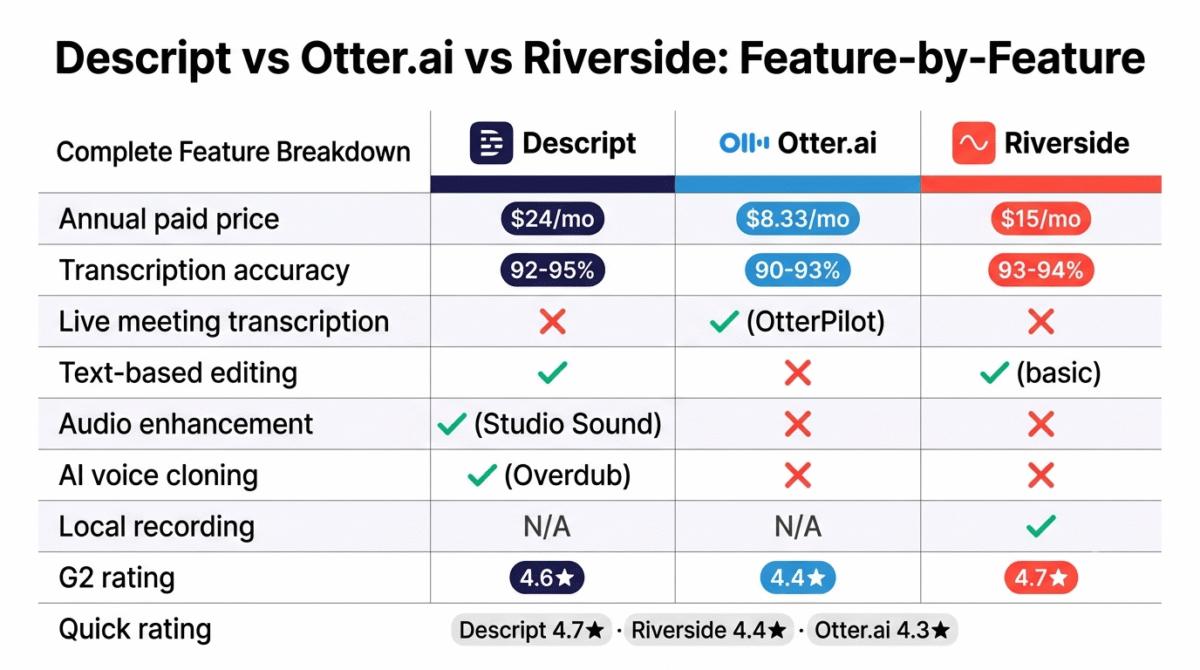
| Feature | Descript Creator | Otter.ai Pro | Riverside Standard |
|---|---|---|---|
| Annual price | $24/user/month | $8.33/user/month | $15/month |
| Free plan | 1 hour/month, watermarked | 300 min/month, 30-min limit | 2 hours/month, no local recording |
| Transcription accuracy (clean English) | 92–95% | 90–93% | 93–94% |
| Live meeting transcription | No | Yes (OtterPilot) | No |
| Real-time captions | No | Yes | No |
| Text-based audio/video editing | Yes | No | Yes (basic) |
| AI filler word removal | Yes (Underlord) | No | No |
| Audio enhancement | Yes (Studio Sound) | No | No |
| AI social clip creation | Yes (Underlord) | No | Yes (Magic Clips) |
| Voice cloning/correction | Yes (Overdub) | No | No |
| Local recording (studio quality) | N/A | N/A | Yes |
| Meeting calendar integration | No | Yes | No |
| Slide capture | No | Yes | No |
| Languages supported | English primarily | 6 languages | English primarily |
| Best for | Video/podcast creators | Meeting-heavy professionals | Remote interview podcasters |
| G2 rating | 4.6/5 | 4.4/5 | 4.7/5 |
Which Transcription Software Should You Choose?
Choose Descript Creator ($24/month, annual) if:
You produce podcasts, YouTube videos, or any spoken-word content and want to edit, produce, and repurpose that content from the transcript without opening a traditional audio editing timeline. The text-based editing workflow, Studio Sound audio enhancement, Underlord AI production assistant, and Overdub voice correction together make Descript the most complete AI content production platform built around transcription available in 2026. It is the natural choice for any creator who currently spends significant time in audio editing software.
Choose Otter.ai Pro ($8.33/month, annual) if:
Your primary transcription need is meetings, capturing what is said on Zoom, Google Meet, and Teams calls, making it searchable, and sharing summaries with teams efficiently. OtterPilot’s automatic call joining, real-time captioning, slide capture, and AI Chat search across your meeting archive are purpose-built for this workflow. At $8.33/month, Pro is the most affordable credible paid subscription in this comparison. Monitor your monthly minute usage, the 1,200-minute limit is sufficient for most individuals but hits a hard stop for high-volume meeting schedules.
Choose Riverside Pro ($24/month, annual) if:
You produce a remote podcast or video interview series where recording quality is a primary concern, and your guests’ internet reliability is not guaranteed. Riverside’s local recording architecture produces studio-quality audio and 4K video regardless of participant connection quality, the single most important capability for any creator who has experienced a ruined interview from a guest’s poor internet. The Magic Clips AI and text-based editing are practical additions that make it a complete remote production platform alongside its transcription capability.
Start with free tiers for all three before paying. Descript’s 1 hour/month is enough to evaluate the text-based editing workflow. Otter.ai’s 300 minutes/month with OtterPilot joining a few real meetings reveals whether the meeting transcription use case fits your workflow. Riverside’s free plan evaluates the interface and transcription quality, though local recording requires a paid plan. Evaluate with real content before committing to annual billing.
Setting Up Transcription for Your Content Workflow, The Practical Guide
For bloggers and content creators adding transcription to their workflow for the first time:
Step 1, Identify your primary use case. Podcast and video production → start with Descript free. Meeting transcription → start with Otter.ai free. Remote interview recording → start with Riverside free. For the rest of your podcast transcription workflow beyond just this tool choice, see our full toolkit guide for podcasters. Your primary use case determines your tool before evaluating any features.
Step 2, Test with one real piece of content. Do not evaluate on synthetic test audio. Upload an actual podcast episode to Descript, let OtterPilot join an actual client call in Otter, or record an actual guest interview in Riverside. The realistic accuracy, workflow fit, and friction level will be immediately apparent with real content and invisible with a demo.
Step 3, Budget for the realistic plan, not the entry plan. Descript Hobbyist (10 hours/month) is insufficient for any creator publishing weekly. Creator at $24/month is the realistic minimum. Otter Pro’s 1,200 minutes (20 hours) covers most individuals. Riverside Standard’s 5 hours fits a monthly publisher, weekly publishers need Pro at $24/month.
Step 4, Build your content repurposing workflow around the transcript. After your first transcribed recording, identify three downstream uses for the text: one blog post outline, one set of show notes, three social media pull quotes. Do this for every piece of content. The transcript becomes the content hub from which all other formats derive, and the time savings compound with every episode.
Step 5, Review transcript accuracy before publishing any attributed quote. AI transcription at 92–95% accuracy means approximately 5–8 errors per 100 words. In a 10,000-word transcript, that is 500–800 potential errors. Scan for proper nouns, technical terms, and direct quotes before using them in published content. The correction time is still significantly less than manual transcription, but the review step is not optional for published attribution.
Final Verdict
Descript is the best transcription software for content creators in 2026, the text-based editing workflow, Studio Sound audio enhancement, and Underlord AI production assistant make it the most complete content production platform built around a transcript. For any podcaster or video creator who currently spends hours in audio editing timelines, Descript’s Creator plan at $24/month is the most impactful single subscription upgrade available.
Otter.ai is the best transcription software for meeting-heavy professionals, OtterPilot’s automatic meeting joining, real-time captioning, and AI Chat search across the meeting archive are the most functional meeting transcription stack available at any price. The Pro plan at $8.33/month (annual) is the most affordable credible subscription in this comparison.
Riverside is the best transcription software for remote podcast and interview production, the local recording architecture that guarantees studio-quality output regardless of guest internet quality is a capability no other tool in this comparison offers, and it is the foundation that makes all of Riverside’s transcription and editing features more accurate and more useful.
Ratings:
- Descript: 4.7 / 5
- Riverside: 4.4 / 5
- Otter.ai: 4.3 / 5
Frequently Asked Questions
What is the best free transcription software in 2026?
Otter.ai offers the most functional free transcription tier, 300 minutes per month with OtterPilot meeting joining, a 30-minute session limit, and basic AI summaries at zero cost with no credit card required. Descript’s free plan provides 1 hour of transcription with full access to the text-based editing interface, enough to evaluate whether the workflow fits your production process. Riverside’s free plan evaluates the interface but does not include local recording, the feature that defines the tool’s core value.
How accurate is AI transcription in 2026?
For clean English audio with a single speaker in a quiet environment, Descript, Otter.ai, and Riverside all achieve 92–95% word-for-word accuracy. Accuracy drops to 80–88% with multiple speakers talking over each other, non-native English accents, technical jargon, or poor recording quality. At 95% accuracy on a 10,000-word transcript, approximately 500 words require correction, still significantly faster than manual transcription but not publish-ready without review for direct quotes or attributed statements.
Is Descript worth it for podcasters in 2026?
Yes, for podcasters who currently edit in Audacity, GarageBand, or Adobe Audition, Descript’s text-based editing typically reduces editing time by 40–60% per episode. The Creator plan at $24/month (annual) includes 30 media hours, enough for 12–15 full-length podcast episodes monthly, plus Studio Sound noise removal, Underlord AI show notes and clip creation, and Overdub voice correction. The productivity gain pays back the subscription cost within the first two or three episodes for most active podcasters.
What is the difference between Otter.ai and Descript?
Otter.ai is built for meeting transcription, it joins live calls, provides real-time captions, and makes recorded conversations searchable. It does not edit audio or video. Descript is built for content production, it transcribes uploaded recordings and then allows you to edit, produce, and publish from the transcript. It does not join live meetings. If your primary need is capturing what happens in meetings, use Otter. If your primary need is producing podcasts or video content from recordings, use Descript.
Can I use these tools for languages other than English?
Otter.ai supports six languages, English, Spanish, French, German, Japanese, and Chinese. Descript’s transcription is primarily optimised for English, with limited support for other languages that produces lower accuracy than the English results. Riverside’s transcription is English-first with developing multilingual support. For non-English transcription at professional accuracy, dedicated multilingual transcription services like Sonix or Rev’s human transcription option deliver more reliable results than any of the three tools in this comparison.
How do transcription tools handle multiple speakers?
All three tools include speaker diarisation, automatically distinguishing between different voices and labelling them as Speaker 1, Speaker 2, and so on. Accuracy for two-speaker conversations is generally strong (90–94% labelling accuracy in testing). With three or more simultaneous speakers or significant audio overlap, labelling accuracy drops to 75–85% and typically requires manual correction to assign labels correctly. Riverside’s local recording, which captures each participant on a separate track, produces the cleanest multi-speaker diarisation because the tracks are isolated before mixing.
Is transcription software useful for bloggers who do not produce podcasts?
Yes, in multiple ways. Bloggers who interview experts for posts can record the interview on Zoom and transcribe with Otter.ai, producing a searchable reference document and accurate pull quotes without manual note-taking. Bloggers who speak their first drafts aloud (a common technique for overcoming blank page anxiety) can use Descript to capture spoken drafts and edit them into written posts. Bloggers who want to repurpose existing YouTube videos into written content can upload the video to Descript and receive a transcript in minutes.
How long does AI transcription take in 2026?
Processing time varies by tool and file length. Descript and Riverside both process uploaded audio at approximately 3–5× real-time, a 30-minute recording is transcribed in 6–10 minutes. Otter.ai provides real-time transcription during live meetings and processes uploaded files similarly fast. All three tools are meaningfully faster than human transcription services, which typically deliver within 12–24 hours for professional accuracy at $1–2 per audio minute.








