WordPress powers 43% of the internet in 2026, and behind every well-built WordPress site is a developer with the right toolkit. The difference between a WordPress developer who builds sites in a week and one who takes a month is almost never talent. It is the combination of tools, workflows, and development environment decisions that compound into dramatically different productivity levels.
This guide covers the complete Best Tools for WordPress Developers in 2026, every category of tool a professional WordPress developer needs, from local development environment to client delivery. Every recommendation is based on real development workflows, not theoretical capability assessments.
One important framing: as a WordPress designer and developer yourself, you already know many of these tools. This guide is structured both for your own reference and as a resource your blog readers, developers at all levels, will find genuinely useful.
Table of Contents
The WordPress Developer Workflow
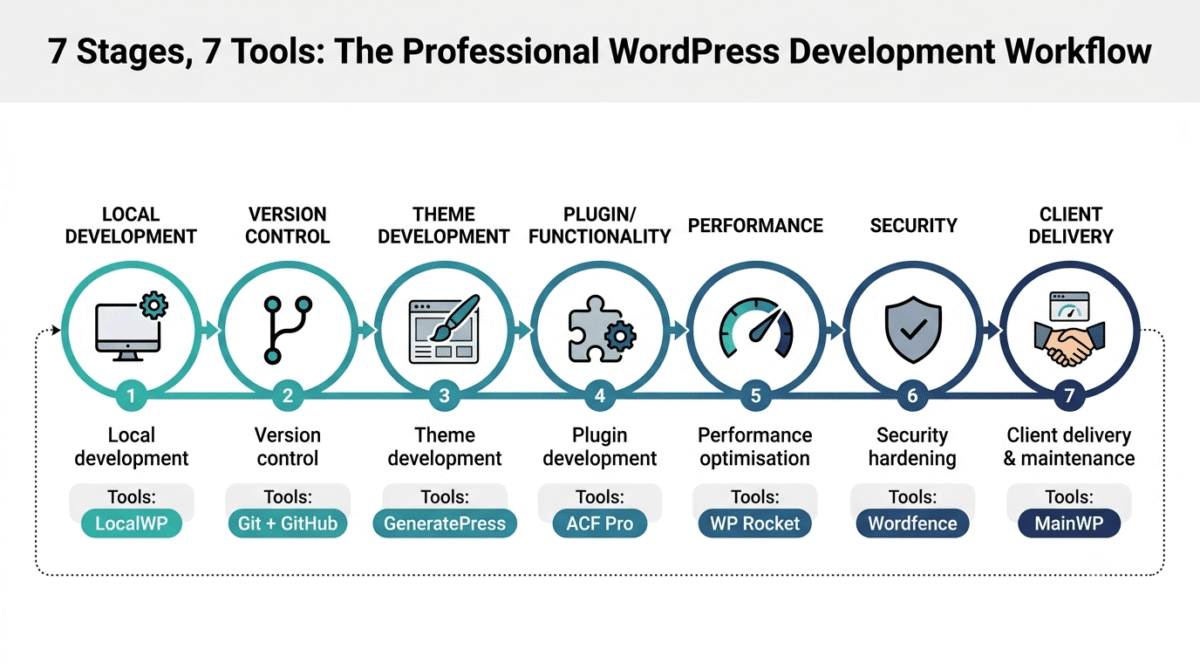
Professional WordPress development follows a consistent workflow regardless of project type:
Stage 1, Local development: Building and testing on your own machine before anything goes live
Stage 2, Version control: Tracking code changes and enabling rollback
Stage 3, Theme and block development: Building the visual layer with performance in mind
Stage 4, Plugin and functionality development: Extending WordPress with custom features
Stage 5, Performance optimisation: Ensuring sites meet Core Web Vitals and speed benchmarks
Stage 6, Security hardening: Protecting sites against the most common attack vectors
Stage 7, Client delivery and maintenance: Handing over sites professionally and maintaining them long-term
The tools below are organised by stage, giving you a clear map of which tool serves which purpose in the development workflow.
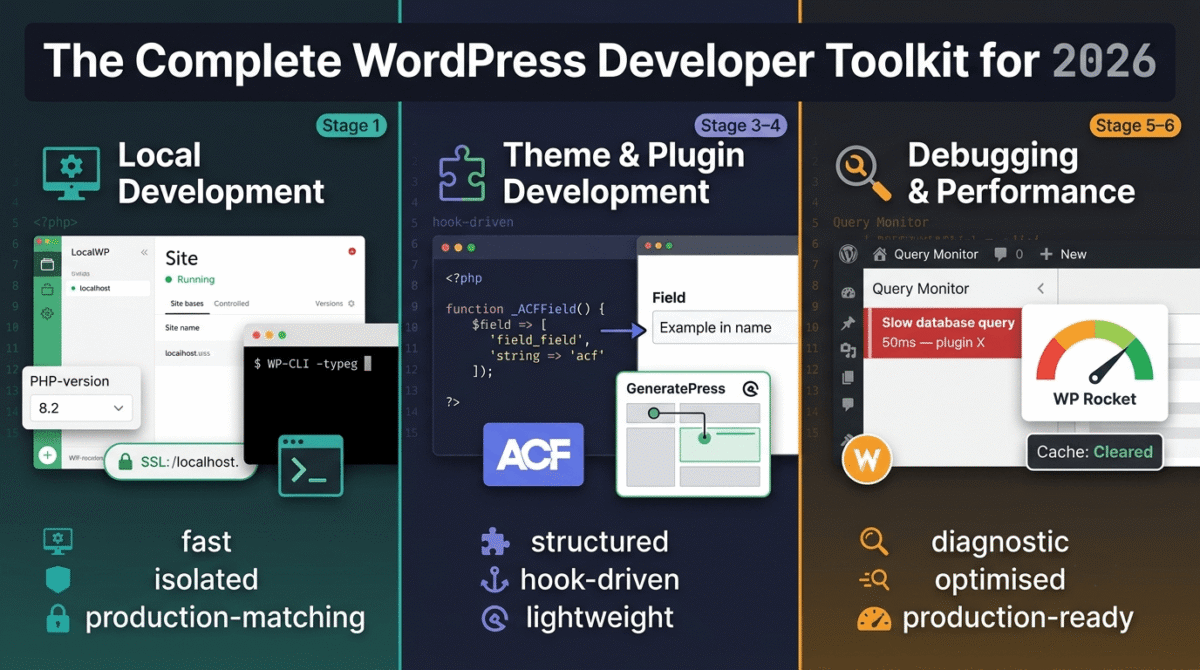
Stage 1: Local Development Environment
1. LocalWP, Best Local WordPress Development Environment
Price: Free | $20/month (Pro)
No affiliate, recommended because it is the best free option
Download: localwp.com
LocalWP (formerly Local by Flywheel) is the best local WordPress development environment in 2026, a dedicated application that installs complete WordPress sites on your computer in under 60 seconds, with automatic configuration of PHP, MySQL, and a web server without any manual setup.
Why LocalWP beats XAMPP and MAMP for WordPress development:
- One-click WordPress installation, no manual database setup, wp-config.php editing, or server configuration
- Multiple PHP versions per site, test the same site on PHP 7.4, 8.0, 8.2, and 8.3 simultaneously
- SSL on local sites, https:// on localhost matches the production environment, preventing SSL-related development surprises
- Live Link, share your local site with clients and collaborators via a temporary public URL without deploying to staging
- WP-CLI integration, run WP-CLI commands directly from LocalWP’s interface
- Push to staging, one-click deployment to WP Engine, Kinsta, Flywheel, and other supported hosts
- Xdebug integration for step-through debugging
LocalWP Pro adds cloud backups of local sites, priority support, and additional integrations, the free version covers everything most individual developers need.
2. DevKinsta, Best Alternative Local Development for Kinsta Users
Price: Free
No affiliate
Download: kinsta.com/devkinsta
DevKinsta is Kinsta’s free local development environment, specifically optimised for sites hosted on Kinsta, with one-click push to staging and pull from production. If your clients use Kinsta hosting, DevKinsta’s direct staging integration justifies using it alongside or instead of LocalWP.
3. XAMPP, Best Traditional Local Server Stack
Price: Free
No affiliate
Download: apachefriends.org
XAMPP provides the traditional Apache + MySQL + PHP stack for developers who prefer manual server configuration. Less convenient than LocalWP for WordPress-specific development but more flexible for projects that require non-standard server configurations or non-WordPress PHP applications alongside WordPress sites.
Stage 2: Version Control and Deployment
4. Git + GitHub, Essential Version Control for WordPress Development
Price: Free (GitHub, unlimited public and private repos for individuals)
No affiliate, industry standard
Git version control is non-negotiable for professional WordPress development, every theme, plugin, and custom code change should be committed to a Git repository. Benefits that should be obvious but often aren’t for solo developers:
- Rollback, instantly revert any change that broke something to the last working commit
- Collaboration, multiple developers working on the same codebase without overwriting each other
- Deployment, automated deployment from GitHub to staging and production via CI/CD
- Code history, complete record of every change made to a project, who made it, and why
WordPress-specific Git workflow:
Track your custom theme and plugins in Git, not core WordPress files, not the uploads folder, and not wp-config.php (which contains database credentials). The .gitignore file for WordPress development should exclude these sensitive and non-custom files.
5. WP Pusher, Best Git-Based WordPress Theme and Plugin Deployment
Price: $9/month (Personal) | $29/month (Professional)
No affiliate
WP Pusher connects your GitHub, GitLab, or Bitbucket repositories to your WordPress sites, automatically deploying theme and plugin updates when you push to specific branches. The continuous deployment workflow eliminates manual FTP deployment: push to the main branch and WP Pusher deploys to production automatically.
6. WP-CLI, Essential Command-Line Interface for WordPress
Price: Free and open source
No affiliate, essential developer tool
Download: wp-cli.org
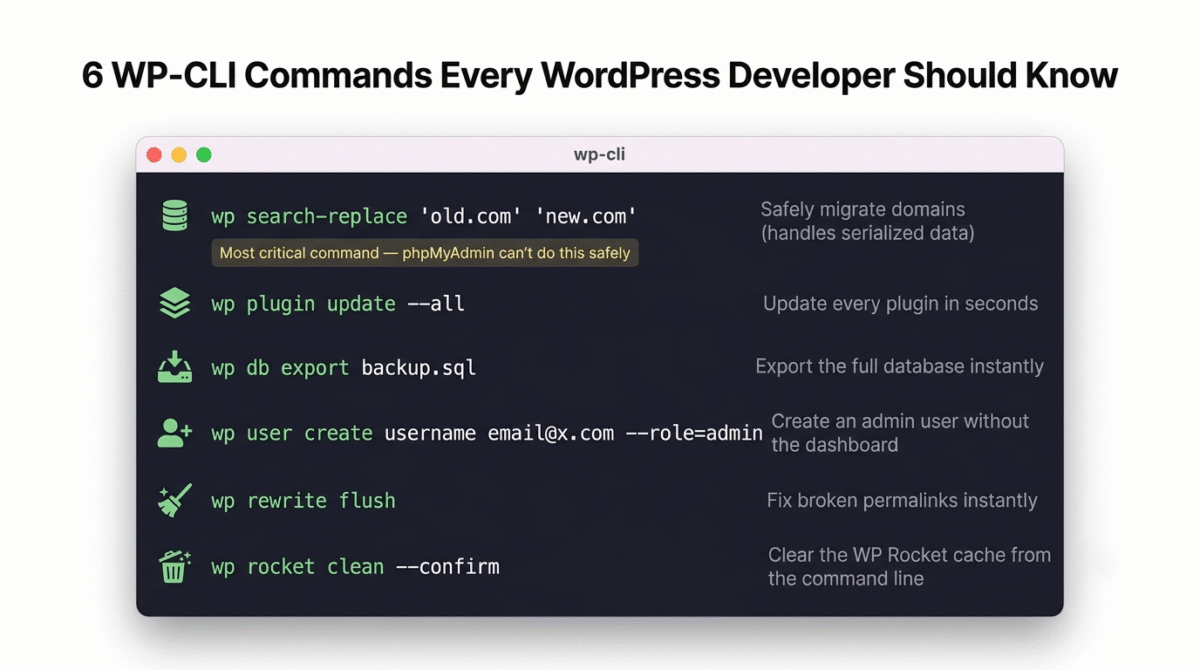
WP-CLI is the command-line tool for WordPress management, performing in seconds what the admin dashboard takes minutes to accomplish. Essential WP-CLI commands for WordPress developers:
# Install WordPress
wp core install --url=example.com --title="Site Title" --admin_user=admin --admin_email=you@example.com

# Update all plugins
wp plugin update --all

# Export database
wp db export backup.sql

# Search and replace (handles serialized data correctly)
wp search-replace 'old-domain.com' 'new-domain.com'

# Create a user
wp user create username email@example.com --role=administrator

# Activate a plugin
wp plugin activate plugin-name

# Flush rewrite rules
wp rewrite flush

# Clear cache (with WP Rocket)
wp rocket clean --confirm
The search-replace command is the most critically important WP-CLI command for WordPress developers, correctly handling serialized data in the database when migrating sites between domains, something phpMyAdmin find-and-replace cannot do safely.
Stage 3: Theme Development
7. GeneratePress, Best WordPress Theme for Developers
Price: Free | $59/year (Premium)
Affiliate: GeneratePress affiliate, 30% commission
GeneratePress is the most developer-friendly WordPress theme, lightweight (under 30KB), standards-compliant, and designed to be extended rather than to include everything by default. The hook system, filter coverage, and clean HTML output make GeneratePress the preferred base theme for custom development.
Why GeneratePress over Astra, Divi, and other popular themes:
- No page builder dependency, pure Gutenberg-compatible HTML output
- Extensive hook system, add custom functionality without theme file modification
- Minimal CSS footprint, start with 10KB of CSS rather than stripping out 200KB of unwanted styles
- Child theme is clean, GeneratePress child themes contain only your customisations
- No jQuery dependency on the frontend (optional, reduces JavaScript payload)
- Active development and excellent developer documentation
The Premium version adds the Site Library (100+ starter sites), Elements (custom hooks for inserting content anywhere), and WooCommerce integration.
8. Kadence Theme, Best Gutenberg-Native WordPress Theme
Price: Free | $79/year (Kadence Full Bundle)
Affiliate: Kadence affiliate, 20% commission
Kadence’s Gutenberg-first approach, building with Full Site Editing (FSE) blocks natively rather than as an afterthought, makes it the best theme for projects built entirely in the block editor. The Kadence Blocks plugin extends Gutenberg with advanced layout blocks that handle most design needs without a page builder.
When to choose Kadence over GeneratePress:
Choose GeneratePress for maximum developer control and minimal CSS footprint. Choose Kadence when clients need more design flexibility through the block editor without learning custom development.
9. Elementor Pro, Best Page Builder for Client-Managed WordPress Sites
Price: $59/year (Essential, 1 site) | $99/year (Advanced, 3 sites)
Affiliate: Elementor affiliate, 50% commission
Despite the performance overhead that makes page builders unsuitable for performance-optimised developer builds, Elementor Pro remains the most practical choice for client-managed sites where non-technical users need to update layouts without developer assistance.
The Theme Builder, creating custom headers, footers, and template parts that automatically apply to posts, pages, and archive pages based on conditions, is Elementor’s most powerful development feature. Combined with the dynamic data features (displaying custom field values, taxonomy terms, and user data in templates), Elementor Pro handles complex template requirements that static themes cannot accommodate.
Developer-friendly Elementor practices:
- Build with Elementor where client needs require visual editing; use GeneratePress/Kadence otherwise
- Use Elementor’s custom CSS option rather than inline styles for maintainable output
- Minimise global widget usage to reduce CSS bloat
- Enable Elementor’s Improved Asset Loading for performance optimisation
Stage 4: Plugin and Functionality Development
10. Advanced Custom Fields (ACF) Pro, Essential WordPress Data Management Plugin
Price: Free (ACF) | $49/year (ACF Pro) | $149/year (ACF Pro Extended)
Affiliate: ACF affiliate program
Full review: Best WordPress Plugins →
Advanced Custom Fields is the most important plugin in professional WordPress development, enabling custom data fields attached to any post type, page, user, term, or option without custom database tables. Every serious WordPress project uses ACF for structured content management beyond the standard title and content fields.
What ACF Pro enables that the free version does not:
- Repeater fields, add an unlimited number of rows to a structured data group
- Flexible Content fields, build dynamic page layouts with named layout blocks
- Gallery fields, manage image galleries with ordering and metadata
- Clone fields, reuse field groups across multiple post types
- Options pages, store site-wide settings in a custom admin page
- Block fields, build custom Gutenberg blocks with ACF’s visual field builder
The ACF blocks feature, creating custom Gutenberg blocks using ACF fields and PHP templates rather than JavaScript React, is the most practically important ACF Pro feature for WordPress developers who build custom blocks without React expertise.
11. Custom Post Type UI, Best Plugin for Custom Post Type Registration
Price: Free
No affiliate, essential free plugin
Custom Post Type UI provides a visual interface for registering custom post types and taxonomies without writing PHP registration code. For WordPress developers who regularly create custom post types for clients (Properties, Team Members, Testimonials, Events, Products), CPTUI replaces repetitive boilerplate code with a clean admin interface.
When to use code instead of CPTUI: For projects where portability matters (moving between environments), registering post types in a custom plugin’s PHP code is more reliable than CPTUI. For rapid prototyping and single-site builds, CPTUI’s speed advantage is compelling.
12. Gravity Forms, Best WordPress Form Plugin for Developers
Price: $59/year (Basic, 1 site) | $159/year (Elite, unlimited sites)
Affiliate: Gravity Forms affiliate, 20% commission
Gravity Forms is the most developer-extensible WordPress form plugin, the extensive hook and filter system, the REST API, and the add-on ecosystem make it the preferred form solution for complex form requirements. The conditional logic, multi-page forms, file uploads, and payment integrations cover enterprise form requirements that Contact Form 7 and WPForms cannot match.
Developer-specific Gravity Forms advantages:
- gform_pre_submission and gform_after_submission hooks for custom form processing logic
- REST API for external form data access
- GPPA (Gravity Perks Populate Anything) for dynamic field population from external data sources
- GravityView integration for front-end display of form submissions
- Comprehensive add-ons for Stripe, PayPal, MailChimp, HubSpot, and 40+ other integrations
13. WooCommerce, Best E-Commerce Foundation for WordPress Developers
Price: Free (core) | Paid extensions for advanced functionality
No affiliate, open source platform
WooCommerce is the most widely deployed e-commerce platform globally, and as a WordPress developer, WooCommerce expertise is one of the highest-value skills in the market. The action and filter hook system provides extensive customisation without core file modification, the REST API enables headless implementations, and the template override system allows complete theme-level WooCommerce customisation.
Essential WooCommerce development knowledge:
- Template override system, copy WooCommerce templates to your theme for customisation
- Action hooks, woocommerce_before_add_to_cart_button, woocommerce_after_checkout_form, etc.
- WC() global, accessing WooCommerce data objects throughout the theme
- Custom product types, registering custom product types with WooCommerce’s product type framework
- WooCommerce REST API, building custom storefronts and integrations
Stage 5: Performance Optimisation
14. WP Rocket, Best WordPress Caching Plugin for Developers
Price: $59/year (1 site) | $119/year (3 sites) | $299/year (unlimited)
Affiliate: WP Rocket affiliate, 20% commission
Full review: Best WordPress Plugins →
WP Rocket is the most comprehensive caching and performance plugin, page caching, CSS/JavaScript minification and combination, image lazy loading, database optimisation, DNS prefetching, and CDN integration all in one plugin with a clean, non-overwhelming interface.
Developer-specific WP Rocket features:
- Compatibility mode for page builders, handles cache invalidation for Elementor, Divi, and Beaver Builder correctly
- WP-CLI integration, clear cache, activate/deactivate features, and regenerate static files from the command line
- CDN integration, Cloudflare, KeyCDN, and other CDNs connected with zone configuration
- Exclude patterns, fine-grained control over which pages, cookies, and user agents bypass the cache
- Safe Mode for updates, temporarily disables optimisations that might conflict with plugin/theme updates
For Hostinger users specifically: Hostinger’s LiteSpeed servers support LiteSpeed Cache (free) which integrates at the server level for superior performance versus WP Rocket’s PHP-level caching. On LiteSpeed hosting, LiteSpeed Cache is the recommended performance choice; on other hosting environments, WP Rocket is the premium option.
15. Imagify, Best Image Optimisation Plugin for WordPress
Price: Free (25MB/month) | $4.99/month (Starter) | $9.99/month (Growth)
Affiliate: Imagify affiliate
Full review: Best WordPress Plugins →
Imagify automatically compresses and converts images on upload, reducing file sizes by 40–80% without visible quality loss and converting all images to WebP format for browsers that support it. The bulk optimisation feature processes your entire existing media library in one operation.
Developer workflow: Configure Imagify to run automatically on upload with Aggressive compression mode for photographs and Normal mode for screenshots and graphics. Enable WebP conversion. This configuration covers 95% of image optimisation without any per-image manual action.
16. Asset CleanUp, Best Plugin for Removing Unused CSS and JS
Price: Free | $39/year (Pro)
No affiliate
Asset CleanUp identifies and removes CSS and JavaScript files loaded by plugins and themes on pages where they are not needed, a common source of unnecessary page weight on WordPress sites. A contact form plugin loading its CSS and JavaScript on every page when the form only exists on the Contact page is a typical example Asset CleanUp addresses.
The test mode, showing which assets load on each page without actually deactivating them, enables safe identification before removal.
Stage 6: Debugging and Development Tools
17. Query Monitor, Best WordPress Debugging Plugin
Price: Free
No affiliate, essential developer tool
Full review: Best WordPress Plugins →
Query Monitor is the most important debugging plugin for WordPress developers, displaying database queries, PHP errors, hook execution, AJAX calls, HTTP API calls, and performance data for every page load in the admin bar.
What Query Monitor surfaces:
- Slow database queries (showing the exact SQL, execution time, and the plugin/function that generated it)
- PHP errors and notices (with full stack traces)
- All hooks and filters fired (with the functions attached to each)
- HTTP API requests (showing external calls your plugins make and their response times)
- REST API calls (request and response data for API debugging)
- Block editor queries and render times
Critical for WordPress developer productivity: The ability to identify which plugin generates a slow query (50ms database query on every page load from a popular SEO plugin’s redirect checking) or which hook is firing unexpectedly makes Query Monitor irreplaceable for performance debugging.
Remove Query Monitor from production sites, it exposes technical information not intended for public visibility.
18. Debug Bar, Best Supplement to Query Monitor
Price: Free
No affiliate
Debug Bar adds a debug menu to the admin bar providing additional debugging panels including PHP deprecation notices, database query counts, and object cache status. Used alongside Query Monitor for comprehensive debugging coverage.
19. WP Crontrol, Best Tool for WordPress Cron Job Management
Price: Free
No affiliate
WP Crontrol provides visibility and control over WordPress’s cron system, showing all scheduled events, their next run times, and the hooks they fire. Essential for debugging issues caused by stuck or duplicated cron jobs, which are a frequent source of performance problems in WordPress sites with plugin-heavy configurations.
Stage 7: Security Hardening for Developer-Built Sites
20. Wordfence Security, Essential Security for Every WordPress Site
Price: Free | $119/year (Premium)
No affiliate, essential free plugin
Full review: Best WordPress Plugins →
Every WordPress site a developer builds for a client should have Wordfence installed and configured before delivery. The firewall, malware scanner, and login security provide the security baseline that protects both clients and developer reputation, a hacked client site reflects on the developer who built it.
21. WP Hide Login, Best Login URL Security Plugin
Price: Free
No affiliate
Changing the WordPress login URL from the default /wp-admin/ and /wp-login.php to a custom path eliminates automated brute force attacks before Wordfence even sees them, dramatically reducing server load from attack traffic and reducing exposure to credential stuffing scripts that only target default login URLs.
22. UpdraftPlus, Essential Backup Plugin for Every Client Site
Price: Free | $70/year (Personal)
No affiliate
Full review: Best WordPress Plugins →
Every client site needs automated backups before any development work begins and as ongoing maintenance. UpdraftPlus’s automated scheduled backups to Google Drive, Dropbox, or Amazon S3 provide the recovery capability that protects both client data and developer liability.
Developer backup configuration: Database daily, full files weekly, retain 7 daily and 4 weekly backups. Store remotely (never on the same server as the site). Test restoration annually.
Stage 8: Client Management and Business Tools
23. MainWP, Best WordPress Site Management Dashboard for Developers
Price: Free (self-hosted dashboard) | Paid extensions for advanced features
Affiliate: MainWP affiliate
MainWP provides a centralised dashboard for managing unlimited WordPress sites from one interface, updating core, plugins, and themes across all client sites simultaneously, monitoring uptime, and running security scans across your entire client portfolio from one location.
The self-hosted model, running MainWP on your own WordPress installation rather than a third-party service, means no per-site SaaS fees. The free dashboard covers the most important management features; paid extensions add advanced backup management, client reporting, and white-label client portals.
24. ManageWP, Best Alternative WordPress Management Platform
Price: Free (basic) | $2/site/month (premium features)
Affiliate: ManageWP affiliate
ManageWP provides cloud-hosted WordPress site management, similar to MainWP but managed by ManageWP’s infrastructure rather than your own server. The per-site pricing model is more scalable for large agencies; the self-hosted MainWP model is more cost-effective for freelancers managing under 20 sites.
25. WP Sandbox, Best Staging Environment Tool for Developers
Price: Free
No affiliate
WP Sandbox creates one-click staging environments for WordPress sites, cloning a live site to a temporary staging URL for testing updates, developing new features, and experimenting with plugins before applying changes to production. Essential for professional WordPress maintenance workflows.
The Professional WordPress Developer Stack
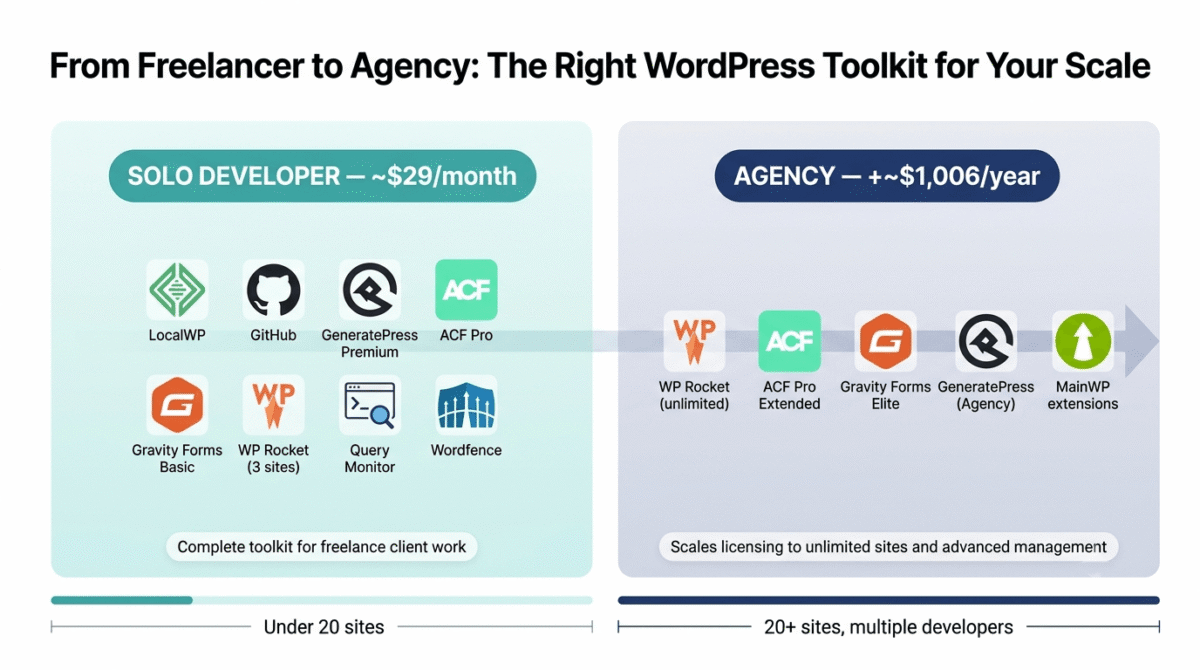
Solo Developer Stack (freelancer, under 20 client sites)
| Tool | Purpose | Cost |
|---|---|---|
| LocalWP | Local development | Free |
| GitHub | Version control | Free |
| WP-CLI | Command-line management | Free |
| GeneratePress Premium | Base theme | $59/year |
| ACF Pro | Custom fields | $49/year |
| Gravity Forms Basic | Forms (1 site) | $59/year |
| WP Rocket | Performance (3 sites) | $119/year |
| Imagify Starter | Image optimisation | $59.88/year |
| Query Monitor | Debugging | Free |
| Wordfence | Security | Free |
| MainWP | Site management | Free |
| UpdraftPlus | Backups | Free |
| Annual total | ~$346/year (~$29/month) |
Agency Stack (multiple developers, 20+ client sites)
Add to solo stack:
| Tool | Purpose | Cost |
|---|---|---|
| WP Rocket (unlimited) | Performance | $299/year |
| ACF Pro Extended | Advanced blocks | $149/year |
| Gravity Forms Elite | Forms (unlimited sites) | $159/year |
| GeneratePress (Agency) | Theme (unlimited) | $299/year |
| MainWP extensions | Advanced management | $100–$300/year |
| Annual additions | ~$1,006/year |
Developer-Specific WordPress Tips
As a WordPress developer, these practices separate professional from amateur development:
Always use a child theme. Never modify parent theme files, updates overwrite your changes. A child theme with style.css and functions.php is the minimum; build your customisations there.
Use a custom plugin for site-specific functions. Functions added to functions.php are tied to the theme, switching themes loses them. A site-specific plugin (my-site-functions.php) survives theme changes and is excluded from theme Git repositories.
Prefix everything. Custom functions, classes, hooks, and post meta keys should be prefixed with a unique identifier (rtt_ for RateTheTool, for example) to prevent conflicts with plugins and future WordPress core additions.
Never edit production directly. All development happens locally → staging → production, never directly on production. One accidental typo in functions.php can take a live client site offline.
Document your hooks. A commented list of all custom hooks and filters in your theme or plugin, with descriptions of what they do and example usage, is the difference between maintainable code and legacy code nobody wants to touch.
Test on the minimum supported PHP version. If your client’s host runs PHP 7.4 and you develop on PHP 8.2, your code may work locally but fail in production. LocalWP’s per-site PHP version selection enables testing on exact production versions.
Frequently Asked Questions
What is the best local development environment for WordPress in 2026?
LocalWP is the best local WordPress development environment, one-click WordPress installation, multiple PHP versions per site, SSL on local domains, Live Link for client preview, and WP-CLI integration make it the most complete and beginner-friendly option. DevKinsta is the best alternative for Kinsta-hosted client sites.
Do WordPress developers need to know PHP?
Yes, WordPress is built on PHP, and meaningful WordPress development requires PHP knowledge. At minimum, WordPress developers need to understand PHP functions, classes, arrays, loops, and WordPress’s hook system. Advanced development (custom plugins, REST API integrations, WooCommerce extensions) requires more sophisticated PHP including object-oriented programming. HTML, CSS, JavaScript, and MySQL are also required for full-stack WordPress development.
What is the best WordPress theme for developers?
GeneratePress is the best WordPress theme for developers who prioritise performance and developer control, minimal CSS footprint, extensive hook system, and no page builder dependency. Kadence is the best alternative for Gutenberg-native development with full site editing. Elementor-based themes are appropriate for projects where clients need visual editing capability but carry performance overhead that pure Gutenberg themes avoid.
Is Advanced Custom Fields still relevant in 2026?
Yes, ACF remains the most widely used custom fields plugin in professional WordPress development. The native Gutenberg custom fields interface lacks ACF’s flexibility for complex data structures, and ACF’s Blocks feature provides the most practical approach to custom Gutenberg block development for PHP developers who prefer not to write React. ACF Pro’s repeater, flexible content, and options page features have no equivalent native WordPress functionality.
What tools do professional WordPress developers use daily?
Professional WordPress developers use daily: a code editor (VS Code), a local development environment (LocalWP), version control (Git + GitHub), WP-CLI for command-line management, Query Monitor for debugging, and a password manager (1Password) for managing client site credentials. For client work: ACF Pro for custom fields, Gravity Forms for complex forms, and WP Rocket for performance optimisation.
How do WordPress developers manage multiple client sites?
Professional WordPress developers managing multiple client sites use a WordPress management dashboard, MainWP (self-hosted, free) or ManageWP (cloud, freemium), to update core, plugins, and themes across all client sites from one interface, monitor uptime, run security scans, and generate maintenance reports. Without a management dashboard, maintaining 20+ client sites manually is unsustainable.