Managing a remote team without the right project management tool is like running a restaurant without a kitchen: technically possible, chaotic in practice, and doomed to produce inconsistent results.
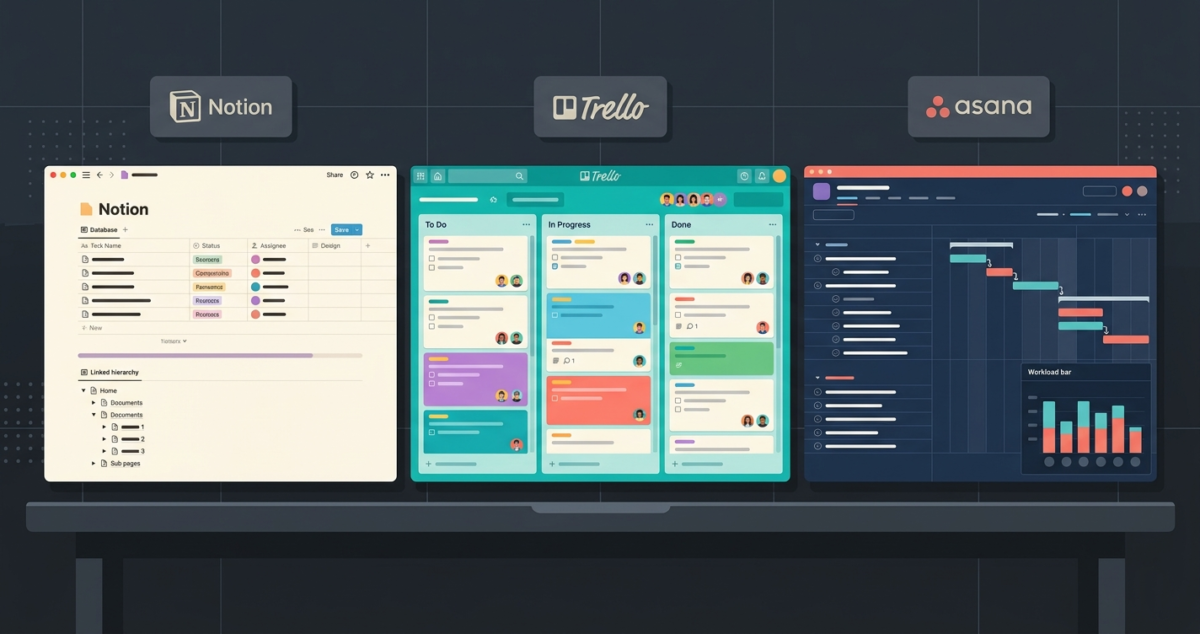
Remote work has permanently changed how teams operate. In 2026, the majority of knowledge workers collaborate across time zones, work from home offices and co-working spaces, and depend on software to replace the informal coordination that happens naturally in a shared office. The project management tool your team chooses is not a nice-to-have; it is the infrastructure your entire operation runs on. However, if your team is small, co-located, or primarily looking for a simple, flexible wiki-based database, a solution from our best project management software 2026 (Notion vs Trello vs Asana) review might be a better fit.
I tested Monday.com vs ClickUp vs Basecamp for 60 days across real remote team workflows, sprint planning, client project delivery, content production, and cross-functional team coordination. Here is the honest comparison.
Table of Contents
How We Evaluated These Tools
Every platform was tested across five criteria:
– Ease of adoption: how quickly does a new team member understand and start using the tool?
– Task and project management: how well does it handle deadlines, dependencies, and workload?
– Communication: how does it handle team discussion, file sharing, and client updates?
– Customisation: can the tool adapt to different team workflows and project types?
– Value: free plan quality and paid plan pricing for remote teams
Why Remote Teams Need Different Tools Than In-Office Teams
Before comparing the three platforms, it is worth understanding why remote teams have specific project management needs that in-office teams do not.
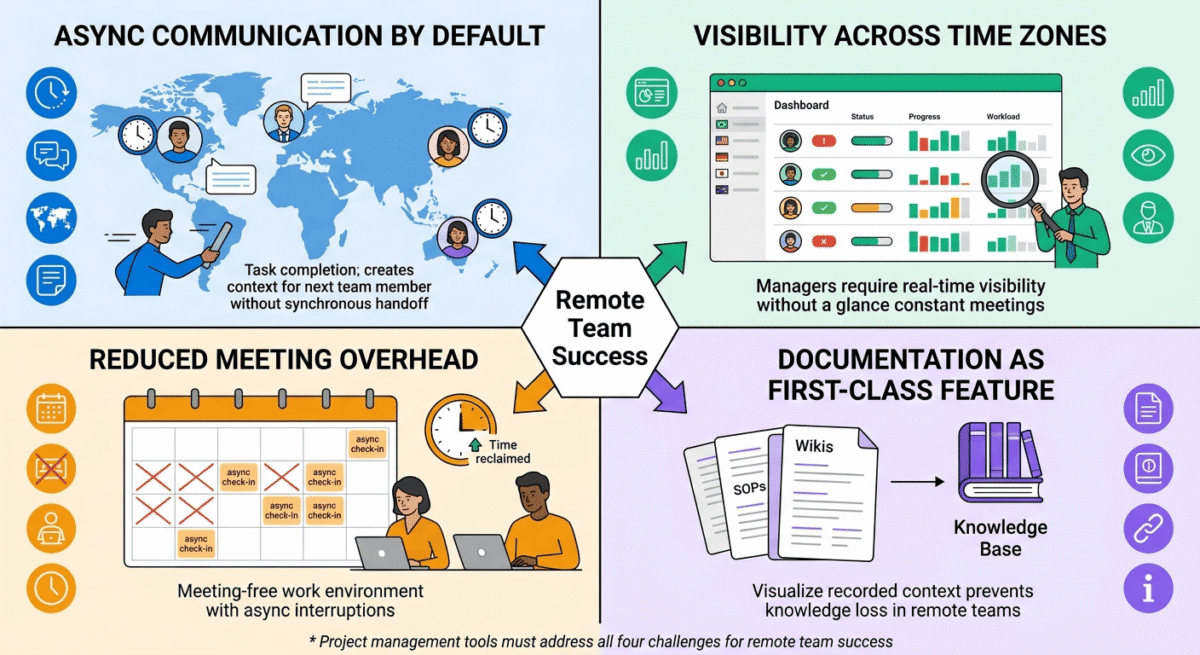
Async communication by default. Remote team members are rarely online simultaneously. A project management tool needs to make context clear enough that team members can pick up tasks without a synchronous handoff, and every task needs enough detail that the assignee knows exactly what to do without asking.
Visibility across time zones. When a manager cannot walk past someone’s desk and see what they are working on, they need a dashboard that shows team workload, progress, and blockers at a glance. To streamline the complete lifecycle of a remote workforce, from tracking daily deliverables to running compliant international payroll, pair your platform with the best HR software small business 2026.
Reduced meeting overhead. The best remote project management tools reduce the number of meetings required to coordinate work, not increase them. Tools that require constant synchronous check-ins defeat the purpose of remote work flexibility.
Documentation as a first-class feature. Remote teams need written records of decisions, context, and progress. A tool that treats documentation as an afterthought creates knowledge gaps that slow the team down.
Monday.com Review: Best Project Management Tool for Visual Teams and Client-Facing Work
Free plan: Yes, up to 2 seats, 3 boards
Starting paid price: $9/seat/month (Basic, billed annually, minimum 3 seats)
Best plan for most remote teams: Standard, $12/seat/month (billed annually)
Platforms: Web, iOS, Android, Windows, Mac
Affiliate program: Yes, Monday.com affiliate program, up to $100 per referral
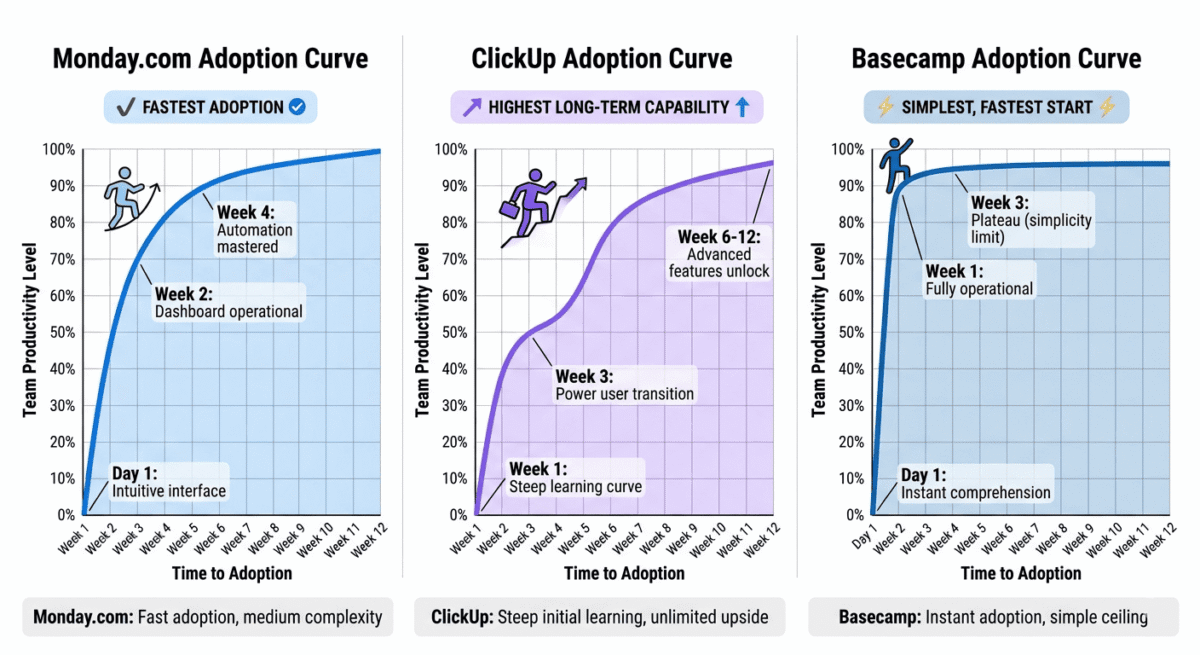
Monday.com is the most visually polished project management tool on this list, and the one most likely to impress clients, stakeholders, and executives who need a clear picture of project status without learning a complex tool. Its colourful, customisable dashboards and intuitive grid interface make it the easiest tool for teams to adopt quickly, and its automation capabilities reduce manual status updates that slow remote teams down.
What Monday.com does best
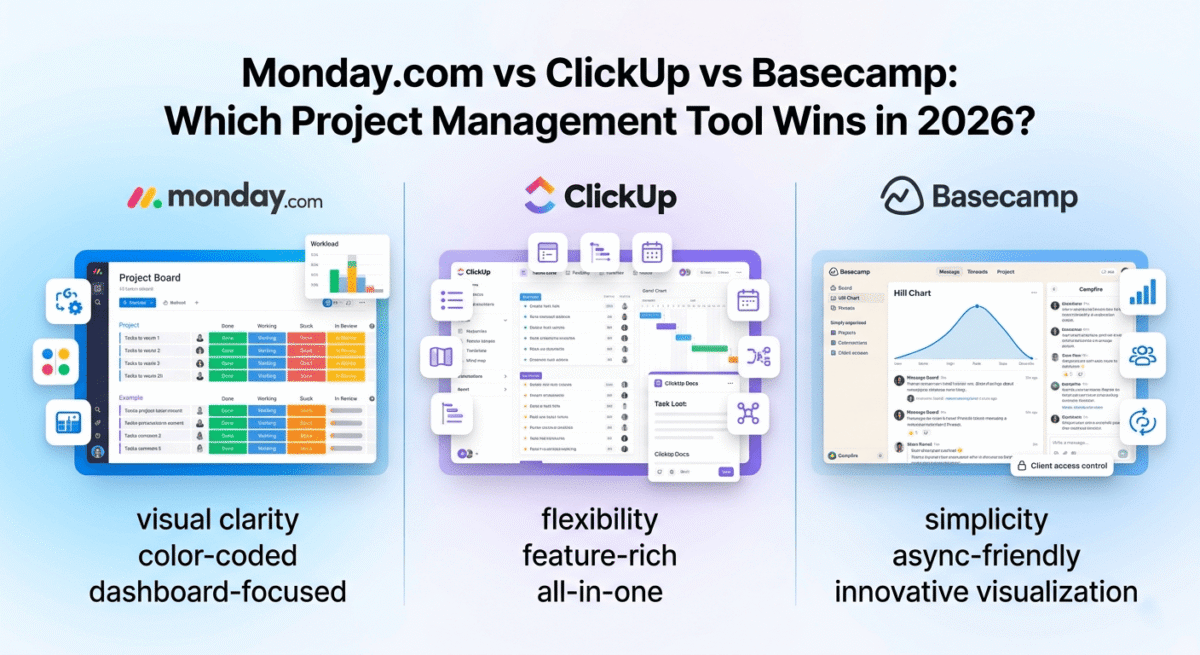
Monday.com’s board interface is the most immediately comprehensible of the three tools. Every project is a board, every task is a row, and every piece of information about that task- status, assignee, due date, priority, progress, custom fields, is a column. The result is a spreadsheet-like view that most team members understand within minutes of first seeing it, without training.
The status column, a colour-coded indicator showing whether a task is Done, Working on it, Stuck, or any custom status you define, gives managers an instant visual overview of where every item stands. The combination of colour coding across multiple boards creates dashboards that communicate project health at a glance, which is particularly valuable for remote managers who need to identify blockers without scheduling a check-in meeting.
Monday.com’s automation capabilities are the strongest of the three tools tested. Pre-built automation recipes, “when status changes to Done, notify the project manager” or “when a due date arrives, send an email reminder”, reduce the manual status updates and follow-up tasks that consume remote team time. Creating an automation requires no coding: select a trigger, select a condition, select an action, and click save.
The Dashboard feature aggregates data across multiple boards into executive-level views, total tasks by status, workload by team member, budget tracking, timeline views across projects, and custom charts. For remote team leaders managing multiple concurrent projects, this cross-project visibility is genuinely valuable and difficult to replicate in competing tools at the same simplicity level.
Monday Work Management’s Workload view shows how many tasks each team member has been assigned in a given week, enabling managers to identify overloaded and underutilised team members and rebalance assignments before deadlines are missed. For remote teams where workload is invisible without explicit tracking, this view is one of the most practical features available.
Integrations cover the most common remote work stack, Slack, Zoom, Google Drive, Microsoft Teams, Jira, GitHub, Salesforce, and 200+ more. The Monday.com marketplace also includes purpose-built industry templates for marketing campaigns, software development sprints, event planning, HR onboarding, and dozens of other workflows.
Where Monday.com falls short
The free plan on Monday.com, limited to two seats and three boards, isn’t practical for a real team. Every meaningful feature requires a paid plan, and the minimum of 3 seats means even solo users pay for three seats. A team of five on the Standard plan pays $60/month, more expensive than ClickUp and significantly more than Basecamp’s flat-fee model.
Monday.com does not have a built-in document editor. Unlike ClickUp’s Docs or Basecamp’s message boards and Hill Charts, Monday.com relies on integrations with Google Drive or Notion for documentation. For remote teams where written context is critical, this gap requires a workaround.
Task dependencies, a critical feature for remote teams managing sequential workflows, are only available on the Standard plan and above, not the Basic plan. Paying $ 9 per seat per month for a tool without dependencies is a meaningful limitation.
Monday.com pricing
Plan | Price/seat/month (annual) | Min seats | Key features |
Free | $0 | 2 | 3 boards, 200 items, 500MB storage |
Basic | $9 | 3 | Unlimited boards, 5GB storage, prioritised support |
Standard | $12 | 3 | + Timeline, calendar, guest access, automations (250/month) |
Pro | $19 | 3 | + Time tracking, chart view, formula columns, 25,000 automations |
Enterprise | Custom | Custom | + Advanced security, audit log, tailored onboarding |
A team of 5 on Standard: $60/month. A team of 10: $120/month.
Monday.com: Pros and Cons
Pros:
– Most visually intuitive interface, new team members productive within hours
– Best automation capabilities, 200+ pre-built recipes, no coding required
– Workload view prevents remote team member burnout
– Cross-project dashboards for executive-level visibility
– 200+ integrations covering the full remote work stack
– Best for client-facing project tracking, impressive to stakeholders
– Strong mobile apps for iOS and Android
Cons:
– Most expensive per-seat pricing for equivalent features
– Free plan is practically unusable, 2 seats, 3 boards
– No built-in document editor
– Task dependencies require Standard plan minimum
– Minimum 3-seat billing, solo users overpay
– Can feel over-engineered for simple team workflows
Rating: 4.6 / 5 Best project management tool for visual teams, client-facing projects, and managers who need cross-team dashboards. Most impressive to stakeholders.
ClickUp Review: Best Project Management Tool for Feature Depth and Value
Free plan: Yes, unlimited tasks, unlimited members, 100MB storage
Starting paid price: $7/member/month (Unlimited, billed annually)
Best plan for most remote teams: Business, $12/member/month (billed annually)
Platforms: Web, iOS, Android, Windows, Mac, Linux
Affiliate program: Yes, ClickUp affiliate program, 20% recurring commission
ClickUp is the most feature-rich project management tool available in 2026, and the one most likely to replace multiple tools in your remote work stack simultaneously. It combines task management, documents, whiteboards, goal tracking, time tracking, chat, and sprints in a single platform, with a free plan that is genuinely the most useful of the three tools tested. Built-in trackers are convenient, but for automated client invoicing and granular payroll exports, you should pair your workspace with the best time tracking software 2026.
What ClickUp does best
ClickUp’s free plan is exceptional: unlimited tasks, unlimited members, and access to most core features make it the best free project management tool available. A remote team of any size can use ClickUp free indefinitely for basic project and task management without spending a dollar. This is a meaningful differentiator from Monday.com’s 2-seat free plan and Basecamp’s paid-only model.
View flexibility is ClickUp’s most distinctive capability. Every project can be viewed as a list, board (Kanban), Gantt chart, calendar, timeline, workload, mind map, or table, switching between views with a single click. Different team members can work in whichever view suits their workflow best while looking at the same underlying data. A developer who prefers a sprint board and a manager who prefers a Gantt timeline can both work efficiently in the same ClickUp workspace.
ClickUp Docs, a built-in document editor comparable to Notion, lets remote teams create wikis, meeting notes, SOPs, project briefs, and any other documentation directly within the project management tool. Tasks can be linked to relevant documents and vice versa, keeping context attached to the work it relates to. For remote teams where documentation is a first-class need, ClickUp Docs eliminates the need for a separate tool like Confluence or Notion.
ClickUp Goals, a goal and OKR tracking system, connects individual tasks to team objectives, showing how daily work contributes to quarterly goals. For remote teams where strategic alignment can get lost without regular in-person interaction, this visibility is genuinely useful.
ClickUp AI, available on paid plans, assists with writing task descriptions, summarising comment threads, generating meeting agendas, and drafting project updates. For remote teams who communicate primarily through text, AI-generated summaries of long comment threads save meaningful time.
The automation system rivals Monday.com’s in capability, with trigger-based workflows that move tasks, assign people, send notifications, and update statuses automatically based on conditions you define. Custom automation reduces the manual coordination work that slows remote teams. If your remote team handles post-sale client onboarding pipelines, ensure your project automation links up natively with a tool from our best CRM software small business 2026 guide.
ClickUp’s sprint management, task points, velocity tracking, burndown charts, and sprint reviews make it a capable replacement for dedicated agile tools like Jira for software development teams that do not need enterprise-grade complexity.
Where ClickUp falls short
ClickUp’s greatest weakness is the inverse of its greatest strength: the sheer number of features creates a steep learning curve and ongoing interface complexity that overwhelm many teams. New users face an almost unlimited number of customisation options, views, statuses, custom fields, spaces, folders, and lists, and without deliberate setup discipline, ClickUp workspaces quickly become disorganised and confusing.
Many ClickUp teams report that adoption fails not because the tool is bad, but because teams set it up inconsistently and the resulting chaos reduces trust in the system. ClickUp requires more intentional setup and team training than Monday.com or Basecamp.
ClickUp’s mobile app, while functional, is less polished than Monday.com’s. Occasional performance issues and a more complex navigation structure make mobile-first use cases less smooth.
ClickUp pricing
Plan | Price/member/month (annual) | Key features |
Free | $0 | Unlimited tasks, unlimited members, 100MB storage |
Unlimited | $7 | Unlimited storage, integrations, dashboards, Gantt charts |
Business | $12 | + Google SSO, custom exporting, advanced automations, workload |
Enterprise | Custom | + Advanced permissions, enterprise API, dedicated support |
A team of 5 on Business: $60/month. A team of 10: $120/month. Same price as Monday.com Standard, but with significantly more features.
ClickUp: Pros and Cons
Pros:
– Best free plan, unlimited tasks and members at zero cost
– Most feature-rich, replaces multiple tools (tasks, docs, goals, chat, time tracking)
– Most view flexibility, list, board, Gantt, calendar, timeline, workload, mind map
– ClickUp Docs replaces Notion for in-context documentation
– Best value paid plan, more features per dollar than Monday.com
– ClickUp AI for writing assistance and thread summarisation
– 20% recurring affiliate commission
– Available on Linux, unique among the three
Cons:
– Steepest learning curve, feature depth overwhelms new users
– Requires deliberate setup and team training for successful adoption
– Mobile app less polished than Monday.com
– Can become chaotic without consistent team-wide setup discipline
– Notification system can become overwhelming without careful configuration
– Some features feel unfinished compared to dedicated single-purpose tools
Rating: 4.7 / 5 Best project management tool for feature depth and value. Ideal for remote teams willing to invest in setup and training to unlock maximum capability.
Basecamp Review: Best Project Management Tool for Simplicity and Flat-Fee Pricing
Free plan: Yes, Basecamp Personal (limited features, up to 3 projects)
Starting paid price: $15/user/month (Basecamp) | $299/month flat fee (Basecamp Pro Unlimited)
Best plan for most remote teams: Pro Unlimited, $299/month flat fee for unlimited users
Platforms: Web, iOS, Android
Affiliate program: Yes, Basecamp affiliate program
Basecamp is the original remote work project management tool, built by the team at 37signals, who wrote the book on remote work (literally, their book “Remote” is a foundational text on distributed team management). Basecamp’s philosophy is radical simplicity: fewer features, less complexity, and a flat organisational structure that treats all work the same way regardless of team size or project complexity.
What Basecamp does best
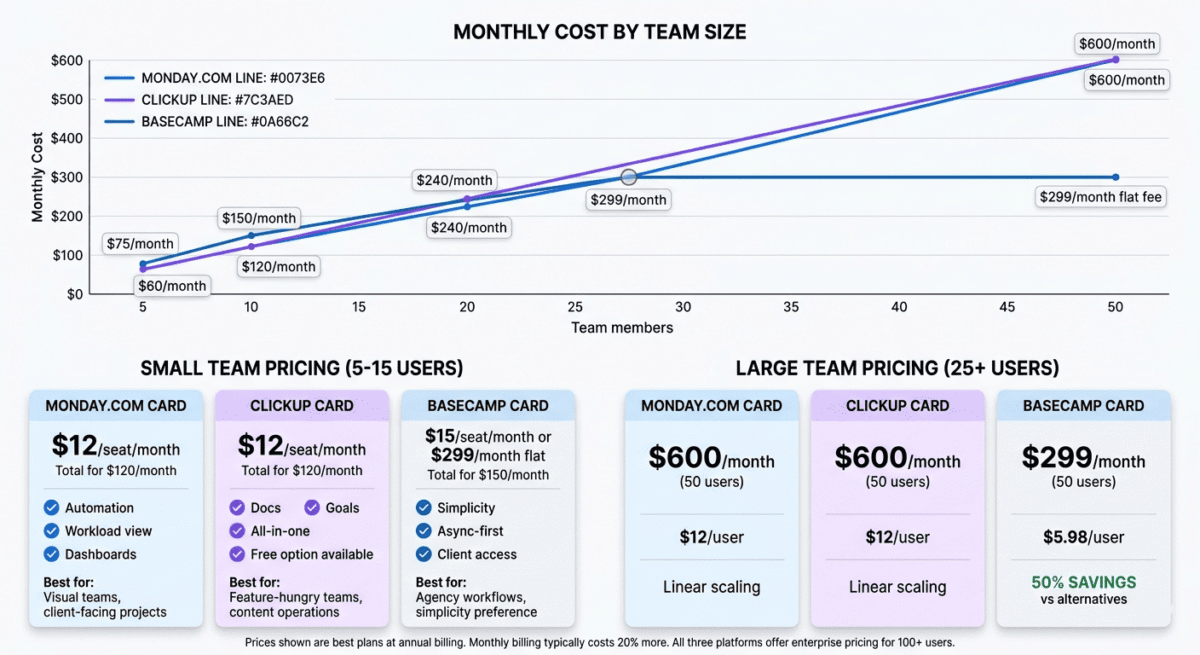
Basecamp’s Pro Unlimited pricing model is its most distinctive feature, and for teams of more than 20 people, potentially its most compelling. At $299/month flat fee regardless of user count, Basecamp is the most cost-effective option for larger remote teams. A team of 25 on Monday.com Standard pays $300/month. A team of 25 on ClickUp Business pays $300/month. A team of 25 on Basecamp Pro Unlimited pays $299/month, and so does a team of 100.
The Hill Charts feature is Basecamp’s most innovative contribution to project management. Rather than tracking tasks as percentages or status colours, Hill Charts visualise work as a hill: tasks on the upward slope are in the discovery/planning phase (figuring out how to do them), tasks over the peak are in execution (knowing how to do them and doing it), and tasks on the downward slope are completing. This metaphor captures the natural shape of project work more accurately than linear progress bars and gives managers a more honest view of where work actually stands.
Basecamp’s communication tools are built around reducing meeting load for remote teams. Every project has a dedicated message board for async team discussion, a campfire chat for real-time conversation, automatic check-in questions that replace daily standups, and a shared document area for project files and notes. The combination creates a self-contained project environment where all communication and work happens in one place.
The Clientside feature, available on Pro Unlimited, gives clients access to specific project areas without seeing internal team discussions. Clients see what you share; they do not see your internal conversations about their project. For agencies and consultants managing client projects remotely, this controlled transparency is genuinely valuable.
Basecamp’s simplicity is its most consistent praise from long-term users. There are no custom fields, no view switching, no complex automation rules, and no nested project hierarchies. Everything works the same way: projects contain to-do lists, messages, documents, schedules, and campfire chats. New team members understand Basecamp’s structure within minutes; the adoption friction that plagues ClickUp is essentially absent.
Where Basecamp falls short
Basecamp’s simplicity is also its most common criticism. There are no task dependencies, no Gantt charts, no workload views, no time tracking, no recurring tasks (on basic plans), and no automation. Teams that need these features either work around them manually or use Basecamp alongside dedicated tools, which partially defeats the consolidation benefit.
Basecamp’s per-user pricing ($15/user/month on the standard plan) is more expensive than ClickUp and Monday.com for small teams. A team of 5 on Basecamp standard pays $75/month versus $60/month for the same team on Monday.com Standard or ClickUp Business.
Basecamp does not have a Kanban board view; tasks live in lists, not visual boards. For teams that prefer board-based project management, Basecamp’s list-only task interface feels limiting.
Reporting and analytics are minimal. There are no dashboard charts, no progress metrics across projects, and no workload visualisation. Managers who need data-driven project oversight find Basecamp’s reporting significantly lacking compared to Monday.com or ClickUp.
Basecamp pricing
Plan | Price | Users | Projects | Key features |
Free (Personal) | $0 | Limited | 3 | Basic features, not for commercial use |
Basecamp | $15/user/month | Unlimited | Unlimited | Full features, per-seat billing |
Pro Unlimited | $299/month flat | Unlimited | Unlimited | + Priority support, 1-on-1 onboarding, 5TB storage |
At what team size does Pro Unlimited become better value than per-seat tools?
– vs Monday.com Standard ($12/seat): break-even at 25 users
– vs ClickUp Business ($12/seat): break-even at 25 users
– The larger your team, the better Basecamp Pro Unlimited’s value
Basecamp: Pros and Cons
Pros:
– Flat-fee Pro Unlimited pricing, best value for teams of 25+
– Simplest interface, new team members productive immediately
– Hill Charts, most innovative progress visualisation in project management
– Built-in client access controls, ideal for agencies and consultancies
– Async-first design reduces meeting overhead
– Built by the team who defined remote work best practices
– All-in-one project communication, messages, chat, docs, and schedules in one place
Cons:
– No task dependencies, Gantt charts, or workload views
– No Kanban board interface
– No time tracking built in
– Minimal reporting and analytics
– Per-user pricing ($15/user) expensive for small teams vs alternatives
– Too simple for complex multi-project portfolio management
– No automation capabilities
Rating: 4.3 / 5 Best project management tool for simplicity and large team flat-fee pricing. Wrong choice for teams needing advanced features or visual project tracking.
Head-to-Head Comparison
Monday.com Standard | ClickUp Business | Basecamp Pro Unlimited | |
Price (10 users) | $120/month | $120/month | $299/month |
Price (30 users) | $360/month | $360/month | $299/month |
Free plan | 2 seats, 3 boards | Unlimited members | 3 projects (personal) |
Task dependencies | Yes | Yes | No |
Gantt/timeline view | Yes | Yes | No |
Kanban board | Yes | Yes | No |
Workload view | Yes | Yes (Business) | No |
Built-in docs | No | Yes (Docs) | Basic (message boards) |
Time tracking | Pro plan | Yes | No |
Automations | Yes (250/month) | Yes (advanced) | No |
Client access | Via guest seats | Via guests | Yes (Clientside feature) |
Hill Charts | No | No | Yes (unique to Basecamp) |
AI features | Yes | Yes | No |
Mobile app quality | Excellent | Good | Good |
Learning curve | Low | High | Very low |
Best for | Visual teams | Feature-hungry teams | Simple workflows, large teams |
Which Tool Should Your Remote Team Choose?
Choose Monday.com if:
Your team needs a visually impressive, easy-to-adopt tool that works well for client-facing project tracking and executive dashboards. Monday.com’s automation capabilities, workload views, and cross-project dashboards make it the best choice for managers who need visibility across multiple concurrent projects without a steep learning curve. Also the right choice when you need to onboard clients or stakeholders into your project tool quickly.
Choose ClickUp if:
You want the maximum features per dollar, and your team is willing to invest time in setup and training to unlock ClickUp’s full capability. ClickUp’s free plan makes it the lowest-risk starting point; your entire team can use it for free before committing to a paid plan. Ideal for software development teams, content operations teams, and any remote organisation that wants to consolidate tasks, docs, goals, and communication in a single tool.
Choose Basecamp if:
Your remote team has 25 or more members and you want the simplest possible tool with flat-fee pricing that does not punish growth. Basecamp’s async-first design, built-in client access controls, and radical simplicity make it the best choice for agencies, consultancies, and service businesses that want a tool everyone uses consistently without complex setup or ongoing administration.
The Remote Team Setup Recommendation
Based on 60 days of testing across real remote workflows, here is the recommended setup by team type:
Small remote team (2–10 people), budget-conscious: ClickUp Free. Unlimited members, unlimited tasks, and the core features most small teams need, at zero cost. Upgrade to ClickUp Unlimited ($7/member/month) when you need unlimited storage and integrations.
Small remote team (2–10 people), values simplicity: Monday.com Standard ($12/seat/month). Easier to adopt than ClickUp, more visually polished, and the automation capabilities keep the team coordinated without constant manual effort.
Growing remote team (10–25 people): ClickUp Business ($12/member/month) for the feature depth and value, or Monday.com Standard if visual simplicity and client-facing dashboards matter more than raw feature count.
Large remote team (25+ people): Basecamp Pro Unlimited ($299/month flat) for the flat-fee pricing advantage and radical simplicity that keeps large teams aligned without per-seat cost penalties.
Agency or consultancy with client projects: Basecamp Pro Unlimited for the Clientside feature, or Monday.com for its more impressive client-facing dashboards.
Final Verdict
ClickUp is the best project management tool for most remote teams in 2026. Its free plan is the most generous available, its feature depth is unmatched, and its $12/member/month Business plan provides more capability per dollar than any competing tool. The investment in setup and training pays off in a more capable, more connected remote team.
Monday.com is the best tool for visual clarity and ease of adoption if your remote team needs to get productive quickly without extensive training, or if you need to impress clients and stakeholders with polished project dashboards, Monday.com delivers better first impressions and faster adoption than ClickUp.
Basecamp is the best tool for simplicity and large-team flat-fee pricing; once your team exceeds 25 members, Basecamp Pro Unlimited becomes the most cost-effective option, and its async-first philosophy aligns perfectly with how the most productive remote teams operate.
Ratings:
– ClickUp: 4.7 / 5
– Monday.com: 4.6 / 5
– Basecamp: 4.3 / 5
Frequently Asked Questions
What is the best project management tool for remote teams in 2026?
ClickUp is the best project management tool for most remote teams. Its free plan supports unlimited members at zero cost, its feature set is the most comprehensive available, and the Business plan at $12/member/month provides exceptional value. Monday.com is the better choice for teams that prioritise ease of adoption and visual dashboards over raw feature depth.
Is Monday.com worth the price?
Yes, for teams that need visual project dashboards, strong automation, and workload management without a steep learning curve. Monday.com’s Standard plan at $12/seat/month is more expensive than ClickUp for equivalent features, but the lower adoption friction and more polished interface justify the cost for teams where time-to-productivity matters. The minimum 3-seat billing is a genuine drawback for very small teams.
Is ClickUp really free?
Yes. ClickUp’s free plan supports unlimited members with unlimited tasks and access to core features including list, board, and calendar views, Docs, Goals, and basic automations. The 100MB storage limit is the primary restriction; teams that share large files regularly need the Unlimited plan at $7/member/month for unlimited storage.
What is the difference between Monday.com and ClickUp?
Monday.com is easier to adopt, more visually polished, and better for client-facing project tracking. ClickUp has more features, better value per dollar, a more generous free plan, and better documentation capabilities through ClickUp Docs. Monday.com wins on simplicity and visual quality. ClickUp wins on feature depth and value. Both handle core remote team project management well.
Is Basecamp good for remote teams?
Yes, Basecamp was specifically designed for remote teams and is built by the pioneers of modern remote work culture. Its async-first communication tools, Hill Charts, and flat-fee pricing make it particularly well-suited for larger remote teams. It is less suitable for teams that need Gantt charts, workload visualisation, task dependencies, or automation capabilities.
What project management tool do most remote teams use?
ClickUp and Monday.com are the most widely adopted among modern remote teams. Asana and Jira also have large user bases, Asana for general project management and Jira for software development teams. Basecamp has a loyal user base among agencies and service businesses. The best tool depends on team size, workflow complexity, and budget; there is no single universal answer.
How many project management tools should a remote team use?
Ideally one, tool fragmentation is one of the most common sources of coordination failure in remote teams. When task management happens in one tool, communication in another, documents in a third, and goal tracking in a fourth, information gets siloed, and team members waste time switching contexts. ClickUp’s all-in-one approach to tasks, docs, goals, and chat reduces this fragmentation most effectively.
Can project management software replace daily standups for remote teams?
Yes, for many remote teams, a well-configured project management tool eliminates the need for daily synchronous standups. ClickUp’s automatic check-in questions, Monday.com’s status updates, and Basecamp’s automatic question feature (“What did you work on today?”) all replace synchronous standups with async equivalents that are less disruptive to deep work. The best remote teams use these async tools to replace status meetings while preserving synchronous time for creative collaboration and problem-solving.