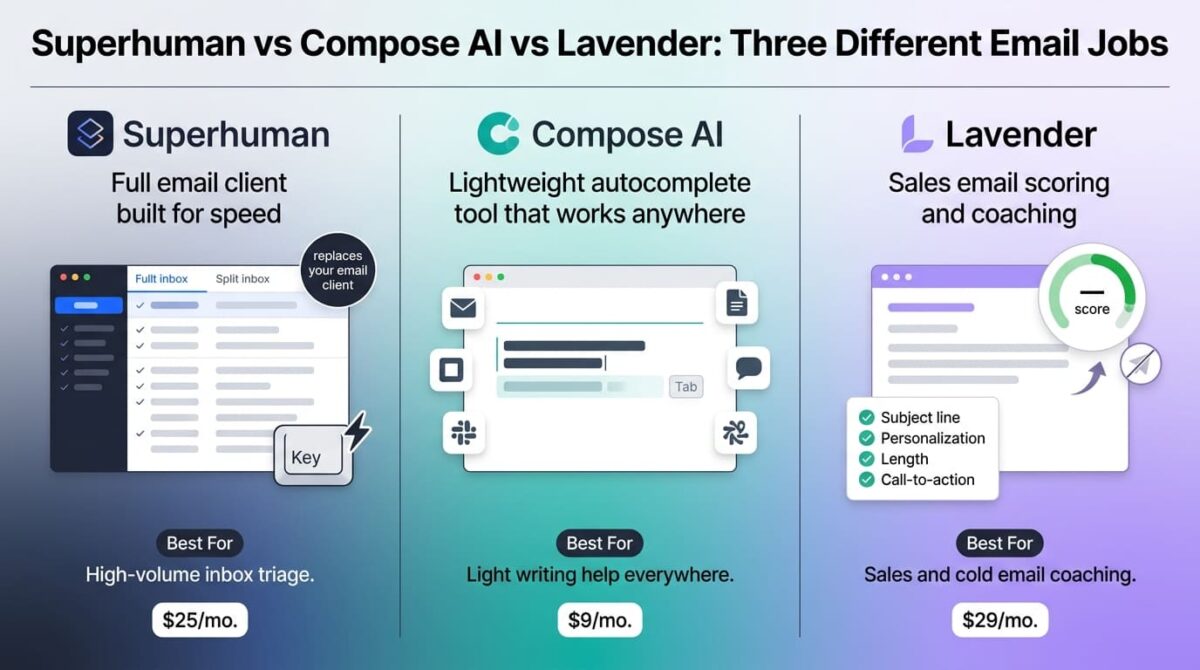
Superhuman vs Compose AI vs Lavender sounds like three versions of the same idea, but each one solves a different piece of the email problem. Superhuman replaces the email client entirely, built for speed and triage with AI drafting as one feature among many. Compose AI is a lightweight Chrome extension that autocompletes text anywhere you type, email included but not exclusively. Lavender doesn’t touch sending at all; it scores and coaches sales emails against response-rate data from inside Gmail or Outlook.
One quick note before comparing: this list originally included Flowrite, but Flowrite no longer exists as a standalone product. Maestro Labs acquired its email-writing business in January 2025 and folded it into their own tool, MailMaestro, while the original Flowrite team moved on to an unrelated AI evaluation product. A fair amount of content still online describes Flowrite with live pricing that no longer applies.
I tested Superhuman vs Compose AI vs Lavender for 30 days, writing and sending the same set of routine and sales-style emails through all three and tracking which job each one did well in practice. Here is the honest comparison, including why comparing these three on price alone misses that they’re not really competing for the same use case.
Table of Contents
How We Tested
Five criteria shaped the testing:
- Core job: full client replacement, generic autocomplete, or sales-specific coaching
- Free tier usability: whether the free plan supports ongoing use or expires within days
- Pricing at realistic use: monthly cost once team size or usage volume is factored in
- Platform reach: Chrome-only, full client, or works inside existing email apps
- Measurable impact: whether the tool’s suggestions are backed by data or generic AI rewriting
Superhuman Review: A Full Email Client Built for Speed, Not Just AI Drafting
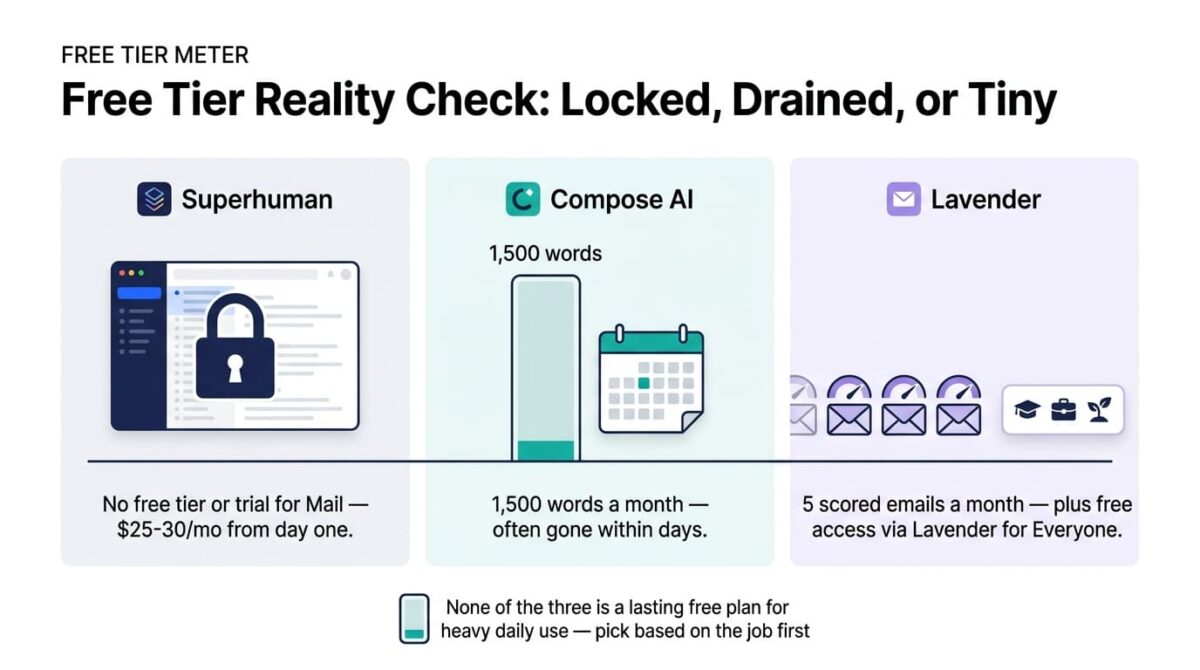
Free plan: No, Superhuman Mail has no free tier or trial
Starting price: $25/user/month (Starter, billed annually), $30/month monthly
Best plan for most users: Starter, for individual high-volume users
Platforms: Mac, iOS, Android, Chrome extension; Gmail and Outlook only
Affiliate program: Yes, Superhuman affiliate program
Superhuman is a complete email client replacement, not an add-on layered onto Gmail, with AI drafting and summarization built alongside split-inbox organization and extensive keyboard shortcuts.
What Superhuman does best
Email triage speed is the clearest reason people pay for Superhuman: split inbox, read statuses, and keyboard-driven navigation are designed for someone processing 100-plus emails a day, a different problem than generating well-written text. AI features, auto-drafting replies and summarizing long threads, are built into that same fast workflow rather than requiring a separate extension or tab.
Business tier’s CRM integrations with HubSpot and Salesforce also extend Superhuman into a sales-adjacent tool for teams that live in their inbox as a primary workspace, though coordinating meetings outside the inbox still benefits from dedicated Calendly vs Acuity vs Cal.com: Best Appointment Scheduling Software in 2026.
Where Superhuman falls short
There’s no free tier or trial for Superhuman Mail specifically; the $30/month entry price (or $25 annually) applies from day one with no way to test the full client before paying. Superhuman’s parent company was formerly Grammarly, which acquired the original Superhuman email client in 2025 and then rebranded its entire corporate identity to Superhuman in October 2025, folding Mail into a broader “Superhuman Suite” alongside Grammarly’s writing tools and Coda’s workspace product.
Support is limited to Gmail and Outlook only, and the premium price positions it specifically for heavy email users rather than anyone writing email occasionally, a narrower fit than either competitor.
Superhuman pricing
| Plan | Price | Notable Feature |
|---|---|---|
| Starter | $25/user/month (annual), $30 monthly | Split inbox, AI drafting, calendar integration |
| Business | $33/user/month (annual), $40 monthly | CRM integrations, Ask AI, team analytics |
| Enterprise | Custom | SSO, dedicated customer success manager |
Superhuman: Pros and Cons
Pros:
- Fastest inbox triage experience of the three tools tested
- AI drafting and summarization built into the core client, not a separate layer
- CRM integrations at Business extend it toward sales workflows
- Backed by substantial resources following the Grammarly rebrand
Cons:
- No free tier or trial for the Mail product specifically
- Priciest entry point of the three at $25-30/month
- Limited to Gmail and Outlook, no other email providers
- Built for email volume and speed more than writing quality specifically
Rating: 4.0 / 5, the fastest full email client of the three, priced and built for heavy daily email volume rather than occasional writing help.
Compose AI Review: The Cheapest Option, With a Free Tier That Runs Out Fast
Free plan: Yes, 1,500 words/month
Starting price: $9/month (Premium)
Best plan for most users: Premium, once the free tier’s word limit is exhausted
Platforms: Chrome extension only, no mobile app
Affiliate program: No, Compose AI runs no consumer referral program
Compose AI is a lightweight Chrome extension that autocompletes text as you type across Gmail, Google Docs, LinkedIn, Slack, and most web-based text fields, not an email-specific tool.
What Compose AI does best
Ghost-text autocomplete that learns personal writing patterns over time works well for repetitive phrasing, cutting typing time without requiring a prompt or instruction the way a full AI drafting tool does. Working across any web-based text field, not just email, makes it a lighter, more general-purpose tool than either competitor, useful for someone who wants writing assistance everywhere rather than inbox-specific coaching.
At $9/month, it also undercuts both competitors on price by a wide margin for anyone whose needs fit its lighter feature set.
Where Compose AI falls short
The free tier’s 1,500-word monthly limit runs out within days of regular use, functioning closer to a short trial than an ongoing free option despite being marketed as a free tier. Compose AI is also Chrome-only, with no mobile app and no native support for Outlook’s desktop client, a narrower platform reach than Superhuman’s or Lavender’s.
It also doesn’t score or coach email quality the way Lavender does, and doesn’t replace an email client the way Superhuman does; it’s a narrower autocomplete layer that works best alongside whatever email tool is already in use, not a replacement for one.
Compose AI pricing
| Plan | Price | Words/Month | Notable Feature |
|---|---|---|---|
| Free | $0 | 1,500 | Basic autocomplete, limited usage |
| Premium | $9/month | Higher limit | Advanced AI models, priority access |
| Enterprise | Custom | Custom | Team deployment, custom quote |
Compose AI: Pros and Cons
Pros:
- Cheapest paid tier of the three by a wide margin
- Works across Gmail, Docs, LinkedIn, and Slack, not just email
- Ghost-text autocomplete learns personal writing style over time
- Lightweight, no workflow change required to start using it
Cons:
- Free tier’s 1,500 words runs out within days of regular use
- Chrome extension only, no mobile app
- Doesn’t score or coach email quality like Lavender
- Doesn’t replace an email client the way Superhuman does
Rating: 3.9 / 5, the cheapest and most general-purpose of the three, with a free tier too small to function as a lasting option.
Lavender Review: Sales Email Coaching Backed by Response-Rate Data
Free plan: Yes, 5 scored emails/month
Starting price: $29/month (Starter), unlimited scoring
Best plan for most users: Starter, for individual sales reps; Teams for coaching a group
Platforms: Chrome extension, works inside Gmail and Outlook
Affiliate program: Yes, Lavender affiliate program
Lavender doesn’t generate email from scratch or replace a client; it scores and coaches emails already being written, trained on documented reply-rate outcomes rather than generic AI rewriting, which pairs directly with the strategies tested in Instantly vs Smartlead vs Apollo: Best AI Cold Email Outreach Tools.
What Lavender does best
Scoring trained on documented reply data, rather than a generic large language model’s sense of “good writing,” is Lavender’s clearest differentiator: subject line strength, personalization signals, length, and call-to-action clarity are all evaluated against what’s shown to correlate with documented responses, not a model’s general writing preferences. For a sales team specifically, that data-backed coaching is a different and more targeted value proposition than either competitor offers.
The Lavender for Everyone program extends no-cost access to students, job seekers, and bootstrapped entrepreneurs beyond the standard 5-email free tier, a notable inclusion neither Superhuman nor Compose AI offers.
Where Lavender falls short
Team plans scale quickly: at roughly $69-99/user/month for the Teams tier, a 10-person sales team moves into meaningful budget territory fast, and Teams plans carry a 3-seat minimum. Lavender also doesn’t send email, verify addresses, or replace CRM functionality; it’s an add-on to an existing sales stack rather than a standalone email solution.
Outside of sales and cold outreach specifically, Lavender’s value drops off: marketing or transactional email doesn’t benefit from reply-rate-trained scoring the way personalized cold outreach does, making it a narrower fit than Superhuman’s or Compose AI’s more general-purpose positioning.
Lavender pricing
| Plan | Price | Notable Feature |
|---|---|---|
| Free | $0 | 5 scored emails/month |
| Starter | $29/month | Unlimited scoring, AI coaching |
| Pro | $49/month | Advanced personalization, detailed analytics |
| Teams | ~$69-99/user/month (3-seat minimum) | Team analytics, shared templates |
Lavender: Pros and Cons
Pros:
- Scoring trained on documented reply-rate data, not generic AI rewriting
- Lavender for Everyone offers free access to students and job seekers
- Transparent self-serve pricing with no required sales call
- Strongest fit of the three for sales teams writing cold outreach specifically
Cons:
- Team pricing climbs quickly and carries a 3-seat minimum
- Doesn’t send, verify, or manage email, an add-on rather than a standalone tool
- Narrower value outside of sales and cold outreach use cases
- Doesn’t replace an email client the way Superhuman does
Rating: 4.2 / 5, the most differentiated AI value of the three for sales-specific email, narrower in scope outside that use case.
Head-to-Head Comparison
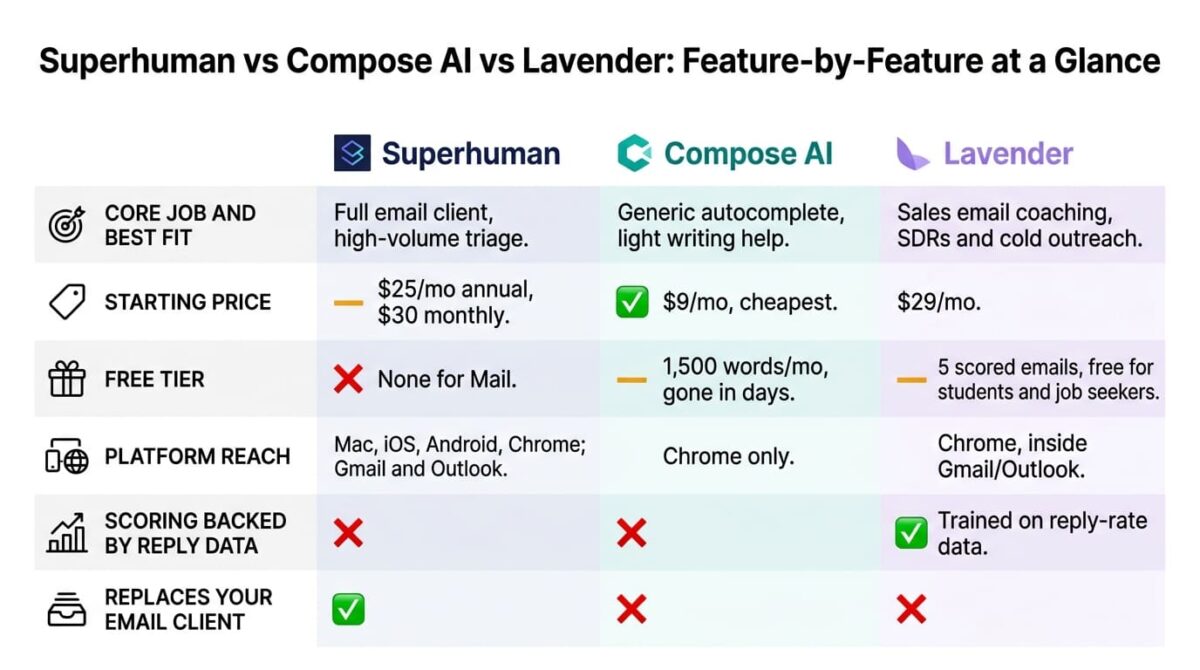
| Feature | Superhuman | Compose AI | Lavender |
|---|---|---|---|
| Core job | Full email client | Generic text autocomplete | Sales email coaching and scoring |
| Starting price | $25/month (annual) | $9/month | $29/month |
| Free tier | None for Mail | Yes (1,500 words/month) | Yes (5 scored emails/month) |
| Platform reach | Mac, iOS, Android, Chrome | Chrome only | Chrome, inside Gmail/Outlook |
| Scoring backed by reply data | No | No | Yes |
| Replaces email client | Yes | No | No |
| Best suited for | High-volume inbox triage | Light, general writing assistance | SDRs and sales teams writing cold email |
Which Should You Choose?
Choose Superhuman if inbox speed and triage for high email volume matter more than writing coaching specifically, and the premium price fits the budget.
Choose Compose AI if lightweight autocomplete across several tools, not just email, covers the need, and the free tier’s word limit is acceptable for light use.
Choose Lavender if cold email or sales outreach quality is the core job, and data-backed scoring matters more than generating text from scratch.
Our Recommendations
Based on 30 days of testing across triage, light writing, and sales coaching workflows, here is the recommended setup by situation:
Executive or founder processing 100+ emails daily: Superhuman Starter, for the fastest triage experience available.
Solo freelancer wanting light writing help across several tools: Compose AI’s free tier, upgrading to Premium once the word limit becomes a meaningful constraint.
SDR or sales rep writing cold outreach regularly: Lavender Starter, for reply-rate-trained scoring neither competitor offers.
Sales manager coaching a team on email quality: Lavender Teams, budgeting for the per-seat cost as it scales past a handful of reps.
Student or job seeker writing application and networking emails: Lavender’s free-for-everyone program, for coaching beyond the standard 5-email free tier at no cost.
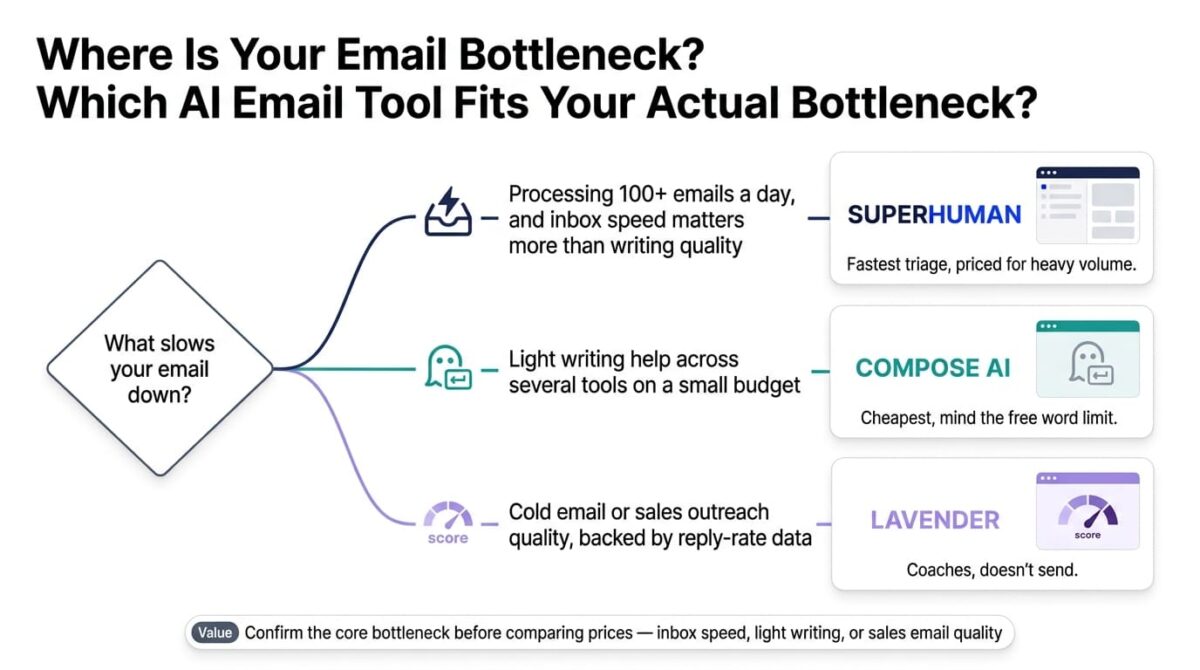
Final Verdict
Superhuman, Compose AI, and Lavender solve three different problems that happen to all involve email, and none of them substitutes cleanly for either of the other two.
- Lavender: 4.2 / 5, the most differentiated value for sales-specific email, narrower outside that use case
- Superhuman: 4.0 / 5, the fastest full email client, priced for heavy daily volume rather than occasional writing help
- Compose AI: 3.9 / 5, the cheapest and most general-purpose, with a free tier too small to rely on
Before comparing prices across these three, confirm which job is the core bottleneck: inbox speed points toward Superhuman, light writing help across multiple tools points toward Compose AI, and sales email quality points toward Lavender specifically.
Frequently Asked Questions
Why isn’t Flowrite included in this comparison?
Flowrite was acquired by Maestro Labs in January 2025 and merged into their product, MailMaestro. The original Flowrite team moved on to an unrelated AI evaluation tool, and Flowrite no longer exists as a standalone, purchasable product.
Does Superhuman Mail have a free trial?
No. Unlike the broader Superhuman Suite, which includes a free tier for Grammarly writing and Coda document features, Superhuman Mail itself has no free tier or trial and starts at $25-30/month from the first day.
Is Compose AI’s free plan enough for regular use?
Not for consistent daily writing. The 1,500-word monthly limit is typically used up within a few days of active writing, making it closer to a short trial than an ongoing free option.
What makes Lavender’s scoring different from a generic AI writing tool?
Lavender’s scoring model is trained on documented reply-rate outcomes from sales emails, evaluating elements like subject line strength and personalization against what’s shown to correlate with responses, rather than a general-purpose language model’s sense of good writing.
Can Lavender replace my email client like Superhuman does?
No. Lavender works as a coaching layer inside Gmail or Outlook, scoring and suggesting improvements to emails you’re already writing. It doesn’t send, organize, or triage your inbox the way Superhuman’s full client does.
Which tool is cheapest for someone who just wants writing help occasionally?
Compose AI, at $9/month, is the cheapest paid option of the three, suited to light, general writing assistance across several tools rather than email-specific coaching or full client replacement.
Does Lavender offer any free access beyond the basic free tier?
Yes, through its Lavender for Everyone program, which extends free access to students, job seekers, and bootstrapped entrepreneurs beyond the standard 5-scored-email monthly limit.
Does Superhuman make sense for someone who doesn’t process high email volume?
Probably not. Superhuman’s speed and triage features are built for people handling 100-plus emails daily; someone with lighter email volume is likely paying for capability they won’t use as heavily as the price assumes.