Something changed in AI coding tools between 2024 and 2026, and it was not incremental. Context windows expanded far enough to fit entire repositories rather than single files. Models fine-tuned specifically on code replaced general-purpose LLMs that happened to understand code. And agentic patterns, where the assistant reads your codebase, reasons about it, and then writes, matured from impressive demos into tools that developers use for real work every day.
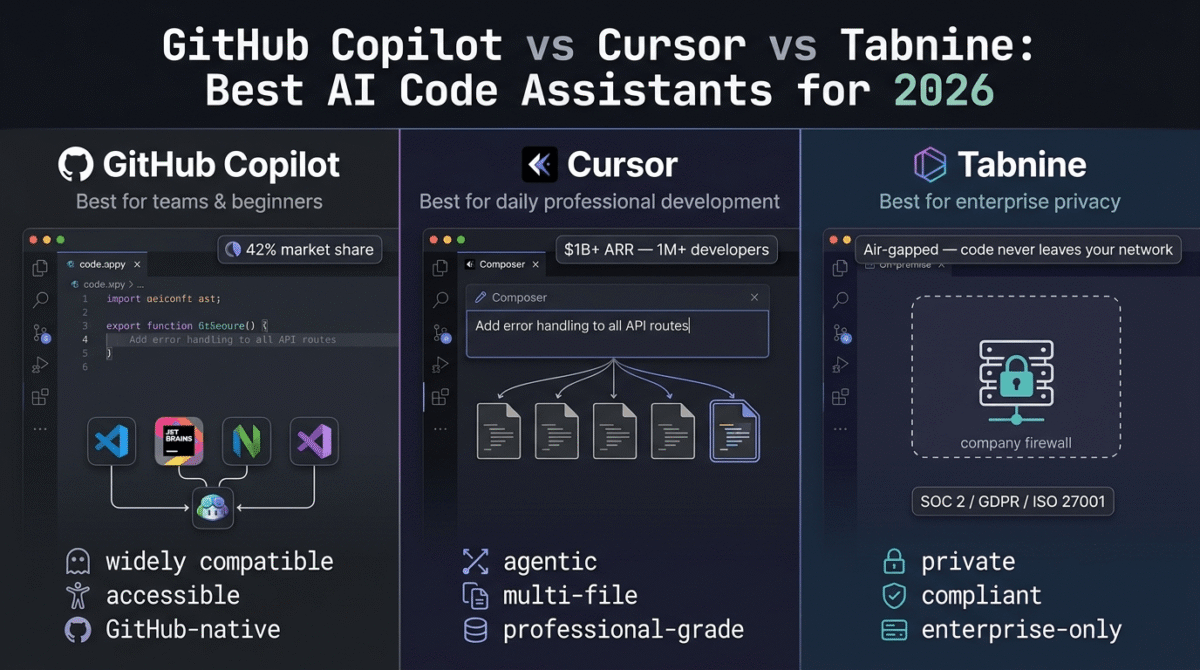
The result is a market that looks nothing like it did 18 months ago. GitHub Copilot still holds roughly 42% market share as the enterprise default. Cursor has crossed $1 billion in annualised revenue and a million paying developers, becoming the tool serious individual developers reach for first. Tabnine has pivoted entirely to enterprise and discontinued every free and individual plan, positioning itself as the only credible option for organizations that cannot send code to external servers.
I tested all three (GitHub Copilot vs Cursor vs Tabnine) in real development workflows, Python backends, TypeScript frontends, multi-file refactors, and debugging sessions, across VS Code and JetBrains IDEs over 30 days. Here is the honest comparison.
Table of Contents
How We Evaluated These Tools
Every tool was tested across five criteria:
- Code quality and accuracy, does the suggestion actually work, and how often does it require correction versus accepting directly?
- Agentic and multi-file capability, can the tool handle complex instructions across an entire codebase, or is it limited to line-by-line completion?
- Pricing transparency, how clearly does the tool communicate what you get per month, and where are the hidden billing triggers?
- IDE integration and workflow fit, does the tool work inside your existing editor, or require switching to an AI-native IDE?
- Value for money, at each pricing tier, does the productivity gain justify the monthly cost for individual developers and small teams?
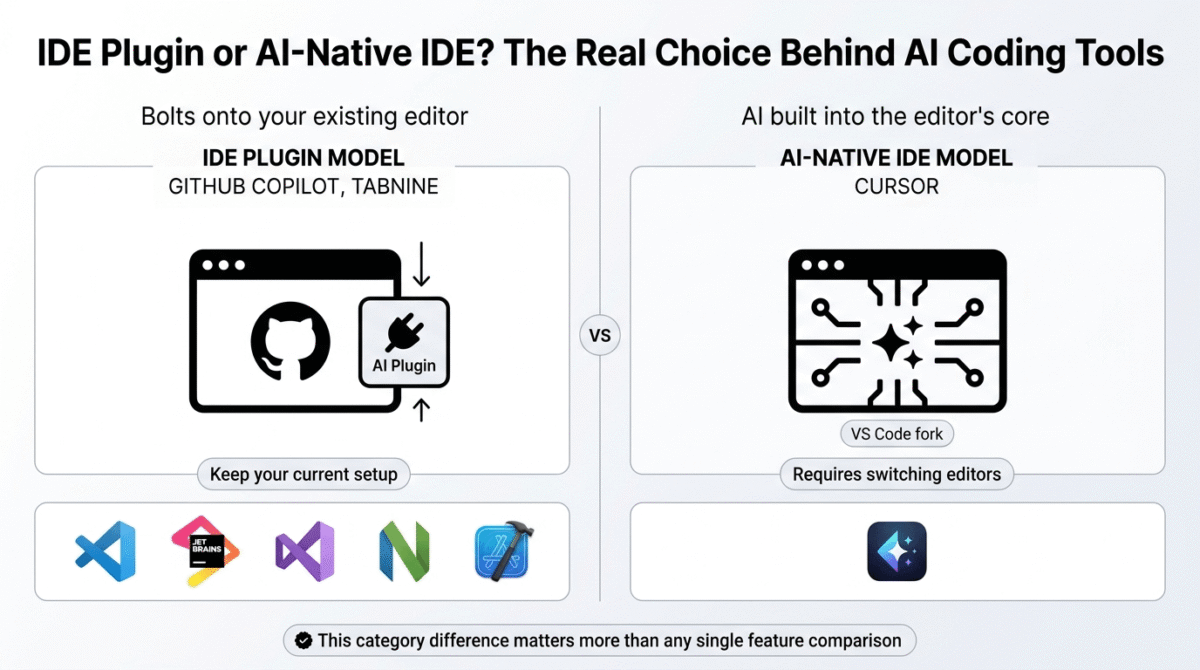
One important distinction before diving in: in 2026, the AI coding assistant market has split into two categories. IDE plugins, GitHub Copilot and Tabnine, bolt onto your existing editor. AI-native IDEs, Cursor and Windsurf, are full VS Code forks rebuilt around AI as a first-class primitive. This review covers one from each side of that divide, plus Tabnine as the enterprise-specific outlier.
Why AI Code Assistants Matter Beyond Full-Time Developers
AI code assistants are not just for software engineers at tech companies. In 2026, they have become practical tools for a much broader audience:
Bloggers and content creators building their own tools. A blogger who wants a custom WordPress plugin, an automated social media poster, or a simple Python script to process a CSV file can build and debug it with AI assistance without hiring a developer. What previously required a $100/hour freelancer can now be handled with a $10/month AI subscription and a few hours of learning. See our roundup of AI tools for bloggers for how a code assistant fits alongside the rest of a blogger’s AI stack.
Freelancers who code occasionally. Web designers who need to write custom CSS, marketers who build Zapier automations with JavaScript, and virtual assistants who maintain client websites all benefit from AI code completion, it reduces the time spent on Stack Overflow looking up syntax and reduces the error rate in code they are not confident in.
WordPress developers. For developers in the RateTheTool audience who build client sites, AI code assistants dramatically accelerate custom plugin development, theme customisation, and debugging. Copilot’s understanding of PHP and WordPress-specific patterns makes it particularly relevant for this audience.
Technical founders and indie hackers. Solo builders who wear every hat, including the developer hat, get a meaningful productivity multiplier from AI coding tools. Shipping a feature in two hours instead of eight changes what is possible for a one-person product.
GitHub Copilot Review: Best AI Code Assistant for GitHub Teams and Beginners
Free plan: Yes, 2,000 completions/month, 50 premium requests/month
Starting paid price: $10/month (Pro), $100/year (annual)
Best plan for most users: Pro, $10/month
Platforms: VS Code, JetBrains, Visual Studio, Neovim, Xcode, GitHub.com
Affiliate program: Yes, GitHub affiliate program
GitHub Copilot remains the enterprise standard for AI coding in 2026, and its market dominance is built on three things that competitors have been unable to fully replicate: the widest IDE support, the deepest integration with the GitHub workflow, and the most accessible entry price among paid AI coding tools.
What GitHub Copilot does best
GitHub Copilot pricing ranges from free to $39/user/month in 2026, with five tiers: Free with 2,000 completions and 50 agent requests per month, Pro at $10/month, Pro+ at $39/month, Business at $19/user/month, and Enterprise at $39/user/month. The free tier is a genuine evaluation tool, not a time-limited trial, and the Pro plan at $10/month is the cheapest credible individual subscription in the AI coding category.
Copilot’s IDE support is unmatched in this comparison. GitHub Copilot holds approximately 42% market share and is the easiest entry point for beginners and GitHub teams, with the widest IDE support of any tool in the category. VS Code, JetBrains, Visual Studio, Neovim, Xcode, and Eclipse are all supported, which matters for enterprise teams and individual developers who are not willing or able to switch editors.
The GitHub integration is Copilot’s structural advantage over every competitor. Pull request summarisation, code review suggestions, issue-to-code generation, and Actions workflow automation are all Copilot features that only work because Copilot lives inside GitHub itself. For developers whose workflow is GitHub-centric, which describes most professional developers in 2026, this native integration removes friction that third-party tools cannot eliminate regardless of their quality.
The Enterprise plan offers IP indemnity, legal protection if AI-generated code creates liability, custom model training on private codebases, and deep VS Code and JetBrains integration. For companies where legal exposure from AI-generated code is a real concern, this indemnity is a commercial differentiator that Cursor and most alternatives cannot match.
Where GitHub Copilot falls short
In early 2026, GitHub moved Pro from a fixed-completions structure to unlimited completions plus a 300 premium-request cap. If your workflow leans on chat and agent mode, that cap is your new ceiling, hitting it bills $0.04 per extra request. A developer who runs 200 requests over the cap pays $8 on top of the $10 base.
Multi-file agentic editing is where Copilot falls behind Cursor. Cursor’s Composer interface can take a feature description and implement it end-to-end across multiple files, a capability that Copilot’s agent mode approximates but does not match in depth or reliability in 2026. For developers doing complex refactors across large codebases, this gap is meaningful in daily productivity.
The Enterprise tier requires GitHub Enterprise Cloud at $21/user, which moved the real Enterprise cost from $39 to $60 per user per month. The Copilot line did not change, the prerequisite did. Teams evaluating Copilot Enterprise should budget $60/user, not $39.
GitHub Copilot pricing
| Plan | Monthly Price | Annual Price | Key limits |
|---|---|---|---|
| Free | $0 | $0 | 2,000 completions, 50 premium requests/month |
| Pro | $10/month | $100/year | Unlimited completions, 300 premium requests/month |
| Pro+ | $39/month | $390/year | 1,500 premium requests, all frontier models incl. o1, o3 |
| Business | $19/user/month | — | Pooled AI credits, audit logs, admin controls |
| Enterprise | $39/user/month (+$21 GH Enterprise) | — | Fine-tuning on private codebase, IP indemnity |
Note: Copilot switched to AI Credits billing on June 1, 2026. Business/Enterprise customers receive 2× promotional credits through August 2026. Inline completions do not consume credits on any paid plan.
GitHub Copilot: Pros and Cons
Pros:
- Best IDE support, VS Code, JetBrains, Neovim, Visual Studio, Xcode, Eclipse
- Cheapest credible paid plan at $10/month
- Genuine free tier, 2,000 completions and 50 premium requests, no expiry
- Deepest GitHub integration, PR summaries, code review, Actions automation
- IP indemnity on Enterprise, legal protection competitors do not offer
- Free for verified students and open-source maintainers
- Widest language support across all plan tiers
Cons:
- Pro plan 300 premium-request cap adds overage costs for chat/agent-heavy developers
- Multi-file agentic editing less capable than Cursor Composer
- Enterprise true cost is $60/user (requires GitHub Enterprise Cloud at $21/user)
- June 2026 credit billing transition adds complexity to cost forecasting
- Agent mode requires Pro plan, free tier access is limited
Rating: 4.5 / 5, Best AI code assistant for GitHub-centric teams, beginners, and anyone who wants the widest IDE compatibility at the lowest price. The go-to starting point before evaluating more expensive alternatives.
Cursor Review: Best AI Code Assistant for Daily Professional Development
Free plan: Yes, limited completions and agent requests (Hobby tier)
Starting paid price: $20/month (Pro), $16/month (annual)
Best plan for most users: Pro, $20/month
Platforms: Cursor IDE (VS Code fork), Windows, macOS, Linux
Affiliate program: Yes, Cursor affiliate program
Cursor has quickly become one of the most popular AI code editors, crossing $1 billion in annualized revenue and attracting over a million paying developers. Companies like Stripe, OpenAI, Figma, and Adobe use it daily. In 2026, it is the tool that individual developers consistently recommend to each other, the best benchmark for what professional AI-assisted development looks like when the editor itself is built around AI rather than bolted onto it.
What Cursor does best
Cursor’s Composer interface can take a feature description and implement it end-to-end across multiple files. Start on the free tier, you’ll hit the limit within a week. This multi-file agentic editing capability is Cursor’s defining advantage. Where Copilot generates the next function, Cursor can understand a codebase, identify what needs to change across five files to implement a feature, make all those changes, and explain what it did. This is a qualitatively different kind of assistance.
Cursor Pro at $20/month includes unlimited Tab completions, extended Agent limits, Cloud Agents, access to all frontier models including MCPs, skills, and hooks, plus a $20 monthly credit pool for premium model requests. When Cursor picks the model for you in Auto mode, usage is included at no extra cost. Manually selecting frontier models, Claude Sonnet, GPT-4, Opus, draws from your $20 pool.
The .cursorrules file is a Cursor-specific feature that lets you define persistent coding standards, project context, and style preferences that inform every AI suggestion in a codebase. Teams using .cursorrules report a 70% reduction in PR review comments, because Cursor’s suggestions already conform to the team’s standards before they hit review. No other tool in this comparison has an equivalent mechanism.
Cursor’s codebase indexing, the ability to read and understand your entire repository, not just the current file, makes context-aware suggestions possible at a depth that IDE plugins cannot match. When you ask Cursor to “add error handling consistent with how we handle errors elsewhere in this codebase,” it actually finds those patterns and applies them. Copilot, working as a plugin with file-level context, cannot do this reliably.
Where Cursor falls short
Cursor pricing starts at free (Hobby), then $20/month for Pro, $60/month for Pro+, and $200/month for Ultra. The Hobby plan provides approximately half a day of serious agent work before hitting limits, 2,000 completions and 50 slow premium requests. The free tier exists to evaluate the editor, not to do real work.
The requirement to use Cursor’s own IDE, a VS Code fork, is the most common objection from developers evaluating the tool. Teams using JetBrains IDEs (IntelliJ, PyCharm, WebStorm) or Visual Studio cannot use Cursor without switching editors entirely. For many professional developers, this is a non-starter regardless of Cursor’s quality.
The credit pool is where Pro gets nuanced. Run out, and you switch to Auto for the rest of the month or pay overages at API rates with no penalty markup. Heavy agentic users who manually select frontier models can exhaust the $20 pool before mid-month, especially during intensive multi-file refactor sessions. The core insight in 2026 is that you probably want two tools, an IDE assistant like Cursor for daily coding, plus a terminal agent like Claude Code for complex tasks. Paying for Cursor Pro + Copilot + Claude Pro simultaneously is a trap, pick two at most and master them.
Cursor pricing
| Plan | Monthly Price | Annual Price | Key features |
|---|---|---|---|
| Hobby | $0 | $0 | Limited completions, limited agent requests, 1-week Pro trial for new users |
| Pro | $20/month | ~$16/month | Unlimited Tab completions, extended Agent, all frontier models, $20 credit pool |
| Pro+ | $60/month | ~$48/month | Everything in Pro, $60 credit pool (3× Pro) |
| Ultra | $200/month | ~$160/month | Highest usage tier for intensive individual use, 20× Pro credit pool ($400 value) |
| Business | $40/user/month | ~$32/user/month | Pooled team usage, admin controls, SCIM, audit logs, shared team context |
Annual billing saves 20% on Pro and Pro+. Auto mode usage is free and unlimited on paid plans, only manual frontier model selection draws from the credit pool.
Cursor: Pros and Cons
Pros:
- Best multi-file agentic editing, Composer handles end-to-end feature implementation
- Entire codebase context, not limited to current file like IDE plugins
- .cursorrules for persistent project standards, reduces PR review friction
- All frontier models available on Pro, Claude, GPT-4, Gemini accessible from one subscription
- Auto mode unlimited on paid plans, most daily use does not hit credit limits
- Free student access via university and bootcamp partnerships
- Most recommended by individual developers in 2026
Cons:
- Requires switching to Cursor IDE, no JetBrains, Visual Studio, or Neovim support
- Free Hobby tier is evaluation-only, not viable for real workflows
- $20/month Pro is double Copilot’s $10/month entry price
- Credit pool exhaustion possible for heavy frontier model users before month-end
- Agentic sessions on frontier models can be expensive at overage rates
- No IP indemnity, unlike Copilot Enterprise
Rating: 4.6 / 5, Best AI code assistant for individual developers and teams willing to adopt the Cursor IDE. The most capable daily coding tool in 2026, at a price that is easy to justify if you code professionally.
Tabnine Review: Best AI Code Assistant for Enterprise Privacy and Compliance
Free plan: No, free tier retired April 2025
Starting paid price: $39/user/month (Code Assistant, annual billing only)
Best plan for most users: Code Assistant, $39/user/month (enterprise only)
Platforms: VS Code, JetBrains, Eclipse, Visual Studio, Tabnine CLI
Affiliate program: Yes, Tabnine partner program
Tabnine is now enterprise-only, no free or individual plans, priced at $39–59/user/month for teams. It is a Gartner Visionary in 2026 for Enterprise AI Coding Agents, with SOC 2 Type II, GDPR, and ISO 27001 certifications, and four deployment modes including air-gapped on-premise via Dell PowerEdge with NVIDIA GPUs.
This pivot stranded individual developers who relied on Tabnine’s previously generous free and low-cost plans. It also clarified exactly what Tabnine is for in 2026, and who it is not for.
What Tabnine does best
Tabnine is the right choice when privacy, compliance, and enterprise control matter more than raw feature count. The core difference is deployment model, Tabnine can run entirely on-premises with the model in your infrastructure, your code never leaving your network, and air-gapped deployments for regulated industries supported as a product configuration.
Most tools claim “private” but mean “we don’t train on your code.” Tabnine means “the model runs inside your firewall.” For a compliance team at a financial institution, a healthcare organization under HIPAA, or a defense contractor where proprietary code cannot touch an external API, this distinction is not academic, it is a hard requirement that eliminates every other tool in this comparison.
Tabnine’s Code Review Agent won “Best Innovation in AI Coding” at the 2025 AI TechAwards. The agent performs automated multi-step code reviews, flags potential security vulnerabilities, enforces coding standards, and integrates with Jira to close the loop between issue tracking and code quality, all within the organization’s own infrastructure.
The Enterprise Context Engine, launched March 2026, maps an organization’s entire codebase architecture, coding standards, and internal APIs, then uses this organizational knowledge to ground AI suggestions in actual company patterns rather than generic open-source conventions. The Enterprise Context Engine claims an 82% boost in code acceptance rates by ensuring suggestions fit the codebase they will be merged into, not the average public repository.
Tabnine’s Bring Your Own Model (BYOM) support lets enterprises use internally fine-tuned models or approved third-party models through Tabnine’s interface, a level of model governance control that no other tool in this comparison provides. Organizations with specific model approval requirements (common in regulated sectors) can satisfy those requirements without abandoning AI coding assistance.
Where Tabnine falls short
Tabnine killed its free tier on April 2, 2025, and discontinued every individual plan shortly after. It is now enterprise-only, minimum $39/user/month, annual billing required, no exceptions. For solo developers, freelancers, bloggers, and small businesses, the core audience of RateTheTool.com, Tabnine is simply inaccessible. There is no evaluation tier, no monthly billing, and no individual license. You buy as a team under an annual contract or you do not buy at all.
Tabnine leads in privacy and enterprise compliance but lags in value and free offerings compared to competitors. At $39/user/month on an annual contract, Tabnine costs nearly four times GitHub Copilot Pro ($10/month) and double Cursor Pro ($20/month), for a tool that most independent benchmarks show is competitive but not superior in raw code completion quality.
Neovim and Xcode are not supported, a relevant limitation for developers on Apple platforms or terminal-centric workflows. The tool’s strength is enterprise IDE environments (VS Code and JetBrains), and its feature set reflects that focus.
Tabnine pricing
| Plan | Monthly Price | Annual Price | Key features |
|---|---|---|---|
| Free | Available | Available | Retired April 2025, no longer offered |
| Code Assistant | $39/user/month | Annual only | AI completions, chat, zero-data-retention, SOC 2/GDPR/ISO 27001 compliance standards |
| Agentic Platform | $59/user/month | Annual only | Adds autonomous agents, Model Context Protocol (MCP) tool support, CLI integrations, unlimited codebase connections, and automated Code Review Agent pipelines |
| Enterprise | Custom | Annual only | Air-gapped deployment architecture, Bring Your Own Model (BYOM) support, dedicated engineering resources, and physical Dell PowerEdge on-premise infrastructure configurations |
No monthly billing. No individual licenses. No free trial, 14-day enterprise trial available for qualified organizations only.
Important note for individual users: If you are a solo developer, freelancer, or small business owner, Tabnine is not available to you in 2026. The free tier was retired in April 2025 and all individual plans were discontinued. GitHub Copilot’s free tier and Cursor’s Hobby plan are your practical free alternatives.
Tabnine: Pros and Cons
Pros:
- Only enterprise AI coding tool with true air-gapped, on-premise deployment
- Zero-data-retention architecture, code never sent to external servers
- SOC 2 Type II, GDPR, and ISO 27001 certified, satisfies regulated industry requirements
- BYOM support, enterprises can use internally approved and fine-tuned models
- Code Review Agent, automated PR review with Jira integration
- Enterprise Context Engine, suggestions grounded in your organization’s actual codebase patterns
- Widest enterprise IDE support, VS Code, JetBrains, Eclipse, Visual Studio
Cons:
- No free tier, no individual plans, retired April 2025
- $39/user/month minimum, annual billing only, most expensive entry in this comparison
- Inaccessible for solo developers, freelancers, and small businesses
- Raw code completion quality competitive but not superior to Copilot or Cursor
- No Neovim or Xcode support
- Sales process required, no self-serve signup for evaluation
- 14-day trial only for qualified enterprise organizations
Rating: 4.0 / 5, Best AI code assistant for enterprises with strict data privacy requirements and regulated industry compliance needs. Completely unsuitable for individual developers and small businesses without an enterprise budget and annual commitment.
Head-to-Head Comparison
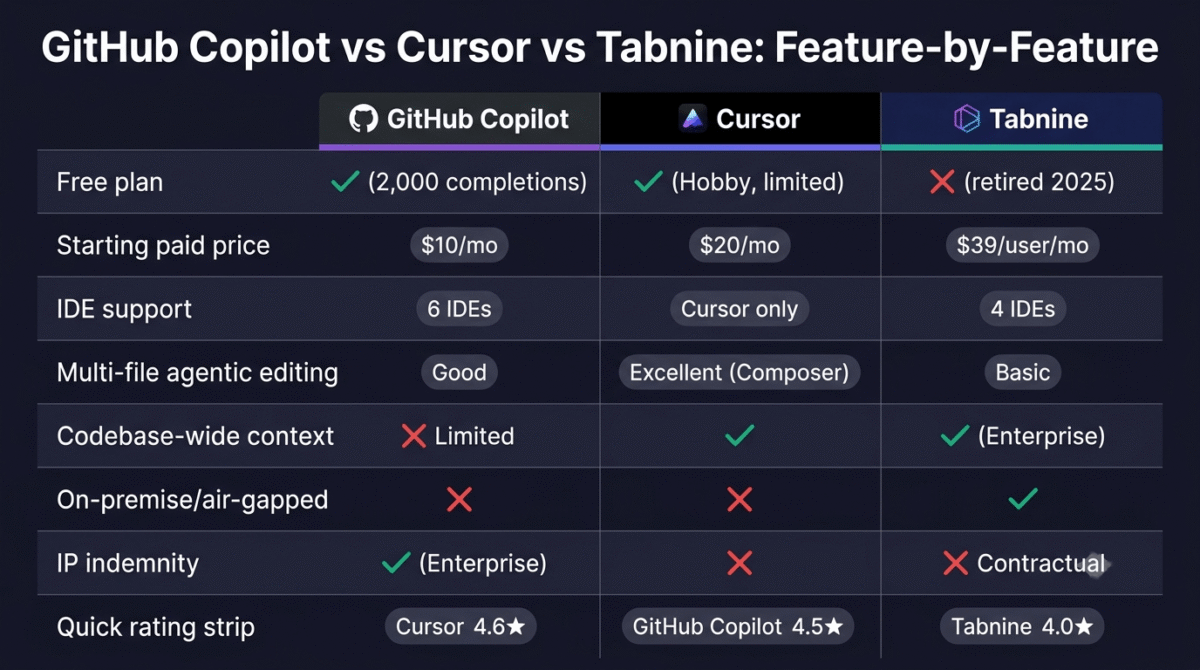
| Feature | GitHub Copilot Pro | Cursor Pro | Tabnine Code Assistant |
|---|---|---|---|
| Monthly price | $10/month | $20/month | $39/user/month (annual only) |
| Free plan | Yes, 2,000 completions, 50 requests | Yes, limited (Hobby tier) | No, retired April 2025 |
| IDE requirement | Works in existing IDE | Cursor IDE only (VS Code fork) | Works in existing IDE |
| Supported IDEs | VS Code, JetBrains, Neovim, Visual Studio, Xcode | Cursor IDE (VS Code-based) only | VS Code, JetBrains, Eclipse, Visual Studio |
| Multi-file agentic editing | Good (improving) | Excellent (Composer) | Good (Agentic Platform tier) |
| Codebase indexing | Limited (file-level) | Full codebase (entire repo) | Full (Enterprise Context Engine) |
| Data privacy | Cloud-processed | Cloud-processed | Air-gapped on-premise available |
| IP indemnity | Enterprise plan only | No | No |
| BYOM (custom models) | No | No | Yes (Enterprise) |
| Languages supported | 30+ | 30+ | 30+ |
| GitHub integration | Native, deepest | Limited | Limited |
| Best for | GitHub teams, beginners, wide IDE support | Professional individual developers | Regulated enterprises, privacy-critical orgs |
| G2 rating | 4.5/5 | 4.7/5 | 4.1/5 |
Which AI Code Assistant Should You Choose?
Choose GitHub Copilot if:
You are already using GitHub as your development platform and want AI assistance integrated natively into that workflow. At $10/month Pro or free for students, it is the lowest-cost entry point to professional AI coding assistance and the tool with the widest IDE compatibility, critical if your team uses JetBrains, Visual Studio, Neovim, or Xcode where Cursor does not operate. For beginners, WordPress developers, and teams evaluating AI coding tools for the first time, Copilot is the correct starting point before considering more expensive alternatives.
Choose Cursor if:
You code daily and are willing to adopt the Cursor IDE (VS Code fork) in exchange for the most capable AI coding experience available to individual developers. Composer’s multi-file agentic editing, full codebase context, and the .cursorrules customisation system are meaningfully ahead of Copilot at the $20/month Pro tier. Companies like Stripe, OpenAI, Figma, and Adobe use Cursor daily, if professional-grade AI coding is the priority and editor switching is not a barrier, Cursor is the tool to reach for.
Choose Tabnine if:
Your organization cannot send code to external cloud APIs, because of regulatory requirements (healthcare, finance, defense), internal data governance policies, or legal requirements around IP in specific jurisdictions. Tabnine’s air-gapped deployment, zero-data-retention architecture, and BYOM support are capabilities no other enterprise-grade tool in this comparison offers. The $39/user/month annual commitment is steep; if air-gapped compliance is a hard requirement, it is the only option.
Stay on a free tier if:
You code occasionally and want to explore AI assistance without a subscription. Codeium has the most generous free tier with autocomplete and chat at no usage limits for personal use. GitHub Copilot’s free plan (2,000 completions, 50 premium requests) is the most accessible free option from a major platform. Cursor’s Hobby tier lets you evaluate the editor experience before committing. Test one free tier for four weeks before paying for anything.
Setting Up Your First AI Code Assistant, The Practical Guide
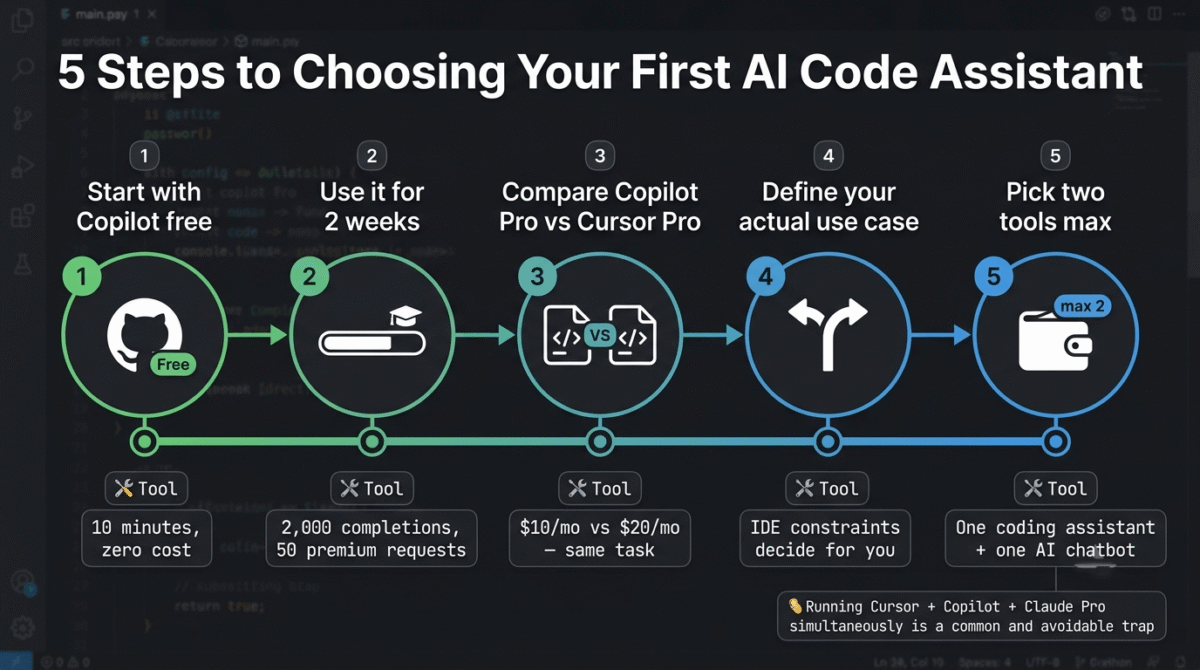
For developers new to AI coding tools, here is the fastest path to a working setup:
Step 1, Start with GitHub Copilot free. Create a GitHub account if you do not already have one, enable Copilot from your account settings, and install the VS Code extension. You are coding with AI assistance within ten minutes at zero cost. This is the correct first step regardless of which tool you ultimately choose.
Step 2, Use it for two weeks before evaluating the limits. The free tier’s 2,000 monthly completions and 50 premium requests are enough to understand whether AI code assistance changes your workflow. If you notice yourself regularly hitting the cap or wanting richer multi-file assistance, that is your signal to evaluate Pro plans.
Step 3, Compare Copilot Pro ($10/month) and Cursor Pro ($20/month) on the same project. Both offer trial periods, Cursor gives new accounts a one-week Pro trial automatically. Run the same refactoring task through both tools and compare the output quality before committing to a subscription.
Step 4, Define your actual use case. If you are in VS Code and GitHub-centric, Copilot Pro at $10/month is likely the better value. If you do complex multi-file work and can use the Cursor IDE, $20/month for Cursor Pro delivers meaningfully better output. If you are in JetBrains or Neovim, Cursor is not an option and Copilot is the answer.
Step 5, Set a budget rule before subscribing. Paying for Cursor Pro plus Copilot plus Claude Pro simultaneously is a common trap, pick two tools at most and master them. One AI coding assistant and one AI chatbot (for reasoning and research) is the sensible stack for most developers. “If you haven’t picked that second tool yet, see our general AI chatbot comparison of ChatGPT vs Claude vs Gemini for reasoning and research alongside your coding assistant.
Final Verdict
Cursor is the best AI code assistant for individual developers and professional teams in 2026, the Composer multi-file editor, full codebase context, and .cursorrules customisation deliver a qualitatively different coding experience from IDE plugins. The $20/month Pro plan is easy to justify for anyone who codes daily.
GitHub Copilot is the best AI code assistant for teams and beginners, the widest IDE support, deepest GitHub integration, and $10/month Pro entry price make it the practical starting point for anyone new to AI coding tools or working across diverse editor environments.
Tabnine is the best AI code assistant for regulated enterprises, air-gapped deployment, zero-data-retention, and BYOM support are capabilities no competitor offers. The enterprise-only positioning and $39/user/month minimum make it inaccessible and unnecessary for anyone outside regulated industries with strict compliance requirements.
Ratings:
- Cursor: 4.6 / 5
- GitHub Copilot: 4.5 / 5
- Tabnine: 4.0 / 5
Frequently Asked Questions
What is the best free AI code assistant in 2026?
GitHub Copilot’s free tier, 2,000 completions and 50 premium requests per month with no expiry, is the most accessible free option from a major platform. It works in VS Code, JetBrains, Neovim, Visual Studio, and Xcode without switching editors. Codeium (now Windsurf) offers unlimited free completions and chat for personal use and is worth evaluating as a free alternative. Cursor’s Hobby tier provides a free evaluation experience but is not viable for ongoing professional work.
Is Cursor better than GitHub Copilot in 2026?
For most individual developers who code daily and are comfortable using VS Code, yes, Cursor’s multi-file Composer editing, full codebase context, and .cursorrules customisation deliver more capable AI assistance than Copilot at the individual level. For teams needing JetBrains or Neovim support, for organizations needing IP indemnity, or for developers who prefer to keep their existing editor, Copilot is the better practical choice. The $10/month price difference is real but secondary to the editor compatibility
Does Tabnine still have a free plan in 2026?
No. Tabnine retired its free Basic tier in April 2025 and discontinued all individual plans shortly after. In 2026, Tabnine is enterprise-only, starting at $39/user/month on annual contracts. There is no self-serve signup, no monthly billing, and no individual license. For individual developers looking for a free or affordable AI coding tool, GitHub Copilot’s free tier and Cursor’s Hobby plan are the practical alternatives.
Can AI code assistants write complete applications?
No, and this is an important distinction to understand before purchasing. AI coding assistants help developers write code faster, suggest implementations, handle boilerplate, explain unfamiliar code, and assist with debugging. They do not understand requirements, make architectural decisions, or take ownership of outcomes. A skilled developer using Cursor or Copilot ships features faster; an unskilled developer using the same tools ships bad code faster. AI coding tools are productivity multipliers for developers, not developer replacements.
Is it safe to use AI code assistants with proprietary code?
It depends on the tool and plan. GitHub Copilot Business and Enterprise, and Cursor on any paid plan, do not use your code to train their models. However, your code is processed on their cloud servers for suggestion generation. If your organization has policies against sending code to external services, common in finance, healthcare, and defense, only Tabnine’s on-premise deployment satisfies this requirement. Most developers and small businesses have no practical reason to worry about this distinction.
How much does an AI code assistant actually cost per month for a developer?
The honest calculation for most individual developers: GitHub Copilot Pro at $10/month or Cursor Pro at $20/month. Budget for Copilot premium request overages ($0.04 per request over 300) if you use Chat and Agent mode heavily. Cursor Pro’s $20 credit pool covers most Auto mode usage without triggering overages. Total realistic monthly cost: $10–35 for Copilot Pro including occasional overages, or $20–40 for Cursor Pro depending on frontier model usage. Running both simultaneously is possible but rarely necessary, pick one and commit.
What AI models do these tools use in 2026?
GitHub Copilot Pro uses GPT-4o as the default, with Claude Sonnet available on Pro+ and GPT-o1/o3-mini on Pro+. Cursor Pro provides access to Claude Sonnet, Claude Opus, GPT-4o, Gemini, and other frontier models with Auto mode selecting the optimal model per task. Tabnine supports its proprietary models plus Claude, GPT, Llama, and custom BYOM models at the enterprise tier. All three tools use multiple underlying models rather than a single fixed model.
Which AI code assistant is best for WordPress developers?
GitHub Copilot is the most practical choice for WordPress developers. Its PHP understanding is strong, it works within the VS Code extensions WordPress developers already use, the $10/month Pro price is easy to justify, and the free tier lets you evaluate it on real WordPress code before paying. Copilot handles custom plugin development, theme function writing, hook and filter patterns, and WP-CLI command generation reliably. Cursor is a viable alternative for WordPress developers comfortable switching to the Cursor IDE, and delivers better results on complex custom plugin architecture. See our full roundup of WordPress developer tools for the rest of the stack that pairs with an AI code assistant.