A blog in one language leaves readers on the table. Translating your posts, or client documents, into Spanish, German, or Hindi can widen your audience, but a poor translation costs trust. This guide compares DeepL vs Google Translate vs Microsoft Translator for bloggers and freelancers who translate regularly.
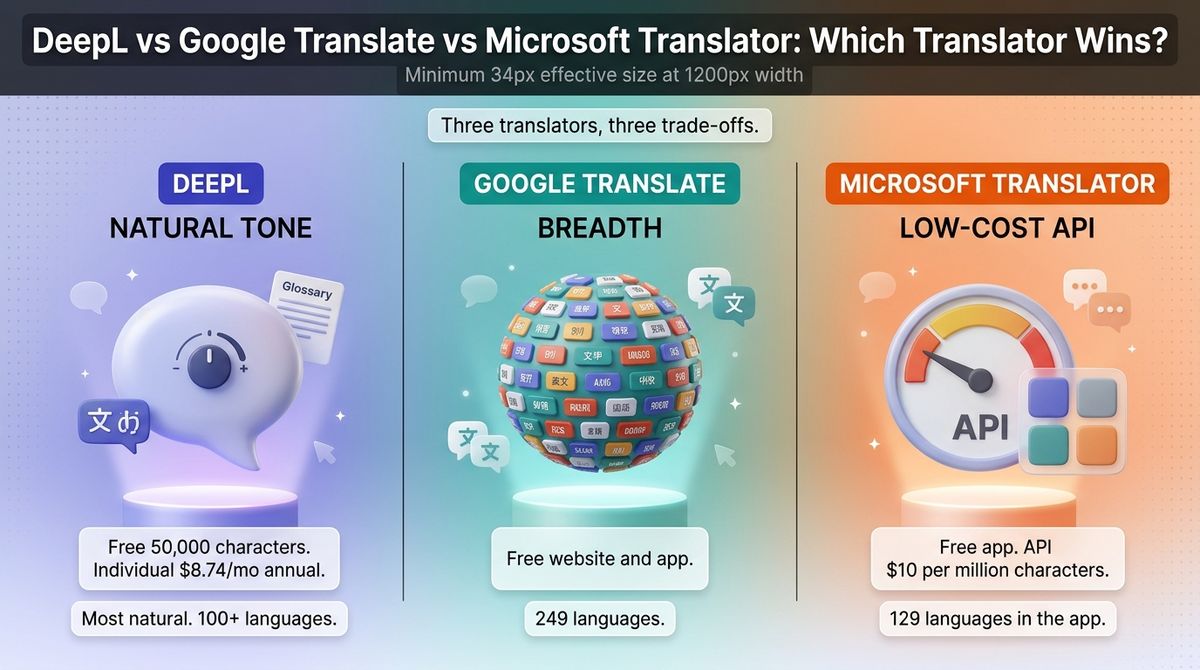
The three tools take different routes. DeepL aims for natural-sounding text and charges beyond a small free allowance. Google Translate is free and covers the most languages. Microsoft Translator is free in its app, and its Azure API is the cheapest at scale.
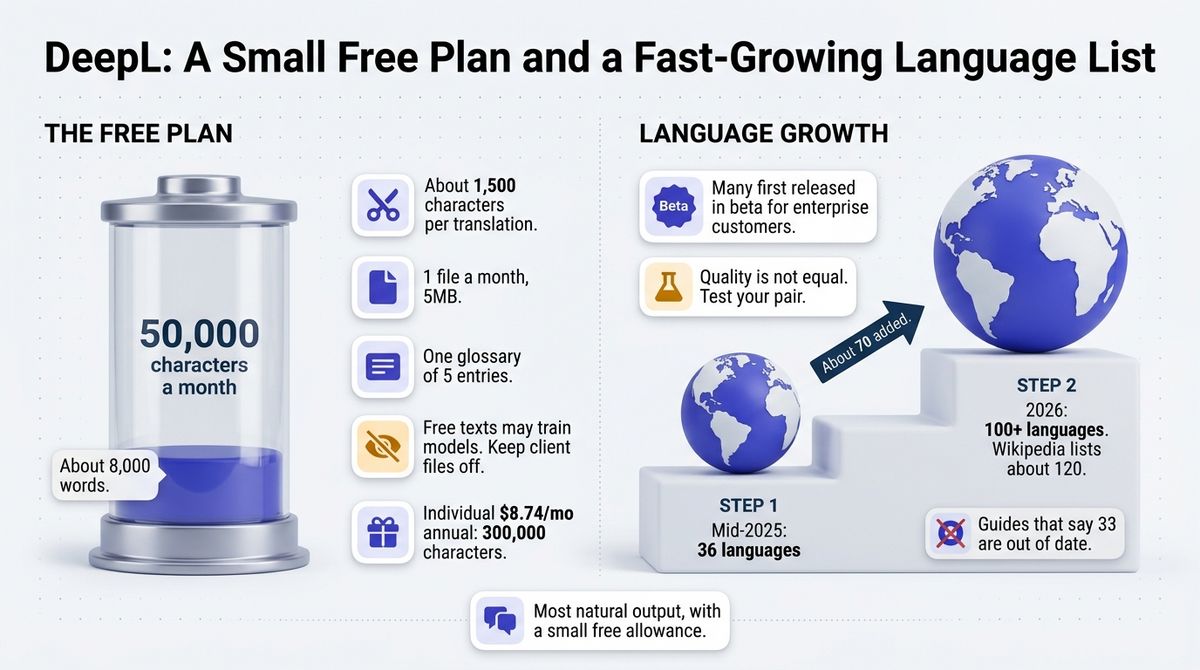
I tested DeepL vs Google Translate vs Microsoft Translator for 30 days, translating the same five 1,200-word blog posts into Spanish, German, French, Hindi, and Japanese, and comparing tone, formatting, and glossary handling. Here is the honest comparison. Two catches to know first: DeepL now supports more than 100 languages, so guides that say 33 are out of date, and its free plan stops at 50,000 characters a month.
Table of Contents
How We Tested
I scored each tool on five criteria, using the same five posts throughout.
- Translation quality and tone. I compared how natural each translation read and whether it kept headings and links intact.
- Language coverage. I checked how many languages each tool handles, and which blogger-relevant languages are missing or in beta.
- Free limits and cost. I compared the free allowance, the cheapest paid plan, and the API price per million characters.
- Documents and glossaries. I looked at file translation and whether you can fix recurring terms such as brand names.
- Data handling and integrations. I checked how each tool treats your text and where it plugs into other software.
As a WordPress developer, I also checked each engine’s API free tier, since translation plugins such as WPML, Weglot, and TranslatePress can use engines like these.
DeepL Review: The Most Natural Output, With a Small Free Allowance
- Free plan: Yes; 50,000 characters a month, with about 1,500 characters per translation
- Starting price: Individual at $8.74 a month billed annually ($10.49 monthly)
- Best plan for most users: Individual
- Platforms: Web, Windows, macOS, iOS, Android, browser extensions
- Affiliate program: None confirmed
DeepL is a German translation company founded in 2017. Its Translator handles text and documents, and DeepL Write is a separate rewriting tool. DeepL now supports more than 100 languages, with Wikipedia listing about 120.
What DeepL does best
DeepL reads the most naturally of the three, according to independent comparisons, especially for European languages. It offers formal and informal tone choices, glossaries for recurring terms, and document translation that keeps formatting. For a blogger translating into German, French, or Spanish, that means less editing. Before translating your articles, you may want to refine them using the best writing apps for bloggers.
Individual costs $8.74 a month on annual billing and gives 300,000 characters, roughly 50,000 words. Paid plans do not use your text to train DeepL’s models, according to DeepL’s FAQ. A 30-day trial is offered.
Where DeepL falls short
The free plan is small. It allows 50,000 characters a month, about 8,000 words, with roughly 1,500 characters per translation, so a long post needs several pastes. Free texts may also be used to train DeepL’s models, so keep client documents off the free plan.
Language coverage changed fast, and the quality is not equal across it. DeepL grew from 36 languages in mid-2025 to over 100 after adding about 70, many first released in beta for enterprise customers. Test your pair before you rely on it. Pricing is also hard to pin down: US and euro pages differ, and older guides use Starter, Advanced, and Ultimate plan names that no longer apply.
DeepL pricing
| Plan | Monthly billing | Annual billing, per month | Characters per month | Files per month | Notes |
|---|---|---|---|---|---|
| Free | $0 | $0 | 50,000 | 1 (5MB) | About 1,500 characters per translation; one glossary of five entries; text may train models |
| Individual | $10.49 | $8.74 | 300,000 | 3 (30MB) | 30-day trial; paid data protection |
| Team | $34.49 per user | $28.74 per user | 1,000,000 per user | 20 | Shared glossaries and style rules, bulk translation |
| Business | $68.99 per user | $57.49 per user | Unlimited, fair use | 100 | DeepL Write Pro included |
| Write Pro add-on | $9.49 per user | $7.49 per user | Not applicable | Not applicable | Rewriting assistant; included on Business |
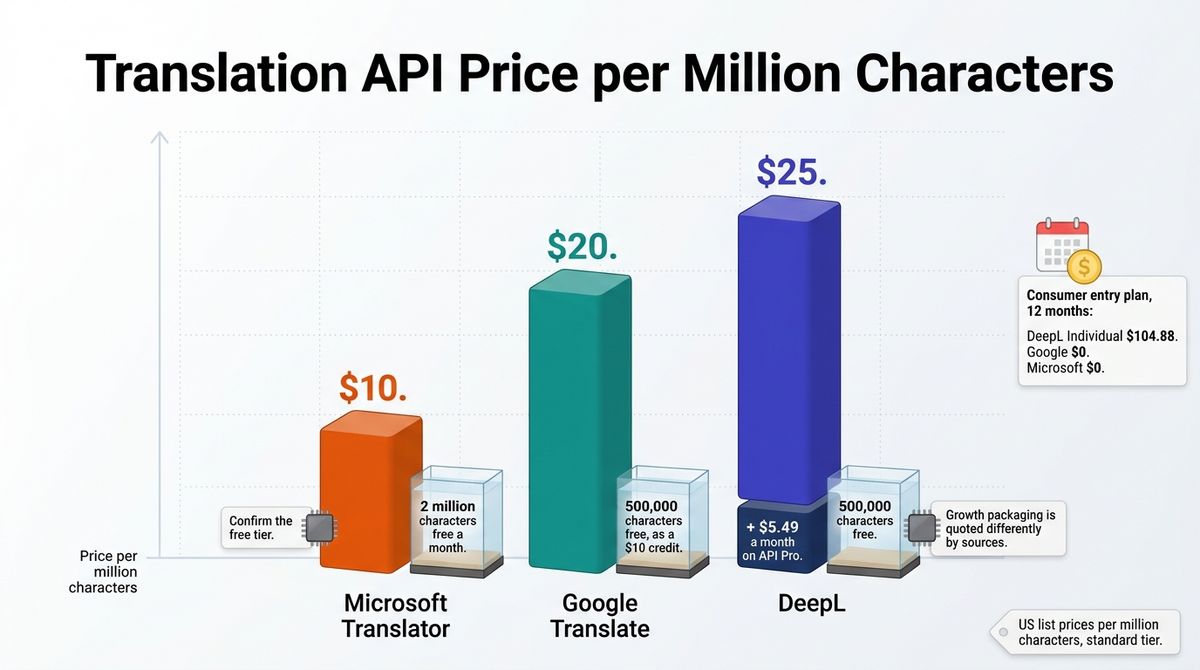
| API | Free: 500,000 characters a month | Pro: $5.49 a month plus $25 per million characters | Pay per use | Not applicable | Growth packaging is quoted differently by sources |
DeepL: Pros and Cons
Pros:
- Most natural output, especially in European languages
- Formal and informal tone choices and glossaries
- Document translation that keeps formatting
- Paid plans do not train on your text
Cons:
- Free plan stops at 50,000 characters a month
- Free texts may be used to train models
- Newer languages vary in quality
- Pricing differs by region, and older guides are out of date
Rating: 4.5 / 5, the most natural translations, with a small free allowance.
Google Translate Review: The Broadest Coverage, Free
- Free plan: Yes; the website and app are free, including document translation and offline languages
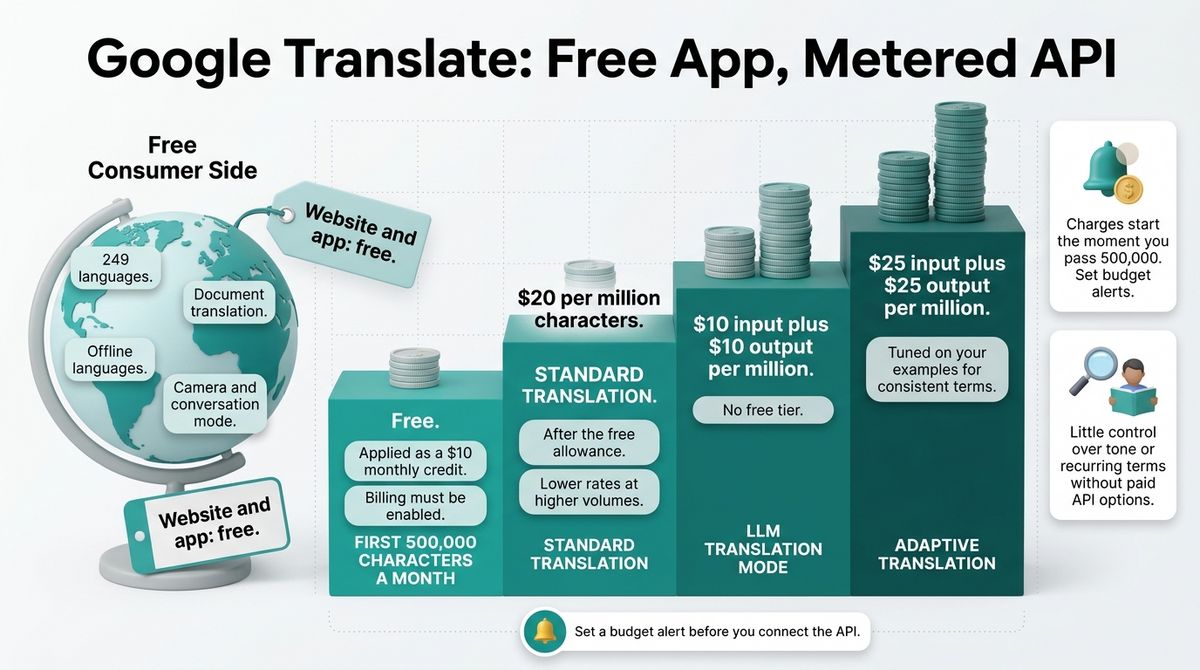
- Starting price: Free; the Cloud Translation API is $20 per million characters after 500,000 free characters a month
- Best plan for most users: Free website and app
- Platforms: Web, iOS, Android, Chrome
- Affiliate program: None confirmed
Google Translate is Google’s free translation service, with a website, mobile apps, and a developer API called Cloud Translation. It supports 249 languages, the most of any major provider. Google added Gemini-powered improvements in late 2025, mainly for idioms and conversational text.
What Google Translate does best
Google Translate covers the most ground. With 249 languages, it handles smaller languages and regional pairs that the other two skip, and it is free on the website and app, with no sign-up. The app also adds camera translation, conversation mode, and offline languages.
For developers, the Cloud Translation API gives 500,000 characters a month free, applied as a $10 credit, then $20 per million characters on the standard model. An LLM translation mode costs $10 input plus $10 output per million characters, and adaptive translation, tuned to your examples, costs $25 plus $25.
Where Google Translate falls short
Quality varies by language pair. Reviewers rate Google behind DeepL for natural tone in European languages, and the free tools give you little control over formality or recurring terms. You can fix terms only through the API’s custom options, which add cost.
The free API allowance needs billing enabled, and charges start the moment you pass 500,000 characters, so set budget alerts. Google’s spam guidance has also named text translated by an automated tool without human review as a risk, so edit translated posts before you publish them.
Google Translate pricing
| Item | Cost | Limits | Notes |
|---|---|---|---|
| Website and app | Free | Includes document translation and offline languages | 249 languages |
| Cloud Translation API, first 500,000 characters a month | Free | Applied as a $10 monthly credit | Billing must be enabled |
| Cloud Translation API, standard translation | $20 per million characters | After the free allowance | Lower rates at higher volumes |
| LLM translation mode | $10 input plus $10 output per million characters | No free tier | Priced by input and output |
| Adaptive translation | $25 input plus $25 output per million characters | Tuned on your examples | For consistent terminology |
Google Translate: Pros and Cons
Pros:
- 249 languages, the broadest coverage
- Free website and app, including documents and offline use
- Camera and conversation translation in the app
- Cloud Translation API with 500,000 free characters a month
Cons:
- Less natural than DeepL in European languages, per reviewers
- Little control over tone or recurring terms without paid API options
- API billing must be enabled for the free allowance
- Unreviewed output can put published pages at risk
Rating: 4.4 / 5, the broadest coverage, and free.
Microsoft Translator Review: The Cheapest API and the Best Fit for Microsoft 365
- Free plan: Yes; the Translator app is free, and the Azure API has a 2 million character free tier
- Starting price: Free; Azure standard translation is $10 per million characters
- Best plan for most users: Free app, or Azure’s free tier for testing
- Platforms: Web, iOS, Android, built into Office, Edge, and Teams
- Affiliate program: None confirmed
Microsoft Translator is Microsoft’s translation service. It powers translation inside Office, Edge, and Teams, and it ships as a free mobile app and as Azure AI Translator for developers. The app lists 129 languages, and Azure’s list is longer, from 130+ to 182 depending on the source.
What Microsoft Translator does best
Microsoft is the cheapest API of the three. Azure AI Translator costs $10 per million characters on the standard tier, half of Google’s price, and its free tier gives 2 million characters a month. That suits a developer testing a multilingual site.
The free app covers text, voice, and camera translation, and translation is built into Word, PowerPoint, Outlook, Edge, and Teams. If your clients live in Microsoft 365, you can translate inside the tools they already use. Azure also offers Custom Translator for domain-specific models. Freelancers using these platforms often compare infrastructure tools to find the best business email hosting for small teams.
Where Microsoft Translator falls short
The consumer side is thinner than DeepL or Google. The app retired its Converse group chat feature, and the Windows desktop app was retired in 2021. Reviewers rate Microsoft behind DeepL for natural tone in European writing.
The free API tier has caveats. Sources disagree on whether the 2 million character allowance expires after the first Azure year, so confirm it on Azure’s pricing page. Custom Translator needs Azure setup and costs extra, and language counts vary by product, so check your pair.

Microsoft Translator pricing
| Item | Cost | Limits | Notes |
|---|---|---|---|
| Translator app (iOS, Android) | Free | Text, voice, and camera translation | 129 languages; Converse group chat retired |
| Translation in Office, Edge, and Teams | Included | Depends on your Microsoft plan | Built into the apps |
| Azure AI Translator free tier | Free | 2 million characters a month | Sources disagree on whether it ends after the first Azure year |
| Azure AI Translator standard | $10 per million characters | Pay as you go | Lowest base price of the three APIs |
| Custom Translator | Extra cost | Domain-specific models | Needs Azure setup |
Microsoft Translator: Pros and Cons
Pros:
- Lowest API price at $10 per million characters
- 2 million free characters a month on Azure’s free tier
- Built into Office, Edge, and Teams
- Free mobile app with text, voice, and camera translation
Cons:
- Less natural than DeepL in European writing, per reviewers
- Converse group chat retired; Windows desktop app retired in 2021
- Free-tier terms are described differently by different sources
- Custom models need Azure setup
Rating: 4.0 / 5, the cheapest API, and the best fit inside Microsoft 365.
Head-to-Head Comparison Table
| Feature | DeepL | Google Translate | Microsoft Translator |
|---|---|---|---|
| Best at | Natural-sounding text in European languages | Broadest coverage, free | Low-cost API and Microsoft 365 |
| Languages | 100+ (Wikipedia lists about 120) | 249 | 129 in the app; 130+ on Azure |
| Free plan | 50,000 characters a month, about 1,500 per translation | Free website and app | Free app; 2 million characters on Azure |
| Cheapest paid plan | $8.74 a month, annual billing | None for consumers | None for consumers |
| 12-month cost, entry plan | $104.88 | $0 | $0 |
| API price | $5.49 a month plus $25 per million characters; 500,000 free | $20 per million; 500,000 free | $10 per million; 2 million free |
| Document translation | 1, 3, 20, or 100 files a month by plan | Free in the website and app | Through Azure and Office |
| Glossaries and terms | Glossaries on every plan; larger on paid | Custom options on the API | Custom Translator on Azure |
| Tone control | Formal and informal choices | Not confirmed | Not confirmed |
| Data handling | Paid plans do not train on your text; free may | Check Google’s terms | Azure business terms |
| Built into | Browser extension, desktop and mobile apps | Chrome, Android, and Google apps | Office, Edge, and Teams |
| Affiliate program | None confirmed | None confirmed | None confirmed |
| Best for | Posts in European languages | Wide language coverage on a budget | Microsoft 365 users and API testing |
| Our rating | 4.5 / 5 | 4.4 / 5 | 4.0 / 5 |
Which Should You Choose?
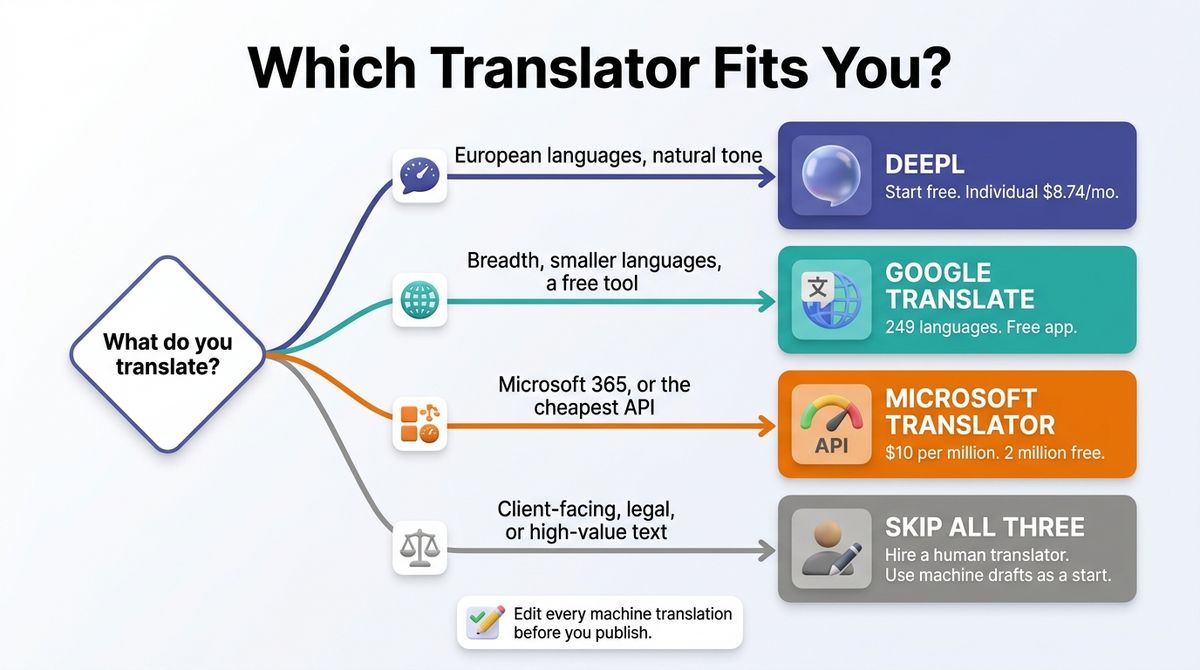
Choose DeepL if you translate into European languages and want natural-sounding text. Start on the free plan, and move to Individual at $8.74 a month when 50,000 characters stops covering you.
Choose Google Translate if you need breadth or a free tool you can use without limits. It is the best option for smaller languages and for quick checks.
Choose Microsoft Translator if you work in Microsoft 365 or need the cheapest API. The 2 million-character free tier suits plugin testing.
Skip all three if the text is client-facing, legal, or high-value. Hire a human translator, and use a machine draft only as a starting point. When managing client deliverables, freelancers should also pick the best client proposal software for freelancers to streamline agreements.
Edit every machine translation before you publish it. Google’s older spam guidance named text translated by an automated tool without human review as spam, and its newer scaled content abuse policy judges pages by the value they give users. A person who reads the target language should check each post.
Our Recommendations
- Solo blogger translating a few posts into Spanish, German, or French: DeepL free for a post or two, then Individual at $8.74 a month. Edit the output.
- Blogger targeting Hindi, Arabic, or Southeast Asian readers: Google Translate for coverage, with a native speaker to review the result.
- WordPress developer building a multilingual site: Connect a translation plugin to an API free tier: 2 million characters on Azure, or 500,000 on DeepL or Google.
- Freelancer working inside Microsoft 365: Microsoft Translator in Word, Outlook, and Teams.
- Client-facing or legal copy: A human translator, with DeepL or Google as a first draft.
Final Verdict
For most readers comparing DeepL vs Google Translate vs Microsoft Translator, DeepL is the winner. It reads the most naturally, adds formality control and glossaries, and its Individual plan costs $8.74 a month. Google Translate wins on breadth and price, and Microsoft Translator wins on API cost and Microsoft 365.
- DeepL: 4.5 / 5, the most natural translations, with a small free allowance.
- Google Translate: 4.4 / 5, the broadest coverage, and free.
- Microsoft Translator: 4.0 / 5, the cheapest API, and the best fit inside Microsoft 365.
Frequently Asked Questions
What is the best translation tool for bloggers?
DeepL is the best choice for most bloggers who translate into European languages because its output reads more naturally and its Individual plan costs $8.74 a month. Google Translate is the better pick for breadth, with 249 languages and a free app. Microsoft Translator suits Microsoft 365 users and low-cost API work.
Is DeepL better than Google Translate?
For European languages, usually yes. Independent comparisons generally rate DeepL’s output as more natural, and it offers formal and informal tone choices. Google Translate covers 249 languages, including many smaller ones, and it is free. Quality varies by language pair, so test your own text in both before choosing.
Is DeepL free?
Yes, with limits. DeepL’s free plan allows 50,000 characters a month, about 8,000 words, with roughly 1,500 characters per translation, one file translation, and one glossary of five entries. Free texts may be used to train DeepL’s models. Individual costs $8.74 a month on annual billing and raises the cap to 300,000 characters.
How many languages does DeepL support?
DeepL supports more than 100 languages in 2026, with Wikipedia listing about 120. Older guides that say 33 or 36 are out of date: DeepL grew from 36 languages in mid-2025 to over 100 after adding about 70 languages, many first released in beta for enterprise customers. Check DeepL’s language list for the pair you need.
Is Google Translate free?
Yes. The Google Translate website and app are free, including document translation and offline languages. Only the Cloud Translation API for developers is charged: the first 500,000 characters a month are free as a $10 credit, then standard translation costs $20 per million characters. Billing must be enabled to use the free allowance.
How much does Microsoft Translator cost?
The Microsoft Translator app for iOS and Android is free, with text, voice, and camera translation, and Microsoft’s translation is built into Office, Edge, and Teams. Developers pay through Azure: the free tier gives 2 million characters a month, then standard translation costs $10 per million characters, the lowest base price of the three.
Can I publish machine-translated posts as they are?
Review them first. Google’s older spam guidance named text translated by an automated tool without human review as spam, and its newer scaled content abuse policy judges pages by the value they give users. A human who reads the target language should edit each translation before you publish, especially for client work.
Which translation API is cheapest?
Microsoft Azure Translator is cheapest at $10 per million characters, with a 2 million character free tier. Google Cloud Translation costs $20 per million after 500,000 free characters. DeepL API costs $5.49 a month plus $25 per million characters, with 500,000 free characters. Check each provider’s page, since DeepL’s Growth packaging is quoted differently.