Your WordPress blog loads fast for you and slowly for a reader on the other side of the world. Choosing between Cloudflare vs Bunny.net vs KeyCDN is how most bloggers try to fix that. It gets confusing quickly because the three bill in completely different ways.
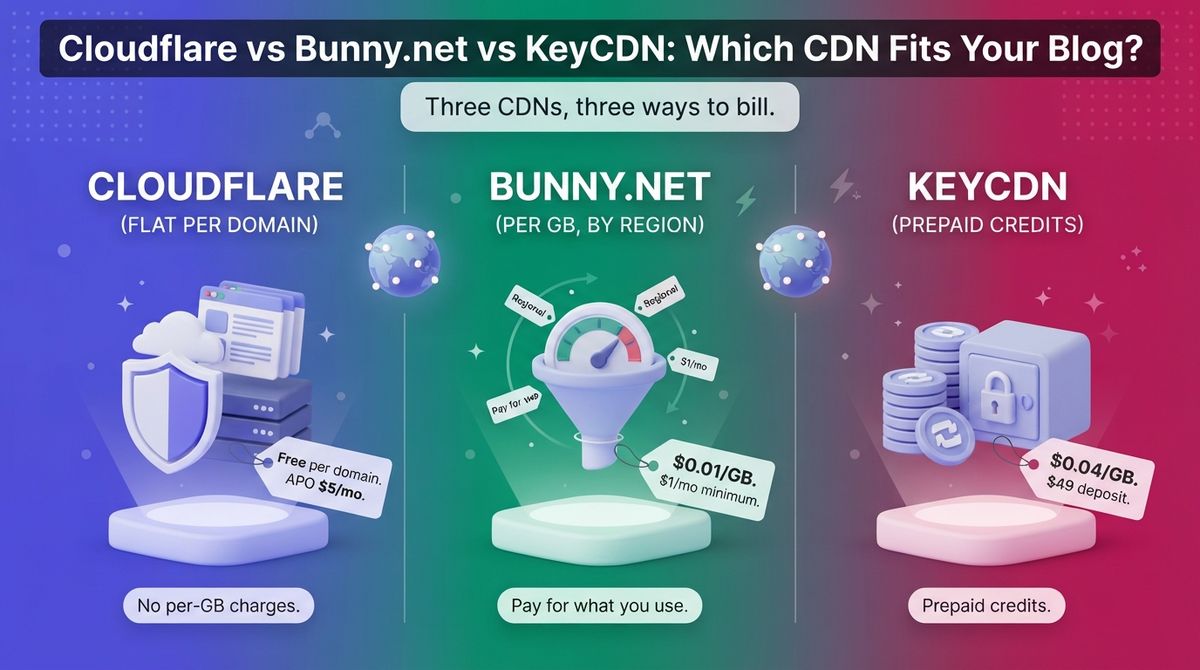
A CDN keeps copies of your images, CSS, and JavaScript on servers near your readers. Faster pages help Core Web Vitals, bounce rate, and the ad revenue that depends on both. Cloudflare charges per domain, Bunny.net charges per gigabyte, and KeyCDN sells prepaid credits. The cheapest option depends on your traffic and where your readers live. Fast page speeds help retain visitors who read user feedback gathered by review collection tools for social proof.
I tested Cloudflare vs Bunny.net vs KeyCDN for 30 days, putting each one in front of the same WordPress blog with the same theme, images, and caching plugin, and checking page loads from several locations. Here is the honest comparison, including a pricing catch to understand before you sign up: KeyCDN requires a $49 prepaid deposit, and Cloudflare charges $5 a month for WordPress page caching on its free plan.
Table of Contents
How We Tested
I scored each CDN on five criteria:
- Setup effort on WordPress: how many steps it takes to go live, and what can break along the way.
- Speed and caching behavior: what each CDN caches, and how quickly repeat visits load.
- Pricing and three-year cost: the sticker price, the add-ons, and the total after 36 months.
- WordPress integration and extras: plugin quality, security tools, and image handling.
- Terms and reliability: usage limits, billing rules, and how each vendor treats small accounts.
Cloudflare Review: The Free CDN With a Security Layer Built In
- Free plan: Yes, $0 per domain
- Starting price: $0 (Pro from $20/month billed annually, or $25/month billed monthly)
- Best plan for most users: Free, plus APO at $5/month if you want HTML page caching
- Platforms: Web dashboard, API, official WordPress plugin
- Affiliate program: Unconfirmed, no public program found
Cloudflare is a reverse-proxy CDN. You point your domain’s nameservers at Cloudflare, and every visit passes through its network before it reaches your host. That one change brings CDN delivery, DNS, SSL, and DDoS protection into a single dashboard.
What Cloudflare does best
Cloudflare does not bill per gigabyte on any website plan. A traffic spike from a viral post never turns into a surprise invoice, and that is rare in this category.
The official WordPress plugin switches on Automatic Platform Optimization, or APO. APO serves cached copies of your HTML pages from Cloudflare’s edge, not only images and scripts. That is the biggest technical difference from the pull-zone CDNs below, which leave page requests to your host. APO bypasses its cache for logged-in users, so wp-admin and previews stay intact.
Where Cloudflare falls short
The setup moves your DNS, and that is where most problems start. A common mistake is leaving SSL mode on Flexible while WordPress forces HTTPS, which causes a redirect loop. Pro and Business plans are also billed per domain. Five domains on Pro cost $125 a month at monthly billing. If you prefer full server control over managed hosting, compare VPS hosting options for developers to manage your stack directly.
The free plan has terms attached. Cloudflare restricts sites that serve mostly video or large media files through the CDN, so read the service terms before putting a media library behind it. One source also reports that the Business plan rose from $200 to $250 a month for new customers in late 2025. Confirm current rates on Cloudflare’s plans page.
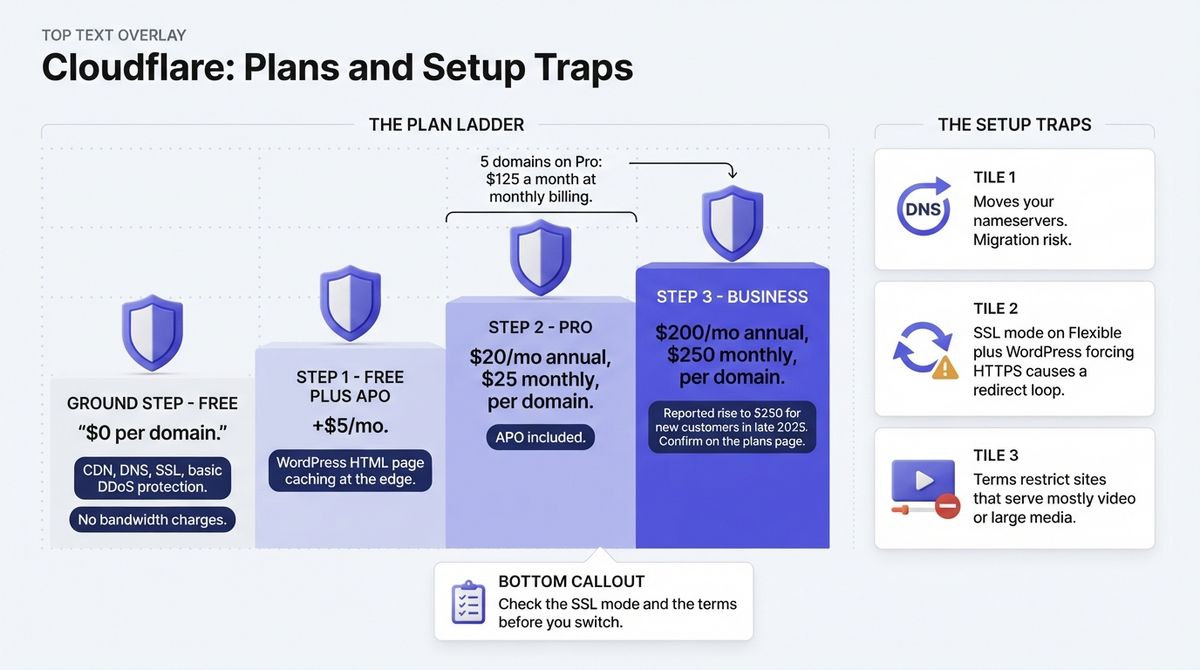
Cloudflare pricing
| Plan | Price | What it means for a blogger |
|---|---|---|
| Free | $0 per domain | CDN, DNS, SSL, and basic DDoS protection, no bandwidth charges |
| APO add-on (Free plan) | $5/month | WordPress HTML page caching at the edge |
| Pro | $20/month billed annually, $25/month billed monthly, per domain | APO included, more security rules |
| Business | $200/month billed annually, $250/month billed monthly, per domain | Higher limits and stronger support, built for revenue-critical sites |
| Enterprise | Custom quote | Not relevant for most blogs |
Cloudflare: Pros and Cons
Pros:
- The free plan covers CDN, DNS, SSL, and basic DDoS protection at $0.
- No per-gigabyte charges on any website plan.
- APO caches HTML pages, not only static files.
- One dashboard for speed and security.
Cons:
- Requires a nameserver change, which carries migration risk.
- Pro and Business are billed per domain, so costs climb with each site.
- APO costs $5/month extra on the free plan.
- Terms limit video-heavy and large-media delivery.
Rating: 4.7 / 5, the best starting point for most WordPress blogs.
Bunny.net Review: Cheap Per-GB Pricing and a Plugin That Does the Work
- Free plan: No, 14-day free trial with no credit card
- Starting price: $1/month minimum, pay as you go
- Best plan for most users: Standard network, for blogs with mostly North America and Europe readers
- Platforms: Web dashboard, API, official WordPress plugin
- Affiliate program: Yes, $20 in account credit per referred paying customer, open to paying customers
Bunny.net is a Slovenia-based edge platform that bundles CDN, storage, video streaming, DNS, and edge scripting under one pay-as-you-go account. The Standard network runs on 119 points of presence. All features are included at every usage level, and there are no request fees.
What Bunny.net does best
Price is the headline. Standard network traffic costs $0.01 per GB in North America and Europe, with a $1 monthly minimum. A blog serving 100 GB a month pays about $1. Monthly spending limits stop a spike from becoming a large bill.
The official WordPress plugin does more than rewrite URLs. It bundles Bunny CDN, Bunny Shield for WAF and DDoS protection, Bunny Optimizer for image and file compression, Bunny Offloader for moving media to storage, Bunny Stream for video, and Bunny Fonts for GDPR-friendly fonts. In the standard pull-zone setup, you create a pull zone that points at your site, and the plugin swaps your static file URLs for the CDN hostname.
Where Bunny.net falls short
Regional pricing is the catch. Asia and Oceania cost $0.03 per GB, three times the North America and Europe rate. South America costs $0.045 and the Middle East and Africa cost $0.06. A blog with a large Australian audience pays noticeably more per gigabyte than one serving London and New York.
There is no free plan, only the 14-day trial. Offloader and Shield require you to move your domain to Bunny DNS and turn on CDN Acceleration, which removes some of the appeal of skipping a nameserver change. Bunny Optimizer is a separate paid add-on at roughly $9.50 a month per site.
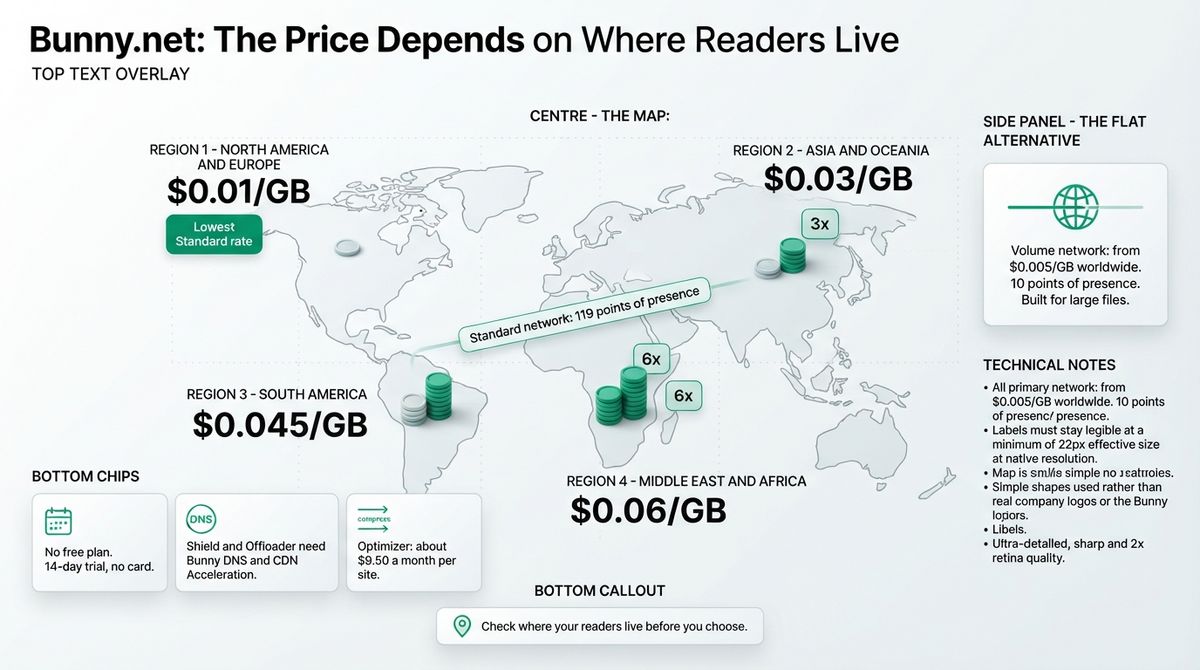
Bunny.net pricing
| Service | Price | Notes |
|---|---|---|
| Standard network, Europe and North America | $0.01/GB | 119 points of presence |
| Standard network, Asia and Oceania | $0.03/GB | Same network, higher rate |
| Standard network, South America | $0.045/GB | Regional rate |
| Standard network, Middle East and Africa | $0.06/GB | Regional rate |
| Volume network | From $0.005/GB worldwide | 10 points of presence, built for large files |
| Monthly minimum | $1 | Covers about 100 GB on the Standard network in Europe and North America |
| Bunny Optimizer | About $9.50/month per site | Optional image and file compression |
| Edge storage | About $0.01 to $0.02/GB per month | Each replication region bills again |
Bunny.net: Pros and Cons
Pros:
- $0.01/GB in North America and Europe is the lowest Standard rate of the three.
- $1 monthly minimum, no contract, no request fees.
- The official plugin covers CDN, security, optimization, offloading, video, and fonts.
- One account handles many sites with no per-domain fee.
Cons:
- Asia, Oceania, South America, and Africa cost three to six times more.
- No free plan, only a 14-day trial.
- Shield and Offloader need Bunny DNS.
- Optimizer is an extra monthly cost.
Rating: 4.6 / 5, the best paid CDN for WordPress bloggers.
KeyCDN Review: Simple Pay-As-You-Go, But Priced Above the Field
- Free plan: No, 14-day trial
- Starting price: $0.04/GB in North America and Europe, $4 monthly minimum usage, $49 minimum prepaid credit
- Best plan for most users: Pay As You Go, North America and Europe
- Platforms: Web dashboard, API, free CDN Enabler WordPress plugin
- Affiliate program: Unconfirmed, no public program found
KeyCDN is a Swiss pay-as-you-go CDN operated by KeyCDN AG in Frauenfeld and launched in 2012. It works as a pull zone, like Bunny.net. You create a zone, add a hostname such as cdn.yourdomain.com, and let a plugin rewrite your static file URLs.
What KeyCDN does best
Billing is simple. There are no request charges, TLS certificates are free, and the first three zones cost nothing, then $1 per zone each month. Credits are prepaid at $1 each, and KeyCDN’s current FAQ says they do not expire.
Its developer tools are solid. KeyCDN maintains CDN Enabler, a free, open-source WordPress plugin that works with any CDN hostname, including Bunny.net. The platform also offers a RESTful API, query string controls, cookie stripping, access rules, and two-factor authentication.
Where KeyCDN falls short
The rate is the problem. At $0.04/GB, KeyCDN costs four times Bunny.net’s Standard rate in North America and Europe. A blog serving 200 GB a month pays $8 at KeyCDN and $2 at Bunny.net. You must also buy at least $49 in credits up front, and credits are nonrefundable.
Older reviews complain that credits expired after one year, while the current FAQ says they do not. Check the billing page before you pay. Pricing is now split by region, with separate Asia and Oceania and Africa and Latin America rates. One benchmark of published price lists shows delivery into Asia costing roughly double.

KeyCDN pricing
| Item | Price | Notes |
|---|---|---|
| Pay As You Go, North America and Europe | From $0.04/GB | Applies to the first 10 TB |
| Pay As You Go, Asia and Oceania | Higher regional rate | Listed separately on the pricing page |
| Pay As You Go, Africa and Latin America | Higher regional rate | Listed separately on the pricing page |
| Minimum usage | $4/month | Charged even if you use less |
| Minimum payment | $49 in credits | 1 credit equals $1, nonrefundable |
| Zones | First 3 free, then $1/zone/month | TLS certificates are free |
| Request fees | None | Bandwidth only |
KeyCDN: Pros and Cons
Pros:
- Simple prepaid billing with no request charges.
- Free CDN Enabler plugin that works with any CDN.
- API, access rules, and two-factor authentication.
- First three zones are free.
Cons:
- $0.04/GB is four times Bunny.net’s Standard rate.
- $49 minimum deposit and $4 monthly minimum usage.
- Credits are nonrefundable, and older reviews report a one-year expiry.
- No free plan and no built-in image optimization.
Rating: 3.6 / 5, a competent CDN that costs too much for what it adds.
Head-to-Head Comparison Table
| Feature | Cloudflare | Bunny.net | KeyCDN |
|---|---|---|---|
| Free plan | Yes, $0 per domain | No, 14-day trial | No, 14-day trial |
| Entry cost | $0 (APO $5/month on Free) | $1/month minimum | $4/month minimum, $49 deposit |
| Pricing model | Flat per domain | Per GB, by region | Per GB, by region, prepaid credits |
| Cost per GB, North America and Europe | None, unmetered | $0.01 | $0.04 (first 10 TB) |
| Cost per GB, Asia and Oceania | None, unmetered | $0.03 | Higher than $0.04 |
| Setup method | Nameserver change | Pull zone or Bunny DNS | Pull zone plus CDN Enabler |
| WordPress plugin | Official Cloudflare plugin (APO) | Official bunny.net plugin | CDN Enabler (free) |
| Security | DDoS protection and basic WAF on Free | Bunny Shield (WAF, DDoS) | Access rules, free TLS, 2FA |
| HTML page caching | Yes, through APO | Static files in a standard pull zone | Static files in a standard pull zone |
| Minimum commitment | None | $1/month | $49 prepaid, $4/month |
| Best for | Most bloggers | Image-heavy blogs, multi-site owners | Existing KeyCDN users |
| Rating | 4.7 / 5 | 4.6 / 5 | 3.6 / 5 |
Which Should You Choose?
The right CDN depends on what your blog serves and who reads it.
- Choose Cloudflare if your blog is mostly text and images, you want a $0 starting point, and you are comfortable moving DNS. It is also the only one of the three with no per-gigabyte cost for readers in Asia and Oceania.
- Choose Bunny.net if your pages are image-heavy, you run several sites, or you want to pay for what you use. The $1 minimum makes it the cheapest paid option for small blogs.
- Choose KeyCDN if you already use its API or prefer prepaid credits from a Swiss provider. For a new blog, the price gap to Bunny.net is hard to justify.
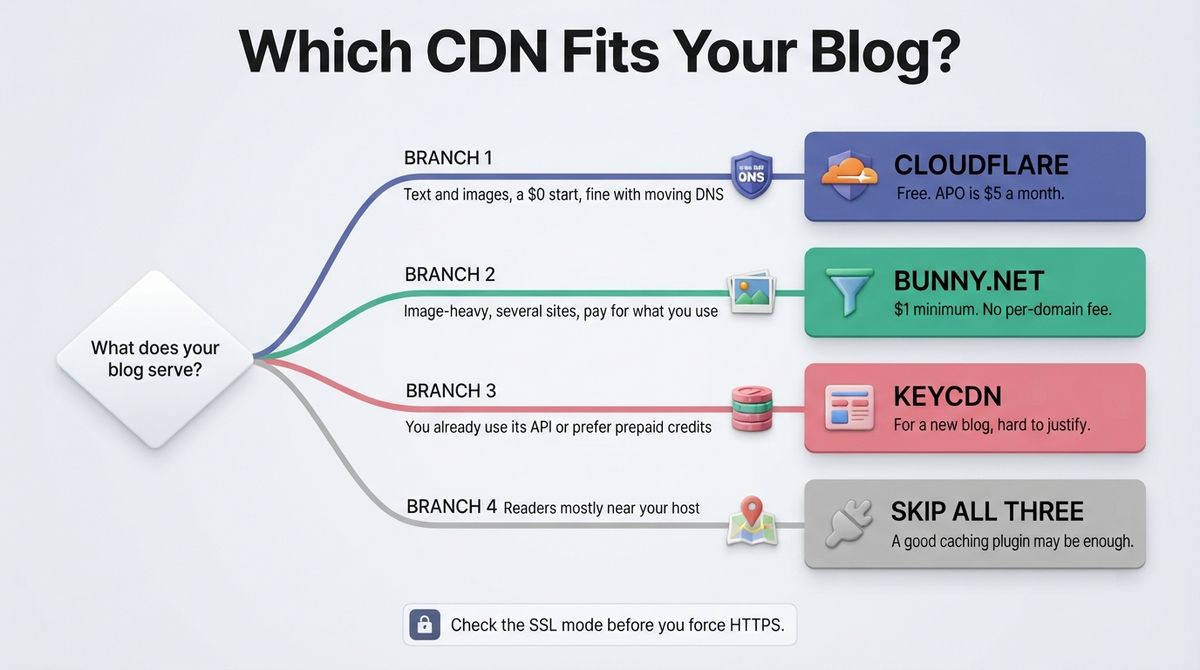
What each costs over three years
Take a blog serving 200 GB a month to readers in North America and Europe. Cloudflare Free costs $0 over 36 months, or $180 with APO at $5 a month. Cloudflare Pro costs $720 on annual billing for a single domain.
Bunny.net costs about $2 a month, or $72 over 36 months, and $414 if you add Optimizer at $9.50 a month. KeyCDN costs $8 a month, or $288 over 36 months. None of the three uses a first-year promotional price, so nothing doubles at renewal. The traps are the KeyCDN deposit, Bunny’s regional multipliers, and Cloudflare’s per-domain billing.

Our Recommendations
- Solo blogger with a text-focused site: Start with Cloudflare Free. Add APO at $5 a month if pages feel slow for readers far from your host.
- Photography or image-heavy blogger: Use Bunny.net on the Standard network with Optimizer. The plugin handles offloading and compression in one place.
- Blogger with a large Australian or Asian audience: Use Cloudflare for flat pricing, or Bunny’s Volume network at a flat $0.005 per GB worldwide.
- Freelancer or agency running many client sites: Use Bunny.net, which has no per-domain fee. Five client domains on Cloudflare Pro cost $125 a month at monthly billing.
- Course creator with video or large downloads: Use Bunny.net, with Stream for video and the Volume network for large files. Cloudflare’s terms restrict video-heavy delivery on website plans.
Final Verdict
For most WordPress bloggers, Cloudflare is the best starting point. It costs nothing, adds security, and its APO option caches full pages. Bunny.net is the best paid CDN. It is cheaper than Cloudflare Pro for most blogs and far cheaper than KeyCDN. KeyCDN works, but it charges four times Bunny’s rate for a similar pull-zone setup.
In the Cloudflare vs Bunny.net vs KeyCDN decision, start free with Cloudflare and move to Bunny.net when image weight or traffic outgrows it. Before routing static assets through a network, optimize files using image compression tools for WordPress bloggers to save bandwidth.
- Cloudflare: 4.7 / 5, best for most blogs and anyone on a $0 budget.
- Bunny.net: 4.6 / 5, best paid CDN and best for image-heavy or multi-site owners.
- KeyCDN: 3.6 / 5, reliable but overpriced next to Bunny.net.
Frequently Asked Questions
Do I need a CDN for a WordPress blog?
Not always, but it helps once readers come from several countries. Your host serves every file from one location, so distant readers wait longer. A CDN copies your images, CSS, and JavaScript to servers near them. If most readers sit near your host, a good caching plugin may be enough.
Is Cloudflare’s free plan enough for a WordPress blog?
Yes, for most text-focused blogs. The free plan includes CDN delivery, DNS, SSL, and basic DDoS protection at $0 with no bandwidth charges. WordPress-specific page caching through APO costs $5 a month extra. Blogs serving mostly video or large media files should read Cloudflare’s terms first.
Is Bunny.net cheaper than Cloudflare?
Not on price alone, because Cloudflare’s free plan costs $0. Bunny.net is cheaper than Cloudflare Pro for most blogs and far cheaper than KeyCDN. Standard network traffic costs $0.01 per GB in North America and Europe, with a $1 monthly minimum. A blog serving 100 GB a month pays about $1.
How much does KeyCDN cost for a small blog?
KeyCDN charges $0.04 per GB in North America and Europe, with a $4 monthly minimum. You must add at least $49 in prepaid credits to start. A blog serving 100 GB a month spends about $4 monthly, so the first deposit covers roughly a year. Traffic into Asia and Oceania costs more.
Does a CDN work with LiteSpeed Cache or WP Rocket?
Yes. Most caching plugins, including LiteSpeed Cache and WP Rocket, have CDN settings where you enter your CDN hostname. Pull-zone CDNs like Bunny.net and KeyCDN use that hostname to serve static files. Cloudflare works at the DNS level, so it runs alongside your caching plugin without URL rewriting.
Does a CDN help SEO?
Indirectly. A CDN does not change rankings by itself, but faster delivery improves Core Web Vitals such as Largest Contentful Paint. Better scores support user experience and can help rankings at the margin. The gain is largest for readers far from your host and for image-heavy pages.
Can I use Cloudflare and Bunny.net together?
Yes, but it adds complexity. A common setup keeps Cloudflare for DNS and security while Bunny.net serves images from its own hostname. Set that hostname to DNS-only in Cloudflare to avoid double proxying. Bunny’s Offloader and Shield features expect Bunny DNS, so check the guides before mixing them.
Which CDN is best for readers in Australia?
Cloudflare, on cost. It charges the same flat price everywhere, while Bunny.net bills Asia and Oceania traffic at $0.03 per GB, three times its North America and Europe rate. KeyCDN also prices Asia and Oceania higher than its $0.04 base. Bunny’s Volume network offers a flat $0.005 per GB worldwide.