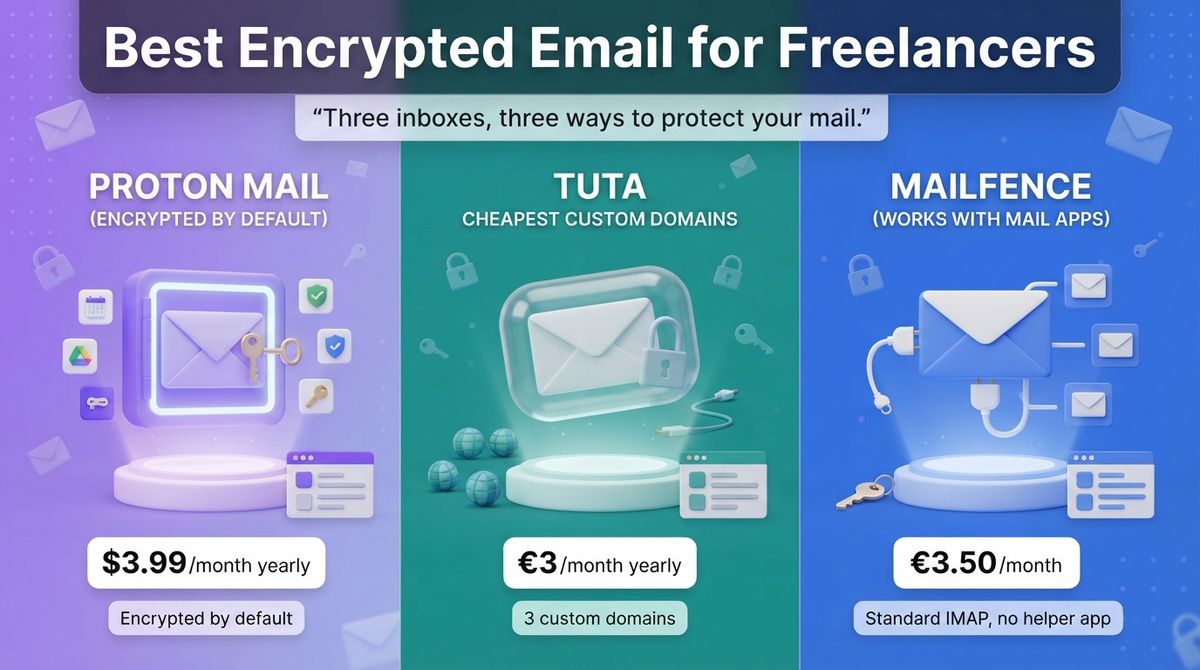
You send contracts, invoices, and client files from your inbox, and most of it sits readable on your provider’s servers. Choosing between Proton Mail vs Tuta vs Mailfence is how many freelancers close that gap. The three protect different things in different ways.
An encrypted email provider locks your stored mail so staff and attackers cannot read it, and it adds end-to-end encryption between people who both use it. That protects less than most people expect, because a message to a client on Gmail is only protected in transit unless you add a password or PGP. Prices also hide limits: Mailfence’s cheapest plan has no custom domain or IMAP, Tuta has no IMAP at all, and Proton’s Mail Plus allows one domain.
I tested Proton Mail vs Tuta vs Mailfence for 30 days, setting up the same custom-domain address with each, then sending encrypted and password-protected messages to a Gmail and an Outlook account and connecting a desktop mail app where each allowed it. Here is the honest comparison, including the catch most freelancers miss: the cheapest plan that lets you use your own domain costs about $3.99, €3, or €3.50 a month depending on the provider, and only Mailfence supports standard IMAP without a helper app.
Table of Contents
How We Tested
I scored each provider on five criteria:
- Encryption by default: what is protected without any action from you.
- Custom domain and professional features: domains, aliases, calendar, and storage.
- Client and app compatibility: IMAP, helper apps, and what recipients on Gmail or Outlook see.
- Pricing and three-year cost: monthly versus annual billing and renewal rules.
- Jurisdiction and ecosystem: where the company is based and what else it offers.
Proton Mail Review: Encrypted by Default, With a Full Ecosystem
- Free plan: Yes, 1 GB, 1 address, 150 messages a day
- Starting price: $4.99/month, or $3.99/month billed yearly ($47.88/year) (Mail Plus)
- Best plan for most users: Mail Plus for one custom domain; Unlimited if you also want a VPN, password manager, and 500 GB
- Platforms: Web, iOS, Android, Windows, macOS, Linux
- Affiliate program: Yes, Proton Partners Program; commission varies by plan and is shown after you apply, with a $100 minimum for bank-transfer payouts
Proton Mail is a Swiss encrypted email service from Proton, the company behind Proton Calendar, Drive, Pass, and VPN. It uses zero-access encryption, so Proton cannot read stored mail, and messages between Proton users are end-to-end encrypted automatically. It uses OpenPGP, so it can also exchange encrypted mail with PGP users.
What Proton Mail does best
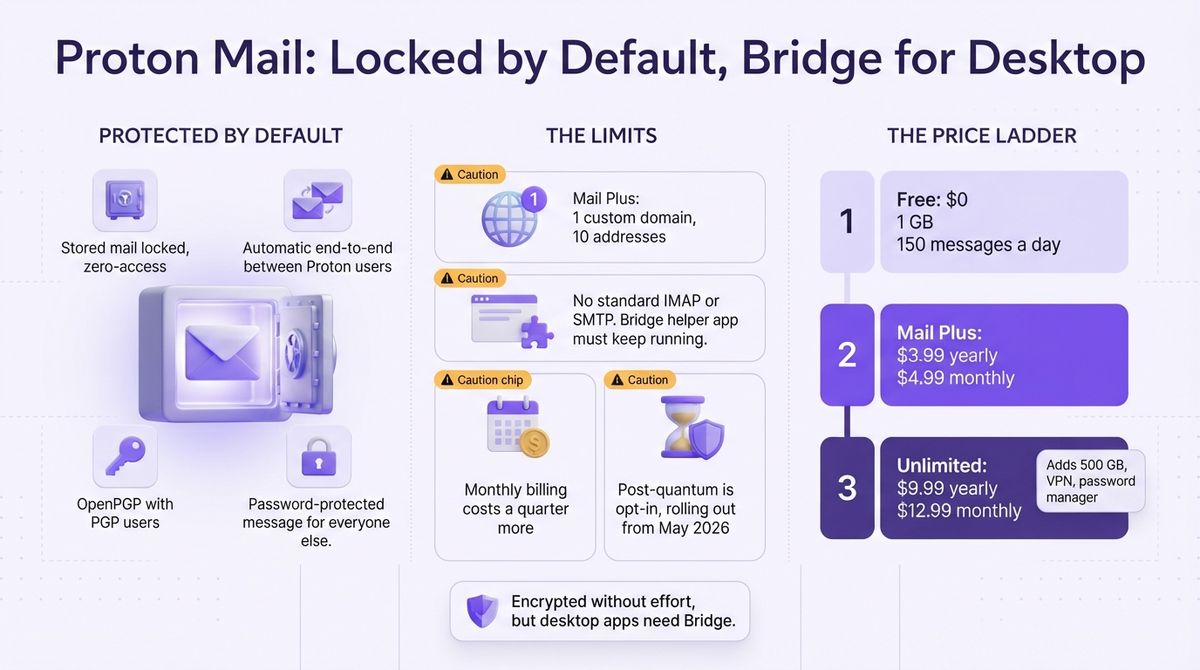
Proton protects your mail without asking you to do anything. Stored messages are locked so Proton cannot read them, and mail between Proton users is end-to-end encrypted. For anyone else, you can send a password-protected message. Mail Plus adds a custom domain, 10 addresses, 15 GB, 10 hide-my-email aliases, and unlimited folders, labels, and filters.
The ecosystem is the other strength. Proton Unlimited bundles 500 GB, 15 addresses, three custom domains, a no-logs VPN for protecting public Wi-Fi connections, a password manager, Drive, and Calendar for $9.99 a month billed yearly. Pricing is also flat: Mail Plus renews at $47.88 a year after any first-year promotion. If you are upgrading your setup beyond solo work, you may also want to review business email hosting for small teams.
Where Proton Mail falls short
Mail Plus allows only one custom domain and 10 addresses. Proton does not offer standard IMAP or SMTP. To use Apple Mail, Outlook, or Thunderbird on a paid plan, you install Proton Mail Bridge, a helper app that must keep running on your computer.
It costs more than Tuta for less domain capacity. Monthly billing on Mail Plus is $4.99, a quarter more than the yearly rate. The free plan limits you to 1 GB and 150 messages a day. Post-quantum protection is opt-in and rolling out to all plans from May 2026, while Tuta enables it by default.
Proton Mail pricing
| Plan | Monthly billing | Yearly billing | What you get |
|---|---|---|---|
| Free | $0 | $0 | 1 GB, 1 address, 150 messages/day, no custom domain |
| Mail Plus | $4.99/month | $3.99/month ($47.88/year) | 15 GB, 10 addresses, 1 custom domain, 10 hide-my-email aliases, unlimited folders, labels, and filters |
| Proton Unlimited | $12.99/month | $9.99/month ($119.88/year) | 500 GB, 15 addresses, 3 custom domains, VPN, password manager, Drive, Calendar |
| Duo | $19.99/month | $14.99/month ($179.88/year) | 2 users, 2 TB shared |
| Proton for Business | Not stated | From €6.99/user/month billed yearly | Team mail with admin controls |
Proton Mail: Pros and Cons
Pros:
- Zero-access encryption by default, with automatic end-to-end encryption between Proton users.
- OpenPGP compatibility for exchanging encrypted mail with PGP users.
- Unlimited bundles: a VPN, password manager, Drive, and Calendar.
- Flat renewal pricing after any first-year promotion.
Cons:
- No standard IMAP or SMTP; paid plans need the Bridge helper app.
- Mail Plus allows only one custom domain.
- Monthly billing costs a quarter more than yearly billing.
- Post-quantum protection is opt-in, not on by default.
Rating: 4.5 / 5, the best all-round choice for most freelancers.
Tuta Review: The Cheapest Credible Custom-Domain Encrypted Mailbox
- Free plan: Yes, 1 GB on @tuta.com and @tuta.io addresses
- Starting price: €3/month billed yearly (€36/year); monthly billing costs €7.20 more per year (Revolutionary)
- Best plan for most users: Revolutionary
- Platforms: Web, iOS, Android, Windows, macOS, Linux
- Affiliate program: Unconfirmed, no public affiliate program found
Tuta, formerly Tutanota, is a German encrypted email, calendar, and contacts service that rebranded in November 2023. It encrypts with its own protocol rather than PGP, including subject lines, and has used post-quantum protection by default for new accounts since March 2024. Its data centers are in Germany.
What Tuta does best
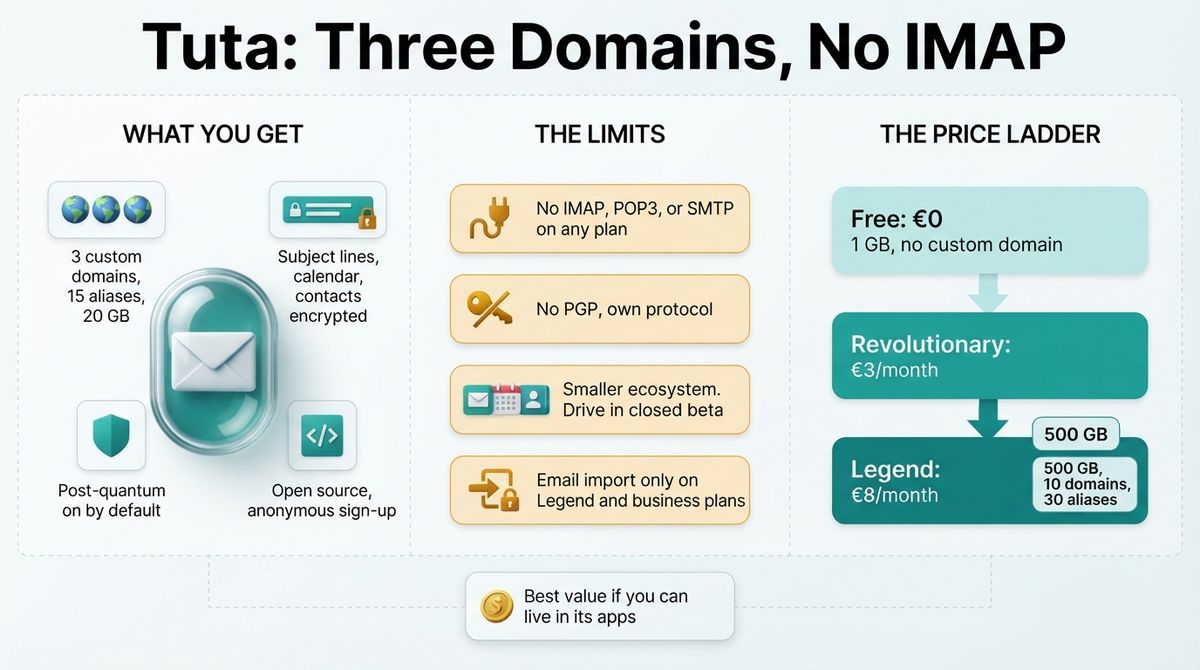
Tuta is the cheapest paid route to a custom domain. Revolutionary costs €3 a month on yearly billing and includes 20 GB, three custom domains, and 15 aliases. Reports say addresses on your own domains do not count against the alias limit. Legend costs €8 a month and adds 500 GB, 10 custom domains, and 30 aliases.
Privacy goes deeper by default. Tuta encrypts subject lines, calendar, and contacts, offers anonymous sign-up, and is open source. Messages between Tuta users are end-to-end encrypted, and external recipients can receive a password-protected message. Business plans start at €6 per user a month.
Where Tuta falls short
Tuta does not support IMAP, POP3, or SMTP on any plan, by design. You read mail only in its web, desktop, and mobile apps. That keeps encryption intact, but it breaks workflows that depend on Apple Mail, Outlook, or tools that connect to your inbox. Because it does not use PGP, it cannot exchange PGP-encrypted mail directly.
The ecosystem is smaller than Proton’s. Tuta offers mail, calendar, and contacts, and its Drive product entered closed beta in April 2026. As of mid-2026, email import was limited to the Legend and business plans. Monthly billing costs more than yearly billing.
Tuta pricing
| Plan | Yearly billing | Monthly billing | Storage | What you get |
|---|---|---|---|---|
| Free | €0 | €0 | 1 GB | @tuta.com and @tuta.io addresses, no custom domain |
| Revolutionary | €3/month (€36/year) | €7.20 more per year | 20 GB | 3 custom domains, 15 aliases, unlimited calendars and labels |
| Legend | €8/month (€96/year) | €19.20 more per year | 500 GB | 10 custom domains, 30 aliases, priority support, email import |
| Business | From €6/user/month | Not stated | Shared | Custom domains and shared storage for teams |
Tuta: Pros and Cons
Pros:
- Cheapest paid custom-domain plan, with three domains on Revolutionary.
- Encrypts subject lines, calendar, and contacts by default.
- Post-quantum protection on by default for new accounts.
- Open source, with anonymous sign-up.
Cons:
- No IMAP, POP3, or SMTP on any plan.
- No PGP compatibility.
- Smaller ecosystem: mail, calendar, and contacts only.
- Email import limited to Legend and business plans.
Rating: 4.4 / 5, the best value if you can live in its apps.
Mailfence Review: Standard Mail Apps and Open Encryption
- Free plan: Yes, 500 MB, webmail only, with no custom domain or IMAP
- Starting price: €3.50/month (Entry), where your own domain and IMAP start
- Best plan for most users: Entry
- Platforms: Web, plus any standard mail app through IMAP and SMTP
- Affiliate program: Yes, per reviewers; commission rate unconfirmed (one older listing says 30% recurring)
Mailfence is a small Belgian email service paid for by its subscribers, with no ads. It supports OpenPGP, built into the webmail, and bundles calendar, contacts, documents, and groups. It publishes a threat model that states plainly what it protects against and where its limits are.
What Mailfence does best
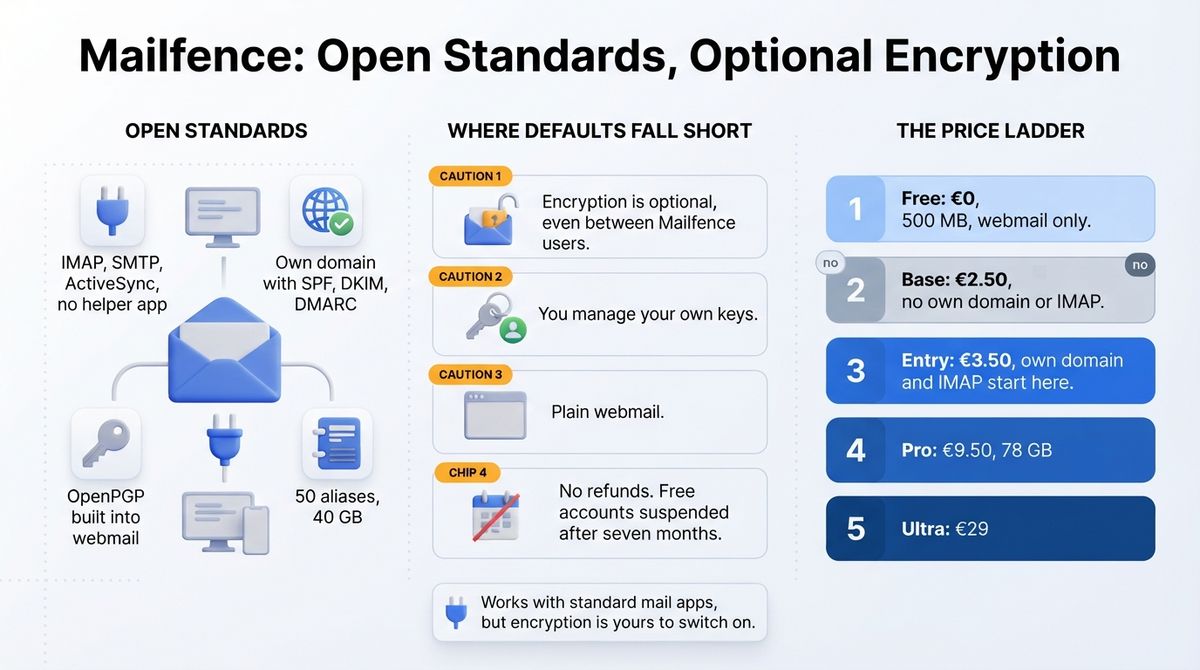
Mailfence is the only one of the three that works with standard mail apps and no helper. From Entry, it supports IMAP, SMTP, and ActiveSync, so Apple Mail, Outlook, Thunderbird, and phone mail apps connect directly. It also supports CalDAV and CardDAV. Entry includes your own domain with SPF, DKIM, and DMARC, 50 aliases, and 40 GB.
It is built on open standards. OpenPGP signing and encryption sit in the webmail and work with any OpenPGP correspondent. For people without PGP, you can send a password-protected message instead. Belgian jurisdiction means GDPR and Belgian privacy law apply.
Where Mailfence falls short
Encryption is optional. Unless you encrypt a message yourself, it sits on Mailfence’s servers with optional encryption features for different needs, even between two Mailfence users. You also look after your own keys. Proton encrypts stored mail by default.
The cheapest paid plan, Base at €2.50, has no custom domain, IMAP, or SMTP, so freelancers need Entry. The webmail is plain, and one reviewer had to refresh in Safari to see new mail. Mailfence does not refund subscriptions. Free accounts are suspended after seven months without use and deleted five months later.
Mailfence pricing
| Plan | Price | Storage | What you get |
|---|---|---|---|
| Free | €0 | 500 MB | Webmail only; no aliases, own domain, or IMAP |
| Base | €2.50/month | 5 GB mail, 6 GB documents | 10 aliases, email support; no IMAP or own domain |
| Entry | €3.50/month | 40 GB | 50 aliases, own domain, IMAP, SMTP, ActiveSync, user management, premium support |
| Pro | €9.50/month | 78 GB | 100 aliases, priority support by email and phone |
| Ultra | €29/month | Largest allowance | 200 aliases, priority support |
Mailfence: Pros and Cons
Pros:
- Standard IMAP, SMTP, and ActiveSync from Entry, with no helper app.
- OpenPGP built into the webmail, compatible with any PGP user.
- Own domain with SPF, DKIM, and DMARC at €3.50 a month.
- A published threat model and no ads.
Cons:
- Encryption is optional, and you manage your own keys.
- Base, the cheapest paid plan, has no IMAP or custom domain.
- Plain webmail, and subscriptions are not refunded.
- Free accounts are suspended after seven months without use.
Rating: 3.9 / 5, the right pick for mail-app workflows and PGP, with weaker defaults.
Head-to-Head Comparison Table
| Feature | Proton Mail | Tuta | Mailfence |
|---|---|---|---|
| Free plan | Yes, 1 GB | Yes, 1 GB | Yes, 500 MB |
| Cheapest plan with own domain | $3.99/month yearly ($4.99 monthly) | €3/month yearly | €3.50/month |
| Custom domains on that plan | 1 | 3 | Yes, from Entry |
| Storage on that plan | 15 GB | 20 GB | 40 GB, mail and documents |
| Encryption by default | Yes, zero-access | Yes, including subject lines | No, OpenPGP when you choose |
| Standard IMAP and SMTP | Only through Bridge | No, by design | Yes, from Entry |
| PGP compatibility | Yes | No, own protocol | Yes |
| Post-quantum protection | Opt-in, rolling out from May 2026 | On by default for new accounts | Not stated |
| Based in | Switzerland | Germany | Belgium |
| Other apps | Calendar, Drive, Pass, VPN | Calendar | Calendar, contacts, documents, groups |
| Best for | Most freelancers | Budget-minded privacy | Mail-app and PGP workflows |
| Rating | 4.5 / 5 | 4.4 / 5 | 3.9 / 5 |
Which Should You Choose?
The right provider depends on your apps, your clients, and how much you want encrypted by default.
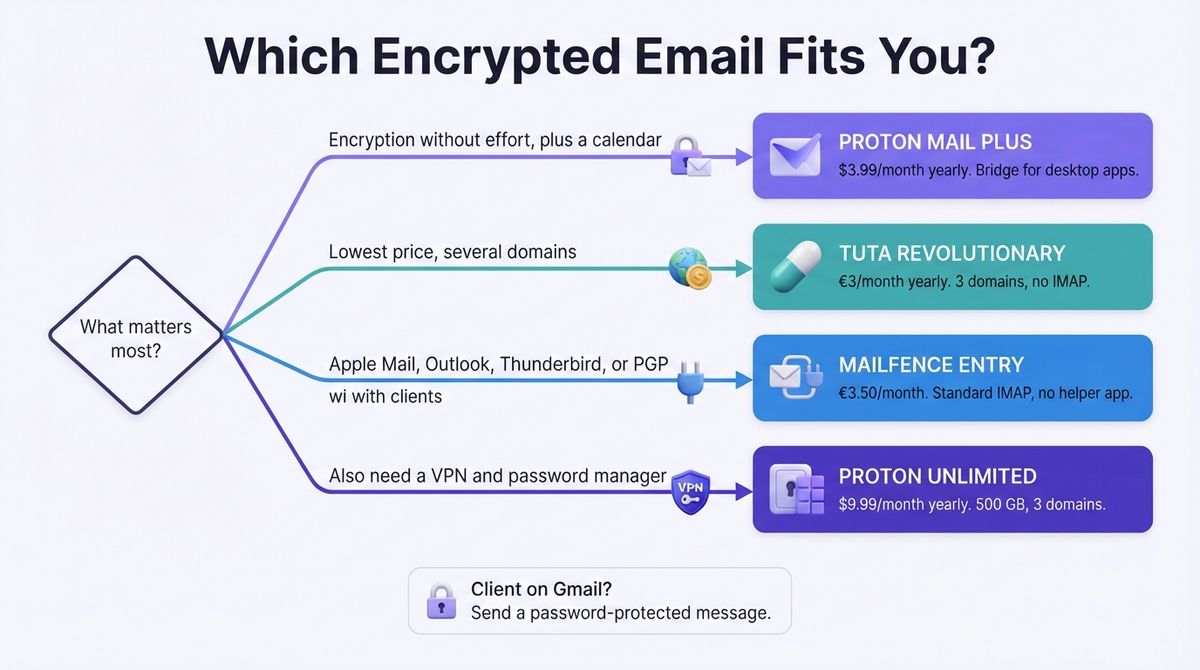
- Choose Proton Mail if you want encryption without effort, a custom domain, and a calendar, and you can live with Bridge for desktop mail apps.
- Choose Tuta if you want the lowest price and three custom domains, and you do not need IMAP or PGP.
- Choose Mailfence if you must use Apple Mail, Outlook, or Thunderbird directly, or exchange PGP-encrypted mail with clients.
Check what your client sees
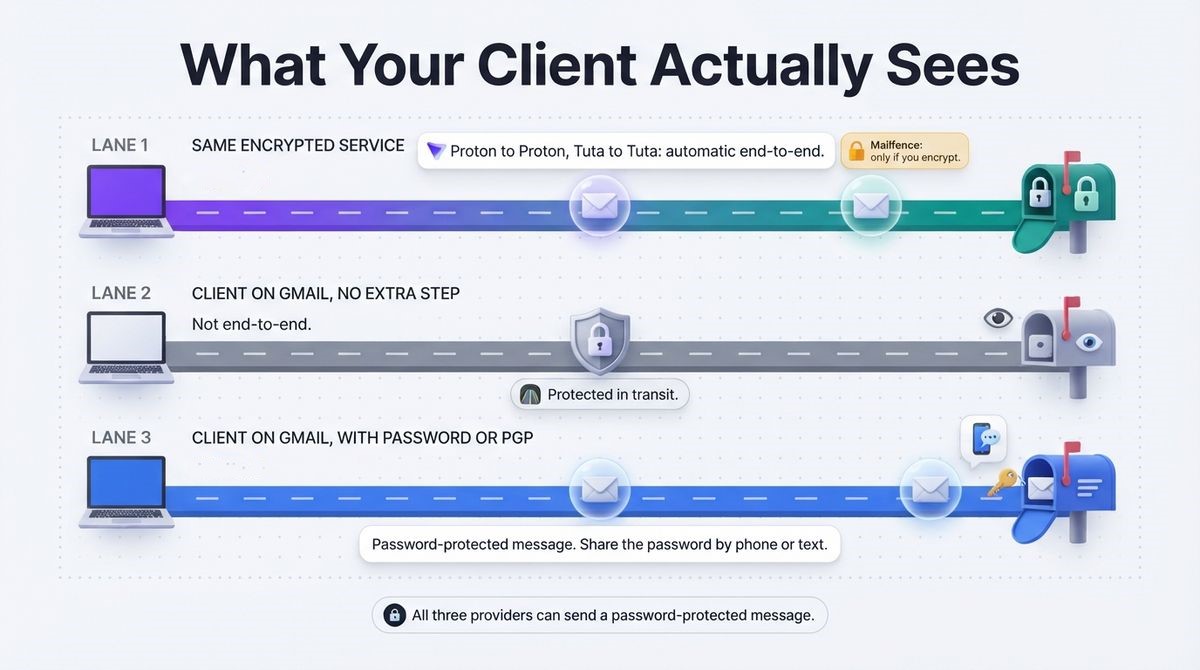
Encryption only covers part of the path. A message to a client on Gmail is protected in transit, but it is not end-to-end encrypted unless you use PGP or a password-protected message. All three providers can send a password-protected message, so share the password through another channel, such as a phone call or text.
What each costs over three years
Proton Mail Plus costs $143.64 over 36 months on yearly billing, or $179.64 if you pay monthly. Proton Unlimited costs $359.64. Tuta Revolutionary costs €108 on yearly billing, and Legend costs €288. Mailfence Entry costs €126 at its listed €3.50 monthly price, and longer terms cost less. Proton lists prices in dollars, and Tuta and Mailfence list euros.

Our Recommendations
- Solo freelancer who wants one secure inbox: Use Proton Mail Plus. It encrypts stored mail by default and includes a custom domain and a calendar.
- Budget-conscious freelancer with several domains: Use Tuta Revolutionary, which includes three custom domains at €3 a month on yearly billing.
- Freelancer who must use Apple Mail, Outlook, or Thunderbird: Use Mailfence Entry for standard IMAP and SMTP with no helper app.
- Freelancer who also needs a VPN and password manager: Use Proton Unlimited at $9.99 a month on yearly billing, which bundles them with 500 GB and three domains.
- Freelancer who wants free encryption on an existing host: Use Thunderbird’s built-in OpenPGP with any IMAP account. Both you and your client need keys.
WordPress note: Moving your domain’s MX records changes where you receive mail, not how your site sends it. Keep WordPress form notifications and newsletters on a transactional sending service, and publish SPF and DKIM records for every sender so messages reach inboxes.
Final Verdict
Proton Mail is the best choice for most freelancers. It encrypts by default, supports a custom domain, and adds a calendar and an optional ecosystem. Tuta is the best value, with three domains at €3 a month, as long as you can live without IMAP. Mailfence suits freelancers who need standard mail apps and PGP, but its encryption is optional.
In the Proton Mail vs Tuta vs Mailfence decision, pick Proton for simplicity, Tuta for price, and Mailfence for compatibility.
- Proton Mail: 4.5 / 5, best all-round choice for most freelancers.
- Tuta: 4.4 / 5, best value for budget-minded privacy.
- Mailfence: 3.9 / 5, best for mail apps and PGP.
Frequently Asked Questions
What is the best encrypted email for freelancers?
Proton Mail is the best fit for most freelancers. Mail Plus gives a custom domain, 10 addresses, and 15 GB for $3.99 a month billed yearly, and it encrypts stored mail by default. Tuta is cheaper and offers three domains but has no IMAP. Mailfence works with standard mail apps, but encryption is optional.
Can I use my own domain with encrypted email?
Yes, on paid plans. Proton Mail Plus supports one custom domain, Tuta Revolutionary supports three, and Mailfence supports your own domain from the Entry plan at €3.50 a month. Free plans on all three use the provider’s own addresses, so a custom domain needs an upgrade.
Does Tuta support IMAP?
No. Tuta does not support IMAP, POP3, or SMTP on any plan, by design. You read mail only in Tuta’s web, desktop, and mobile apps. That keeps encryption intact but breaks workflows that rely on Apple Mail, Outlook, or tools that connect to your inbox. Proton needs Bridge, and Mailfence supports IMAP from Entry.
Is email to a Gmail client encrypted?
Only in transit unless you add protection. End-to-end encryption works automatically between users on the same encrypted service, or with PGP when both people have keys. For a client on Gmail, send a password-protected message, which Proton, Tuta, and Mailfence all support, and share the password through another channel.
How much does Proton Mail cost?
Proton Mail’s free plan has 1 GB and 150 messages a day. Mail Plus costs $4.99 monthly or $3.99 a month billed yearly ($47.88), with 15 GB, 10 addresses, and one custom domain. Proton Unlimited costs $12.99 monthly or $9.99 billed yearly and adds 500 GB, three domains, VPN, and a password manager.
Which Mailfence plan do I need as a freelancer?
Entry, at €3.50 a month. The cheaper Base plan at €2.50 has no custom domain and no IMAP or SMTP. Entry adds your own domain with SPF, DKIM, and DMARC, 50 aliases, 40 GB, and standard mail app access. Mailfence does not refund subscriptions, so try the free plan first.
Is Tuta or Proton better for post-quantum encryption?
Tuta turns on post-quantum protection by default for new accounts, through its TutaCrypt protocol introduced in March 2024. Proton’s post-quantum option is opt-in and rolling out to all plans from May 2026. Neither makes email immune to every risk, since recipients on other providers fall outside end-to-end encryption.
Can I send website emails from an encrypted mailbox?
It is not the best fit. Encrypted mailbox providers are built for personal and business inboxes, not for sending site notifications or newsletters at volume. Keep WordPress form emails on a transactional sending service, and publish SPF, DKIM, and DMARC records for every sender on your domain so messages reach inboxes.