If you are comparing Scrivener vs iA Writer vs Ulysses, you are probably tired of drafting blog posts in a browser tab full of distractions. A dedicated writing app keeps your drafts in one place, protects your focus, and gets text into WordPress without formatting damage. The hard part is that these three apps are built for very different writers, and they charge in very different ways.
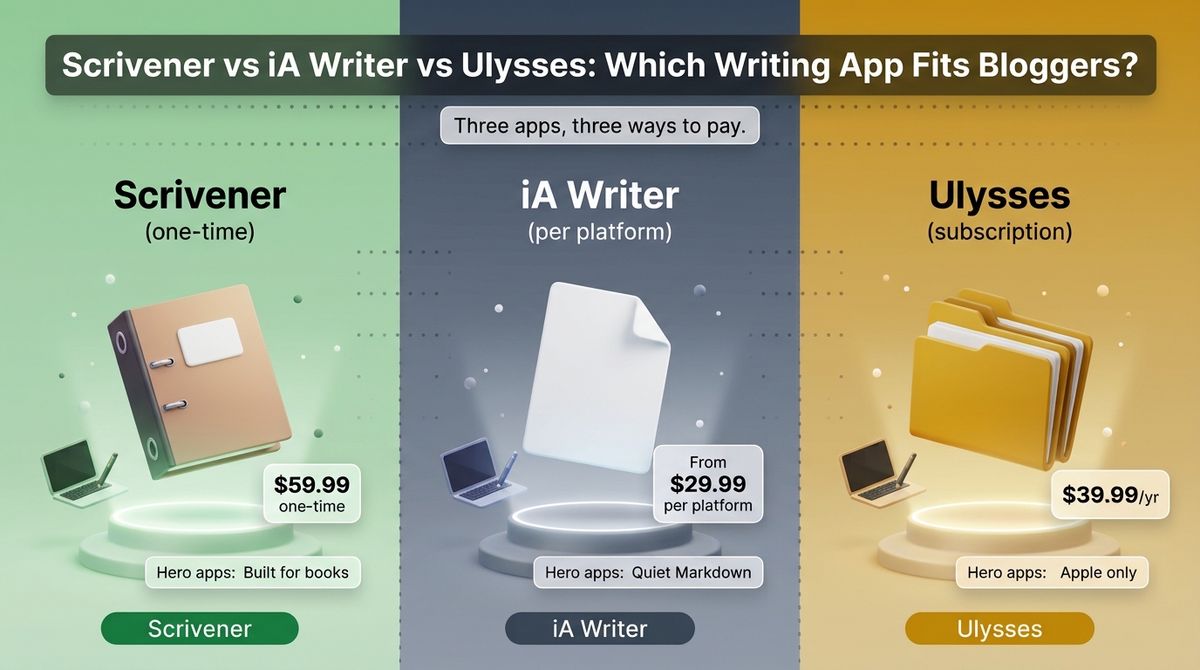
Scrivener is a one-time purchase built for long projects, iA Writer is a minimalist Markdown editor sold separately for each platform, and Ulysses is an Apple-only subscription. Over three years, the same Mac can cost $49.99, $59.99, or $119.97. Platform matters too: only two of the three run on Windows, and none run on Android.
I tested Scrivener vs iA Writer vs Ulysses for 30 days, drafting the same 2,000-word blog post in each, then publishing or exporting it to WordPress and checking the formatting. Here is the honest comparison, including one pricing catch: iA Writer raised its iPhone and iPad price from $19.99 to $49.99, so older reviews understate what it costs across devices.
Table of Contents
How We Tested
Every app was scored on the same five criteria.
- Drafting experience. Focus, editing tools, and how each app handles a 2,000-word post and a 20,000-word guide.
- Pricing and licensing. One-time cost versus subscription, per-platform fees, and what happens at upgrade time.
- WordPress workflow. Direct publishing, handling of images, headings, tags, and categories, and export quality.
- Organization and long-form tools. Drafts library, folders, goals, snapshots, and compiling.
- Platform and sync. Mac, Windows, iPhone, and iPad support, and how files sync between devices.
Scrivener Review: Built for Books, Overkill for Blog Posts
- Free plan: No, 30-day free trial on Mac and Windows (counted by days you open the app); no trial on iOS
- Starting price: $59.99 one-time for Mac or Windows, $23.99 for iOS and iPadOS
- Best plan for most users: Mac or Windows license (one-time)
- Platforms: macOS, Windows, iOS, iPadOS
- Affiliate program: Yes, 20% on licenses through FirstPromoter
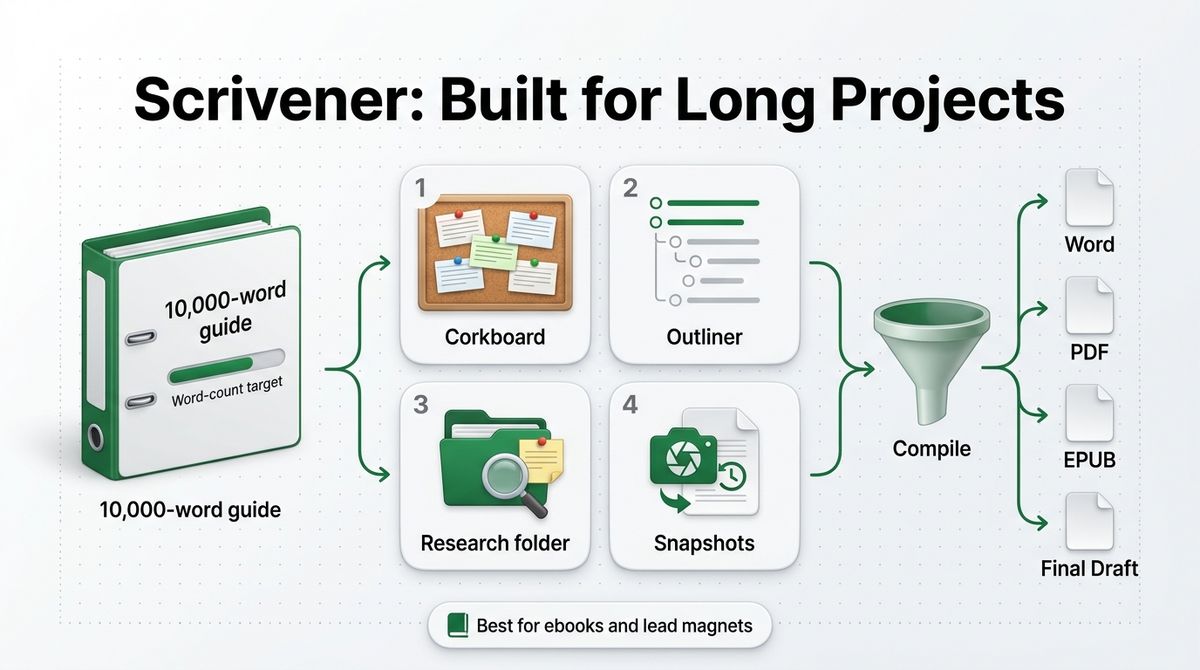
Scrivener, from Literature & Latte, is a project-based writing studio. You split a long document into sections, keep research files and notes beside the draft, and compile everything into Word, PDF, EPUB, or Final Draft formats when you finish. It runs on Mac, Windows, iPhone, and iPad.
What Scrivener does best
Scrivener is the strongest tool for long projects. The corkboard, outliner, research folder, and snapshots let you restructure an ebook or a 10,000-word guide without losing earlier versions, and word-count targets keep you on pace. For a blogger planning a lead magnet or a book, nothing else here comes close.
The pricing is also the most straightforward. You pay $59.99 once for Mac or Windows, updates within Scrivener 3 are free, and the 30-day trial counts only the days you open the app. There is no subscription to forget about.
Where Scrivener falls short
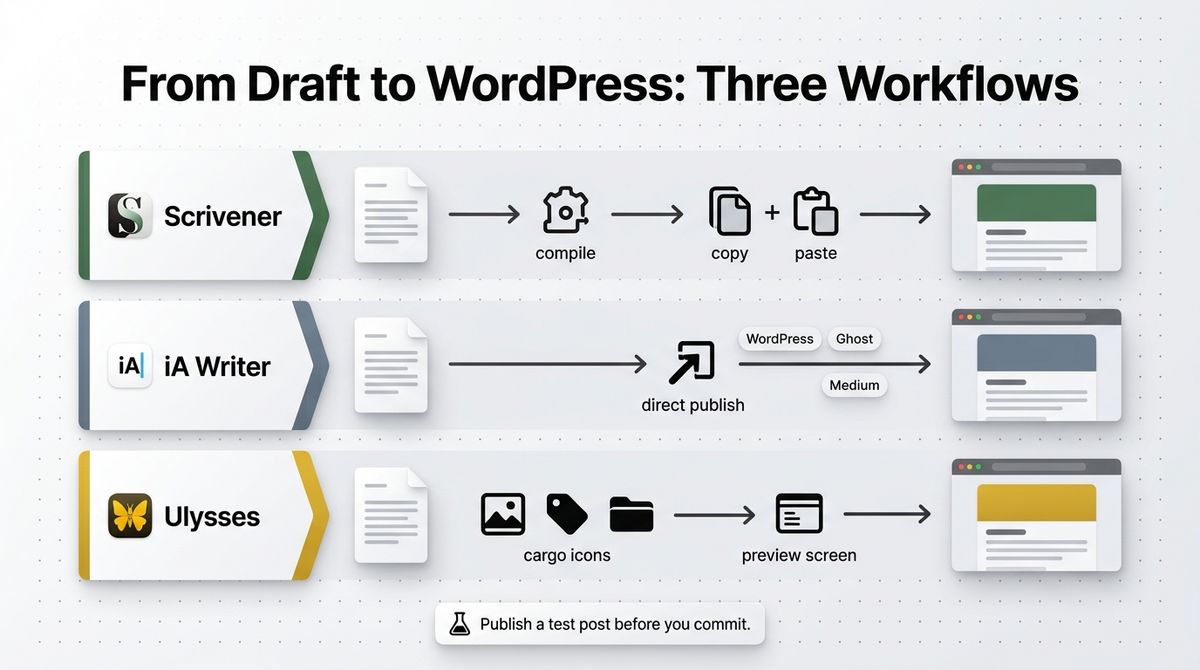
It is overkill for blog posts. Scrivener is not Markdown-first; it has no one-click WordPress publishing, and you compile or copy your text out, so the workflow for a weekly blogger is slower than in the other two. The interface also takes a few hours to learn.
Licenses are per platform, so Mac and Windows together cost $95.98, and the iOS app is another $23.99 with no free trial. The Windows build is a release behind the Mac build, 3.1 versus 3.5 at last check, and a future Scrivener 4 would carry a paid upgrade. Android and Linux are not supported.
Scrivener pricing
| Plan | Price | What you get |
|---|---|---|
| Free trial | $0 | 30 days of use on Mac or Windows, counted by days you open the app |
| Scrivener for Mac | $59.99 one-time | Full app, free updates within Scrivener 3 |
| Scrivener for Windows | $59.99 one-time | Separate license; build trails the Mac version |
| Mac and Windows bundle | $95.98 one-time | Both licenses |
| Scrivener for iOS and iPadOS | $23.99 one-time | Sold separately on the App Store, no free trial |
| Educational license | $50.99 for Mac (October 2026) | Verified students and academics |
Scrivener: Pros and Cons
Pros:
- One-time $59.99 with free Scrivener 3 updates
- Corkboard, outliner, research folder, and snapshots
- Compiles to Word, PDF, EPUB, and Final Draft
- 30-day trial on Mac and Windows
- Runs on Mac, Windows, iPhone, and iPad
Cons:
- No direct WordPress publishing
- Steep learning curve for short posts
- Licenses are sold per platform
- Windows build trails the Mac version
- No Android app and no trial on iOS
Rating: 4.2 / 5, best for ebooks and long guides, overkill for weekly posts.
iA Writer Review: Cleanest Drafting, Priced Per Platform
- Free plan: No, free trial (7 days per iA’s pricing page as of August 2026)
- Starting price: Windows $29.99, Mac $49.99, iPhone and iPad $49.99, each one-time
- Best plan for most users: Mac or Windows purchase
- Platforms: macOS, Windows, iOS, iPadOS
- Affiliate program: Not confirmed
iA Writer is a minimalist Markdown editor from iA. It strips the screen down to your text, with Focus Mode, syntax highlighting for parts of speech, and Authorship, which marks text you typed differently from text you pasted or generated with AI. It publishes straight to WordPress, Ghost, and Medium. If you rely on automated content generation during your draft phase, consider evaluating the best AI writing tools for SEO as part of your overall content workflow.
What iA Writer does best
It is the quietest place to draft. The fixed typography, Focus Mode, and syntax highlighting help you tighten sentences, and Authorship marks pasted and AI-generated text so you can see what you wrote yourself. For bloggers who write one post at a time, the lack of options is a feature. Writers who also manage extensive newsletter outreach might want to review the best AI email writing assistants to speed up subscriber communication.
Publishing to WordPress is built in, and the one-time pricing is simple. A Windows license costs $29.99 and a Mac license costs $49.99, with no subscription. The free trial lets you write and export before you buy.
Where iA Writer falls short
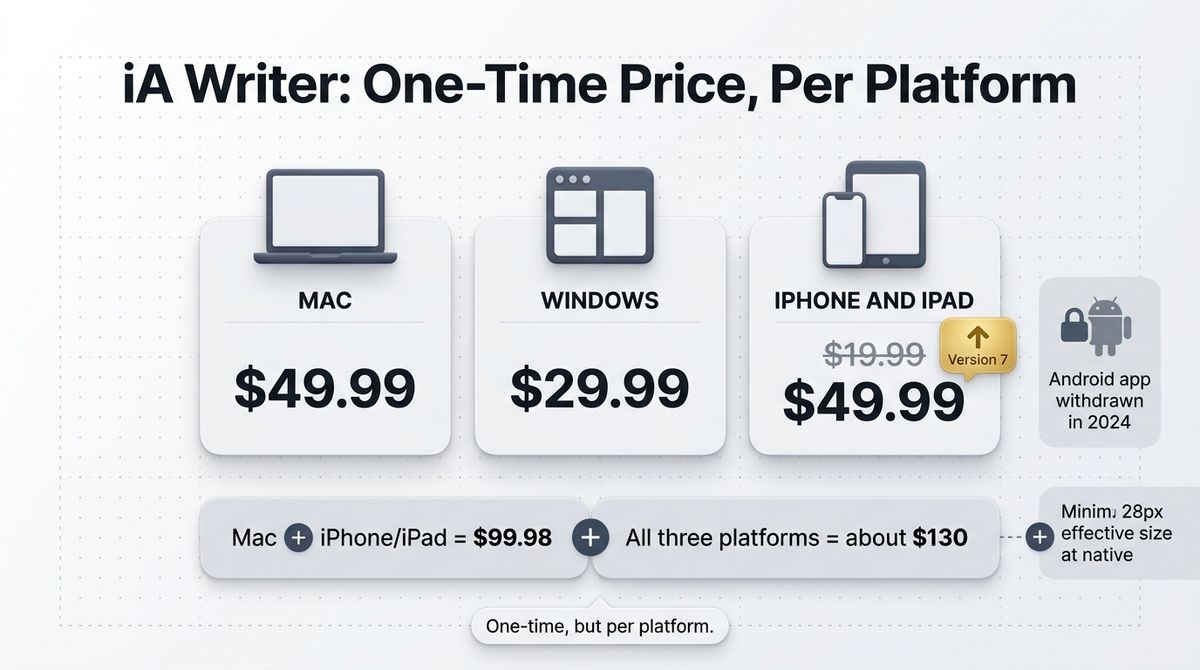
Each platform is a separate purchase, and prices have risen. The iPhone and iPad app went from $19.99 to $49.99 with version 7, so Mac plus iOS now costs $99.98, and all three platforms cost about $130. iA also withdrew its Android app in 2024, so Android is out.
Organization is basic, so long guides and large libraries are harder to manage than in Scrivener or Ulysses, and customization is limited to a handful of fonts. Authorship was still missing on Windows at last check, and the trial is only seven days.
iA Writer pricing
| Plan | Price | What you get |
|---|---|---|
| Free trial | $0 | 7 days on Mac, iOS, and Windows, no card required |
| Mac | $49.99 one-time | App Store or direct from iA |
| Windows | $29.99 one-time | Microsoft Store or direct from iA; Authorship missing at last check |
| iPhone and iPad | $49.99 one-time (was $19.99 before version 7) | App Store only |
| Android | Not available | iA withdrew the Android app in 2024 |
iA Writer: Pros and Cons
Pros:
- Cleanest distraction-free interface of the three
- Direct WordPress, Ghost, and Medium publishing
- One-time pricing with no subscription
- Authorship marks pasted and AI-generated text
- Windows license is only $29.99
Cons:
- Separate purchase for each platform
- iPhone and iPad price rose to $49.99
- Limited organization for long projects
- Android app withdrawn
- Short seven-day trial
Rating: 4.5 / 5, the best pick for simple, one-time-priced drafting.
Ulysses Review: Best Blogging Workflow, Apple Only
- Free plan: No free plan; free trial of the full app
- Starting price: $5.99 per month or $39.99 per year
- Best plan for most users: Yearly plan
- Platforms: macOS, iOS, iPadOS
- Affiliate program: Yes, 25% commission per subscriber, paid quarterly
Ulysses is a writing app for Mac, iPhone, and iPad from Ulysses GmbH in Germany. It keeps every text in one library synced by iCloud, supports Markdown, and publishes directly to WordPress, Ghost, Medium, and Micro.blog. It moved to a subscription in 2017 and has no one-time option.
What Ulysses does best
It has the best publishing workflow of the three. You can post to WordPress from inside the app with images, tags, and categories, or connect to the best newsletter platforms for paid subscriptions, and preview the result before submitting. For a blogger who publishes weekly, that removes copy-and-paste steps and formatting cleanup.
The library is also strong. Groups, keywords, writing goals, and version history keep hundreds of drafts organized, and one subscription covers Mac, iPhone, and iPad with iCloud sync. The trial includes export and sync, so you can test the full workflow.
Where Ulysses falls short
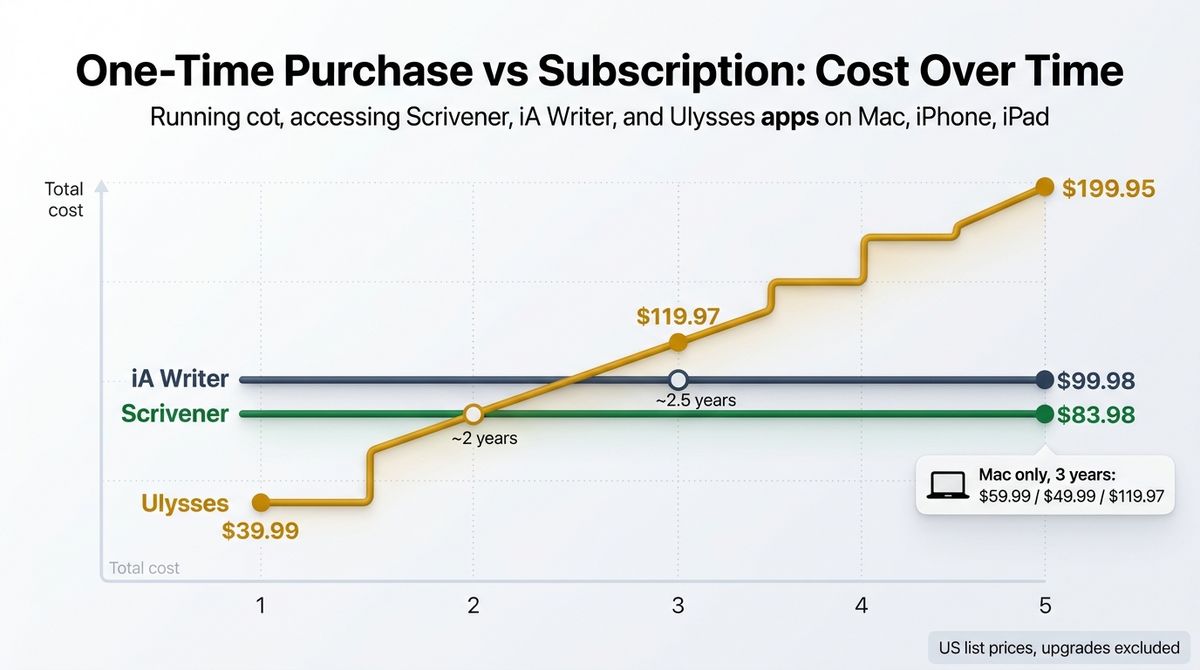
It is Apple-only and subscription-only. There is no Windows, Android, or web version, and no one-time purchase. At $39.99 a year, Ulysses costs $119.97 over three years, more than twice the price of a Mac license for iA Writer at $49.99.
Long-form output is limited compared with Scrivener, so books need a separate formatting tool. Older reviews also list $49.99 a year, but the App Store now shows $39.99 yearly or $5.99 monthly in the US. Prices vary by region.
Ulysses pricing
| Plan | Price | What you get |
|---|---|---|
| Free trial | $0 | Fully functional trial, including export and sync |
| Monthly | $5.99 per month | Mac, iPhone, and iPad access with iCloud sync |
| Yearly | $39.99 per year (about $3.33 per month) | Same access, about 44% less than paying monthly |
Ulysses: Pros and Cons
Pros:
- Direct publishing to WordPress, Ghost, Medium, and Micro.blog
- Strong library with groups, keywords, and goals
- One subscription covers Mac, iPhone, and iPad
- iCloud sync
- Fully functional free trial
Cons:
- Apple only
- Subscription only, no one-time purchase
- $119.97 over three years
- Weaker long-form output than Scrivener
Rating: 4.6 / 5, the best pick for Apple users who publish to WordPress.
Scrivener vs iA Writer vs Ulysses: Head-to-Head Comparison
| Feature | Scrivener | iA Writer | Ulysses |
|---|---|---|---|
| Pricing model | One-time per platform | One-time per platform | Subscription |
| Mac price | $59.99 | $49.99 | $39.99 per year ($5.99 monthly) |
| Windows price | $59.99 | $29.99 | Not available |
| iPhone and iPad | $23.99 | $49.99 | Included in subscription |
| 3-year cost, Mac only | $59.99 | $49.99 | $119.97 |
| 3-year cost, Mac plus iPhone and iPad | $83.98 | $99.98 | $119.97 |
| 5-year cost, Mac plus iPhone and iPad | $83.98 | $99.98 | $199.95 |
| Free trial | 30 days of use (not on iOS) | 7 days | Fully functional trial |
| Direct WordPress publishing | No | Yes | Yes, with images, tags, and categories |
| Long-form tools | Corkboard, outliner, snapshots, compile | Basic | Library, groups, goals |
| Android | No | No (withdrawn in 2024) | No |
| Affiliate program | Yes, 20% via FirstPromoter | Not confirmed | Yes, 25% per subscriber |
| Best for | Ebooks and long guides | Simple one-time-priced drafting | Weekly bloggers on Apple devices |
| Rating | 4.2 / 5 | 4.5 / 5 | 4.6 / 5 |
Three- and five-year costs use US list prices and exclude possible future paid upgrades.
Which Should You Choose?
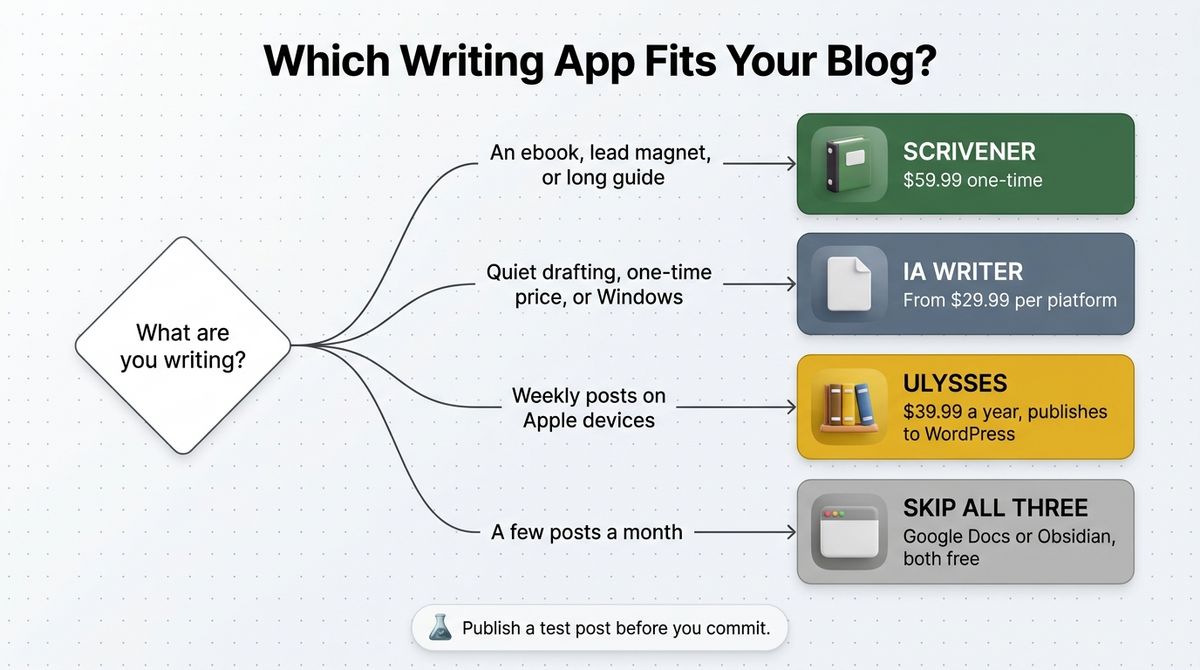
- Choose Scrivener if you are writing an ebook, a lead magnet, or a long guide and want a one-time price.
- Choose iA Writer if you want a quiet Markdown editor with one-time pricing, or you write on Windows or across Mac and Windows.
- Choose Ulysses if you write on Apple devices, publish to WordPress weekly, and accept a subscription.
- Skip all three if you write occasionally. Google Docs and Obsidian are both free, and either can handle a few posts a month.
One developer note applies to every app here. Publish a test draft with images and headings before you commit, and check that your theme’s block styles and image alt text come through. Use the best image compression tools for bloggers before upload so your Media Library stays light.
Our Recommendations
- Solo blogger on a Mac or iPhone: Ulysses at $39.99 a year. Start the trial and publish a test post to WordPress.
- Blogger on Windows, or anyone who dislikes subscriptions: iA Writer, which costs $29.99 on Windows and $49.99 on Mac.
- Blogger writing a book or lead magnet: Scrivener at $59.99 for the draft, then paste finished chapters or excerpts into WordPress.
- Freelance writer with clients who use Word: Scrivener compiles to Word, and Ulysses exports to Word and PDF.
- Occasional writer or small team: Skip a dedicated app and use Google Docs until the workflow slows you down.
Final Verdict
In the Scrivener vs iA Writer vs Ulysses comparison, Ulysses is the best pick for bloggers on Apple devices because it publishes to WordPress with images, tags, and categories. iA Writer is the better choice if you want a one-time price or work on Windows. Scrivener wins for books and long guides, but it is overkill for weekly posts.
- Ulysses: 4.6 / 5
- iA Writer: 4.5 / 5
- Scrivener: 4.2 / 5
Check each vendor’s live pricing page before you buy. All prices above were checked in October 2026.
Frequently Asked Questions
Which is better for blogging, Scrivener, iA Writer, or Ulysses?
Ulysses is the best for bloggers on Apple devices because it publishes to WordPress with images, tags, and categories. iA Writer suits bloggers who want a one-time price or use Windows. Scrivener suits ebooks and long guides, but it has no direct WordPress publishing and is slower for weekly posts.
How much does Scrivener cost?
Scrivener costs $59.99 one-time for Mac or Windows, $95.98 for a Mac and Windows bundle, and $23.99 for iPhone and iPad. The educational Mac license is $50.99. Updates within Scrivener 3 are free, and a future major version would carry a paid upgrade. A 30-day trial counts only days you open the app.
How much does iA Writer cost?
iA Writer is a one-time purchase per platform: $49.99 for Mac, $29.99 for Windows, and $49.99 for iPhone and iPad. The iPhone and iPad price was $19.99 before version 7. Mac plus iOS costs $99.98, and all three platforms cost about $130. iA lists a seven-day free trial on its pricing page.
How much does Ulysses cost?
Ulysses costs $5.99 per month or $39.99 per year in the US, and one subscription covers Mac, iPhone, and iPad. There is no one-time purchase or free plan, but the trial is fully functional, including export and sync. Over three years the yearly plan totals $119.97. Older reviews that list $49.99 a year are outdated.
Can I publish directly to WordPress from these apps?
Ulysses and iA Writer can publish to WordPress from inside the app, and both also support Ghost and Medium. Ulysses supports images, tags, categories, and a preview before posting. Scrivener has no direct publishing, so you compile or copy your text into WordPress. Run a test post before relying on any workflow.
Do any of them work on Windows or Android?
Scrivener and iA Writer run on Windows, and Ulysses does not. None of the three supports Android: Scrivener has no Android app, and iA withdrew its Android app in 2024. Ulysses is limited to Mac, iPhone, and iPad. Windows bloggers should look at iA Writer at $29.99 or Scrivener at $59.99.
Is a one-time purchase cheaper than a subscription?
Usually, if you keep the app for more than about two years. For a Mac plus iPhone and iPad, Scrivener costs $83.98 and iA Writer $99.98 once, while Ulysses costs $39.99 a year. Ulysses catches up with Scrivener after about two years and with iA Writer after about two and a half. Future paid upgrades could change the math.
Is there a free alternative for writing blog posts?
Yes. Google Docs is free and works in any browser, and Obsidian is a free Markdown editor for desktop and mobile. Neither has built-in WordPress publishing like Ulysses, but both cost nothing. If you publish a few posts a month, start with a free tool and upgrade only when workflow friction costs you time.