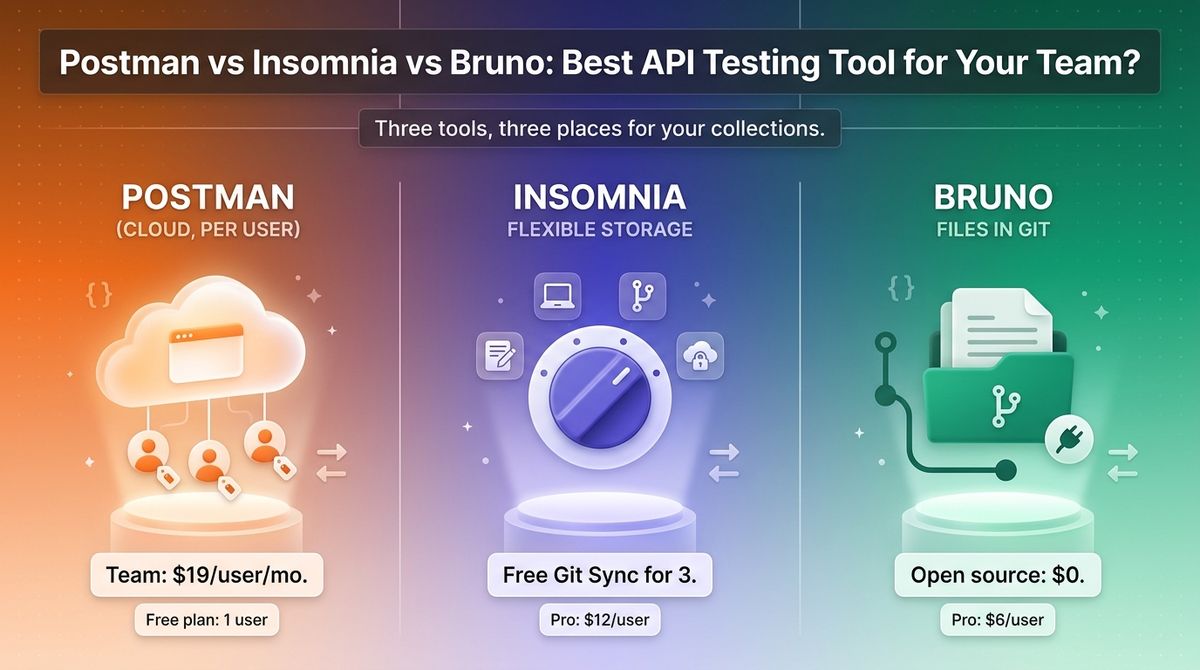
If you are comparing Postman vs Insomnia vs Bruno, you probably have API requests scattered across browser tabs, curl commands, and a teammate’s laptop. An API client keeps those requests organized, runs tests, and shares collections with your team. The tool you pick also decides whether your collections live in a vendor’s cloud or in your Git repository. Developers who automate their workflows often want to explore the best AI code assistants for their daily coding tasks.
Pricing models differ more than features do. Postman sells per-user cloud workspaces, Insomnia offers free Git sync for small teams plus paid per-user plans, and Bruno is open source with optional paid tiers. Postman also restructured its plans in March 2026, so many reviews still list prices and a free team plan that no longer exist.
I tested Postman vs Insomnia vs Bruno for 30 days, rebuilding the same REST and GraphQL collection in each, then running it from a CI pipeline and sharing it with a second developer. Here is the honest comparison, including one pricing catch: Postman’s Free plan is now limited to one user.
Table of Contents
How We Tested
Every tool was scored on the same five criteria.
- Request building and testing. REST, GraphQL, and gRPC support, scripting, and assertions.
- Pricing and limits. Free plan limits, per-user costs, and what forces an upgrade.
- Collaboration and storage. Git sync, cloud sync, and how a second developer joins.
- Automation. CLI runners and CI pipeline support.
- Privacy and control. Where collections are stored, account requirements, and offline use.
Postman Review: Most Complete Platform, Pricier for Teams Since March
- Free plan: Yes, 1 user only, with 50 AI credits per month (since March 2026)
- Starting price: Solo at $9 per month billed annually ($12 monthly); Team at $19 per user per month billed annually
- Best plan for most users: Free for solo developers, Team for two or more people
- Platforms: Web, Windows, macOS, Linux
- Affiliate program: Not confirmed (Postman lists a partner program, not an affiliate program)
Postman is the best-known API platform. It combines a request client with collections, environments, mock servers, monitors, API documentation, and a CLI for CI pipelines. Collections live in Postman’s cloud workspaces or, on paid plans, in Git.
What Postman does best
Postman has the widest feature set. Mock servers, monitors, API documentation, and the Postman CLI sit in one product, and most developers already know the interface. If your team needs mocking and monitoring from the same tool, nothing else here matches it. Teams building production web services should also monitor website uptime and service health to catch outages early.
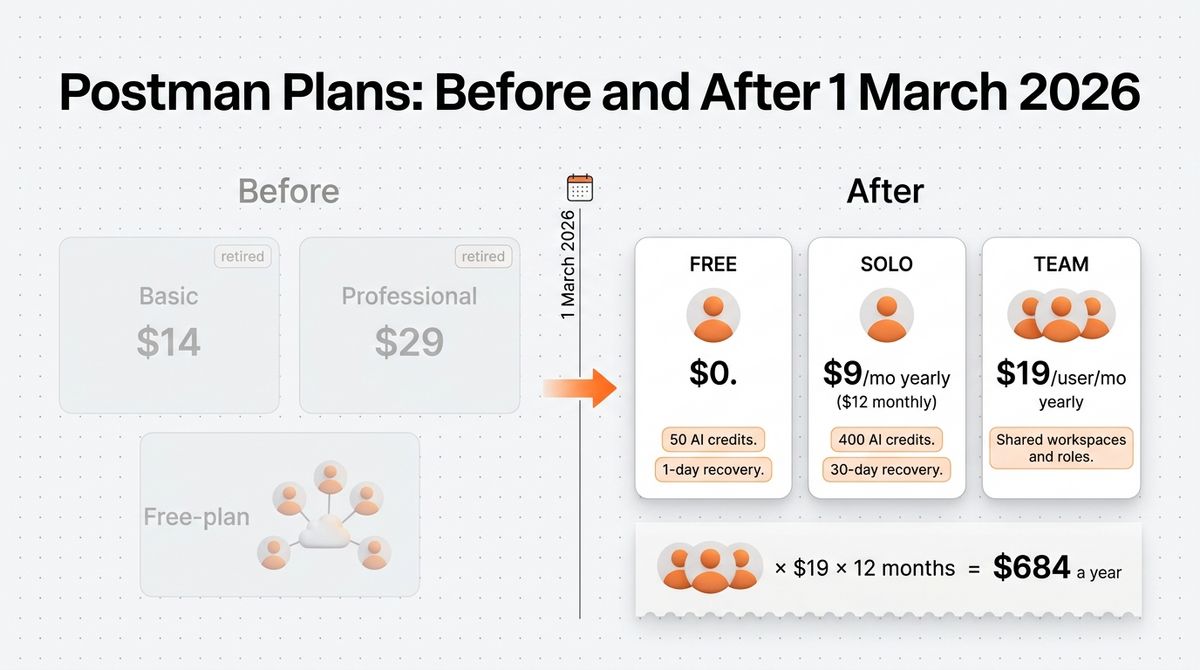
The Free plan still covers core work for one developer. It includes the full API client, the Collection Runner, the CLI, and mock servers, and Solo at $9 raises AI credits from 50 to 400 a month and extends collection recovery from one day to 30 days.
Where Postman falls short
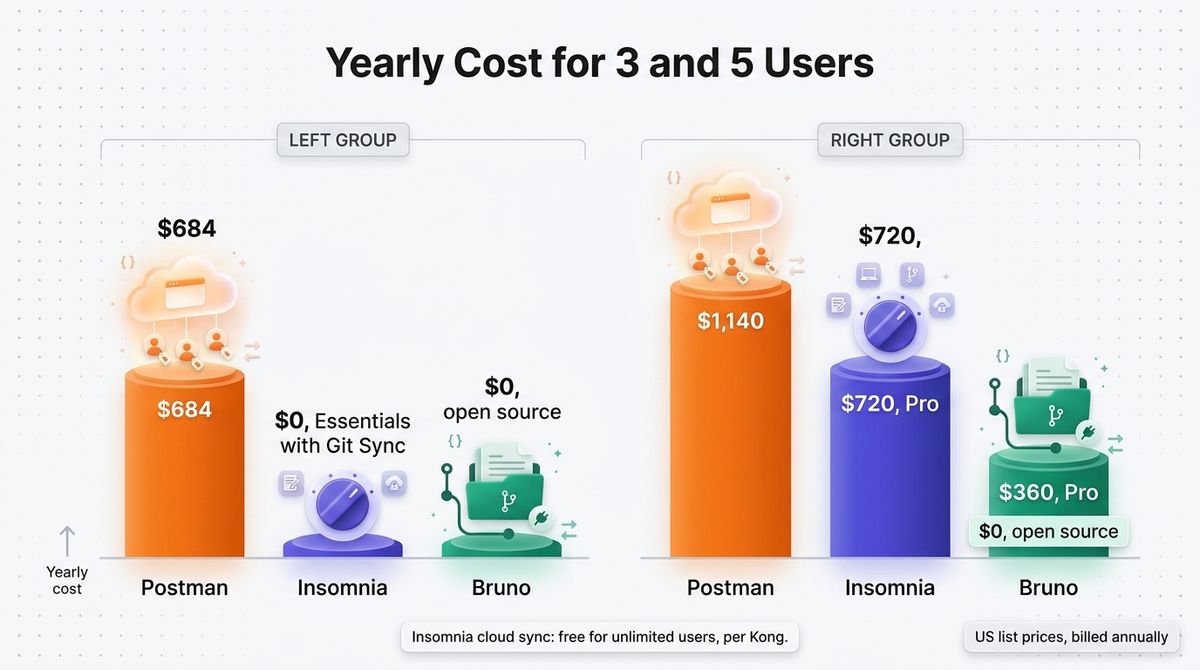
Collaboration is no longer free. On 1 March 2026, Postman limited the Free plan to one user, retired Basic at $14 and Professional at $29, and moved teams to Team at $19 per user per month billed annually. A three-person team now pays $57 a month, or $684 a year, to share workspaces.
Costs also stack up in smaller ways. AI runs on credits, with 50 a month on Free, 400 on Solo, and overage fees of $0.04 to $0.05 per credit on Solo and Team. Solo is single-user, so it is not a cheap team plan, and Enterprise, reported at about $49 per user per month, is quote-based.
Postman pricing
| Plan | Price | What you get |
|---|---|---|
| Free | $0 | 1 user, 50 AI credits per month, Collection Runner, CLI, mock servers, 1 day of collection recovery |
| Solo | $9 per month billed annually ($12 monthly) | 1 user, 400 AI credits per month, 30 days of collection recovery |
| Team | $19 per user per month billed annually | Unlimited users, shared workspaces and roles, 400 AI credits per user per month |
| Enterprise | Quote (about $49 per user per month reported) | 800 AI credits per user, pooled, SSO, governance controls, dedicated support |
Postman: Pros and Cons
Pros:
- Widest feature set, with mocks, monitors, and documentation
- Free plan covers one developer fully
- Postman CLI for CI pipelines
- Interface most developers already know
- Native Git on paid plans
Cons:
- Free plan is single-user since March 2026
- Team costs $19 per user per month
- AI credits with overage fees
- Account and cloud workspaces required
- Per-seat cost scales quickly
Rating: 4.3 / 5, the most complete platform, now the priciest for teams.
Insomnia Review: Most Flexible Storage, Free for Small Teams
- Free plan: Yes (Essentials), unlimited local and cloud projects, Git Sync for up to 3 users
- Starting price: Pro at $12 per user per month
- Best plan for most users: Essentials for teams of up to three, Pro beyond that
- Platforms: Windows, macOS, Linux
- Affiliate program: Not confirmed
Insomnia is an open-source API client from Kong, licensed under Apache 2.0. It supports REST, GraphQL, gRPC, WebSocket, and SOAP, and lets you store projects locally, in Git, or in an optionally end-to-end encrypted cloud. Version 12 added an MCP client and AI mock generation.
What Insomnia does best
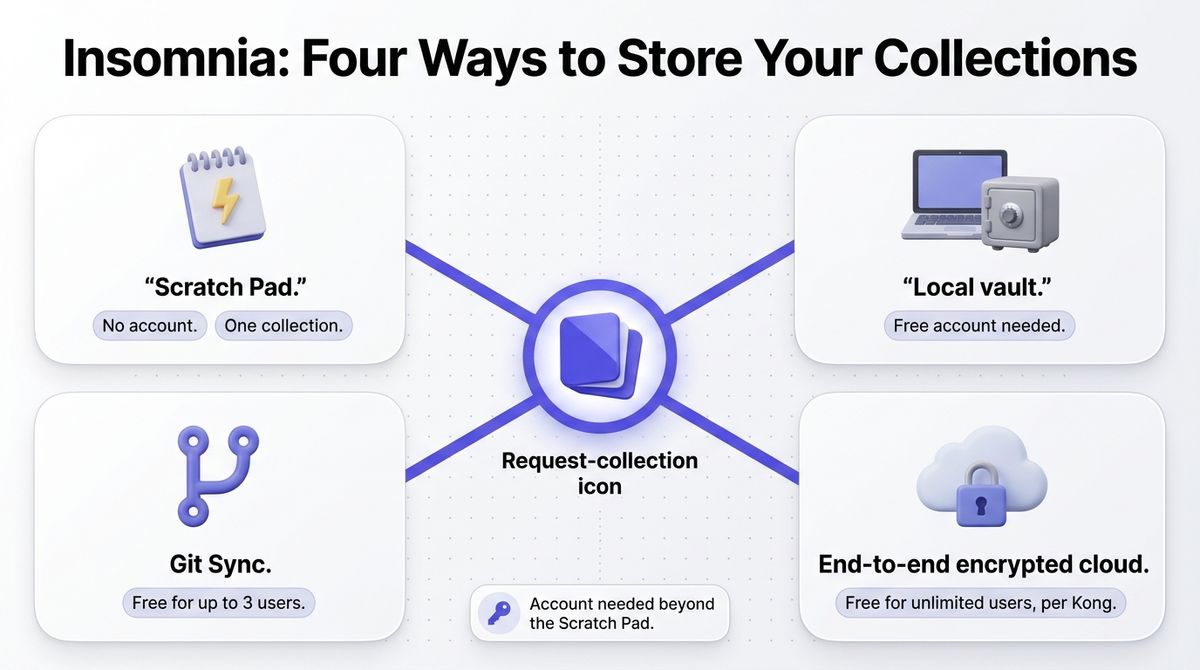
Storage flexibility is the strength. You can work in a local-only Scratch Pad with no account, use a local vault, sync through Git, or collaborate through an end-to-end encrypted cloud. Kong says the cloud is free for unlimited users, and Git Sync is free for up to three users.
The free plan is generous for the category. Essentials includes the Inso CLI, 1,000 mock requests a month, and unlimited cloud and local projects, so a team of three can collaborate for $0, against $57 a month on Postman Team. Pro at $12 per user removes the three-user Git cap and adds role-based access control.
Where Insomnia falls short
Account requirements have frustrated users before. Insomnia 8.0 moved projects behind a login in September 2023, and after backlash Kong restored local-only projects in version 8.3, still behind a free account. Only the Scratch Pad works with no account at all, and it is limited to one collection.
Mock requests are capped at 1,000 a month on Essentials and 10,000 on Pro. Enterprise costs $45 per user per month, self-serve up to 50 users, and older reviews that list Individual at $5 and Team at $12 are out of date.
Insomnia pricing
| Plan | Price | What you get |
|---|---|---|
| Essentials (free) | $0 | Unlimited local and cloud projects, Git Sync for up to 3 users, Inso CLI, 1,000 mock requests per month |
| Pro | $12 per user per month (about 15% less billed annually) | Git Sync for all users, unlimited organizations, role-based access control, 10,000 mock requests per month |
| Enterprise | $45 per user per month, self-serve up to 50 users | Kong Konnect integration, SSO and SCIM, storage controls, unlimited mock requests |
Insomnia: Pros and Cons
Pros:
- Apache 2.0 open source
- Free Git Sync for up to 3 users
- Local, Git, or end-to-end encrypted cloud storage
- Scratch Pad needs no account
- Broad protocol support, including gRPC, WebSocket, and SOAP
Cons:
- Account needed beyond the Scratch Pad
- Free Git Sync stops at three users
- Mock requests are capped
- Enterprise costs $45 per user
- History of login backlash in 2023
Rating: 4.4 / 5, the most flexible choice for small teams.
Bruno Review: Free, Git-Native, and Offline-First
- Free plan: Yes, the open-source edition is free and MIT-licensed; no account needed
- Starting price: Pro at $6 per user per month billed annually
- Best plan for most users: Free open-source edition
- Platforms: Windows, macOS, Linux, plus a CLI
- Affiliate program: Not confirmed
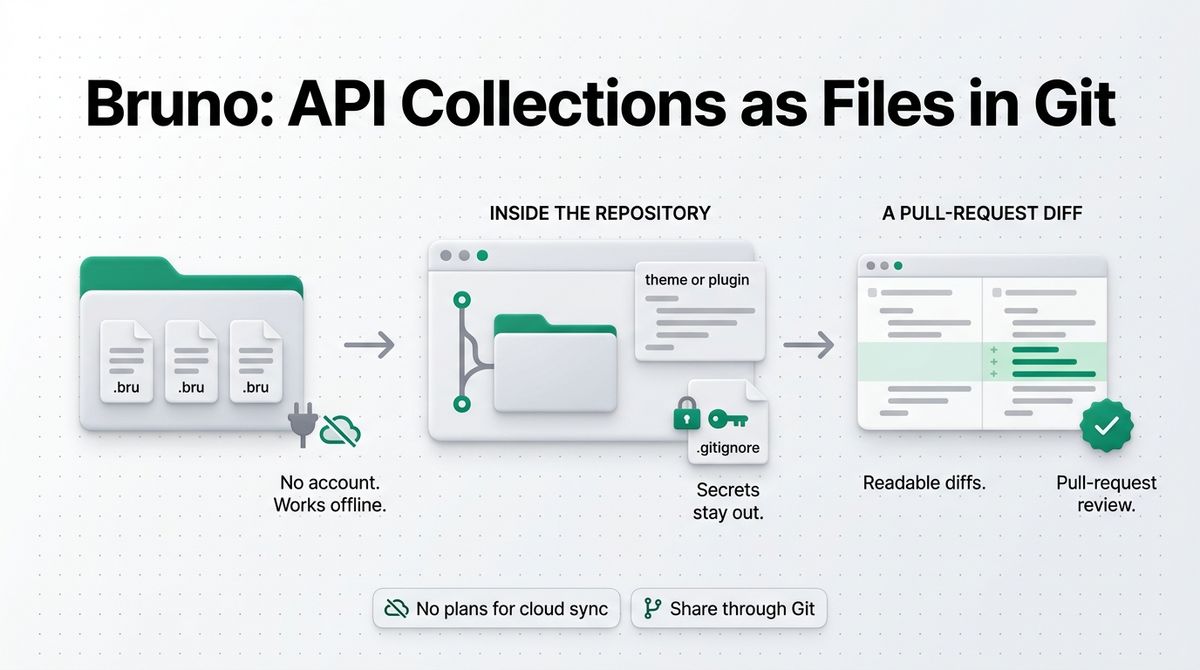
Bruno is an open-source, offline-first API client. It stores every collection as plain-text .bru files in a folder you choose, usually inside your Git repository, so requests are versioned like code. It supports REST, GraphQL, gRPC, WebSocket, and SOAP, and it has a CLI for CI pipelines.
What Bruno does best
Bruno puts your collections where your code already lives. Plain-text files produce readable diffs and pull-request review, and no vendor cloud sits in between. Requests run on your machine, no account is needed, and the project’s own README says there are no plans to add cloud sync. For privacy-conscious teams, that is the main draw.
The cost is also the lowest. The open-source edition is free and includes unlimited collection runs, Pro costs $6 per user per month, and Ultimate costs $11 and adds SSO, SCIM, audit logs, and secret-manager integrations. A five-person team on Pro pays $360 a year, against $1,140 on Postman Team. When launching a commercial product, you will need to choose online payment processors for business transactions.
Where Bruno falls short
There is no cloud collaboration. Teams share through Git, so everyone needs basic Git skills, and a competing vendor’s comparison notes that Bruno has no hosted mock server, hosted docs, or real-time collaboration. The free edition also limits you to two workspaces and five OpenAPI syncs a month.
The full in-app Git interface, private Git providers, and unlimited workspaces and OpenAPI syncs need Pro. Older reviews mention a $19 one-time Golden Edition, but the current paid plans are Pro and Ultimate. Bruno is also a younger project, first committed in September 2022, so its ecosystem is smaller than Postman’s.
Bruno pricing
| Plan | Price | What you get |
|---|---|---|
| Open Source | $0 | MIT licensed, unlimited collection runs, 2 workspaces, 5 OpenAPI syncs per month, CLI |
| Pro | $6 per user per month billed annually | Unlimited workspaces and OpenAPI syncs, in-app Git with public and private providers, email and chat support |
| Ultimate | $11 per user per month billed annually | Everything in Pro plus SSO, SCIM, audit logs, and secret-manager integrations |
Bruno: Pros and Cons
Pros:
- Free and MIT-licensed, with no account
- Collections stored as plain files in Git
- Works fully offline
- Lowest paid prices at $6 and $11 per user
- Supports REST, GraphQL, gRPC, WebSocket, and SOAP
Cons:
- No cloud sync or real-time collaboration
- Free edition limited to 2 workspaces and 5 OpenAPI syncs
- In-app Git needs Pro
- Fewer built-in platform features, such as hosted mocks and monitors
- Smaller ecosystem than Postman
Rating: 4.6 / 5, the best value for Git-first developers and freelancers.
Postman vs Insomnia vs Bruno: Head-to-Head Comparison
| Feature | Postman | Insomnia | Bruno |
|---|---|---|---|
| Free plan | 1 user only | Unlimited local and cloud projects, Git Sync for 3 users | Open source, MIT licensed |
| Entry paid price | Solo, $9 per month (1 user) | Pro, $12 per user | Pro, $6 per user |
| Team price | $19 per user per month | $12 per user, or free for up to 3 on Git Sync | $6 per user, or free via your own Git |
| Yearly cost, 3 users | $684 | $0 on Essentials | $0 on the open-source edition |
| Yearly cost, 5 users | $1,140 | $720 on Pro | $0 open source, $360 on Pro |
| Storage | Postman cloud workspaces, or Git on paid plans | Local, Git, or end-to-end encrypted cloud | Plain files in your Git repository |
| Account required | Yes | Only for beyond the Scratch Pad | No |
| CLI for CI | Postman CLI | Inso CLI | Bruno CLI (bru run) |
| Affiliate program | Not confirmed | Not confirmed | Not confirmed |
| Best for | Teams that need mocks, monitors, and docs | Small teams that want free Git sync | Git-first developers and freelancers |
| Rating | 4.3 / 5 | 4.4 / 5 | 4.6 / 5 |
Insomnia’s cloud sync is free for unlimited users according to Kong, while Git Sync is free for up to three users, so the $720 figure assumes five Git Sync users on Pro.
Which Should You Choose?
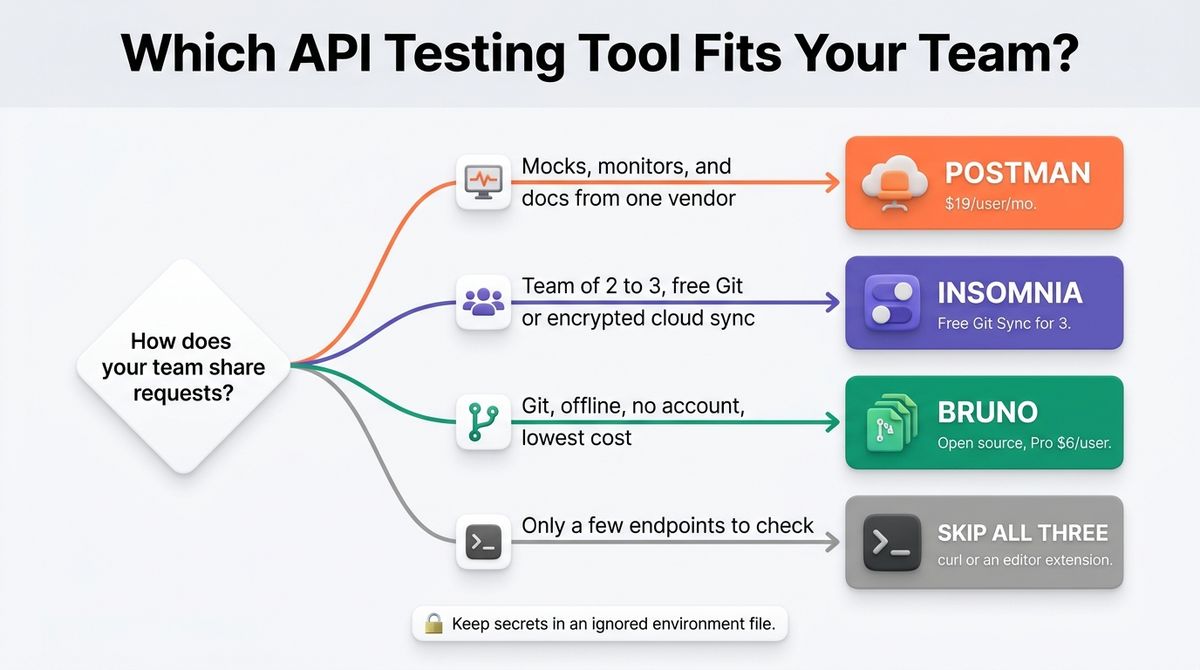
- Choose Postman if you need mock servers, monitors, and API documentation from one vendor, or your company already runs on it, and you can pay $19 per user.
- Choose Insomnia if you are a team of two or three that wants free Git or encrypted cloud sync, or you need broad protocol support.
- Choose Bruno if you want collections in Git, offline use, no account, and the lowest cost. It is the pick for freelancers and privacy-minded teams.
- Skip all three if you only test a few endpoints. curl, or a free REST client extension inside your editor, handles quick checks with nothing new to install.
One developer note applies to every tool here. As a WordPress developer, I would keep a collection for the WordPress REST API in the same Git repository as your theme or plugin, and store application passwords in an environment file listed in .gitignore so credentials never reach the repository. You can discover essential tools for WordPress developers to speed up your plugin and theme building workflow.
Our Recommendations
- Freelancer or solo developer: Bruno’s open-source edition. It costs $0 and keeps collections in your repository. Postman Free works if you prefer the familiar interface.
- Small team of 2 to 3: Insomnia Essentials with Git Sync, which costs $0, against $684 a year on Postman Team.
- Team of 5 or more that works in Git: Bruno Pro at $6 per user, or $360 a year for five, or Insomnia Pro at $12 per user.
- Team that needs mocks, monitors, and docs in one tool: Postman Team at $19 per user per month.
- Developer on WordPress, WooCommerce, or client sites: Bruno collections stored in each project’s repository, with secrets kept in ignored environment files.
Final Verdict
In the Postman vs Insomnia vs Bruno comparison, Bruno is the best pick for most developers and freelancers. It is free, stores collections in Git, works offline, and costs $6 per user if you need paid features. Insomnia is the better fit for small teams that want free hosted or Git sync. Postman remains the most complete platform, but its March 2026 changes made it the most expensive choice for teams.
- Bruno: 4.6 / 5
- Insomnia: 4.4 / 5
- Postman: 4.3 / 5
Check each vendor’s live pricing page before you buy. All prices above were checked in October 2026.
Frequently Asked Questions
Which is better, Postman, Insomnia, or Bruno?
Bruno suits most developers because it is free, Git-native, and works offline with no account. Insomnia suits small teams that want free Git or encrypted cloud sync. Postman suits teams that need mock servers, monitors, and documentation in one platform and can pay $19 per user per month. Pick by how your team shares collections.
Is Postman still free?
Yes, but only for one person. Since 1 March 2026, Postman’s Free plan is limited to one user, with 50 AI credits a month and a one-day collection recovery window. Teams that share workspaces on Free must move to Team at $19 per user per month billed annually, or switch tools. Solo costs $9 for one user.
How much does Postman cost now?
Postman lists Free at $0, Solo at $9 per month billed annually, and Team at $19 per user per month billed annually. Enterprise is quote-based and reported near $49 per user. The older Basic at $14 and Professional at $29 plans no longer appear on its pricing page. Solo costs $12 when billed monthly.
Is Insomnia free?
Yes. Insomnia’s Essentials plan is $0 and includes unlimited local and cloud projects, Git Sync for up to three users, the Inso CLI, and 1,000 mock requests a month. A local Scratch Pad works with no account. Pro costs $12 per user per month and removes the three-user Git Sync cap.
Is Bruno free?
Bruno’s open-source edition is free under the MIT license, with unlimited collection runs, and needs no account. Paid Pro costs $6 per user per month and Ultimate $11, both billed annually, adding in-app Git features, unlimited workspaces, SSO, and audit logs. You can use the free edition in production without paying.
Which tool works offline?
Bruno works fully offline, storing collections as plain files in your folder or Git repository with no account. Insomnia’s Scratch Pad and Local Vault work locally, though the vault needs a free account. Postman requires an account and keeps collections in cloud workspaces, so it is the least offline-friendly of the three.
Can I move my collections from Postman to Bruno or Insomnia?
Yes. Both Bruno and Insomnia import Postman collections, and Bruno also imports Insomnia collections. Export your collection from Postman as JSON, import it, then check scripts, environment variables, and authentication, which are the parts most likely to need manual fixes. Keep the original export as a backup until your tests pass.
Can I run API tests in a CI pipeline?
Yes. Postman provides the Postman CLI, Insomnia provides the Inso CLI, and Bruno provides a CLI that runs collections with bru run and can output JSON, JUnit, or HTML reports. Run the CLI in GitHub Actions or another CI service and fail the build on test errors. Store secrets in your CI vault, not in the repository.