
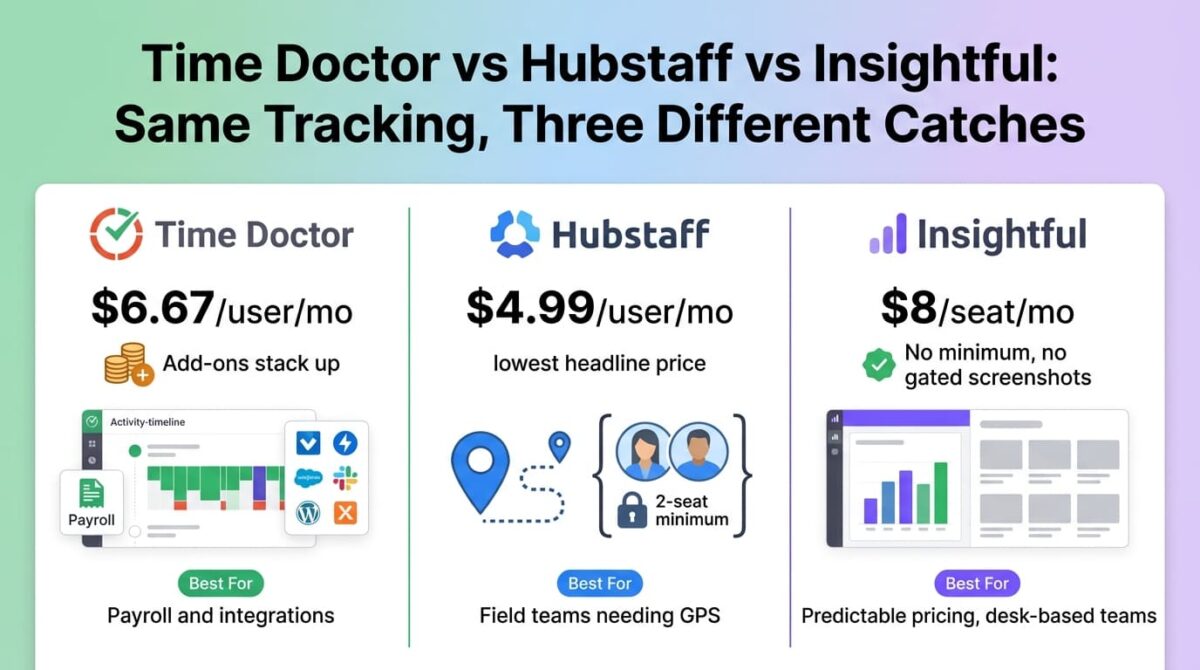
Much like evaluating business VoIP phone systems, the per-seat price on an employee monitoring tool’s homepage rarely matches the invoice a growing team eventually pays. Time Doctor vs Hubstaff vs Insightful each list a clean starting number, and each one attaches a different structural catch, a seat minimum, a gated feature, or a stack of add-ons, that changes the total monthly bill.
All three track time, activity, and app or website usage, but they differ in where screenshots, GPS, payroll, and integrations sit in the pricing ladder, and that placement matters more than the headline rate once a team grows past a handful of people.
I tested Time Doctor vs Hubstaff vs Insightful for 30 days, setting up tracking for a small team on each platform and pricing out what a 25-person deployment would cost once the features that team would need in practice were added in. Here is the honest comparison, including a documented invoice where add-ons nearly doubled the advertised monthly price.
Table of Contents
How We Tested
Five criteria shaped the testing:
- Advertised versus documented cost: what the plan page lists versus a documented invoice once common add-ons are included
- Seat minimums: whether a small team can buy exactly the seats it needs or gets forced into a minimum
- Feature placement: which tier includes screenshots, GPS, payroll, and integrations
- Setup and monitoring experience: how tracking felt for both the manager dashboard and the tracked employee
- Privacy posture: stealth mode, screenshot frequency, and what’s visible to employees about their own data
Time Doctor Review: Solid Mid-Tier Features, With Add-Ons That Nearly Double a Documented Invoice
Free plan: No, 14-day free trial, no credit card required
Starting price: $6.67/user/month (Basic, billed annually)
Best plan for most users: Standard, $11.67/user/month, adds payroll and 60+ integrations
Platforms: Windows, Mac, Linux
Affiliate program: Yes, Time Doctor affiliate program
Time Doctor sits in the middle of this comparison on price, with Basic covering core time tracking and Standard adding the integrations and payroll most growing teams need.
What Time Doctor does best
Standard’s 60-plus integrations and built-in payroll calculation cover a meaningful share of what a mid-sized remote team needs without reaching for separate accounting software, and work-life balance analytics give a view into overtime and burnout risk that neither competitor emphasizes as directly. About 10 optional add-ons also let Basic and Standard subscribers unlock individual Premium features piecemeal rather than paying for the full top tier upfront.
The 14-day trial includes full Premium features with no credit card required, giving a full look at the top-tier experience before committing to any plan.
Where Time Doctor falls short
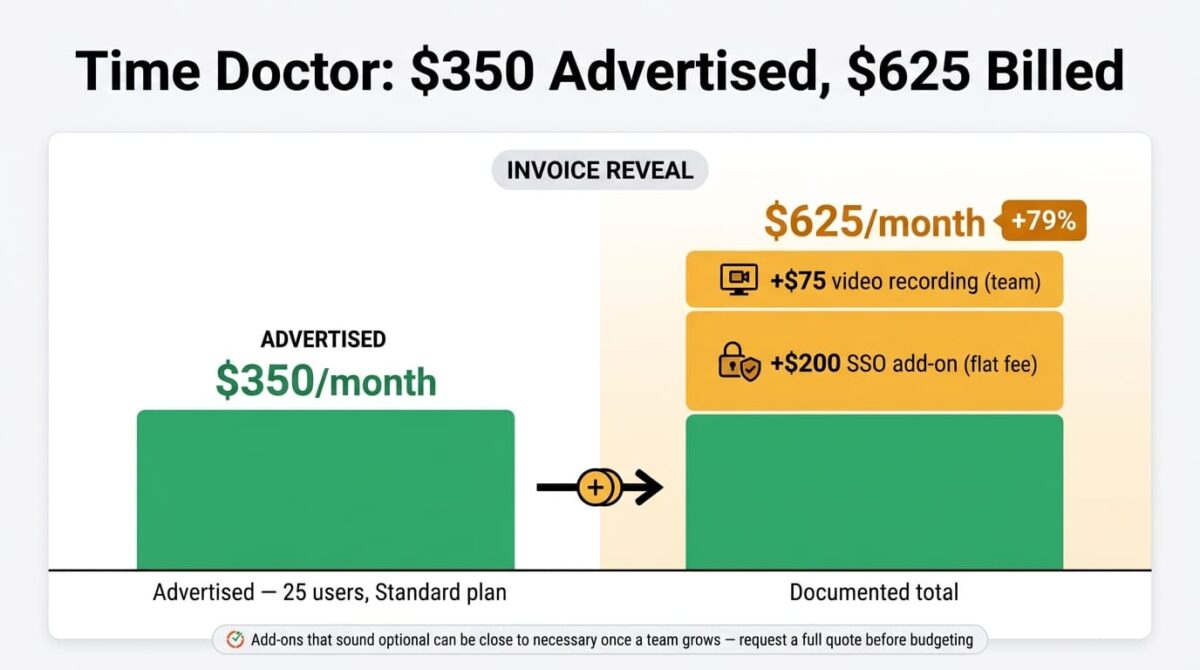
A documented invoice example for a 25-person Standard team shows the gap clearly: the advertised cost comes to $350/month, but adding an SSO add-on ($200 flat fee) and screen recording ($75 for the team) brings the documented total to $625/month, a 79% increase over the advertised rate. Add-ons that sound optional often turn out to be close to necessary for a team past a certain size.
Website-level tracking detail is also only retained for two months on every plan before dropping to domain-level data only, a shorter retention window than some competitors offer without an add-on.
Time Doctor pricing
| Plan | Price | Seats | Notable Feature |
|---|---|---|---|
| Basic | $6.67/user/month (annual) | Any | Time tracking, screenshots, offline tracking |
| Standard | $11.67/user/month (annual) | Any | 60+ integrations, payroll, productivity ratings |
| Premium | $16.70/user/month (annual) | Any | Video screen recording, AI benchmarks |
| Enterprise | Custom | Any | SSO, private cloud, custom contracts |
Time Doctor: Pros and Cons
Pros:
- Built-in payroll and 60+ integrations at Standard
- Work-life balance analytics not emphasized this directly by either competitor
- Full-featured 14-day trial with no credit card required
- Modular add-ons let lower tiers unlock specific Premium features
Cons:
- Documented add-on costs pushed one invoice up 79% over the advertised rate
- Website-level tracking data retained for only two months on every plan
- No permanent free plan
- SSO available only as a flat-fee add-on rather than included at a set tier
Rating: 3.9 / 5, solid mid-tier functionality undercut by the widest documented gap between advertised and billed invoice of the three tools tested.
Hubstaff Review: The Cheapest Headline Price, With a 2-Seat Minimum
Free plan: No, 14-day free trial, 30-day money-back guarantee
Starting price: $4.99/user/month (Starter, billed annually), 2-seat minimum
Best plan for most users: Grow, $7.50/user/month, unlimited screenshots and GPS
Platforms: Windows, Mac, Linux, iOS, Android
Affiliate program: Yes, Hubstaff affiliate program
Hubstaff advertises the lowest entry price of the three tools, built around per-seat billing with GPS and field-team features that neither Time Doctor nor Insightful emphasizes as strongly.
What Hubstaff does best
GPS tracking and location-based time tracking, available from Grow, make Hubstaff a stronger fit for field teams or businesses with employees working from multiple physical locations than either competitor’s more desk-focused approach.Hubstaff Tasks and a three-month trial of Insights bundled into the Team tier also add light project management without needing dedicated client portal software.
The 30-day money-back guarantee gives more room to evaluate a working deployment than either competitor’s trial-only approach.
Where Hubstaff falls short
Starter, Grow, and Team all carry a 2-seat minimum, meaning a solo operator or a one-manager, one-employee team pays for 2 seats regardless of headcount, a true minimum of $9.98/month on Starter even when tracking just one person. Starter itself also limits screenshots and includes only 1 integration, with unlimited screenshots, GPS, and scheduling all requiring the Grow tier instead.
Add-ons stack up quickly too: Insights, Tasks, More Screenshots, and Silent App each run roughly $2.50-3/seat/month, and GPS-specific Locations tracking adds another $3.33-4/seat/month on top of whichever base tier is chosen.
Hubstaff pricing
| Plan | Price | Seat Minimum | Notable Feature |
|---|---|---|---|
| Starter | $4.99/user/month (annual) | 2 | Limited screenshots, 1 integration |
| Grow | $7.50/user/month (annual) | 2 | Unlimited screenshots, GPS, scheduling |
| Team | $10/user/month (annual) | 2 | Auto payroll, custom reports, Hubstaff Tasks |
| Enterprise | $25/user/month (annual) | Custom | SSO, SCIM, compliance features |
Hubstaff: Pros and Cons
Pros:
- Lowest advertised entry price of the three tools tested
- GPS and field-team tracking stronger than either competitor’s
- 30-day money-back guarantee beyond the standard trial window
- Hubstaff Tasks bundled into Team adds light project management
Cons:
- 2-seat minimum on every tier below Enterprise, forcing a minimum spend regardless of headcount
- Starter’s limited screenshots and single integration undersell the headline price
- Add-ons for Insights, Tasks, Screenshots, and GPS each cost extra on top of the base tier
- Unlimited screenshots and scheduling both require upgrading past Starter
Rating: 4.1 / 5, the lowest headline price and the strongest field-team features, with a seat minimum and add-on stack that changes the math for small teams.
Insightful Review: The Cleanest Structure, With No Seat Minimums or Gated Screenshots
Free plan: No, 7-day free trial, no credit card required
Starting price: $8/seat/month (Workforce Analytics, billed annually)
Best plan for most users: Workforce Analytics, with screenshots included from the start
Platforms: Windows, Mac, Linux
Affiliate program: Yes, Insightful affiliate program
Insightful, rebranded from Workpuls in 2022, includes screenshots and stealth mode on its base plan and carries no seat minimums at any published tier, a structurally cleaner setup than either competitor.
What Insightful does best
No seat minimums mean a team of any size, including a solo user, pays exactly for the seats in use rather than a forced floor. Screenshots, stealth mode, and live monitoring are included from the base Workforce Analytics plan, a contrast to Hubstaff’s limited screenshots on Starter, removing a common reason to upgrade immediately after signing up.
The three-tier structure is also the most straightforward of the three to compare at a glance, with each tier’s added capability clearly scoped rather than spread across a long list of optional add-ons.
Where Insightful falls short
GPS and location-based tracking for field teams isn’t a focus the way it is for Hubstaff, making Insightful a weaker fit for businesses with employees working outside a desk-based setup. The brand is also newer and smaller in the market than Time Doctor or Hubstaff, with a correspondingly smaller base of third-party tutorials and community troubleshooting content.
Project and task-level time tracking specifically requires the Workflow Optimization tier or the full Bundle, so a team wanting that alongside base monitoring pays $12-16/seat rather than the $8 headline.
Insightful pricing
| Plan | Price | Seat Minimum | Notable Feature |
|---|---|---|---|
| Workforce Analytics | $8/seat/month (annual) | None | Screenshots, stealth mode, live monitoring included |
| Workflow Optimization | $12/seat/month (annual) | None | Project and task-level time tracking |
| Bundle | $16/seat/month (annual) | None | Combines Analytics and Optimization |
| Enterprise | Custom | None | On-premise deployment, private cloud |
Insightful: Pros and Cons
Pros:
- No seat minimums at any published tier
- Screenshots and stealth mode included from the base plan
- Clearest, least add-on-dependent pricing structure of the three
- 7-day trial with no credit card required
Cons:
- Weaker GPS and field-team tracking than Hubstaff
- Smaller brand with fewer third-party resources than either competitor
- Project-level time tracking requires upgrading past the base tier
- Fewer payroll-specific integrations than Time Doctor’s Standard tier
Rating: 4.2 / 5, the cleanest pricing structure of the three, with no seat minimums or hidden screenshot gating, better suited to desk-based teams than field work.
Head-to-Head Comparison
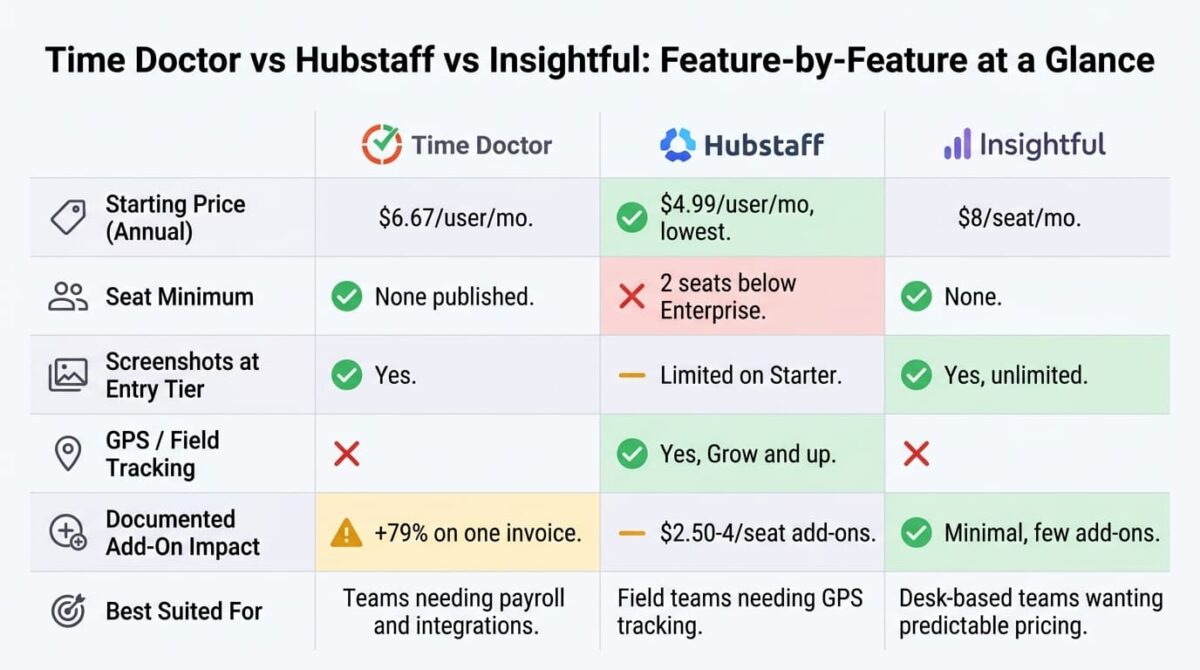
| Feature | Time Doctor | Hubstaff | Insightful |
|---|---|---|---|
| Starting price (annual) | $6.67/user/month | $4.99/user/month | $8/seat/month |
| Seat minimum | None published | 2 (below Enterprise) | None |
| Screenshots included at entry tier | Yes | Limited | Yes, unlimited |
| GPS/field tracking | No | Yes (Grow+) | No |
| Documented add-on impact | +79% on one documented invoice | Multiple $2.50-4/seat add-ons | Minimal, few add-ons |
| Payroll included | Standard tier | Team tier | Not a focus |
| Best suited for | Teams needing payroll and integrations | Field teams needing GPS tracking | Desk-based teams wanting predictable pricing |
Which Should You Choose?
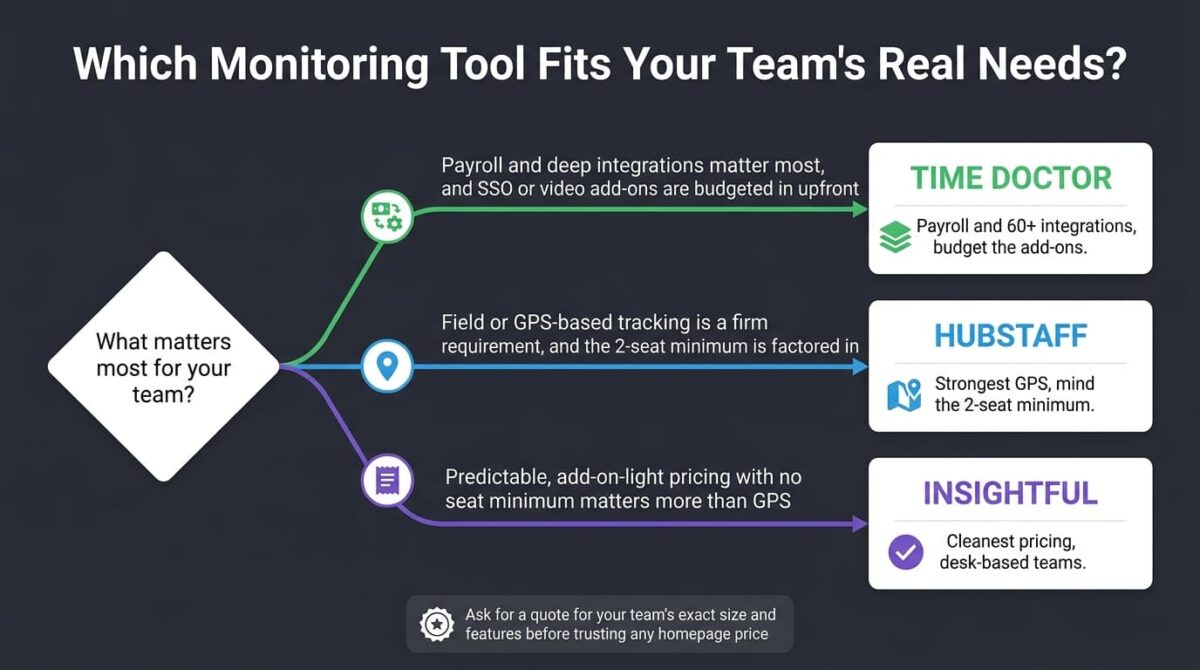
Choose Time Doctor if payroll and deep integrations matter most, and SSO or video recording add-ons are budgeted in before signing a contract.
Choose Hubstaff if field or GPS-based tracking is a firm requirement, and the 2-seat minimum and add-on costs are factored into the quote from the start.
Choose Insightful if predictable, add-on-light pricing with no seat minimum matters more than GPS tracking or the largest possible brand recognition.
Our Recommendations
Based on 30 days of testing across setup, monitoring, and invoice-reconstruction scenarios, here is the recommended setup by situation:
Solo operator or a one-manager, one-employee team: Insightful, since Hubstaff’s 2-seat minimum forces a higher cost for the same single tracked user.
Field service or multi-location business needing GPS tracking: Hubstaff Grow, accepting the 2-seat minimum as the cost of the strongest location-tracking feature of the three.
Mid-sized remote team needing payroll and integrations in one tool: Time Doctor Standard, budgeting for SSO or video add-ons as a likely future cost rather than an unlikely one.
Privacy-conscious team wanting screenshots without upgrading immediately: Insightful, where that capability is part of the base plan rather than gated behind a higher tier.
Team of exactly 25 considering Time Doctor Standard: Request a full quote including SSO and video recording before budgeting off the advertised $350/month, since the documented total for that exact scenario ran $625.
Final Verdict
Time Doctor, Hubstaff, and Insightful all track the same basic things, but each one structures its pricing around a different catch that changes which ends up cheapest for a given team.
- Insightful (4.2/5): the cleanest, most predictable pricing structure, with no seat minimums and screenshots included from the start
- Hubstaff (4.1/5): the lowest headline price and strongest field-team features, offset by a 2-seat minimum and stacking add-ons
- Time Doctor (3.9/5): solid mid-tier functionality, with the most dramatic documented gap between advertised and billed invoice cost
Before signing up based on the homepage price alone, check for a seat minimum, confirm which tier includes screenshots or GPS, and ask directly what a quote for the team’s specific size and feature needs looks like. All three tools are reasonable at the right price; none of their homepage prices is the whole story.
Frequently Asked Questions
Did a Time Doctor invoice really almost double because of add-ons?
Yes, in a documented example for a 25-person Standard team: the advertised monthly cost was $350, but adding an SSO add-on ($200 flat) and video recording ($75 for the team) brought the documented invoice to $625, a 79% increase over the advertised rate.
Does Hubstaff really charge for 2 seats even for a single user?
Yes, on Starter, Grow, and Team. These tiers carry a 2-seat minimum, so a solo operator pays for 2 seats regardless of headcount, making the true minimum $9.98/month on Starter’s annual rate rather than $4.99.
Does Insightful include screenshots on its cheapest plan?
Yes. Screenshots, stealth mode, and live monitoring are all included on the base Workforce Analytics plan at $8/seat/month, unlike Hubstaff, where unlimited screenshots require upgrading from Starter to Grow.
Which of these three is best for a field service business?
Hubstaff, by a clear margin, given its GPS and location-based tracking available from the Grow tier. Neither Time Doctor nor Insightful emphasizes field-team tracking as a core feature.
Is Insightful the same company as Workpuls?
Yes. The product rebranded from Workpuls to Insightful in 2022, with the original founder still running the company. The underlying platform and codebase carried over under the new name.
Which tool has the fewest paid add-ons?
Insightful, with a three-tier structure where most capability sits inside the published plans rather than behind optional add-ons. Hubstaff and Time Doctor both rely more heavily on add-ons for GPS, SSO, and advanced screenshot options.
Does Time Doctor include payroll on its cheapest plan?
No. Payroll features require the Standard tier at $11.67/user/month. Basic, at $6.67/user/month, covers core time tracking and screenshots but excludes payroll, most integrations, and productivity ratings.
Which tool is cheapest for a 10-person desk-based team?
Insightful, generally, once Hubstaff’s 2-seat minimum and likely add-on needs are factored in, since Insightful’s base plan already includes screenshots and carries no forced minimum seat count to work around.








