A blog post with a dull featured image gets fewer clicks, regardless of how good the writing is. A before-and-after of a product, a well-lit portrait for an About page, a landscape shot for a travel post, the quality gap between an unedited photo and one that has been through thirty seconds of AI enhancement is visible to any reader, even one who cannot articulate exactly what looks different. AI photo editing has quietly moved from a professional photography workflow tool into something a blogger or content creator with no design background can realistically use to produce images that look intentional rather than incidental.
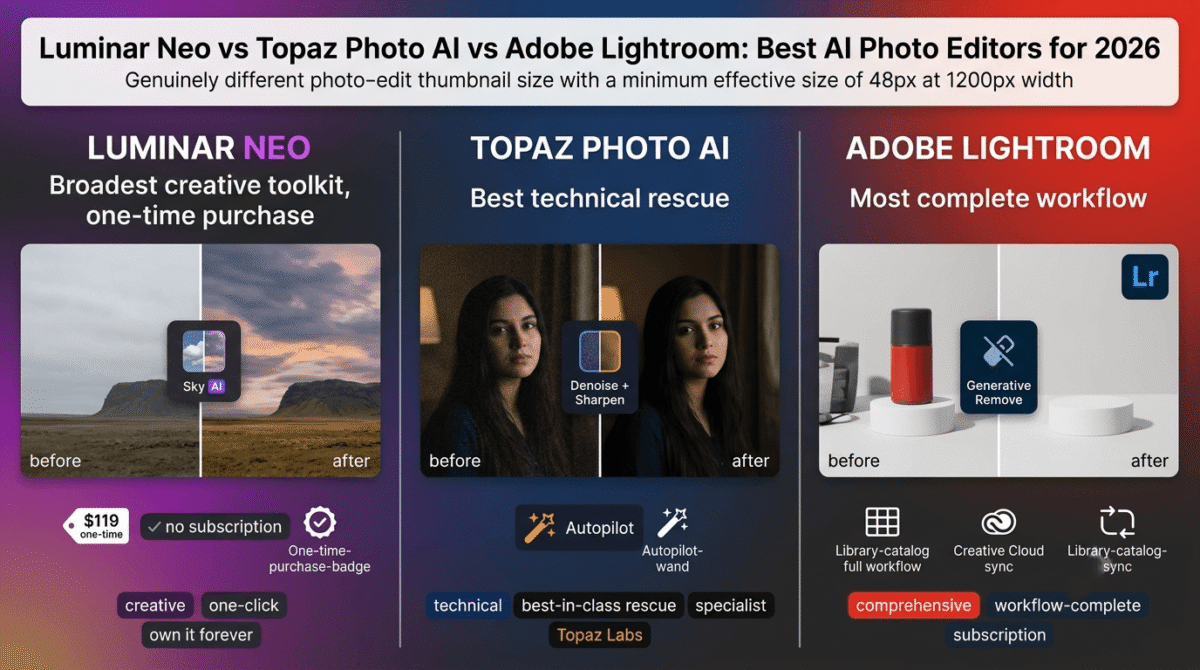
In 2026, this category has split clearly into three philosophies. Luminar Neo is the all-in-one creative editor with the most AI features in a single interface, available as a one-time purchase. Topaz Photo AI is the technical specialist, the tool photographers reach for specifically when they need to fix noise, blur, or low resolution, and nothing else does it as well. Adobe Lightroom with AI is the most complete photography workflow, tied to a subscription that has remained at a consistent price while Adobe’s generative AI tools have genuinely improved. I tested all three (Luminar Neo vs Topaz Photo AI vs Adobe Lightroom) for 30 days on real blog photography and content images. Here is the honest comparison.
Table of Contents
How We Tested These Tools
Every platform was evaluated against five criteria:
- AI editing quality on realistic content, how good are the results on the kinds of images a blogger or content creator actually shoots: portraits, product photos, landscapes, and screen captures
- Ease of use for non-photographers, can someone without formal photography training get a meaningfully improved image in under five minutes
- Pricing model transparency, one-time purchase, subscription, or per-image credit, and what you are actually committing to long-term
- Workflow integration, does the tool work as a standalone application, a plugin, or both, and how well does it fit into an existing content creation process
- Output quality on problem images, noise, blur, low resolution, and difficult lighting, which are the real failure modes for non-professional photography
Why AI Photo Editing Is Different From AI Image Generation
This distinction is worth making explicitly because these two categories are frequently confused, and they solve different problems. AI image generation, covered in our separate review of Midjourney, DALL-E, and Adobe Firefly, creates an image from scratch based on a text prompt, useful when you need a custom illustration or a concept image you cannot photograph.
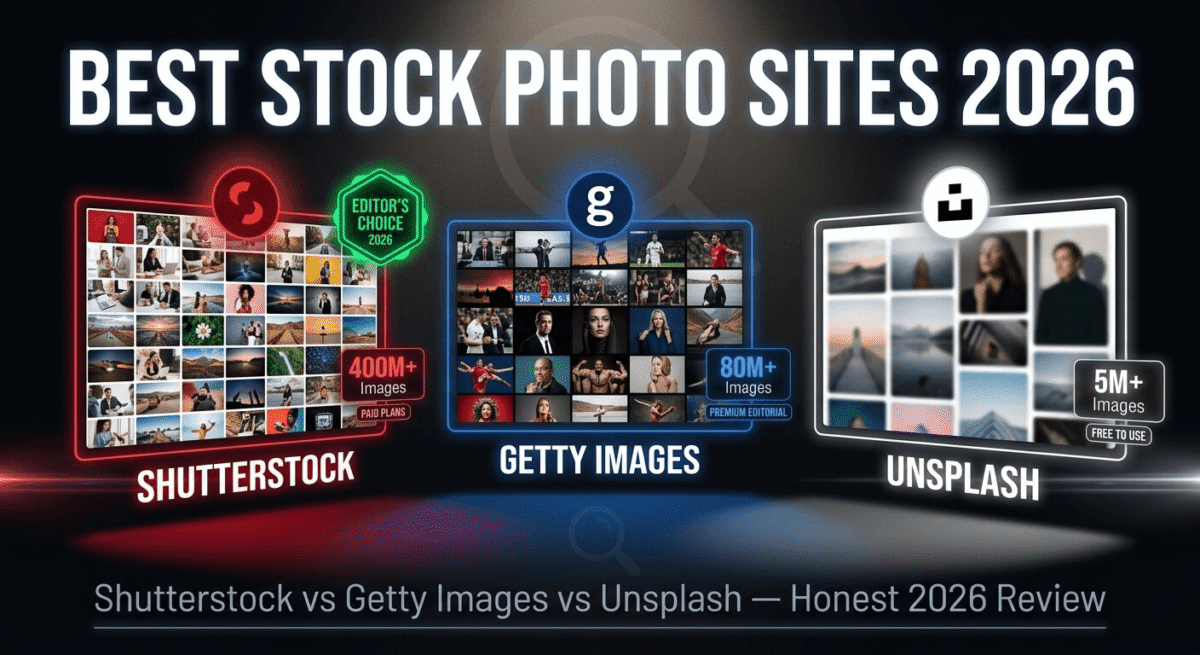
AI photo editing works on images you have already taken. It enhances, corrects, or transforms a real photograph, reducing noise from a dimly lit shot, sharpening a slightly out-of-focus portrait, removing a distracting object from a background, or replacing an overcast sky with something more interesting. The starting point is always a real photo, and the goal is to make it better rather than to create something new from nothing. For a blogger shooting their own content on a phone or basic camera, this is the more immediately useful category. If you don’t have a photo to edit in the first place, see our roundup of stock photo sites for images to run through one of these tools instead.
Luminar Neo Review: Best All-in-One AI Photo Editor for Bloggers and Creative Content
Free plan: No, 7-day free trial
Starting paid price: $119 one-time (perpetual desktop license), or $119/year for a subscription with ongoing updates
Best plan for most bloggers: The one-time perpetual license, for anyone who wants to own the software without an ongoing subscription
Platforms: Windows, Mac
Affiliate program: Yes, Luminar Neo affiliate program
Luminar Neo is built around a single insight that separates it from the rest of this comparison: most photographers and content creators want creative results quickly, and they want to own the software outright rather than pay for access monthly. Both of those instincts are reflected clearly in the product.
What Luminar Neo does best
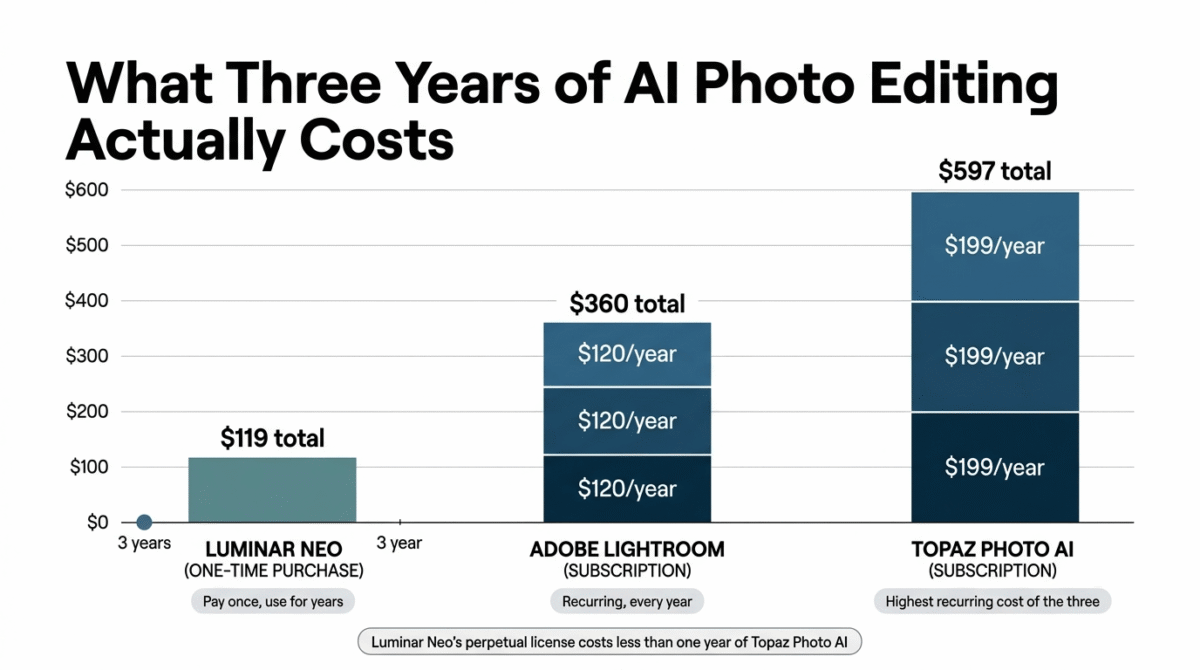
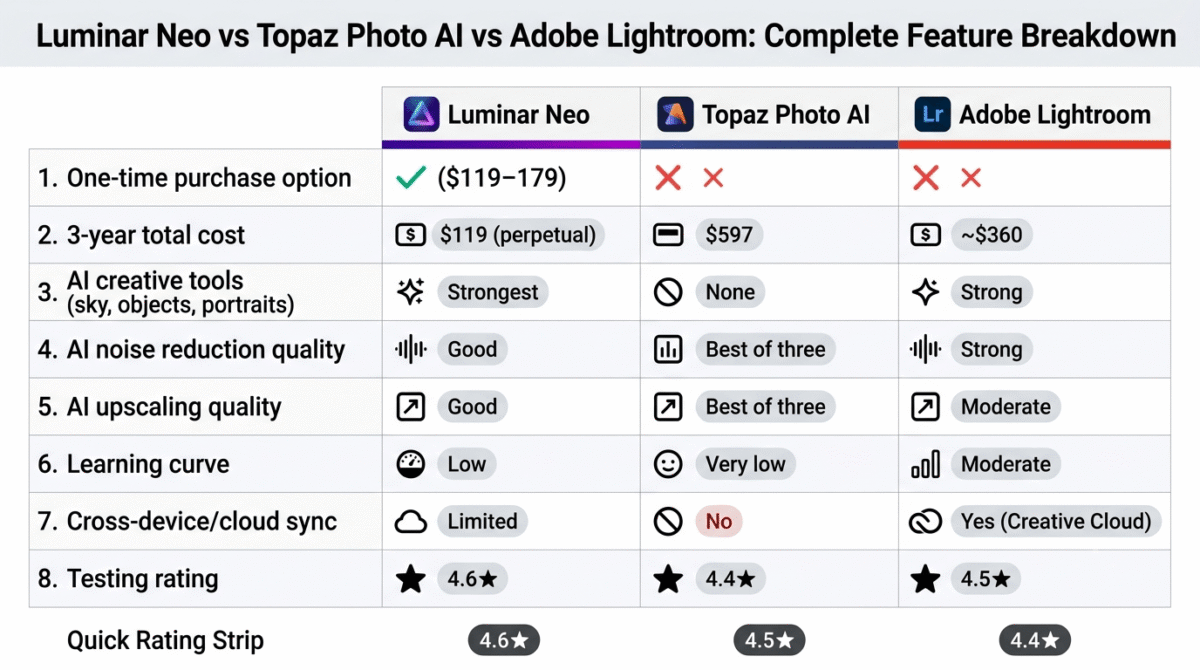
The one-time purchase option is Luminar Neo’s most commercially distinctive feature in a category increasingly dominated by subscriptions. At $119 for a perpetual desktop license, including Windows and Mac, a blogger or content creator pays once and uses the software indefinitely, without a recurring cost appearing on their monthly statement. This is a real, calculable value against Adobe’s Photography Plan: three years of Adobe costs around $720, three years of Luminar Neo’s equivalent subscription costs around $357, and a one-time perpetual license costs $119 total with no further obligation.
The breadth of AI tools in a single interface is Luminar Neo’s defining creative strength. Sky AI replaces overcast or plain skies with more dramatic alternatives in a single click, automatically masking around complex edges like trees and buildings. Portrait Bokeh AI creates a professional shallow-depth-of-field effect on portraits taken with a flat, phone-camera focal length. GenErase removes unwanted objects, a power line, a distracting person in the background, a logo on a shirt, and fills the space with generated background content. Once the photo itself is edited, a design tool like Canva or Adobe Express is usually the next step for adding text overlays or turning it into a finished blog graphic, see our Canva Pro vs Adobe Express comparison. Powerline Removal AI specifically cleans up landscape shots of one of the most common photographic annoyances. These are genuinely useful for the specific types of images a content creator regularly produces.
The interface is the most beginner-friendly of the three tools tested. Unlike Lightroom’s more structured library-and-develop workflow, Luminar Neo presents its AI tools as browsable, one-click options that show a live preview before you commit, reducing the learning curve substantially for a non-photographer who needs a better image without a technical education in how to achieve it.
Where Luminar Neo falls short
Luminar Neo’s AI upscaling and noise reduction, while present and functional, are consistently described by independent reviewers as falling below Topaz Photo AI’s specialized capabilities in those specific tasks, multiple comparisons find Luminar Neo’s Noiseless AI and Upscale AI producing good but not best-in-class results on genuinely difficult, high-noise or very low-resolution images.
The preset-based editing approach, while accessible, means edits do not automatically adapt to each photo’s individual lighting conditions, applying a preset to a batch of photos taken in different light requires per-photo manual adjustment in a way that Lightroom’s more adaptive AI masking and Topaz Photo AI’s autopilot mode do not.
Working as a Lightroom plugin requires exporting a separate TIFF file for each image rather than editing non-destructively within Lightroom’s catalog, which adds storage overhead and complicates file management for anyone already invested in an Adobe workflow.
The one-time purchase pricing, while genuinely attractive, does not include all future feature updates automatically, some new AI modules are sold separately, which is worth understanding before assuming the purchase price locks in everything Luminar Neo ever releases.
Luminar Neo pricing
| Option / Tier | Price | What You Get |
|---|---|---|
| Perpetual Desktop License | $119 one-time | Mac or Windows desktop license (2 computer seats), core AI photo tools (Sky AI, Portrait AI, Atmosphere AI), 12 months of cloud-based Generative AI tools (GenErase, GenSwap, GenExpand) |
| Cross-Device Perpetual | $159 one-time | Includes all Desktop features plus mobile apps (iOS, Android, ChromeOS) and cross-device editing cloud sync |
| Perpetual Max | $179 one-time | Desktop + mobile apps + 1-year access to the Creative Library (extra LUTs, overlays, sky packs, and professional presets) |
| Pro Subscription | $119 / year | All desktop & mobile apps, full Creative Library access, continuous major version updates, ongoing generative AI processing credits included without additional upgrade passes |
Luminar Neo: Pros and Cons
Pros:
- One-time purchase option, own the software without a recurring subscription
- Broadest AI creative tool set in a single interface (Sky AI, Portrait Bokeh AI, GenErase, Powerline Removal)
- Most beginner-friendly interface with live preview before committing to any edit
- Competitive pricing against Adobe’s Photography Plan across any multi-year comparison
- 7-day free trial available before any payment
Cons:
- Noise reduction and upscaling less capable than Topaz Photo AI on genuinely difficult images
- Preset-based approach doesn’t auto-adapt to per-photo lighting variation
- Plugin workflow with Lightroom creates TIFF files and storage overhead
- Some new feature modules sold separately from the base license
- Local processing can strain older or lower-spec hardware on RAW files
Rating: 4.6 / 5, Best AI photo editor for bloggers and content creators who want the broadest creative feature set, accessible to non-photographers, at a one-time purchase price.
Topaz Photo AI Review: Best for Technical Image Rescue, Noise, Blur, and Upscaling
Free plan: No, free trial available, limited output resolution
Starting paid price: $199/year, or $17/month when committing annually
Best for: Photographers and content creators specifically dealing with noisy, blurry, or low-resolution images who need best-in-class technical restoration
Platforms: Windows, Mac (also works as Lightroom and Photoshop plugin)
Affiliate program: Yes, Topaz Labs affiliate program
Topaz Photo AI takes the narrowest brief of the three tools tested: it consolidates what were previously three separate, highly regarded Topaz Labs applications, Denoise AI, Sharpen AI, and Gigapixel AI, into one, and it does those three specific things better than virtually any competing general-purpose editor. It is not trying to replace Lightroom or Luminar Neo; it is trying to be the best possible tool for a specific, common photography problem.
What Topaz Photo AI does best
Noise reduction and sharpening quality are Topaz Photo AI’s defining capabilities, and the independent consensus across professional photography reviewers is consistent: for genuinely difficult images, high-ISO low-light shots, slightly out-of-focus subjects, or low-resolution files that need to be printed or displayed at larger sizes, Topaz Photo AI’s results exceed what Luminar Neo’s equivalent tools produce and match or exceed what Adobe Lightroom’s AI Denoise produces in controlled comparisons.
The Autopilot feature is genuinely useful for a non-technical user: Topaz Photo AI analyses an uploaded photo and automatically suggests which of its three core tools to apply based on what it detects in the image, reducing the decision overhead that would otherwise require the user to identify whether the problem is noise, blur, or low resolution before selecting a treatment.
Upscaling quality, increasing an image’s resolution beyond its original pixel count without the soft, artifact-heavy results older interpolation methods produce, is where Topaz Photo AI’s lineage as the successor to Gigapixel AI is most visible. Independent comparisons consistently rate its upscaling results above what Luminar Neo and Adobe Lightroom’s Super Resolution produce, which matters for a blogger repurposing older, lower-resolution images at higher display sizes.
The plugin model fits cleanly into an existing Lightroom or Photoshop workflow: send a problematic image to Topaz Photo AI, fix it, and return it to your existing catalog without disrupting the broader editing process you already use.
Where Topaz Photo AI falls short
Topaz Photo AI is not a full photo editor. It has no color grading, no sky replacement, no object removal, no creative presets, no portrait retouching, it does three things, and only those three things. A content creator buying it as their sole photo editing tool will immediately find the gaps; it is genuinely designed as a companion to a broader editing workflow, not as a replacement for one.
At $199/year, the highest subscription price of the three tools compared here, Topaz Photo AI is also the hardest to justify as a standalone purchase for a blogger whose images are reasonably well-lit and in focus to begin with. The pricing makes the most sense once you are regularly dealing with the specific technical problems it solves, not as general-purpose editing software.
Local hardware processing means results speed depends significantly on your machine’s GPU, older computers may take considerably longer to process high-resolution RAW files than the tool’s marketing implies, which is worth testing on your specific hardware during the free trial before committing to a subscription.
Topaz Photo AI pricing
| Plan / Billing Option | Price | Key Details & Features |
|---|---|---|
| Annual Billing | $199 / year (~$16.58/mo equivalent) | Full access to standalone desktop apps (Mac & Windows, 2 seat licenses), automated AI Autopilot defect detection, Denoise AI, Sharpen AI, Upscale (Gigapixel engine), Face Recovery, Super Focus, and non-destructive plugin integration for Adobe Lightroom Classic, Photoshop, and Capture One |
| Monthly Billing | ~$39 / month | Identical feature access, deep-learning models, and plugin capabilities as the annual plan, providing short-term project flexibility without a full 12-month commitment |
Topaz Photo AI: Pros and Cons
Pros:
- Best-in-class noise reduction and upscaling of the three tools compared
- Autopilot automatically identifies and applies the right tool for each image
- Fits cleanly as a plugin into existing Lightroom and Photoshop workflows
- Genuinely replaces three previously separate, highly regarded Topaz tools in one subscription
- Free trial available with no time limit, only resolution restriction on output
Cons:
- Not a full editor, no color grading, no creative tools, no sky replacement or object removal
- Most expensive subscription of the three tools at $199/year
- Hardest to justify as a solo purchase without a specific high-noise or upscaling need
- Local processing speed depends heavily on GPU hardware
- No one-time purchase option, subscription only
Rating: 4.4 / 5, Best-in-class for its specific three tasks, but too narrow and too expensive as a general-purpose photo editor. Right choice once noise, blur, or upscaling is a genuine, recurring need in your workflow.
Adobe Lightroom with AI Review: Best for a Complete Photography Workflow, Tied to a Subscription
Free plan: No, included in Creative Cloud Photography Plan
Starting paid price: $9.99/month (Photography Plan, includes Lightroom + Photoshop + 20GB cloud storage)
Best plan for most bloggers with an existing Adobe investment: The Photography Plan, which provides both Lightroom and Photoshop at the lowest available Adobe entry price
Platforms: Windows, Mac, iOS, Android, web
Affiliate program: Yes, Adobe affiliate program
Adobe Lightroom’s position in this comparison is unusual: it is both the most complete and the most expensive over time, but its $9.99/month Photography Plan has remained stable while its AI capabilities have improved meaningfully. Generative Fill, Generative Remove, AI Masking, AI Denoise, and the new Harmonize tool represent a genuinely more capable AI editing suite than Lightroom offered even two years ago.
What Adobe Lightroom does best
The most complete photography workflow of the three tools is Lightroom’s defining advantage. Library organization, RAW file processing, non-destructive editing, color grading, cloud sync across devices, and now a substantial AI editing suite all live in one application, the breadth of what a single Lightroom subscription provides makes it the most comprehensive single-tool answer to a content creator’s entire photography workflow, not just one part of it.
Generative Remove, powered by Adobe’s cloud-based Firefly AI, removes unwanted objects and fills the space with generated content that matches the surrounding environment, independent comparisons consistently rate its output quality among the strongest in this category, and the cloud-based processing means the quality does not depend as heavily on your local GPU as Luminar Neo’s or Topaz Photo AI’s local processing does.
AI Masking, automatically selecting subjects, skies, backgrounds, or specific objects for targeted editing, is one of Lightroom’s most genuinely impressive AI features, enabling edits that previously required careful manual selection in Photoshop to be completed in seconds with a single click, and adjustable by fine-tuning sliders rather than manual brushwork.
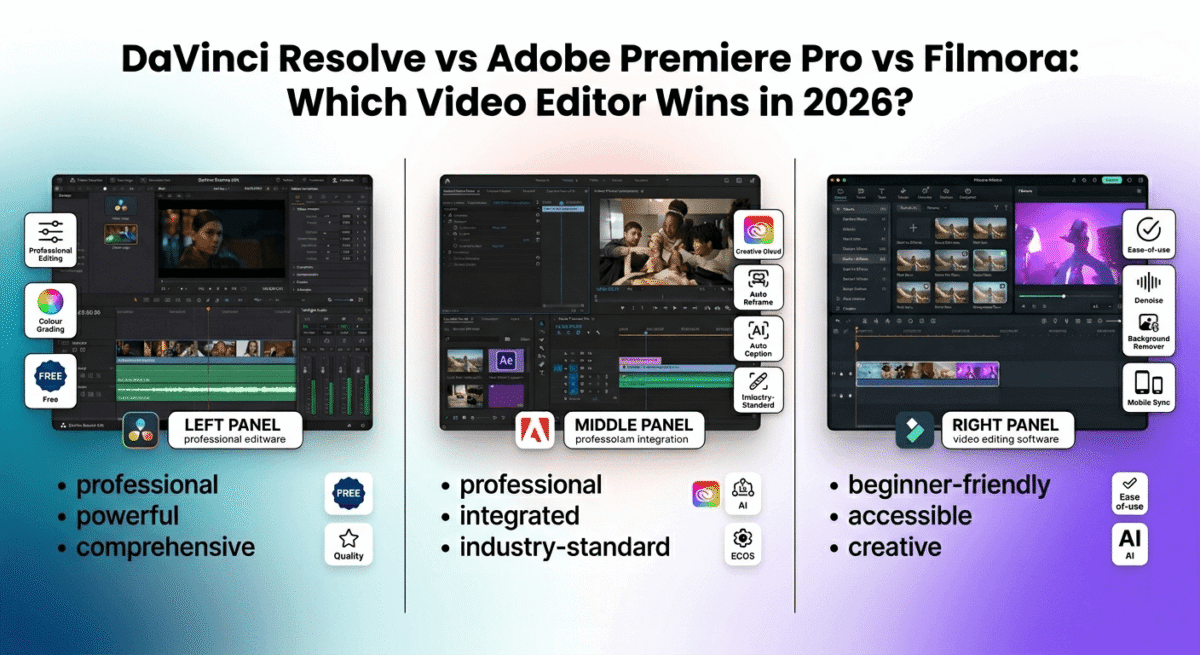
Cross-device access via the Creative Cloud is a real workflow advantage for a blogger who shoots on a phone and edits on a desktop, the same library is available on every device, and edits sync automatically without a manual transfer step. If you’re already invested in Adobe’s ecosystem for photos, see our DaVinci Resolve vs Adobe Premiere Pro vs Filmora comparison for the video editing software side of that same Creative Cloud subscription.
Where Adobe Lightroom falls short
The subscription model is the central financial reality of Lightroom, and it compounds over time in a way the one-time purchase options do not. At $9.99/month, the three-year cost is approximately $360, comparable to Luminar Neo’s subscription equivalent but approximately three times the cost of Luminar Neo’s one-time perpetual license. For a blogger who intends to use the software for years, this ongoing commitment is worth calculating against the alternatives before assuming Lightroom’s brand recognition justifies its total cost.
Lightroom’s learning curve is the steepest of the three tools for a non-photographer starting from scratch. The library-and-develop workflow, while logical once learned, is more structured and less immediately intuitive than Luminar Neo’s creative-first interface or Topaz Photo AI’s three-button autopilot.
Adobe’s generative AI features use a credit system for actions like Generative Fill and Generative Remove, credits are included in the subscription at a standard level, but high-volume users may run into limits and need to manage usage more carefully than the subscription’s simple monthly price implies.
Adobe Lightroom pricing
| Plan | Price | What You Get & Core Inclusions |
|---|---|---|
| Photography Plan | $9.99 / month (20GB) | Lightroom (cloud-based), Lightroom Classic (desktop/local catalog), Photoshop (desktop & iPad), 20GB cloud storage, Adobe Portfolio, and monthly Firefly generative AI credits 1TB cloud storage tier available for ~$19.99/mo |
| Lightroom Single App | ~$11.99 / month ($119.88/yr) | Lightroom multi-device cloud app (desktop, mobile, web) with 1TB cloud storage included Does NOT include Photoshop, Lightroom Classic, or local catalog storage support |
| Creative Cloud All Apps | $54.99 – $69.99 / month | Full Adobe creative suite (20+ apps including Photoshop, Illustrator, Premiere Pro, After Effects, InDesign, Acrobat Pro, Audition), 100GB+ cloud storage, Adobe Express Premium, and Adobe Fonts Creative Cloud Standard at $54.99/mo; Pro tier with expanded Firefly AI credits at $69.99/mo |
Adobe Lightroom: Pros and Cons
Pros:
- Most complete photography workflow, library, RAW editing, color grading, and AI tools in one subscription
- Generative Remove quality rates among the best in independent comparisons
- AI Masking and AI Denoise are genuinely strong, well-integrated features
- Cross-device access via Creative Cloud, including iOS and Android
- Photography Plan at $9.99/month is the lowest-cost Adobe entry point
Cons:
- Subscription-only, no one-time purchase option
- Three-year cost roughly three times Luminar Neo’s perpetual license
- Steepest learning curve of the three tools for non-photographers
- Generative AI credit system adds a usage-management layer to the subscription
- Less immediately accessible to a blogger new to photo editing than Luminar Neo
Rating: 4.5 / 5, Most complete photography workflow available, and genuinely strong AI features, but the subscription model’s long-term cost is real and worth calculating against one-time purchase alternatives before committing.
Head-to-Head Comparison
| Feature / Criteria | Luminar Neo | Topaz Photo AI | Adobe Lightroom |
|---|---|---|---|
| Free plan | No 7-day trial available | No Trial available (watermarked export) | No 7-day trial available |
| One-time purchase | Yes ($119 – $179) Perpetual license options available | No Subscription-only model | No Subscription-only model |
| Annual subscription | $119 / year Includes continuous updates & extras | $199 / year Standalone app subscription | $9.99 – $11.99 / month ~$119.88 – $143.88 / year |
| 3-year total cost | $119 (Perpetual) or $357 (Sub) | $597 Annual renewal rate | ~$360 – $432 20GB plan vs 1TB plan |
| AI creative tools | Strongest Sky replacement, portrait relighting, GenSwap | None Focused purely on technical restoration | Strong Generative Remove, AI masking |
| AI noise reduction | Good Noiseless AI extension | Best in class Deep-learning RAW noise removal | Strong Built-in Denoise AI engine |
| AI upscaling quality | Good Upscale AI extension | Best in class Gigapixel resolution enlargement | Moderate Super Resolution (limited 2x) |
| RAW file support | Yes Broad camera profile database | Yes Direct RAW demosaicing engine | Yes Industry-standard Adobe Camera RAW |
| Learning curve | Low One-click slider presets | Very Low Automated Autopilot analysis | Moderate Requires catalog & panel familiarity |
| Plugin integration | Yes Works as plugin (TIFF workflow) | Yes Non-destructive plugin filter | N/A Primary host environment |
| Cross-device / Cloud | Limited Mobile app sync on higher tiers | No Desktop local processing only | Best in class Full cloud sync (Desktop, iPad, Web, Mobile) |
| Best for | Creative editing & bloggers Fast visual overhauls & atmospheric edits | Technical image rescue Fixing motion blur, high-ISO noise, & low-res files | Complete photography workflow Batch culling, organization, & color grading |
Which Tool Should You Choose?
Choose Luminar Neo if:
You are a blogger or content creator who wants the broadest AI creative editing tools, sky replacement, portrait enhancement, object removal, in a single application, at a one-time purchase price. Luminar Neo is the most directly useful tool for this site’s core audience: content creators who shoot their own images and want professional results without a subscription or a photography degree.
Choose Topaz Photo AI if:
You regularly deal with high-noise, blurry, or low-resolution images and need best-in-class technical restoration that Luminar Neo’s AI tools do not fully match. It is the right tool when the specific problem is noise, blur, or upscaling, not as a general-purpose editor, but as the best available solution for that particular class of image problem.
Choose Adobe Lightroom if:
You want the most complete photography workflow, library management, RAW processing, color grading, and strong AI tools, and are comfortable with a subscription model. If you already pay for Creative Cloud for other Adobe tools, Lightroom’s addition at the Photography Plan price is likely the lowest-friction choice. If you are starting fresh, run the three-year math against Luminar Neo’s perpetual license before assuming the familiar brand name is the obvious answer.
The Blogger and Content Creator Setup Recommendation
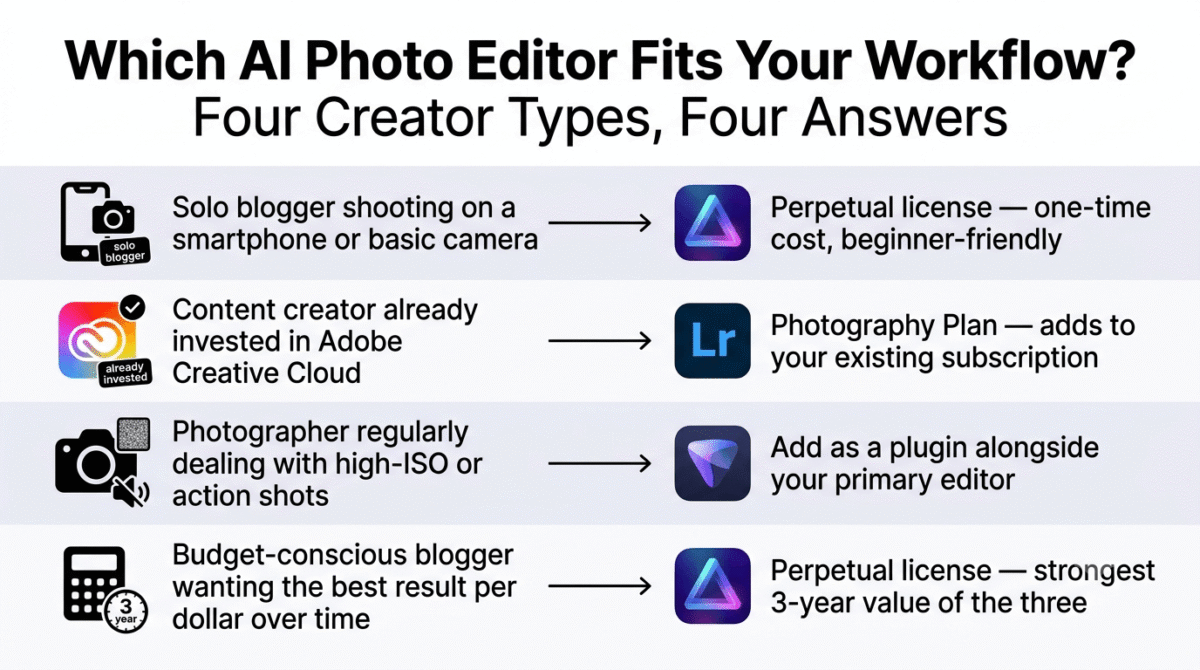
Based on 30 days of testing across real blog and content images, here is the recommended setup by creator type:
Solo blogger shooting on a smartphone or basic camera: Luminar Neo’s perpetual license. The one-time cost, beginner-friendly interface, and AI tools covering the specific problems phone photography produces, flat backgrounds, boring skies, cluttered scenes, make it the most direct value for this exact use case.
Content creator already invested in Adobe Creative Cloud for other tools: Adobe Lightroom, at the Photography Plan price, since it adds meaningfully to an existing Adobe subscription rather than duplicating it.
Photographer or visual content creator regularly dealing with high-ISO indoor shots or action photography: Add Topaz Photo AI as a plugin alongside whichever primary editor you use, Luminar Neo or Lightroom, specifically for noise reduction and sharpening on the images where your primary tool’s results fall short.
Budget-conscious blogger who wants the best result per dollar over three years: Luminar Neo’s perpetual license at $119. The three-year total cost calculation against Topaz Photo AI at $597 or Lightroom at approximately $360–$432 makes the perpetual license the strongest value for a blogger who plans to use photo editing software consistently over time.
Final Verdict
Luminar Neo is the best AI photo editor for most bloggers and content creators in 2026, its combination of the broadest AI creative tool set, the most beginner-friendly interface, and the only one-time purchase option in this comparison makes it the strongest overall recommendation for a content creator who shoots their own images and wants meaningfully better results without a subscription commitment.
Adobe Lightroom is the best choice for a complete photography workflow, its RAW processing, library organization, AI editing tools, and cross-device sync are the most comprehensive package available, and the $9.99/month Photography Plan is the most defensible subscription in this comparison, provided you are comfortable with the long-term cost that subscription implies.
Topaz Photo AI is the best tool for its specific three tasks, noise reduction, sharpening, and upscaling, and performs those tasks better than either competitor. Use it as a specialist companion to a broader editor rather than a standalone solution.
Ratings:
- Luminar Neo: 4.6 / 5
- Adobe Lightroom: 4.5 / 5
- Topaz Photo AI: 4.4 / 5
Frequently Asked Questions
What is the best AI photo editing software in 2026?
Luminar Neo is the best overall choice for bloggers and content creators, combining the broadest AI creative tools with the only one-time purchase option in this comparison. Adobe Lightroom is the stronger choice for a complete photography workflow, and Topaz Photo AI is the best specialized tool for noise reduction, sharpening, and upscaling specifically.
Is there a good AI photo editor that isn’t a subscription?
Yes, Luminar Neo offers a perpetual desktop license at $119 as a one-time purchase, making it the only tool in this comparison available without an ongoing subscription. Topaz Photo AI and Adobe Lightroom are both subscription-only.
What is the difference between AI photo editing and AI image generation?
AI image generation creates a new image from scratch based on a text prompt, tools like Midjourney and DALL-E fall into this category. AI photo editing works on an existing photograph, enhancing or correcting it by reducing noise, sharpening blur, replacing skies, removing objects, or adjusting lighting. For bloggers working with real photos they have taken, editing is the more relevant category.
Is Topaz Photo AI worth the price for a blogger?
Only if noise, blur, or upscaling is a specific, recurring problem in your images. At $199/year with no one-time purchase option, Topaz Photo AI is difficult to justify as general-purpose photo editing software, its three specialized tools are best-in-class, but a blogger whose images are reasonably well-lit and in focus will not get $199 of annual value from those specific capabilities.
Does Luminar Neo work with existing Lightroom files?
Yes, as a plugin, though with a workflow caveat: using Luminar Neo as a Lightroom plugin creates a separate TIFF file for each image rather than editing non-destructively within Lightroom’s catalog, adding storage overhead and complicating file management compared to editing entirely within Lightroom.
How does Adobe Lightroom’s AI compare to Luminar Neo’s?
Lightroom’s Generative Remove and AI Masking are among the strongest AI editing features available in any tool, and AI Denoise is highly regarded in independent comparisons. Luminar Neo’s AI tools are broader in creative scope, sky replacement, portrait bokeh, powerline removal, while Lightroom’s are more deeply integrated into a non-destructive, catalog-based workflow. The choice depends on whether you want a creative-first interface or a complete workflow platform.
Which AI photo editor is best for smartphone photography?
Luminar Neo handles smartphone images well, with AI tools specifically suited to the common limitations of phone photography, flat depth of field, plain backgrounds, and variable sky quality. Its beginner-friendly interface also makes it accessible without the more structured learning curve of Lightroom’s library-and-develop workflow.