Your task management app is the tool you interact with more times per day than almost any other. It is where your work lives, where your commitments are tracked, and where the gap between intention and execution either closes or widens. Choosing the wrong one, or using a capable one poorly, is one of the most consistent causes of missed deadlines, dropped balls, and the chronic feeling of being busy without being productive.
In 2026, three apps dominate personal and professional task management for individuals and small teams: Todoist vs TickTick vs Microsoft To Do. If you’re building out your whole stack rather than just task management, our roundup of the best tools for small business covers the rest of the toolkit these apps plug into. All three are capable. All three have genuine strengths. And all three are the right choice for a different type of user.
I tested all three as my primary task management system for 30 days each, managing blog content production, client projects, personal commitments, and daily habits. If client projects are a bigger part of your workload than personal task tracking, you may want dedicated freelancer project tools instead, see our Notion vs ClickUp vs Trello comparison. Here is the honest comparison.
Table of Contents
How We Evaluated These Apps
Every app was tested across five criteria:
- Task capture speed, how quickly can you add a task from any device or context?
- Organisation system, how well does the app handle projects, priorities, and due dates?
- Recurring tasks and habits, how effectively does each tool manage repeating commitments?
- Cross-platform experience, how consistently does the app work across desktop, mobile, and web?
- Value, free plan quality and paid plan pricing versus features offered
Why Task Management Apps Matter More Than Most Productivity Tools
A calendar manages time. A note-taking app manages knowledge. A task management app manages commitments, the specific, actionable things you have agreed (with yourself or others) to do.
The distinction matters because commitments without a reliable capture and review system create cognitive load, the mental energy spent remembering what you need to do rather than actually doing it. Research consistently shows that externalising commitments into a trusted system reduces anxiety, improves focus, and increases the probability that important work gets done rather than urgent-but-unimportant work consuming the day.
For bloggers specifically, a task management app tracks the editorial calendar tasks that Notion stores as data, “write introduction for VPN post,” “add affiliate links to grammar checker post,” “submit URL to Search Console after publishing.” If you’re deciding whether to run your content calendar in Notion versus a dedicated task app, see our Notion vs Trello vs Asana comparison for how the two systems actually divide the work. The granular daily actions that turn a content strategy into published content.
Todoist Review: Best Task Management App for Most Users
Free plan: Yes, 5 active projects, 5 collaborators per project
Starting price: $4/month (Pro, billed annually)
Best plan for most users: Free plan or Pro, $4/month
Platforms: Web, Windows, Mac, Linux, iOS, Android, browser extensions, email plugins
Affiliate program: Yes, Todoist affiliate program, 30% recurring commission
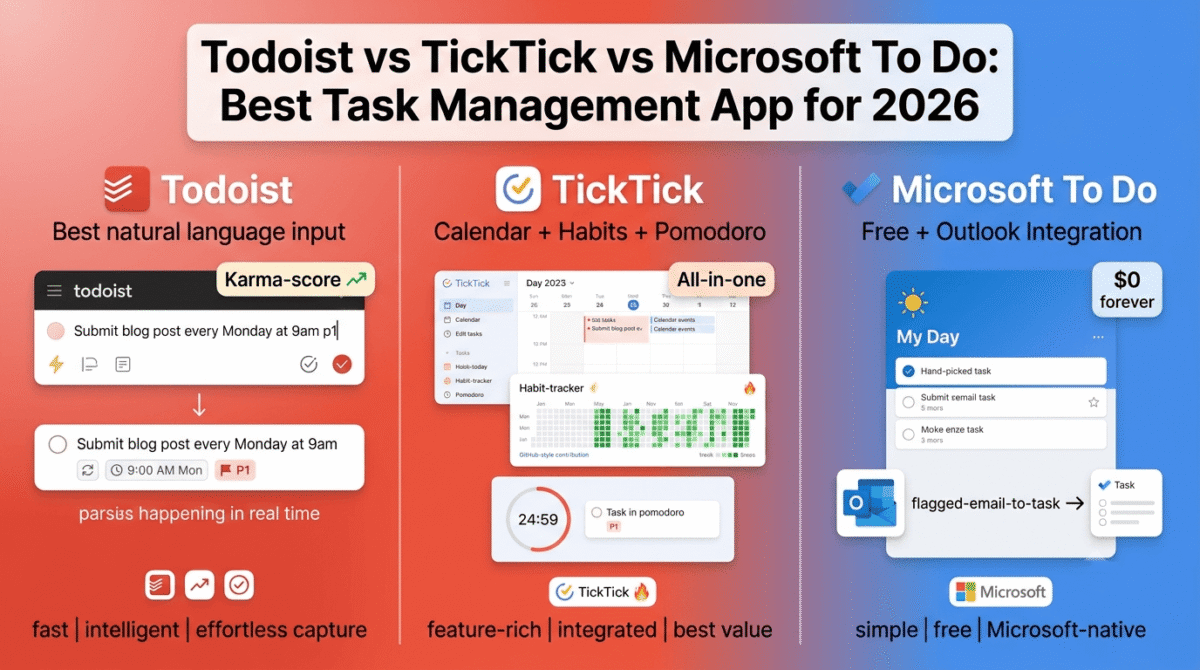
Todoist is the most polished and universally praised task management app available, used by over 30 million people worldwide. Its combination of natural language input, clean design, reliable cross-platform sync, and the Karma productivity scoring system makes it the app most productivity writers and coaches recommend as their default starting point.
What Todoist does best
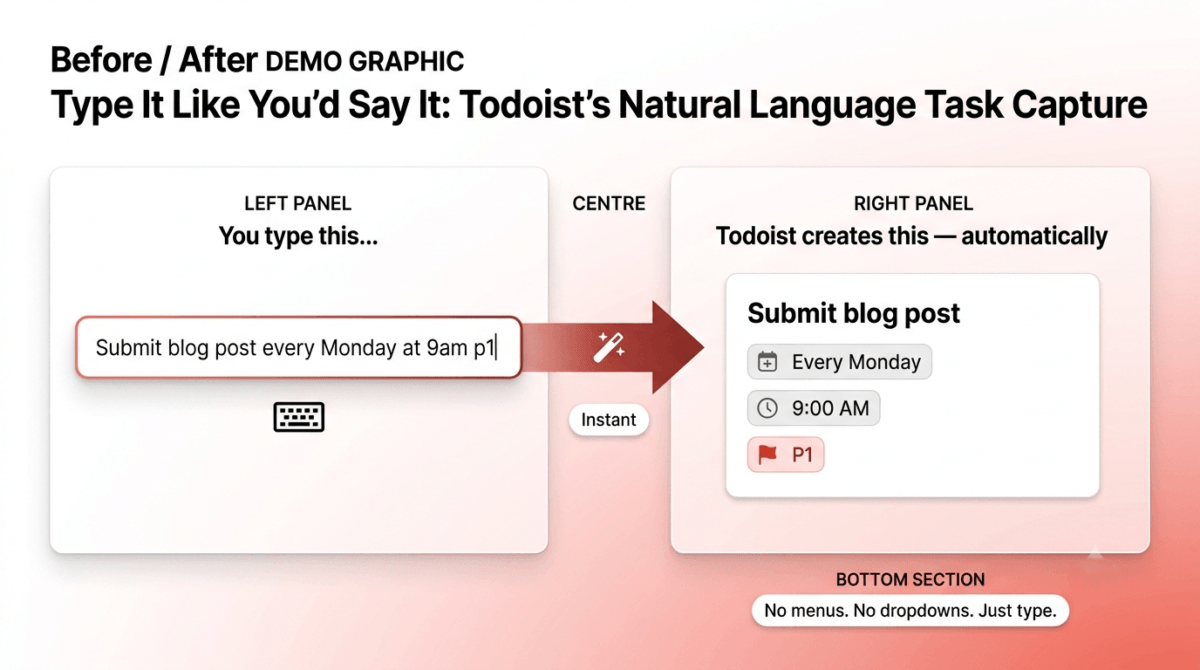
Todoist’s natural language input is its most practically valuable feature. Type “Submit blog post every Monday at 9am p1” and Todoist creates a recurring task, due every Monday at 9am, with priority 1, all parsed from plain text without navigating menus or dropdown selectors. “Doctor appointment next Friday at 3pm” creates the correct task and date automatically.
This natural language parsing makes task capture fast enough to be frictionless, the critical quality for any task management system, because a system that slows down capture gets bypassed in favour of mental notes that never get recorded.
The project and section organisation creates a clear hierarchy, projects for major areas (Blog, Client Work, Personal), sections within projects for subcategories (Blog → Drafts, Publishing, Research), and tasks within sections with due dates, priorities, labels, and subtasks. The visual clarity of this hierarchy makes navigating a complex task list intuitive rather than overwhelming.
Todoist’s Karma system, a productivity score that increases when you complete tasks on time and decreases when you let tasks go overdue, provides the gamification that makes daily task completion feel rewarding rather than merely obligatory. The streak tracking and level progression create psychological momentum that sustains consistent use beyond the initial novelty period.
The filter system, creating custom views like “All priority 1 tasks due this week” or “All tasks labelled @waiting across all projects”, enables sophisticated task review without manual searching. Power users build filter-based dashboards that surface exactly the right tasks for each context.
The integration library covers every major productivity tool, Google Calendar (bidirectional sync), Slack (creating tasks from messages), Gmail and Outlook (creating tasks from emails), Zapier (connecting to hundreds of other apps), and browser extensions for all major browsers. Todoist fits into existing workflows rather than requiring workflow rebuilding around the app.
Todoist for bloggers and content creators
For a blogger managing a content calendar, Todoist’s recommended setup is:
- Blog project with sections: Ideas, Researching, Drafting, Editing, Publishing, Promoting
- Recurring tasks for daily publishing workflow: “Check Google Search Console” every Monday, “Update affiliate links” every month, “Submit sitemap” after each new post
- Priority 1 for publication deadlines, Priority 2 for affiliate signups and backlog tasks
- Labels for context: @writing, @technical, @outreach, enabling filter views that show only tasks matching your current context
Where Todoist falls short
Todoist’s free plan limits you to 5 active projects, sufficient for minimal use but restricting for users who want separate projects for every client, every content category, and every personal area. The Pro plan at $4/month removes project limits and adds reminders, filters, labels, and Todoist AI.
The calendar view, showing tasks on a visual calendar, was only introduced recently and remains less polished than TickTick’s calendar integration. For users who think in calendar time blocks rather than task lists, Todoist’s timeline view is functional but not the strength of the app.
The habit tracking capability, repeating tasks are available but without the streak visualisation and completion statistics that TickTick’s dedicated habit tracker provides.
Todoist pricing
Plan | Price/month (annual) | Projects | Key features |
Free | $0 | 5 | Basic tasks, 5 collaborators |
Pro | $4 | 300 | + Reminders, filters, labels, AI |
Business | $6/user | 500 | + Team inbox, admin controls |
Todoist: Pros and Cons
Pros:
- Best natural language task input, fastest capture of the three tools
- Karma gamification system sustains long-term consistent use
- Most extensive integration library, works with every major tool
- Available on every platform including Linux
- Clean, polished design, pleasant daily use
- Todoist AI for task breakdown and prioritisation
- 30% recurring affiliate commission
Cons:
- Free plan limited to 5 projects
- Calendar view less polished than TickTick
- Habit tracking basic compared to TickTick
- Reminders require Pro plan, not available free
- Less suitable for complex project management than dedicated PM tools
Rating: 4.7 / 5, Best task management app for most users. The fastest capture, best integrations, and most sustained engagement of the three tools tested.
TickTick Review: Best Task Management App for Habit Tracking and Calendar Users
Free plan: Yes, genuinely capable free tier
Starting price: $2.79/month (Premium, billed annually)
Best plan for most users: Premium, $2.79/month
Platforms: Web, Windows, Mac, Linux, iOS, Android, browser extensions, Apple Watch
Affiliate program: Yes, TickTick affiliate program
TickTick is the most feature-rich task management app at its price point, combining task management, habit tracking, a Pomodoro timer, calendar integration, and a kanban board view in one application at $2.79/month. For users who want a single app that handles multiple productivity functions without subscribing to separate tools, TickTick’s breadth is unmatched.
What TickTick does best
TickTick’s calendar integration is the best of the three tools, a dedicated Calendar view shows your tasks and calendar events together in a unified timeline. Tasks with due dates appear on their scheduled day alongside Google Calendar or Apple Calendar events, giving you a complete picture of both commitments and appointments in one view. For users who think in terms of time blocks rather than lists, this calendar-plus-tasks view is the most naturally useful productivity interface available in any task app.
The habit tracker, a dedicated section within TickTick specifically for repeating behaviours you want to build, is the most sophisticated built-in habit management of the three tools. Each habit shows a visual streak calendar (similar to GitHub’s contribution graph), completion statistics, and a daily check-in view. For bloggers who want to build consistent habits (publish daily, do keyword research weekly, share on social media every day), TickTick’s habit tracker provides the streak visualisation and accountability that makes consistency more likely.
The built-in Pomodoro timer, starting a 25-minute focus timer directly from a specific task, links focused work sessions to specific tasks rather than requiring a separate timer app. The session history shows how many Pomodoro sessions each task consumed, useful data for estimating how long similar future tasks will take.
The kanban board view, displaying tasks as cards in columns (To Do, In Progress, Complete), provides a visual project management interface within the same app used for personal task management. For bloggers who want to see their content pipeline as a board without switching to a separate project management tool, TickTick’s kanban view covers this need.
TickTick’s smart date parsing, while slightly less sophisticated than Todoist’s, handles the common patterns accurately, “tomorrow at 9am,” “every weekday,” “next Tuesday” all parse correctly from plain text input.
The tag system, more flexible than Todoist’s label approach for some users, enables cross-project tagging that creates contextual views without the project/list hierarchy constraints.
Where TickTick falls short
TickTick’s design is slightly less polished than Todoist’s, the interface is more feature-dense and occasionally feels cluttered when all features are enabled simultaneously. First-time users report more initial overwhelm with TickTick than with Todoist’s more minimal default presentation.
The integration library, while covering the essentials (Google Calendar, Alexa, Siri), is less extensive than Todoist’s, fewer third-party tools connect natively to TickTick, requiring Zapier workarounds for integrations that Todoist handles natively.
The collaboration features are adequate but less polished than Todoist’s, task assignment, shared lists, and project collaboration work but are not a primary use case that TickTick prioritises in its development roadmap.
TickTick pricing
Plan | Price/month (annual) | Key features |
Free | $0 | Basic tasks, lists, calendar view |
Premium | $2.79 | + Calendar, kanban, habit tracker, Pomodoro, filters |
TickTick: Pros and Cons
Pros:
- Best calendar integration, tasks and events in unified timeline view
- Best built-in habit tracker, streak visualisation and statistics
- Built-in Pomodoro timer linked to specific tasks
- Kanban board view for visual project management
- Most affordable premium plan, $2.79/month
- Most features per dollar of any task management app
- Available on every major platform including Apple Watch
Cons:
- Slightly less polished design than Todoist
- More initial overwhelm for new users
- Smaller integration library than Todoist
- Collaboration features less developed
- Natural language parsing slightly less sophisticated than Todoist
Rating: 4.6 / 5, Best task management app for users who want habit tracking, calendar integration, and Pomodoro timing in one tool. Best value at $2.79/month.
Microsoft To Do Review: Best Free Task Management App for Microsoft Users
Free plan: Yes, completely free, all core features
Starting price: Free, no paid plan for individuals
Best plan for most users: Free (included with Microsoft account)
Platforms: Web, Windows, Mac, iOS, Android
Affiliate program: None, Microsoft product
Microsoft To Do is the most polished completely free task management app, the successor to Wunderlist (acquired by Microsoft in 2015) with deep integration into the Microsoft 365 ecosystem. For users who are already in the Microsoft environment, Outlook email, Microsoft 365, and Windows, To Do provides capable task management that requires no additional subscription.
What Microsoft To Do does best
Microsoft To Do’s My Day feature is its most distinctive and practically effective capability. Each morning, My Day presents a blank canvas, you manually select tasks from your full list to work on today, building a focused daily agenda rather than being overwhelmed by every task in every project simultaneously. This deliberate daily planning ritual, choosing your priorities rather than having your full backlog visible at all times, is one of the most effective task management practices for reducing overwhelm.
The Outlook integration is the most seamless of any task app with email, flagging an email in Outlook automatically creates a task in To Do, syncing with the Tasks section of Outlook. For users whose workflow is email-heavy, this flag-to-task conversion eliminates the manual transcription that other apps require when email becomes a task.
Microsoft To Do’s design is the cleanest and most visually refined of the three tools, a minimal interface that presents tasks without visual clutter. The colour-coding, list icons, and typography create a pleasant daily interaction that sustained use over months does not fatigue.
The shared lists, shareable between Microsoft accounts for collaborative task management, enable basic team task sharing without a paid subscription. For families coordinating household tasks or small teams sharing simple task lists, To Do’s free sharing is practically useful.
The integration with Microsoft Planner, the team-based project management tool included in Microsoft 365, provides a path from personal task management to team project management within the same Microsoft ecosystem. Planner tasks assigned to you appear in To Do automatically, consolidating personal and work tasks in one view.
Where Microsoft To Do falls short
Microsoft To Do’s organisation capabilities are the most limited of the three tools, projects are called “lists,” there are no sections within lists, subtasks are basic, and the filter and label system is significantly less sophisticated than Todoist’s or TickTick’s. For users managing complex projects with many tasks, To Do’s flat list structure becomes difficult to navigate. If you need full Project Management features?, multiple views, dependencies, team workload tracking, our Monday.com vs ClickUp vs Basecamp comparison covers tools built for that scale.
There is no Karma gamification, no habit tracker, no Pomodoro timer, and no kanban view, the feature set is deliberately minimal, which works for simple task management but limits the app for productivity-focused power users.
Natural language input, while improved, is less sophisticated than Todoist’s. Creating recurring tasks requires navigating menus rather than typing “every Monday at 9am” as natural text.
The lack of a paid plan is both an advantage (no decision about whether to upgrade) and a limitation, there is no premium tier to unlock advanced features when basic features become insufficient.
Microsoft To Do pricing
Microsoft To Do is completely free, all features available at no cost with any Microsoft account. There is no paid plan for individual users.
Microsoft 365 subscribers get deeper integration (Outlook flagging, Planner sync, Teams integration) as part of their existing subscription, but To Do itself has no additional cost.
Microsoft To Do: Pros and Cons
Pros:
- Completely free, all features, no subscription required
- My Day deliberate daily planning feature reduces overwhelm
- Best Outlook and Microsoft 365 integration
- Cleanest, most minimal design of the three tools
- Shared lists for basic collaboration at no cost
- Planner integration brings team tasks into personal view
- Part of the Microsoft ecosystem, familiar for Windows users
Cons:
- Most limited organisation, no sections, basic subtasks
- No habit tracking, Pomodoro, or kanban view
- Natural language input less sophisticated than Todoist
- Filter and label system significantly less powerful
- No paid plan to unlock advanced features
- Less suitable for complex personal productivity systems
- Smaller integration library than Todoist
Rating: 4.3 / 5, Best completely free task management app for Microsoft users. Ideal for simple task management and email-heavy workflows, limited for power users who need advanced organisation.
Head-to-Head Comparison
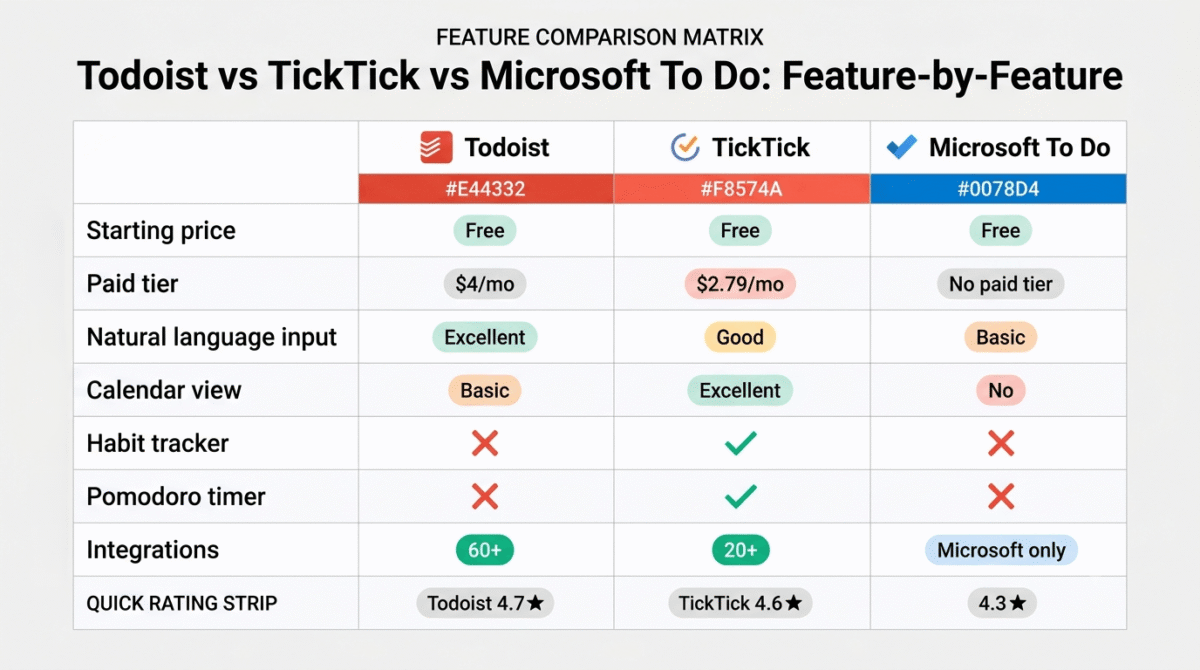
Todoist Free | Todoist Pro | TickTick Free | TickTick Premium | Microsoft To Do | |
Price/month | $0 | $4 | $0 | $2.79 | $0 |
Projects/lists | 5 | 300 | Unlimited | Unlimited | Unlimited |
Natural language input | Excellent | Excellent | Good | Good | Basic |
Calendar view | Basic | Good | Basic | Excellent | No |
Habit tracker | No | No | No | Yes | No |
Pomodoro timer | No | No | No | Yes | No |
Kanban board | No | No | No | Yes | No |
Reminders | No | Yes | Yes | Yes | Yes |
Subtasks | Yes | Yes | Yes | Yes | Basic |
Filters and labels | No | Yes | Basic | Yes | No |
Outlook integration | Plugin | Plugin | No | No | Excellent (native) |
Linux support | Yes | Yes | Yes | Yes | No |
Gamification | Basic | Karma | No | No | No |
Integrations | 60+ | 60+ | 20+ | 20+ | Microsoft only |
Affiliate program | 30% recurring | 30% recurring | Yes | Yes | None |
Best for | Most users | Power users | Calendar thinkers | All-in-one | Microsoft users |
Which Task Management App Should You Choose?
Choose Todoist if:
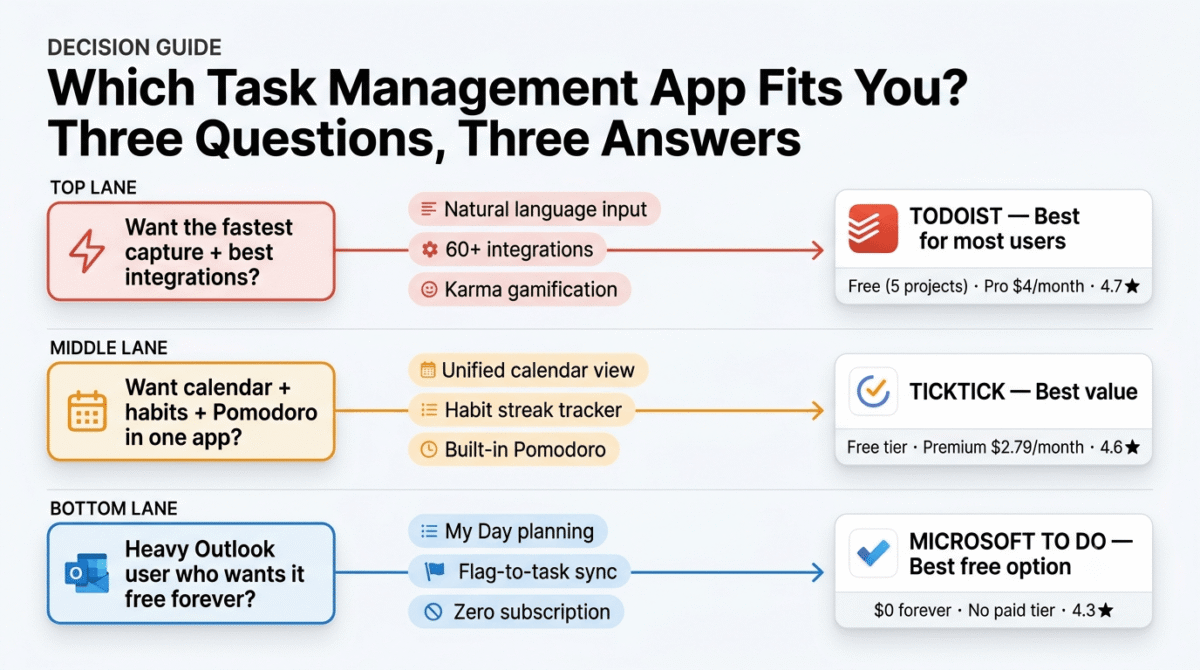
You want the most polished task management experience with the fastest capture, best integrations, and most sustained engagement over time. Todoist’s natural language input and Karma system make it the app most likely to become a genuine daily habit rather than a tool you set up and abandon. The free plan covers basic needs; Pro at $4/month is worth it for reminders and unlimited projects.
Choose TickTick if:
You think in calendar terms (wanting to see tasks and events together), want to build habits alongside task management, appreciate having a Pomodoro timer integrated with your tasks, or want the most features per dollar of any task management subscription. At $2.79/month, TickTick Premium is the best value productivity app available.
Choose Microsoft To Do if:
You are a heavy Outlook user where the flag-to-task integration is compelling, you prefer a completely free option with no subscription decision, you want the most minimal and uncluttered task interface, or your task management needs are simple enough that To Do’s limited organisation system does not feel constraining.
The Blogger Task Management System
For a blogger managing daily content production, here is the recommended Todoist setup:
Projects:
- 📝 Blog Content, all writing and publishing tasks
- 🔗 Affiliate & SEO, affiliate program management and SEO tasks
- 📧 Email & Outreach, reader emails, partnership inquiries
- 🛠️ WordPress & Tech, site maintenance and technical tasks
- 🏠 Personal, non-work commitments
Recurring tasks for bloggers:
- “Publish 1 blog post”, recurring daily
- “Check Google Search Console”, recurring every Monday
- “Review affiliate commissions”, recurring 1st of each month
- “Update llms.txt with new posts”, recurring monthly
- “Run UpdraftPlus backup”, recurring weekly
- “Check for broken affiliate links”, recurring monthly
Priority system:
- P1 (red): Publication deadlines today
- P2 (orange): Important tasks due this week
- P3 (blue): Tasks for this month
- P4 (grey): Someday/maybe ideas
This system, built in Todoist free, captures every blogging commitment, ensures nothing falls through the cracks, and surfaces the right tasks at the right time.
Final Verdict
Todoist is the best task management app for most users in 2026, the fastest natural language capture, most extensive integrations, and Karma gamification create the most reliable daily habit of the three tools. Start with the free plan and upgrade to Pro ($4/month) when you need reminders and more than 5 projects.
TickTick is the best value task management app, $2.79/month for calendar integration, habit tracking, Pomodoro timing, and kanban views is an extraordinary feature-to-cost ratio. The right choice for users who want multiple productivity functions in one subscription.
Microsoft To Do is the best free option for Microsoft users, completely free, deeply integrated with Outlook, and the most minimal design make it the right choice for simple task management in the Microsoft ecosystem.
Ratings:
- Todoist: 4.7 / 5
- TickTick: 4.6 / 5
- Microsoft To Do: 4.3 / 5
Frequently Asked Questions
What is the best task management app in 2026?
Todoist is the best task management app for most users, its natural language input makes capture faster than any competing tool, the Karma gamification system sustains consistent long-term use, and the 60+ integrations connect Todoist to every major productivity tool. TickTick is the best value option at $2.79/month for users who want habit tracking and calendar integration alongside task management.
Is Todoist free?
Yes, Todoist’s free plan provides basic task management with 5 active projects, unlimited tasks within those projects, and basic collaboration at zero cost. The Pro plan at $4/month adds reminders, filters, labels, unlimited projects, and Todoist AI. For most bloggers and individual users, the free plan is sufficient to start, upgrade when the 5-project limit becomes constraining.
What is the difference between Todoist and TickTick?
Todoist has faster natural language task capture, more integrations, and a better gamification system. TickTick has better calendar integration (showing tasks and events together), a dedicated habit tracker with streak visualisation, a built-in Pomodoro timer, and a kanban board view, all at $2.79/month versus Todoist Pro’s $4/month. Choose Todoist for the best daily task management experience; choose TickTick if you want habit tracking and calendar integration in one tool.
Is Microsoft To Do replacing Outlook Tasks?
Yes, Microsoft To Do has effectively replaced Outlook’s legacy Tasks system. Flagged emails in Outlook appear in To Do automatically, and the two systems sync bidirectionally. Microsoft’s roadmap positions To Do as the unified personal task management layer across all Microsoft 365 products, connecting with Teams, Planner, and Outlook tasks in one interface.
Can I use multiple task management apps?
Technically yes, but using multiple systems typically reduces rather than improves productivity. The value of a task management app comes from having every commitment in one trusted system that you review consistently. Splitting tasks across two apps creates uncertainty about which app contains which tasks, reduces review consistency, and defeats the purpose of externalising commitments into a trusted system. Pick one app and use it comprehensively rather than partially using multiple tools.
What happened to Wunderlist?
Microsoft acquired Wunderlist in 2015 and discontinued it in 2020, replacing it with Microsoft To Do. Microsoft To Do was built by the original Wunderlist team and incorporates many of the features that made Wunderlist popular, including shared lists, My Day planning, and the clean minimal design philosophy. Former Wunderlist users who have not yet found a replacement will feel immediately at home with Microsoft To Do.
Which task management app works best on iPhone?
All three apps have excellent iOS applications. Todoist’s iOS app is the most polished and feature-complete mobile task management experience, natural language capture works via the iOS widget and Siri shortcuts. TickTick’s iOS app adds the habit tracker and Pomodoro timer to the mobile experience. Microsoft To Do’s iOS integration with Outlook and Apple Reminders makes it the most native-feeling iOS task app for users in the Apple ecosystem.