
Reclaim.ai vs Motion vs Sunsama used to be a four-way conversation. Clockwise, once one of the most recommended names in this category, no longer exists, and the reason matters for anyone choosing a calendar assistant today.
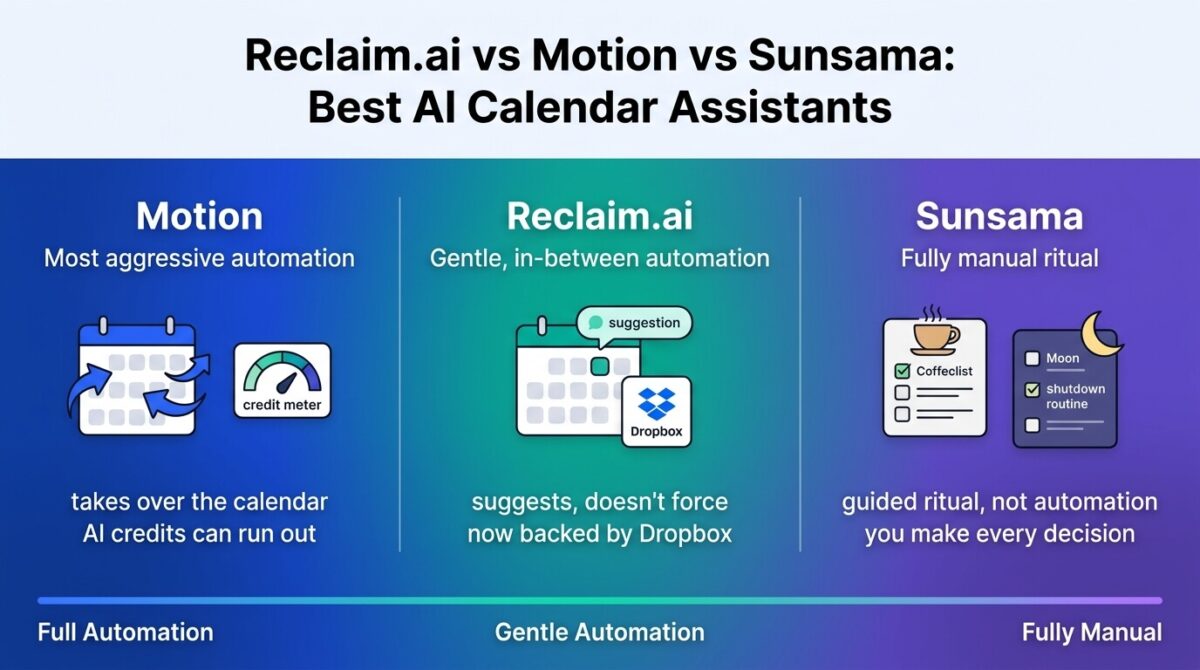
Beyond that, these three tools don’t even agree on how much control an algorithm should have over your day. Motion aggressively rearranges a calendar around task priorities. Reclaim.ai nudges and suggests without forcing changes. Sunsama skips automation almost entirely in favor of a guided manual planning ritual. Picking between them means picking a philosophy as much as a feature set.
I tested Reclaim.ai vs Motion vs Sunsama for 30 days, running the same set of tasks, meetings, and habits through all three and tracking how much each one took over versus left in my hands. Here is the honest comparison, including why one well-known name from this category isn’t part of it anymore.
Table of Contents
How We Tested
Five criteria shaped the testing:
- Automation philosophy, how much control the tool takes over the calendar versus how much it leaves to the user
- Free tier usability, whether a free or trial plan supports proper evaluation before paying
- Pricing predictability, whether the advertised price reflects what a typical month costs in practice
- Team versus solo fit, how each tool scales from individual use to a full team
- Platform stability, company backing and product direction, given recent upheaval in this category
Why Clockwise Isn’t Part of This Comparison
Clockwise shut down completely on March 27, 2026, after Salesforce acquired it and hired its team to work on agentic AI products rather than continuing the calendar app. The shutdown came with about a week’s notice, and user data was deleted rather than migrated anywhere. Clockwise itself publicly recommended Reclaim.ai as the closest alternative for departing users.
This matters beyond a single product disappearing. All three tools in this comparison sit on top of Google Calendar or Outlook rather than owning their own calendar infrastructure, a structural vulnerability Clockwise’s shutdown made visible. Company backing and product direction deserve weight here alongside features specifically because of what just happened to a competitor that looked just as established months ago.
Reclaim.ai Review: The Gentlest Automation, Now Backed by Dropbox
Free plan: Yes, Lite plan, 1 user, 2 calendar syncs, 3 habits, 1-week scheduling range
Starting price: $10/seat/month (Starter, billed annually), up to 10 seats
Best plan for most users: Starter, $10/seat/month, unlimited habits and 8-week scheduling range
Platforms: Web, iOS, Android, Chrome extension
Affiliate program: Yes, Reclaim.ai affiliate program
Reclaim.ai was acquired by Dropbox in August 2024 for a reported $40.2 million, complementing their expanding suite of B2B products, which includes e-signature tools like Dropbox Sign, and continues operating under its original brand, with both co-founders still running the product.
What Reclaim.ai does best
Reclaim’s automation style is measurably gentler than Motion’s: it blocks time for habits and tasks and adjusts around conflicts, but it suggests rather than forcibly rearranges a calendar the way Motion does. For anyone who wants AI assistance without feeling like control has been handed over entirely, that lighter touch is the clearest differentiator in this comparison.
The free Lite plan has no time limit and covers meaningful, if limited, usage: one calendar sync, three habits, and a week of scheduling range, enough to judge whether the core approach fits before paying anything. Dropbox’s backing also adds a measure of stability that matters more than it used to, given what happened to Clockwise.
Where Reclaim.ai falls short
The free plan’s limits, one calendar sync and a one-week scheduling range, are tighter than they once were and don’t stretch far for anyone managing more than a single, simple calendar. Business features like Team OOO Calendar and Workforce Analytics require the $15/seat/month Business tier, a jump from Starter for any team wanting those specific tools.
Reclaim’s primary experience lives on web and Chrome; the mobile app offers visibility and basic controls but not the full scheduling configuration available on desktop.
Reclaim.ai pricing
| Plan | Price | Seats | Notable Feature |
|---|---|---|---|
| Lite | $0 | 1 | 1 calendar sync, 3 habits, 1-week range |
| Starter | $10/seat/month (annual) | Up to 10 | Unlimited habits, 8-week scheduling range |
| Business | $15/seat/month (annual) | Up to 100 | Team OOO Calendar, Workforce Analytics |
| Enterprise | $22/seat/month (annual) | 100+ | SSO, dedicated security review |
Reclaim.ai: Pros and Cons
Pros:
- Gentlest automation of the three; suggests rather than forces calendar changes
- Free Lite plan has no time limit for proper evaluation
- Backed by Dropbox, adding stability the category has recently lost elsewhere
- Cheapest true entry point among the three tools
Cons:
- Free tier’s one-week scheduling range and single calendar sync are restrictive
- Team-specific features require jumping to Business
- Mobile app trails the web experience in configuration depth
- Less aggressive automation than Motion for anyone wanting a calendar fully managed by AI
Rating: 4.4 / 5, the best value and the gentlest automation philosophy of the three, backed by ownership stability the category needs right now.
Motion Review: The Most Aggressive Auto-Scheduler, With Metered AI Credits
Free plan: No, 7-day trial requiring a payment card
Starting price: $19/seat/month (Pro AI, billed annually), 7,500 AI credits/month
Best plan for most users: Pro AI, $19/seat/month, sufficient for most individual scheduling needs
Platforms: Web, iOS, Android
Affiliate program: Yes, Motion affiliate program
Motion takes the most hands-on approach of the three, actively rearranging a calendar around task deadlines and priorities rather than simply suggesting adjustments.
What Motion does best
Full autonomous scheduling is where Motion clearly leads: task deadlines, project dependencies, and team workload all factor into an automatically rebuilt calendar, a depth of automation neither Reclaim nor Sunsama attempts. For teams managing complex, interdependent projects alongside individual calendars such as tracking deliverables or chasing down client approvals through various e-signature tools, that level of automated coordination is difficult to replicate manually.
Business AI’s team capacity planning and advanced reporting extend Motion further into project management territory than either competitor, useful for a team that wants scheduling and project tracking under one tool.
Where Motion falls short
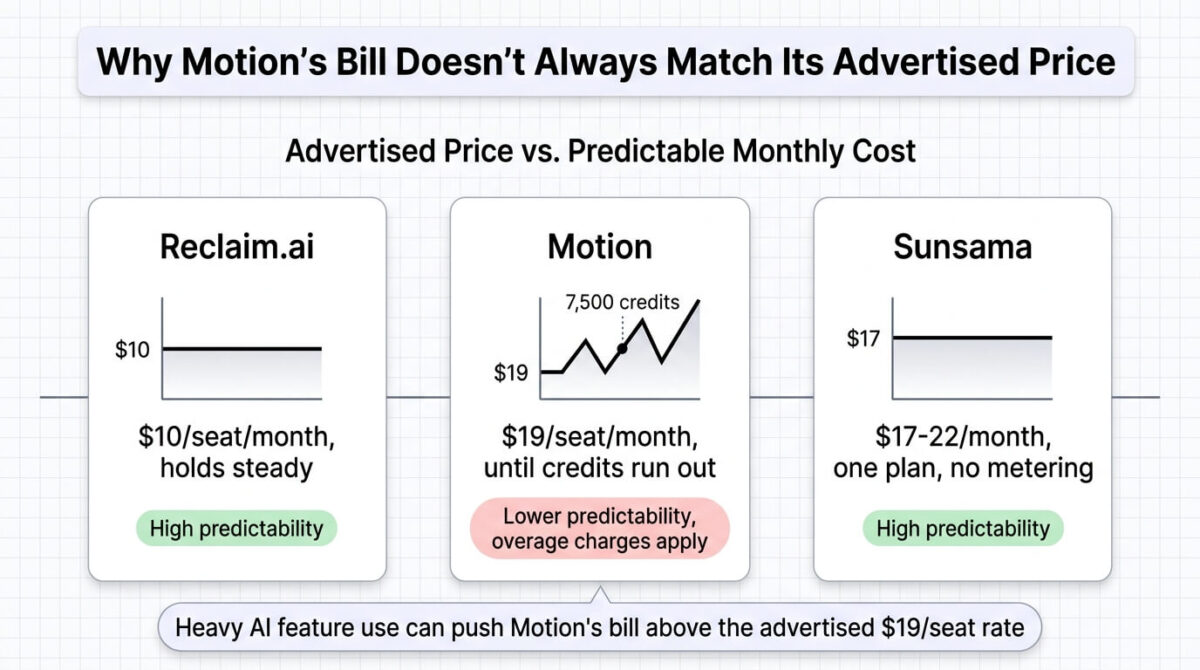
Motion moved to a metered AI-credit system in 2026, replacing simpler flat per-seat pricing, and the shift has drawn measurable frustration from existing users on Reddit and elsewhere. Pro AI includes 7,500 credits monthly before overage charges kick in at roughly $0.39 per 100 credits, meaning heavy AI feature use can push the effective monthly cost above the advertised $19 rate, an unpredictable expense that small businesses will need to closely track in their accounting software.
There’s no permanent free plan, only a 7-day trial that requires payment information upfront. At $19-29/seat/month depending on billing cycle, Motion is also the most expensive of the three tools compared here by a meaningful margin.
Motion pricing
| Plan | Price | AI Credits/Month | Notable Feature |
|---|---|---|---|
| Pro AI | $19/seat/month (annual), $29 monthly | 7,500 | Full autonomous scheduling, AI chat |
| Business AI | $29/seat/month (annual), $49 monthly | 15,000 | Team capacity planning, advanced reporting |
Motion: Pros and Cons
Pros:
- Most aggressive, fully autonomous scheduling of the three tools tested
- Project dependency and team workload coordination unmatched by either competitor
- Business AI adds project management depth beyond pure scheduling
- Handles complex, interdependent project calendars well
Cons:
- Metered AI credits can push total cost above the advertised price for heavy users
- No permanent free plan, and the trial requires a card upfront
- Priciest of the three tools by a meaningful margin
- Recent pricing shift has driven visible user frustration and cancellations
Rating: 4.0 / 5, the most powerful auto-scheduler in this comparison, at the highest and least predictable price of the three.
Sunsama Review: A Guided Planning Ritual Instead of Full Automation
Free plan: No, 14-day trial, no credit card required
Starting price: $17/month (Pro, billed annually), $204/year
Best plan for most users: Pro, the only individual plan, all features included
Platforms: Web, iOS, Android
Affiliate program: Yes, Sunsama affiliate program
Sunsama takes the opposite approach from Motion: instead of an algorithm rearranging a calendar, it walks through a guided daily planning ritual that keeps a person actively involved in every decision.
What Sunsama does best
The daily planning ritual, pulling in tasks from over 20 integrations (which is particularly useful for creators and marketers juggling scattered workflows, like repurposing content across multiple channels) and prompting a deliberate morning plan and evening shutdown, suits anyone who wants structure and reflection without handing scheduling decisions to an algorithm entirely. Workload warnings flag an overcommitted day before it happens, a lighter-touch version of what Motion and Reclaim handle through active rescheduling.
One plan with everything included, no feature gating between tiers, makes Sunsama the simplest of the three to understand and budget for once the trial ends.
Where Sunsama falls short
There’s no free plan at all, only a 14-day trial, a stricter cutoff than Reclaim’s permanent Lite tier. Sunsama also doesn’t auto-schedule or reschedule anything; the entire value proposition depends on engaging with the daily planning ritual each morning, which won’t suit anyone wanting a hands-off, automated experience.
At $17-22/month for what’s fundamentally a guided planning layer rather than an autonomous scheduler, some users will find the price steep relative to Reclaim’s cheaper, more automated Starter tier.
Sunsama pricing
| Plan | Price | Notes | Notable Feature |
|---|---|---|---|
| Pro | $17/month ($204/year, annual) | $22/month billed monthly | All features, no tiers |
| Enterprise | Custom | Teams needing compliance | SSO, SCIM, audit logs |
Sunsama: Pros and Cons
Pros:
- Guided daily ritual suits anyone wanting structure without full automation
- Single plan with everything included, simplest pricing to understand
- Over 20 integrations pull tasks into one daily view
- Evening shutdown routine encourages a clean stopping point each day
Cons:
- No permanent free plan, only a 14-day trial
- No auto-scheduling at all, requiring active daily engagement to get value
- Priced higher than Reclaim’s automated Starter tier for a manual planning layer
- Less suited to anyone wanting a calendar managed with minimal daily input
Rating: 4.1 / 5, the clearest choice for guided, mindful planning, at a price that assumes daily engagement with the ritual itself.
Head-to-Head Comparison
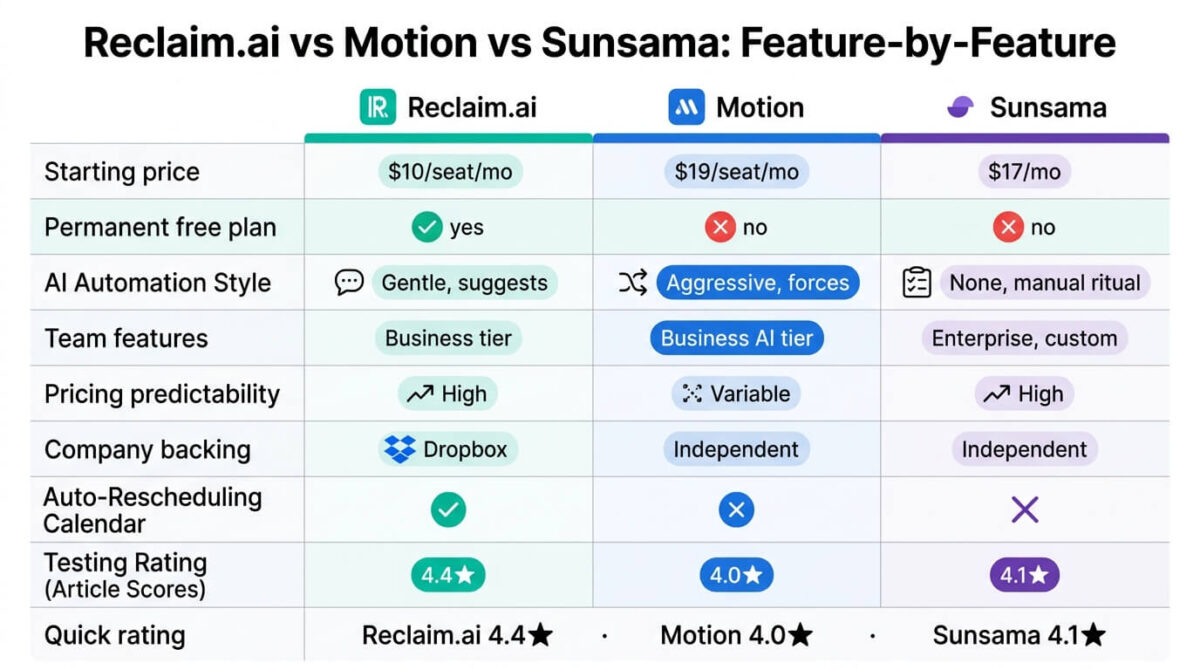
| Feature | Reclaim.ai | Motion | Sunsama |
|---|---|---|---|
| Starting price | $10/seat/month | $19/seat/month | $17/month |
| Permanent free plan | Yes (Lite) | No (7-day trial, card req) | No (14-day trial, no card) |
| Automation style | Gentle, suggests changes | Aggressive, forces rearrangement | None, guided manual ritual |
| Team features | Business tier | Business AI tier | Enterprise (custom) |
| Pricing predictability | High | Lower (metered AI credits) | High |
| Company backing | Dropbox (2024 acquisition) | Independent | Independent |
| Best suited for | Balanced automation on a budget | Complex, interdependent project scheduling | Mindful, hands-on daily planning |
Which Should You Choose?
Choose Reclaim.ai if a balance of automation and cost matters most, and gentle suggestions rather than forced calendar changes fit how much control feels comfortable to hand over.
Choose Motion if complex, interdependent projects need fully autonomous scheduling, and the metered AI-credit pricing is budgeted for realistically rather than assumed flat.
Choose Sunsama if the goal is a deliberate, reflective daily planning habit rather than an algorithm managing the calendar, and the lack of automation is a feature rather than a gap.
Our Recommendations
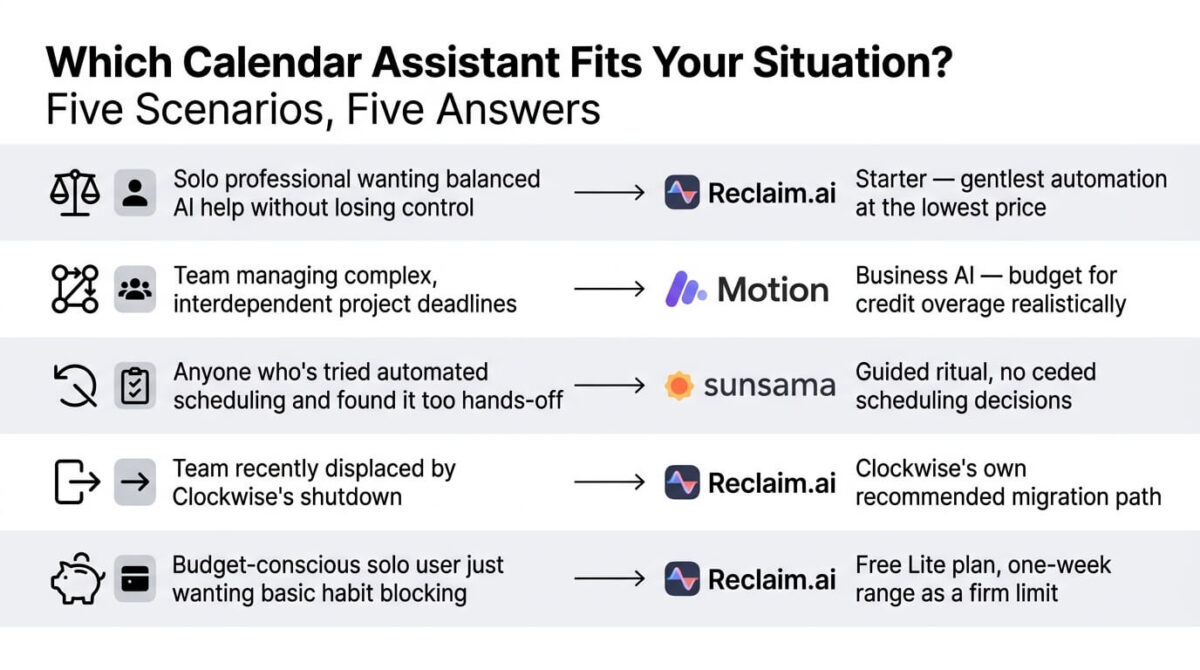
Based on 30 days of testing across automated and manual planning workflows, here is the recommended setup by situation:
Solo professional wanting balanced AI help without losing control: Reclaim.ai Starter, for the gentlest automation at the lowest price of the three.
Team managing complex, interdependent project deadlines: Motion Business AI, budgeting for AI credit overage as a realistic part of the monthly cost.
Anyone who’s tried automated scheduling and found it too hands-off: Sunsama, for the structure of a guided ritual without ceding scheduling decisions to an algorithm.
Team recently displaced by Clockwise’s shutdown: Reclaim.ai, both as Clockwise’s own recommended migration path and for its closer feature match to what Clockwise offered.
Budget-conscious solo user just wanting basic habit blocking: Reclaim.ai’s free Lite plan, understanding its one-week scheduling range as a firm limit rather than a preview.
Final Verdict
Reclaim.ai, Motion, and Sunsama sit at different points on the same spectrum, from Motion’s full automation to Sunsama’s fully manual ritual, with Reclaim landing in between.
- Reclaim.ai, 4.4 / 5, the best value and the steadiest company backing in a category that just lost a major competitor
- Sunsama, 4.1 / 5, the clearest choice for deliberate, hands-on daily planning rather than automation
- Motion, 4.0 / 5, the most powerful auto-scheduler, priced highest with the least predictable monthly cost
Clockwise’s shutdown is a useful reminder that this entire category runs on top of Google Calendar or Outlook rather than owning core infrastructure. Reclaim’s Dropbox backing and Sunsama’s independent, stable single-plan pricing both carry a bit more reassurance on that front than they did a year ago.
Frequently Asked Questions
What happened to Clockwise, and can I still use it?
Clockwise shut down completely on March 27, 2026, after Salesforce acquired it and hired its team for other AI projects. User data was deleted, and there’s no way to access the service anymore. Clockwise publicly recommended Reclaim.ai as the closest replacement for departing users.
Does Motion really cost more than the advertised price?
It can. Motion’s 2026 shift to metered AI credits means the $19/seat/month Pro AI price only covers 7,500 credits monthly; heavy use of AI scheduling features beyond that triggers overage charges, which several users have reported pushed their total bill above the advertised rate.
Is Reclaim.ai’s free plan usable in practice?
For light, single-calendar use, yes, with no time limit on the Lite plan. Its one-week scheduling range and single calendar sync are meaningful constraints, so anyone managing multiple calendars or needing to plan further ahead will need Starter at $10/seat/month.
Does Sunsama automatically reschedule my calendar like Motion or Reclaim?
No. Sunsama doesn’t auto-schedule or move events at all. It guides a manual daily planning session and evening shutdown routine, keeping the person in control of every scheduling decision rather than automating them.
Which tool is best for a team, not just an individual?
Motion’s Business AI tier offers the deepest team coordination, including capacity planning across a group of interdependent projects. Reclaim’s Business tier covers team scheduling and workforce analytics at a lower price, while Sunsama’s team option requires a custom Enterprise quote.
Is Reclaim.ai still independently run after the Dropbox acquisition?
Yes. Both co-founders continue running Reclaim.ai as a distinct product under the Dropbox umbrella, with no reported changes to pricing or roadmap directly tied to the acquisition as of this writing.
Which of these three requires the least daily effort to get value from?
Motion, by design, since it automatically rearranges the calendar with minimal ongoing input. Sunsama requires the opposite: daily engagement with its planning ritual is the entire point, and skipping it means missing most of the tool’s value.
Does Sunsama make sense if I don’t need integrations with 20 different tools?
Possibly not. Sunsama’s value concentrates in pulling tasks from many different tools into one guided daily view; a person using only one or two task sources may find Reclaim’s cheaper, more automated approach a better fit for that workflow.








