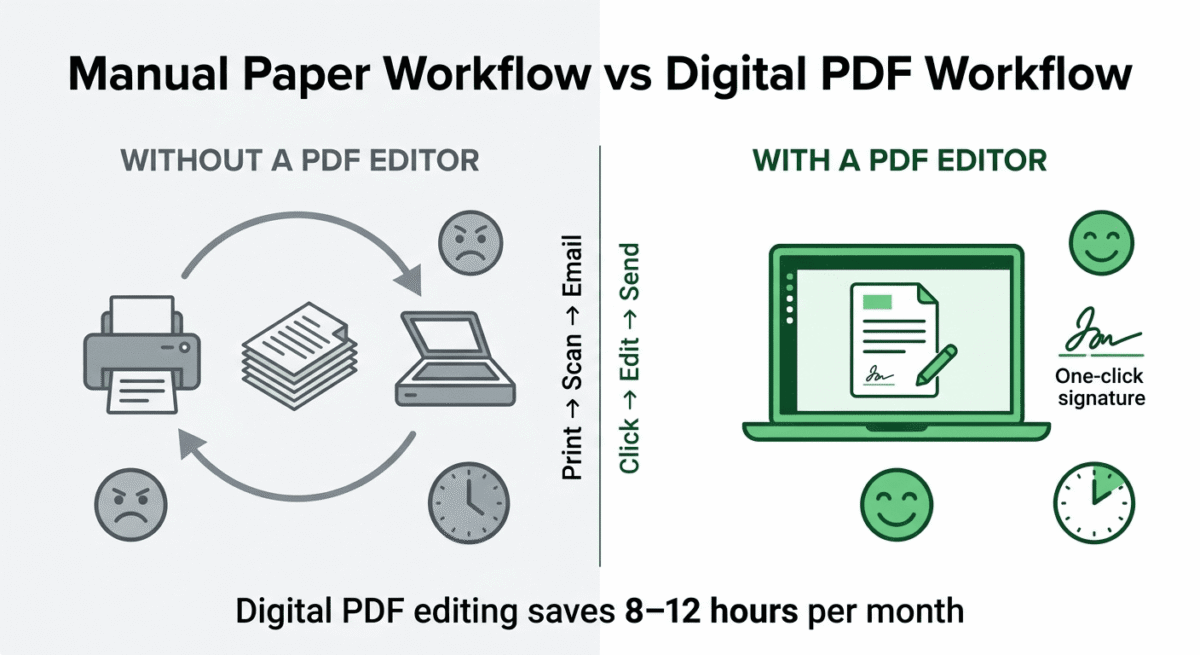
PDF files are everywhere in 2026: contracts, invoices, reports, ebooks, forms, and legal documents all live in PDF format. And yet most people still email documents back and forth, asking someone else to make changes, or print and scan forms just to add a signature.
A good PDF editor eliminates all of that. Edit text directly in the document. Fill and sign forms in seconds. Merge multiple files into one. Convert PDFs to Word, Excel, or PowerPoint. Compress files before sending. Protect sensitive documents with passwords and permissions.
The question is which PDF editor is worth paying for, and whether the industry standard (Adobe Acrobat) justifies its premium price when strong alternatives exist at a fraction of the cost.
I tested Adobe Acrobat vs PDFelement vs Foxit PDF Editor for 30 days on real documents, contracts, fillable forms, report editing, and OCR scanning. Here is the honest comparison.
Table of Contents
How We Evaluated These Tools
Every platform was tested across five criteria:
– Editing capability: how accurately and easily can you edit text, images, and layout in existing PDFs?
– OCR quality: how accurately does optical character recognition convert scanned documents to editable text?
– Form creation and filling: how well does each tool handle fillable forms and digital signatures?
– File conversion: quality of PDF to Word, Excel, and PowerPoint conversion
– Value: free plan quality and paid plan pricing versus features offered
Why PDF Editors Matter for Bloggers and Small Businesses
PDF editing may not seem like a priority for a software review blogger, but it becomes essential quickly as your blog grows:
Contracts and agreements. Affiliate program agreements, sponsored content contracts, and freelance writing contracts all arrive as PDFs. Editing, annotating, and signing them without printing requires a PDF editor.
Ebook and lead magnet creation. Bloggers who create free PDF guides, checklists, or ebooks as email opt-in incentives need PDF creation and editing tools to produce professional-looking documents. For the visual layout itself before exporting to PDF, see our roundup of design tools like Figma, Adobe XD, and Sketch for building a polished lead magnet from scratch.
Invoice management. Receiving and editing PDF invoices from contractors, designers, and service providers is a regular task for any blog running as a business. PDF editing is one small piece of that business operation, see our full roundup of the best tools for small business for the rest of the stack.
Press kits and media packages. As your blog grows, creating a professional press kit in PDF format, with your blog statistics, audience demographics, and advertising rates, becomes a business development necessity.
Adobe Acrobat Review: The Industry Standard, Powerful but Expensive
Free plan: Adobe Acrobat Reader (view and basic commenting only, not editing)
Starting price: $14.99/month (Acrobat Standard, billed annually)
Best plan for most users: Acrobat Standard, $14.99/month (billed annually)
Platforms: Windows, Mac, iOS, Android, web browser
Affiliate program: Yes, Adobe affiliate program, up to 85% commission on first month
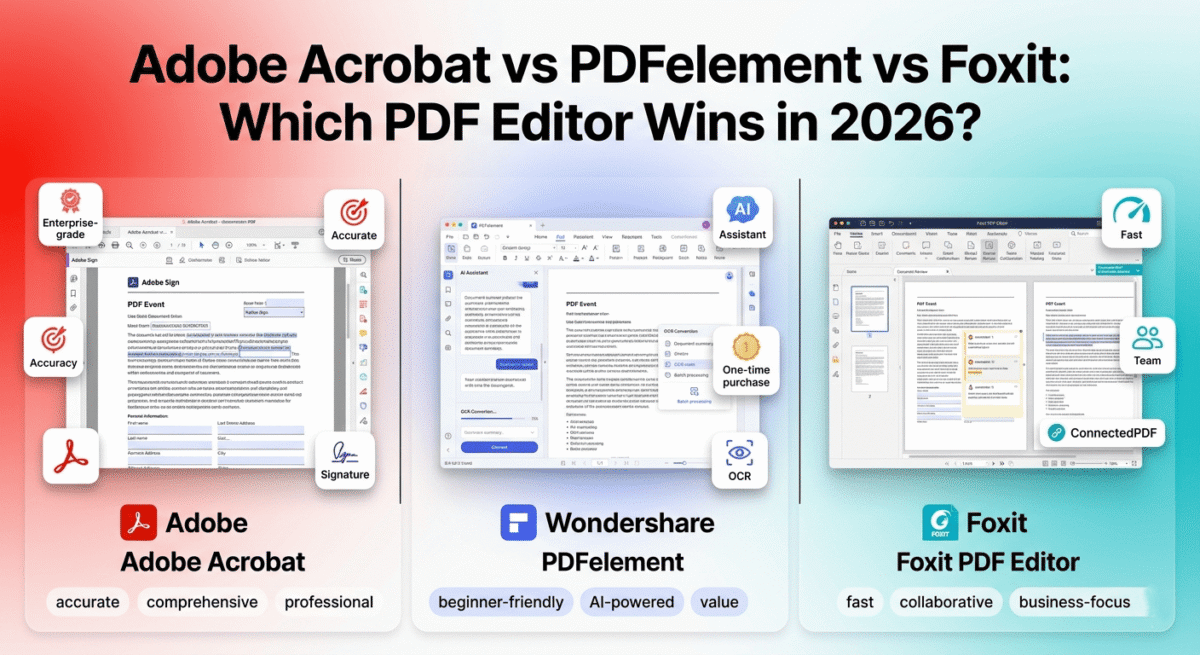
Adobe Acrobat invented the PDF format in 1993 and has defined PDF editing ever since. In 2026, it remains the most powerful, most comprehensive, and most widely trusted PDF tool available, used by legal firms, government agencies, enterprise businesses, and anyone for whom PDF accuracy is non-negotiable. It is also the most expensive option by a significant margin.
What Adobe Acrobat does best
Adobe Acrobat’s text editing is the most accurate of the three tools tested. When you click on text in an Acrobat-edited PDF, the editing cursor places precisely within the text flow, maintaining font matching, paragraph reflowing, and spacing consistency better than any competing tool. Editing a professionally typeset document in Acrobat produces results indistinguishable from the original; the same edit in competing tools often produces subtle font or spacing inconsistencies.
The OCR (Optical Character Recognition) engine in Adobe Acrobat is the most accurate available in a PDF editor. Scanned documents, including low-quality scans from old photocopiers and faxes, are converted to searchable, editable text with error rates noticeably lower than those of PDFelement and Foxit. For businesses that regularly process scanned contracts, receipts, and archival documents, Acrobat’s OCR accuracy is a meaningful practical advantage.
Adobe Acrobat’s form tools are the most comprehensive of the three platforms. Creating fillable PDF forms with text fields, checkboxes, radio buttons, dropdown menus, date pickers, and digital signature fields is a visual drag-and-drop process. The form field detection feature automatically identifies areas in an existing document that look like form fields and converts them to interactive fields with a single click.
Adobe Sign, integrated directly into Acrobat, enables legally binding e-signatures with audit trails, signer authentication, and automated reminder sequences. For bloggers signing contracts with sponsors or managing freelancer agreements, Adobe Sign eliminates the need for a separate e-signature service like DocuSign. If you’d rather compare dedicated e-signature platforms before committing to Adobe’s built-in option, see our DocuSign vs PandaDoc vs Adobe Sign comparison for how to sign PDFs digitally across different tools.
The document comparison feature, available in Acrobat Standard, highlights every difference between two versions of a PDF document, showing insertions, deletions, and modifications in a side-by-side view. For reviewing contract revisions or document changes, this comparison saves hours of manual review.
Acrobat’s PDF portfolio feature, allowing multiple files of different types to be bundled into a single navigable PDF container, and its advanced redaction tools (permanently removing sensitive information including metadata) are features that no competing tool matches at equivalent quality.
The web-based Acrobat online tools, accessible without the desktop application, allow basic editing, compression, conversion, and signing from any browser. For occasional PDF tasks on a device without Acrobat installed, the online tools provide access to core capabilities.
Where Adobe Acrobat falls short
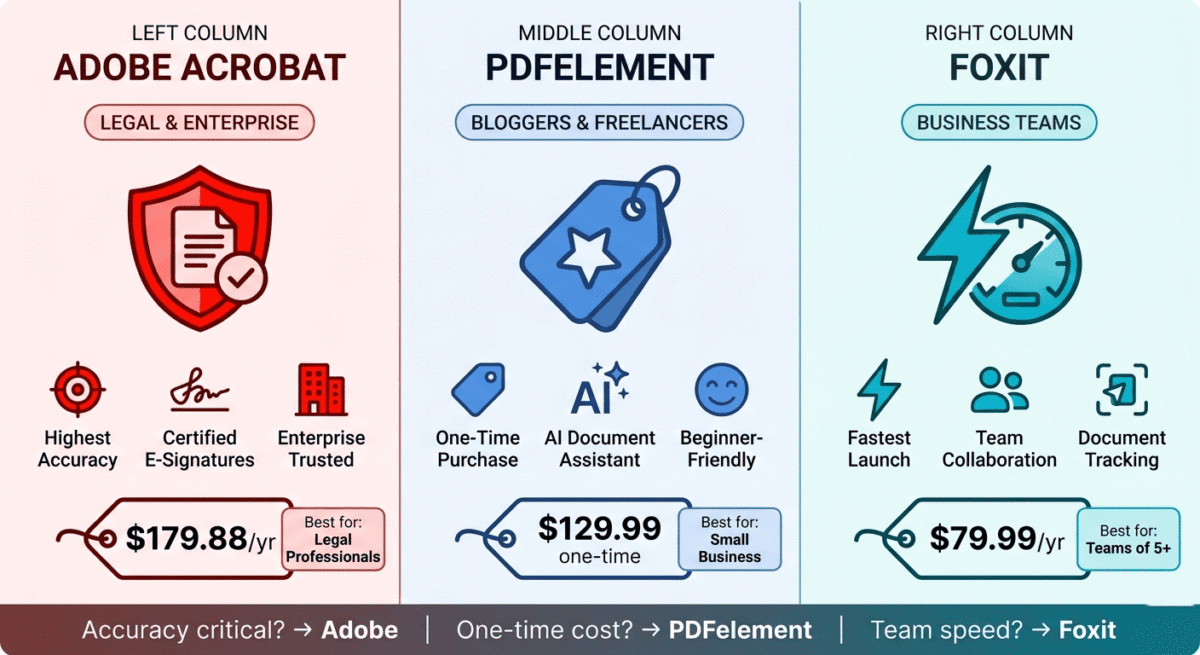
Adobe Acrobat’s pricing is its most significant weakness. The Standard plan at $14.99/month ($179.88/year) and the Pro plan at $19.99/month ($239.88/year) cost more annually than PDFelement’s lifetime licence. For small businesses and individual bloggers who do not need enterprise-grade PDF features daily, this ongoing cost is difficult to justify.
Adobe has moved entirely to subscription pricing; there is no perpetual licence option for Acrobat. Every year you pay again, and stopping the subscription means losing access to the software while your PDFs remain inaccessible for editing.
The interface, while comprehensive, is the most complex of the three tools; finding specific features in Acrobat’s dense menu structure takes longer than in PDFelement’s more streamlined interface. New users frequently struggle to locate common features despite Acrobat’s decades of existence.
Adobe Acrobat pricing
Plan | Price/month (annual) | Key features |
Acrobat Standard | $14.99 | Edit, convert, create, sign, compress |
Acrobat Pro | $19.99 | + Compare, redact, protect, accessibility |
Creative Cloud All Apps | $59.99 | + All Adobe apps including Acrobat Pro |
Adobe Acrobat: Pros and Cons
Pros:
– Most accurate text editing, best font matching and paragraph reflow
– Best OCR accuracy, handles low-quality scans better than competitors
– Most comprehensive form creation tools
– Adobe Sign built in, legally binding e-signatures with audit trail
– Document comparison feature
– Advanced redaction for sensitive information
– Most trusted brand, universally accepted in legal and enterprise contexts
– Web-based tools for browser access without installation
Cons:
– Most expensive, $179.88/year with no perpetual licence option
– Subscription only, no one-time purchase
– Most complex interface, harder to navigate than competitors
– Overkill for occasional PDF users
– Adobe Sign’s full features require higher plan tiers
– Subscription dependency, losing subscription means losing editing access
Rating: 4.6 / 5 Best PDF editor for accuracy and enterprise features. Difficult to justify for most bloggers and small businesses when equally capable alternatives cost significantly less.
PDFelement Review: Best PDF Editor for Value and Ease of Use
Free plan: Yes, full features with a watermark on saved files
Starting price: $79.99/year (PDFelement Standard subscription)
Best plan for most users: Perpetual licence, $129.99 one-time (PDFelement Pro)
Platforms: Windows, Mac, iOS, Android
Affiliate program: Yes, Wondershare affiliate program, up to 30% commission
PDFelement by Wondershare is the strongest Adobe Acrobat alternative in 2026, offering 90% of Acrobat’s capabilities at roughly 30–50% of the cost, in a significantly more beginner-friendly interface. For bloggers, small business owners, and freelancers who need serious PDF editing without enterprise pricing, PDFelement is the most compelling option available.
What PDFelement does best
PDFelement’s interface is the most user-friendly of the three tools. The ribbon-based toolbar, similar to Microsoft Office, organises every feature into logical categories: Edit, Comment, Form, Convert, Protect, and so on. New users find the PDF tool they need within seconds without searching through nested menus. The learning curve from installation to productive use is measured in minutes, not hours.
The text editing accuracy is the closest to Adobe Acrobat’s of any competing tool tested. Font detection and matching work reliably on standard fonts, and editing a paragraph in a professionally produced PDF produces results that are nearly indistinguishable from Acrobat’s on most documents. Complex typographic layouts with custom fonts show more variation than Acrobat, but for the typical business documents most users edit, PDFelement’s accuracy is entirely satisfactory.
PDFelement’s OCR is the most accurate alternative to Adobe Acrobat, supporting 25+ languages and handling multi-column layouts, tables, and mixed text-image documents with better accuracy than Foxit. Scanned receipts, contracts, and reports are converted to editable text reliably, though slightly below Acrobat’s accuracy on poor-quality scans.
The AI-powered features, introduced in PDFelement 10 and significantly expanded in 2025, are the most practical AI additions of the three tools tested. The AI assistant can summarise long PDF documents in seconds, answer questions about document content, translate documents, and proofread text, all within the PDF editor without switching to a separate AI tool. For bloggers who receive lengthy press releases, research reports, or affiliate program terms in PDF format, the AI summary feature saves meaningful reading time.
PDFelement’s form creation is comprehensive, including drag-and-drop form field creation, automatic field detection from existing documents, form data collection and export, and digital signature fields are all included in the Pro version. The signature feature, while not as legally comprehensive as Adobe Sign, covers the standard e-signature use cases that most small businesses need.
The batch processing feature, applying the same operation (OCR, conversion, compression, watermarking) to hundreds of files simultaneously, is a time-saving capability that Foxit does not include at equivalent quality.
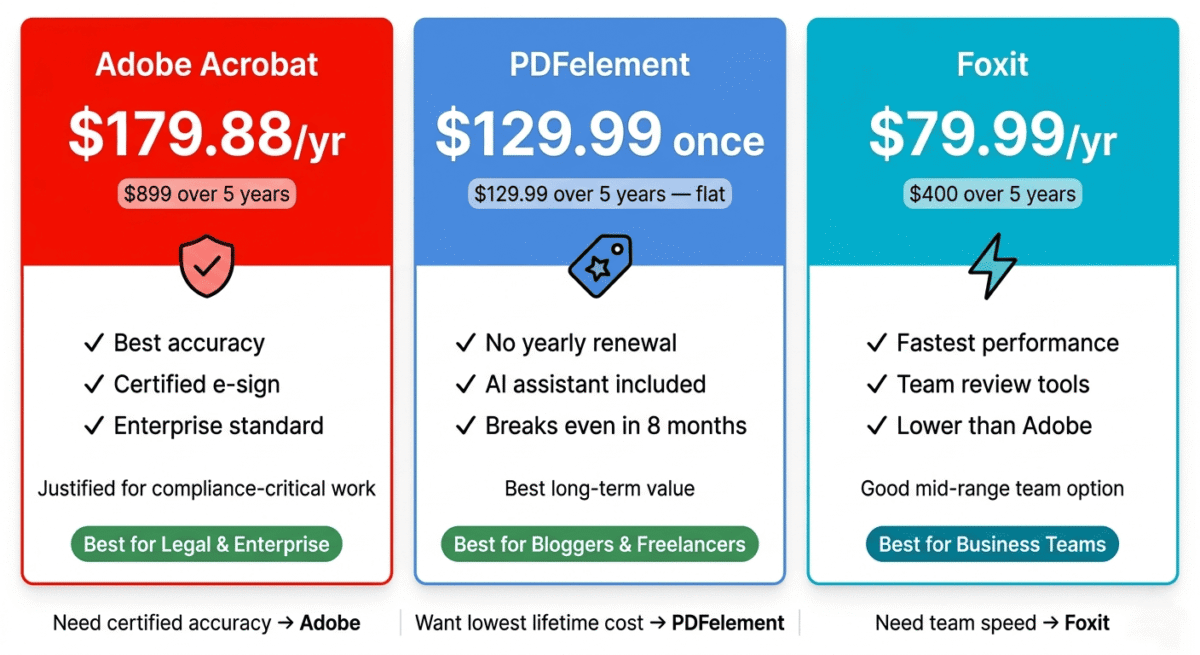
The perpetual licence at $129.99 one-time is PDFelement’s most compelling pricing advantage. Paying once for permanent access to PDFelement Pro, without any recurring subscription, means the tool costs less than a single year of Adobe Acrobat Standard ($179.88). Every year after the first, PDFelement is free while Acrobat continues billing.
Where PDFelement falls short
PDFelement’s font matching on complex or custom-font documents is occasionally imperfect, substituting a similar but not identical font when the original is not installed on your system. Adobe Acrobat handles this more gracefully through its more extensive font embedding detection.
The e-signature functionality, while present, lacks the audit trail and legal certification that Adobe Sign provides for enterprise and legal contexts. For simple e-signatures on freelance contracts, PDFelement’s signatures are practical. For legally sensitive documents requiring certified signatures, Adobe Sign or a dedicated e-signature service is more appropriate.
The mobile apps for iOS and Android are less feature-complete than the desktop versions, useful for viewing, annotating, and basic editing, but not the full editing experience of the desktop application.
PDFelement pricing
Plan | Price | Type | Key features |
Free | $0 | — | Full features with watermark |
Standard | $79.99/year | Subscription | No watermark, all features |
Pro | $129.99 | One-time | Full features, lifetime access |
Pro + AI | $159.99 | One-time | + AI assistant, summary, translation |
PDFelement: Pros and Cons
Pros:
– Best value, $129.99 one-time vs $179.88/year for Acrobat
– Most beginner-friendly interface, ribbon layout, intuitive navigation
– AI assistant for document summarisation, Q&A, and translation
– Good OCR accuracy supporting 25+ languages
– Batch processing for multiple files simultaneously
– Full perpetual licence, no ongoing subscription
– Free version with full features (watermark only)
– Up to 30% affiliate commission
Cons:
– Font matching less accurate than Acrobat on complex layouts
– E-signatures lack enterprise audit trail
– Mobile apps less feature-complete than desktop
– Less universally trusted than Adobe in legal contexts
– Slightly lower OCR accuracy than Acrobat on poor-quality scans
Rating: 4.7 / 5 Best PDF editor for value. Perpetual licence at $129.99 is the most cost-effective serious PDF editing solution available.
Foxit PDF Editor Review: Best Lightweight PDF Editor for Business Teams
Free plan: Yes, Foxit PDF Reader (view, annotate, basic sign, no editing)
Starting price: $79.99/year (Foxit PDF Editor Standard)
Best plan for most users: Standard, $79.99/year
Platforms: Windows, Mac, iOS, Android, web browser
Affiliate program: Yes, Foxit affiliate program
Foxit PDF Editor has been Adobe Acrobat’s most direct competitor for over a decade, targeting business teams who want Acrobat-comparable functionality at lower cost with better multi-user licensing. In 2026, Foxit remains a strong option for Windows-focused business environments, with a smaller, faster application footprint than Adobe Acrobat and competitive pricing for team deployments.
What Foxit does best
Foxit PDF Editor’s application size and launch speed are its most immediately noticeable advantages. The desktop application loads in under 3 seconds compared to Acrobat’s 8–12 second launch time, a practical difference when you open PDFs frequently throughout the day. The smaller application footprint (significantly less disk space than Acrobat’s) makes Foxit practical on lower-spec machines where Acrobat’s resource demands are problematic.
The shared review feature, where multiple team members can annotate and comment on a PDF simultaneously with changes visible to all reviewers in real time, is Foxit’s strongest team collaboration capability. While Acrobat has similar features, Foxit’s implementation is more straightforward and requires less technical setup for multi-reviewer workflows.
Foxit’s ConnectedPDF technology, a cloud-based document tracking system, shows document owners when, where, and by whom their PDF was opened. For bloggers who send proposals or media kits as PDFs, knowing whether a recipient has actually opened the document is practically useful.
The form creation and data management tools are strong, comparable to PDFelement for standard fillable form creation, with good form data export to CSV and Excel for processing collected responses.
Foxit’s compliance features, PDF/A and PDF/X format support for archiving and printing standards, are more developed than PDFelement’s, making it the better choice for businesses with document archiving requirements.
The enterprise volume licensing is Foxit’s strongest commercial advantage, significantly cheaper per-seat pricing than Adobe Acrobat for teams of 10, 25, or 100 users. For businesses deploying PDF editing across a large team, Foxit’s licensing economics are considerably better than Adobe’s.
Where Foxit falls short
Foxit’s text editing accuracy on complex documents falls slightly below both Adobe Acrobat and PDFelement. Font substitution issues on documents with non-standard fonts are more frequent, and paragraph reflow after text editing occasionally produces alignment inconsistencies that require manual correction.
The OCR accuracy, while functional for clean scans, is the weakest of the three tools for poor-quality or low-resolution scanned documents. Heavily degraded scans that Acrobat and PDFelement handle adequately often produce higher error rates in Foxit.
Foxit’s AI features are less developed than PDFelement’s; basic summarisation is available but without the Q&A, translation, and proofreading capabilities that PDFelement’s AI assistant provides.
The Mac version, while available, is less feature-complete than the Windows version; several features present on Windows are absent or limited on Mac. For Mac-primary users, PDFelement provides a more consistent cross-platform experience.
Foxit pricing
Plan | Price/year | Key features |
PDF Reader | Free | View, annotate, basic sign |
PDF Editor Standard | $79.99 | Edit, convert, create, sign |
PDF Editor Pro | $109.99 | + Compare, redact, advanced forms |
Business plans | Volume pricing | Per-seat team licensing |
Foxit: Pros and Cons
Pros:
– Fastest application launch, under 3 seconds vs Acrobat’s 8–12 seconds
– Best for Windows business teams, competitive volume licensing
– ConnectedPDF document tracking shows when recipients open files
– Shared review for multi-reviewer annotation workflows
– Smaller application footprint, practical on lower-spec machines
– PDF/A and PDF/X compliance features for archiving
– Web-based version for browser access
Cons:
– Text editing accuracy below Acrobat and PDFelement on complex layouts
– Weakest OCR of the three tools on poor-quality scans
– Mac version less feature-complete than Windows
– AI features less developed than PDFelement
– Less intuitive interface than PDFelement for new users
– No perpetual licence option, subscription only
Rating: 4.3 / 5 Best PDF editor for Windows business teams needing fast performance and volume licensing. Outclassed by PDFelement for individual users in terms of value and features.
Head-to-Head Comparison
Adobe Acrobat Standard | PDFelement Pro | Foxit PDF Editor Standard | |
Price | $179.88/year | $129.99 one-time | $79.99/year |
Free plan | Reader only (no editing) | Yes (watermarked) | Reader only (no editing) |
Perpetual licence | No | Yes | No |
Text editing accuracy | Excellent | Very good | Good |
OCR accuracy | Excellent | Very good | Good |
Form creation | Excellent | Very good | Very good |
E-signatures | Adobe Sign (enterprise) | Basic e-sign | Basic e-sign |
AI features | Basic | Excellent (summary, Q&A) | Basic |
Batch processing | Yes | Yes | Yes |
Document comparison | Standard plan+ | Pro plan | Pro plan |
Redaction | Pro plan | Pro plan | Pro plan |
Application speed | Slow (8–12s launch) | Medium | Fast (<3s launch) |
Mac experience | Excellent | Excellent | Limited |
Team licensing | Expensive | Per licence | Competitive |
Affiliate commission | Up to 85% first month | Up to 30% | Standard |
Which PDF Editor Should You Choose?
Choose Adobe Acrobat if:
Your work involves legally sensitive documents where accuracy and trust are non-negotiable, legal contracts, certified forms, regulatory submissions, or documents where font and formatting precision are critical. Also choose Acrobat if you are already in the Adobe Creative Cloud ecosystem (the All Apps plan adds Acrobat Pro for minimal additional cost over Photoshop and Premiere alone). For bloggers without these specific needs, Acrobat’s cost is difficult to justify.
Choose PDFelement if:
You need serious PDF editing, including OCR, form creation, batch processing, and document conversion, without ongoing subscription costs. The perpetual licence at $129.99 one-time is the best long-term value in PDF editing, and the AI-powered summary and Q&A features add genuine productivity value beyond basic editing. For bloggers, freelancers, and small business owners, PDFelement Pro is the recommended choice.
Choose Foxit if:
You manage a Windows-based business team where multiple users need PDF editing simultaneously and volume licensing economics matter. Foxit’s fast launch speed and ConnectedPDF tracking are also practical advantages for users who open PDFs frequently. For individual users, PDFelement’s superior AI features and perpetual licensing make it the better choice.
Free PDF Tools Worth Knowing
Before spending on a PDF editor, several free tools cover specific tasks:
Adobe Acrobat online (acrobat.adobe.com), free web tools for compressing, converting, and basic editing of PDFs. Limited to one or two operations per day without a subscription but covers occasional tasks.
Smallpdf (smallpdf.com), free online PDF compression, conversion, merging, and splitting. Two free tasks per day. No installation required, useful for quick one-off tasks.
PDF24, free desktop and web PDF tool covering compression, conversion, merging, and basic editing. No task limits, no watermarks. The best completely free PDF utility for users who do not need OCR or text editing.
ILovePDF (ilovepdf.com), free online PDF merging, splitting, compression, and conversion. Useful for tasks that do not require text editing or OCR.
For bloggers whose PDF needs are primarily compression, merging, and format conversion rather than text editing, these free tools may be sufficient without a paid subscription.
Final Verdict
PDFelement Pro is the best PDF editor for most bloggers and small business owners. The perpetual licence at $129.99 one-time provides serious PDF editing capability at a fraction of Adobe Acrobat’s ongoing cost. The AI-powered document summarisation and Q&A features are genuinely useful additions. For anyone who needs a capable PDF editor without paying annually forever, PDFelement is the clear recommendation.
Adobe Acrobat is the best PDF editor for accuracy and enterprise use. Its text editing precision, OCR quality, and Adobe Sign integration are unmatched. Worth the premium for legal, enterprise, and compliance-heavy workflows. For most bloggers, the cost is not justified by the capability advantage.
Foxit PDF Editor is the best choice for Windows business teams. Volume licensing economics and fast application performance make it the most practical option for multi-user business deployments, though individual users are better served by PDFelement’s value and features.
Ratings:
– PDFelement: 4.7 / 5
– Adobe Acrobat: 4.6 / 5
– Foxit PDF Editor: 4.3 / 5
Frequently Asked Questions
What is the best free PDF editor in 2026?
PDFelement offers the most capable free tier, full PDF editing features with a watermark on saved files. For users who need to edit PDFs occasionally and can tolerate the watermark, PDFelement free provides Acrobat-comparable editing at zero cost. For tasks that do not require text editing (compression, merging, conversion), PDF24 is completely free with no watermarks or task limits.
Is Adobe Acrobat worth the subscription cost?
For legal professionals, enterprise users, and anyone for whom PDF accuracy and Adobe Sign’s certified e-signatures are business requirements, yes. For bloggers and small business owners who need capable PDF editing without enterprise features, PDFelement Pro at $129.99 one-time provides better long-term value than Acrobat’s $179.88/year subscription.
What is the difference between Adobe Acrobat Reader and Adobe Acrobat?
Adobe Acrobat Reader (free) allows viewing, commenting, and basic form filling in PDF files, but not editing text, rearranging pages, or creating new content. Adobe Acrobat (paid subscription) adds full-text editing, OCR, PDF creation, format conversion, advanced form creation, and Adobe Sign. Reader is sufficient for reading and annotating; Acrobat is required for editing.
Can I edit a PDF without Adobe Acrobat?
Yes. PDFelement, Foxit, and several other tools edit PDFs without requiring Adobe software. Microsoft Word also opens and edits PDFs directly (with some formatting limitations), sufficient for basic text changes on simple documents. Google Docs can import PDFs for editing, though complex formatting is often lost in the conversion. For serious PDF editing, a dedicated PDF editor produces better results than a word processor workaround.
What is OCR and why does it matter for PDF editing?
OCR (Optical Character Recognition) converts scanned document images, photos of printed pages, into editable, searchable text. Without OCR, a scanned PDF is just an image; you can view it but not edit the text, search within it, or copy text from it. With OCR, the same document becomes fully editable. For anyone who regularly works with scanned contracts, receipts, or archival documents, OCR quality is one of the most important criteria for PDF editor selection.
Which PDF editor is best for Mac?
Adobe Acrobat and PDFelement both offer full-featured Mac versions comparable to their Windows equivalents. Foxit’s Mac version is less complete. Apple’s built-in Preview application handles basic PDF annotation, form filling, and signature, sufficient for simple tasks without a paid PDF editor. For serious editing on Mac, PDFelement Pro or Adobe Acrobat Standard are the recommended choices.
How do I reduce PDF file size?
All three tools include PDF compression, typically reducing file size by 40–80% depending on the content. Free online tools (Smallpdf, PDF24, ilovepdf) also compress PDFs without software installation. The most effective compression reduces image resolution within the PDF while preserving text quality; all three paid tools offer quality level selection during compression.
Is it legal to edit a PDF someone sent me?
Editing a PDF you received depends on context and document permissions. Editing for your own reference (adding notes, highlighting) is generally acceptable. Editing the content itself and representing the changed document as the original is potentially fraudulent. PDF documents can be password-protected to prevent editing; attempting to bypass these protections without authorisation is illegal in most jurisdictions. Always obtain explicit permission before editing and re-sending a document as if unmodified.