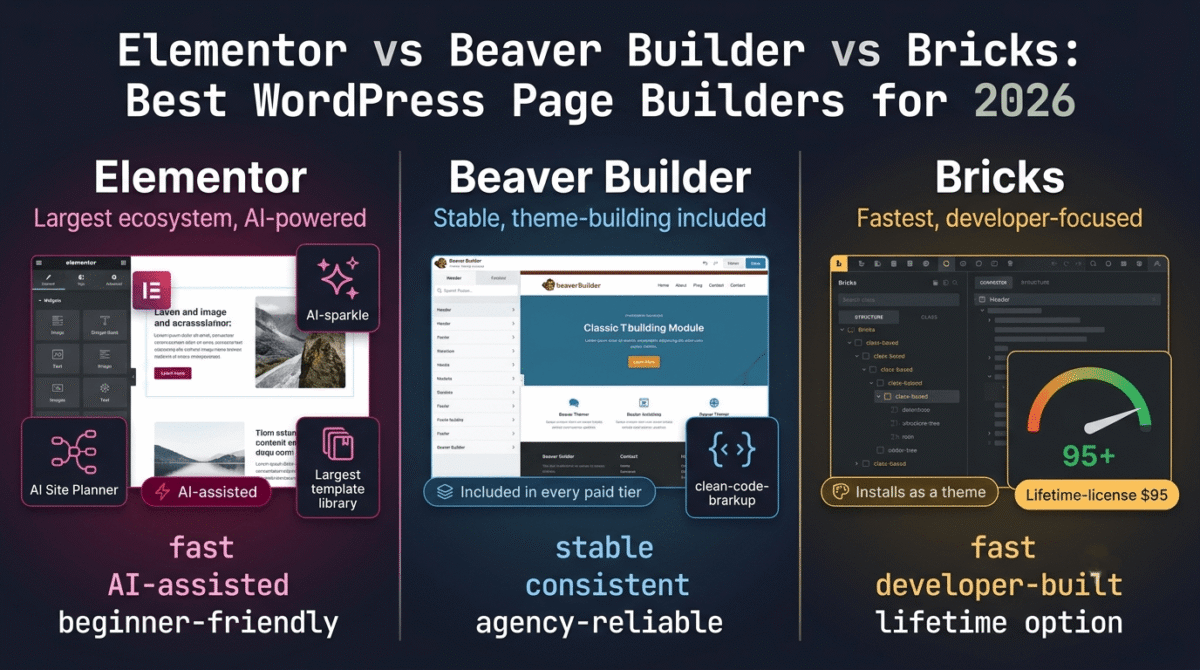
Elementor vs Beaver Builder vs Bricks is the comparison most WordPress site owners land on once they decide a page builder is the right move. All three let you design pages visually. None of them work the same way underneath.
Elementor is a plugin. Bricks installs as a theme. Beaver Builder sits somewhere between the two, pairing a plugin with an optional companion theme. That structural difference alone shapes how each one performs, how it’s maintained, and how much it costs over time.
We built the same three pages, a homepage, a landing page, and a WooCommerce product page, in each builder. Same hosting. Same theme baseline. Same content. What came out the other end is what this review is based on.
Table of Contents
How We Tested
Every builder went through the same five checks:
- Page load performance, page weight added and Core Web Vitals scores on identical hosting
- Learning curve, time to build a working landing page with no prior experience on that builder
- Theme building, headers, footers, archive templates, and WooCommerce layouts
- Pricing over time, cost across one year and three years, including renewal terms
- Handoff difficulty, how easily a non-technical editor can update the page later
The test environment stayed constant across all three builds: Hostinger with LiteSpeed caching, the same server-level setup we run on this site. Any speed differences below come from the builder, not the hosting. See our Hostinger vs Bluehost vs SiteGround comparison if you’re curious how that hosting choice affects performance beyond just page builder overhead.
Elementor Review
Elementor is a WordPress plugin and the most widely installed page builder in the space. Its ecosystem, templates, tutorials, third-party add-ons, is larger than either competitor’s by a wide margin.
What it does well
Elementor’s AI layer stands out this year. Text generation, image creation from prompts, an AI Site Planner that maps a site structure before you build it, and an agentic assistant capable of updating dozens of pages in one pass. Combined with the largest template library of the three and a learning curve most beginners clear in a day, it’s the fastest path from a blank page to a finished site.
Where it struggles
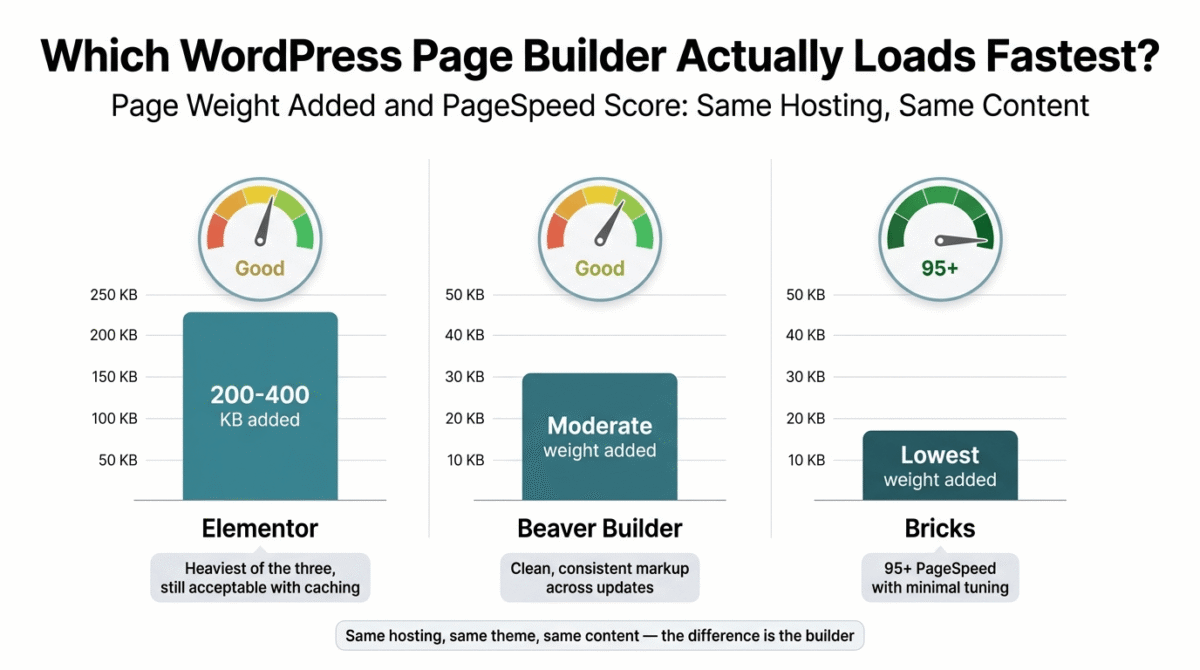
Page weight. Elementor Pro adds 200–400KB depending on widget use, the heaviest of the three builders tested. Pricing has also grown a layer more complex with the addition of an “Elementor One” bundle sitting next to the standard tiers, and AI credits sell as a separate add-on subscription rather than something bundled into Pro.
Elementor Pricing & Plans
| Plan | Price | Sites | Notable Feature |
|---|---|---|---|
| Essential | $59 / year | 1 | Theme Builder, Popup Builder, Form Builder |
| Advanced | $99 / year | 3 | Same feature set, more activations |
| Expert | $199 / year | 25 | Priority support tier |
| Agency | $399 / year | 1,000 | Full agency-scale activation limit |
AI credits are billed separately, starting around $4–$8/month on top of any Pro plan.
Pros:
- Largest template and widget library of the three
- Built-in AI tools most competitors don’t offer
- Shortest learning curve
- Largest support community
Cons:
- Heaviest page weight in our testing
- No lifetime license, discontinued in 2022, every plan renews annually
- Pricing tiers have become harder to compare at a glance
- AI features cost extra
Rating: 4.0/5
Beaver Builder Review
Beaver Builder pairs a page builder plugin with an optional theme and a theme-building add-on called Beaver Themer. It has built a reputation around stability rather than feature count.
What it does well: Clean markup and consistent behavior across theme and plugin updates. Beaver Themer, which handles headers, footers, archives, and WooCommerce layouts, now comes included in every paid tier after a recent pricing change, previously it sat behind the top plan only. It also supports classic, non-block themes, which matters if you’re maintaining a site you’re not ready to move to a block theme.
Where it struggles: No built-in AI tools. Third-party AI plugins can fill the gap, but nothing ships natively the way it does with Elementor. The pricing restructure that bundled Themer into every tier also raised the entry price compared to previous years, check your renewal notice rather than assuming last year’s rate carries forward. The template library is smaller than Elementor’s.
Beaver Builder Pricing & Plans
| Plan | Price | Sites | Notable Feature |
|---|---|---|---|
| Starter | $89 / year | 1 | Beaver Themer + Beaver Builder Theme included |
| Plus | $179 / year | 3 | Same feature set, more activations |
| Professional | $299 / year | 50 | Built for agencies managing multiple client sites |
| Unlimited | $546 / year | Unlimited | White-label options included |
Pros:
- Stable, clean code across updates
- Theme building included at every paid tier
- Works on classic (non-block) themes
- 30-day money-back guarantee tested in your live environment
Cons:
- No native AI tools
- Higher entry price than Elementor’s base tier
- Smaller template library
- Recent pricing change increased renewal costs for some existing users
Rating: 4.0/5
Bricks Review
Bricks installs as a WordPress theme rather than a plugin, and it’s built the way a developer would build a theme from scratch, class-based styling, native support for custom CSS, JS, and PHP.
What it does well: Speed. Bricks scored 95+ on PageSpeed in our tests with little tuning required. A Query Loop Builder handles dynamic content natively, and popup and menu builders come included, which cuts down on the number of separate plugins a site needs. Bricks is also the only one of the three offering a lifetime license.
Where it struggles: The learning curve. Bricks expects comfort with classes, structure, and nesting, closer to hand-coding with guardrails than a drag-and-drop tool. Its template library is thin next to Elementor’s. Handing a Bricks site to a non-technical editor carries risk, since the same flexibility that makes it powerful also makes it easy to break something without meaning to.
Bricks Pricing & Plans
| Plan | Price | Sites | Notable Feature |
|---|---|---|---|
| Starter | $79 / year | 1 | Full feature set, no tier restrictions |
| Business | $149 / year | 3 | Same features, more activations |
| Agency | $249 / year | Unlimited | Eligible for Bricks Expert Listing |
| Ultimate Lifetime | $599 one-time | Unlimited | Lifetime updates and support, no renewal |
Pros:
- Best raw performance of the three builders tested
- Popup, menu, and query builders included, fewer plugins to manage
- Lifetime license option, unlike Elementor
- Every plan gets the full feature set, no functionality gated by tier
Cons:
- Steepest learning curve of the three
- Thin template library
- Risky to hand off to non-technical editors
- Installs as a theme, which changes your update and child-theme workflow
Rating: 4.3/5
A Pricing Detail to Check Before You Buy
Two pricing points shifted enough to catch out anyone comparing based on older articles.
Elementor’s lifetime license is gone. It was discontinued in 2022, so every current plan, including the $399/year Agency tier, renews every year, indefinitely.
Bricks changed its pricing model too. Older reviews describe it as a lifetime-only, one-time-payment product priced around $149–$249. Today, annual subscriptions (Starter, Business, Agency) are the default path, with the $599 Ultimate Lifetime plan sold as a separate option. If the article you’re comparing against was written before this change, the numbers in it no longer apply.
Technical Notes for WordPress Developers
A few details matter more to whoever maintains the site than to whoever picks the tool. See our full WordPress developer toolkit guide for the rest of the stack that pairs with whichever page builder you choose.
Database overhead. Elementor stores a large share of its layout data as post meta. On sites with thousands of pages, this shows up as a bigger wp_postmeta table and extra queries per page load, visible in Query Monitor during development. Bricks and Beaver Builder both stay leaner here.
Update workflow. Bricks installs and updates as a theme, not a plugin. That changes where you check for updates and makes a child theme setup matter more than it does with the other two builders.
Custom post types and dynamic content. Bricks’ Query Loop Builder handles custom post types, a portfolio, a directory, a review database like the one behind this comparison, without extra setup. Elementor’s Loop Builder and Beaver Builder’s dynamic tags get there too, with more manual field mapping along the way.
Plugin count and security surface. Fewer active plugins means a smaller attack surface. Bricks’ built-in popup, menu, and query tools replace plugins you’d otherwise install separately alongside Elementor or Beaver Builder, a small maintenance advantage if you’re already running Wordfence and trying to keep the plugin list short. See our Wordfence vs Sucuri vs iThemes Security comparison if you haven’t settled on a security plugin yet.
Head-to-Head Comparison
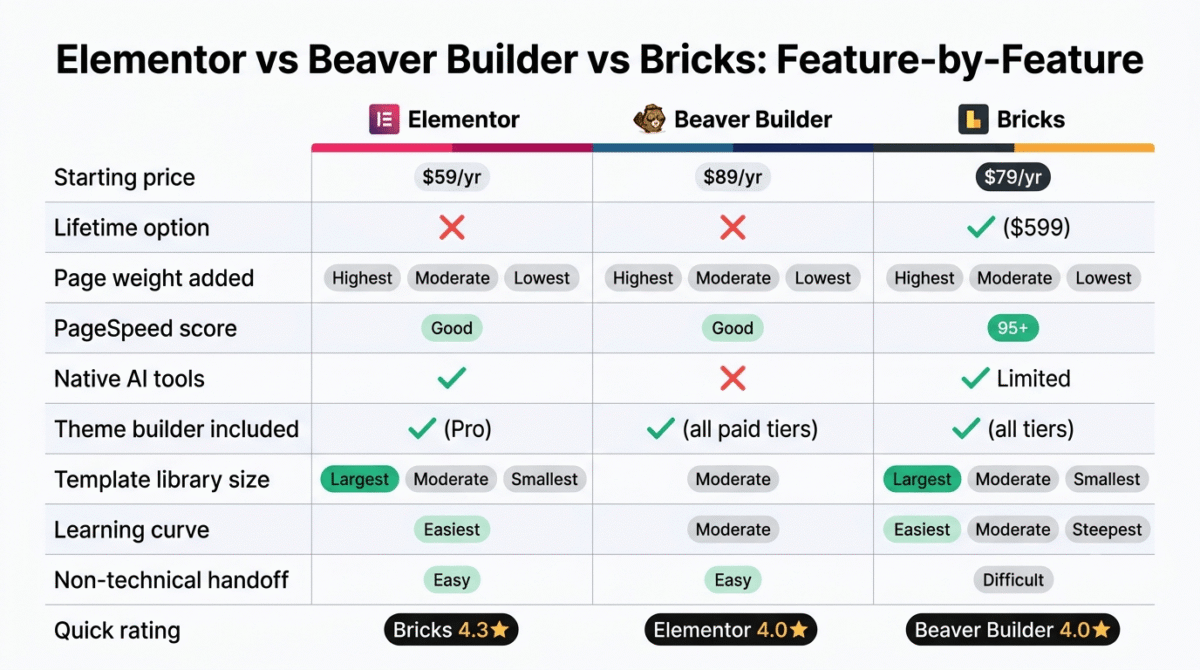
| Feature / Metric | Elementor | Beaver Builder | Bricks |
|---|---|---|---|
| Starting Price | $59 / year | $89 / year | $79 / year |
| Lifetime Option | No | No | Yes $599 one-time |
| Page Weight Added | Highest Deep DOM & asset bloat | Moderate Clean layout CSS/JS | Lowest Minimalist HTML5 markup |
| PageSpeed Score | Good Requires heavy optimization | Good Consistently stable | 95+ Out of Box |
| Native AI Tools | Yes Text, code & image generation | No | Limited |
| Theme Builder Included | Yes (Pro) | Yes All paid tiers | Yes All tiers |
| Template Library | Largest Massive ecosystem | Moderate | Smallest Growing community kits |
| Learning Curve | Easiest Visual drag-and-drop | Moderate | Steepest Requires CSS/HTML fundamentals |
| Non-Technical Handoff | Easy Intuitive WYSIWYG editor | Easy Stable & hard to break | Difficult Best paired with ACF/Gutenberg |
| Classic Theme Support | Yes Works on standard themes | Yes Includes Beaver Builder Theme | Limited Operates as standalone theme |
Which Should You Choose?
Pick Elementor if you’re building solo, want AI tools built in, and value the largest template library available in a WordPress page builder.
Pick Beaver Builder if you’re maintaining client sites, especially on classic themes, and stability matters more to you than having the newest feature set.
Pick Bricks if a developer is involved in the build and load speed is a priority. It rewards technical comfort and penalizes teams without one.
Skip all three if your site is mostly content, posts, articles, standard pages. Gutenberg’s native block editor and Full Site Editing cover that use case for free, without adding a subscription or extra page weight. We run this site on Gutenberg for exactly that reason.
Final Verdict
Elementor, Beaver Builder, and Bricks solve the same problem in three different ways, and none of them beats the other two across every category.
- Bricks, 4.3/5, the strongest performance and the only lifetime-license option, best suited to builds with developer involvement
- Elementor, 4.0/5, the easiest starting point, with AI tools and a template library neither competitor matches
- Beaver Builder, 4.0/5, the steadiest choice for agencies maintaining classic-theme client sites
Before buying any of the three, check whether Gutenberg’s native editor already covers what your site needs. Save the subscription for the pages that need more than that.
Frequently Asked Questions
Is Elementor still a solid page builder in 2026?
Yes, for solo builders and beginners. Its AI tools, template library, and short learning curve outweigh the extra page weight for most non-technical users. If speed is the top priority, Bricks performs better, but Elementor remains the faster path from a blank page to a finished site.
Does Beaver Builder support WooCommerce?
Yes. Beaver Themer, included in every paid tier, lets you design product pages, shop archives, and checkout layouts visually. It doesn’t go as deep as Bricks’ dedicated WooCommerce Builder, but it covers standard store needs.
Is Bricks good for beginners?
Not typically. Bricks expects comfort with classes and structure. Beginners tend to find Elementor or Beaver Builder easier to pick up. Bricks makes more sense once you already understand how WordPress themes and layouts work.
Can I switch page builders later without rebuilding the site?
Not cleanly. None of the three export into another builder’s format, so switching means rebuilding pages from scratch in the new tool. Choosing carefully upfront avoids that work later.
Do I need a page builder if I already use Gutenberg?
Often, no. Gutenberg’s Full Site Editing now handles global styles and template editing for block themes. A page builder still helps with classic themes, complex WooCommerce layouts, and advanced landing pages, but many content-first sites don’t need one.
Which page builder loads fastest?
Bricks, consistently, in our testing, 95+ on PageSpeed with minimal tuning. Beaver Builder came in close behind. Elementor was the slowest of the three, though still acceptable for most sites with proper caching in place. See our GTmetrix vs PageSpeed Insights vs Pingdom comparison if you want to test the results yourself on your own build.
Is the Bricks lifetime license a good deal?
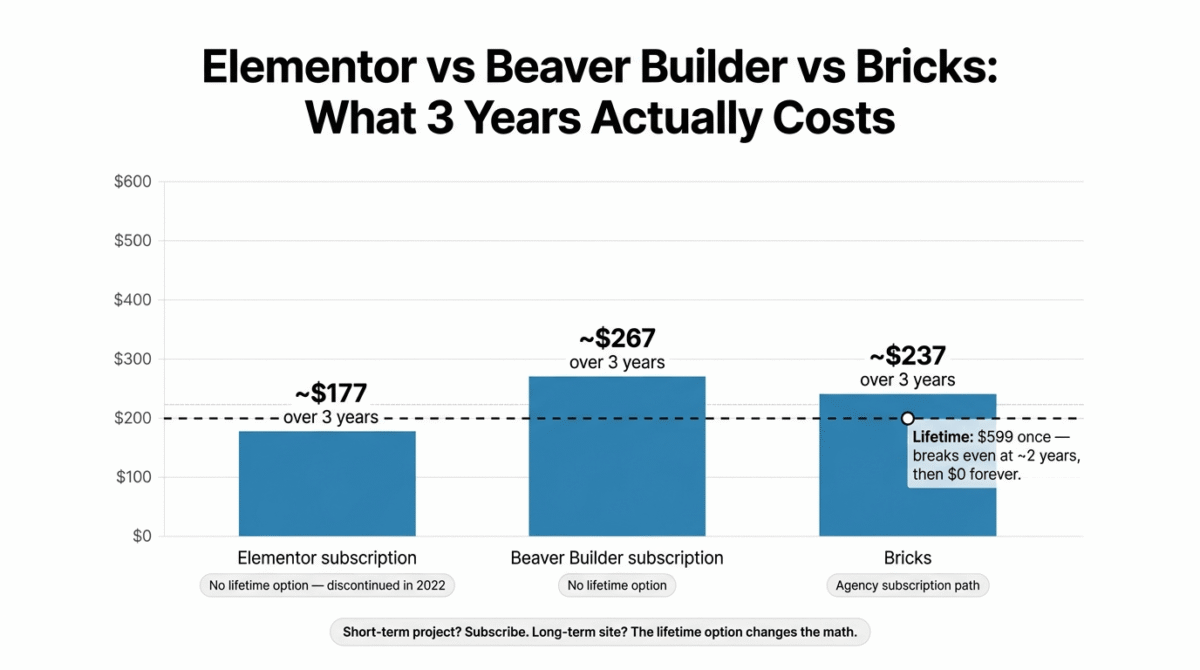
For anyone planning to use Bricks past the two-year mark, yes, the $599 Ultimate Lifetime plan breaks even against the $249/year Agency subscription in a little over two years and costs nothing after that. For a short-term project, the annual Starter plan is the more sensible entry point.
What’s the cost difference between these three builders over three years?
On a single site: Elementor runs about $177 over three years, Beaver Builder about $267, and Bricks about $237 on a subscription, or a flat $599 once with the lifetime plan. Elementor costs less in year one; Bricks costs less over the long run if the lifetime option is on the table.