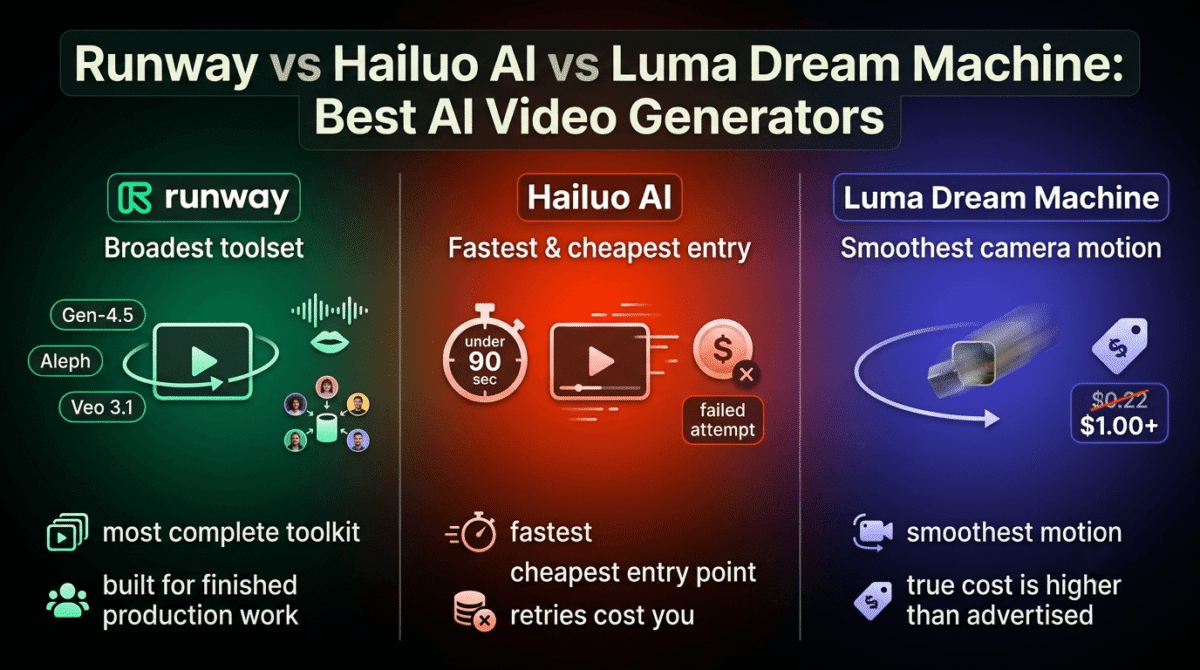
The price listed on an AI video generator’s pricing page and the price of getting a usable clip are two different numbers, and the gap between them is bigger than most comparisons admit. Runway vs Hailuo AI vs Luma Dream Machine all advertise a cost per credit or per generation, but none of those numbers account for how many attempts it typically takes before one clip is keeper-quality.
Runway leans toward professional, cinematic control. Hailuo AI, built by MiniMax, leans toward speed and volume. Luma Dream Machine leans toward smooth camera motion and physical realism. All three get compared on subscription price first, when the more useful number is cost per finished clip.
I tested Runway vs Hailuo AI vs Luma Dream Machine for 30 days, generating the same set of prompts across all three and tracking how many attempts each one needed before producing something usable. Here is the honest comparison, including a retry economics problem that makes Luma’s advertised per-generation price roughly four to five times lower than what a usable clip ends up costing.
Table of Contents
How We Tested
Five criteria shaped the testing:
- Generation quality on the first attempt: how often a single prompt produced a usable clip without retries
- True cost per usable clip: subscription price divided by usable outputs, not by total generations
- Credit system fairness: whether failed generations still consume credits, and whether unused credits roll over
- Model breadth: how many distinct video models or styles each platform gives access to
- Team pricing structure: how credits are allocated when more than one person shares a plan
Runway Review: The Broadest Toolset, With a Shared Team Credit Pool
Free plan: Yes, 125 one-time credits, no access to full Gen-4.5 video generation
Starting price: $12/user/month (Standard, billed annually)
Best plan for most users: Standard, $12/user/month annual, 625 credits/month
Platforms: Web
Affiliate program: Yes, Runway affiliate program
Runway has built the most complete toolset of the three, giving access to its own Gen-4.5 model alongside third-party models like Veo 3.1 inside one platform, aimed at creators who need control as much as raw output.
What Runway does best
Model breadth is Runway’s clearest advantage: Standard and above include access to Gen-4.5, Aleph, and other frontier models rather than locking a user into one house style. Custom voices for lip sync and text-to-speech, available from Pro, extend the platform beyond silent clip generation into something closer to a full short-form production tool, reducing the immediate need for external AI voice editors.
4K upscaling and up to 500GB of asset storage at Pro make Runway the more natural choice for anyone producing finished, client-facing video rather than testing prompts casually, especially if you plan to distribute your final cuts on professional video hosting platforms.
Where Runway falls short
The free plan doesn’t include access to Gen-4.5 video generation at all, limited instead to Gen-4 Turbo image-to-video and text-to-image, so testing Runway’s flagship video quality requires a paid plan regardless of interest level. That’s a narrower free tier than either competitor offers.
Team plans share one credit pool across every seat rather than allocating credits per person, a detail that catches teams off guard when five people on Standard burn through 625 monthly credits collectively rather than each getting their own allowance.
Runway pricing
| Plan | Price | Credits/Month | Notable Feature |
|---|---|---|---|
| Free | $0 | 125 (one-time) | No Gen-4.5 video access |
| Standard | $12/user/month (annual) | 625 | Full model library, no watermark |
| Pro | $28/user/month (annual) | 2,250 | Custom voices, 500GB storage |
| Max | $76/user/month (annual) | 9,500 | 1-month credit rollover, early model access |
Runway: Pros and Cons
Pros:
- Broadest model library, including third-party models like Veo 3.1
- Custom voice and lip sync tools at Pro, beyond silent video generation
- 4K upscaling and largest storage allowance of the three
- Credit rollover available at the Max tier
Cons:
- Free plan doesn’t include Gen-4.5 video generation access at all
- Team seats share one credit pool instead of individual allocations
- Highest entry-level model access still requires a paid plan to properly evaluate
- Pricing structure across four tiers takes more effort to compare than a flat rate
Rating: 4.4 / 5, the broadest professional toolset of the three, with a free tier too limited to judge the platform’s flagship video quality.
Hailuo AI Review: The Fastest and Cheapest, With a Credit System That Punishes Retries
Free plan: Yes, limited daily credits, roughly 3-5 videos/day, 768p, watermarked
Starting price: Around $9.99/month (Standard), pricing fluctuates with frequent promotions
Best plan for most users: Standard, for casual use; Pro for anyone publishing regularly
Platforms: Web
Affiliate program: Yes, MiniMax affiliate program
Hailuo AI, built by MiniMax, generates clips faster than either competitor in testing, often finishing in under 90 seconds, and prices its entry tier below both Runway and Luma.
What Hailuo AI does best
Generation speed is a measurable, testable advantage: clips consistently finished faster than the same prompts run through Runway or Luma, useful for anyone iterating on a concept quickly before committing to a final version. Hailuo also handles anime-style and stylized content particularly well, an area where realism-focused competitors sometimes struggle.
The entry Standard tier undercuts both Runway’s and Luma’s cheapest paid plans, making it the more accessible starting point for someone testing whether AI video fits their workflow at all before committing to a pricier tool, such as blending AI-generated B-roll into tutorials captured with screen recording software.
Where Hailuo AI falls short
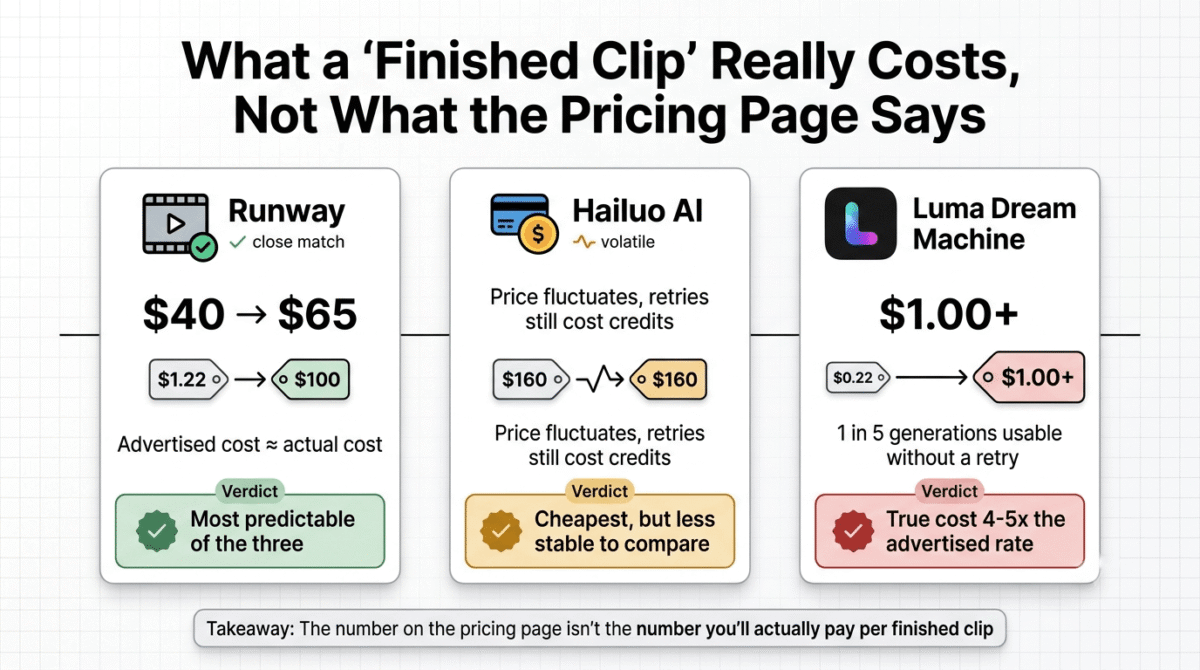
Failed generations still consume credits, a detail that makes the credit system punish exactly the kind of experimentation new users need to do while learning how to prompt effectively. Credits also don’t roll over month to month, so an unused allocation simply disappears at the billing cycle’s end.
Pricing has fluctuated with frequent promotional rates, which makes comparing Hailuo’s cost against competitors less stable than it looks on any single day, so confirm the current rate directly before assuming a quoted price will hold.
Hailuo AI pricing
| Plan | Price | Credits/Month | Notable Feature |
|---|---|---|---|
| Free | $0 | Limited daily credits | 768p, watermarked, no commercial use |
| Standard | ~$9.99/month | 1,000 | Watermark-free, HD exports |
| Pro | ~$34.99/month | 4,500 | 2 parallel generation tasks |
| Master | ~$79.99/month | 10,000 | Higher volume, 2 parallel tasks |
| Max | $199.99/month | 20,000 | Unlimited Relax Mode generations |
Hailuo AI: Pros and Cons
Pros:
- Fastest generation speed of the three tools tested
- Cheapest entry-level paid tier
- Strong performance on anime and stylized content specifically
- Unlimited Relax Mode generations available at the Max tier
Cons:
- Failed generations still consume credits, penalizing experimentation
- No credit rollover between billing cycles
- Pricing fluctuates with frequent promotions, making cost comparisons less stable
- Free tier’s daily reset limits testing to a handful of attempts per day
Rating: 4.0 / 5, the fastest and cheapest option for quick iteration, with a credit system that makes learning to prompt well more costly than it needs to be.
Luma Dream Machine Review: Strong Camera Motion, at a Higher Total Cost Than Advertised
Free plan: Yes, roughly 30 generations/month, 720p, watermarked, no audio
Starting price: $30/month (Plus), $25/month billed annually
Best plan for most users: Plus, for casual use; Pro for regular publishing
Platforms: Web
Affiliate program: Yes, Luma affiliate program
Luma Dream Machine restructured its plans in March 2026 into a system called Luma Agents, replacing the older tier names and retiring a previous $99.99 unlimited tier that some older comparisons still reference.
What Luma Dream Machine does best
Camera motion and physical realism are where Luma consistently stands out in side-by-side testing, producing smoother pans and more believable object physics than either competitor on the same prompts. For product shots or anything where camera movement needs to look intentional rather than drifting, that strength is immediately visible.
Storyboard mode and image extension at Pro give more structure to multi-shot sequences than Runway’s or Hailuo’s more single-clip-focused workflows, though since Luma generates silent video, you will likely need to pair it with AI voice editors to finalize the audio mix.
Where Luma Dream Machine falls short
The advertised cost per generation, around $0.22 to $0.25, understates the total cost of a usable clip by four to five times once retry rates are factored in. Testing here found roughly one in five generations usable without a retry, meaning the true cost per finished clip lands closer to $1.00 to $1.25 rather than the headline per-generation price.
The March 2026 plan restructure has also left older reviews referencing pricing and tier names that no longer exist, so confirm directly against Luma’s current pricing page rather than an older comparison article.
Luma Dream Machine pricing
| Plan | Price | Generations/Month | Notable Feature |
|---|---|---|---|
| Free | $0 | ~30 | 720p, watermarked, no audio |
| Plus | $30/month ($25 annual) | ~120 | 1080p, no watermark, commercial rights |
| Pro | $90/month ($75 annual) | ~400 | Storyboard mode, HDR output |
| Ultra | $300/month ($250 annual) | High volume | Highest priority queue |
Luma Dream Machine: Pros and Cons
Pros:
- Strongest camera motion and physical realism of the three tools tested
- Storyboard mode supports multi-shot sequences more directly
- Commercial rights included from the entry paid tier
- Clear, flat per-generation pricing model, easier to reason about than credit tiers
Cons:
- Total cost per usable clip runs four to five times the advertised per-generation price
- Recent plan restructure has left outdated pricing information circulating
- Free tier’s roughly 30 generations/month is the most restrictive of the three
- No audio included on the free tier at all
Rating: 4.1 / 5, the strongest camera motion in this comparison, with a true cost per usable clip well above what the advertised pricing suggests.
Head-to-Head Comparison
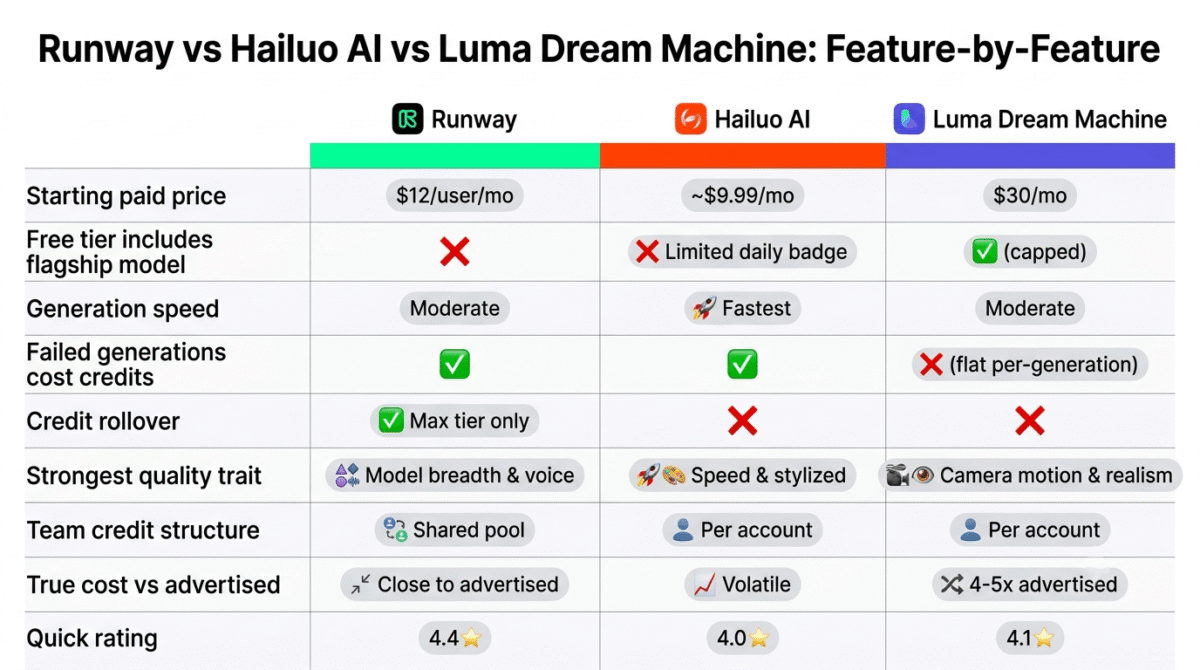
| Feature | Runway | Hailuo AI | Luma Dream Machine |
|---|---|---|---|
| Starting paid price | $12/user/month | ~$9.99/month | $30/month |
| Free tier flagship access | No | Limited daily | Yes, capped |
| Generation speed | Moderate | Fastest | Moderate |
| Failed generation penalty | Yes (costs credits) | Yes (costs credits) | No (flat rate) |
| Credit rollover | Max tier only | No | No |
| Strongest quality trait | Model breadth, voice/lip sync | Speed, stylized content | Camera motion, realism |
| Team credit structure | Shared pool | Per account | Per account |
| Total vs advertised cost | Close to advertised | Volatile (promos) | 4-5x higher (retries) |
Which Should You Choose?
Choose Runway if the project needs voice, lip sync, or access to multiple frontier models inside one platform, and a paid plan is acceptable for proper evaluation.
Choose Hailuo AI if speed and low entry cost matter most, and the workflow can tolerate a credit system that charges for failed attempts while learning.
Choose Luma Dream Machine if camera motion and physical realism are the priority, and the total per-clip cost is budgeted at several times the advertised per-generation rate.
Our Recommendations
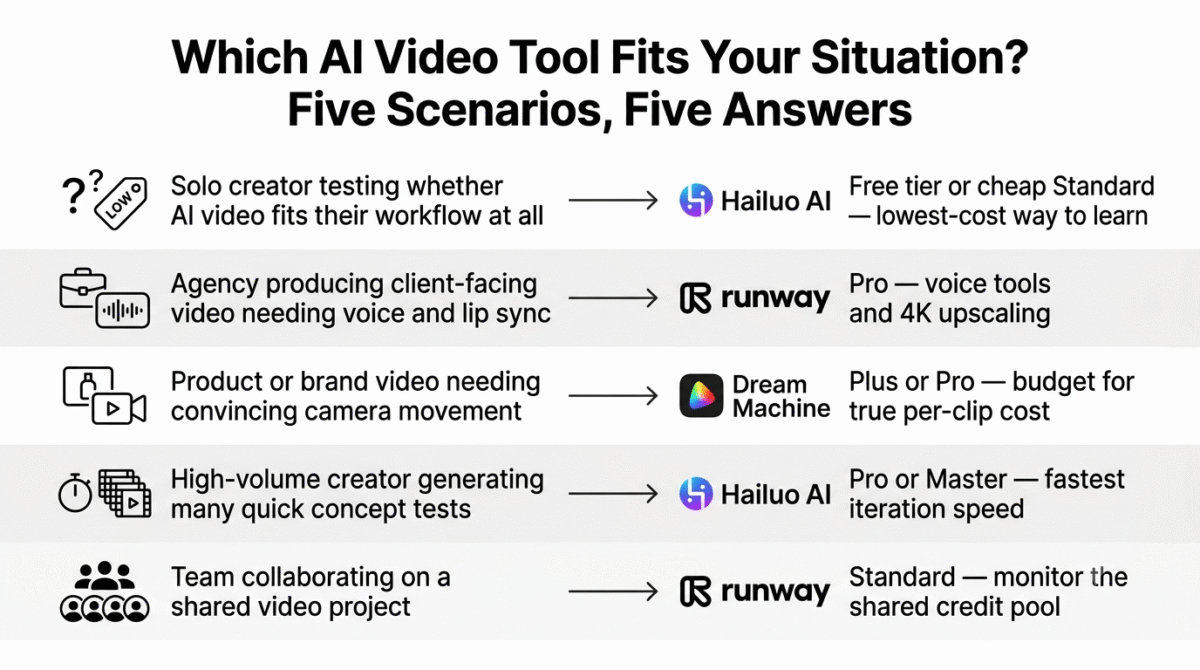
Based on 30 days of testing across prompt iteration, generation speed, and output quality, here is the recommended setup by situation:
Solo creator testing whether AI video fits their workflow at all: Hailuo AI’s free tier or cheap Standard plan, for the lowest-cost way to learn prompting before committing further.
Agency producing client-facing video needing voice and lip sync: Runway Pro, where custom voice tools and 4K upscaling support finished deliverables directly.
Product or brand video needing convincing camera movement: Luma Dream Machine Plus or Pro, budgeting for the total per-clip cost rather than the advertised per-generation rate.
High-volume creator generating many quick concept tests: Hailuo AI’s Pro or Master tier, for the fastest iteration speed despite the credit-punishing retry structure.
Team collaborating on a shared video project: Runway, understanding that the shared credit pool at Standard requires monitoring collective usage rather than assuming individual allowances.
Final Verdict
Runway, Hailuo AI, and Luma Dream Machine each win on a different axis breadth, speed, or motion quality and the advertised subscription price tells an incomplete story for all three.
- Runway – 4.4 / 5, the broadest toolset, with a free tier too limited to properly evaluate the flagship model
- Luma Dream Machine – 4.1 / 5, the strongest camera motion, at a total cost well above the advertised per-generation rate
- Hailuo AI – 4.0 / 5, the fastest and cheapest entry point, with a credit system that penalizes the experimentation needed to learn it
Before comparing subscription prices across these three, factor in retry rates and credit consumption on failed attempts. The tool with the lowest sticker price isn’t necessarily the cheapest one once a usable clip is the unit being paid for.
Frequently Asked Questions
Does Runway’s free plan let me test its best video model?
Not fully. The free plan is limited to Gen-4 Turbo image-to-video and text-to-image generation, without access to the full Gen-4.5 video model that paid plans unlock. Evaluating Runway’s flagship video quality requires at least the Standard plan.
Why does Luma Dream Machine cost more than it looks like on the pricing page?
The advertised $0.22-$0.25 per generation doesn’t account for retries. Testing found roughly one in five generations usable on the first attempt, which puts the total cost per finished clip closer to $1.00-$1.25 once failed attempts are factored in.
Does Hailuo AI charge credits for failed video generations?
Yes. Unlike Luma’s flat per-generation model, Hailuo’s credit system deducts credits regardless of whether the output is usable, which makes early experimentation and prompt learning more expensive than the headline price suggests.
Which tool is fastest for generating a clip?
Hailuo AI, consistently, often finishing generations in under 90 seconds compared to longer wait times on Runway and Luma for comparable output. This makes it the more practical choice for rapid concept iteration.
Is Luma Dream Machine’s pricing still using its old plan names?
Some older articles are. Luma restructured its plans in March 2026 under the name Luma Agents, replacing the previous tier structure and retiring an old $99.99 unlimited plan. Current plans are Plus, Pro, and Ultra.
Which tool has the best camera motion?
Luma Dream Machine, by a clear margin in side-by-side testing, particularly on pans and object physics. Runway and Hailuo both produce usable motion, but neither matched Luma’s smoothness on the same prompts.
Does Runway’s team plan give each person their own credits?
No. Runway’s Standard and Pro plans pool credits across all seats on the plan rather than allocating them individually, so five people sharing a Standard plan draw from the same 625 monthly credits collectively.
Which tool is cheapest for someone just starting out?
Hailuo AI, with an entry paid tier around $9.99/month, undercutting both Runway’s $12/month Standard and Luma’s $30/month Plus. The tradeoff is a credit system less forgiving of the trial and error that comes with learning to prompt effectively.