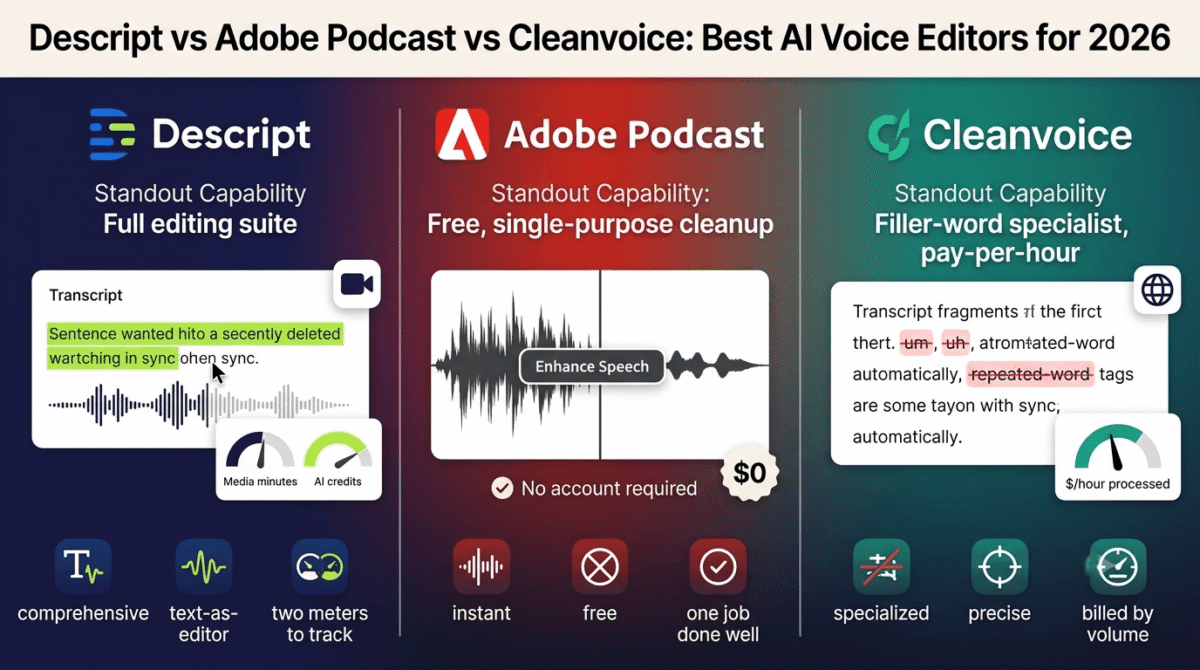
Cleaning up a recording used to mean scrubbing through a waveform by hand, cutting out every “um,” every mouth click, every burst of room noise one at a time. Much like how AI presentation makers revolutionized slide design, AI voice editors replaced that manual process with something closer to editing a document, but Descript vs Adobe Podcast vs Cleanvoice approach the job from three different starting points.
Descript builds a full editing suite around transcript-based editing. Adobe Podcast offers a free, single-purpose noise and echo cleanup tool with no account required. Cleanvoice specializes narrowly in filler words, mouth sounds, and dead air, billing by the hour of audio processed rather than by subscription tier.
I tested Descript vs Adobe Podcast vs Cleanvoice for 30 days, running the same set of raw podcast and video recordings through all three and comparing what each one fixed automatically versus what still needed manual cleanup. Here is the honest comparison, including a change to Descript’s pricing structure that makes its total monthly cost harder to predict than the plan price suggests.
Table of Contents
How We Tested
Five criteria shaped the testing:
- Cleanup accuracy: how well each tool removed noise, filler words, or dead air without cutting into usable speech
- Editing depth: whether the tool offers full transcript-based editing or a single narrow function
- Pricing predictability: whether the advertised plan price reflects what a typical month of use costs in practice
- Free tier usability: whether the free plan produces output usable beyond a quick test
- Workflow fit: whether the tool works alone or needs pairing with another editor to finish the job
Descript Review: The Full Editing Suite, With Pricing That Takes Some Reading
Free plan: Yes, 60 media minutes/month, 100 one-time AI credits, 720p watermarked export
Starting price: $16/month (Hobbyist, billed annually), $24/month billed monthly
Best plan for most users: Creator, $24/month annual, 30 media hours/month
Platforms: Web, macOS, Windows
Affiliate program: Yes, Descript affiliate program
Descript edits audio and video by editing the transcript directly, deleting a word from the text deletes it from the recording, which turns editing into something closer to word processing than timeline scrubbing.
What Descript does best
Transcript-based editing measurably changes how fast a cleanup pass goes, since removing a filler word, a false start, or an entire tangent is as simple as selecting and deleting text. Studio Sound handles background noise reduction well, and Overdub’s voice cloning can patch a flubbed word without a re-record (a capability often reserved for dedicated AI voice generators), features neither Adobe Podcast nor Cleanvoice attempts to offer.
The platform also handles video, not just audio, making it a single tool for podcasters who repurpose episodes into video clips, ready to be uploaded to your preferred video hosting platforms, rather than needing a separate video editor for that step.
Where Descript falls short
A September 2025 overhaul replaced the older “transcription hours” system with separate meters for media minutes and AI credits, and heavy use of AI features, Overdub, Studio Sound, filler-word detection can burn through credits faster than the plan’s headline media-minute allowance suggests. Two people on the same plan doing different amounts of AI-assisted work can end up with very different total costs.
The free plan’s 60 minutes and one-time 100 AI credits are enough to test the workflow but not to produce a finished episode on any kind of recurring basis, and 720p watermarked exports limit what the free tier can be used for in practice.
Descript pricing
| Plan | Price | Media Minutes/Hours | Notable Feature |
|---|---|---|---|
| Free | $0 | 60 min/month | 100 one-time AI credits, 720p watermark |
| Hobbyist | $16/month (annual) | 10 hours/month | Full editing, no watermark |
| Creator | $24/month (annual) | 30 hours/month | Overdub, multitrack, up to 3 editors |
| Business | $50/month (annual) | 40 hours/month | Admin controls, priority rendering |
Descript: Pros and Cons
Pros:
- Transcript-based editing speeds up cleanup significantly
- Overdub voice cloning can patch mistakes without a re-record
- Handles video as well as audio in one tool
- Studio Sound noise reduction performs well in testing
Cons:
- Separate media-minute and AI-credit meters make total cost harder to predict than the plan price suggests
- Heavy AI feature use can exceed a plan’s allowance before the month ends
- Free plan’s 720p watermark limits practical use beyond testing
- Priciest full-featured option of the three tools compared here
Rating: 4.4 / 5, the most complete editing suite in this comparison, with a pricing structure that needs a closer look than the plan price alone provides.
Adobe Podcast Review: A Free Tool That Does One Job Cleanly
Free plan: Yes, Enhance Speech unlimited use, 1 hour/day, 30-minute/500MB file limit
Starting price: Free; Premium $9.99/month ($99.99/year)
Best plan for most users: Free, sufficient for most single-episode cleanup needs
Platforms: Web (browser-based, no install)
Affiliate program: No, Adobe runs no referral program for this specific tool
Adobe Podcast’s core feature, Enhance Speech, takes a noisy recording and strips background noise and echo in one click, with no account required to try it and no cost for the vast majority of realistic use cases.
What Adobe Podcast does best
The free tier is close to unrestricted for a solo creator: 1 hour of processing per day with no sign-up required for a single file, covering a full episode’s cleanup at no cost indefinitely. For anyone whose only need is turning a noisy home recording into something broadcast-clean, Enhance Speech does that one job about as well as any tool in this comparison, free or paid.
Mic Check, a pre-recording tool that analyzes microphone setup before hitting record, is a distinctly useful addition that neither Descript nor Cleanvoice offers, catching setup problems before they become cleanup problems.
Where Adobe Podcast falls short
The tool does exactly one thing: enhancement, and nothing resembling filler-word removal, multitrack editing, or transcript-based cutting. Anyone expecting a full editing workflow from Adobe Podcast will need to pair it with Descript, Cleanvoice, or a traditional DAW for everything past the initial cleanup pass.
The 30-minute, 500MB per-file limit on the free tier also means longer episodes need splitting before processing, or a $9.99/month Premium upgrade to handle 2-hour files in one pass.
Adobe Podcast pricing
| Plan | Price | Daily Limit | Notable Feature |
|---|---|---|---|
| Free | $0 | 1 hour/day, 30-min/500MB files | Enhance Speech, Mic Check, basic Studio |
| Premium | $9.99/month ($99.99/year) | 4 hours/day, 2-hour/1GB files | Video support, bulk uploads, adjustable strength |
Adobe Podcast: Pros and Cons
Pros:
- Free tier handles most single-episode cleanup needs with no cost
- No account required for a quick single-file enhancement
- Mic Check catches microphone setup issues before recording
- Browser-based with no software to install
Cons:
- Single-purpose tool, no filler-word removal or multitrack editing
- 30-minute file limit on free tier requires splitting longer episodes
- No standalone editing workflow, needs pairing with another tool for anything beyond cleanup
- Fixed enhancement strength on the free tier, no manual adjustment
Rating: 4.3 / 5, the strongest free option for pure audio cleanup, narrow in scope by design rather than by limitation.
Cleanvoice Review: Filler-Word Removal Done Narrowly and Well
Free plan: No permanent free plan, 30-minute free trial, no signup required
Starting price: $11/month (10 hours), or pay-as-you-go from $11 for 5 hours
Best plan for most users: Standard, $30/month for 30 hours, at $1.00/hour
Platforms: Web, API available for 200+ hours/month
Affiliate program: Yes, Cleanvoice affiliate program
Cleanvoice does one specific job: stripping filler words, mouth sounds, stutters, and dead air out of a recording automatically, billed by the hour of audio processed rather than a flat monthly rate.
What Cleanvoice does best
Filler-word and dead-air detection is Cleanvoice’s clear specialty, catching “um,” “uh,” repeated words, and long pauses more consistently in testing than Descript’s built-in filler-word tool managed on the same files. Multilingual support is also a clear differentiator, uncommon among tools this narrowly focused on English-centric podcast markets.
The pay-as-you-go option, with credits valid for two years, suits anyone publishing on an irregular schedule who doesn’t want a recurring subscription for something used a few times a year.
Where Cleanvoice falls short
There’s no full editing suite here, no multitrack timeline, no transcript-based manual editing, no voice cloning. Cleanvoice is a processing step in a workflow, not a destination editor, and needs pairing with Descript, Adobe Podcast, or a DAW for everything else a finished episode requires before you queue the promo clips in your social media scheduling tools.
The hourly billing model, while transparent, compounds at higher volumes faster than a flat subscription would, a weekly podcast with several hours of raw recording per episode can land on the $90/month Pro tier faster than the $11/month entry price suggests.
Cleanvoice pricing
| Plan | Price | Hours/Month | Notable Feature |
|---|---|---|---|
| Free trial | $0 | 30 minutes | No signup required |
| Starter | $11/month | 10 hours | Filler word, mouth sound, dead air removal |
| Standard | $30/month | 30 hours | Same features, higher volume |
| Pro | $90/month | 100 hours | Highest volume, lowest per-hour rate |
Cleanvoice: Pros and Cons
Pros:
- Strongest filler-word and dead-air detection of the three tools tested
- Multilingual support uncommon in this specific niche
- Pay-as-you-go credits valid for two years, good for irregular publishing schedules
- Unused subscription hours roll over up to 3x the plan limit
Cons:
- No full editing suite, functions as one step in a larger workflow
- No permanent free plan, only a 30-minute trial
- Hourly billing compounds faster at volume than a flat subscription would
- Best paired with another tool rather than used as a standalone editor
Rating: 4.0 / 5, the sharpest filler-word removal in this comparison, built to be one step in a workflow rather than the whole thing.
Head-to-Head Comparison
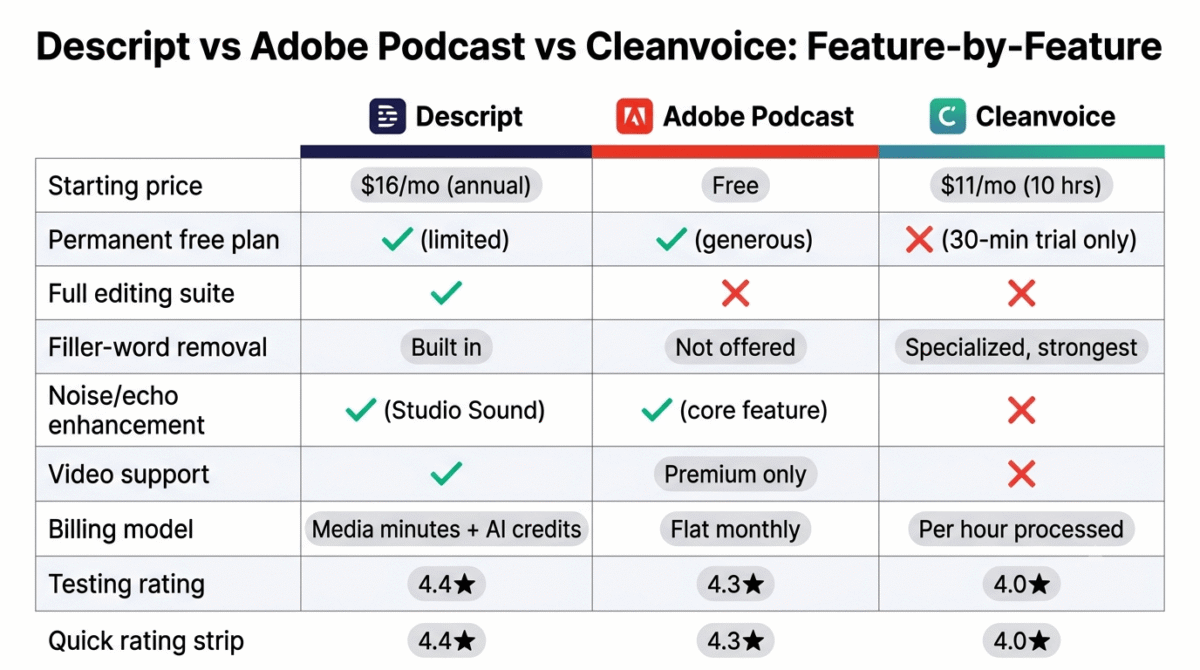
| Feature | Descript | Adobe Podcast | Cleanvoice |
|---|---|---|---|
| Starting price | $16/month (annual) | Free | $11/month (10 hours) |
| Permanent free plan | Yes (limited) | Yes (generous) | No (30-min trial only) |
| Full editing suite | Yes | No | No |
| Filler-word removal | Yes, built in | No | Yes, specialized |
| Noise/echo enhancement | Yes (Studio Sound) | Yes (core feature) | No |
| Video support | Yes | Premium only | No |
| Billing model | Media minutes + AI credits | Flat monthly | Per hour processed |
| Best suited for | All-in-one editing workflow | Free noise cleanup | Filler-word removal at scale |
Which Should You Choose?
Choose Descript if a single tool needs to handle transcript-based editing, noise cleanup, and video export together, and the credit-based pricing fits the day-to-day workflow.
Choose Adobe Podcast if the only need is turning a noisy recording into clean audio, and a full editing suite isn’t part of the job.
Choose Cleanvoice if filler-word and dead-air removal at scale, across many episodes or hours of raw recording, matters more than having an all-in-one editor.
Our Recommendations
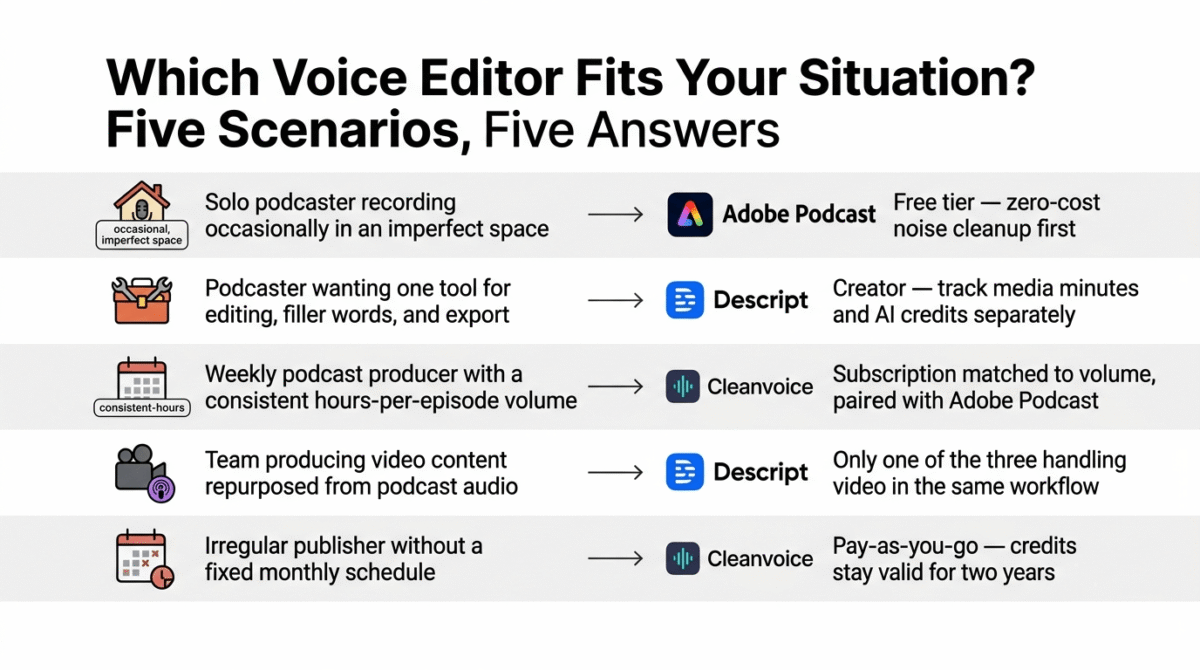
Based on 30 days of testing across cleanup, filler-word removal, and full-editing workflows, here is the recommended setup by situation:
Solo podcaster recording occasionally in an imperfect space: Adobe Podcast’s free tier, for zero-cost noise cleanup before any other editing happens.
Podcaster wanting one tool for editing, filler-word removal, and export: Descript Creator, accepting the need to track media minutes and AI credits separately.
Weekly podcast producer with a consistent hours-per-episode volume: Cleanvoice’s subscription tier matched to that volume, paired with Adobe Podcast for initial noise cleanup.
Team producing video content repurposed from podcast audio: Descript, for the only one of the three that handles video editing and export in the same workflow.
Irregular publisher without a fixed monthly schedule: Cleanvoice’s pay-as-you-go credits, which stay valid for two years rather than expiring unused each month.
Final Verdict
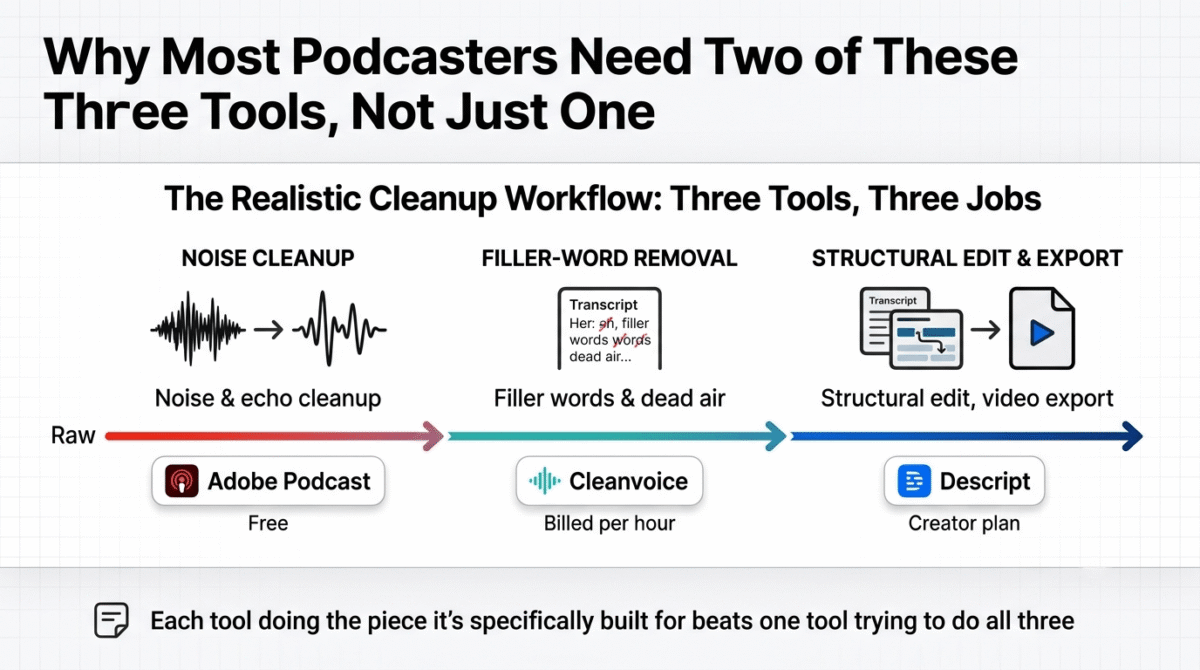
Descript, Adobe Podcast, and Cleanvoice solve overlapping pieces of the same broader cleanup problem, and the right combination often involves more than one of them.
- Descript – 4.4 / 5, the most complete editing suite, with pricing that rewards understanding the credit system before committing
- Adobe Podcast – 4.3 / 5, the strongest free option for pure noise cleanup, narrow in scope by design
- Cleanvoice – 4.0 / 5, the sharpest filler-word removal available, built as one workflow step rather than a full editor
For most creators, the realistic setup pairs at least two of these three rather than relying on one alone, Adobe Podcast for free cleanup, Cleanvoice for filler words, and Descript for the structural edit and export, each doing the piece it’s specifically built for.
Frequently Asked Questions
Is Adobe Podcast’s free plan enough for most podcasters?
For pure noise and echo cleanup, yes, covering 1 hour of processing per day with a 30-minute file limit. Longer episodes need splitting first, and anyone needing filler-word removal or full editing will still need a second tool alongside it.
Why did Descript’s pricing get more confusing recently?
A September 2025 change replaced simple transcription-hour limits with separate meters for media minutes and AI credits. Heavy use of features like Overdub or Studio Sound can exhaust the AI-credit allowance before the media-minute limit is reached, making the total monthly cost harder to predict from the plan price alone.
Does Cleanvoice offer full audio editing beyond filler-word removal?
No. Cleanvoice specializes narrowly in removing filler words, mouth sounds, stutters, and dead air. There’s no multitrack timeline or transcript-based manual editing, so it works best as one step in a workflow alongside Descript, Adobe Podcast, or a traditional DAW.
Which tool is best for a weekly podcast on a budget?
Adobe Podcast’s free tier for noise cleanup, paired with Cleanvoice’s lowest subscription tier matched to typical weekly hours, covers most of the cleanup work at a lower combined cost than Descript’s Creator plan alone, though it means using two tools instead of one.
Can Descript replace both Adobe Podcast and Cleanvoice?
Largely, yes. Descript includes Studio Sound for noise reduction and a built-in filler-word removal tool, though testing here found Cleanvoice’s filler-word detection slightly more consistent on the same files. For an all-in-one workflow, Descript covers most of what the other two do individually.
Is Cleanvoice’s hourly billing cheaper than a flat subscription long-term?
It depends on volume. At lower hours per month, Cleanvoice’s per-hour rate is competitive, but a high-volume weekly show can reach the $90/month Pro tier faster than expected, at which point the hourly model costs more than it initially appears to.
Does Adobe Podcast support languages other than English?
Enhance Speech’s noise removal works on any language since it processes audio signal rather than language content. Cleanvoice specifically markets multilingual filler-word detection as a differentiator, which is a more language-dependent feature than pure noise cleanup.
Which tool requires the least setup to try?
Adobe Podcast, with no account required for a single-file enhancement, and Cleanvoice’s 30-minute trial, also with no signup. Descript requires creating an account even for the free tier, though the process takes only a minute or two.