After recording your lessons with your preferred screen recording software, your course video needs something none of the free platforms provide: protection against a paying student downloading a lesson and reposting it, reliable playback at scale once a course has hundreds of students, and a bill that doesn’t scale unpredictably as the library grows. That combination is why “Vimeo vs Wistia vs Bunny Stream” comes up constantly in course-creator communities, even though the three products come from different corners of the video hosting market.
One of them was built for marketing teams and has no native DRM at all. One is infrastructure a developer wires into an existing course platform rather than a finished product. And one has spent the last year going through the kind of corporate ownership change that changes whether a platform is safe to build a business on.
I tested Vimeo vs Wistia vs Bunny Stream for 30 days, uploading the same course library to each and checking DRM protection, bandwidth limits, and setup time from account creation to a working embed. Here is the honest comparison, including a recent ownership change at one of these three that most course-creator guides still haven’t caught up with.
Table of Contents
How We Tested
Five criteria shaped the testing:
- Content protection, whether DRM or token authentication stops a video from being downloaded or shared
- Bandwidth and scaling costs: what happens to the bill once a course library grows past a handful of videos
- Setup complexity: how much technical work stands between signing up and a working, embeddable player
- Category fit, whether the platform was built for course delivery specifically or for a different use case entirely
- Company stability, recent ownership changes, layoffs, or pricing restructures that affect long-term reliability
Vimeo Review: The Most Complete Toolset, With a Reliability Question to Weigh First
Free plan: Yes, 500 MB/week upload limit, heavily restricted
Starting price: $12/month (Starter), shared 2 TB monthly bandwidth cap across self-serve tiers
Best plan for most users: Advanced, $75/month, needed for course-selling features via Vimeo On Demand
Platforms: Web, iOS, Android, embeddable player
Affiliate program: Yes, Vimeo affiliate program
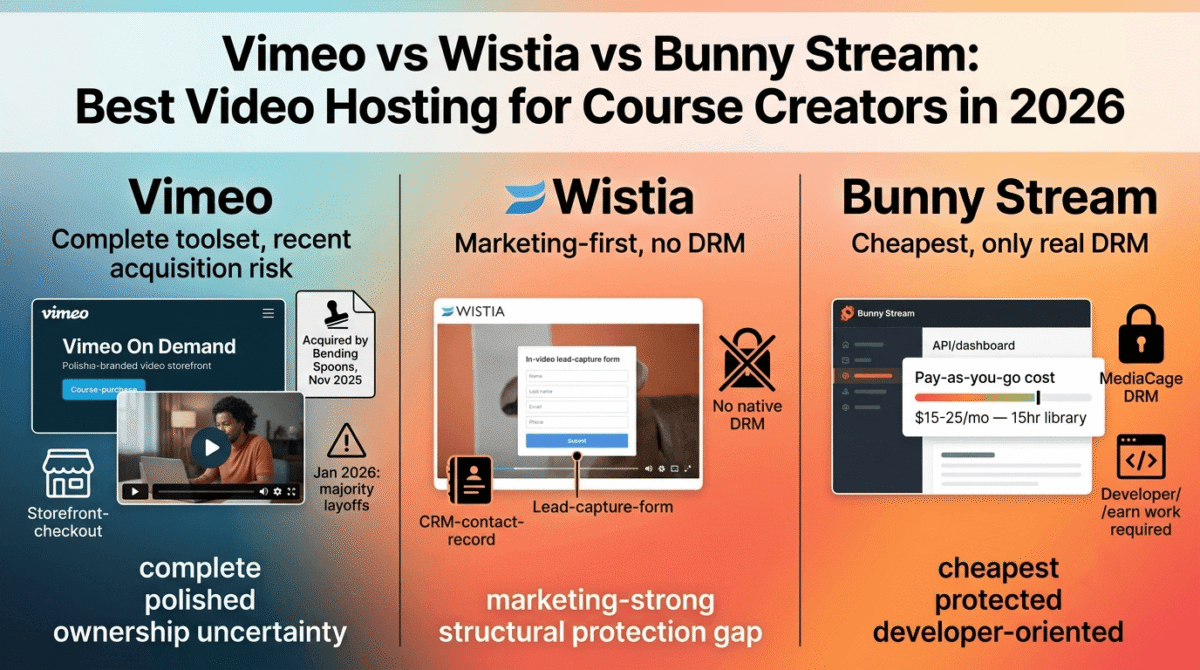
Vimeo has the longest track record and the most complete feature set of the three for course creators specifically, including a built-in way to sell video access directly. That history now comes with a company-stability question to understand before committing.
What Vimeo does best
Vimeo On Demand, available on Advanced and above, lets a creator sell direct access to course content without routing through a separate LMS, complete with a branded storefront and payment handling. Combined with password protection, a customizable player, and engagement analytics, it’s the closest thing to a complete out-of-the-box course delivery solution among the three platforms tested.
The player and embed experience is also the most polished of the three, with broad third-party integration support and a level of brand familiarity that makes students comfortable pressing play without wondering what platform they’ve landed on.
Where Vimeo falls short
Vimeo was acquired by Bending Spoons in November 2025 for $1.38 billion, and in January 2026 the company laid off the majority of its staff, reportedly including its entire video engineering team. Bending Spoons has a documented pattern from prior acquisitions, Evernote, WeTransfer, Filmic Pro, of cutting staff sharply after closing a deal and then reducing investment in the acquired product over time. Vimeo continues to operate and sell plans normally, but the pace of future development and support is an open question for anyone building a course business meant to last years, not months.
Separately, the platform-wide 2 TB monthly bandwidth cap applies across self-serve tiers, including Advanced. Exceeding it twice in a 12-month period, or hitting 10 TB once, triggers a required move to custom Enterprise pricing, a limit that a popular course with heavy rewatch activity can reach faster than expected.
Vimeo pricing
| Plan | Price | Storage / Bandwidth | Notable Feature |
|---|---|---|---|
| Free | $0 | 500 MB/week | Heavily restricted, not for course use |
| Starter | $12/month | 2 TB storage | Custom player, password privacy |
| Standard | $25/month | 2 TB storage | Branding, lead capture, custom CTAs |
| Advanced | $75/month | 2 TB storage (shared cap) | Vimeo On Demand for selling courses directly |
Vimeo: Pros and Cons
Pros:
- Most complete course-selling toolset via Vimeo On Demand
- Polished, familiar embed and playback experience
- Broadest third-party integration support of the three
- Established brand recognition that students trust on sight
Cons:
- Recent acquisition and mass layoffs raise measurable long-term reliability questions
- Shared 2 TB monthly bandwidth cap across self-serve tiers can be hit faster than expected
- Bending Spoons’ documented pattern includes reduced investment in acquired products over time
- Course-selling features require the $75/month Advanced tier
Rating: 3.8 / 5, the most complete feature set for course creators, weighed down by a company-stability risk most reviews aren’t yet accounting for.
Wistia Review: Built for Marketing Teams, Not Course Protection
Free plan: Yes, 25 GB storage, 200 GB bandwidth, 1 user
Starting price: $79/month (Business), billed annually ($99/month billed monthly)
Best plan for most users: Business, $79/month, though scaling to a team quickly raises the effective cost
Platforms: Web, embeddable player
Affiliate program: Yes, Wistia affiliate program
Wistia is a B2B video marketing platform first, built around lead capture, viewer-level analytics, and CRM integration rather than protecting paid content from redistribution.
What Wistia does best
In-video lead capture forms, heatmap-style engagement analytics, and CRM integrations stand out for a marketing team using video to generate leads, and the branded player customization is thorough. For a course creator running the marketing side of their business, landing page videos, webinar replays, email-gated lead magnets, Wistia handles that specific job well.
Analytics depth stands out here too: viewer-level watch data tied to a CRM contact record gives more actionable follow-up information than either Vimeo or Bunny Stream provides out of the box.
Where Wistia falls short
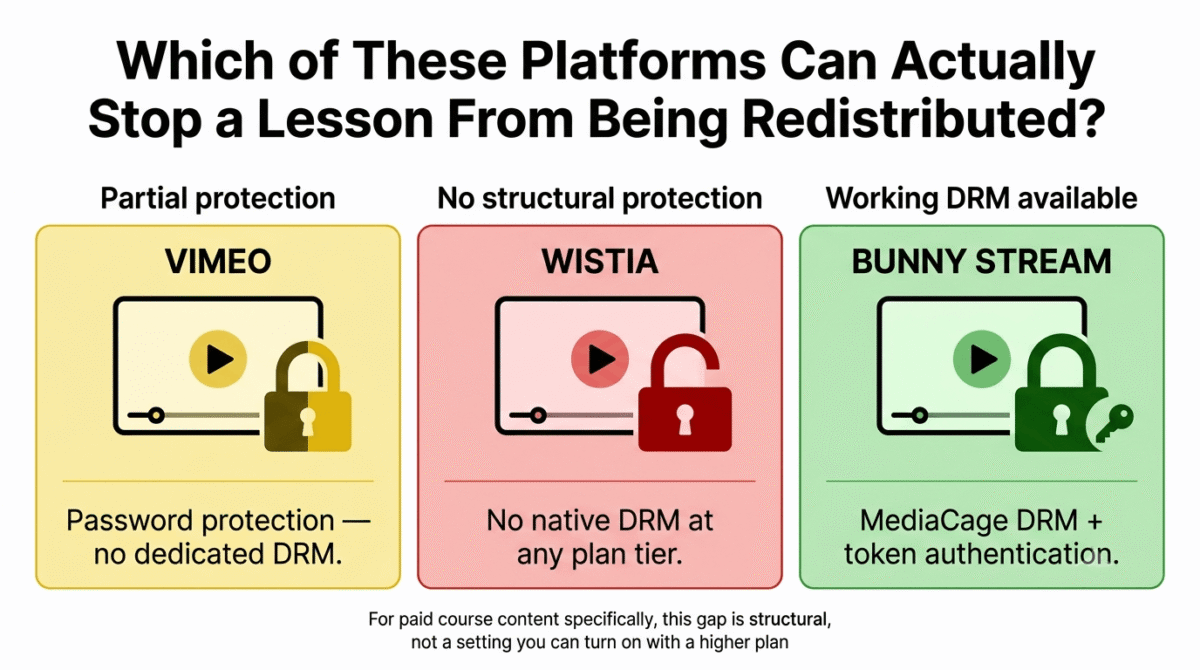
Wistia has no native DRM support. For a course creator selling paid content, that’s a structural gap rather than a minor limitation, there’s no built-in way to stop a paying student from downloading and redistributing a lesson, which neither Vimeo’s password protection nor Wistia’s own access controls fully address the way dedicated DRM does.
The pricing also escalates faster than the $79/month headline suggests. Adding a small team and the Automation Suite (Business + Lead gen) pushes the effective monthly cost to $329–$479 once seats, automation, and webinar add-ons are included, a jump that catches teams budgeting off the entry price.
Wistia pricing
| Plan | Price | Storage / Bandwidth | Notable Feature |
|---|---|---|---|
| Free | $0 | 25 GB / 200 GB | 1 user, Wistia branding on player |
| Business | $79/month (annual) | 250 GB / 1 TB | 3 users included, $25/extra seat, analytics, lead capture |
| Business + Lead gen | $329/month (annual) | Business limits | Automation Suite, marketing workflow tools |
| Enterprise | Custom | 1 TB+ / 2 TB | SSO, advanced governance, dedicated support |
Wistia: Pros and Cons
Pros:
- Strong viewer-level analytics tied directly to CRM contact records
- In-video lead capture and A/B testing built in
- Thorough player branding and customization
- Well suited to the marketing side of a course business specifically
Cons:
- No native DRM, a structural gap for protecting paid course content
- Effective cost scales well past the $79/month headline with team seats and automation
- Category built for B2B marketing, not course content protection
- Per-video pricing model was retired in March 2026, still confusing older comparisons
Rating: 3.5 / 5, excellent for the marketing side of a course business, a category mismatch for protecting the paid course content itself.
Bunny Stream Review: The Cheapest Option, With DRM Included
Free plan: No, but a 14-day trial and a $1/month minimum keep entry cost low
Starting price: Pay-as-you-go, roughly $0.01/GB storage and $0.005–$0.01/GB delivery
Best plan for most users: No fixed tier, a 15-hour course library typically runs $15–$25/month
Platforms: Web, API-based, embeddable player
Affiliate program: Yes, Bunny.net affiliate program
Bunny Stream is video infrastructure, not a finished course platform. It’s built to be wired into an existing site or LMS rather than logged into and used directly the way Vimeo or Wistia are.
What Bunny Stream does best
Cost is the clearest advantage. A typical course library, around 15–25 hours of video, runs roughly $15–$25 per month on Bunny’s pay-as-you-go pricing, a fraction of Vimeo’s or Wistia’s fixed monthly tiers for a comparable library size. Standard H.264 encoding is included at no extra charge, and the 119+ point-of-presence CDN delivers reliable playback globally.
DRM is where Bunny Stream earns its place in this comparison specifically. MediaCage Enterprise DRM and token authentication are both available, giving course creators a technical barrier against casual redistribution that Wistia doesn’t offer at any price point. Even without the paid DRM add-on, signed URLs and token authentication provide a meaningful baseline of protection, especially when paired with robust WordPress security plugins to lock down your underlying membership site.
Where Bunny Stream falls short
There’s no polished course-selling interface, no built-in payment handling, and no drag-and-drop setup. Bunny Stream is an API and a dashboard, and turning it into a working course delivery system takes developer time, a dedicated WordPress page builder, or a pre-built integration with a separate LMS. A non-technical creator without development help or a compatible course platform will find the setup barrier significant.
The DRM add-on itself has a cost structure to understand before assuming it’s as cheap as the base pricing suggests: MediaCage runs a $99/month base fee plus per-license costs, and multi-key billing means a single HD playback can generate two billed licenses rather than one, roughly doubling the effective per-play cost compared to the headline rate.
Bunny Stream pricing
| Component | Price | Notable Feature |
|---|---|---|
| Storage | ~$0.01/GB | Standard H.264 encoding included free |
| CDN delivery (EU/NA) | $0.005–$0.01/GB | Higher rates for Asia, South America, Africa |
| Premium encoding | $0.025–$0.150/minute | Optional, for higher-resolution or alternate codecs |
| MediaCage Enterprise DRM | $99/month base + per-license fees | Multi-key billing roughly doubles effective per-play cost |
Bunny Stream: Pros and Cons
Pros:
- Lowest cost by a wide margin for a typical course-sized video library
- Working DRM and token authentication available, unlike Wistia
- Standard encoding included for free, with 119+ global CDN points of presence
- Pay-as-you-go pricing scales with usage rather than fixed tiers
Cons:
- No turnkey course-selling interface, requires integration work
- Not a fit for non-technical creators without developer support
- DRM add-on’s multi-key billing makes the effective cost higher than the headline per-license rate
- No native payment handling or student management
Rating: 4.3 / 5, the strongest value and the only one of the three with working DRM, provided the setup work is accounted for upfront.
Head-to-Head Comparison
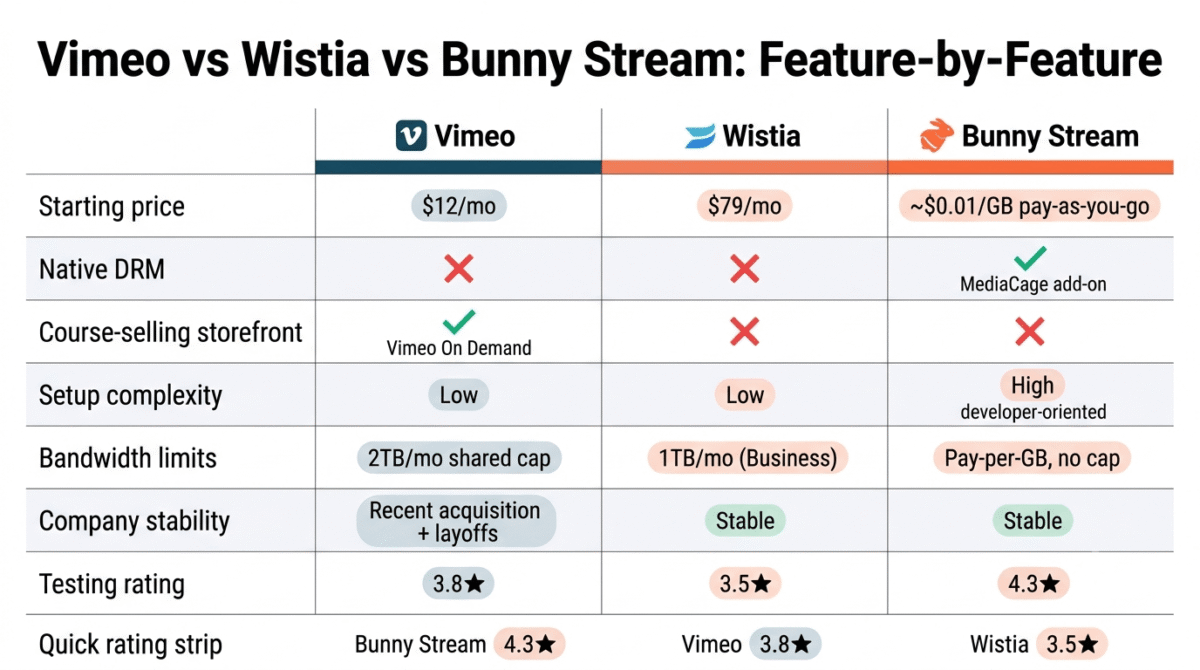
| Feature | Vimeo | Wistia | Bunny Stream |
|---|---|---|---|
| Starting price | $12/month | $79/month | ~$0.01/GB (pay-as-you-go) |
| Native DRM | No | No | Yes (MediaCage add-on) |
| Course-selling storefront | Yes (Vimeo On Demand) | No | No |
| Setup complexity | Low | Low | High (developer-oriented) |
| Bandwidth limits | 2 TB/month shared cap | 1 TB/month (Business) | Pay-per-GB, no fixed cap |
| Company stability | Recent acquisition, mass layoffs | Stable | Stable |
| Best category fit | General course hosting + sales | B2B marketing video | Cost-conscious, technical course delivery |
Which Should You Choose?
Choose Vimeo if a built-in storefront for selling course access directly matters more than any concern about the platform’s post-acquisition trajectory, and the 2 TB bandwidth cap fits the expected course size.
Choose Wistia if the primary need is marketing analytics and lead capture around course content, with DRM protection handled elsewhere or considered less critical for the specific content being hosted.
Choose Bunny Stream if cost and content protection matter more than an out-of-the-box interface, and either development help or a compatible LMS integration is available to handle setup.
Our Recommendations
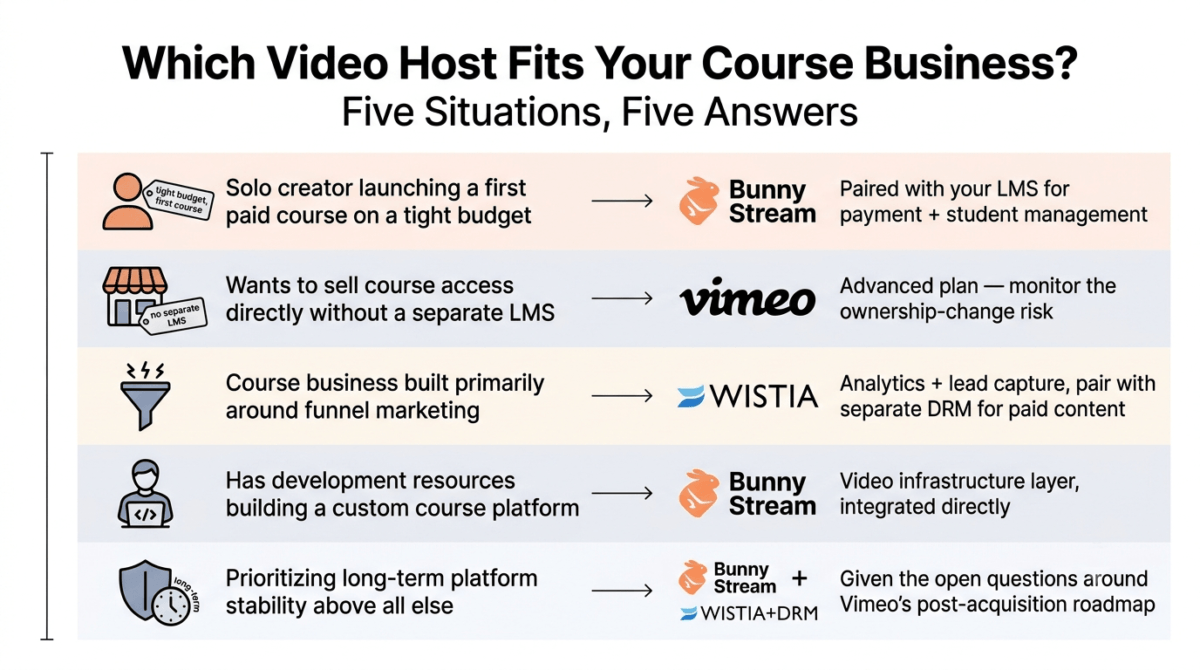
Based on 30 days of testing across upload, playback, and protection scenarios, here is the recommended setup by situation:
Solo creator launching a first paid course on a tight budget: Bunny Stream, paired with an existing community platform or LMS for payment and student management, for the lowest cost and working DRM protection.
Creator who wants to sell course access directly without a separate LMS: Vimeo’s Advanced plan, accepting the ownership-change risk as a factor to monitor rather than a dealbreaker today.
Course business built primarily around funnel marketing and lead generation: Wistia, for the analytics and lead capture, with a separate DRM solution for the paid course content.
Anyone with development resources building a custom course platform: Bunny Stream as the video infrastructure layer, integrated directly rather than routed through a general-purpose hosting platform.
A creator prioritizing long-term platform stability above all else: Bunny Stream or a Wistia-plus-separate-DRM combination, given the open questions around Vimeo’s post-acquisition roadmap.
Final Verdict
Vimeo, Wistia, and Bunny Stream sit in distinctly different parts of the video hosting market, and the right pick depends heavily on which tradeoff, cost, protection, or convenience- matters most.
- Bunny Stream, 4.3 / 5, the strongest value and the only working DRM option, at the cost of a higher setup bar
- Vimeo, 3.8 / 5, the most complete course-selling toolset, carrying a measurable reliability question after its acquisition and layoffs
- Wistia, 3.5 / 5, strong for marketing, a structural mismatch for protecting paid course content specifically
For a course business built to last, the DRM gap in Wistia and the ownership uncertainty at Vimeo both deserve serious weight against Bunny Stream’s higher setup cost. None of the three is wrong for every situation, but each carries a tradeoff to understand before committing a course library to it.
Frequently Asked Questions
Is Vimeo still a safe choice for course creators after the Bending Spoons acquisition?
It’s still functional and actively sold, but the acquisition closed in November 2025 and was followed by layoffs in January 2026 that reportedly included the entire video engineering team. Bending Spoons has a documented pattern of reducing investment in acquired products, which is a legitimate long-term consideration rather than an immediate service outage.
Does Wistia have any DRM protection at all?
No. Wistia offers password protection and access controls but no native digital rights management. For course content where preventing redistribution matters, this is a structural limitation rather than a setting that can be turned on with a higher plan.
Is Bunny Stream difficult to set up for a non-technical creator?
Yes, relative to Vimeo or Wistia. Bunny Stream is API-based infrastructure without a drag-and-drop course-selling interface, so it typically requires either developer help or a pre-built integration with an existing course platform to become a working, embeddable solution.
Why did Vimeo add a 2 TB bandwidth cap?
The cap applies across Vimeo’s self-serve tiers as part of a broader pricing restructure. Exceeding it twice within 12 months, or hitting 10 TB once, triggers a required move to custom Enterprise pricing, which can happen faster than expected for a popular course with heavy rewatch activity.
How much does Bunny Stream’s DRM cost in practice?
MediaCage Enterprise DRM starts at a $99/month base fee plus per-license costs starting around $0.005 per license. Multi-key billing means one HD playback typically generates two billed licenses, roughly doubling the effective per-play cost compared to the advertised per-license rate.
Which platform is cheapest for a small course library?
Bunny Stream, by a wide margin. A course library of 15–25 hours of video typically runs $15–$25 per month on Bunny’s pay-as-you-go pricing, compared to Vimeo’s $75/month Advanced tier or Wistia’s $79/month Business plan for comparable functionality.
Can Wistia work for course creators if DRM isn’t a priority?
Yes, particularly for the marketing side of a course business. Its lead capture, CRM integration, and viewer-level analytics are strong for funnel-building content. The gap only becomes a meaningful problem for the paid course content itself, where redistribution protection matters more.
Is it normal to use more than one of these platforms together?
Yes, and it’s a reasonable setup here specifically: Wistia for marketing and funnel videos, paired with Bunny Stream or Vimeo for the protected, paid course content itself, rather than expecting one platform to do both jobs equally well.