WordPress powers a large majority of websites globally, and the moment a blog or small business site starts attracting an international audience, a real architectural decision arrives that most site owners haven’t had to think about before: how does the same WordPress install serve content in multiple languages without becoming an unmanageable mess of duplicated pages, broken SEO, or a translation workflow nobody on the team can actually maintain. This is not a decision to make casually; the plugin you choose determines where your translated content actually lives, how much database overhead your site carries, and how much manual work falls on you versus how much an AI engine handles automatically.
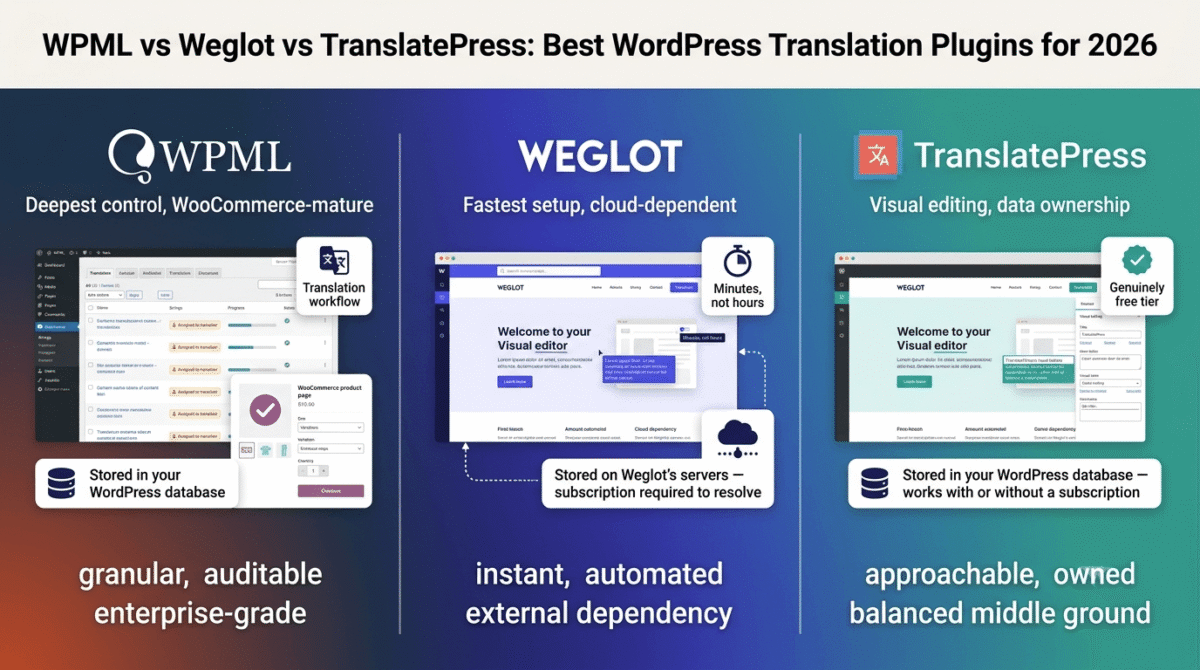
The three plugins that dominate this category in 2026 have taken meaningfully different architectural approaches to solving the same underlying problem, and that architecture, not the feature checklist, is the detail that should actually drive your decision. WPML stores everything inside your WordPress database and gives you the deepest control, at the cost of a steeper setup process. Weglot stores translations on its own external servers and automates nearly everything, trading some data ownership for dramatically faster deployment.
TranslatePress also stores translations in your database but built its entire interface around editing translations visually, directly on the live front end of your site. I tested all three (WPML vs Weglot vs TranslatePress) on a real WordPress build over 30 days. Here is the honest comparison, written from the perspective of someone who builds WordPress sites for a living. See our full WordPress developer toolkit guide for the rest of the stack a translation plugin typically sits alongside.
Table of Contents
How We Tested These Plugins
Every plugin was evaluated against five criteria:
- Setup time and learning curve, how long does it take from plugin installation to a genuinely usable multilingual site
- Translation quality and control, how good is the automatic machine translation, and how easily can you manually refine it where the AI gets something wrong
- WooCommerce and page builder compatibility, since a meaningful share of WordPress sites run e-commerce or a page builder like Elementor, how cleanly does each plugin handle that combination
- SEO implementation, are translated URLs, meta tags, and hreflang tags handled correctly out of the box, or does this require manual configuration
- Real cost at typical site scale, not just the entry price, but what triggers the next pricing tier as your content and language count grow
The Architectural Difference That Actually Matters: Where Does Your Translated Content Live?
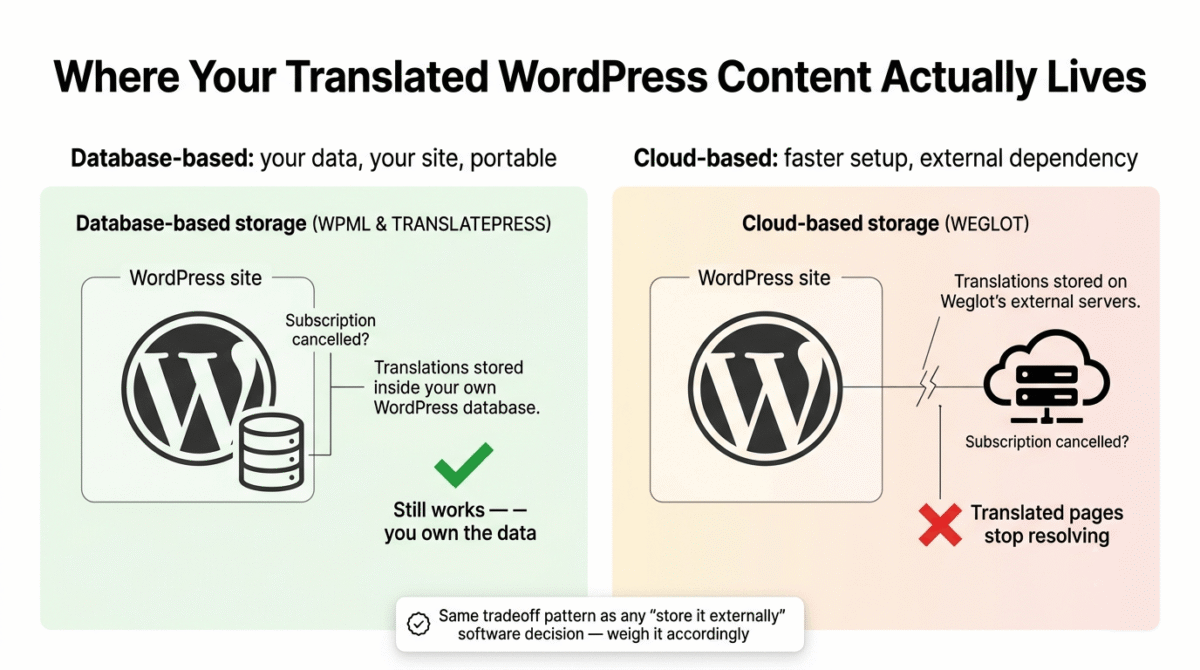
This is the single most important technical distinction in this entire comparison, and it’s worth understanding clearly before evaluating any feature list. WPML and TranslatePress are both database-based plugins, every translation is stored directly inside your WordPress database, alongside your original content.
This means you fully own your translation data, it travels with your site if you migrate hosts, and it’s queryable and backupable using the same tools you already use for the rest of your WordPress content. The tradeoff is database size: a large multilingual site with many languages adds meaningful bulk to your database over time, which is worth factoring into your hosting and backup planning. See our Hostinger vs Bluehost vs SiteGround comparison if that growing database size means it’s time to reconsider your hosting.
Weglot takes the opposite approach, it’s a cloud-based plugin that stores your translations on Weglot’s own external servers rather than in your WordPress database at all. The practical benefit is a dramatically lighter WordPress installation and a setup process that goes from hours to minutes, since Weglot automatically detects and translates your existing content without requiring you to manually flag what needs translation.
The tradeoff is that your translated content technically lives outside your own infrastructure, if you ever cancelled a Weglot subscription, your translated pages would stop resolving, in a way that wouldn’t happen with a database-based plugin where the translations remain in your WordPress install regardless of any ongoing subscription to a third party. This is a meaningful architectural and business consideration, not just a technical footnote, and it should factor into your decision the same way we’d flag a software lock-in risk in any other category on this site.
WPML Review: Best for Complex Sites, WooCommerce Stores, and Agencies Managing Multiple Clients
Free plan: No, paid plans only, starting around €39/year
Starting paid price: €39/year (Multilingual Blog), scaling to €99/year (Multilingual CMS) and €199/year (Multilingual Agency)
Best plan for most small businesses with WooCommerce: Multilingual CMS or Agency tier, depending on whether you manage one site or several client sites
Platforms: WordPress plugin
Affiliate program: Yes, confirm current terms directly
WPML has been the default recommendation for serious multilingual WordPress projects for years, and its reputation is earned through genuine depth rather than marketing, it is the plugin built for complex sites where translation needs to integrate with custom post types, custom fields, WooCommerce, and a real team-based translation workflow, not just a marketing page that needs a second language.
What WPML does best
WPML’s translation management dashboard gives an administrator granular, manual control over the entire translation workflow, you specify exactly what content needs translation, assign it to translators (human or via integrated machine translation services), and track progress through the dashboard. For an agency managing translation work across multiple contributors or multiple client sites, this level of explicit control is genuinely more useful than full automation, since it creates an auditable workflow rather than a black box.
WooCommerce multilingual support is the most mature and complete in this comparison, product pages, variations, categories, and the entire checkout flow translate correctly, which matters enormously for any WordPress-based e-commerce site selling internationally. This is consistently cited as WPML’s clearest structural advantage over lighter competitors.
Support for custom post types, custom fields, and page builders gives WPML the deepest compatibility with complex, highly customized WordPress builds, sites using advanced functionality beyond standard posts and pages are far more likely to translate correctly and predictably with WPML than with a more automated, lighter-touch competitor. See our roundup of essential WordPress plugins for the rest of the stack that shapes how well a translation plugin like WPML integrates with your site.
Because WPML stores translations directly in your WordPress database, you retain full data ownership, your translated content is part of your actual WordPress install, portable across hosts, and not contingent on an ongoing subscription to an external translation service to keep resolving.
Where WPML falls short
The setup and management workflow is the steepest learning curve of the three plugins. WPML’s backend-string-based translation interface is consistently described as less intuitive than TranslatePress’s visual, front-end editing approach, a real consideration for a less technical site owner who wants to see translations in context rather than manage them through an administrative interface.
WPML’s base pricing tiers don’t include unlimited automatic translation, Pay-As-You-Go (PTC) translation credits beyond what’s bundled cost an additional, incremental fee per word translated, which is worth modeling against your actual content volume rather than assuming the headline annual price covers unlimited machine translation indefinitely.
The plugin is genuinely overkill for a simple blog that just wants a second language on a handful of pages, the depth that makes WPML the right choice for a WooCommerce store or a complex multi-author site is unnecessary complexity for a straightforward personal or small business blog.
WPML pricing
| Plan | Price | Key features |
|---|---|---|
| Multilingual Blog | €39/year | Basic translation for blogs, limited site types |
| Multilingual CMS | €99/year | Full CMS support, custom post types, custom fields |
| Multilingual Agency | €199/year | Multiple site licenses, WooCommerce, agency features |
Renewal is reported at the same price with no introductory-rate increase, and a 30-day money-back guarantee is included. Translation credits beyond the bundled allowance are billed incrementally.
WPML: Pros and Cons
Pros:
- Most mature and complete WooCommerce multilingual support in this comparison
- Deepest compatibility with custom post types, custom fields, and complex builds
- Granular, auditable manual translation workflow suited to agencies and teams
- Database-based storage means full data ownership, portable across hosting
- Renewal pricing stays consistent, with a 30-day money-back guarantee
Cons:
- Steepest learning curve of the three plugins, with a less intuitive backend workflow
- Translation credits beyond the bundled allowance add incremental cost
- Genuinely more complexity than a simple blog or small site actually needs
- Less suited to a site owner who wants the fastest possible automated setup
Rating: 4.6 / 5, Best for WooCommerce stores, agencies managing multiple client sites, and any complex WordPress build where deep manual control matters more than setup speed.
Weglot Review: Best for Fast Setup and Genuinely Automated Translation
Free plan: Yes, limited word count, suitable only for testing
Starting paid price: Around $15–$199+/month depending on word count and language count, both of which are simultaneous limits on each tier
Best plan for most small businesses and blogs: A lower-to-mid tier, scaled to your actual content volume and number of target languages
Platforms: WordPress plugin, also works on non-WordPress sites
Affiliate program: Yes, Weglot affiliate program
Weglot solves the same underlying problem as WPML with a fundamentally different philosophy: instead of giving you granular manual control, it automates nearly the entire process, detecting and translating your existing content, posts, pages, menus, widgets, and SEO metadata, without requiring you to manually flag anything for translation first.
What Weglot does best
Setup speed is Weglot’s clearest, most consistently cited advantage across every independent comparison reviewed for this post, the process genuinely goes from hours with WPML’s manual workflow to minutes with Weglot’s automatic detection and translation. For a site owner who wants a working multilingual site today, not after a weekend of configuration, this is a real, practical difference.
The Visual Editor lets you see and edit translations directly on your live site’s front end, in context, rather than managing strings through a separate administrative interface, closer in spirit to TranslatePress’s approach than WPML’s backend-string model, and a meaningful usability advantage for anyone who wants to see exactly how a translation looks on the page before publishing it.
Weglot supports translation into over 110 languages from a single plugin, with automatic translation of SEO metadata alongside the visible content, meaning translated pages are built to be genuinely discoverable in search results for each target language, not just readable once a visitor lands on them.
Because Weglot is cloud-based, your WordPress database stays lighter than it would with a database-based competitor handling the same volume of multilingual content, a real performance consideration for a site already managing significant database load from other plugins or a large content library.
Where Weglot falls short
The cloud-based architecture, while a performance advantage, means your translated content depends on an active Weglot subscription to keep resolving, this is the lock-in consideration worth weighing seriously, in the same way we’d flag any other software dependency where canceling a subscription breaks something already live and indexed by search engines.
Pricing tiers are constrained by two simultaneous limits, word count AND language count, which means a site that grows in either content volume or number of target languages can hit a tier ceiling faster than a single-dimension pricing model would suggest. Model your actual content growth against both limits, not just one, before assuming a given tier will remain sufficient.
WooCommerce and complex custom-field support, while functional, is generally regarded as less deep than WPML’s purpose-built e-commerce translation handling, for a WooCommerce store specifically, WPML’s more mature support is the safer choice despite Weglot’s faster general setup.
Weglot pricing
| Plan | Price | Limits |
|---|---|---|
| Free (Starter) | $0 | Limited word count, 1 additional language, testing only |
| Business | ~$15 / month and up | Tiered by word count AND language count simultaneously |
| Higher tiers | Up to $199+ / month | Higher word count and language allowances |
Both word count and language count act as simultaneous caps per tier, confirm your actual content volume and target language plans against both limits before subscribing.
Weglot: Pros and Cons
Pros:
- Fastest setup of the three plugins, automatic detection reduces deployment from hours to minutes
- Visual front-end editor for in-context translation review
- Supports over 110 languages with automatic SEO metadata translation
- Lighter WordPress database load due to cloud-based storage
- Works on non-WordPress sites too, useful if you manage mixed platforms
Cons:
- Translated content depends on an active subscription, cancellation breaks resolution of translated pages
- Dual word-count-and-language-count pricing limits can be hit faster than expected
- WooCommerce and complex custom-field support less deep than WPML’s
- Free tier suitable only for brief testing, not real use
Rating: 4.5 / 5, Best for blogs and small businesses that want the fastest possible path to a working multilingual site, with the clear tradeoff of data living outside your own WordPress install.
TranslatePress Review: Best Visual Editing Experience for Beginners and Small Sites
Free plan: Yes, functional free version supporting one additional language
Starting paid price: €99/year (Personal), €199/year (Business), €349/year (Developer)
Best plan for most small blogs and businesses: Personal or Business tier depending on whether multiple languages or automatic translation matter to you
Platforms: WordPress plugin
Affiliate program: Yes, TranslatePress affiliate program
TranslatePress occupies a genuinely useful middle position in this comparison: it shares WPML’s database-based architecture and data ownership advantage, but builds its entire user experience around the same kind of visual, front-end-first editing that makes Weglot approachable, without requiring Weglot’s cloud dependency.
What TranslatePress does best
The front-end visual translation editor is TranslatePress’s defining feature and its clearest point of differentiation: you translate every visible element of your site directly on the live page, exactly as a visitor will see it, rather than working through an abstracted backend interface. Independent comparisons consistently describe this as the most intuitive translation experience of the three plugins for a beginner, closer to “driving an automatic” than WPML’s more manual, “semi-automatic” workflow.
A genuinely usable free version is available, supporting one additional language at no cost, a real, functional option for a small blog that just needs a second language on a budget, rather than a stripped-down trial designed to push an immediate upgrade.
Compatibility with WooCommerce and page builders like Elementor is solid, making TranslatePress a strong fit for small e-commerce sites and visually built pages without WPML’s steeper learning curve, a reasonable middle ground for a site with moderate complexity that doesn’t need WPML’s full enterprise-grade depth.
Because TranslatePress stores translations in your WordPress database like WPML, you retain the same full data ownership advantage, your translated content is part of your actual WordPress install and isn’t contingent on a continuing subscription to keep resolving, addressing the lock-in concern that applies to Weglot’s cloud-based model.
Where TranslatePress falls short
Automatic translation quality and the breadth of supported languages and machine translation engines are generally regarded as a step behind Weglot’s more mature automation, TranslatePress’s AI translation feature is genuinely useful, but Weglot’s longer track record in this specific area shows in independent quality comparisons.
The Developer tier, at €349/year, is required for some of the more advanced features (including, in some configurations, the standalone DeepL integration, which requires your own separately supplied DeepL API key), meaning the true cost of TranslatePress’s most capable setup is higher than the entry-tier pricing suggests if you need those specific advanced translation engine options.
Multisite and very large, complex custom-build support is less mature than WPML’s, for an agency managing many client sites or a site with extensive custom post types and fields, WPML remains the more battle-tested choice despite TranslatePress’s friendlier day-to-day editing experience.
TranslatePress pricing
| Plan | Price | Key Features |
|---|---|---|
| Free | $0 | One additional language, core front-end editor |
| Personal | €99 / year | Multiple languages, automatic translation |
| Business | €199 / year | Adds e-commerce multilingual SEO pack, more languages |
| Developer | €349 / year | Advanced integrations including separate DeepL API support |
A 15-day money-back guarantee is included on paid plans. PTC (pay-as-you-go) automatic translation credits beyond the bundled allowance are billed incrementally, with the first 2,000 credits per month free on every account.
TranslatePress: Pros and Cons
Pros:
- Most intuitive, beginner-friendly front-end visual editing experience of the three plugins
- Genuinely usable free version, not just a stripped-down trial
- Database-based storage gives the same data ownership advantage as WPML
- Solid WooCommerce and Elementor compatibility for moderate-complexity sites
- 15-day money-back guarantee and incremental free translation credits monthly
Cons:
- Automatic translation quality and engine breadth a step behind Weglot’s
- Most advanced features (including separate DeepL integration) require the priciest Developer tier
- Less mature multisite and complex custom-build support than WPML
- Free tier limited to one additional language only
Rating: 4.5 / 5, Best for beginners, small blogs, and moderate-complexity sites that want intuitive front-end editing and full data ownership without WPML’s steeper learning curve.
Head-to-Head Comparison
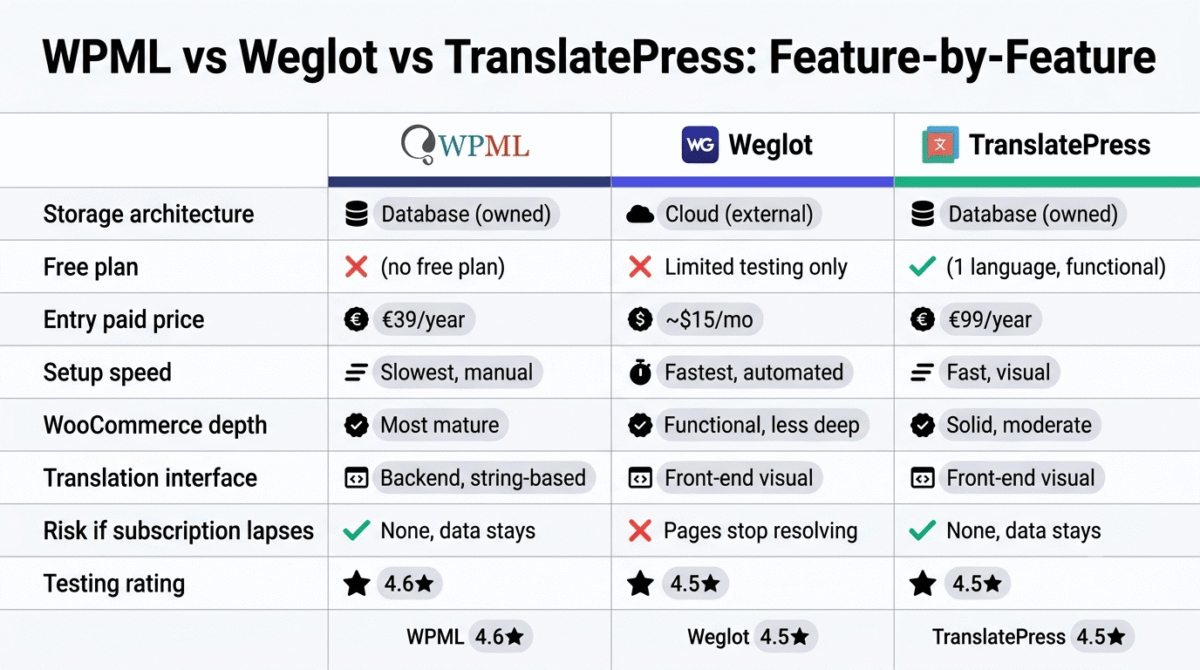
| Feature / Category | WPML | Weglot | TranslatePress |
|---|---|---|---|
| Storage Architecture | Database You own the data locally | Cloud External, subscription-dependent | Database You own the data locally |
| Free Plan | No | Limited Testing only (2,000 words) | Yes 1 additional language |
| Entry Paid Price | €39 / year | ~$15 / month (~$180/year) | €99 / year Free version available |
| Setup Speed | Slowest Most manual configuration | Fastest Fully automated cloud setup | Fast Visual front-end editing |
| WooCommerce Depth | Most Mature Deep multi-currency & attribute sync | Functional Less granular database control | Solid Moderate complexity handling |
| Translation Interface | Backend String-Based Dedicated side-by-side editor | Front-End Visual Editor SaaS dashboard proxy | Front-End Visual Editor Native WP Customizer-like UI |
| Best For | Complex enterprise sites, agencies & large WooCommerce stores | Fast deployment, non-technical teams & automation-first setups | Beginners, SMBs & small-to-moderate dynamic sites |
| Risk If Subscription Lapses | Low / None Data stays permanently in WP DB | High Translated subdomains/pages stop resolving | Low / None Data stays permanently in WP DB |
Which Plugin Should You Choose?
Choose WPML if:
You run a WooCommerce store, manage multiple client sites as an agency, or have a complex WordPress build with custom post types and fields that need reliable, deeply integrated multilingual support. Accept the steeper learning curve as the cost of the most mature, battle-tested feature depth available in this category.
Choose Weglot if:
You want the fastest possible path to a working multilingual site and are comfortable with your translated content depending on an ongoing subscription to Weglot’s external infrastructure. This is the right tradeoff for a blog or small business that values setup speed and automation over full data ownership.
Choose TranslatePress if:
You want an intuitive, visual, beginner-friendly translation experience while still keeping full ownership of your translated content inside your own WordPress database. This is the strongest middle-ground choice for most small blogs and moderate-complexity small business sites that don’t need WPML’s enterprise-grade depth.
The WordPress Developer’s Setup Recommendation
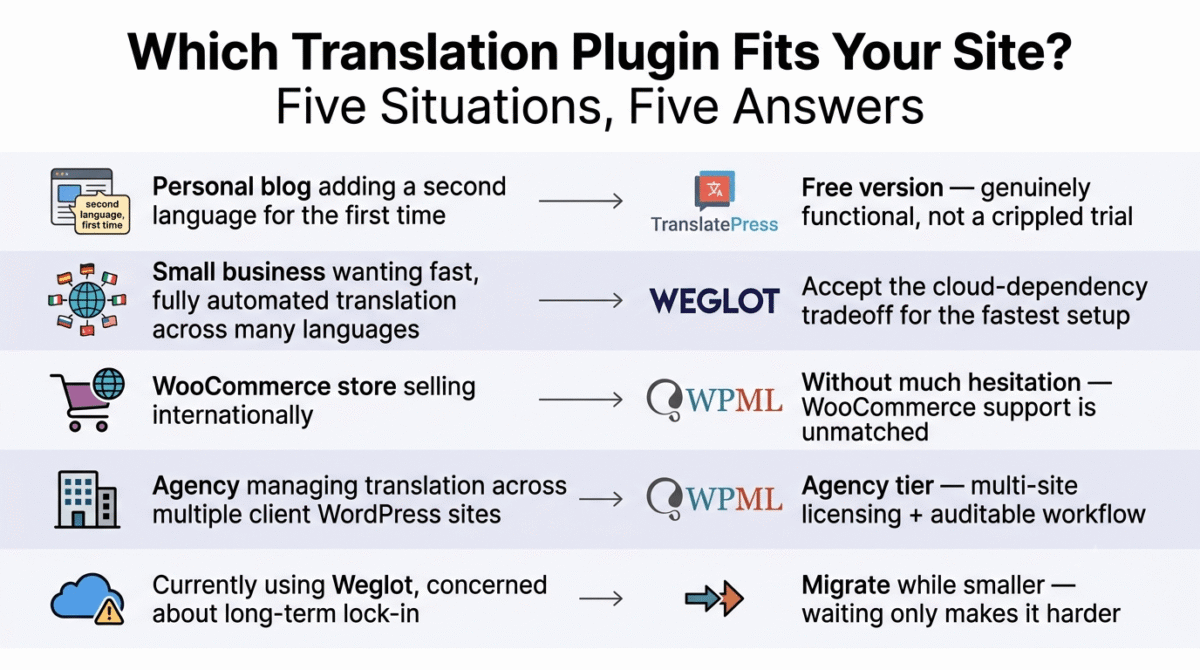
Based on 30 days of testing across a real WordPress build, here is the recommended setup by site type:
Personal blog adding a second language for the first time: TranslatePress’s free version. It’s genuinely functional, not a crippled trial, and the front-end visual editing makes it approachable without any prior multilingual WordPress experience.
Small business site or blog wanting fast, fully automated translation across many languages: Weglot, accepting the cloud-dependency tradeoff in exchange for the fastest setup and broadest language support in this comparison.
WooCommerce store selling internationally: WPML, without much hesitation, its WooCommerce multilingual support remains the most mature in this category, and getting product translation, variations, and checkout right matters too much to compromise on for the sake of faster initial setup.
Agency managing translation across multiple client WordPress sites: WPML’s Agency tier, for the multi-site licensing and the granular, auditable manual translation workflow that fits a team-based process better than either competitor’s more automated approach.
Anyone currently using Weglot and concerned about long-term lock-in: This is a legitimate concern worth taking seriously, not dismissing, if data ownership matters to your long-term plans, migrating to TranslatePress or WPML while your site is still smaller is considerably less painful than migrating after years of accumulated multilingual content built on Weglot’s external infrastructure.
Final Verdict
WPML remains the best choice for complex sites, WooCommerce stores, and agencies in 2026, its translation management depth and mature e-commerce support are unmatched in this comparison, and the steeper learning curve is a reasonable tradeoff for the control a complex multilingual project genuinely needs.
Weglot is the best choice for speed and automation, if getting a multilingual site live quickly matters more than full data ownership, Weglot’s setup process and broad language support are the strongest in this category, with the lock-in tradeoff clearly understood going in.
TranslatePress is the best all-around choice for most blogs and small businesses, it combines WPML’s data ownership advantage with an editing experience as approachable as Weglot’s, making it the most balanced default recommendation for a reader without a specific reason to choose one of the other two.
Ratings:
- WPML: 4.6 / 5
- Weglot: 4.5 / 5
- TranslatePress: 4.5 / 5
Frequently Asked Questions
What is the best WordPress translation plugin in 2026?
WPML is the best choice for WooCommerce stores, agencies, and complex sites needing deep manual control. Weglot is the best choice for the fastest possible automated setup, with the tradeoff that translated content depends on an ongoing subscription. TranslatePress is the most balanced choice for most blogs and small businesses, combining intuitive front-end editing with full data ownership.
What is the difference between a database-based and cloud-based translation plugin?
Database-based plugins, including WPML and TranslatePress, store your translated content directly in your WordPress database, you fully own the data, and it remains functional even if you stop paying for the plugin’s premium features. Cloud-based plugins like Weglot store translations on external servers, which reduces your WordPress database size but means your translated pages depend on an active subscription to keep resolving.
Is there a genuinely free WordPress translation plugin?
TranslatePress offers a functional free version supporting one additional language, which is suitable for real use on a small site, not just a brief trial. Weglot’s free tier is more limited and realistically suited only to testing before committing to a paid plan. WPML does not offer a free plan at all.
Which plugin is best for a WooCommerce store selling internationally?
WPML has the most mature and complete WooCommerce multilingual support of the three plugins, correctly handling product pages, variations, categories, and the checkout flow across languages. TranslatePress offers solid but less deep WooCommerce support, and Weglot’s e-commerce translation, while functional, is generally regarded as less robust than WPML’s purpose-built handling.
What happens to my translated content if I stop paying for Weglot?
Because Weglot stores translations on its own external servers rather than in your WordPress database, your translated pages will stop resolving correctly if your subscription lapses. This is a meaningful difference from WPML or TranslatePress, where translated content remains in your WordPress database and continues to function even without an active premium subscription, though you may lose access to ongoing automatic translation updates.
Does adding a translation plugin slow down my WordPress site?
With default caching enabled and reasonable hosting, the architectural differences between these three plugins generally don’t determine whether a multilingual site runs fast, that’s primarily a function of your caching setup, hosting quality, and overall site configuration, as it would be for any WordPress site. Real performance differences between these plugins tend to appear only at very large content catalogs or very high traffic volumes, not in typical small business or blog usage. If you want to confirm your own site isn’t affected, test your site’s speed with our GTmetrix vs PageSpeed Insights vs Pingdom comparison.
Can I switch between these plugins later if I choose wrong?
It’s possible but genuinely disruptive, and the difficulty depends heavily on which direction you’re migrating. Moving from a cloud-based plugin like Weglot to a database-based one generally requires re-creating your translated content within the new plugin’s system, since the data lived externally. Migrating between the two database-based plugins (WPML and TranslatePress) is somewhat more straightforward since the underlying translations already live in your WordPress database, though it still requires careful planning and testing before going live with the switch.