Everyone uses cloud storage. Most people use whatever came pre-installed on their device and never think about it again.
That is a mistake because the right cloud storage service can save you hours every week, protect files you cannot afford to lose, and cost you nothing. The wrong one quietly charges you more than it should for storage; you could get cheaper elsewhere.
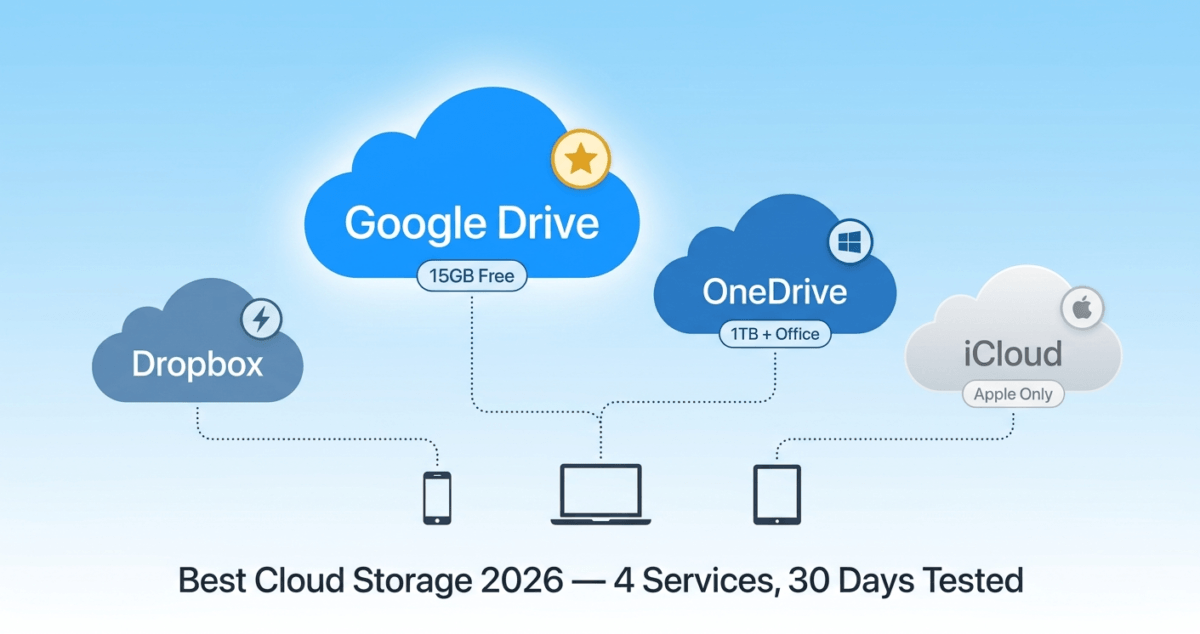
I tested Google Drive vs Dropbox vs OneDrive vs iCloud for 30 days across Windows, Mac, iPhone, and Android, uploading, syncing, sharing, and collaborating on real files. Here is the honest comparison of which cloud storage service is actually best in 2026.
Table of Contents
How We Evaluated These Services
Every service was tested across five criteria:
– Free storage: how much do you get for free, and is it actually useful?
– Sync speed: how quickly do files appear across devices after uploading?
– File sharing and collaboration: How easy is it to share files and work with others?
– Platform support: does it work well on Windows, Mac, iPhone, and Android?
– Pricing: free tier value and paid plan cost versus storage offered
Why Cloud Storage Matters More Than Ever in 2026
Before comparing services, it is worth understanding what you are actually buying.
Cloud storage does three things: it backs up your files so you never lose them if your device breaks or is stolen, it syncs your files across all your devices so you always have the latest version everywhere, and it lets you share files and collaborate with others without emailing attachments back and forth.
In 2026, the average person has photos, documents, and files spread across a phone, a laptop, and possibly a tablet. Without cloud storage, those files exist in only one place, and losing that device means losing everything. With cloud storage, your files are safe, accessible, and shareable from any device, anywhere.
Google Drive Review: Best Free Cloud Storage Overall
Free storage: 15GB (shared across Drive, Gmail, and Photos)
Paid plans: Google One 100GB for $1.99/month, 200GB for $2.99/month, 2TB for $9.99/month
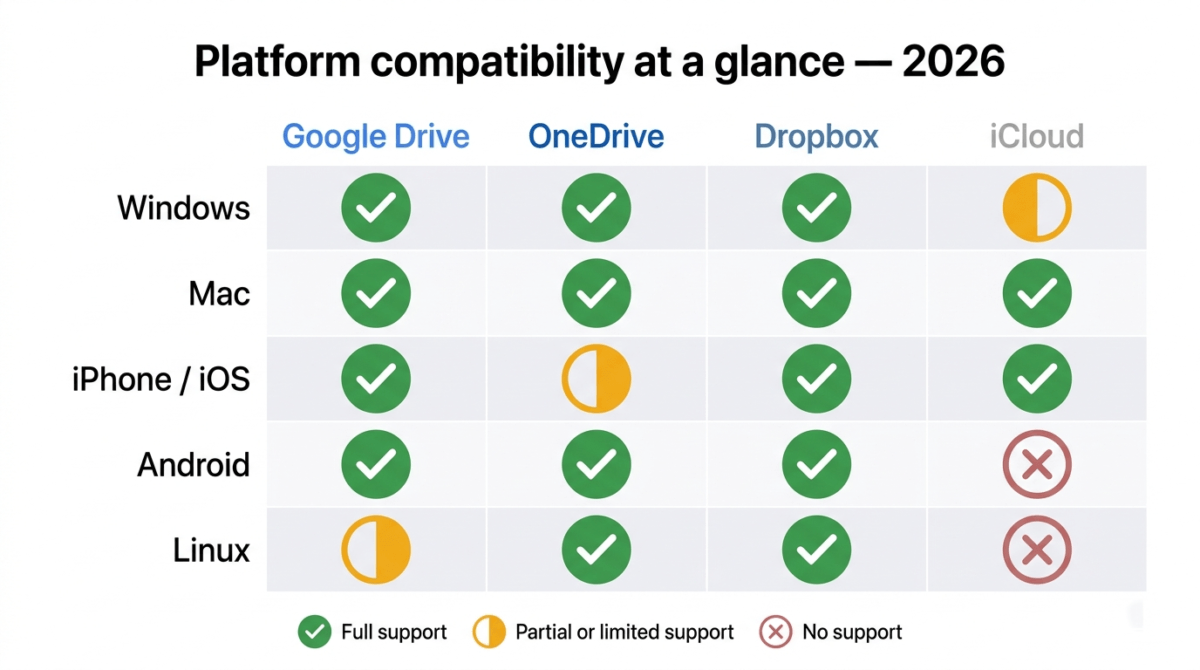
Platforms: Windows, Mac, iOS, Android, web browser
Best for: Anyone already using Gmail or Google Workspace, students, and users who want the best free tier
Google Drive is the most widely used cloud storage service in the world, and for most people, it is the right choice. The combination of 15GB free storage, seamless integration with Google Docs, Sheets, and Slides, and one of the best mobile apps available makes it the default recommendation for individual users.
Free storage: the most generous of the four
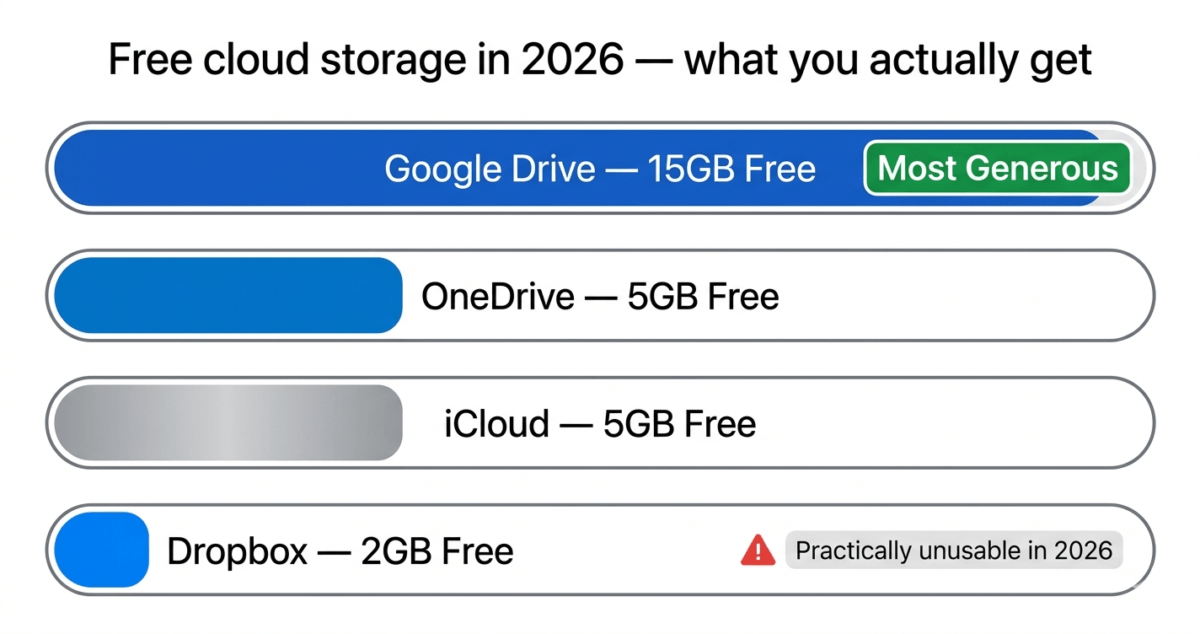
Google Drive gives you 15GB free, the largest free tier of any mainstream cloud storage service. This storage is shared across your Google account: Drive files, Gmail attachments, and Google Photos all count toward the same 15GB.
For most users, 15GB is enough to store years of documents, spreadsheets, and presentations. The catch is Google Photos: if you take a lot of photos on your phone and back them up to Google Photos, that 15GB fills up faster than you expect. Google Photos used to offer unlimited photo storage at compressed quality; this ended in 2021, and photos now count toward your 15GB limit.
Collaboration and Google Workspace
Google Drive’s killer feature is Google Docs, Sheets, and Slides, the browser-based office suite built directly into Drive. Multiple people can edit the same document simultaneously, with changes appearing in real time and a complete version history preserved automatically.
For students, remote teams, and anyone who collaborates on documents regularly, this real-time collaboration is genuinely transformative. No emailing files back and forth, no version confusion, no “which copy is the latest?” Everyone works on the same file simultaneously.
Google Drive also integrates with hundreds of third-party apps Slack, Zoom, Adobe, DocuSign, and more making it the most connected cloud storage platform available.
Sync speed
Google Drive’s sync speed was excellent in testing; files uploaded to the web interface appeared on connected devices within 10–30 seconds for documents and small files. Large files (video, high-resolution images) took longer but synced reliably without errors.
The Google Drive desktop app (Drive for Desktop) is smooth and unobtrusive, running in the background without noticeable performance impact.
Google Drive pricing
Plan | Price | Storage |
Free | $0 | 15GB |
Google One Basic | $1.99/mo | 100GB |
Google One Standard | $2.99/mo | 200GB |
Google One Premium | $9.99/mo | 2TB |
Google One’s pricing is the most competitive of the four services at every storage tier. 100GB for $1.99/month and 2TB for $9.99/month are both strong values. Google One also includes benefits beyond storage, VPN access, Google Photos editing features, and Google Store discounts.
Google Drive: Pros and Cons
Pros:
– Largest free tier, 15GB shared across Google account
– Best-in-class real-time collaboration via Google Docs, Sheets, Slides
– Most affordable paid plans, 100GB for $1.99/month
– Works on every platform, Windows, Mac, iOS, Android, and browser
– 300+ third-party integrations
– Excellent mobile apps on iOS and Android
– Google One benefits beyond storage (VPN, Photos editing)
Cons:
– 15GB shared with Gmail and Google Photos fills faster than it appears
– Google Workspace (business) plans significantly more expensive
– Privacy concerns. Google’s business model involves data analysis
– Desktop sync app heavier on resources than OneDrive or Dropbox
– No end-to-end encryption, Google can technically access your files
Rating: 4.6 / 5 Best free cloud storage and best value for personal use.
Dropbox Review: Best for File Syncing and Cross-Platform Reliability
Free storage: 2GB
Paid plans: Plus, $9.99/month (2TB) | Professional, $16.58/month (3TB) | Business, $15/user/month
Platforms: Windows, Mac, Linux, iOS, Android, web browser
Best for: Professionals, creative teams, and users who need the fastest and most reliable file syncing
Affiliate program: Yes, referral program and reseller partnerships
Dropbox invented modern cloud storage in 2007 and spent years as the undisputed best option. In 2026, it remains the most technically polished file sync service available, but its free plan is now nearly unusable, and its pricing has become difficult to justify for individual users when Google Drive and OneDrive offer far more storage for less money.
Where Dropbox still leads
Dropbox’s file syncing is the fastest and most reliable of the four services tested. Files synced to the Dropbox folder on your computer appear on other connected devices in seconds, consistently faster than Google Drive and OneDrive in our testing. For professionals who frequently update large files (designers working with high-resolution images, video editors, developers with large codebases), this sync speed advantage is genuine and meaningful. If you are collaborative-building or managing web assets here in the cloud, you’ll want to ensure your production site loads just as fast, make sure to check out our hands-on breakdown of the best Web Hosting in 2026 to optimize your front-end performance.
Dropbox’s desktop integration is also the best. The Dropbox folder behaves exactly like a local folder on your computer. You save files into it the same way you save any file, and syncing happens automatically in the background. The right-click context menu in Windows Explorer and Mac Finder integrates cleanly, making sharing a link or checking sync status a two-click operation.
Dropbox Paper, the collaborative document tool built into Dropbox, is capable, though it does not match Google Docs for features or adoption. Dropbox also integrates cleanly with Slack, Zoom, Microsoft Office, Google Workspace, and hundreds of other tools.
The free plan problem
Dropbox’s free plan offers only 2GB of storage, the smallest of the four services by a significant margin. In 2026, 2GB holds approximately 500 photos or a handful of documents. It is not a practical amount of storage for everyday use.
This is Dropbox’s most significant competitive weakness. Google Drive gives you 15GB free. OneDrive gives you 5GB free. iCloud gives you 5GB free. Dropbox gives you 2GB less than a typical smartphone photo takes in burst mode.
The Plus plan at $9.99/month (billed annually) gives you 2TB of storage — excellent value for the storage amount, but it is a significant jump from 2GB free to $9.99/month paid, with no middle ground.
Dropbox pricing
Plan | Price | Storage | Best for |
Free | $0 | 2GB | Almost nothing practical |
Plus | $9.99/mo | 2TB | Individual power users |
Professional | $16.58/mo | 3TB | Freelancers and professionals |
Business | $15/user/mo | 9TB (team) | Small teams |
Dropbox: Pros and Cons
Pros:
– Fastest file sync speeds of the four services tested
– Best desktop integration, behaves exactly like a local folder
– Works on Linux, unique among the four major services
– Excellent third-party integrations (Slack, Zoom, Office, etc.)
– Smart Sync, access all files without storing them locally (paid plans)
– Version history and file recovery up to 180 days (Plus and above)
– Reliable and polished across all platforms
Cons:
– Worst free plan, only 2GB of storage
– Expensive relative to Google Drive and OneDrive for equivalent storage
– No built-in office suite for document creation and editing
– Smart Sync (selective sync) only on paid plans
– Less value for money for casual users compared to Google One
Rating: 4.2 / 5 Best sync technology, worst free plan. Worth paying for if fast reliable sync is your priority.
OneDrive Review: Best Cloud Storage for Windows Users
Free storage: 5GB
Paid plans: Microsoft 365 Personal, $6.99/month (1TB + full Office apps) | Microsoft 365 Family, $9.99/month (6TB across 6 users + Office)
Platforms: Windows, Mac, iOS, Android, web browser
Best for: Windows users, Microsoft 365 subscribers, and anyone who uses Word, Excel, or PowerPoint
OneDrive is Microsoft’s cloud storage service, built directly into Windows 10 and 11. If you use a Windows computer, OneDrive is already running on your device, and if you subscribe to Microsoft 365, you already have 1TB of OneDrive storage included.
Built into Windows: the biggest advantage
OneDrive’s single biggest advantage over every competitor is its deep integration with Windows. The OneDrive folder appears in Windows Explorer alongside your local folders. Files sync automatically. The Photos app on Windows backs up to OneDrive by default. And Microsoft 365 files Word documents, Excel spreadsheets, PowerPoint presentations- save to OneDrive by default and open instantly across devices.
For Windows users who already live in the Microsoft ecosystem, Outlook email, Teams, Office apps, OneDrive requires no setup, no additional software, and no learning curve. It simply works.
Microsoft 365: the real value proposition
OneDrive’s strongest value proposition is the Microsoft 365 bundle. For $6.99/month, Microsoft 365 Personal gives you:
– 1TB of OneDrive storage
– Full desktop versions of Word, Excel, PowerPoint, OneNote, and Outlook
– 60 Skype calling minutes per month
– Advanced security features
Compare this to buying Office as a standalone purchase ($149.99 one-time for Office Home) or paying $9.99/month for Google One’s 2TB plan. The Microsoft 365 Personal bundle is exceptional value if you need the Office apps.
For families, Microsoft 365 Family at $9.99/month gives up to six users 1TB each (6TB total) plus Office apps for all six, the most storage per dollar of any option on this list for multi-person households.
Collaboration with Office apps
OneDrive’s collaboration via Microsoft 365 is genuinely strong for Office files. Multiple users can co-author a Word document or Excel spreadsheet simultaneously, with changes syncing in real time, comparable to Google Docs for Office format files.
For users who receive Word or Excel files from clients, employers, or colleagues, for most business users, editing directly in OneDrive without format conversion is a meaningful advantage over Google Drive, which converts Office files to Google Docs format.
Where OneDrive falls short
Outside the Windows and Microsoft 365 ecosystem, OneDrive loses its advantages. On Mac, the OneDrive app is functional but less seamlessly integrated than on Windows. The 5GB free plan is mediocre, more than Dropbox but less than Google Drive’s 15GB.
OneDrive’s sync reliability has also historically been criticised. In our testing, sync was reliable but occasionally slower than Dropbox, and we encountered one instance where a file did not sync correctly until the app was manually refreshed.
OneDrive pricing
Plan | Price | Storage | Includes |
Free | $0 | 5GB | Basic storage |
Microsoft 365 Personal | $6.99/mo | 1TB | Office apps (1 user) |
Microsoft 365 Family | $9.99/mo | 6TB | Office apps (up to 6 users) |
OneDrive: Pros and Cons
Pros:
– Built into Windows, no setup required for Windows users
– Microsoft 365 Personal at $6.99/month includes 1TB storage + full Office apps. exceptional value
– Microsoft 365 Family is best multi-user value of any service
– Native co-authoring in Word, Excel, PowerPoint without format conversion
– Deep integration with Teams, Outlook, and Microsoft ecosystem
– Personal Vault, extra-secure area for sensitive files with 2FA
Cons:
– Only 5GB free, less than Google Drive’s 15GB
– Less seamless on Mac and non-Windows platforms
– Occasional sync reliability issues in testing
– Limited third-party integrations compared to Google Drive and Dropbox
– Not the best choice for users outside the Microsoft ecosystem
Rating: 4.4 / 5 Best cloud storage for Windows users and Microsoft 365 subscribers. The Microsoft 365 bundle is the best value in cloud storage.
ICloud Review: Best Cloud Storage for Apple Users
Free storage: 5GB
Paid plans (iCloud+): 50GB, $0.99/month | 200GB, $2.99/month | 2TB, $9.99/month
Platforms: iOS, Mac, Windows (limited), web browser
Best for: iPhone and Mac users who want seamless Apple ecosystem integration
iCloud is Apple’s cloud storage service, built into every iPhone, iPad, and Mac. If you use Apple devices, iCloud is the path of least resistance; it backs up your iPhone automatically, syncs your photos across your iPhone and Mac, and stores your contacts, calendars, and messages.
Seamless Apple ecosystem integration
iCloud’s strength is how invisibly it integrates into Apple devices. iPhone backup happens automatically overnight over Wi-Fi. Photos taken on your iPhone appear on your Mac within seconds. Contacts, calendars, Safari bookmarks, and iMessage history sync across all Apple devices without any configuration.
For users who only use Apple devices, iCloud just works, and the integration depth is unmatched by any third-party cloud service on Apple hardware.
iCloud Drive, the file storage component, is functional for documents and general files. iCloud+ plans add Hide My Email (creates random email aliases to protect your real address), Private Relay (a basic privacy feature similar to a VPN for Safari browsing), and HomeKit Secure Video for home cameras.
Where iCloud falls short
Outside the Apple ecosystem, iCloud ranges from limited to frustrating. The Windows app for iCloud has improved in recent years but remains significantly less polished than OneDrive or Dropbox on Windows. There is no native Linux support. The Android app is essentially non-existent.
For collaboration and office document work, iCloud offers Pages, Numbers, and Keynote (Apple’s alternatives to Word, Excel, and PowerPoint) via iCloud.com, but these tools have far lower adoption than Google Docs or Microsoft 365. Sharing a Pages document with a Windows user creates immediate compatibility friction.
iCloud’s 5GB free tier, shared across your iPhone backup, photos, and files, fills up quickly for iPhone users. Apple’s iCloud backup for a standard iPhone typically uses 3–8GB, meaning the free plan is consumed by phone backup alone for most users before storing a single document.
iCloud pricing
Plan | Price | Storage |
Free | $0 | 5GB |
iCloud+ 50GB | $0.99/mo | 50GB |
iCloud+ 200GB | $2.99/mo | 200GB |
iCloud+ 2TB | $9.99/mo | 2TB |
iCloud+’s pricing is competitive, particularly the 50GB plan at $0.99/month, which is cheaper than any comparable tier from Google, Dropbox, or Microsoft.
iCloud: Pros and Cons
Pros:
– Seamless integration with iPhone, iPad, and Mac, works invisibly in the background
– Best automatic iPhone backup of any service
– Photos sync instantly across Apple devices
– Competitive pricing, 50GB for $0.99/month, is the cheapest entry paid tier
– Hide My Email and Private Relay features on iCloud+ add privacy value
– Family Sharing, share 200GB or 2TB plan across up to six family members
Cons:
– Very limited outside the Apple ecosystem, Windows app is mediocre, no Android app
– 5GB free quickly consumed by iPhone backup alone
– Pages/Numbers/Keynote have low adoption compared to Google Docs and Office
– No Linux support
– Collaboration features less mature than Google Drive or Microsoft 365
– Not recommended as primary storage if you use non-Apple devices
Rating: 4.3 / 5 Best cloud storage for Apple-only users. Poor choice if any of your devices run Windows or Android.
Side-by-Side Comparison
Google Drive | Dropbox | OneDrive | iCloud | |
Free storage | 15GB | 2GB | 5GB | 5GB |
Cheapest paid plan | $1.99/mo (100GB) | $9.99/mo (2TB) | $6.99/mo (1TB + Office) | $0.99/mo (50GB) |
2TB price | $9.99/mo | $9.99/mo | $6.99/mo (1TB) | $9.99/mo |
Sync speed | Fast | Fastest | Good | Fast (Apple devices) |
Collaboration | Excellent (Google Docs) | Good (Paper) | Excellent (Office) | Limited |
Windows integration | Good | Good | Excellent (built-in) | Limited |
Mac integration | Good | Good | Good | Excellent (built-in) |
Linux support | No | Yes | No | No |
Mobile apps | Excellent | Excellent | Good | Excellent (iOS only) |
Office suite included | Google Docs (free) | None | Microsoft 365 (paid) | iWork (free) |
Affiliate program | No | Yes | No | No |
Which Cloud Storage Should You Choose?
Choose Google Drive if:
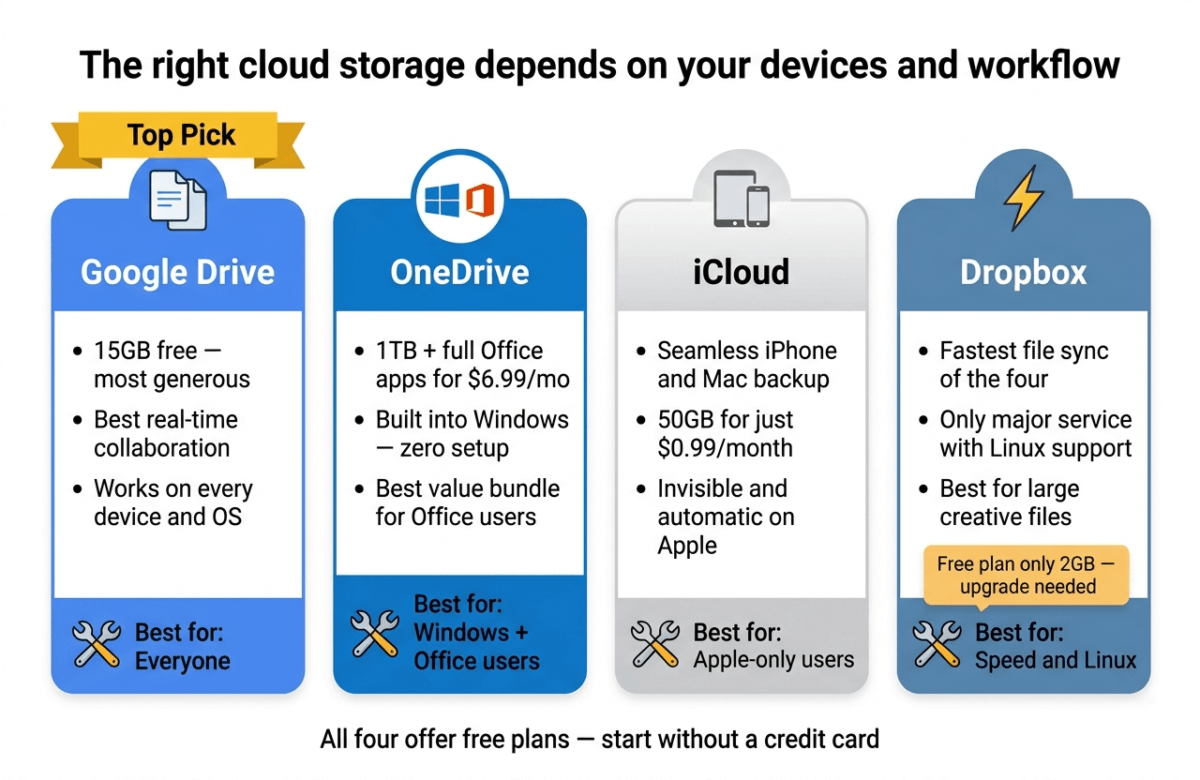
You want the most free storage and the best collaboration tools. Google Drive’s 15GB free tier and Google Docs real-time collaboration make it the default recommendation for students, individuals, and anyone not locked into Apple or Microsoft ecosystems. The Google One pricing is also the most competitive at every storage tier.
Choose OneDrive if:
You use Windows and already pay for Microsoft 365, or you are considering it. The Microsoft 365 Personal plan at $6.99/month gives you 1TB of OneDrive storage plus full Office apps, making it the best value bundle in cloud storage. Windows users get seamless built-in integration with zero setup.
Choose iCloud if:
You use only Apple devices, iPhone, Mac, iPad, and want your photos, contacts, and device backup handled automatically without thinking about it. The 50GB plan at $0.99/month is the cheapest entry-level paid tier available. Avoid iCloud if you use Windows or Android regularly.
Choose Dropbox if:
You need the fastest, most reliable file sync across platforms and are willing to pay for it. Dropbox’s sync speed and desktop integration are genuinely the best available. It is also the only major service with Linux support. Just go in knowing the free plan is practically useless at 2GB.
Final Verdict
For most people in 2026, Google Drive is the best cloud storage service, with the largest free tier, the best collaboration tools, the most affordable paid plans, and compatibility with every device and platform.
OneDrive is the best deal for Windows users who subscribe to Microsoft 365, 1TB of storage plus full Office apps for $6.99/month is hard to beat.
iCloud is the best choice for Apple-ecosystem users who want seamless automatic backup and sync across iPhone and Mac without any configuration.
Dropbox is the best technical sync service but the worst value for casual users; its 2GB free plan is barely functional in 2026, and you can get far more storage for less money elsewhere.
Ratings:
– Google Drive: 4.6 / 5
– OneDrive: 4.4 / 5
– iCloud: 4.3 / 5
– Dropbox: 4.2 / 5
Frequently Asked Questions
Which cloud storage gives the most free space?
Google Drive gives the most free cloud storage at 15GB shared across Drive, Gmail, and Google Photos. OneDrive and iCloud both offer 5GB free. Dropbox offers only 2GB free, the smallest of any major cloud storage service.
Is Google Drive safe to store personal files?
Google Drive uses AES-256 encryption for files at rest and TLS encryption in transit, the same standards used by banks. However, Google does not offer end-to-end encryption, meaning Google can technically access your files if legally required. For most personal files, documents, photos, and spreadsheets, Google Drive is safe and reliable. For highly sensitive documents (legal, financial, medical), consider a service with end-to-end encryption like pCloud or Tresorit.
Can I use multiple cloud storage services at once?
Yes, and many people do. A common setup: use Google Drive free (15GB) for documents and collaboration, iCloud free (5GB) for iPhone backup, and OneDrive with Microsoft 365 for Office files. Using multiple free tiers together can give you 25GB+ of free cloud storage without paying for anything.
Is Dropbox worth paying for in 2026?
For individual casual users, Dropbox is difficult to recommend over Google Drive or OneDrive, as you get far less storage per dollar. For professionals and creative teams who need the fastest sync speeds, version history up to 180 days, Smart Sync for large file libraries, and excellent cross-platform reliability, Dropbox Plus at $9.99/month delivers real value.
What is the best cloud storage for photos?
Google Photos (backed by Google Drive storage) is the best cloud photo storage for Android and multi-platform users, with excellent search, automatic organisation, and editing tools. iCloud Photos is best for iPhone users, seamless automatic backup and sync across Apple devices. If you plan on turning those backed-up images into a public online portfolio, you will also want to consult our guide on the best website builder 2026 to find the most visually striking platform. Amazon Photos offers unlimited photo storage free for Amazon Prime subscribers, often overlooked but worth considering.
How much cloud storage do I actually need?
For document storage only: 15GB free (Google Drive) is sufficient for most users. For photo backup from a smartphone: 100–200GB handles several years of photos for most people. For video storage or large creative files: 1–2TB. As a starting point, use Google Drive’s free 15GB and upgrade only when you approach the limit.
Is OneDrive included with Windows?
OneDrive (5GB free) is built into Windows 10 and 11 and requires no installation or signup beyond a Microsoft account. OneDrive with 1TB storage is included with Microsoft 365 Personal ($6.99/month) and Family ($9.99/month) subscriptions.