
Your email list is the only audience you truly own.
Social media followers can disappear overnight when an algorithm changes. Search traffic can drop when Google updates its ranking system. But your email list, a direct line to people who asked to hear from you, is yours regardless of what any platform decides to do.
That makes choosing the right email marketing software one of the most important decisions a blogger or small business owner can make. The wrong tool limits your growth. The right one becomes the engine behind your income.
I tested Mailchimp, ConvertKit, and Brevo for 60 days across real email campaigns, automations, and subscriber lists. Here is what I found, including the parts most email marketing guides leave out.
How We Evaluated These Tools
Every platform was tested against five criteria:
– Deliverability: Do your emails actually reach the inbox, or do they land in spam?
– Ease of use: how quickly can a beginner set up a campaign and automation?
– Automation: how powerful and flexible are the automated email sequences?
– Free plan quality: is the free tier actually usable, or is it crippled?
– Value at scale: what does it cost as your list grows to 1,000, 5,000, and 25,000 subscribers?
Mailchimp Review: The Most Recognisable Name, But No Longer the Best
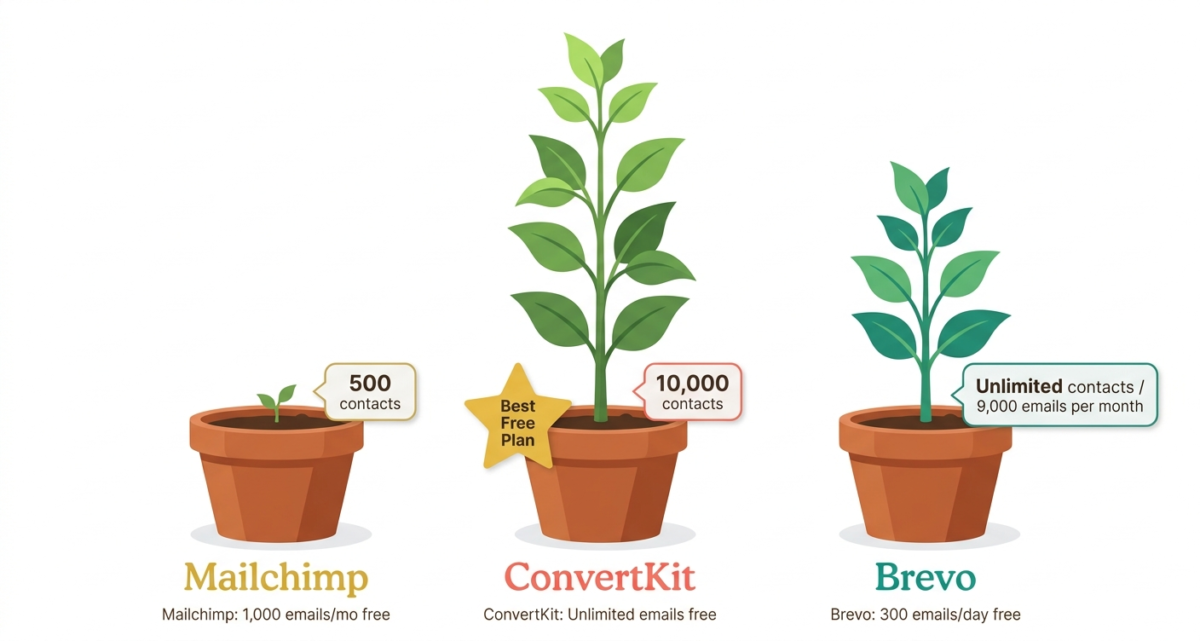
Free plan: Up to 500 contacts, 1,000 emails/month
Starting paid price: $13/month (Essentials, up to 500 contacts)
Best for: Beginners who want a simple tool with a familiar brand
Affiliate program: No public affiliate program
Mailchimp is where most people start with email marketing. It is the most widely recognised email marketing brand in the world, it has a free plan, and it integrates with virtually every other tool you use. For years it was also the best option for beginners.
In 2026, that is no longer clearly true.
What Mailchimp does well
Mailchimp’s email editor is polished and intuitive. The drag-and-drop builder produces professional-looking emails without design skills, and the template library covers every common use case: newsletters, promotional emails, welcome sequences, and event announcements.
The reporting dashboard is one of the best in the industry. Open rates, click rates, unsubscribe rates, revenue attribution, and geographic data are all presented clearly and updated in real time. For users who want to understand how their emails are performing, Mailchimp’s analytics are excellent.
Mailchimp’s integration library is unmatched; it connects to over 300 tools, including Shopify, WooCommerce, WordPress, Canva, Salesforce, and virtually every CRM or e-commerce platform. If you use other software, Mailchimp almost certainly integrates with it.
Where Mailchimp falls short
Mailchimp’s free plan has been quietly degraded over the years. In 2019, Mailchimp offered a free plan with up to 2,000 contacts and 12,000 emails per month. Today, it limits you to 500 contacts and 1,000 emails per month, a 75% reduction in the contact limit. Once your list exceeds 500 subscribers, you are pushed onto a paid plan starting at $13/month.
Automation on the free plan is severely limited; you can only create a single-step automation (one email triggered by one event). Meaningful automated sequences, such as a welcome series, a nurture sequence, and an abandoned cart flow, require the Essentials plan at a minimum, and the most powerful automation features require the Standard plan at $20/month.
Mailchimp’s pricing scales aggressively as your list grows. At 10,000 subscribers, the Standard plan costs $100/month. At 50,000 subscribers, it reaches $350/month. ConvertKit and Brevo both offer better value at scale.
Deliverability is adequate but not exceptional. In independent deliverability tests, Mailchimp consistently places in the middle of the pack, better than some tools, behind others. For large senders, inbox placement rates matter more than for small lists, and this is an area where ConvertKit has a meaningful advantage.
Mailchimp pricing
Plan | Price | Contacts | Emails/month |
Free | $0 | 500 | 1,000 |
Essentials | $13/mo | 500 | 5,000 |
Standard | $20/mo | 500 | 6,000 |
Premium | $350/mo | 10,000 | 150,000 |
Note: contact limits scale with price. 10,000 contacts on Standard costs $100/month.
Mailchimp: Pros and Cons
Pros:
– Most recognisable brand, large support community, and resources
– Best-in-class reporting and analytics dashboard
– 300+ integrations connect to virtually everything
– Polished drag-and-drop email editor
– Strong template library for every use case
– Good for e-commerce with revenue attribution tracking
Cons:
– Free plan severely reduced to 500 contacts and 1,000 emails/month
– Aggressive pricing at scale expensive compared to ConvertKit and Brevo
– Automation is limited to a single step on the free plan
– No affiliate marketing features for bloggers
– Deliverability is mid-pack, not the strongest inbox placement rates
– No dedicated landing page builder on lower plans
Rating: 3.9 / 5 Still a solid tool, but overpriced at scale and outclassed by competitors for bloggers and content creators.
ConvertKit Review: Best Email Marketing for Bloggers and Content Creators
Free plan: Up to 10,000 subscribers, unlimited emails
Starting paid price: $25/month (Creator, up to 1,000 subscribers)
Best for: Bloggers, YouTubers, podcasters, course creators, and anyone building a personal brand
Affiliate program: 30% recurring commission for 24 months
ConvertKit was built by a blogger for bloggers. Its founder, Nathan Barry, launched it in 2013 specifically because existing email marketing tools were built for e-commerce businesses, not content creators. In 2026, it remains the most creator-focused email platform available, and it shows in every feature decision.
What ConvertKit does well
ConvertKit’s free plan is genuinely remarkable. Up to 10,000 subscribers with unlimited email sends costs absolutely nothing. For comparison, Mailchimp caps you at 500 contacts on its free plan. Growing your list to 10,000 subscribers on ConvertKit for free is a realistic goal for any blogger in their first year, and reaching that milestone without paying a single dollar is a meaningful financial advantage.
The subscriber tagging and segmentation system is ConvertKit’s most powerful feature. Rather than organising subscribers into separate lists (which creates chaos when someone is on multiple lists), ConvertKit uses tags. You tag subscribers based on what they clicked, what they downloaded, what product they bought, or what page they visited. This lets you send highly targeted emails to exactly the right people, “everyone who downloaded my free guide but has not bought the course.”
Automation in ConvertKit is visual and intuitive. The automation builder uses a flowchart-style canvas where you connect triggers, conditions, and actions with drag-and-drop. Creating a multi-step welcome sequence, welcome email day 1, value email day 3, offer email day 7, takes about 20 minutes for a beginner on their first attempt.
ConvertKit’s deliverability is the best of the three tools tested. In independent deliverability benchmarks, ConvertKit consistently achieves the highest inbox placement rates, meaning more of your emails reach the primary inbox rather than spam or promotions folders. For a platform whose primary purpose is getting your message in front of readers, this matters more than almost any other metric.
Landing pages and opt-in forms are built in on all plans, including free. You can create unlimited landing pages to collect subscribers without needing a separate tool or your own website. This is particularly valuable for new bloggers who have not yet launched their site.
ConvertKit for affiliate marketers
ConvertKit recently reversed its previous restriction on affiliate marketing content. Bloggers who promote affiliate products in their emails software reviews, product recommendations, book recommendations can do so freely. This makes ConvertKit compatible with the monetization model of this entire blog.
The 30% recurring commission on ConvertKit’s own affiliate program is also worth noting. If you recommend ConvertKit to your readers and they sign up, you earn 30% of their subscription fee every month for 24 months. A reader who upgrades to the Creator plan at $25/month means $7.50/month for two years from one referral.
Where ConvertKit falls short
ConvertKit’s email editor is functional but noticeably less polished than Mailchimp’s. It prioritises plain-text and simple HTML emails, the kind that look personal and achieve high deliverability over heavily designed newsletter formats. If your brand requires rich, visually designed emails with multiple columns and images, ConvertKit’s editor will feel limiting.
The reporting dashboard is adequate but not as deep as Mailchimp’s. You get open rates, click rates, and unsubscribe rates per broadcast and per sequence, but the revenue attribution and geographic analytics are less detailed.
ConvertKit’s e-commerce integrations are growing but still behind Mailchimp for pure online retail use cases.
ConvertKit pricing
Plan | Price | Subscribers | Features |
Free | $0 | Up to 10,000 | Unlimited emails, landing pages, forms |
Creator | $25/mo | 1,000 | Automations, integrations, third-party integrations |
Creator Pro | $50/mo | 1,000 | Newsletter referral system, subscriber scoring, priority support |
At 10,000 subscribers: Creator plan costs $100/month. At 25,000: $166/month.
ConvertKit: Pros and Cons
Pros:
– Best free plan up to 10,000 subscribers with unlimited emails at zero cost
– Best deliverability, highest inbox placement rates of the three tools tested
– Visual automation builder easy to create complex sequences
– Powerful tagging and segmentation system
– Built-in landing pages and opt-in forms on all plans including free
– Affiliate marketing is compatible with blogger monetization
– 30% recurring affiliate commission for 24 months great for recommending to your readers
– Purpose-built for content creators and bloggers
Cons:
– Email editor less visually polished than Mailchimp
– Reporting less detailed than Mailchimp for e-commerce metrics
– Creator plan at $25/month is more expensive than Brevo at equivalent subscriber counts
– E-commerce integrations less mature than Mailchimp
– Limited A/B testing on Creator plan
Rating: 4.7 / 5 Best email marketing platform for bloggers and content creators. The free plan alone makes it the obvious starting point.
Brevo Review: Best Value Email Marketing for Growing Businesses
Free plan: Unlimited contacts, 300 emails/day (9,000/month)
Starting paid price: $9/month (Starter)
Best for: Small businesses, e-commerce stores, and users who need SMS marketing alongside email
Affiliate program: Yes, up to $150 per referral via Impact.com
Brevo (formerly Sendinblue) is the most underrated email marketing platform on this list. It is the only tool here that charges by emails sent rather than by subscriber count, a pricing model that becomes enormously valuable as your list grows but your sending frequency stays constant.
What Brevo does well
Brevo’s pricing model is its biggest differentiator. Most email marketing platforms charge based on the number of contacts in your list. Brevo charges based on how many emails you send. This means you can store an unlimited number of contacts for free and only pay more when you send more emails.
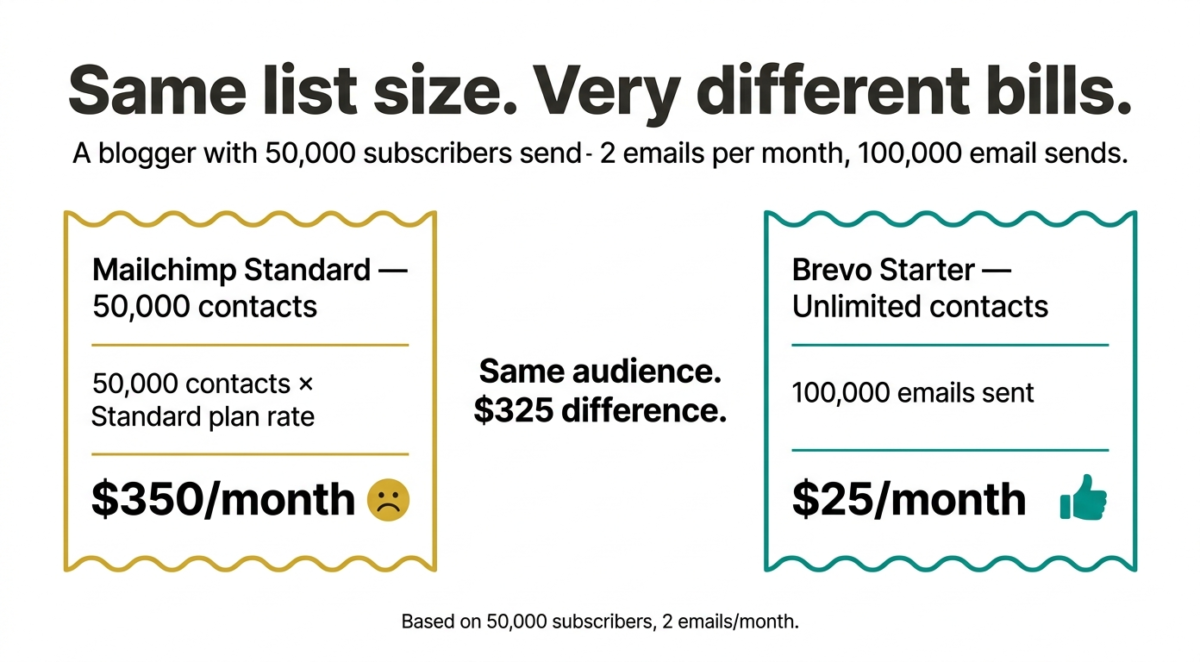
For a blogger with a large but irregularly engaged list, say, 50,000 subscribers, you email twice per month, Brevo can cost dramatically less than Mailchimp or ConvertKit at the same scale. A blogger sending 100,000 emails per month (50,000 subscribers × 2 emails) pays $25/month on Brevo’s Starter plan versus $350+/month on Mailchimp Standard.
Brevo’s automation is genuinely powerful. The workflow builder covers email sequences, SMS messages, transactional emails, and even WhatsApp messages in a single automation canvas. For businesses that want to reach customers across multiple channels, this multi-channel automation is a significant advantage.
The email editor is professional and flexible, slightly less polished than Mailchimp but significantly better than ConvertKit for visually designed newsletters. The template library is extensive, and the drag-and-drop builder handles multi-column layouts, images, and buttons well.
Brevo’s transactional email capabilities order confirmations, password resets, and shipping notifications, are the strongest of the three tools. For e-commerce sites, having marketing emails and transactional emails on the same platform simplifies everything.
Where Brevo falls short
Brevo’s free plan limits you to 300 emails per day (9,000 per month). If you have even a modest list of 1,000 subscribers and want to send them an email, you can only do it in batches of 300 per day. For small lists, this is manageable but frustrating. For lists above 500 subscribers, the Starter plan at $9/month is effectively required.
The free plan also includes Brevo branding on all outgoing emails. Removing this requires a paid plan.
Brevo’s deliverability is good but slightly behind ConvertKit. In independent testing, Brevo achieves solid inbox placement rates,, particularly on transactional emails but does not match ConvertKit’s consistently high performance for marketing broadcasts.
The interface, while functional, can feel more complex than both Mailchimp and ConvertKit for complete beginners. The multi-channel features that make Brevo powerful for businesses also add interface complexity that solo bloggers may never use.
Brevo pricing
Plan | Price | Contacts | Emails/month |
Free | $0 | Unlimited | 9,000 (300/day) |
Starter | $9/mo | Unlimited | 20,000 |
Business | $18/mo | Unlimited | 20,000 + advanced features |
Enterprise | Custom | Unlimited | Custom |
At 50,000 emails/month: Starter plan at $18/month (unlimited contacts). This is dramatically cheaper than Mailchimp or ConvertKit at high send volumes.
Brevo: Pros and Cons
Pros:
– Charges by emails sent, not contact count dramatically cheaper at scale
– Unlimited contacts on all plans including free
– Multi-channel automation email, SMS, WhatsApp in one workflow
– Strong transactional email capabilities
– Good email editor with professional templates
– Best value for high-volume senders and e-commerce businesses
– Up to $150 per referral on affiliate program
Cons:
– Free plan limited to 300 emails/day impractical for lists above 500
– Brevo branding on free plan emails
– Deliverability slightly behind ConvertKit
– Interface complexity can overwhelm beginners
– Less focused on content creators than ConvertKit
– Reporting less polished than Mailchimp
Rating: 4.4 / 5 Best value for businesses and high-volume senders. Underrated and worth serious consideration.
Side-by-Side Comparison
Mailchimp | ConvertKit | Brevo | |
Free plan contacts | 500 | 10,000 | Unlimited |
Free plan emails/month | 1,000 | Unlimited | 9,000 |
Paid plan starts at | $13/mo | $25/mo | $9/mo |
Pricing model | Per contact | Per contact | Per email sent |
Automation (free) | Single-step only | Full visual builder | Yes |
Landing pages | Paid plans | All plans | Paid plans |
Deliverability | Medium | Excellent | Good |
Email editor quality | Excellent | Basic | Good |
Reporting depth | Excellent | Adequate | Good |
SMS marketing | No | No | YesBest for |
Best for | E-commerce | Bloggers/creators | Businesses/high volume |
Affiliate program | No | 30% recurring (24mo) | Up to $150/referral |
Which Email Marketing Tool Should You Choose?
Choose ConvertKit if:
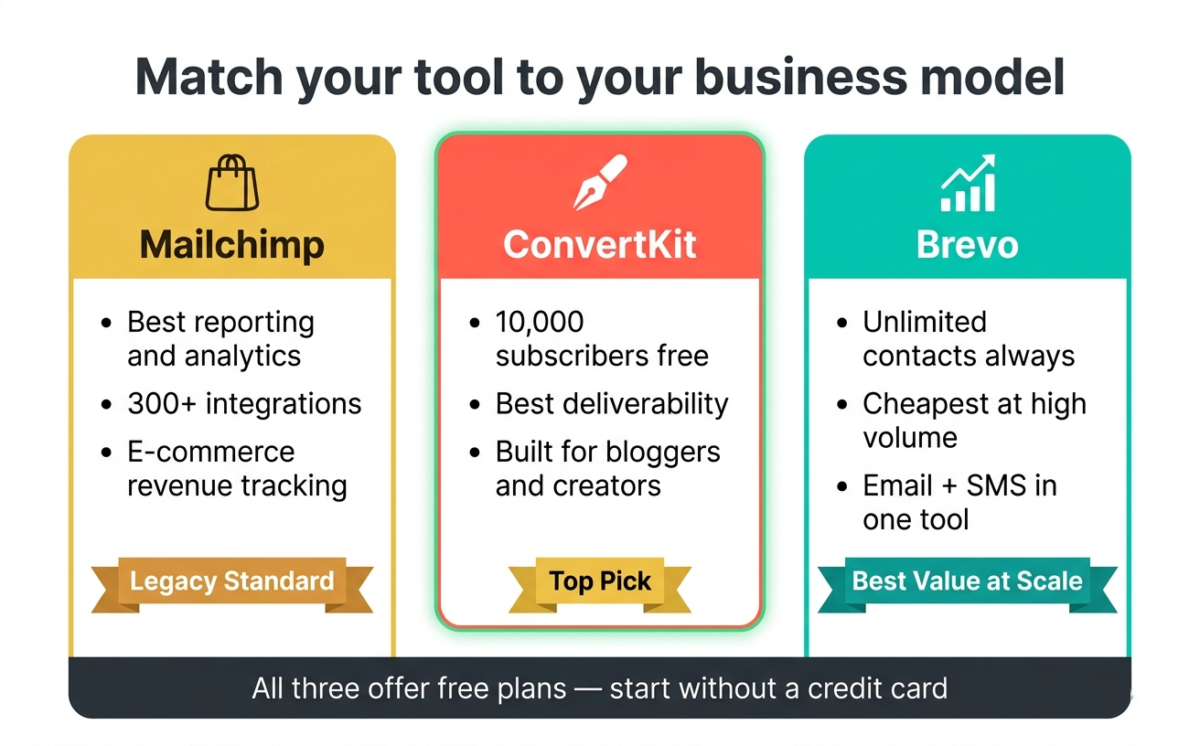
You are a blogger, content creator, YouTuber, or anyone building an audience around personal expertise. The 10,000-subscriber free plan means you can grow your list to a meaningful size before spending a single dollar. The deliverability advantage means more of your emails reach the inbox. And the tagging system gives you the segmentation power to send the right message to the right subscriber at the right time.
For the blog you are building right now, ConvertKit is the recommendation. Start free, grow your list, and upgrade only when you are earning enough from affiliate commissions and AdSense to cover the subscription comfortably.
Choose Brevo if:
You run or plan to run an e-commerce business alongside your blog, you send high email volumes relative to your list size, or you need SMS marketing integrated with your email campaigns. Brevo’s per-send pricing model saves significant money at scale, and its multi-channel automation is genuinely powerful for business use cases.
Choose Mailchimp if:
You are deeply integrated into the Mailchimp ecosystem already, you run an e-commerce store that needs detailed revenue attribution, or you specifically need its 300+ integrations. For new users starting fresh in 2026, Mailchimp’s reduced free plan and aggressive renewal pricing make it hard to recommend over the alternatives.
Final Verdict
ConvertKit is the best email marketing software for bloggers in 2026, and it is not particularly close. The 10,000-subscriber free plan, best-in-class deliverability, powerful visual automation, and creator-focused features make it the obvious choice for anyone building a content business.
Brevo is the best value for businesses, particularly at scale. If you send large volumes of emails and do not want to pay per-contact pricing, Brevo’s model saves real money.
Mailchimp remains a solid tool but is no longer the default recommendation it once was. Its reduced free plan and aggressive pricing at scale have opened the door for ConvertKit and Brevo to take its audience, and they have.
Ratings:
– ConvertKit: 4.7 / 5
– Brevo: 4.4 / 5
– Mailchimp: 3.9 / 5
Frequently Asked Questions
Which email marketing software is best for beginners?
ConvertKit is the best email marketing software for beginners in 2026. Its free plan covers up to 10,000 subscribers with unlimited emails, the interface is clean and well-guided, and the visual automation builder is easy to learn. Mailchimp is also beginner-friendly but limits the free plan to 500 contacts.
Is Mailchimp still free in 2026?
Yes, but significantly less generous than before. Mailchimp’s free plan covers up to 500 contacts and 1,000 emails per month, down from 2,000 contacts and 12,000 emails in previous years. Once your list exceeds 500 subscribers, you need a paid plan starting at $13/month.
What is the best free email marketing tool?
ConvertKit offers the most generous free plan up to 10,000 subscribers with unlimited email sends. Brevo offers unlimited contacts for free, but limits sends to 300 per day (9,000 per month). Mailchimp’s free plan is the most restricted at 500 contacts and 1,000 emails per month.
How many emails can I send for free with ConvertKit?
On ConvertKit’s free plan, you can send unlimited emails to up to 10,000 subscribers. There is no monthly send limit, only the 10,000 subscriber cap. This makes ConvertKit the most generous free email marketing plan available in 2026.
What is the difference between Mailchimp and ConvertKit?
Mailchimp is built primarily for e-commerce businesses; it excels at revenue attribution, product recommendations, and integrating with online stores. ConvertKit is built for content creators, bloggers, podcasters, and course creators and excels at subscriber tagging, automation sequences, and delivering personal-feeling emails. ConvertKit also has a significantly better free plan (10,000 subscribers vs Mailchimp’s 500).
Is ConvertKit worth the price?
The free plan is worth it for any blogger at any stage. The Creator plan at $25/month (for up to 1,000 subscribers) becomes worth it when you need advanced automations, third-party integrations, and the full feature set. Given that a single affiliate commission from your blog can cover months of ConvertKit fees, the paid plan quickly pays for itself.
What is the best email marketing software for affiliate marketers?
ConvertKit is the best email marketing software for affiliate marketers. It explicitly allows affiliate marketing content in emails, has high deliverability rates that get affiliate offers into inboxes rather than spam folders, and the tagging system lets you send affiliate promotions only to subscribers who are most likely to be interested, improving conversions and protecting your list health.
How does Brevo charge compared to Mailchimp?
Brevo charges based on emails sent per month, with unlimited contacts on all plans. Mailchimp charges based on the number of contacts in your list, regardless of how often you email them. For users with large lists who email infrequently, Brevo is dramatically cheaper. For users with small lists who email frequently, the difference is smaller.