Do you actually need antivirus software in 2026?
It is a fair question. Windows 11 ships with Microsoft Defender built in. Macs have Gatekeeper and XProtect. Browsers warn you about dangerous sites. So is third-party antivirus software still worth paying for, or is it an industry selling you a solution to a problem you no longer have?
The honest answer: it depends on what you do online and what you want to protect. I tested Norton, Bitdefender, and Malwarebytes for 30 days on real Windows and Mac devices to find out which antivirus tools are genuinely worth your money in 2026 and which ones you can skip.
How We Tested These Antivirus Tools
Every tool was evaluated across five criteria:
– Detection rates: using AV-Test and AV-Comparatives independent lab results from 2025–2026
– System performance impact: how much does the antivirus slow down your device during scans and real-time protection?
– Features: What do you get beyond basic virus scanning?
– Ease of use: how simple is setup, scanning, and managing threats?
– Value: free plan quality and paid plan pricing versus what you actually get
Do You Still Need Antivirus in 2026?
Before comparing the tools, let us answer the question directly.
Microsoft Defender built into Windows 10 and 11 has improved dramatically. In independent lab tests from AV-Test, Defender scores 97–99% detection rates for known malware, which is genuinely good. For a casual user who browses mainstream websites and does not download software from unknown sources, Defender plus common sense may be sufficient.
However, third-party antivirus software still adds value in specific scenarios:
– You frequently download files, software, or torrents from the internet
– You use public Wi-Fi regularly (airports, coffee shops, hotels)
– You run a business and need to protect client data
– You want protection against phishing, ransomware, and identity theft, not just viruses
– You use a Mac (Mac malware has increased significantly since 2022)
– You want a VPN, password manager, or dark web monitoring bundled with your security
Modern antivirus tools are not just virus scanners. They are full security suites covering ransomware protection, phishing detection, webcam protection, identity theft monitoring, and VPN access. For most people, a premium antivirus subscription provides security coverage that Microsoft Defender does not offer.
Norton 360 Review: Best All-in-One Security Suite
Free plan: No (free trial only)
Starting price: $29.99/year (Norton AntiVirus Plus, 1 device)
Best plan for most users: Norton 360 Deluxe, $49.99/year (5 devices)
Platforms: Windows, Mac, iOS, Android
Affiliate program: Up to $40 per sale via Commission Junction
Norton is the most recognisable name in antivirus software, and in 2026, it remains one of the best full security suites available. It does far more than scan for viruses; it bundles a VPN, a password manager, dark web monitoring, parental controls, and cloud backup into a single subscription.
Detection rates
Norton consistently achieves 99–100% malware detection rates in independent lab tests from both AV-Test and AV-Comparatives, among the highest scores of any antivirus tested. In real-world protection tests, Norton detects and blocks threats before they can execute, including zero-day exploits and ransomware.
Norton’s SONAR (Symantec Online Network for Advanced Response) behavioural detection system monitors running programs for suspicious activity, catching new malware that has not yet been added to signature databases. This proactive detection is one of Norton’s strongest features.
Features
Norton 360 Deluxe includes:
– Real-time malware, virus, spyware, and ransomware protection
– Secure VPN with no-log policy (unlimited data on Deluxe and above)
– Password manager (Norton Identity Safe)
– Dark web monitoring alerts if your personal information appears in breach data
– 50GB cloud backup for Windows
– Parental controls (SafeCam and School Time features)
– Smart Firewall for Windows
– SafeCam blocks unauthorised access to your webcam
– PC SafeCam and PC Cloud Backup on Windows only
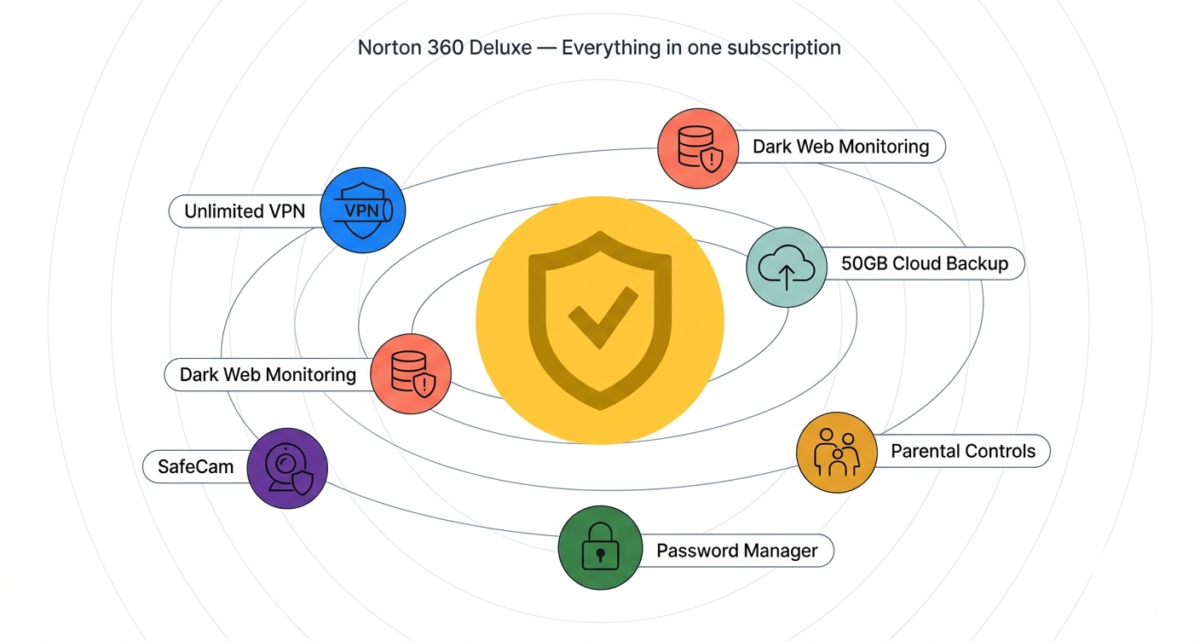
The bundled VPN alone is worth noting. Standalone VPN subscriptions cost $3–$13/month. Getting a capable no-log VPN included with your antivirus subscription at no extra cost represents genuine additional value, particularly if you currently pay separately for both.
System performance
Norton has historically been criticised for slowing down devices during scans. In 2026, this has improved significantly, but it is still the heaviest of the three tools on system resources during full scans. On a mid-range Windows laptop, Norton’s full system scan used around 45% CPU for approximately 35 minutes.
During idle periods (real-time protection running in the background), performance impact was minimal, similar to Bitdefender and Malwarebytes. The slowdown is noticeable primarily during active scans, which most users schedule to run overnight.
Ease of use
Norton’s interface is clean and well-organised. The dashboard shows your current protection status at a glance, and running a scan is a single button click. Setting up the VPN, password manager, and dark web monitoring is guided through a straightforward onboarding flow.
Norton pricing
Plan | Price/year | Devices | Key extras |
AntiVirus Plus | $29.99 | 1 | 2GB cloud backup, password manager |
360 Standard | $39.99 | 1 | VPN, dark web monitoring, 10GB backup |
360 Deluxe | $49.99 | 5 | VPN, dark web monitoring, 50GB backup, parental controls |
360 with LifeLock | $99.99 | 5 | Identity theft insurance, restoration assistance |
Norton regularly runs promotions offering 40–60% off first-year pricing. Always check for current deals before purchasing.
Norton: Pros and Cons
Pros:
– 99–100% malware detection rates among the highest in independent testing
– Bundled VPN with no-log policy and unlimited data (Deluxe and above)
– Dark web monitoring alerts for personal data breaches
– Cloud backup included (50GB on Deluxe)
– Parental controls on Deluxe and above
– Webcam protection (SafeCam) unique feature blocking unauthorised camera access
– Covers Windows, Mac, iOS, and Android on one subscription
Cons:
– No meaningful free plan, trial only
– Heaviest system impact during scans of the three tools tested
– Password manager is basic compared to dedicated tools like 1Password
– Bundled VPN is capable but not as fast as dedicated VPN services
– Norton LifeLock plans significantly more expensive
– Annual subscription, no monthly billing option on most plans
Rating: 4.5 / 5 Best all-in-one security suite. Worth the price if you want maximum coverage from a single subscription.
Bitdefender Review: Best Antivirus for Pure Protection and Low System Impact
Free plan: Yes, Bitdefender Antivirus Free Edition (Windows only)
Starting price: $29.99/year (Bitdefender Antivirus Plus, 3 devices)
Best plan for most users: Bitdefender Total Security $49.99/year (5 devices)
Platforms: Windows, Mac, iOS, Android
Affiliate program: Yes, up to $70 per sale via Commission Junction
Bitdefender is consistently ranked number one or two in independent antivirus lab tests, and it has been for the better part of a decade. If pure malware detection accuracy and minimal system impact are your priorities, Bitdefender is the best antivirus available in 2026.
Detection rates
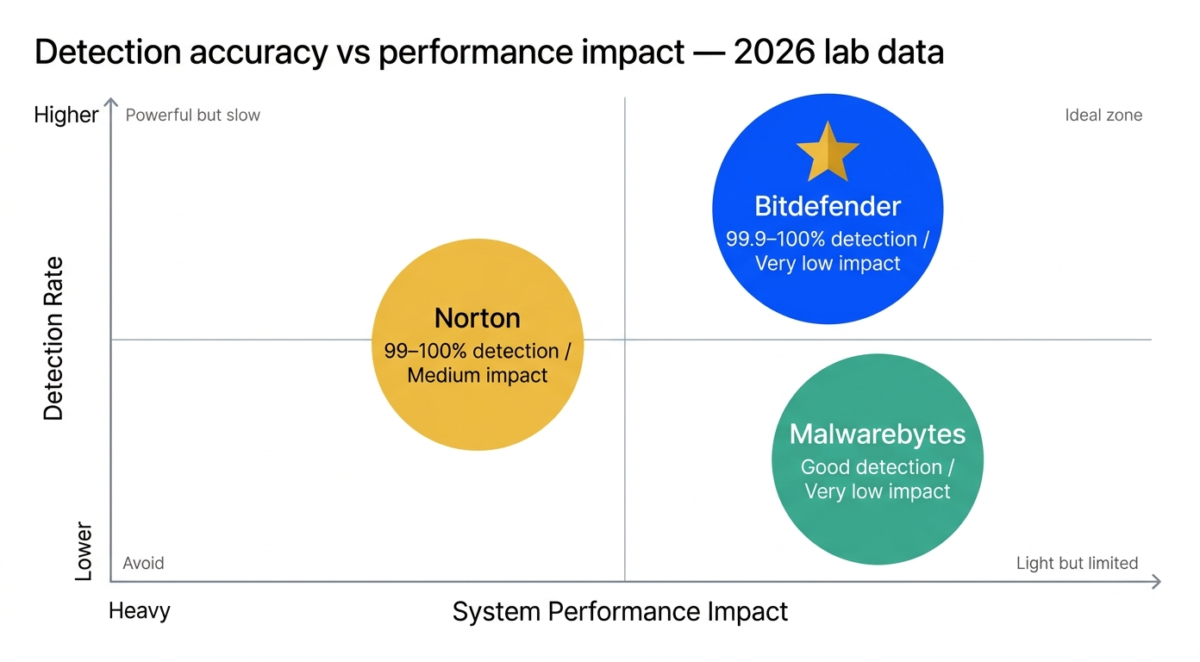
Bitdefender achieves 99.9–100% malware detection rates in AV-Test and AV-Comparatives testing, matching or marginally exceeding Norton. In the AV-Comparatives Real-World Protection Test, Bitdefender has ranked first or second out of 17 tested products in every quarter of 2025.
Bitdefender’s detection engine uses multiple layers: signature-based detection for known threats, behavioural analysis for unknown threats, and cloud-based lookups for real-time intelligence. The cloud integration means Bitdefender’s threat database is always current without requiring large local updates.
System performance impact
This is where Bitdefender genuinely separates itself from Norton. In independent performance testing from AV-Test, Bitdefender consistently achieves the lowest system impact scores of any premium antivirus, meaning your device runs fastest while Bitdefender is protecting it.
In our testing, Bitdefender’s full scan used around 28% CPU on the same mid-range laptop where Norton used 45%. Background real-time protection was virtually undetectable, with no noticeable slowdown during web browsing, document editing, or video streaming. For older or lower-powered devices, this performance advantage is particularly significant.
Features
Bitdefender Total Security includes:
– Real-time malware, ransomware, spyware, and adware protection
– Advanced Threat Defense behavioural monitoring
– Web protection and anti-phishing
– Anti-tracker (blocks websites from tracking your browsing)
– VPN (200MB free daily; unlimited VPN requires add-on at $2.99/month)
– Password manager (Bitdefender Password Manager, basic)
– Parental controls (Bitdefender Parental Control)
– File Shredder secure deletion of sensitive files
– Webcam and microphone protection
– Vulnerability assessment, scans for outdated software and weak passwords
– Safe Online Banking, a dedicated browser for financial transactions
– Cross-platform: Windows, Mac, iOS, Android
The VPN limitation is worth flagging. Bitdefender Total Security includes a VPN, but limits it to 200MB per day unless you purchase the unlimited VPN add-on. 200MB is enough for light web browsing but not for streaming or extended use. If a VPN is important to you, Norton’s unlimited VPN is better value, or consider a standalone VPN service.
Ease of use
Bitdefender’s interface is modern, clean, and the easiest of the three tools to navigate. The main dashboard shows a protection score and quick access to scan, update, and settings. The Autopilot feature handles security decisions automatically without requiring user input, ideal for users who want strong protection without constantly managing alerts.
Bitdefender pricing
Plan | Price/year | Devices | Key extras |
Free Edition | $0 | 1 (Windows) | Basic antivirus only |
Antivirus Plus | $29.99 | 3 (Windows) | VPN (200MB/day), password manager |
Internet Security | $42.49 | 3 (Windows) | Parental controls, firewall |
Total Security | $49.99 | 5 (cross-platform) | All features, all platforms |
Premium Security | $79.99 | 10 | Unlimited VPN, premium support |
Bitdefender: Pros and Cons
Pros:
– Highest detection rates in independent testing, best pure malware protection
– Lowest system performance impact of the three tools tested
– Free plan available for Windows (basic antivirus)
– Anti-tracker blocks website tracking across browsers
– Safe Online Banking browser for secure financial transactions
– Autopilot mode for hands-off security management
– Excellent cross-platform coverage on Total Security
– Highest affiliate commission of the three up to $70 per sale
Cons:
– VPN limited to 200MB/day on Total Security insufficient for regular VPN use
– Password manager is basic compared to dedicated tools
– Free plan Windows only, no free Mac protection
– Unlimited VPN requires additional payment
– Anti-phishing can occasionally flag legitimate sites as suspicious
Rating: 4.8 / 5 Best antivirus for pure protection. Number one recommendation for anyone prioritising detection accuracy and system performance.
Malwarebytes Review: Best Lightweight Malware Scanner and Complement Tool
Free plan: Yes, on-demand scanner (no real-time protection)
Starting price: $3.75/month or $44.99/year (Premium, 1 device)
Best plan for most users: Malwarebytes Premium + Privacy, $59.99/year (3 devices, includes VPN)
Platforms: Windows, Mac, iOS, Android, Chromebook
Affiliate program: Yes, up to $25 per sale via Impact.com
Malwarebytes occupies a different category from Norton and Bitdefender. Rather than a comprehensive security suite, Malwarebytes is a specialised malware scanner and cleaner, the tool security professionals reach for when they need to clean an already-infected device or want a lightweight second layer of protection alongside Windows Defender.
Detection rates
Malwarebytes is not submitted to AV-Test or AV-Comparatives benchmarks as regularly as Norton or Bitdefender, a point worth acknowledging. In the tests it has participated in, detection rates are good but not consistently at the 99–100% level of Bitdefender and Norton.
Where Malwarebytes excels is in detecting potentially unwanted programs (PUPs), adware, browser hijackers, and stalkerware categories that traditional antivirus tools sometimes miss. Its malware removal capabilities are widely considered the best available: if your device is already infected, Malwarebytes is often the tool that cleans it when others fail.
Features
Malwarebytes Premium includes:
– Real-time malware, ransomware, and spyware protection
– Web protection blocks malicious and phishing websites
– Exploit protection prevents vulnerability-based attacks
– Brute force protection (Windows)
– Browser Guard, free Chrome and Firefox extension blocking ads, trackers, and malicious sites
– Play mode pauses notifications during games and full-screen apps
Malwarebytes Premium + Privacy adds:
– VPN with no-log policy (Malwarebytes Privacy VPN)
– Available in 40+ countries
The free version is worth particular attention. Malwarebytes Free gives you an on-demand scanner, meaning you can run a scan manually to check your device for malware at any time, for free. It does not include real-time protection (which requires Premium), but it is the best free malware scanner available and is widely used by IT professionals for device cleanup.
System performance
Malwarebytes has the lightest footprint of the three tools. Real-time protection runs quietly in the background with minimal CPU or RAM usage. Scan times are faster than Norton and Bitdefender, and the impact during scanning is the lowest of the three, around 20% CPU on our test device.
For older computers where system resources are limited, Malwarebytes Premium is the most practical full-featured option.
Where Malwarebytes falls short
Malwarebytes is not a complete antivirus replacement for most users. It does not include a firewall, parental controls, cloud backup, password manager, dark web monitoring, or webcam protection. If you need a comprehensive security suite, Norton or Bitdefender covers far more ground.
Malwarebytes works best in one of two scenarios: as a standalone tool for users whose primary protection is Windows Defender (adding real-time malware scanning and web protection on top of Defender’s built-in coverage), or as a second-opinion scanner run periodically on top of a primary antivirus.
Malwarebytes pricing
Plan | Price/year | Devices | Key extras |
Free | $0 | 1 | On-demand scanner only |
Premium | $44.99 | 1 | Real-time protection, web protection |
Premium (5 devices) | $79.99 | 5 | Same features, more devices |
Premium + Privacy | $59.99 | 3 | Premium + VPN |
Malwarebytes: Pros and Cons
Pros:
– Best malware removal tool industry standard for cleaning infected devices
– Excellent free on-demand scanner, useful for periodic checks at no cost
– Lightest system impact of the three tools tested
– Browser Guard extension is free and excellent, blocks ads, trackers, and malicious sites
– Best for detecting adware, PUPs, and browser hijackers
– Works well as a complement to Windows Defender
– Available on Chromebook, unique among the three
Cons:
– Not a complete security suite no firewall, parental controls, cloud backup, webcam protection
– Detection rates not as consistently high as Norton or Bitdefender in lab tests
– Free plan does not include real-time protection
– Less value for money as a standalone primary antivirus vs Norton/Bitdefender at similar prices
– Affiliate commission lower than Bitdefender
Rating: 4.2 / 5 Best lightweight scanner and best malware removal tool. Ideal as a complement to Windows Defender or as a second-opinion scanner.
Head-to-Head Comparison
Norton 360 Deluxe | Bitdefender Total Security | Malwarebytes Premium | |
Detection rate | 99–100% | 99.9–100% | Good (not fully benchmarked) |
System impact | Medium | Very low | Very low |
Free plan | No | Yes (Windows) | Yes (scanner only) |
Price/year (5 devices) | $49.99 | $49.99 | $79.99 |
VPN included | Yes (unlimited) | Yes (200MB/day) | Add-on ($59.99 with Privacy) |
Password manager | Basic | Basic | No |
Dark web monitoring | Yes | No | No |
Cloud backup | 50GB (Windows) | No | No |
Parental controls | Yes | Yes | No |
Webcam protection | Yes | Yes | No |
Firewall | Yes | Yes | No |
Best for | All-in-one suite | Pure protection | Malware removal / light use |
Which Antivirus Should You Choose?
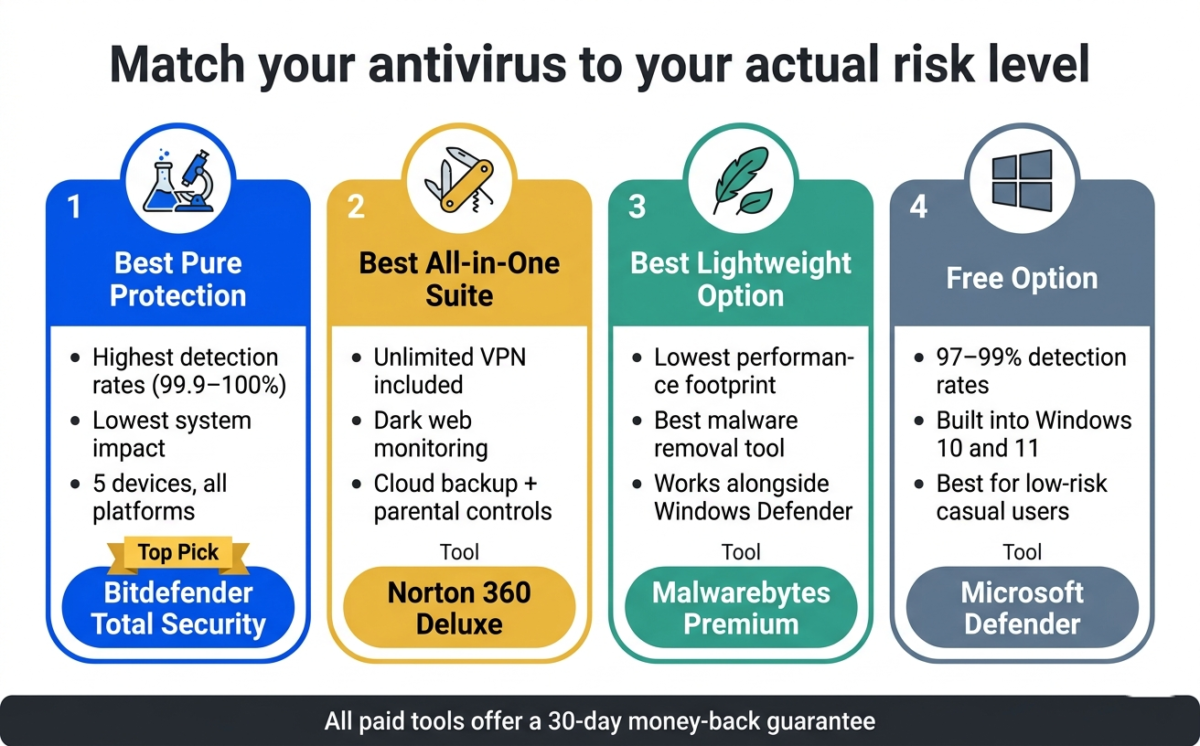
Choose Bitdefender Total Security if:
You want the highest malware detection rates with the lowest impact on your device’s performance. Bitdefender is the number one antivirus in independent lab testing, and the tool security professionals most commonly recommend for everyday protection. The Total Security plan covers five devices across all platforms at the same price as Norton’s Deluxe plan, excellent value.
Choose Norton 360 Deluxe if:
You want a single subscription that covers everything: antivirus, VPN, password manager, dark web monitoring, cloud backup, and parental controls. Norton’s unlimited VPN alone saves you $40–$80/year compared to buying a separate VPN subscription. If simplicity and all-in-one coverage matter more than absolute detection performance, Norton is the right choice.
Choose Malwarebytes if:
You want a lightweight complement to Windows Defender, you need the best available tool for cleaning an already-infected device, or you want a free on-demand scanner for periodic checks. Malwarebytes Premium is also the best choice for users on older, lower-powered computers where Norton or Bitdefender’s resource usage would cause noticeable slowdowns.
Use Windows Defender (free) if:
You are a careful, experienced user who only downloads software from trusted sources, primarily uses mainstream websites, and keeps Windows updated. Microsoft Defender’s detection rates have improved to the point where it provides adequate baseline protection for low-risk users at absolutely no cost.
Final Verdict
Bitdefender Total Security is the best antivirus software in 2026 for users who prioritise pure protection and system performance. Its detection rates are the highest in independent testing, and its system impact this e lowest, making it the technically superior choice.
Norton 360 Deluxe is the best value all-in-one security suite for users who want comprehensive coverage. The bundled unlimited VPN, dark web monitoring, and cloud backup represent real additional value beyond the antivirus itself.
Malwarebytes is the best specialist tool, ideal for malware removal, as a complement to Windows Defender, or for users who want the lightest possible security footprint.
Ratings:
– Bitdefender Total Security: 4.8 / 5
– Norton 360 Deluxe: 4.5 / 5
– Malwarebytes Premium: 4.2 / 5
Frequently Asked Questions
Do I actually need antivirus software in 2026?
For most Windows users, Microsoft Defender provides adequate baseline protection. However, third-party antivirus software adds significant value if you frequently download files, use public Wi-Fi, run a business, use a Mac (where built-in protection is less comprehensive), or want additional features like VPN, dark web monitoring, ransomware protection, and identity theft alerts. For low-risk casual users, Defender is sufficient. For everyone else, a premium antivirus adds meaningful protection.
Is Windows Defender good enough in 2026?
Yes, for basic protection. Microsoft Defender achieves 97–99% malware detection rates in independent testing, significantly better than it was five years ago. It does not include a VPN, dark web monitoring, parental controls, or cloud backup. If you want those features, a paid antivirus is worth considering. If you only need malware protection and practice safe browsing habits, Defender is a legitimate free option.
What is the best free antivirus?
Bitdefender Free Edition provides real-time antivirus protection for Windows at no cost. Malwarebytes Free offers an excellent on-demand scanner (no real-time protection) across all platforms. Windows Defender is built into Windows 10 and 11 and requires no installation. For Mac users, there is no free third-party antivirus we can recommend without reservation. Bitdefender’s Mac plan starts at $19.99/year.
Does antivirus slow down your computer?
Modern antivirus software has minimal impact during normal use. The slowdown is most noticeable during full system scans, which typically use 25–45% CPU for 30–60 minutes. Bitdefender and Malwarebytes have the lowest system impact in our testing. Scheduling scans to run overnight eliminates any practical impact on daily use.
Is Norton or Bitdefender better?
Bitdefender is better for pure malware detection and system performance it has the highest detection rates in independent testing with the lowest resource usage. Norton is better if you want an all-in-one security suite. Its bundled unlimited VPN, dark web monitoring, and cloud backup offer more comprehensive coverage beyond antivirus. Both are excellent choices; the decision comes down to whether you want pure protection or broader security coverage.
Can Malwarebytes be used alongside another antivirus?
Yes. Malwarebytes is specifically designed to run alongside existing antivirus software without conflicts. Many security professionals run Malwarebytes alongside Bitdefender or Norton as a second-opinion scanner. Malwarebytes Free (on-demand scanner) can be run periodically on any device regardless of what other security software is installed.
What is the best antivirus for Mac in 2026?
Bitdefender for Mac is the best paid antivirus for Mac; it has the highest detection rates in Mac-specific testing and minimal performance impact. For free Mac protection, Malwarebytes Free offers a capable on-demand scanner. Note that Mac malware has increased significantly since 2022, and Apple’s built-in XProtect has limitations, particularly against adware, browser hijackers, and newer threats.
Is antivirus necessary for iPhone or Android?
For iPhone (iOS), antivirus is generally unnecessary. Apple’s App Store restrictions and iOS sandboxing make malware infection very rare. For Android, the risk is higher, particularly if you install apps from outside the Google Play Store. Bitdefender Mobile Security and Norton Mobile Security both offer solid Android protection at reasonable prices.