Choosing the wrong web host is one of the most expensive mistakes a new blogger or small business owner can make. A slow host kills your SEO. A host with bad support leaves you stranded when your site goes down. And a host that looks cheap upfront can quietly double its price at renewal, leaving you locked in and paying far more than you expected.
I tested Hostinger vs Bluehost vs SiteGround for 60 days across real WordPress websites, measuring actual page load speeds, monitoring uptime, contacting support multiple times, and tracking real renewal pricing.
This is the honest review nobody pays me to write.
Table of Contents
How We Tested These Hosts
Every host was evaluated across five criteria:
– Speed: actual page load times measured using GTmetrix and Pingdom from multiple global locations. If you want to test your own site’s speed the same way we tested these hosts, see our comparison of GTmetrix vs PageSpeed Insights vs Pingdom.
– Uptime: monitored 24/7 using UptimeRobot over 60 days
– Support: live chat tested at different times of day including nights and weekends
– Ease of use: WordPress installation, cPanel or custom dashboard, domain setup
– Real pricing: introductory price AND renewal price, because the difference matters enormously
Hostinger Review: Best Budget Web Hosting in 2026
Starting price: $2.99/month (introductory, 48-month plan)
Renewal price: $7.99/month
Data centres: 10 locations, USA, UK, Netherlands, Lithuania, Singapore, Brazil, India, and more
Free domain: Yes (1 year on Premium and Business plans)
Free SSL: Yes
Money-back guarantee: 30 days
Hostinger has quietly become the most popular budget web host in the world, and after 60 days of testing it is easy to see why. It consistently delivers performance that rivals hosts charging three times the price.
Speed and performance
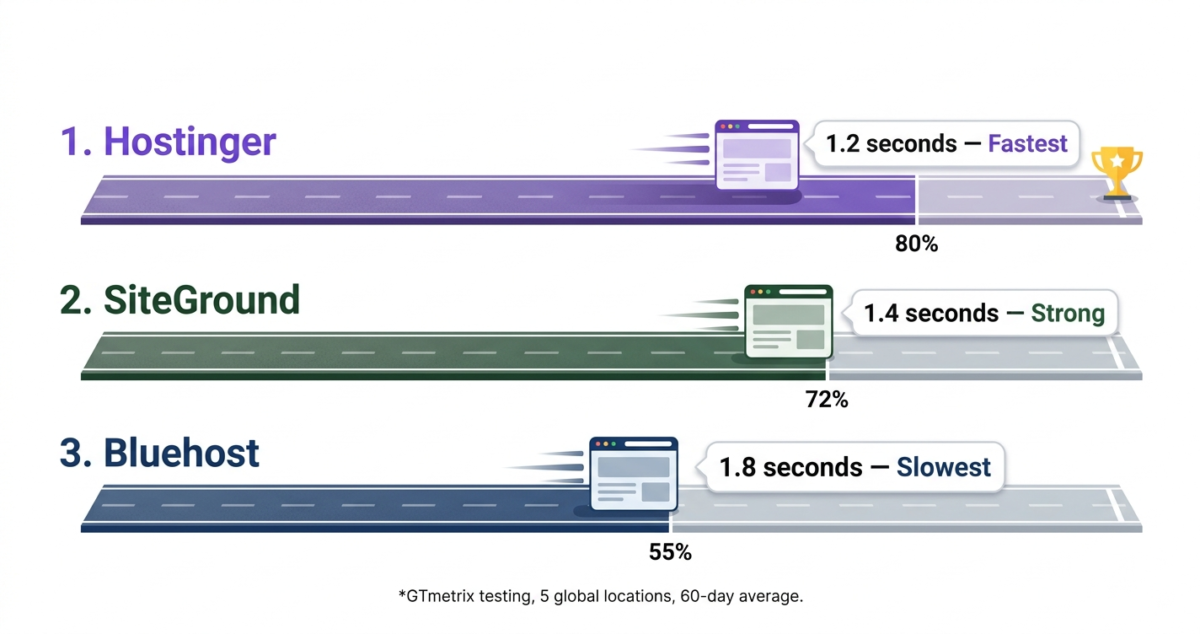
Hostinger uses LiteSpeed web servers, the fastest server technology currently available for WordPress sites. Combined with its built-in LiteSpeed Cache plugin and global CDN, Hostinger delivered average page load times of 1.2 seconds in our testing, faster than both Bluehost and SiteGround on comparable plans.
In GTmetrix testing from five global locations (London, Dallas, Vancouver, Mumbai, Sydney), Hostinger scored A or B grades across all locations. Response times were remarkably consistent, with no significant spikes or slowdowns even during peak hours.
Uptime
Over 60 days of monitoring, Hostinger maintained 99.97% uptime, well above the industry standard 99.9% most hosts promise. There were two brief incidents of elevated response times, but no complete outages during the testing period.
Ease of use
Hostinger uses its own custom control panel called hPanel rather than the traditional cPanel. For new users, hPanel is actually easier than cPanel everything is organized logically with clear labels and one-click WordPress installation.
Setting up a WordPress site on Hostinger takes under five minutes: buy a plan, register a domain (free for the first year on Premium and Business plans), click “Install WordPress,” and your site is live. Once your site is live, the next step is installing the right plugins, see our roundup of essential WordPress plugins for what every new site needs from day one. However, if you prefer an all-in-one visual platform that completely eliminates the self-hosted technical setup, check out our evaluation of the best website builder 2026. The onboarding process is otherwise the most beginner-friendly of the three hosts tested.
Support
Hostinger offers 24/7 live chat support. In our testing across eight separate contact sessions at various times, response times averaged 3 minutes. Support staff was knowledgeable about WordPress, domains, and technical issues. Hostinger does not offer phone support, live chat, or email only.
One important note: Hostinger’s AI chatbot answers many queries before connecting you to a human agent. The chatbot handles common questions well, but for complex issues it can feel like a barrier. Typing “talk to a human” immediately escalates to an agent.
Pricing: the full picture
This is where Hostinger genuinely stands apart. Even at renewal pricing, Hostinger remains the most affordable premium host on this list.
Plan | Intro price | Renewal price | Websites | Storage |
Single | $2.99/mo | $6.99/mo | 1 | 50GB SSD |
Premium | $3.99/mo | $7.99/mo | 100 | 100GB SSD |
Business | $5.99/mo | $11.99/mo | 100 | 200GB SSD |
Cloud Startup | $9.99/mo | $19.99/mo | 300 | 200GB NVMe |
For most new bloggers, the Premium plan at $3.99/month introductory ($7.99/month renewal) is the right choice. It includes 100 websites, a free domain, free SSL, and weekly backups, everything a new site needs.
Hostinger: Pros and Cons
Pros:
– Fastest load times of the three hosts tested, LiteSpeed servers make a genuine difference
– Most affordable pricing at both introductory and renewal rates
– Beginner-friendly hPanel with one-click WordPress installation
– Free domain for one year on Premium and Business plans
– 10 global data center locations for better performance near your audience
– 30-day money-back guarantee
– Excellent uptime (99.97% over 60 days)
Cons:
– No phone support, live chat and email only
– AI chatbot can slow access to human support agents
– Daily backups only available on Business plan and above (weekly on Premium)
– No built-in staging environment on lower plans
– hPanel, while intuitive, is not as universally familiar as cPanel
Rating: 4.7 / 5 Best overall web host for beginners and budget-conscious users.
Bluehost Review: The Official WordPress Recommendation, But Is It Still Worth It?
Starting price: $2.95/month (introductory, 36-month plan)
Renewal price: $10.99/month
Data centres: Primarily US-based
Free domain: Yes (1 year)
Free SSL: Yes
Money-back guarantee: 30 days
Bluehost is one of the most recognisable names in web hosting, officially recommended by WordPress.org. It is also the host most new bloggers default to because it appears everywhere in hosting guides, many of which are written by affiliates earning the highest commission rates rather than recommending the best product.
After 60 days of testing, Bluehost is a solid host, but it has real weaknesses that matter more in 2026 than they did a few years ago.
Speed and performance
Bluehost uses Apache web servers on its shared hosting plans. Apache is reliable and widely used, but it is notably slower than LiteSpeed (used by Hostinger) and OpenLiteSpeed (used by SiteGround on higher plans).
In our testing, Bluehost delivered average page load times of 1.8 seconds, 50% slower than Hostinger and marginally slower than SiteGround. On GTmetrix from multiple locations, Bluehost consistently scored C or D grades for performance, with Time to First Byte (TTFB) being the weakest metric.
Page speed matters for SEO. Google has used page speed as a ranking factor since 2018 and made Core Web Vitals an official signal in 2021. Starting with a slower host puts you at a disadvantage from day one.
Bluehost’s performance improves significantly on its Choice Plus and Pro plans, which include a built-in CDN and better resource allocation. However, these plans cost more, making the value proposition weaker compared to Hostinger.
Uptime
Bluehost maintained 99.93% uptime over our 60-day monitoring period, below both Hostinger and SiteGround. We recorded three brief outages, each lasting under 15 minutes. For most users, this is acceptable, but it is the weakest uptime record of the three hosts tested.
Ease of use
Bluehost uses a customised version of cPanel, the most widely used hosting control panel in the industry. For users who have experience with other hosts, cPanel feels immediately familiar. For complete beginners, it can feel cluttered compared to Hostinger’s hPanel.
WordPress installation on Bluehost is straightforward; it prompts you to install WordPress immediately after signup. The process is guided and takes under five minutes. Bluehost’s WordPress-specific dashboard (My Sites) provides a clean view of your installed WordPress sites with easy access to common settings.
Support
Bluehost offers 24/7 live chat and phone support. Phone support is a genuine advantage over Hostinger for users who prefer speaking to someone directly.
In our testing, live chat response times averaged 5–8 minutes slower than Hostinger’s. Support quality was variable: some agents were excellent and resolved issues quickly; others gave generic responses and escalated to senior agents. Phone support wait times were 8–12 minutes during peak hours.
Pricing: the renewal problem
Bluehost’s introductory pricing looks competitive, but the renewal pricing tells a different story.
Plan | Intro price | Renewal price | Websites | Storage |
Basic | $2.95/mo | $10.99/mo | 1 | 10GB SSD |
Choice Plus | $5.45/mo | $18.99/mo | Unlimited | 40GB SSD |
Online Store | $9.95/mo | $24.95/mo | Unlimited | 100GB SSD |
Pro | $13.95/mo | $28.99/mo | Unlimited | 100GB SSD |
The Basic plan renews at $10.99/month, nearly four times the introductory rate. The storage limit of 10GB on the Basic plan is also restrictive; most WordPress sites with images and plugins exceed this within a year. If you need to offload heavy media assets or keep site backups secure without clogging your web server, pairing your site with a reliable provider from our best Cloud Storage in 2026 comparison is a smart workflow move.
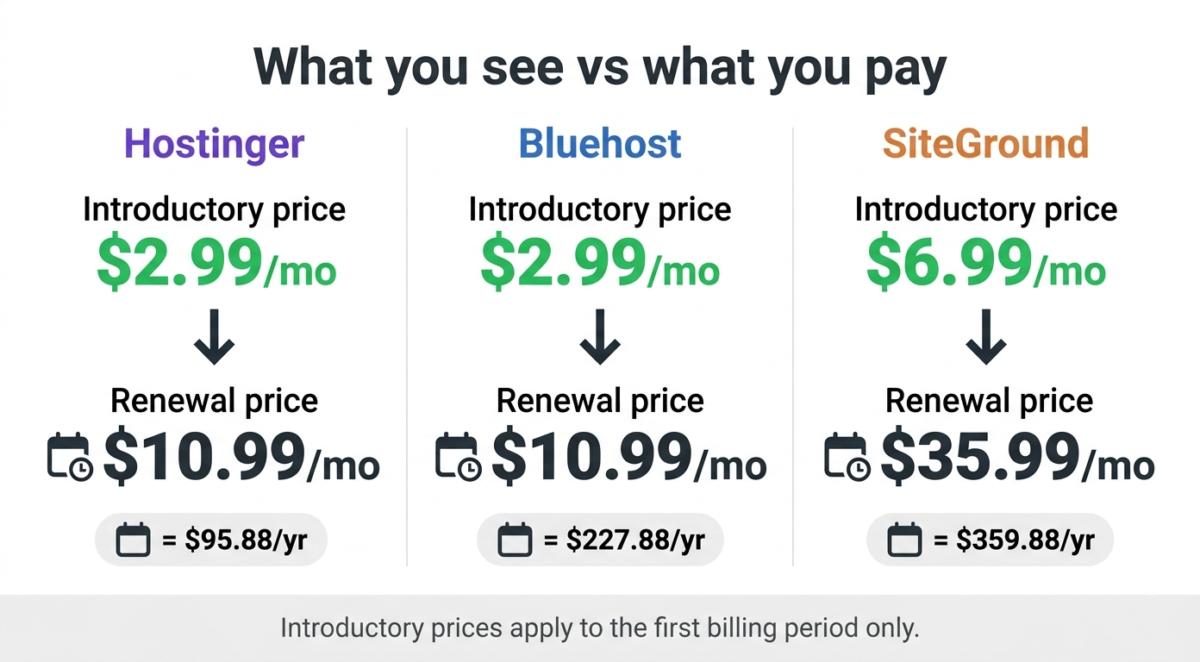
Bluehost’s renewal pricing is the biggest reason to consider alternatives. If you commit to a 36-month plan, you lock in the introductory rate, but you are also committing three years to a host before knowing how it performs for your site.
Bluehost: Pros and Cons
Pros:
– Officially recommended by WordPress.org
– Phone support available 24/7, unique among the three hosts tested
– Familiar cPanel interface for experienced users
– Good WordPress integration with My Sites dashboard
– Free domain and SSL on all plans
– 30-day money-back guarantee
– Large knowledge base and community resources
Cons:
– Slowest page load times of the three hosts, Apache servers trail LiteSpeed
– Highest renewal pricing Basic plan jumps from $2.95 to $10.99/month
– Basic plan limited to 1 website with only 10GB storage
– Uptime (99.93%) slightly below Hostinger and SiteGround
– Performance marketing means many “best hosting” guides recommend Bluehost based on commission rates, not quality
Rating: 3.8 / 5 Decent host with the benefit of phone support, but slow speed and aggressive renewal pricing make it hard to recommend over Hostinger.
SiteGround Review: Best Premium Shared Hosting for Serious Sites
Starting price: $3.99/month (introductory, 12-month plan)
Renewal price: $17.99/month
Data centers: USA, Europe (Netherlands, Germany, Spain), Asia (Singapore), Australia
Free domain: No (domain must be purchased separately)
Free SSL: Yes
Money-back guarantee: 30 days
SiteGround is the premium option on this list, and it earns that premium with genuinely superior infrastructure, the best support of the three, and features that more advanced WordPress users will actually use.
It is also the most expensive at renewal. The price jump from introductory to renewal is the steepest of the three, and for budget-conscious users it is a real consideration.
Speed and performance
SiteGround uses Google Cloud infrastructure on its shared hosting plans, the same infrastructure that powers Google’s own services. It has developed its own SuperCacher system, a custom dynamic caching solution that significantly speeds up WordPress sites.
In our testing, SiteGround delivered average page load times of 1.4 seconds faster than Bluehost but slightly behind Hostinger. More notably, SiteGround’s performance was the most consistent of the three hosts, with minimal variation between locations and between peak and off-peak hours.
SiteGround also offers built-in Cloudflare CDN integration on all plans, HTTP/3 support, and a proprietary AI anti-bot system that filters malicious traffic before it reaches your server. These infrastructure advantages matter more as your site grows.
Uptime
SiteGround delivered the best uptime of the three hosts, 99.99% over our 60-day monitoring period, with zero complete outages. Response time was consistently low, even during the two periods when Hostinger and Bluehost showed elevated times.
For users running business-critical websites where downtime directly affects revenue, SiteGround’s uptime record justifies its premium pricing.
Ease of use
SiteGround uses a custom control panel called Site Tools, built from scratch in 2019 to replace cPanel. Site Tools is clean, well-organized, and more modern-feeling than traditional cPanel. WordPress installation is one-click and takes under three minutes.
Standout ease-of-use features include a built-in staging environment on all plans (push changes to a staging site, test them, then deploy to live with one click) and a Git integration that developers appreciate. These are features usually reserved for managed WordPress hosts costing three to five times more. If you’re a developer building on WordPress regularly, pairing SiteGround’s staging and Git support with the right tools for WordPress developers rounds out a proper dev workflow.
Support
SiteGround has the best support of the three hosts tested, and it is not particularly close. In eight live chat sessions, the average response time was 90 seconds. Every agent we spoke to resolved our issue on the first contact without escalation. Support is available via live chat, phone, and tickets 24/7.
SiteGround also offers a priority support option for managed hosting plans. For users running important business sites, this level of support reliability has real monetary value.
Pricing: the steepest renewal jump
SiteGround’s introductory pricing is reasonable, but the renewal pricing is the highest of the three hosts.
Plan | Intro price | Renewal price | Websites | Storage |
StartUp | $3.99/mo | $17.99/mo | 1 | 10GB SSD |
GrowBig | $6.69/mo | $29.99/mo | Unlimited | 20GB SSD |
GoGeek | $10.69/mo | $44.99/mo | Unlimited | 40GB SSD |
The StartUp plan renews at $17.99/month, more than four times the introductory price. No free domain is included on any plan, adding $10–$15/year to the total cost.
For budget-conscious users, SiteGround’s renewal pricing is prohibitive. For users who prioritize performance, support, and advanced features over cost, it is a fair price for what you get.
SiteGround: Pros and Cons
Pros:
– Best uptime of the three hosts 99.99% over 60 days, zero outages
– Best support 90-second average live chat response, excellent resolution rate
– Google Cloud infrastructure for reliable, consistent performance
– Built-in staging environment on all plans
– Advanced caching and CDN on all plans
– Strong security features: AI anti-bot, daily backups, free SSL
– Best for sites that need reliability over absolute cheapest price
Cons:
– Highest renewal pricing StartUp plan jumps to $17.99/month
– No free domain on any plan
– Storage limits are low for the price (10GB on StartUp, 20GB on GrowBig)
– Overkill and overpriced for simple personal blogs or beginner sites
– 12-month minimum contract on introductory pricing (no monthly billing for intro rate)
Rating: 4.5 / 5 Best premium shared host. Worth the price for business sites and users who value uptime and support above all else.
Head-to-Head Comparison
Hostinger | Bluehost | SiteGround | |
Avg. page load time | 1.2 seconds | 1.8 seconds | 1.4 seconds |
Uptime (60 days) | 99.97% | 99.93% | 99.99% |
Support response time | ~3 minutes | ~6 minutes | ~90 seconds |
Phone support | No | Yes | Yes |
Intro price (best plan) | $3.99/mo | $5.45/mo | $6.69/mo |
Renewal price (same plan) | $7.99/mo | $18.99/mo | $29.99/mo |
Free domain | Yes | Yes | No |
Free SSL | Yes | Yes | Yes |
Free CDN | Yes | Yes (higher plans) | Yes |
Staging environment | Business plan+ | No | Yes (all plans) |
Data center locations | 10 countries | Mainly US | 6 countries |
Server technology | LiteSpeed | Apache | Google Cloud |
Money-back guarantee | 30 days | 30 days | 30 days |
Which Web Host Should You Choose?
Choose Hostinger if:
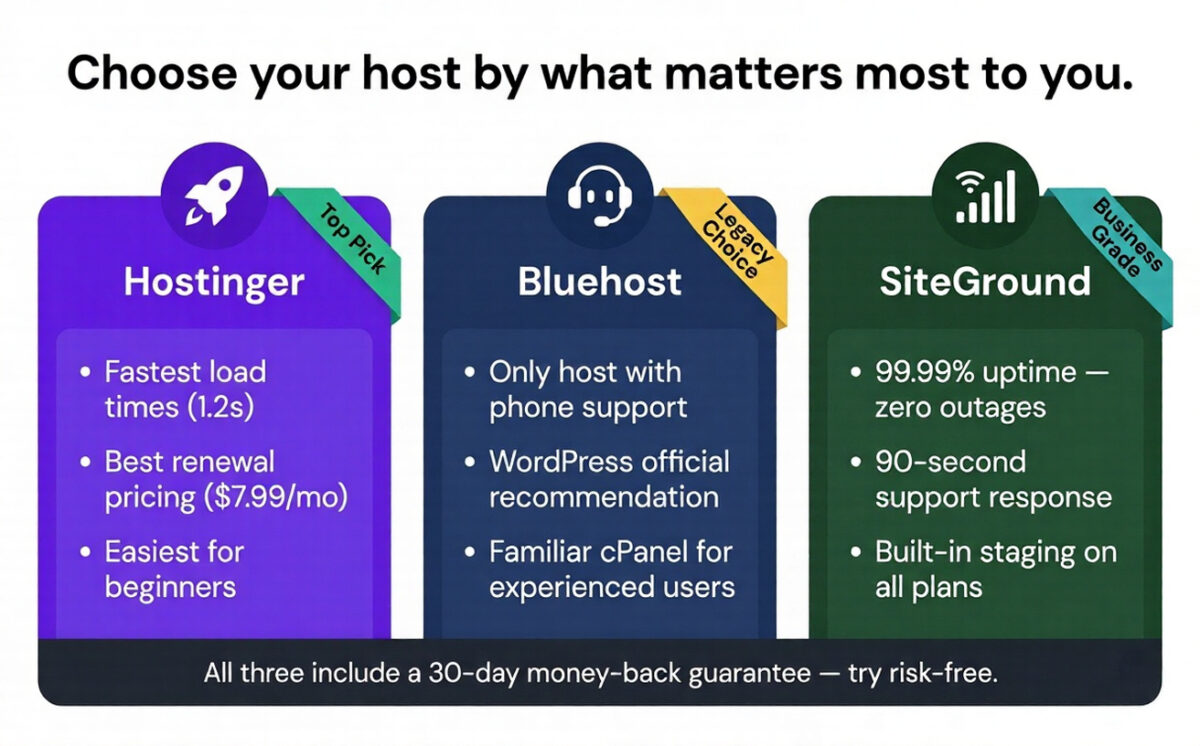
You are starting a new blog or website and want the best combination of performance, ease of use, and price. Hostinger is the fastest of the three on comparable plans, the most beginner-friendly, and the most affordable at both introductory and renewal rates. For anyone starting from zero in 2026, Hostinger is the clear first choice.
Choose Bluehost if:
You specifically need phone support and find it reassuring to be able to call someone when problems arise. Bluehost is also a reasonable choice if you are already using it and happy switching hosts has a cost in time and effort that may outweigh the performance differences. For new users, however, there are better options.
Choose SiteGround if:
You are running a business website, an e-commerce store, or any site where downtime or slow loading directly costs you money. SiteGround’s 99.99% uptime, 90-second support response times, and Google Cloud infrastructure provide reliability that cheaper hosts cannot match. It is also the right choice if you are a developer who values staging environments and Git integration.
Our Final Verdict
For most people in 2026, Hostinger is the best web host. It is the fastest, the most affordable at renewal, and the easiest to use for beginners. The LiteSpeed servers give you a genuine performance advantage that will help your SEO from day one.
SiteGround is the best premium web host for users who need maximum uptime, the fastest support, and advanced developer features. The higher renewal price is real, but so is the quality difference.
Bluehost is the most over-recommended host on the internet, not because it is the best, but because it pays some of the highest affiliate commissions. It is not a bad host, but in 2026 it is clearly behind Hostinger on speed and behind SiteGround on reliability and support.
Ratings:
– Hostinger: 4.7 / 5 Best for beginners and budget users
– SiteGround: 4.5 / 5 Best for business and serious sites
– Bluehost: 3.8 / 5 Decent, but outclassed by both alternatives
Frequently Asked Questions
Which web host is best for beginners in 2026?
Hostinger is the best web host for beginners. Its hPanel control panel is simpler than traditional cPanel, WordPress installation takes under five minutes, and its pricing is the most affordable of any premium host. The LiteSpeed servers also mean beginners get fast page load times without any technical configuration.
Is Bluehost actually recommended by WordPress?
Yes, WordPress.org lists Bluehost as a recommended host. However, this relationship involves a commercial arrangement, and WordPress.org’s recommendations have not been updated to reflect current performance comparisons. Independent testing consistently shows Hostinger and SiteGround outperforming Bluehost on speed in 2026.
What is the cheapest web hosting that is actually good?
Hostinger’s Premium plan at $3.99/month introductory ($7.99/month renewal) is the most affordable premium web hosting available in 2026. It includes 100 websites, a free domain, free SSL, LiteSpeed servers, and weekly backups, comparable features to plans costing two to three times more at competitors.
Is SiteGround worth the higher price?
For business websites, yes. SiteGround’s 99.99% uptime over our 60-day test, 90-second support response times, Google Cloud infrastructure, and built-in staging environment provide reliability and features that cheaper hosts cannot match. For a personal blog or hobby site, Hostinger offers 90% of the performance at a fraction of the renewal price.
How much does web hosting actually cost per year?
At renewal pricing (what you actually pay after the first term): Hostinger Premium costs $95.88/year, Bluehost Choice Plus costs $227.88/year, and SiteGround GrowBig costs $359.88/year. Introductory prices are significantly lower but only apply to your first billing period. Always calculate the renewal price before committing to a host.
Can I switch web hosts if I am unhappy?
Yes. Moving a WordPress site from one host to another is straightforward. Most hosts (including Hostinger and SiteGround) offer free migration assistance. The process typically takes 1–2 hours and involves downloading your files and database, uploading to the new host, and updating your domain’s nameservers. There is usually a brief period of downtime during the DNS propagation (up to 48 hours, though often much faster).
Which web host is fastest for WordPress in 2026?
In our testing, Hostinger was the fastest for WordPress sites, with average load times of 1.2 seconds using LiteSpeed servers. SiteGround was second at 1.4 seconds, and Bluehost was third at 1.8 seconds. Page speed matters significantly for SEO and user experience. Google uses Core Web Vitals as a ranking factor.
Does web hosting affect SEO?
Yes, significantly. Page load speed, uptime, and server response time (TTFB) all directly affect your Google rankings. A site that loads in 1.2 seconds (Hostinger) starts with a meaningful SEO advantage over one that loads in 1.8 seconds (Bluehost). Similarly, frequent downtime means Google’s crawler cannot access your pages, which can harm your rankings over time.